

- Make your child agents work together while maintaining conversation continuity
- Hand off control dynamically between the entry agent and specialized peer agents
- Return control automatically to the entry agent once a peer agent completes its task
- Treat pipelines added as toolkits as direct-invocation peers that run without an LLM wrapper
Prerequisites
- User role with agent edit access
- At least one child agent configured in the parent agent’s toolkits
- Swarm Mode enabled in your chat or agent
How to Enable Swarm Mode
The default state of the Swarm Mode module — on or off — is defined in the project settings. If Swarm Mode is turned off by default, you can turn it on for your current conversation or agent.For a Conversation
- Go to the conversation.
- Select
+in the chat input toolbar. - Select Modules → Swarm Mode in the list.
- Toggle Swarm Mode on.
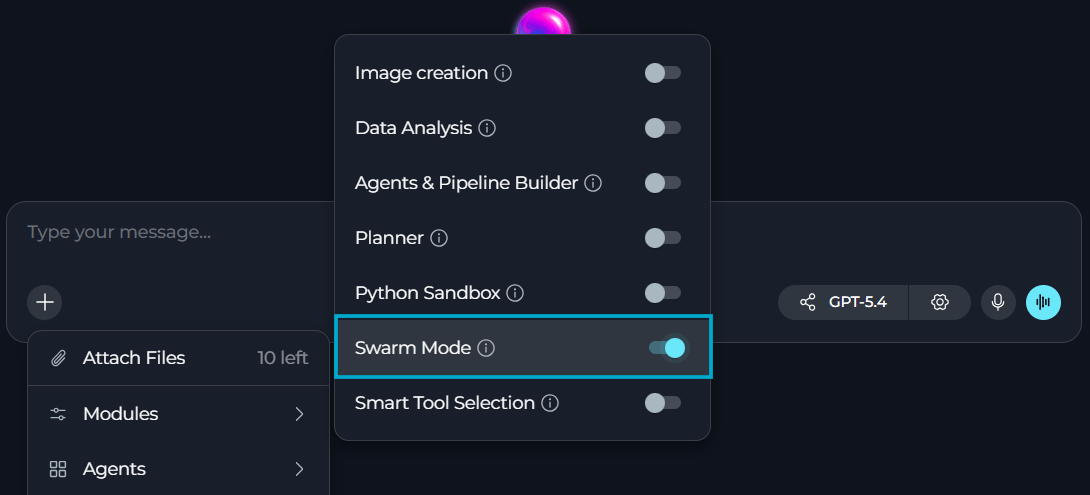
For an Agent
- Select Agents.
- Select the agent to configure, or create a new agent.
- In the TOOLS section, find MODULES.
- Find Swarm Mode. Select Show all if you do not see it immediately.
- Toggle Swarm Mode on.
- Select Save.
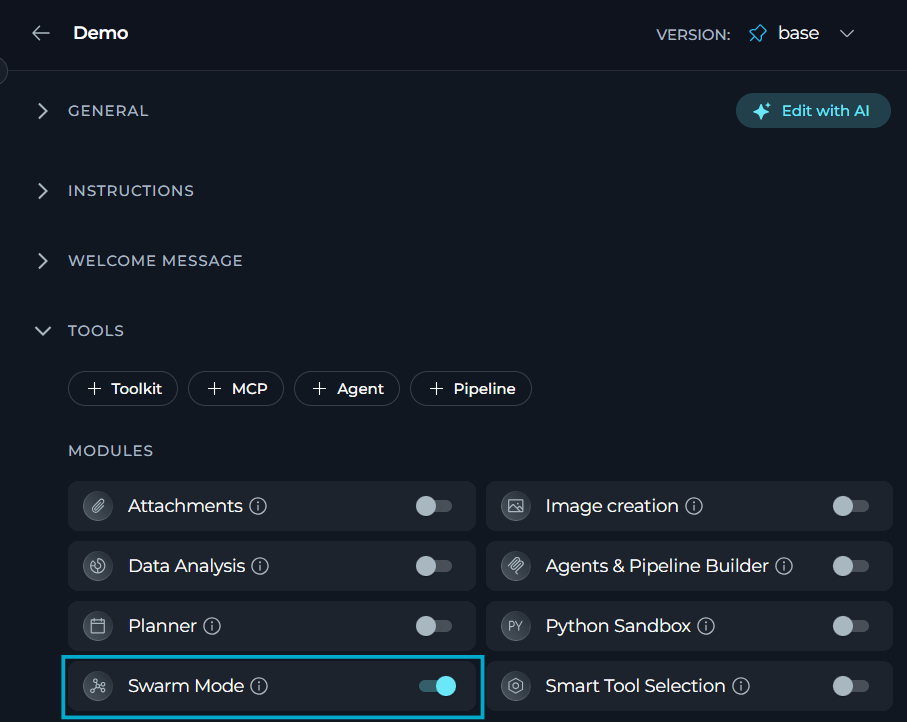
Always add and configure your child agents before enabling Swarm Mode. The parent agent needs at least one child agent to create a functional swarm.
How Swarm Mode Works
Swarm Mode replaces a single agent handling every request with a set of peer agents that hand off control to each other within the same conversation. Traditional Agent vs Swarm ModeLimitations
- Swarm Mode has no effect if no child agent is configured in the entry agent’s toolkits; the agent behaves as a standard agent.
- Only one handoff is processed per turn. If the entry agent emits multiple handoff tool calls in a single response, only the first is executed — any additional handoff calls in that response are discarded, not queued for later.
- A peer agent’s handoff
taskargument is its only input — it has no access to prior conversation history, other tool results, or other peers’ outputs unless that data is inlined explicitly.
Agent Roles
Swarm Mode creates a flat peer-to-peer architecture. There is no strict parent/child hierarchy — the entry agent is simply the default starting point that the user talks to; all other agents are peers with equal standing:
Pipelines added as toolkits to the swarm agent participate as direct-invocation peers — they run their full graph and return the result without an LLM wrapper, then hand control back automatically. Regular agents run as LLM-equipped peers.
Execution Flow
When Swarm Mode is enabled and child agents are configured, ELITEA handles handoffs automatically:- User Request: User sends a message to the conversation.
- Entry Agent Analysis: Entry agent analyzes the request and determines if a specialist is needed.
- Handoff: Entry agent uses a handoff tool (e.g.,
transfer_to_test_agent) to delegate to a peer agent. The handoff tool’staskargument must be completely self-contained — the peer receives only this string and has no access to prior conversation history, other tool results, or other peers’ outputs. Always inline all required data verbatim. - Peer Executes Task: Peer agent executes the task using its specialized tools and knowledge.
- Return Control: Peer agent uses
transfer_to_main_agentto return control after completing the task. - Continue Coordination: Entry agent receives results and continues coordinating the overall workflow.
When Swarm Mode is enabled, the system automatically creates handoff tools for each peer agent. Every agent in the swarm receives a
transfer_to_[agent_name] tool for every other peer — this is bidirectional and flat: any agent can hand off to any other. The entry agent and all peers share the same conversation state (SwarmState) via LangGraph’s langgraph-swarm library, ensuring seamless collaboration.Conversation Visibility
A handoff to a peer happens in two steps with different visibility into the conversation:- The peer’s routing layer receives the full shared conversation history (SwarmState) and decides whether to answer directly or hand off again.
- When the peer executes the task itself, only the handoff’s
taskstring is passed to that execution — prior conversation history, other tool results, and other peers’ outputs are not included unless inlined intotask.
Because step 2 only receives the
task string, always inline the specific data a peer needs to complete its task — do not rely on it having access to earlier messages or other peers’ results.Example Scenarios
QA Coordination Agent
QA Coordination Agent
Scenario: A QA team uses a coordinator agent to manage testing across multiple platforms and tools.Configuration:
- Parent Agent: QA Coordinator
- Child Agents:
- API Test Agent (TestRail toolkit)
- UI Test Agent (Selenium toolkit)
- Performance Test Agent (JMeter toolkit)
- Swarm Mode: Enabled
Run a full test suite for the new release: API tests, UI smoke tests, and load testing. Create bug reports for any failures.
Workflow:- QA Coordinator receives the request and plans the test strategy
- Hands off to API Test Agent → runs API tests, reports results
- Hands off to UI Test Agent → runs smoke tests, reports results
- Hands off to Performance Test Agent → runs load tests, reports metrics
- Coordinator summarizes all results and creates bug reports for failures
- User receives comprehensive test report with bug ticket links
Development Workflow Agent
Development Workflow Agent
Scenario: A development team uses a manager agent to coordinate code review and deployment tasks.Configuration:
- Parent Agent: Dev Manager
- Child Agents:
- Code Review Agent (GitHub toolkit, code analysis tools)
- Deployment Agent (Kubernetes toolkit, CI/CD tools)
- Swarm Mode: Enabled
Review the pull request for feature X, and if approved, deploy it to staging
Workflow:- Dev Manager analyzes the request
- Hands off to Code Review Agent → reviews PR, checks tests, provides feedback
- Code Review Agent reports: “PR approved, all checks passed”
- Dev Manager hands off to Deployment Agent
- Deployment Agent deploys to staging, monitors deployment health
- Manager coordinates the entire process and reports completion
Content Creation Swarm
Content Creation Swarm
Scenario: A marketing team uses a content coordinator to create comprehensive marketing materials.Configuration:
- Parent Agent: Content Coordinator
- Child Agents:
- Research Agent (web search, competitor analysis)
- Writing Agent (content generation, copywriting)
- Design Agent (image generation, Canva integration)
- Swarm Mode: Enabled
Create a blog post about our new product feature, including research, article, and featured image
Workflow:- Content Coordinator breaks down the request
- Hands off to Research Agent → gathers market data, competitor info
- Hands off to Writing Agent → creates article using research insights
- Hands off to Design Agent → generates featured image
- Coordinator assembles all components and presents final blog post package
Test Failures Routed to Bug Tracking
Test Failures Routed to Bug Tracking
Scenario: A parent agent runs API tests and routes any failures straight to bug tracking, without the user relaying results manually between specialists.Configuration:
- Parent Agent: Test Coordinator
- Child Agents:
- Test Agent (TestRail toolkit)
- Bug Tracker Agent (Jira toolkit)
- Swarm Mode: Enabled
Run the API tests and if any fail, create bug reports in Jira
Workflow:- Parent agent receives the request
- Parent uses
transfer_to_test_agentto hand off to the testing specialist - Test agent executes API tests using its TestRail toolkit
- Test agent identifies failed tests and uses
transfer_to_main_agent - Parent analyzes failures and uses
transfer_to_bug_tracker_agent - Bug tracker agent creates Jira tickets for each failure
- Bug tracker agent returns control with
transfer_to_main_agent - Parent summarizes the results to the user
Best Practices
Always provide self-contained task context on handoff
Always provide self-contained task context on handoff
When delegating to a peer agent, the
task argument in the handoff tool call is the only input the peer receives. The peer has no access to the prior conversation, other tool results, or other agents’ outputs. Always inline all required data verbatim in the task string — never use references like “the items”, “those results”, or “the data from earlier”. If you would write a pronoun, substitute the actual data instead.Bad: transfer_to_test_agent(task="Run tests on those endpoints.")Good: transfer_to_test_agent(task="Run integration tests on the following API endpoints and return a pass/fail summary: POST /api/orders, GET /api/orders/{id}, DELETE /api/orders/{id}")Design specialized child agents with clear purposes
Design specialized child agents with clear purposes
Each child agent should have a well-defined specialization and appropriate toolkits. Avoid creating generic agents — instead, create focused specialists (e.g., “GitHub Issues Agent” vs. “Development Agent”). This makes handoff decisions clearer and more effective.
Use descriptive agent names and descriptions
Use descriptive agent names and descriptions
The parent agent uses child agent names and descriptions to decide when to hand off. Use clear, descriptive names like “API_Testing_Agent” and detailed descriptions that explain the agent’s capabilities and when to use them.
Keep child agent count manageable
Keep child agent count manageable
While Swarm Mode supports multiple child agents, managing 3-5 specialists is optimal. Too many child agents can make coordination complex and slow down decision-making. Group related capabilities into single agents when appropriate.
Configure comprehensive toolkits for child agents
Configure comprehensive toolkits for child agents
Each child agent should have all the toolkits it needs to complete its specialized tasks independently. For example, a bug reporting agent needs both testing tools to verify bugs and Jira tools to create tickets.
Test swarm coordination before production use
Test swarm coordination before production use
Run test scenarios to verify that handoffs work smoothly, agents return control properly, and the conversation flow makes sense. Check that child agents are being called appropriately based on task requirements.
Combine with other modules
Combine with other modules
Swarm Mode works well with other modules like Smart Tools Selection (for token optimization), Data Analysis (for specialist data agents), and Python Sandbox (for code execution specialists).
Monitor conversation flow and handoffs
Monitor conversation flow and handoffs
Review conversation logs to understand handoff patterns and optimize agent coordination. If certain agents are rarely called or frequently called for wrong tasks, adjust agent descriptions and parent instructions.
Provide clear parent agent instructions
Provide clear parent agent instructions
The parent agent’s system prompt should include guidance on when to delegate tasks and how to coordinate the overall workflow. Clear instructions improve handoff decisions and overall effectiveness.
Troubleshooting
Swarm Mode enabled but agents not collaborating
Swarm Mode enabled but agents not collaborating
Possible causes:
- No child agents configured in the parent agent’s toolkits
- Swarm Mode enabled without child agents present
- Parent agent not recognizing when to hand off tasks
- Verify that child agents are added to the parent agent in the TOOLKITS section
- Check that child agents appear in the toolkits list with type “agent”
- Review parent agent’s system prompt to ensure it knows when to delegate
- Test with explicit requests like “delegate this to [specialist agent name]”
- If no child agents are configured, Swarm Mode will fall back to standard agent behavior
Child agent not returning control to parent
Child agent not returning control to parent
Possible causes:
- Child agent completing task but not using
transfer_to_main_agent - Child agent stuck in a loop or waiting for input
- Conversation flow interrupted
- Check child agent’s system prompt — it should know to return control when done
- Child agents automatically receive a
transfer_to_main_agenthandoff tool - Review conversation logs to see where control flow stopped
- Restart the conversation if agents are stuck in an inconsistent state
- Ensure child agents have clear completion criteria
Wrong agent being called for tasks
Wrong agent being called for tasks
Possible causes:
- Child agent names or descriptions not clear enough
- Parent agent instructions unclear about delegation
- Tasks require multiple specialists but only one is called
- Use descriptive agent names that clearly indicate specialization
- Enhance child agent descriptions to specify their exact capabilities
- Update parent agent’s system prompt with clear delegation guidelines
- Review handoff tools — the parent sees tools like
transfer_to_[agent_name]with the child’s description - Test with specific scenarios and refine agent descriptions based on results
Performance slower than expected
Performance slower than expected
Possible causes:
- Multiple handoffs adding latency
- Child agents processing large context
- Too many child agents configured
- Handoffs add processing time — this is expected behavior for coordination
- Limit the number of child agents to 3-5 specialists
- Consider if all delegations are necessary—some tasks may not need specialists
- Use Smart Tools Selection with Swarm Mode to reduce token overhead
- For simple tasks that don’t need collaboration, consider disabling Swarm Mode
See also: