

Prerequisites
- Credential for your toolkit (required for all except Artifact). See Create a Credential.
- Vector Storage: PgVector selected in Settings → AI Providers.
- Embedding Model selected in Settings → AI Providers.
- A configured toolkit that supports indexing. See Indexing Overview.
Index Data
Create a new index or refresh an existing one from the connected source system. This tool collects source content, processes it with the configured chunking strategy, and stores the result in the vector database so it can be searched later. Purpose- Create a searchable index from supported toolkit data.
- Update an existing index with the latest source content.
- Prepare indexed content for Search Index, Stepback Search Index, and Stepback Summary Index.
- Open your toolkit detail page.
- The Indexes section appears in the right panel.
- Select + Index.
- Fill in the Index Data parameters.
-
Select Index to run the tool and create the index.

Common Settings & Parameters
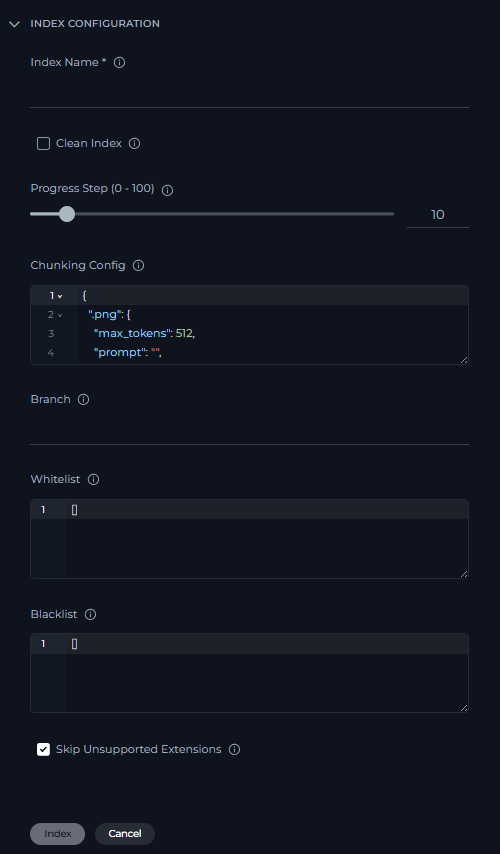
Toolkit-Specific Settings & Parameters
The following parameters apply to specific toolkit types only.Search Index
Search indexed content using natural-language queries. This tool returns matching chunks from the selected index so you can inspect the raw search results directly. Purpose- Search indexed content with a direct semantic query.
- Retrieve matching chunks from a selected index.
- Test search quality before using more advanced stepback tools.
- Open your toolkit detail page.
- Select an existing index card from the Indexes section.
- Click the Search button in the page header.
- Select Select Tool in the left panel.
- Choose Search Index.
- Fill in the search parameters.
- Select Search to run the tool.

Common Settings & Parameters
Applicable to all toolkits that support indexing.
Stepback Search Index
Advanced search that rewrites or simplifies the query before searching and can use conversation context to improve retrieval. Purpose- Improve retrieval for complex or multi-part questions.
- Use conversation context through the
Messagesparameter. - Return raw matching chunks after stepback query transformation.
- Open your toolkit detail page.
- Select an existing index card from the Indexes section.
- Click the Search button in the page header.
- Select Select Tool in the left panel.
- Choose Stepback Search Index.
- Fill in the search parameters.
- Select Search to run the tool.

Common Settings & Parameters
Applicable to all toolkits that support indexing.
Stepback Summary Index
Contextual search plus an AI-generated answer, with optional citations. This tool combines stepback retrieval with answer generation for users who want a direct response instead of raw chunks. Purpose- Search indexed content with stepback retrieval.
- Generate a concise answer from the retrieved content.
- Support question-answering workflows where users want a direct response.
- Open your toolkit detail page.
- Select an existing index card from the Indexes section.
- Click the Search button in the page header.
- Select Select Tool in the left panel.
- Choose Stepback Summary Index.
- Fill in the search parameters.
- Select Search to run the tool.

Common Settings & Parameters
Applicable to all toolkits that support indexing.
Remove Index
Delete an existing collection when it is no longer needed. Use this tool to remove outdated or temporary indexes from the toolkit. Purpose- Remove an index that is no longer needed.
- Clean up outdated, duplicate, or test indexes.
- Open your toolkit detail page.
- Select an index card from the Indexes section.
- On the index detail page, click Delete Index link in the left panel.
- Confirm the deletion.
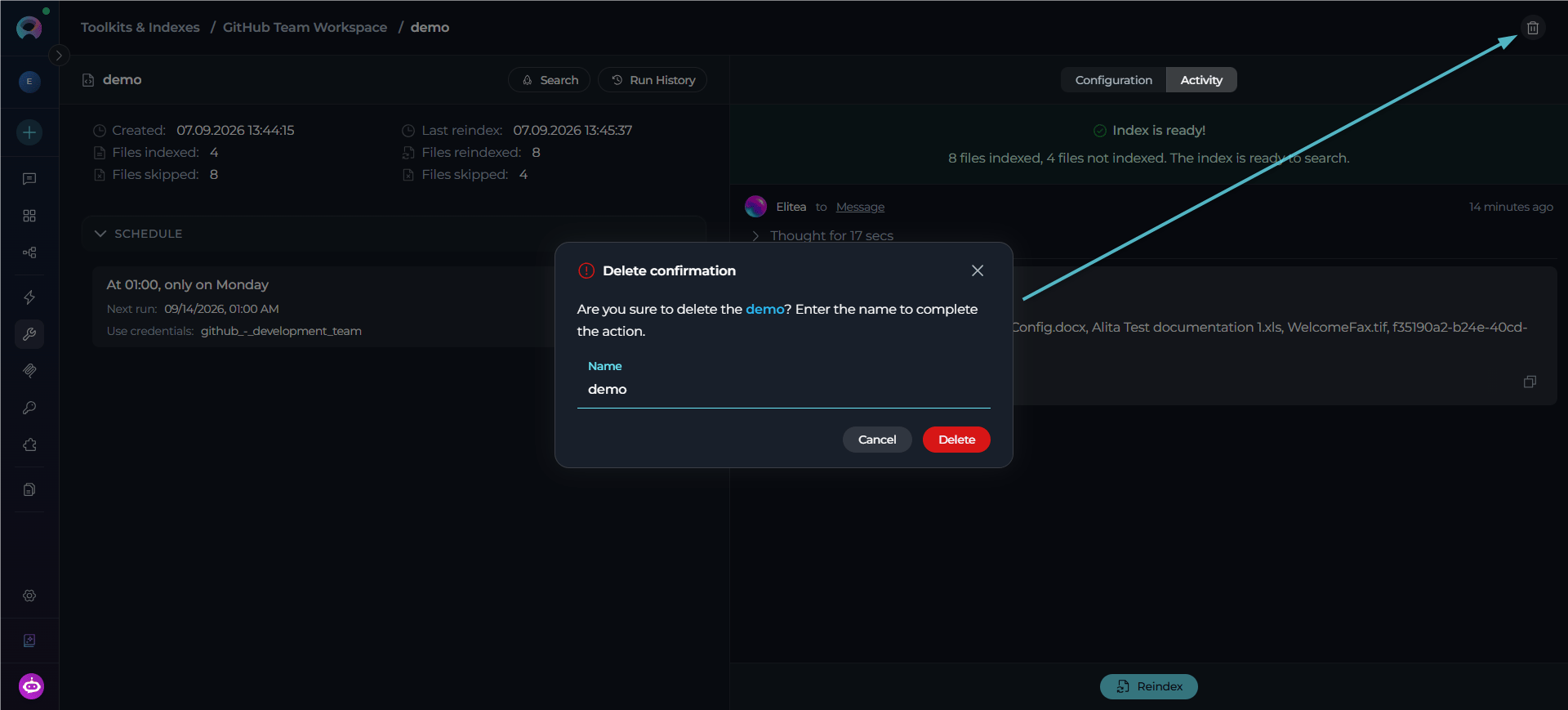
List Indexes
List all available indexes for the current toolkit. Use this tool to confirm which indexes exist before searching, reindexing, or deleting. Purpose- View the indexes available for the current toolkit.
- Confirm index names before running search or delete actions.
- Check whether an expected index has been created.
- Open your toolkit detail page.
- The Indexes section appears in the right panel showing all available index cards.
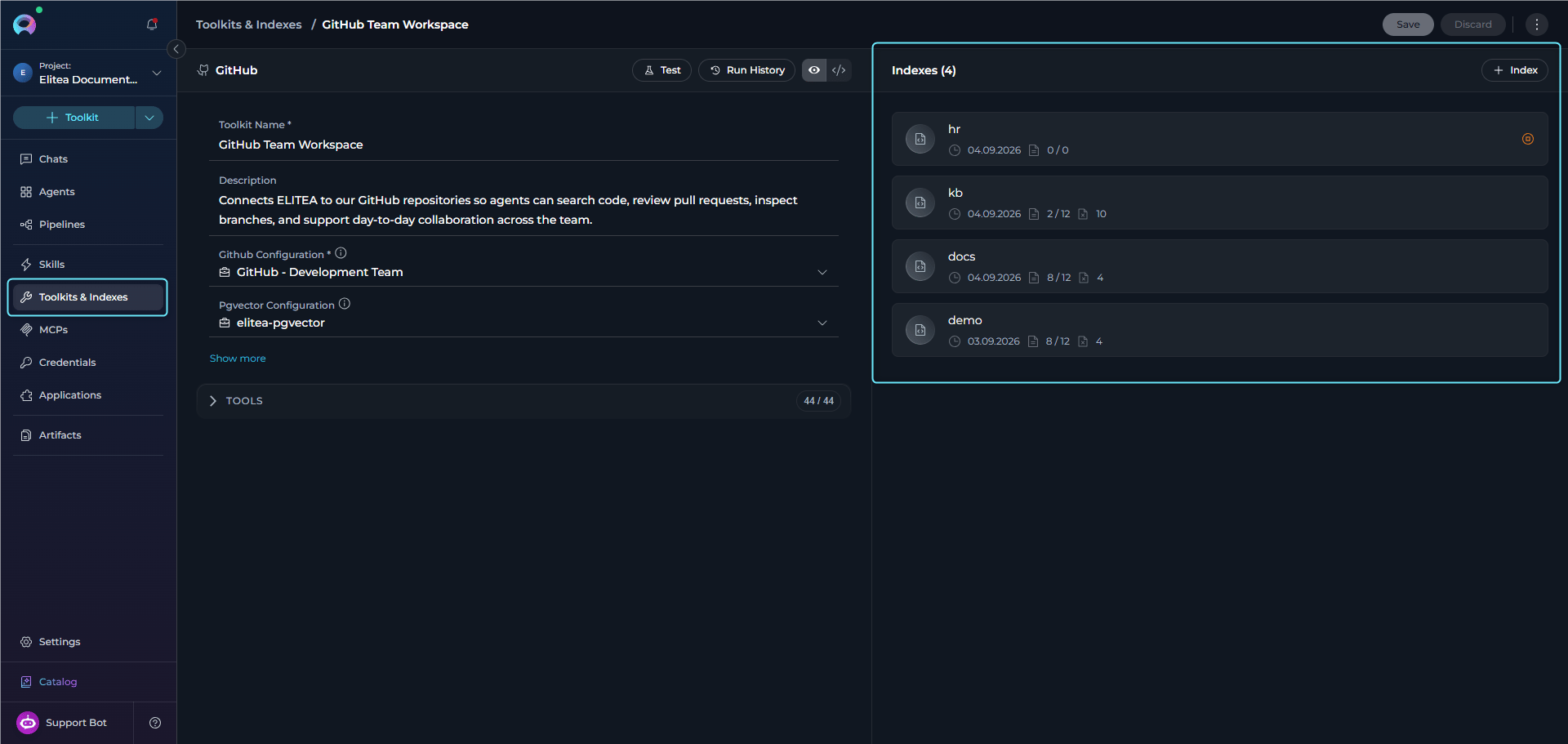
Search Tools Comparison
The following table compares the three search tools available in the Indexes section.Tips & Troubleshooting
- If search returns few or no results, try lowering Cut Off (for example, from
0.5to0.35) or increasing Search Top. - Use Index Name consistently (for example,
prod,test) so you can target the right dataset later. - For better question answering, consider proposal-style chunking when indexing, because it turns on titles, summaries, and propositions.
Guides & References
- Indexing Overview
- Create & Use Indexes
- GitHub, Confluence, Jira, SharePoint — per-toolkit examples