

- Release version: 2.0.6
- Released on: September 13, 2026
- Access: ELITEA Platform
New Features
Agent Evaluation (Beta)
You can now evaluate chat and task-automation agents from a new Evaluation tab on the agent editor, scoring runs against configurable dimensions and comparing results across datasets and runs.Agent Evaluation is a Beta feature. Supported engines and metrics may change.
- Define evaluation dimensions using an AI-judge, Human or Code engine, each with its own evidence scope, weight, target and polarity.
- Group dimensions and code validations into a suite bound to a specific agent version.
- Run a suite as an offline batch over a dataset or on demand against a single conversation.
- Review the results with native and normalized scores, and add inline human scores that trigger automatic re-aggregation.
- Rely on an append-only human-score audit trail and role-gated access.
Project Back Up & Restore
You can now back up your project’s data and restore them for both team and private projects.- Create an encrypted backup file covering agents, pipelines, toolkits, MCP servers and skills to restore them, if needed. Credentials, tokens and other secrets are excluded from the backup.
- Preview a restore with a dry run before applying it.
- Choose whether the restored entities replace the existing project data or merge with them.
- Platform Admins can take a full, raw database-level backup or restore of a project from the Admin panel.

Clarifying Questions & Follow-up Suggestions in Chat
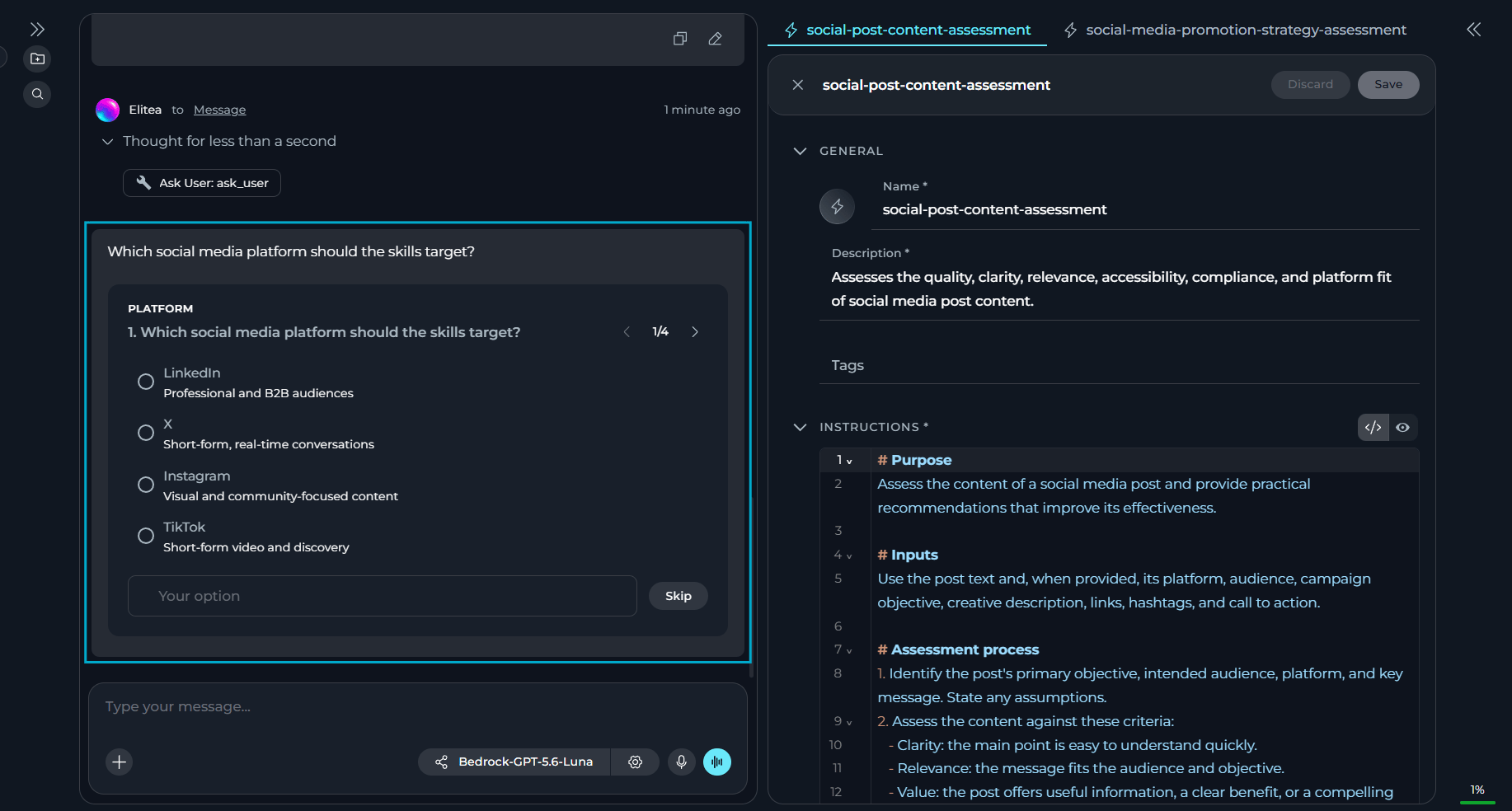
You can now communicate with chat more effectively and get more correct responses with a new chat module and additional clickable AI-generated follow-up suggestions.- Enable the Ask User module so the assistant can pause mid-run and ask structured clarifying questions instead of guessing.
- Answer clarifying questions one at a time.
- Rely on Ask User failing safely in headless or API-only runs, returning a default answer instead of hanging.
- Select a suggestion chip to insert it into the chat input as editable text or skip the suggestion.
- Keep suggestions private and non-persistent.
Skill & Project Context Builders
You can now build skills and project context directly from the chat, using two new chat modules.- Turn on the new Skills Builder or Project Context Builder modules — each toggled independently.
- Open a generated skill or project context from a chip/link in the chat response.
- Keep the creation of skills and project contexts scoped to the current project, even when you have access to other projects.
Folders for Project Entities
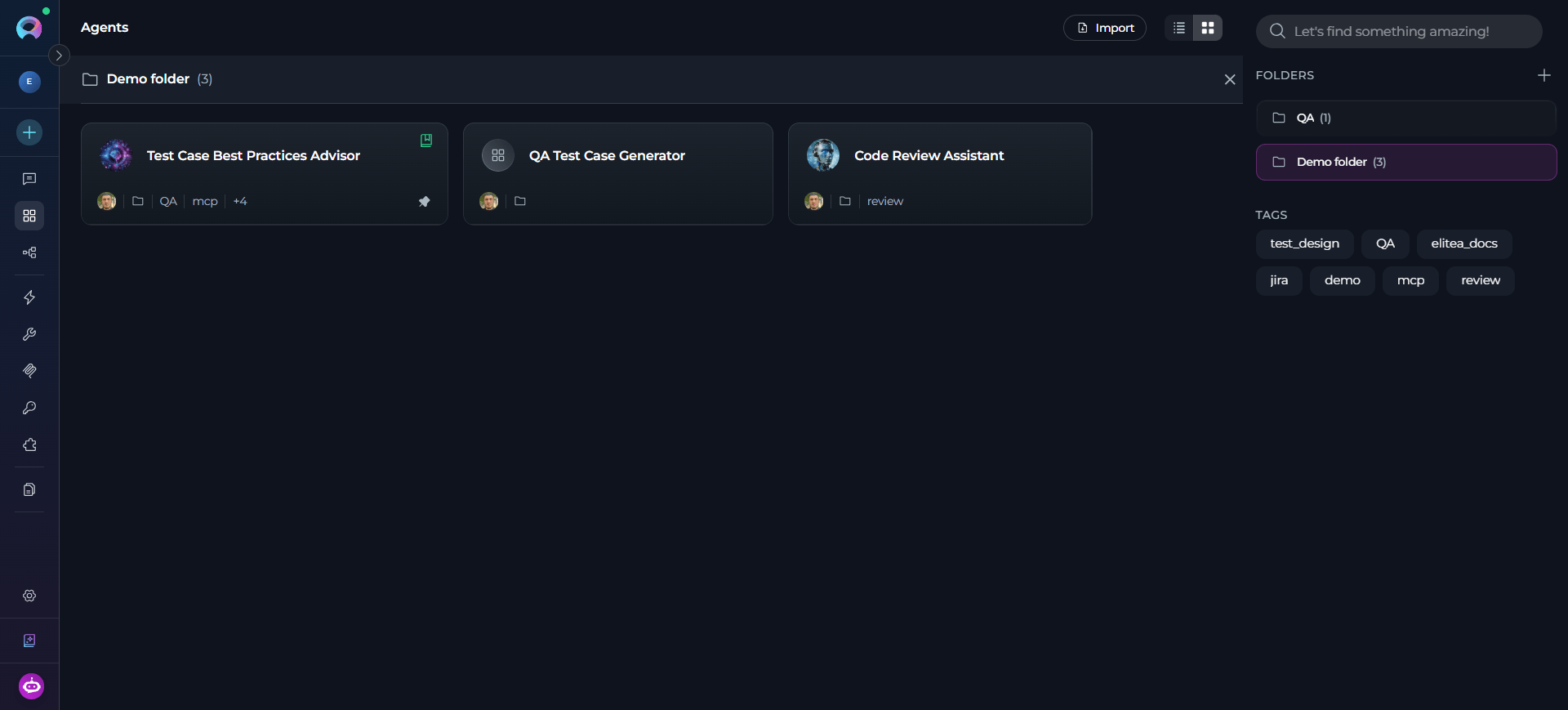
You can now group Agents, Pipelines, Toolkits & Indexes, MCPs and Credentials into folders.- Create a folder from the Folders panel, from a card, or directly while moving an entity into a new folder.
- Move entities to or between folders without affecting their configurations, versions or permissions — folder organization is never a mechanism for granting access or changing the entity.
- Rename or delete folders at any time — deleting a folder leaves its entities untouched.
- Keep search global across all folders and unfiled entities.
Folder-Level Permissions for Project Entities
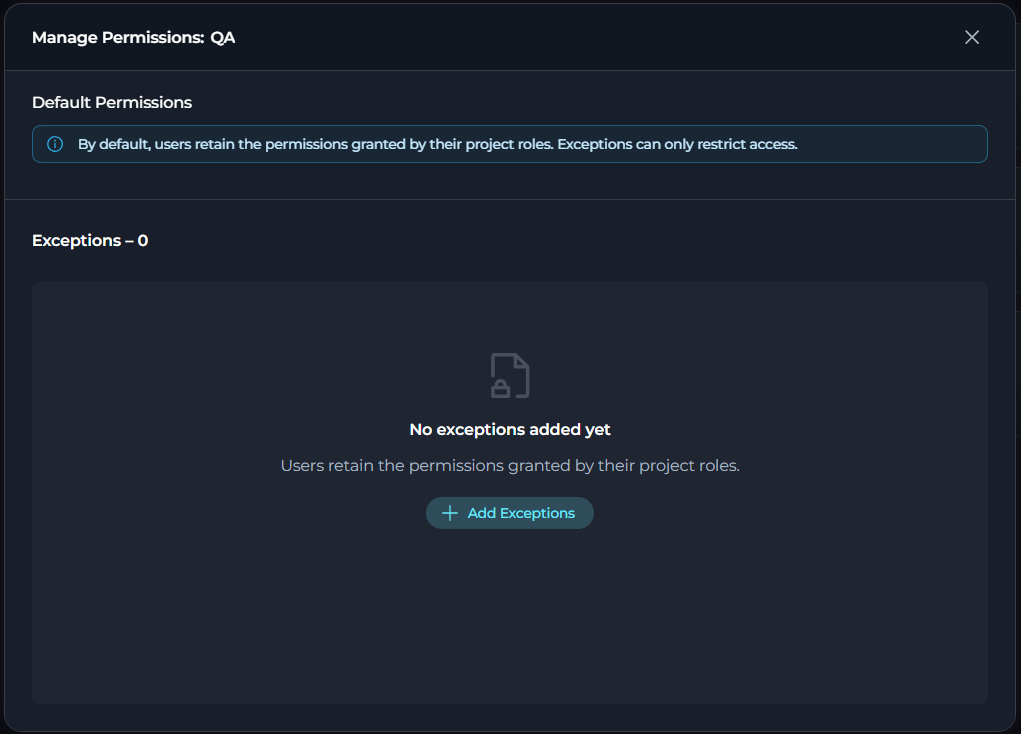
You can now control who can view or modify content in team folders with agents, pipelines, toolkits and indexes, MCPs and credentials.- Manage access per folder by assigning clear folder permission levels.
- Apply a folder exception to every entity currently inside it, including indexes.
- Add, search, edit and remove exceptions for one or multiple users at once, with a clear Exceptions count.
- Restore a user to normal role-based access at any time.
- Enforce restrictions consistently across the UI, REST and RPC paths, including list, search, move, copy, fork and export operations, so direct API access cannot bypass a folder restriction.
Sharing Conversations with External Users
You can now share chat conversations with people outside ELITEA through a secure, read-only public link.- Use a secure, read-only public link to share your conversation.
- Choose what to share before generating the link.
- Set the expiration period and (optional) protect the link with a password.
- Share the link with recipients even without an ELITEA account — they can only view the shared content, not modify it or reply.
Creating New Chats Inside a Folder
You can now start new conversations directly in the chat folder instead of creating it elsewhere and moving it to the folder manually. Benefits: Faster chat organization. Details: Use Chat.Default Modules for Chats & Agents
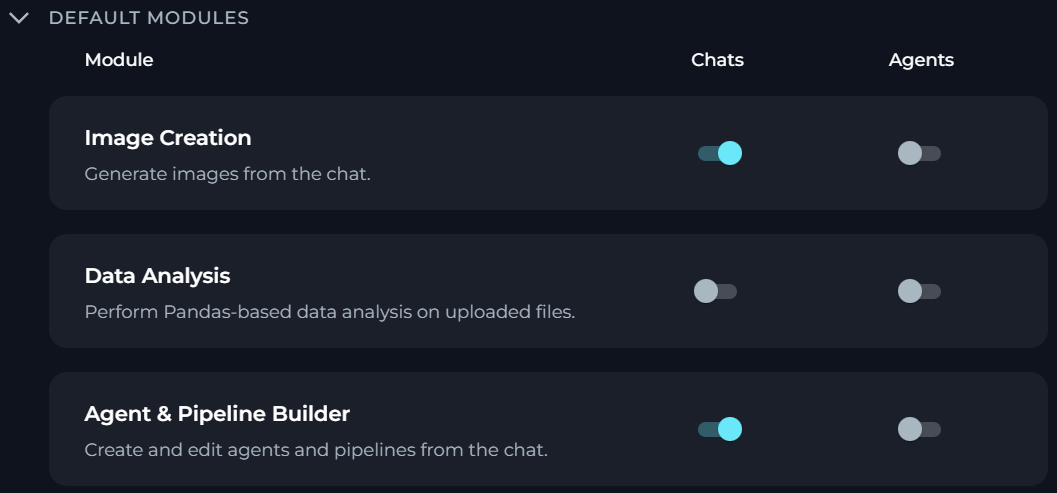
You can now configure default modules for chats and agents in the project settings.- Specify what modules are turned on by default for your project by a set of separate toggles. All toggles are disabled by default for new projects.
- Apply project-level defaults only to newly created chats and agents.
- Turn on or off modules when using chats and agents (if you have the necessary permission).
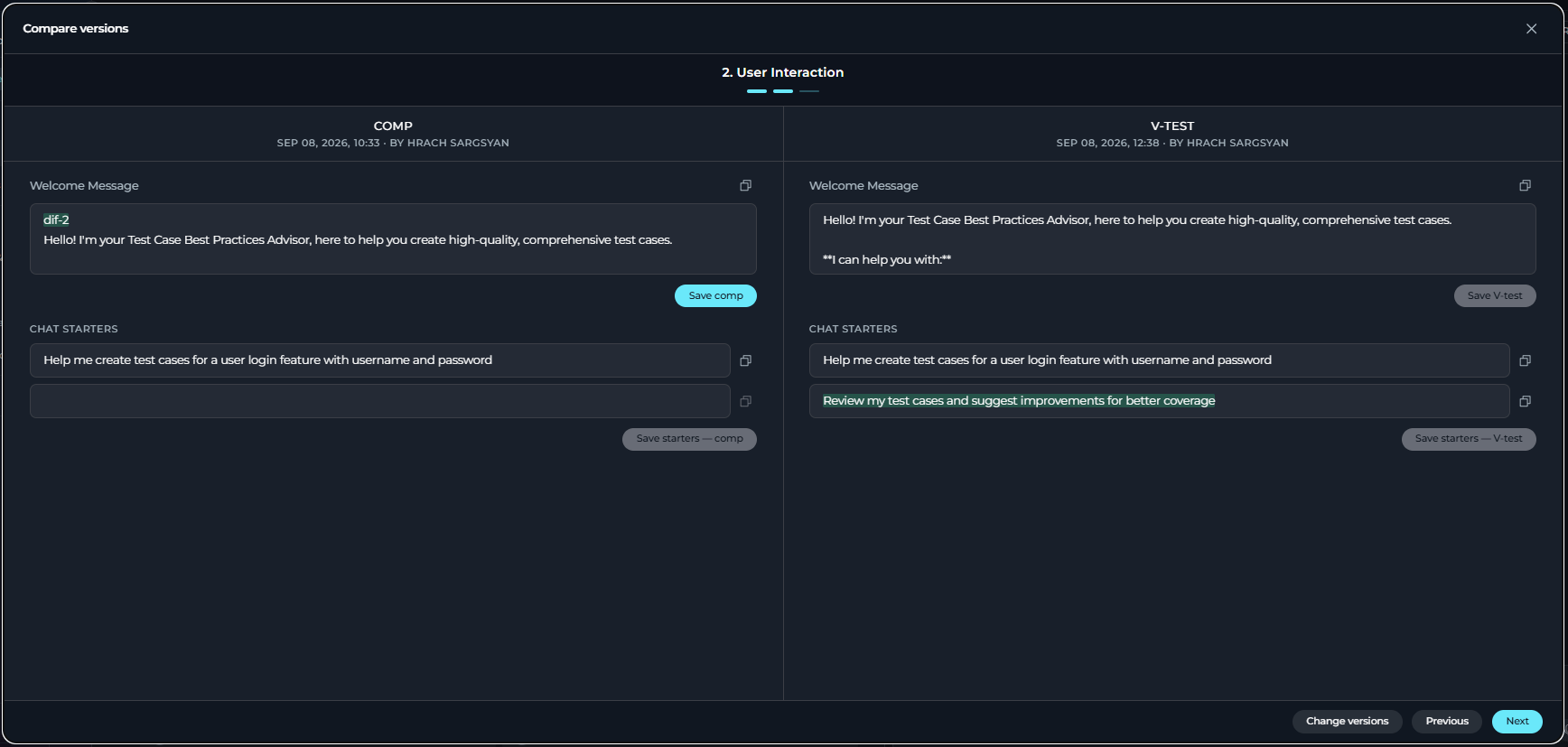
Comparing Agent & Skill Versions
You can now compare two saved versions of an agent or skill in a dedicated comparison modal.Version editing is available only to users with edit permissions and only when at least two versions exist.
- Use a side-by-side comparison modal with highlighted differences and available per-field copy actions.
- See all the differences, including unsaved edits made during the comparison.
- Edit and save versions independently. Saving overwrites the existing version without creating a new one.
JavaScript Execution in HTML Preview
You can now run JavaScript in the HTML preview frame, in both Artifacts and Chat.- Execute JS code embedded in
.htmlfiles when rendered in the Preview mode, in both the Artifacts canvas and Chat. - Build more dynamic, interactive HTML content instead of static markup only.
- Rely on the existing sandboxed preview isolation that keeps rendered content from accessing ELITEA session data, cookies, local storage, or the parent page.
Changed Features
Redesigned Indexing & Reindexing
You can now create, configure, monitor and search indexes through fully redesigned Index pages.- Work with completely reworked New Index, Index details and Search pages.
- See enabled/total tool and index counts and warning/error status icons.
- Keep an existing index searchable throughout a reindex — a failed manual or scheduled reindex no longer breaks or empties the active index.
- When saving configuration changes, select whether ELITEA must trigger a reindex.
- Read source-specific indexing and reindexing summaries.
- Get consistent and shareable run history across toolkits and indexes.
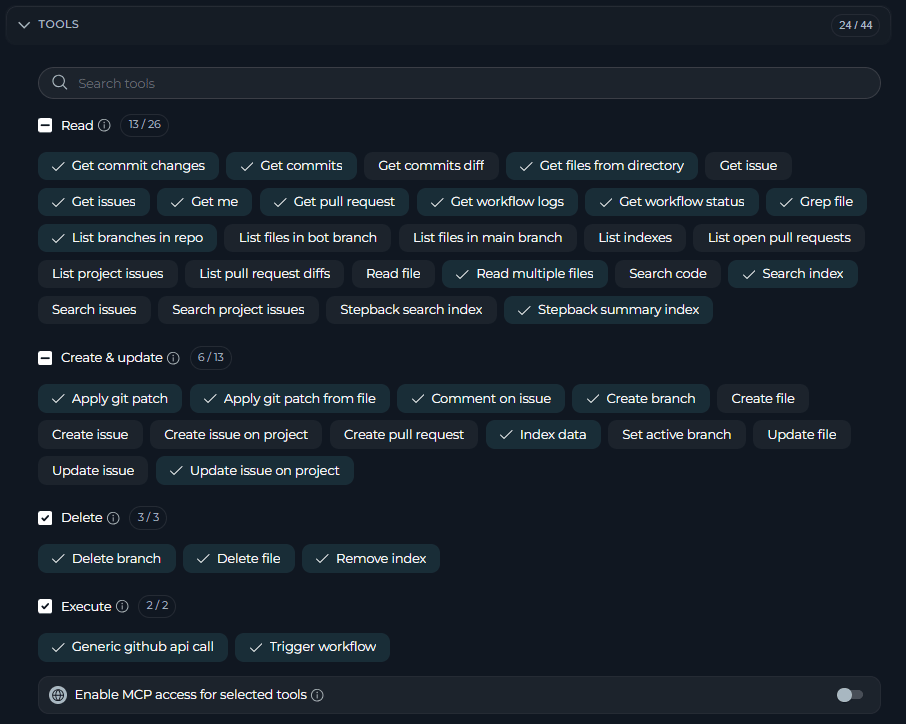
Redesigned Toolkit Tools
You can now configure tools of your toolkits through a redesigned Tools section.- Browse tools grouped by operation type — Read, Create & update, Delete and Execute.
- Search tools by display name or technical name without changing your current selections.
- Select or deselect all tools in a group from the group header.
- Review currently unavailable, but previously selected tools in a separate list.
Tool Testing
You can now test any tools of your toolkit in a dedicated Test page.- Start the tool testing from the action bar and navigate back to the details page in the breadcrumb trail.
- Use a dedicated Test Settings panel to search and select tools and configure their parameters.
- Review test execution results, including existing copy actions, errors and loading states.
UI Enhancements for Agents, Pipelines & Skills
You can now navigate and manage versions on Agent, Pipeline and Skill details pages more clearly, with breadcrumb navigation and a redesigned version selector.- Navigate with breadcrumbs instead of a back button.
- Search the version dropdown by version name or creator.
- Distinguish visually between the currently loaded and default versions.
- Keep versions sorted by creation date regardless of search or selected version.
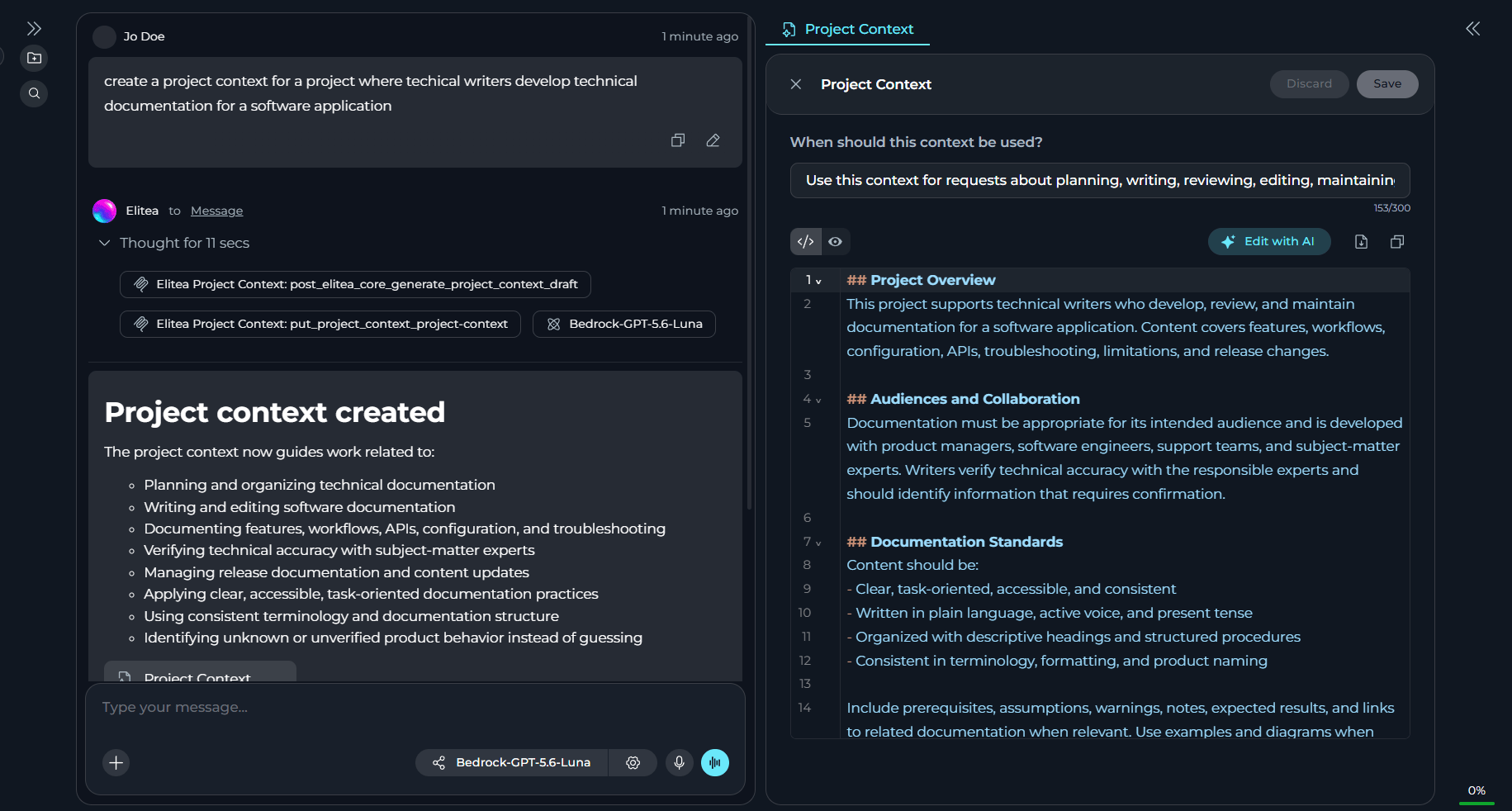
Canvas Mode for Chat-Generated Entities
You can now review and edit chat-generated agents, pipelines, skills or project context in Canvas, without leaving the conversation.- Open a newly generated agent, pipeline, skill or project context automatically in Canvas, alongside with Chat.
- See multiple items generated in the same response open as separate Canvas tabs.
- Reopen a generated entity in Canvas from its chip/link in the chat response.
- Save or discard changes and close a Canvas using the entity editor controls.
- Keep generated entities out of the chat’s participant list by default.
Enhanced Catalog
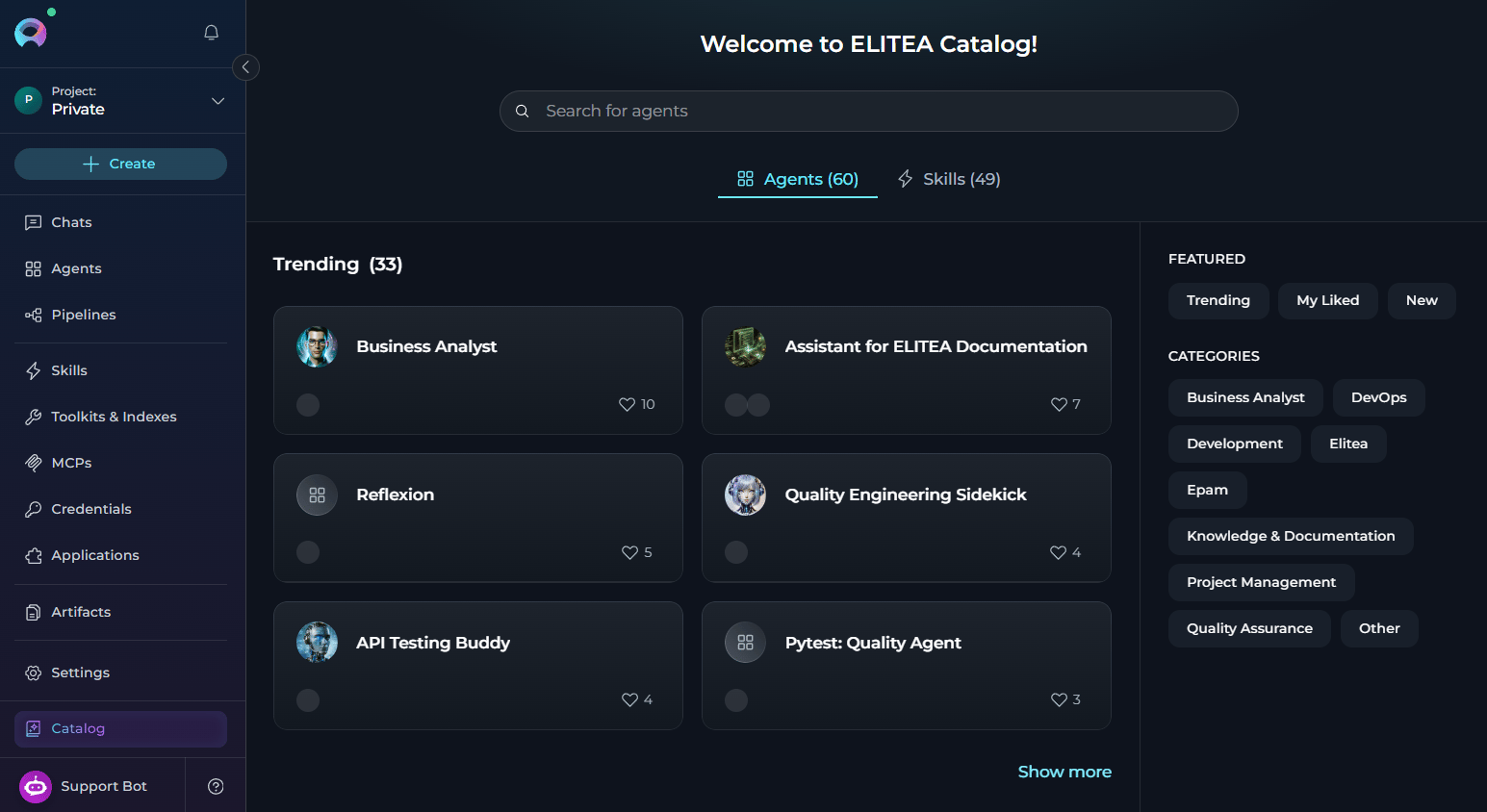
You can now see how many agents and skills are available in the ELITEA catalog and spot recently added items without scanning the whole list.- See a total count of agents and skills in the catalog header or section title.
- See a New badge on any agent or skill catalog card added within the recency window.
- Use the catalog filter to show only recently added items.
Fixed Issues
- #6532 GitLab toolkit
get_issuesreturns properly formatted, indented, consistent JSON. - #6523 A conversation no longer becomes inaccessible when a participant’s stored settings are missing an expected field.
- #6476 Jira
update_issueno longer crashes with an unhandled error whendescriptioncontains a nested/ADF object. - #6431 GPT thinking models can continue a conversation after an image has been generated in chat.
- #6390 Pipeline thinking steps and tool calls display in their correct chronological order relative to a Human In The Loop node’s input.
- #6387 First-time login to a team project opens or selects a chat instead of showing a persistent loading icon.
- #6379 A Human In The Loop pipeline node no longer repeats its question indefinitely when invoked via Chat or a parent agent.
- #6345 Toolkit, MCP and index Run History preserve thinking steps and invoked tool details, consistent with Agent Run History.
- #6296 Scheduled indexing times display in the viewer’s own timezone instead of the creator’s.
- #6295 Thinking-model agents no longer hang without a response or Continue button when the token limit is exceeded during thinking.
- #6294 Agents deliver partial output up to the configured max completion tokens instead of failing immediately with none.
- #6274 MCP tool schemas sanitize property names such as
fname[], preventing Claude Code from rejecting them with a 400 error. - #6273 Connected toolkits appear in the cloud MCP tools list, not only agents tagged for MCP.
- #6262 Prompt validation blocks agent publishing on critical issues instead of only showing warnings.
- #6076 Slack toolkit
read_messagesreturns the messagetstimestamp field. - #6051 SharePoint
read_file_from_sharing_linkno longer crashes on large files exceeding the LLM message length limit. - #5872 Scheduled reindexing executes for team projects, not only private ones.
- #5255 OAuth-authenticated MCP toolkits no longer loop re-authorization when an agent is launched from the Agent page.
- #5241 Pipeline LLM nodes with multiple toolkits keep access to duplicate-named tools instead of losing them to the first toolkit.
- #3562 Clicking Continue after hitting the token limit resumes pipeline or agent execution instead of restarting from the beginning.
Known Issues
- #3151 PPT Files Fail to Read or Index from Artifacts or SharePoint.
- #2719 MCP client disconnects on macOS despite tray showing “connected”.
- #1567 MCP-tagged resources execute the latest version only.
- #6538 Total Cost on the Costs section does not always match the sum of its individual cost components.
- #6467 First click of the Stop button during queued-message processing shows an agent configuration error and removes the Stop control while queued messages keep processing.
- #6457 New user messages can be processed ahead of previously queued messages, returning responses out of order or duplicated.
- #6354 Tracing plugin’s cost-estimation cache seed fails and retries on every lookup on the indexer, which has no database access.
- #5915 A single turn’s tool calls can collectively exceed the model’s context window without summarization ever being triggered.