Migration Guide: Pandas Toolkit to Data Analysis Internal Tool v2.0.0 B2
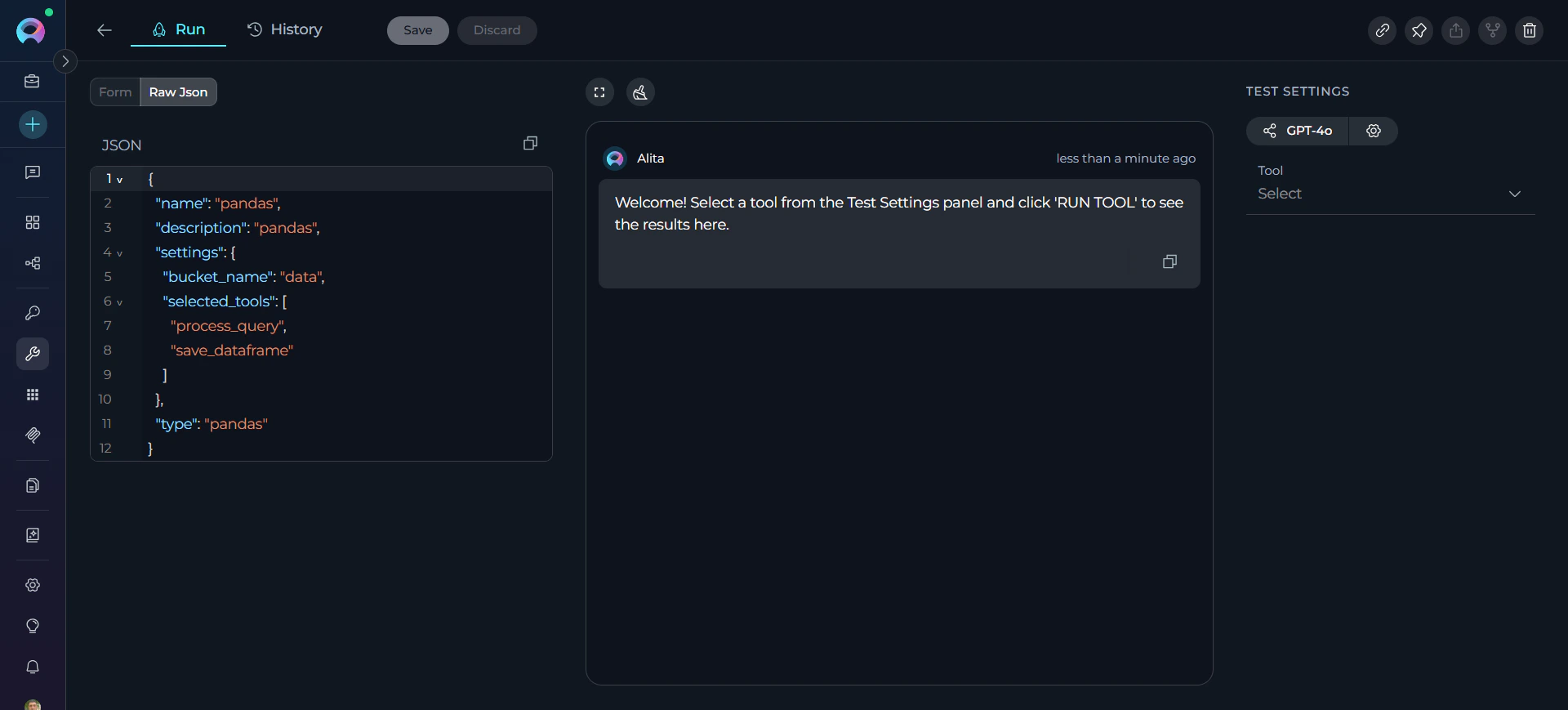
Starting with release 2.0.0 B2, existing Pandas toolkits are disabled and no longer functional. Users must migrate to the Data Analysis internal tool available
Starting with release 2.0.0 B2, existing Pandas toolkits are disabled and no longer functional. Users must migrate to the Data Analysis internal tool available in chat conversations and agents.
This guide provides step-by-step instructions for migrating from the deprecated Pandas toolkit to the new Data Analysis internal tool in ELITEA version 2.0.0 B2. The Pandas toolkit has been replaced by a more streamlined internal tool that provides the same data analysis capabilities without requiring separate toolkit configuration.
The Data Analysis internal tool represents a fundamental shift in how data analysis is performed in ELITEA. Instead of requiring separate toolkit creation and configuration, data analysis is now available directly in both chat conversations and agent configurations.Previous Workflow (Pandas Toolkit)Required multiple steps:
Create a separate Pandas toolkit in the Toolkits section
Configure bucket/file paths and settings
Add the toolkit to specific conversations or agent
Use technical Pandas syntax in conversations
Example usage:
Agent with Pandas toolkit: "Analyze sales_data.csv and show summary statistics"
New Workflow (Data Analysis Internal Tool)Direct usage without setup:
Enable Data Analysis in chat conversations or agent configurations (Steps 1-2 above)
Upload data files directly to conversations
Use natural language queries for analysis
Example usage in Chat:
Upload sales_data.csv to conversation, then ask:"Show summary statistics for sales_data.csv and the top 5 rows"
Example usage in Agent:
Agent with Data Analysis enabled: "Analyze the uploaded sales data and create a summary report"
Benefits of the New Approach:
Simplified Setup: No toolkit creation or configuration required
Universal Access: Available in any conversation or agent with one toggle
Natural Interaction: Use plain English instead of technical commands
Dynamic Data: Work with any uploaded file without pre-configuration
Automatic Processing: File format detection and intelligent analysis
{"docsConfig":{"theme":"mint","$schema":"https://mintlify.com/docs.json","name":"ELITEA Documentation","colors":{"primary":"#C428DD","light":"#6AE8FA","dark":"#A020D0"},"logo":{"light":"https://mintcdn.com/epam-a74ef051/4bC9rHxY9gaCXsks/img/elitea-logo-light.svg?fit=max\u0026auto=format\u0026n=4bC9rHxY9gaCXsks\u0026q=85\u0026s=43ff3b58a346ca6df63da85d614da271","dark":"https://mintcdn.com/epam-a74ef051/4bC9rHxY9gaCXsks/img/elitea-logo-dark.svg?fit=max\u0026auto=format\u0026n=4bC9rHxY9gaCXsks\u0026q=85\u0026s=7cab401c07768c56a3b2dc0d1af6b1ea","href":"https://elitea.ai"},"favicon":"https://mintcdn.com/epam-a74ef051/VKtVArTAzdlvF0zO/img/favicon.ico?fit=max\u0026auto=format\u0026n=VKtVArTAzdlvF0zO\u0026q=85\u0026s=9694338e3d1b62635b13e3440ed7d505","appearance":{"default":"system"},"background":{"color":{"light":"#FDFDFD","dark":"#0E131D"}},"navbar":{"links":[{"href":"https://next.elitea.ai/shared/swagger/","label":"API Documentation"}],"primary":{"type":"button","label":"ELITEA Platform","href":"https://next.elitea.ai"}},"fonts":{"family":"Inter"},"styling":{"eyebrows":"breadcrumbs","latex":true},"navigation":{"pages":[]}},"deployment":{"deploymentMetadataValue":{"subdomain":"epam-a74ef051","hasAudioNarration":false,"actualSubdomain":"epam-a74ef051","customDomains":["docs.elitea.ai"],"gitSource":{"type":"github","owner":"eliteaai","repo":"elitea.github.io","deployBranch":"mintlify","contentDirectory":"docs","isPrivate":true,"mountPath":"","label":""},"chroma":{"liveDeploymentHistoryId":"6adb7616146446953a9e8197","collectionId":"f94ae70d-57ae-4b23-beab-f6cfb9645a99","schemaVersion":"v3","latestBuiltDeploymentHistoryId":"6adb7616146446953a9e8197"},"entitlements":{},"buildId":"6adb7616146446953a9e8197","clientVersion":"0.0.3966","searchFilterCounts":[{"language":"default","tag":"How-To Guides","count":72},{"language":"default","tag":"Integrations","count":50},{"language":"default","tag":"Home","count":39},{"language":"default","tag":"Toolkits","count":36},{"language":"default","tag":"Support","count":33},{"language":"default","tag":"Platform Overview","count":27},{"language":"default","tag":"Chats","count":24},{"language":"default","tag":"Agents, Pipelines \u0026 Skills","count":23},{"language":"default","tag":"Release Notes","count":22},{"language":"default","tag":"Older Releases","count":19}]},"assistantConfig":{"enableAskAiButton":false,"enableStarterQuestions":false,"enableContextualStarterQuestions":false,"enableAskAiSearchBar":true},"hasChatPermissions":false,"hasWebMcpPermissions":false,"toggles":[{"name":"kill-isr","enabled":true,"variant":{"name":"disabled","enabled":false,"feature_enabled":true},"impressionData":false},{"name":"agent-mintlify-slack","enabled":true,"variant":{"name":"disabled","enabled":false,"feature_enabled":true},"impressionData":false},{"name":"editor-v7-file-tree","enabled":true,"variant":{"name":"disabled","enabled":false,"feature_enabled":true},"impressionData":false},{"name":"agent-integrations-settings","enabled":true,"variant":{"name":"disabled","enabled":false,"feature_enabled":true},"impressionData":false},{"name":"automations-pr-grouping","enabled":true,"variant":{"name":"disabled","enabled":false,"feature_enabled":true},"impressionData":false},{"name":"custom-prefix","enabled":true,"variant":{"name":"disabled","enabled":false,"feature_enabled":true},"impressionData":false},{"name":"analytics-v7","enabled":true,"variant":{"name":"disabled","enabled":false,"feature_enabled":true},"impressionData":false},{"name":"user-flows-analytics","enabled":true,"variant":{"name":"disabled","enabled":false,"feature_enabled":true},"impressionData":false},{"name":"no-publish-flow","enabled":true,"variant":{"name":"disabled","enabled":false,"feature_enabled":true},"impressionData":false},{"name":"workos-onboarding","enabled":true,"variant":{"name":"disabled","enabled":false,"feature_enabled":true},"impressionData":false},{"name":"llms-txt-v2","enabled":true,"variant":{"name":"disabled","enabled":false,"feature_enabled":true},"impressionData":false},{"name":"pause-universal-search-reconcile","enabled":true,"variant":{"name":"disabled","enabled":false,"feature_enabled":true},"impressionData":false},{"name":"snapshot-serving-live","enabled":true,"variant":{"name":"disabled","enabled":false,"feature_enabled":true},"impressionData":false},{"name":"stripTemperatureMiddleware","enabled":true,"variant":{"name":"disabled","enabled":false,"feature_enabled":true},"impressionData":false},{"name":"per-site-search-delta","enabled":true,"variant":{"name":"disabled","enabled":false,"feature_enabled":true},"impressionData":false},{"name":"support-platform-pylon-zendesk","enabled":true,"variant":{"name":"disabled","enabled":false,"feature_enabled":true},"impressionData":false},{"name":"snapshot-serving","enabled":true,"variant":{"name":"disabled","enabled":false,"feature_enabled":true},"impressionData":false},{"name":"instant-rollback","enabled":true,"variant":{"name":"disabled","enabled":false,"feature_enabled":true},"impressionData":false},{"name":"granular-notifications-server","enabled":true,"variant":{"name":"disabled","enabled":false,"feature_enabled":true},"impressionData":false},{"name":"granular-notifications","enabled":true,"variant":{"name":"disabled","enabled":false,"feature_enabled":true},"impressionData":false},{"name":"editor-private-page-search","enabled":true,"variant":{"name":"disabled","enabled":false,"feature_enabled":true},"impressionData":false},{"name":"automations-fable","enabled":true,"variant":{"name":"disabled","enabled":false,"feature_enabled":true},"impressionData":false},{"name":"fixed-ai-action-pricing","enabled":true,"variant":{"name":"disabled","enabled":false,"feature_enabled":true},"impressionData":false},{"name":"automation-resolve-merge-conflict","enabled":true,"variant":{"name":"disabled","enabled":false,"feature_enabled":true},"impressionData":false},{"name":"scoped-publishing","enabled":true,"variant":{"name":"disabled","enabled":false,"feature_enabled":true},"impressionData":false},{"name":"mintql","enabled":true,"variant":{"name":"disabled","enabled":false,"feature_enabled":true},"impressionData":false},{"name":"page-level-analytics","enabled":true,"variant":{"name":"disabled","enabled":false,"feature_enabled":true},"impressionData":false},{"name":"editor-version-history-v2","enabled":true,"variant":{"name":"disabled","enabled":false,"feature_enabled":true},"impressionData":false},{"name":"editor-nav-generations","enabled":true,"variant":{"name":"disabled","enabled":false,"feature_enabled":true},"impressionData":false},{"name":"billing-page-v2","enabled":true,"variant":{"name":"disabled","enabled":false,"feature_enabled":true},"impressionData":false},{"name":"workspace-projects","enabled":true,"variant":{"name":"disabled","enabled":false,"feature_enabled":true},"impressionData":false},{"name":"assistant-v5","enabled":true,"variant":{"name":"disabled","enabled":false,"feature_enabled":true},"impressionData":false},{"name":"byok-sep-25","enabled":true,"variant":{"name":"disabled","enabled":false,"feature_enabled":true},"impressionData":false},{"name":"fork-pr-previews","enabled":true,"variant":{"name":"disabled","enabled":false,"feature_enabled":true},"impressionData":false},{"name":"revalidation-jwt","enabled":true,"variant":{"name":"disabled","enabled":false,"feature_enabled":true},"impressionData":false},{"name":"vite-origin","enabled":true,"variant":{"name":"disabled","enabled":false,"feature_enabled":true},"impressionData":false},{"name":"editor-agent-model-picker","enabled":true,"variant":{"name":"disabled","enabled":false,"feature_enabled":true},"impressionData":false},{"name":"billing-updated-9-15","enabled":true,"variant":{"name":"disabled","enabled":false,"feature_enabled":true},"impressionData":false},{"name":"hobby-abuse-scan","enabled":true,"variant":{"name":"disabled","enabled":false,"feature_enabled":true},"impressionData":false},{"name":"dashboard-inbox","enabled":true,"variant":{"name":"disabled","enabled":false,"feature_enabled":true},"impressionData":false}],"isAtlas":false,"googleFontsInlined":false},"customCss":[{"filePath":"custom.css","content":":root{--primary-dark:196 40 221;--primary-light:106 232 250}.dark aside,[data-theme=dark] aside{background-color:rgb(10 15 22/.7)!important}.dark body>div>header,.dark body>header,[data-theme=dark] body>div>header,[data-theme=dark] body>header{background-color:rgb(10 15 22/.85)!important;backdrop-filter:blur(8px);-webkit-backdrop-filter:blur(8px)}pre{border-radius:8px!important}.dark pre,[data-theme=dark] pre{background-color:rgb(8 11 18)!important;border:1px solid rgb(29 37 55/.7)!important}:not(pre)>code{color:#a020d0!important;border-radius:4px}.dark :not(pre)>code,[data-theme=dark] :not(pre)>code{color:#6ae8fa!important;background-color:rgb(19 24 32/.8)!important}header a img,nav a img{height:36px!important;width:auto!important;max-height:none!important}::-webkit-scrollbar{width:5px;height:5px}::-webkit-scrollbar-track{background:0 0}::-webkit-scrollbar-thumb{background:rgba(128,128,160,.25);border-radius:3px}::-webkit-scrollbar-thumb:hover{background:rgba(128,128,160,.45)}"}],"page":{"pagePath":"migration/v2.0.1/pandas-toolkit-migration","slug":"/migration/v2.0.1/pandas-toolkit-migration","pageMetadata":{"title":"Migration Guide: Pandas Toolkit to Data Analysis Internal Tool v2.0.0 B2","description":"Starting with release 2.0.0 B2, existing Pandas toolkits are disabled and no longer functional. Users must migrate to the Data Analysis internal tool available ","href":"/migration/v2.0.1/pandas-toolkit-migration"},"description":{"compiledSource":"\"use strict\";\nconst {jsx: _jsx} = arguments[0];\nconst {useMDXComponents: _provideComponents} = arguments[0];\nfunction _createMdxContent(props) {\n const _components = {\n p: \"p\",\n ..._provideComponents(),\n ...props.components\n };\n return _jsx(_components.p, {\n children: \"Starting with release 2.0.0 B2, existing Pandas toolkits are disabled and no longer functional. Users must migrate to the Data Analysis internal tool available\"\n });\n}\nfunction MDXContent(props = {}) {\n const {wrapper: MDXLayout} = {\n ..._provideComponents(),\n ...props.components\n };\n return MDXLayout ? _jsx(MDXLayout, {\n ...props,\n children: _jsx(_createMdxContent, {\n ...props\n })\n }) : _createMdxContent(props);\n}\nreturn {\n default: MDXContent\n};\n","frontmatter":{},"scope":{}},"pageType":"default","mdx":{"mdxSource":{"compiledSource":"\"use strict\";const{Fragment:_Fragment,jsx:_jsx,jsxs:_jsxs}=arguments[0];const{useMDXComponents:_provideComponents}=arguments[0];function _createMdxContent(props){const _components={a:`a`,code:`code`,li:`li`,ol:`ol`,p:`p`,pre:`pre`,span:`span`,strong:`strong`,tbody:`tbody`,td:`td`,th:`th`,thead:`thead`,tr:`tr`,ul:`ul`,..._provideComponents(),...props.components},{CodeBlock,Heading,Info,OptimizedImage,Table,Warning}=_components;if(!CodeBlock)_missingMdxReference(`CodeBlock`,true);if(!Heading)_missingMdxReference(`Heading`,true);if(!Info)_missingMdxReference(`Info`,true);if(!OptimizedImage)_missingMdxReference(`OptimizedImage`,true);if(!Table)_missingMdxReference(`Table`,true);if(!Warning)_missingMdxReference(`Warning`,true);return _jsxs(_Fragment,{children:[_jsx(Warning,{title:`Action Required`,children:_jsx(_components.p,{children:`Starting with release 2.0.0 B2, existing Pandas toolkits are disabled and no longer functional. Users must migrate to the Data Analysis internal tool available in chat conversations and agents.`})}),`\n`,_jsx(Heading,{level:`2`,id:`overview`,children:`Overview`}),`\n`,_jsx(_components.p,{children:`This guide provides step-by-step instructions for migrating from the deprecated Pandas toolkit to the new Data Analysis internal tool in ELITEA version 2.0.0 B2. The Pandas toolkit has been replaced by a more streamlined internal tool that provides the same data analysis capabilities without requiring separate toolkit configuration.`}),`\n`,_jsx(Heading,{level:`2`,id:`breaking-changes`,children:`Breaking Changes`}),`\n`,_jsx(_components.p,{children:_jsx(_components.strong,{children:`Pandas Toolkit Deprecation`})}),`\n`,_jsxs(_components.p,{children:[_jsx(_components.strong,{children:`Affected Users:`}),` All users with existing Pandas toolkits configured in agents`]}),`\n`,_jsx(_components.p,{children:_jsx(_components.strong,{children:`What Changed:`})}),`\n`,_jsxs(_components.ul,{children:[`\n`,_jsx(_components.li,{children:`Existing Pandas toolkits are disabled and will not function`}),`\n`]}),`\n`,_jsx(OptimizedImage,{src:`https://mintcdn.com/epam-a74ef051/17A86izaGCzTjYjh/img/migration/v2.0.1/pandas/pandas-toolkit-depricated.png?fit=max\u0026auto=format\u0026n=17A86izaGCzTjYjh\u0026q=85\u0026s=d47bf681f1de3b822c5059977c568323`,alt:`Pandas`,\"data-og-width\":`1920`,width:`1920`,\"data-og-height\":`869`,height:`869`,\"data-path\":`img/migration/v2.0.1/pandas/pandas-toolkit-depricated.png`,\"data-optimize\":`true`,\"data-opv\":`3`,srcset:`https://mintcdn.com/epam-a74ef051/17A86izaGCzTjYjh/img/migration/v2.0.1/pandas/pandas-toolkit-depricated.png?w=280\u0026fit=max\u0026auto=format\u0026n=17A86izaGCzTjYjh\u0026q=85\u0026s=461ea00da323b2f3483ece74ea98b33a 280w, https://mintcdn.com/epam-a74ef051/17A86izaGCzTjYjh/img/migration/v2.0.1/pandas/pandas-toolkit-depricated.png?w=560\u0026fit=max\u0026auto=format\u0026n=17A86izaGCzTjYjh\u0026q=85\u0026s=9a113ef41ac2a091acdaadfbd1d306ff 560w, https://mintcdn.com/epam-a74ef051/17A86izaGCzTjYjh/img/migration/v2.0.1/pandas/pandas-toolkit-depricated.png?w=840\u0026fit=max\u0026auto=format\u0026n=17A86izaGCzTjYjh\u0026q=85\u0026s=bd03f9b1a7aba418d495fc872e39c757 840w, https://mintcdn.com/epam-a74ef051/17A86izaGCzTjYjh/img/migration/v2.0.1/pandas/pandas-toolkit-depricated.png?w=1100\u0026fit=max\u0026auto=format\u0026n=17A86izaGCzTjYjh\u0026q=85\u0026s=fead5b9ed49ba7d36a7e63c46c6bdfb1 1100w, https://mintcdn.com/epam-a74ef051/17A86izaGCzTjYjh/img/migration/v2.0.1/pandas/pandas-toolkit-depricated.png?w=1650\u0026fit=max\u0026auto=format\u0026n=17A86izaGCzTjYjh\u0026q=85\u0026s=85ad87b2c9975d5e2d33a20ac7addbfa 1650w, https://mintcdn.com/epam-a74ef051/17A86izaGCzTjYjh/img/migration/v2.0.1/pandas/pandas-toolkit-depricated.png?w=2500\u0026fit=max\u0026auto=format\u0026n=17A86izaGCzTjYjh\u0026q=85\u0026s=6902fd86b5bc83cd8f0ba5dad0f1ad41 2500w`}),`\n`,_jsxs(_components.ul,{children:[`\n`,_jsx(_components.li,{children:`The legacy Pandas toolkit has been replaced by the Data Analysis internal tool`}),`\n`,_jsx(_components.li,{children:`Data Analysis is now available as an internal tool in chat conversations and agent configurations`}),`\n`]}),`\n`,_jsx(_components.p,{children:_jsx(_components.strong,{children:`Migration Benefits:`})}),`\n`,_jsxs(_components.ul,{children:[`\n`,_jsx(_components.li,{children:`Simplified setup - no separate toolkit configuration required`}),`\n`,_jsx(_components.li,{children:`Better integration with conversation workflows`}),`\n`,_jsx(_components.li,{children:`Enhanced user experience with natural language data analysis`}),`\n`,_jsx(_components.li,{children:`Automatic file format detection and processing`}),`\n`]}),`\n`,_jsx(Heading,{level:`2`,id:`migration-steps`,children:`Migration Steps`}),`\n`,_jsx(Heading,{level:`3`,id:`step-1-enable-data-analysis-in-chat-conversations`,children:`Step 1: Enable Data Analysis in Chat Conversations`}),`\n`,_jsx(_components.p,{children:`For ad-hoc data analysis in conversations:`}),`\n`,_jsxs(_components.ol,{children:[`\n`,_jsxs(_components.li,{children:[_jsx(_components.strong,{children:`Open a Conversation:`}),` Navigate to any chat conversation`]}),`\n`,_jsxs(_components.li,{children:[_jsx(_components.strong,{children:`Access Internal Tools:`}),` Click the `,_jsx(_components.strong,{children:`Internal Tools`}),` icon (value icon) next to the attachment button`]}),`\n`,_jsxs(_components.li,{children:[_jsx(_components.strong,{children:`Enable Data Analysis:`}),` Find `,_jsx(_components.strong,{children:`Data Analysis`}),` in the popup list and toggle it ON`]}),`\n`,_jsxs(_components.li,{children:[_jsx(_components.strong,{children:`Confirm Enablement:`}),` A success notification will appear: “Internal tools configuration updated”`]}),`\n`]}),`\n`,_jsx(_components.p,{children:`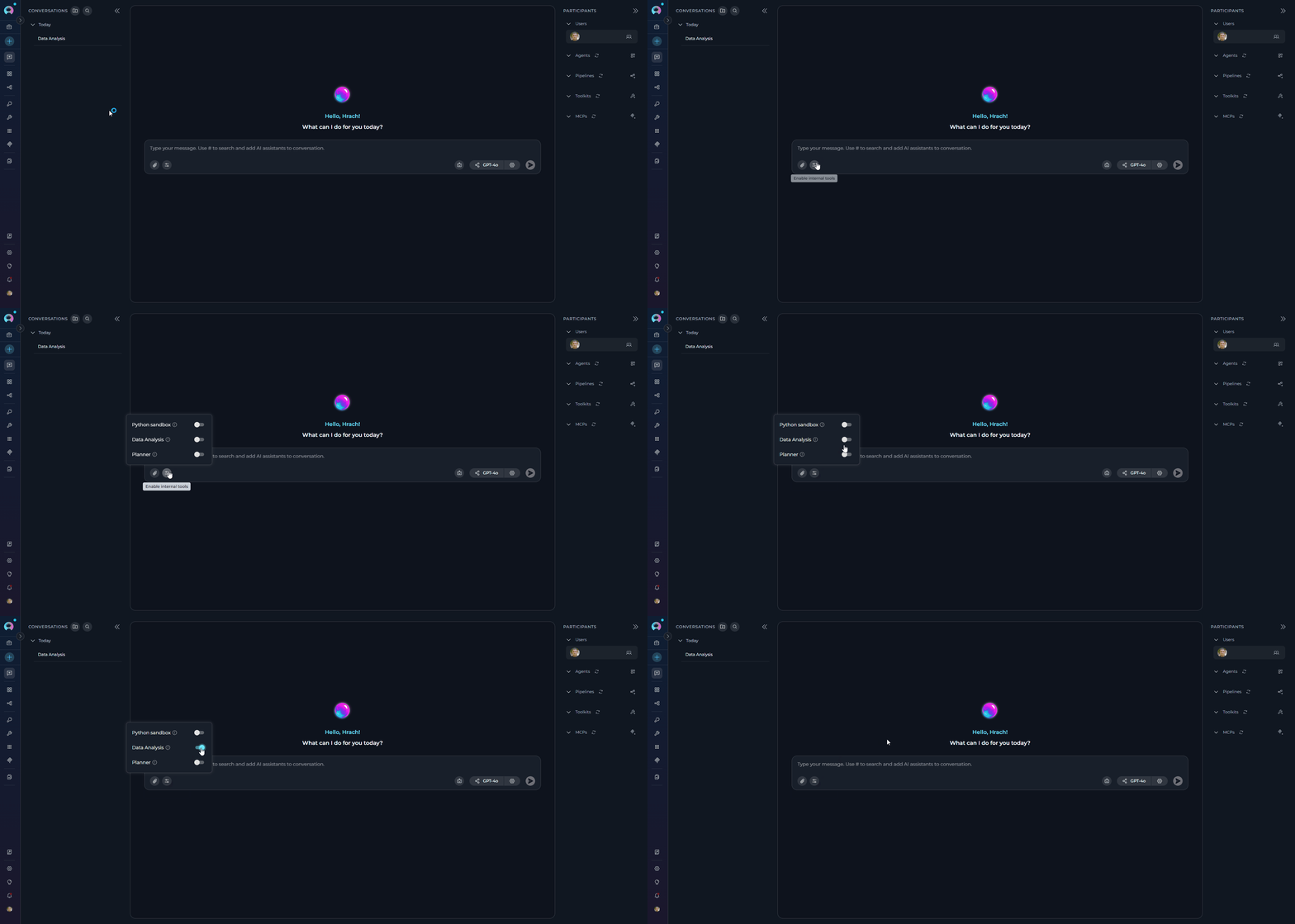`}),`\n`,_jsx(Heading,{level:`3`,id:`step-2-enable-data-analysis-in-agent-configuration`,children:`Step 2: Enable Data Analysis in Agent Configuration`}),`\n`,_jsx(_components.p,{children:`For agents that previously used Pandas toolkits:`}),`\n`,_jsxs(_components.ol,{children:[`\n`,_jsxs(_components.li,{children:[_jsx(_components.strong,{children:`Navigate to Agents:`}),` Open the sidebar and select `,_jsx(_components.strong,{children:`Agents`})]}),`\n`,_jsxs(_components.li,{children:[_jsx(_components.strong,{children:`Select Agent:`}),` Choose the agent that previously used a Pandas toolkit`]}),`\n`,_jsxs(_components.li,{children:[_jsx(_components.strong,{children:`Access Toolkits Section:`}),` Scroll to the `,_jsx(_components.strong,{children:`TOOLKITS`}),` section at the bottom`]}),`\n`,_jsxs(_components.li,{children:[_jsx(_components.strong,{children:`Enable Data Analysis:`}),` Find the `,_jsx(_components.strong,{children:`Data Analysis`}),` switch and toggle it ON`]}),`\n`,_jsxs(_components.li,{children:[_jsx(_components.strong,{children:`Save Configuration:`}),` Click `,_jsx(_components.strong,{children:`Save`}),` at the top of the page`]}),`\n`]}),`\n`,_jsx(_components.p,{children:`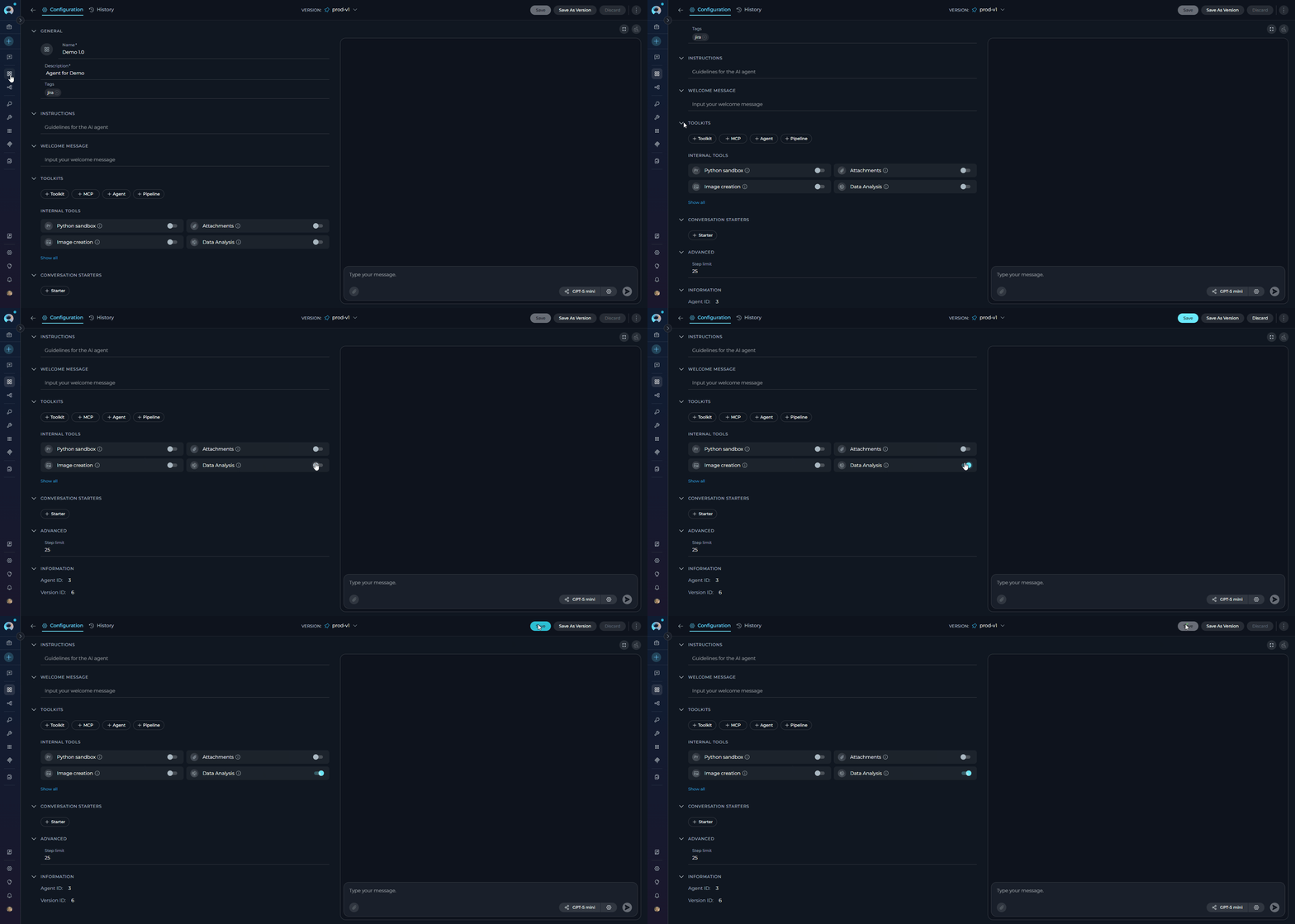`}),`\n`,_jsx(Heading,{level:`3`,id:`step-3-update-data-analysis-workflows`,children:`Step 3: Update Data Analysis Workflows`}),`\n`,_jsx(_components.p,{children:`The Data Analysis internal tool represents a fundamental shift in how data analysis is performed in ELITEA. Instead of requiring separate toolkit creation and configuration, data analysis is now available directly in both chat conversations and agent configurations.`}),`\n`,_jsx(_components.p,{children:_jsx(_components.strong,{children:`Previous Workflow (Pandas Toolkit)`})}),`\n`,_jsx(_components.p,{children:_jsx(_components.strong,{children:`Required multiple steps:`})}),`\n`,_jsxs(_components.ol,{children:[`\n`,_jsx(_components.li,{children:`Create a separate Pandas toolkit in the Toolkits section`}),`\n`,_jsx(_components.li,{children:`Configure bucket/file paths and settings`}),`\n`,_jsx(_components.li,{children:`Add the toolkit to specific conversations or agent`}),`\n`,_jsx(_components.li,{children:`Use technical Pandas syntax in conversations`}),`\n`]}),`\n`,_jsx(_components.p,{children:_jsx(_components.strong,{children:`Example usage:`})}),`\n`,_jsx(CodeBlock,{numberOfLines:`2`,language:`text`,children:_jsx(_components.pre,{className:`shiki shiki-themes github-light-default dark-plus`,style:{backgroundColor:`#ffffff`,\"--shiki-dark-bg\":`#0B0C0E`,color:`#1f2328`,\"--shiki-dark\":`#D4D4D4`},language:`text`,children:_jsxs(_components.code,{language:`text`,numberOfLines:`2`,children:[_jsx(_components.span,{className:`line`,children:_jsx(_components.span,{children:`Agent with Pandas toolkit: \"Analyze sales_data.csv and show summary statistics\"`})}),`\n`,_jsx(_components.span,{className:`line`,children:_jsx(_components.span,{})})]})})}),`\n`,_jsx(_components.p,{children:_jsx(_components.strong,{children:`New Workflow (Data Analysis Internal Tool)`})}),`\n`,_jsx(_components.p,{children:_jsx(_components.strong,{children:`Direct usage without setup:`})}),`\n`,_jsxs(_components.ol,{children:[`\n`,_jsx(_components.li,{children:`Enable Data Analysis in chat conversations or agent configurations (Steps 1-2 above)`}),`\n`,_jsx(_components.li,{children:`Upload data files directly to conversations`}),`\n`,_jsx(_components.li,{children:`Use natural language queries for analysis`}),`\n`]}),`\n`,_jsx(_components.p,{children:_jsx(_components.strong,{children:`Example usage in Chat:`})}),`\n`,_jsx(CodeBlock,{numberOfLines:`3`,language:`text`,children:_jsx(_components.pre,{className:`shiki shiki-themes github-light-default dark-plus`,style:{backgroundColor:`#ffffff`,\"--shiki-dark-bg\":`#0B0C0E`,color:`#1f2328`,\"--shiki-dark\":`#D4D4D4`},language:`text`,children:_jsxs(_components.code,{language:`text`,numberOfLines:`3`,children:[_jsx(_components.span,{className:`line`,children:_jsx(_components.span,{children:`Upload sales_data.csv to conversation, then ask:`})}),`\n`,_jsx(_components.span,{className:`line`,children:_jsx(_components.span,{children:`\"Show summary statistics for sales_data.csv and the top 5 rows\"`})}),`\n`,_jsx(_components.span,{className:`line`,children:_jsx(_components.span,{})})]})})}),`\n`,_jsx(_components.p,{children:_jsx(_components.strong,{children:`Example usage in Agent:`})}),`\n`,_jsx(CodeBlock,{numberOfLines:`2`,language:`text`,children:_jsx(_components.pre,{className:`shiki shiki-themes github-light-default dark-plus`,style:{backgroundColor:`#ffffff`,\"--shiki-dark-bg\":`#0B0C0E`,color:`#1f2328`,\"--shiki-dark\":`#D4D4D4`},language:`text`,children:_jsxs(_components.code,{language:`text`,numberOfLines:`2`,children:[_jsx(_components.span,{className:`line`,children:_jsx(_components.span,{children:`Agent with Data Analysis enabled: \"Analyze the uploaded sales data and create a summary report\"`})}),`\n`,_jsx(_components.span,{className:`line`,children:_jsx(_components.span,{})})]})})}),`\n`,_jsx(_components.p,{children:_jsx(_components.strong,{children:`Benefits of the New Approach:`})}),`\n`,_jsxs(_components.ul,{children:[`\n`,_jsxs(_components.li,{children:[_jsx(_components.strong,{children:`Simplified Setup:`}),` No toolkit creation or configuration required`]}),`\n`,_jsxs(_components.li,{children:[_jsx(_components.strong,{children:`Universal Access:`}),` Available in any conversation or agent with one toggle`]}),`\n`,_jsxs(_components.li,{children:[_jsx(_components.strong,{children:`Natural Interaction:`}),` Use plain English instead of technical commands`]}),`\n`,_jsxs(_components.li,{children:[_jsx(_components.strong,{children:`Dynamic Data:`}),` Work with any uploaded file without pre-configuration`]}),`\n`,_jsxs(_components.li,{children:[_jsx(_components.strong,{children:`Automatic Processing:`}),` File format detection and intelligent analysis`]}),`\n`]}),`\n`,_jsx(Heading,{level:`3`,id:`step-4-remove-deprecated-pandas-toolkits`,children:`Step 4: Remove Deprecated Pandas Toolkits`}),`\n`,_jsx(_components.p,{children:`After migrating to Data Analysis:`}),`\n`,_jsxs(_components.ol,{children:[`\n`,_jsxs(_components.li,{children:[_jsx(_components.strong,{children:`Navigate to Toolkits:`}),` Open the sidebar and select `,_jsx(_components.strong,{children:`Toolkits`})]}),`\n`,_jsxs(_components.li,{children:[_jsx(_components.strong,{children:`Locate Pandas Toolkits:`}),` Find any existing Pandas toolkits`]}),`\n`,_jsxs(_components.li,{children:[_jsx(_components.strong,{children:`Remove Toolkits:`}),` Click the delete/remove option for each Pandas toolkit`]}),`\n`,_jsxs(_components.li,{children:[_jsx(_components.strong,{children:`Confirm Removal:`}),` Acknowledge that the toolkit will be permanently removed`]}),`\n`]}),`\n`,_jsx(Warning,{title:`Cleanup Required`,children:_jsx(_components.p,{children:`Deprecated Pandas toolkits should be removed from agent configurations to avoid confusion. They will not function after 2.0.0 B2.`})}),`\n`,_jsx(Heading,{level:`3`,id:`step-5-test-data-analysis-functionality`,children:`Step 5: Test Data Analysis Functionality`}),`\n`,_jsx(_components.p,{children:`Verify the migration was successful:`}),`\n`,_jsxs(_components.ol,{children:[`\n`,_jsxs(_components.li,{children:[_jsx(_components.strong,{children:`Upload Test Data:`}),` Upload a small CSV or Excel file to a conversation`]}),`\n`,_jsxs(_components.li,{children:[_jsx(_components.strong,{children:`Run Analysis:`}),` Ask for basic analysis (e.g., “Show summary statistics for myfile.csv”)`]}),`\n`,_jsxs(_components.li,{children:[_jsx(_components.strong,{children:`Check Results:`}),` Verify that analysis completes and displays correctly`]}),`\n`,_jsxs(_components.li,{children:[_jsx(_components.strong,{children:`Test Charts:`}),` Request a chart to ensure file generation works (e.g., “Create a bar chart of sales by region”)`]}),`\n`]}),`\n`,_jsx(Heading,{level:`2`,id:`feature-comparison`,children:`Feature Comparison`}),`\n`,_jsxs(Table,{children:[_jsx(_components.thead,{children:_jsxs(_components.tr,{children:[_jsx(_components.th,{children:`Feature`}),_jsx(_components.th,{children:`Legacy Pandas Toolkit`}),_jsx(_components.th,{children:`Data Analysis Internal Tool`}),_jsx(_components.th,{})]})}),_jsxs(_components.tbody,{children:[_jsxs(_components.tr,{children:[_jsx(_components.td,{children:_jsx(_components.strong,{children:`Setup`})}),_jsx(_components.td,{children:`Separate toolkit configuration required`}),_jsx(_components.td,{children:`Enable via Internal Tools toggle`}),_jsx(_components.td,{})]}),_jsxs(_components.tr,{children:[_jsx(_components.td,{children:_jsx(_components.strong,{children:`File Access`})}),_jsx(_components.td,{children:`Configured bucket/file paths`}),_jsx(_components.td,{children:`Upload files directly to conversations`}),_jsx(_components.td,{})]}),_jsxs(_components.tr,{children:[_jsx(_components.td,{children:_jsx(_components.strong,{children:`Chart Generation`})}),_jsx(_components.td,{children:`Manual code required`}),_jsx(_components.td,{children:`Automatic with file downloads`}),_jsx(_components.td,{})]}),_jsxs(_components.tr,{children:[_jsx(_components.td,{children:_jsx(_components.strong,{children:`Agent Integration`})}),_jsx(_components.td,{children:`Complex toolkit setup`}),_jsx(_components.td,{children:`Simple toggle in agent config`}),_jsx(_components.td,{})]})]})]}),`\n`,_jsx(Heading,{level:`2`,id:`support`,children:`Support`}),`\n`,_jsx(_components.p,{children:`If you encounter issues during migration:`}),`\n`,_jsxs(_components.ol,{children:[`\n`,_jsxs(_components.li,{children:[`Check the `,_jsx(_components.a,{href:`/how-tos/chat-conversations/data-analysis-internal-tool#troubleshooting`,children:`Data Analysis Troubleshooting`}),` section`]}),`\n`,_jsx(_components.li,{children:`Verify your ELITEA version is 2.0.0 B2 or later`}),`\n`,_jsxs(_components.li,{children:[_jsx(_components.a,{href:`/support/contact-support`,children:`Contact support`}),` if issues persist`]}),`\n`]}),`\n`,_jsx(Info,{title:`Additional Resources`,children:_jsxs(_components.ul,{children:[`\n`,_jsxs(_components.li,{children:[_jsx(_components.strong,{children:_jsx(_components.a,{href:`/how-tos/chat-conversations/data-analysis-internal-tool`,children:`Data Analysis Internal Tool Guide`})}),` - Complete documentation for the new Data Analysis tool`]}),`\n`,_jsxs(_components.li,{children:[_jsx(_components.strong,{children:_jsx(_components.a,{href:`/menus/agents`,children:`Agent Configuration`})}),` - Setting up agents with internal tools`]}),`\n`,_jsxs(_components.li,{children:[_jsx(_components.strong,{children:_jsx(_components.a,{href:`/archive/pandas_toolkit`,children:`Archived Pandas Toolkit Documentation`})}),` - Legacy documentation (for reference only)`]}),`\n`]})})]})}function MDXContent(props={}){const{wrapper:MDXLayout}={..._provideComponents(),...props.components};return MDXLayout?_jsx(MDXLayout,{...props,children:_jsx(_createMdxContent,{...props})}):_createMdxContent(props)}return{default:MDXContent};function _missingMdxReference(id,component){throw new Error(`Expected `+(component?`component`:`object`)+\" `\"+id+\"` to be defined: you likely forgot to import, pass, or provide it.\")}","frontmatter":{},"scope":{"config":{},"pageMetadata":{"title":"Migration Guide: Pandas Toolkit to Data Analysis Internal Tool v2.0.0 B2","description":"Starting with release 2.0.0 B2, existing Pandas toolkits are disabled and no longer functional. Users must migrate to the Data Analysis internal tool available ","href":"/migration/v2.0.1/pandas-toolkit-migration"}}},"mdxSourceWithNoJs":null},"mdxExtracts":{"tableOfContents":[{"title":"Overview","slug":"overview","depth":2,"children":[]},{"title":"Breaking Changes","slug":"breaking-changes","depth":2,"children":[]},{"title":"Migration Steps","slug":"migration-steps","depth":2,"children":[{"title":"Step 1: Enable Data Analysis in Chat Conversations","slug":"step-1-enable-data-analysis-in-chat-conversations","depth":3,"children":[]},{"title":"Step 2: Enable Data Analysis in Agent Configuration","slug":"step-2-enable-data-analysis-in-agent-configuration","depth":3,"children":[]},{"title":"Step 3: Update Data Analysis Workflows","slug":"step-3-update-data-analysis-workflows","depth":3,"children":[]},{"title":"Step 4: Remove Deprecated Pandas Toolkits","slug":"step-4-remove-deprecated-pandas-toolkits","depth":3,"children":[]},{"title":"Step 5: Test Data Analysis Functionality","slug":"step-5-test-data-analysis-functionality","depth":3,"children":[]}]},{"title":"Feature Comparison","slug":"feature-comparison","depth":2,"children":[]},{"title":"Support","slug":"support","depth":2,"children":[]}],"codeExamples":{}},"jsLinks":[],"subdomain":"epam-a74ef051","siteName":"ELITEA Documentation","title":"Migration Guide: Pandas Toolkit to Data Analysis Internal Tool v2.0.0 B2 - ELITEA Documentation","navMaps":{"firstHrefInVersion":{},"firstHrefInLanguage":{}},"lastModified":"2026-04-09T18:33:18.466Z","originalFileLocation":"migration/v2.0.1/pandas-toolkit-migration.mdx"},"headHtml":"\u003cscript data-mint-head>(function(){var d=document.documentElement,p=null;if(!p){try{p=localStorage.getItem(\"isDarkMode\")}catch(e){}if(p==='true')p='dark';else if(p==='false')p='light';if(p!=='light'\u0026\u0026p!=='dark'\u0026\u0026p!=='system')p=\"system\"}var r=p==='system'?(matchMedia(\"(prefers-color-scheme: dark)\").matches?'dark':'light'):p;d.classList.remove(r==='dark'?'light':'dark');d.classList.add(r);d.setAttribute(\"data-theme-preference\",p)})();\u003c/script>\u003cmeta data-mint-head name=\"description\" content=\"Starting with release 2.0.0 B2, existing Pandas toolkits are disabled and no longer functional. Users must migrate to the Data Analysis internal tool available\">\u003cmeta data-mint-head name=\"application-name\" content=\"ELITEA Documentation\">\u003cmeta data-mint-head name=\"generator\" content=\"Mintlify\">\u003clink data-mint-head rel=\"icon\" type=\"image/png\" sizes=\"192x192\" href=\"/mintlify-assets/_mintlify/favicons/epam-a74ef051/9cx2gAuVNYjPwKtY/_generated/favicon/android-chrome-192x192.png\" media=\"(prefers-color-scheme: light)\">\u003clink data-mint-head rel=\"apple-touch-icon\" type=\"image/png\" sizes=\"180x180\" href=\"/mintlify-assets/_mintlify/favicons/epam-a74ef051/9cx2gAuVNYjPwKtY/_generated/favicon/apple-touch-icon.png\">\u003clink data-mint-head rel=\"icon\" type=\"image/png\" sizes=\"16x16\" href=\"/mintlify-assets/_mintlify/favicons/epam-a74ef051/9cx2gAuVNYjPwKtY/_generated/favicon/favicon-16x16.png\" media=\"(prefers-color-scheme: light)\">\u003clink data-mint-head rel=\"icon\" type=\"image/png\" sizes=\"32x32\" href=\"/mintlify-assets/_mintlify/favicons/epam-a74ef051/9cx2gAuVNYjPwKtY/_generated/favicon/favicon-32x32.png\" media=\"(prefers-color-scheme: light)\">\u003clink data-mint-head rel=\"shortcut icon\" type=\"image/x-icon\" href=\"/mintlify-assets/_mintlify/favicons/epam-a74ef051/9cx2gAuVNYjPwKtY/_generated/favicon/favicon.ico\" media=\"(prefers-color-scheme: light)\">\u003clink data-mint-head rel=\"icon\" type=\"image/png\" sizes=\"192x192\" href=\"/mintlify-assets/_mintlify/favicons/epam-a74ef051/9cx2gAuVNYjPwKtY/_generated/favicon-dark/android-chrome-192x192.png\" media=\"(prefers-color-scheme: dark)\">\u003clink data-mint-head rel=\"icon\" type=\"image/png\" sizes=\"16x16\" href=\"/mintlify-assets/_mintlify/favicons/epam-a74ef051/9cx2gAuVNYjPwKtY/_generated/favicon-dark/favicon-16x16.png\" media=\"(prefers-color-scheme: dark)\">\u003clink data-mint-head rel=\"icon\" type=\"image/png\" sizes=\"32x32\" href=\"/mintlify-assets/_mintlify/favicons/epam-a74ef051/9cx2gAuVNYjPwKtY/_generated/favicon-dark/favicon-32x32.png\" media=\"(prefers-color-scheme: dark)\">\u003clink data-mint-head rel=\"shortcut icon\" type=\"image/x-icon\" href=\"/mintlify-assets/_mintlify/favicons/epam-a74ef051/9cx2gAuVNYjPwKtY/_generated/favicon-dark/favicon.ico\" media=\"(prefers-color-scheme: dark)\">\u003cmeta data-mint-head property=\"og:title\" content=\"Migration Guide: Pandas Toolkit to Data Analysis Internal Tool v2.0.0 B2 - ELITEA Documentation\">\u003cmeta data-mint-head property=\"og:description\" content=\"Starting with release 2.0.0 B2, existing Pandas toolkits are disabled and no longer functional. Users must migrate to the Data Analysis internal tool available\">\u003cmeta data-mint-head property=\"og:site_name\" content=\"ELITEA Documentation\">\u003cmeta data-mint-head property=\"og:url\" content=\"https://docs.elitea.ai/migration/v2.0.1/pandas-toolkit-migration\">\u003cmeta data-mint-head property=\"og:type\" content=\"website\">\u003cmeta data-mint-head property=\"og:image\" content=\"https://epam-a74ef051.mintlify.app/_mintlify/api/og/v2?division=Upgrading+to+v2.0.1\u0026amp;title=Migration+Guide%3A+Pandas+Toolkit+to+Data+Analysis+Internal+Tool+v2.0.0+B2\u0026amp;description=Starting+with+release+2.0.0+B2%2C+existing+Pandas+toolkits+are+disabled+and+no+longer+functional.+Users+must+migrate+to+the+Data+Analysis+internal+tool+available+\u0026amp;theme=736e9868a8934c45ae21c9f5\u0026amp;signature=d0528d385fe909738f7592ed24c31db1b134c679445a52e84d966ffa93eaf291\">\u003cmeta data-mint-head property=\"og:image:width\" content=\"1200\">\u003cmeta data-mint-head property=\"og:image:height\" content=\"630\">\u003cmeta data-mint-head name=\"twitter:card\" content=\"summary_large_image\">\u003cmeta data-mint-head name=\"twitter:title\" content=\"Migration Guide: Pandas Toolkit to Data Analysis Internal Tool v2.0.0 B2 - ELITEA Documentation\">\u003cmeta data-mint-head name=\"twitter:description\" content=\"Starting with release 2.0.0 B2, existing Pandas toolkits are disabled and no longer functional. Users must migrate to the Data Analysis internal tool available\">\u003cmeta data-mint-head name=\"twitter:image\" content=\"https://epam-a74ef051.mintlify.app/_mintlify/api/og/v2?division=Upgrading+to+v2.0.1\u0026amp;title=Migration+Guide%3A+Pandas+Toolkit+to+Data+Analysis+Internal+Tool+v2.0.0+B2\u0026amp;description=Starting+with+release+2.0.0+B2%2C+existing+Pandas+toolkits+are+disabled+and+no+longer+functional.+Users+must+migrate+to+the+Data+Analysis+internal+tool+available+\u0026amp;theme=736e9868a8934c45ae21c9f5\u0026amp;signature=d0528d385fe909738f7592ed24c31db1b134c679445a52e84d966ffa93eaf291\">\u003cmeta data-mint-head name=\"twitter:image:width\" content=\"1200\">\u003cmeta data-mint-head name=\"twitter:image:height\" content=\"630\">\u003cmeta data-mint-head name=\"msapplication-config\" content=\"/mintlify-assets/_mintlify/favicons/epam-a74ef051/9cx2gAuVNYjPwKtY/_generated/favicon/browserconfig.xml\">\u003cmeta data-mint-head name=\"apple-mobile-web-app-title\" content=\"ELITEA Documentation\">\u003cmeta data-mint-head name=\"msapplication-TileColor\" content=\"#C428DD\">\u003clink data-mint-head rel=\"canonical\" href=\"https://docs.elitea.ai/migration/v2.0.1/pandas-toolkit-migration\">\u003clink data-mint-head rel=\"alternate\" type=\"application/xml\" href=\"/sitemap.xml\">\u003clink data-mint-head rel=\"alternate\" type=\"text/markdown\" href=\"/migration/v2.0.1/pandas-toolkit-migration.md\">\u003cscript data-mint-head type=\"application/ld+json\">{\"@context\":\"https://schema.org\",\"@graph\":[{\"@type\":\"Organization\",\"@id\":\"https://docs.elitea.ai/#organization\",\"name\":\"ELITEA Documentation\",\"url\":\"https://docs.elitea.ai\",\"logo\":{\"@type\":\"ImageObject\",\"url\":\"https://mintcdn.com/epam-a74ef051/4bC9rHxY9gaCXsks/img/elitea-logo-light.svg?fit=max\u0026auto=format\u0026n=4bC9rHxY9gaCXsks\u0026q=85\u0026s=43ff3b58a346ca6df63da85d614da271\"}},{\"@type\":\"WebSite\",\"@id\":\"https://docs.elitea.ai#website\",\"name\":\"ELITEA Documentation\",\"url\":\"https://docs.elitea.ai\",\"publisher\":{\"@id\":\"https://docs.elitea.ai/#organization\"}},{\"@type\":\"WebPage\",\"@id\":\"https://docs.elitea.ai/migration/v2.0.1/pandas-toolkit-migration#webpage\",\"url\":\"https://docs.elitea.ai/migration/v2.0.1/pandas-toolkit-migration\",\"name\":\"Migration Guide: Pandas Toolkit to Data Analysis Internal Tool v2.0.0 B2\",\"description\":\"Starting with release 2.0.0 B2, existing Pandas toolkits are disabled and no longer functional. Users must migrate to the Data Analysis internal tool available\",\"dateModified\":\"2026-04-09T18:33:18.466Z\",\"isPartOf\":{\"@id\":\"https://docs.elitea.ai#website\"},\"breadcrumb\":{\"@id\":\"https://docs.elitea.ai/migration/v2.0.1/pandas-toolkit-migration#breadcrumb\"}},{\"@type\":\"BreadcrumbList\",\"@id\":\"https://docs.elitea.ai/migration/v2.0.1/pandas-toolkit-migration#breadcrumb\",\"itemListElement\":[{\"@type\":\"ListItem\",\"position\":1,\"name\":\"Migration \u0026 Upgrade\",\"item\":\"https://docs.elitea.ai/migration/v2.0.1/migration-overview\"},{\"@type\":\"ListItem\",\"position\":2,\"name\":\"Upgrading to v2.0.1\",\"item\":\"https://docs.elitea.ai/migration/v2.0.1/migration-overview\"},{\"@type\":\"ListItem\",\"position\":3,\"name\":\"Migration Guide: Pandas Toolkit to Data Analysis Internal Tool v2.0.0 B2\",\"item\":\"https://docs.elitea.ai/migration/v2.0.1/pandas-toolkit-migration\"}]},{\"@type\":[\"Article\",\"TechArticle\"],\"@id\":\"https://docs.elitea.ai/migration/v2.0.1/pandas-toolkit-migration#article\",\"headline\":\"Migration Guide: Pandas Toolkit to Data Analysis Internal Tool v2.0.0 B2\",\"name\":\"Migration Guide: Pandas Toolkit to Data Analysis Internal Tool v2.0.0 B2\",\"description\":\"Starting with release 2.0.0 B2, existing Pandas toolkits are disabled and no longer functional. Users must migrate to the Data Analysis internal tool available\",\"url\":\"https://docs.elitea.ai/migration/v2.0.1/pandas-toolkit-migration\",\"mainEntityOfPage\":{\"@id\":\"https://docs.elitea.ai/migration/v2.0.1/pandas-toolkit-migration#webpage\"},\"dateModified\":\"2026-04-09T18:33:18.466Z\",\"publisher\":{\"@id\":\"https://docs.elitea.ai/#organization\"},\"isPartOf\":{\"@id\":\"https://docs.elitea.ai#website\"}}]}\u003c/script>\u003cscript data-mint-head type=\"application/ld+json\">{\"@context\":\"https://schema.org\",\"@type\":\"WebSite\",\"name\":\"ELITEA Documentation\",\"creator\":{\"@type\":\"Organization\",\"name\":\"Mintlify\",\"url\":\"https://mintlify.com\"}}\u003c/script>","siteName":"ELITEA Documentation","nav":{"global":null,"tabs":[{"tab":"Home","icon":"house","pages":[{"title":"Home","href":""}]},{"tab":"Getting Started","icon":"rocket","pages":[{"title":"Getting Started","href":"/getting-started/chat-quick-start"}]},{"tab":"How-To Guides","icon":"book-open","pages":[{"title":"How-To Guides","href":"/how-tos/chat/config-mnmt"}]},{"tab":"Integrations","icon":"plug","pages":[{"title":"Integrations","href":"/integrations/mcp/create-and-use-server-stdio"}]},{"tab":"Release Notes","icon":"newspaper","pages":[{"title":"Release Notes","href":"/release-notes/rn-2-0-7"}]},{"tab":"Support","icon":"life-ring","groups":[{"group":"Help \u0026 Support","icon":"circle-question","pages":[{"title":"Frequently Asked Questions","href":"/support/faqs"},{"title":"Troubleshooting","href":"/support/troubleshooting"},{"title":"How to Request a Project Space","href":"/support/request-a-project"},{"title":"How to Contact ELITEA Support","href":"/support/contact-support"},{"title":"Additional Resources","href":"/support/additional-resources"}]},{"group":"Migration \u0026 Upgrade","icon":"arrow-up-from-bracket","pages":[{"group":"Upgrading to v2.0.1","expanded":false,"pages":[{"title":"Migration Guide: Upgrading to v2.0.0 B2","href":"/migration/v2.0.1/migration-overview"},{"title":"Migrating from Condition Node to Router or Decision Nodes","href":"/migration/v2.0.1/condition-node-migration"},{"title":"Migrating from Function Node to Toolkit/MCP/Agent Nodes","href":"/migration/v2.0.1/function-node-migration"},{"title":"Loop Node Deprecation and Migration Guide","href":"/migration/v2.0.1/loop-node-migration"},{"title":"Migrating from Pipeline Node to Agent Node","href":"/migration/v2.0.1/pipeline-node-migration"},{"title":"Tool Node Deprecation and Migration Guide","href":"/migration/v2.0.1/tool-node-migration"},{"title":"Pipeline Save Button State Change","href":"/migration/v2.0.1/pipeline-save-button"},{"title":"Migration Guide: Existing OpenAPI Toolkits to v2.0.0 B2","description":"Starting with release 2.0.0 B2, the OpenAPI toolkit now requires explicit credential configuration for all toolkits. Previously configured toolkits must be upda","href":"/migration/v2.0.1/openapi-toolkit-migration"},{"title":"Migration Guide: Pandas Toolkit to Data Analysis Internal Tool v2.0.0 B2","href":"/migration/v2.0.1/pandas-toolkit-migration"}]},{"group":"Upgrading to v2.0.0","expanded":false,"pages":[{"title":"Migration Guide: Upgrading to v2.0.0","description":"This guide helps you upgrade from v1.7.x to ELITEA v2.0.0, focusing on the critical LLM node updates required for existing pipelines.","href":"/migration/v2.0.0/migration-overview"},{"title":"Updating LLM Nodes in Pipelines","href":"/migration/v2.0.0/update-llm-nodes"},{"title":"Pipeline Migration Guide: Updating from Previous Versions","href":"/migration/v2.0.0/update-pipelines"}]},{"group":"Upgrading to v1.7.0","expanded":false,"pages":[{"title":"Migration Guide: Upgrading to v1.7.0","href":"/migration/v1.7.0/migration-overview"},{"title":"Next Environment Quick Start","href":"/migration/v1.7.0/next-quick-start"},{"title":"Migrate Datasources to Indexing","href":"/migration/v1.7.0/migrate-datasources-to-indexing"}]}]},{"group":"Archived Documentation","icon":"box-archive","tag":"Legacy","expanded":false,"pages":[{"title":"AI Configuration","href":"/menus/settings/ai-configuration"},{"sidebarTitle":"Agent Examples ","tag":"Legacy","title":null,"href":"/archive/agents-examples"},{"title":"ELITEA Toolkit Guide: Browser Integration","sidebarTitle":"Browser Toolkit","tag":"Legacy","href":"/archive/browser_toolkit"},{"title":"ELITEA Agent Toolkit Guide: Pandas Integration","sidebarTitle":"Pandas Toolkit","tag":"Legacy","href":"/archive/pandas_toolkit"},{"title":"ADO Wiki, Boards \u0026 Plans","tag":"Legacy","href":"/archive/ado_wiki_plan_board_toolkit"},{"title":"Monitoring","sidebarTitle":"Monitoring","tag":"Legacy","href":"/archive/monitoring"},{"title":"Permission Management","sidebarTitle":"Manage Users \u0026 Roles","tag":"Legacy","href":"/archive/manage-users-and-roles"},{"title":"Prompt Magic Assistant: Your Guide to Effortless Prompt Creation","sidebarTitle":"Prompt Magic Assistant","tag":"Legacy","href":"/archive/prompt-magic-assistant"},{"title":"Interoperability Guide: ELITEA and EPAM AI Dial","tag":"Legacy","sidebarTitle":"ELITEA \u0026 AI Dial","href":"/archive/alita-dial"},{"title":"Pipeline Framework","tag":"Legacy","href":"/archive/pipeline-agent-framework"},{"title":"Iteration Nodes","tag":"Legacy","href":"/how-tos/pipelines/nodes/iteration-nodes"},{"title":"Connect to Elitea MCP Server via STDIO","sidebarTitle":"Elitea MCP Server (STDIO)","tag":"Legacy","href":"/archive/mcp-server-stdio"},{"title":"Connect External MCP Servers with Elitea","sidebarTitle":"Elitea MCP Client (STDIO)","tag":"Legacy","href":"/archive/mcp-client"}]}]}]},"title":"Migration Guide: Pandas Toolkit to Data Analysis Internal Tool v2.0.0 B2 - ELITEA Documentation","buildId":"dpl_cadrRc5H9XQiJQbDFN5mcYRs2PAj","deploymentId":"dpl_cadrRc5H9XQiJQbDFN5mcYRs2PAj","dynamics":["a74be98ba7"],"chunks":["zoom-image-lightbox-B0E5HDf_.js","lightbox-handle-r17bVUz3.js"]}