

- Performs one specific task (call an AI model, execute code, make a decision)
- Reads input from pipeline state
- Writes output back to state
- Connects to other nodes to form a workflow
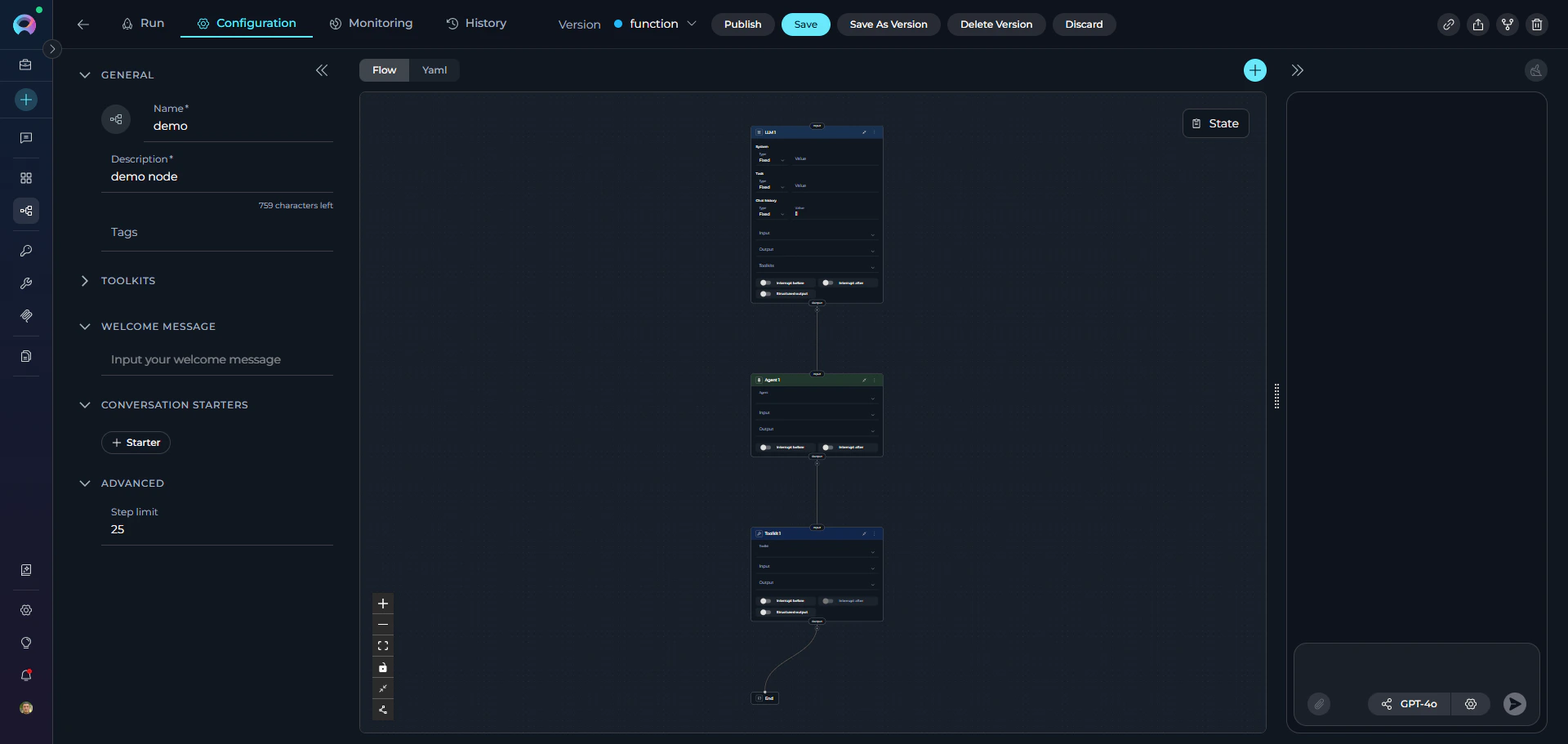
Execution Flow
When a pipeline runs:- Entry Point - Execution begins at the starting node
- Node Execution - The node reads from state, performs its action, and writes results
- Transition - Execution moves to the next node based on configuration
- Iteration - Process continues until reaching END or completing all nodes
Common Node Attributes
All nodes share these common configuration attributes:Core Attributes
id (required)
: Unique identifier for the node within the pipeline. Must be unique across all nodes.
type (required)
: Node type (llm, agent, hitl, toolkit, mcp, code, custom, router, decision, state_modifier, printer). Determines behavior and available parameters.
Input/Output Attributes
input (optional, default: ["input"])
: List of state variable names the node reads from. Defines which parts of the state the node can access.
output (optional, default: [])
: List of state variable names the node writes to. Specifies where the node’s results are stored in state.
If
output is not specified, results typically go to the messages state variable (varies by node type).Flow Control Attributes
transition (optional)
: Simple transition to another node. Specifies the next node to execute unconditionally.
condition (optional)
: Conditional branching using Jinja2 templates. Routes to different nodes based on expression evaluation.
decision (optional)
: AI-powered decision making. Uses LLM to determine the next node based on context.
Node-Specific Attributes
Each node type has additional parameters covered in the individual node type guides.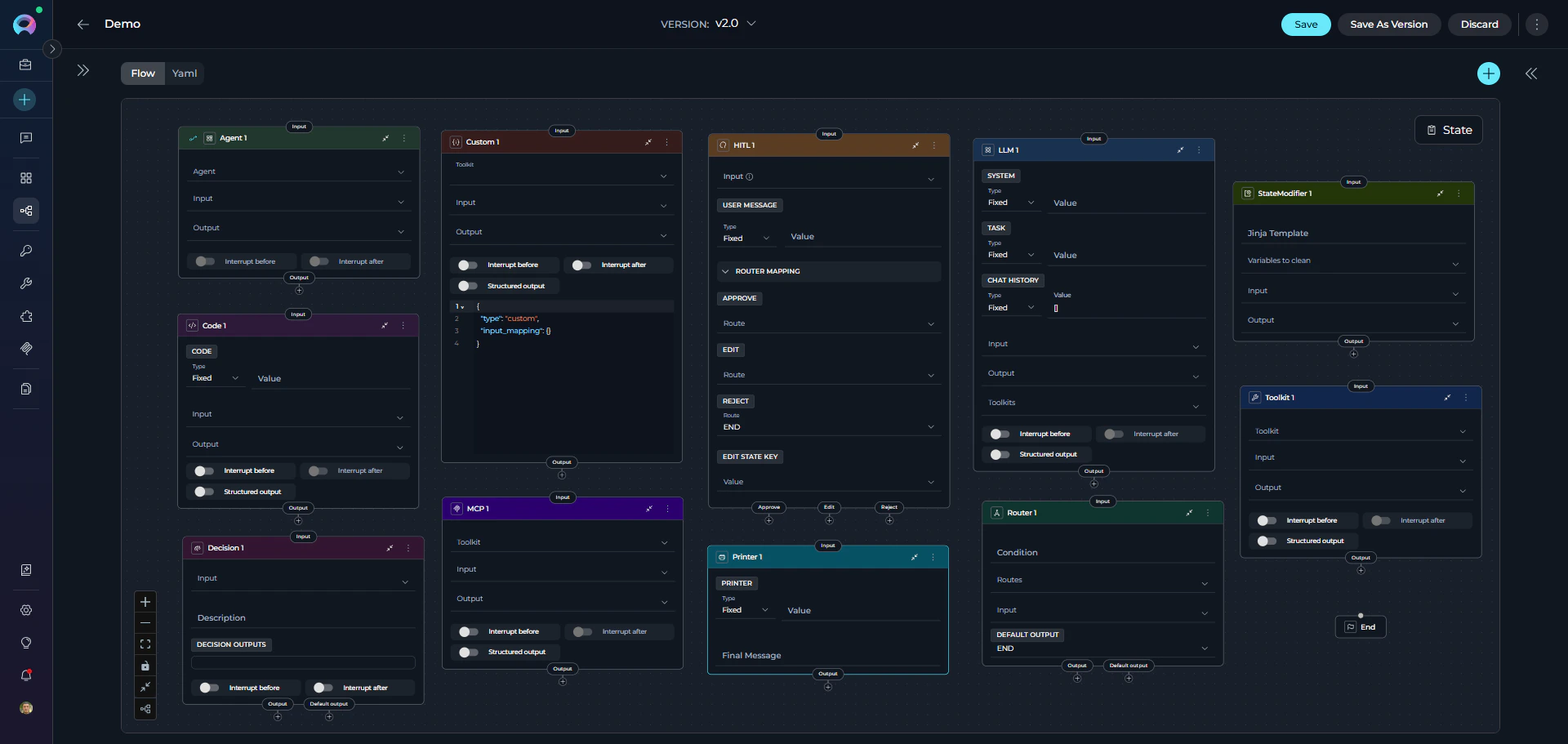
Node Categories
ELITEA Pipelines provide 10 different node types organized into 4 functional categories. Understanding these categories helps you quickly identify the right node for your needs.Interaction Nodes
Purpose: Interact with users or AI models to gather information, generate responses, or delegate tasks. Node Types:-
LLM Node - Interact with Large Language Models
- Call AI models (GPT-4, Claude, etc.) for text generation
- Support chat history and conversation context
- Bind tools for function calling
- Extract structured data from responses
-
Agent Node - Delegate tasks to pre-built AI agents
- Execute specialized agents within your pipeline
- Leverage agent-specific capabilities
- Pass context and get results
- Combine multiple agents in workflows
- Generate text, summaries, or responses
- Analyze content or extract information
- Have contextual conversations
- Delegate to specialized AI capabilities
Execution Nodes
Purpose: Perform actions, call external services, execute code, or trigger integrations. Node Types:-
Toolkit Node - Execute ELITEA toolkit functions
- Call toolkit functions (Jira, GitHub, Slack, Confluence, etc.)
- Direct execution without LLM preprocessing
- Map inputs to toolkit parameters
- Capture structured outputs
- Support for all ELITEA toolkits
-
MCP Node - Execute Model Context Protocol (MCP) tools
- Connect to remote MCP servers via HTTP
- Execute MCP server tools directly
- Configure connection parameters (URL, headers, timeout)
- Map inputs and capture outputs
- Enable/disable specific tools from MCP server
-
Code Node - Run custom Python code
- Execute arbitrary Python scripts
- Access pipeline state via
alita_state - Process data, perform calculations
- Integrate with external APIs
- Return structured results
- Call external services or APIs
- Execute custom business logic
- Process or transform data
- Integrate with third-party systems
- Perform calculations or validations
Control Flow Nodes
Purpose: Make decisions and route pipeline execution based on conditions or logic. Node Types:-
Router Node - Route based on expression evaluation
- Evaluate Python expressions
- Direct flow to specific nodes based on result
- Support multiple output routes
- Use state variables in conditions
-
Decision Node - AI-powered routing decisions
- Let LLM decide the next step based on context
- Provide natural language description of routing criteria
- Define possible decision outcomes (nodes list)
- Specify decisional inputs for LLM analysis
- Fallback to default output if decision unclear
-
Human-in-the-Loop Node - Pause for a human decision
- Present AI output for human review
- Provide Approve / Edit / Reject actions
- Route the pipeline based on the human’s choice
- Optionally update a state variable with the user’s edited value
- Branch workflow based on data values
- Implement business rules
- Create approval workflows
- Route based on AI interpretation
- Handle different scenarios dynamically
Utility Nodes
Purpose: Manage state, transform data, and display information. Node Types:-
State Modifier Node - Transform and clean state
- Use Jinja2 templates to modify state
- Combine multiple state variables
- Format and transform data
- Clean up or reset state variables
- Apply filters (from_json, base64_to_string, split_by_words, etc.)
-
Printer Node - Display formatted output to users
- Format and display messages during pipeline execution
- Pause pipeline execution for user review
- Use Jinja2 templates to format output
- Access state variables in templates
- Resume execution after user acknowledgment
- Format output for specific purposes
- Combine data from multiple sources
- Clean up temporary state
- Transform and structure data
- Display progress or results to users
- Show intermediate workflow status
Choosing the Right Node
Use this guide to select the appropriate node:Decision Tree
Quick Reference Table
Common Patterns
Pattern 1: Gather → Process → ActBest Practices
Use Descriptive Node IDs ✔️ Good:- Toolkit Node for direct ELITEA toolkit calls (faster, more reliable)
- MCP Node for Model Context Protocol server integrations
- Code Node for custom logic not available in toolkits or MCPs
- Printer Node for displaying formatted output to users during execution
Deprecated Nodes
The following nodes are deprecated and will be removed in a future release. Please migrate to the recommended alternatives:Condition Node
Condition Node
The Condition node is deprecated and will be removed in an upcoming release.Migration: Use the Router node for expression-based routing or the Decision node for AI-powered routing decisions.Migration Guide: Condition Node Migration
Function Node
Function Node
The Function node is deprecated and will be removed in an upcoming release.Migration: Use the Toolkit node for ELITEA toolkits, the MCP node for Model Context Protocol servers, or the Agent node for delegating to AI agents.Migration Guide: Function Node Migration
Tool Node
Tool Node
The Tool node is deprecated and will be removed in an upcoming release.Migration: Use the Toolkit node for direct toolkit execution without LLM preprocessing.Migration Guide: Tool Node Migration
Loop Node
Loop Node
The Loop node is deprecated and will be removed in an upcoming release.Migration: Use the Router node with state-based iteration control for implementing loop patterns.Migration Guide: Loop Node Migration
Loop from Tool Node
Loop from Tool Node
The Loop from Tool node is deprecated and will be removed in an upcoming release.Migration: Use the Router node with state-based iteration control for implementing loop patterns.Migration Guide: Loop Node Migration
Pipeline (Subgraph) Node
Pipeline (Subgraph) Node
The Pipeline (Subgraph) node is deprecated and will be removed in an upcoming release.Migration: Use the Agent node to delegate tasks to specialized AI agents, effectively replacing nested pipeline functionality.Migration Guide: Pipeline Node Migration
Custom Node
Custom Node
The Custom node is deprecated and hidden from the node picker. Existing Custom nodes keep working as-is — there is no removal deadline and no dedicated migration guide, since there’s no single replacement.Migration: For new nodes, select the specific node type that matches what you need instead (Toolkit, MCP, LLM, Code, etc.).
- States - Understand how nodes read from and write to pipeline state
- Connections - Learn how to link nodes together
- Entry Point - Define where your pipeline begins
- Flow Editor - Build pipelines visually with drag-and-drop
- YAML Configuration - See complete node definition syntax
- Appendix - Comparison Tables