

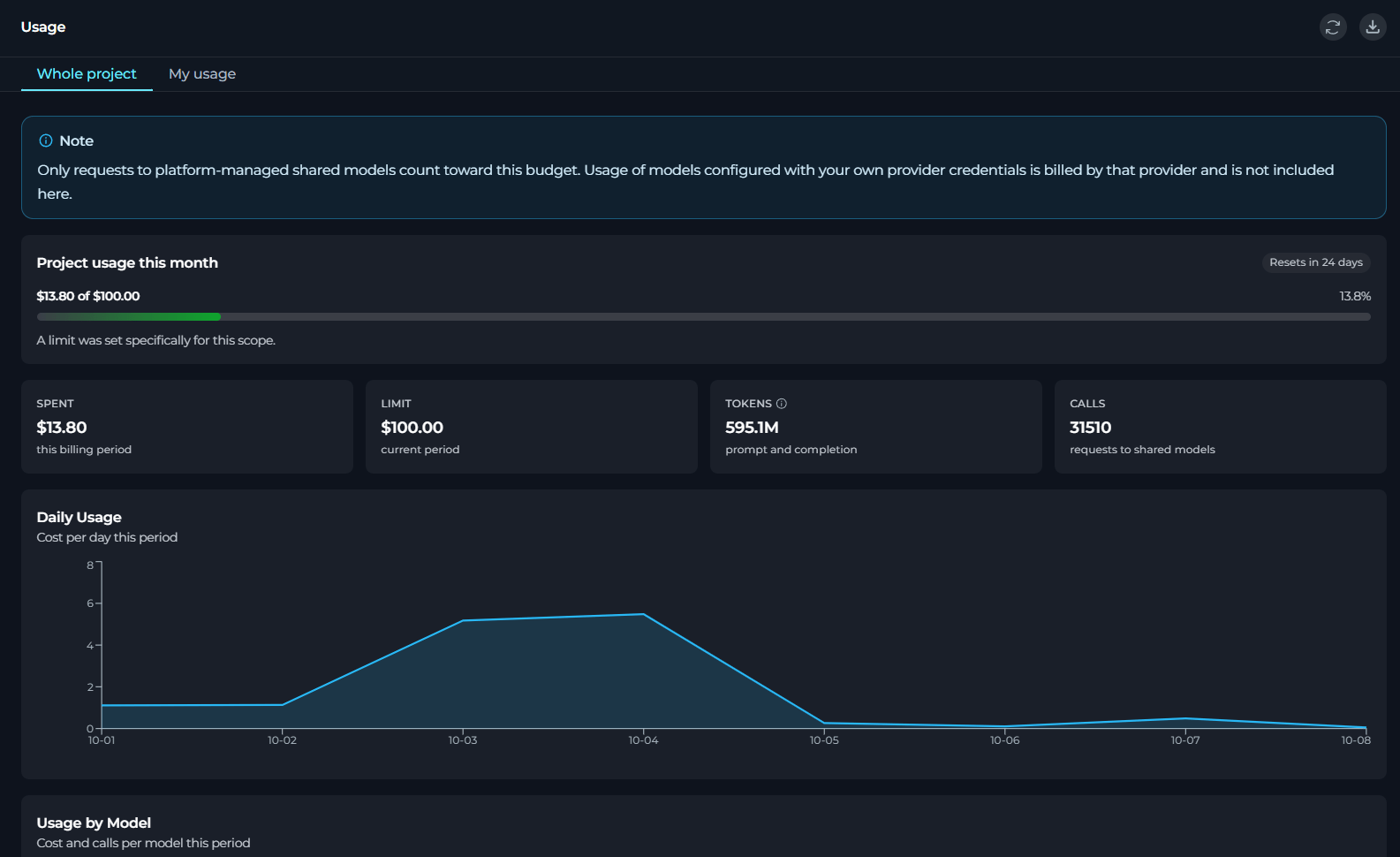
- Page header displays the page title, along with Refresh and Export to Excel buttons on the right.
- Refresh button manually refreshes the usage data for the active tab, without changing the active tab, search filter, or pagination.
- Export to Excel button downloads the current usage data as an Excel file.
- Tabs: Two tabs to switch between Whole project and My usage views. Hidden in private projects, since there is only one scope to view.
- Content area: The main scrollable panel that renders the usage summary, KPI cards, charts, and tables for the active tab.
Usage Tabs
In Usage, you work with two tabs:Whole project
Review project-wide usage, budget state, model usage, and member usage.
My usage
Review your own usage and budget state in the selected project.
In a private project, ELITEA treats the project budget as your own budget (so you see no switcher). In a team project, you can switch between the whole-project view and your personal usage view.
- Usage meter for the current billing period
- Summary KPI cards
- Daily usage
- Usage by model
- In a private project, the banner explains that requests made without selecting a team project are charged to the private project.
- In all scopes, the banner explains that only requests to platform-managed shared models count toward this budget.
Usage Panels
In Usage, you can view these panels, each displaying data for the current billing period:Usage Summary
Usage summary shows the current month’s usage against the applicable budget.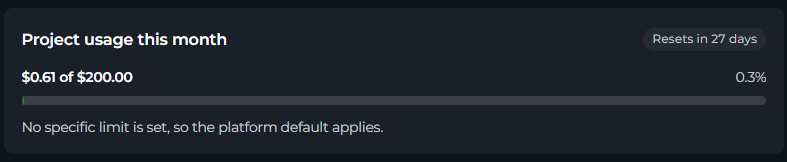
- A title that changes by scope - Project usage this month or My usage this month
- A reset label that shows when the current monthly period resets
- A primary usage label
- A percentage label when a limit exists
- A hint that explains whether the current limit is explicit, inherited from a default, or unlimited
KPI Cards

Hover over the i icon in the TOKENS card to see a breakdown into input, output, cache read, and cache write tokens.
If you cannot see cost amounts, ELITEA hides the SPENT card and shows a simplified LIMIT value.
Daily Usage
In Daily Usage, you can review usage for each day in the current billing period.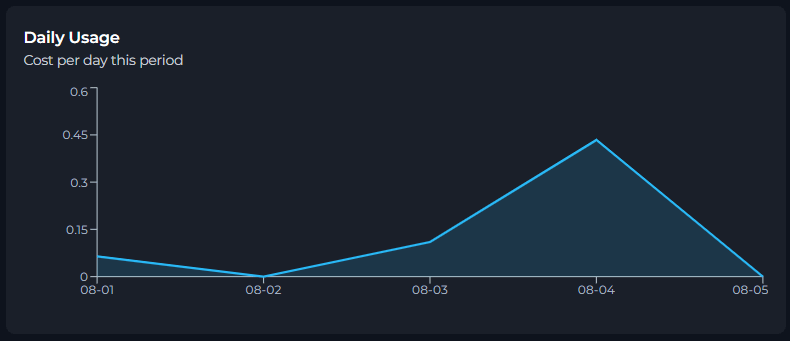
- If you can see amounts, the chart shows Cost per day this period.
- If you cannot see amounts, the chart shows Calls per day this period.
Usage by Model
In Usage by Model, you can review usage grouped by model for the current billing period.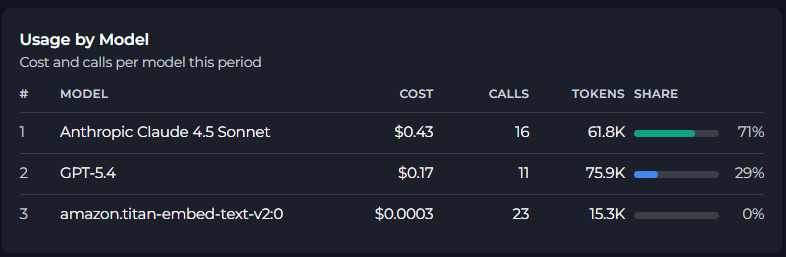
If you can see amounts, the subtitle is Cost and calls per model this period and the share is based on cost.
If you cannot see amounts, the subtitle is Calls and tokens per model this period and the share is based on request count.
If no model usage is recorded for the current period, ELITEA shows No model usage recorded for this period yet.
Members
In Members, project administrators can review per-member usage against each member’s own limit in the current project. Other members see an error message instead of the member breakdown.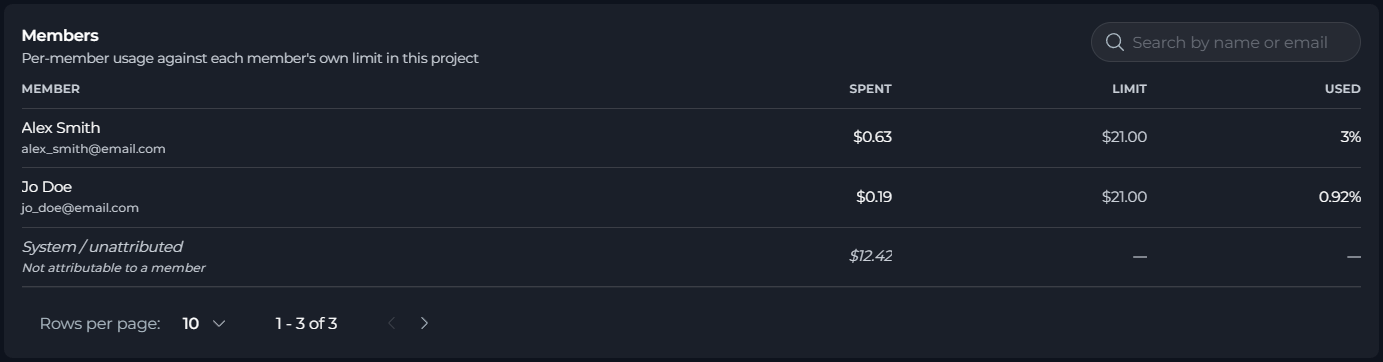
The Used value is highlighted when the member is near or over the warning threshold.
If ELITEA cannot read the member spend records, it shows a warning that the list reflects current members only, and that spend for members who have left the project is missing.
Members are shown only when both of these conditions are true:
- The selected project is not a private project.
- The current tab is Whole project.
Export Usage Data
You can export usage data to an Excel file. To export usage data:- In Settings > Usage, select the export button in the page header.
- Wait for ELITEA to prepare the export.

Limitations
- Usage is reported for the current monthly billing period.
- Only requests to platform-managed shared models are included.
- Models configured with your own provider credentials are billed by that provider and are not included here.
See also: