ELITEA Code Chat extension is deprecated and no longer actively developed. Existing functionality may still be partially available. However, compatibility with
ELITEA Code Chat extension is deprecated and no longer actively developed. Existing functionality may still be partially available. However, compatibility with current and future IDE versions cannot be guaranteed. No further updates, bug fixes, or feature enhancements are planned.
ELITEA Code Chat for VSCode and IntelliJ is an auxiliary GUI for ELITEA Code, allowing you to utilize the functionality of ELITEA Code and chat with ELITEA. It provides a seamless interface for interacting with prompts, datasources, and agents configured in ELITEA.
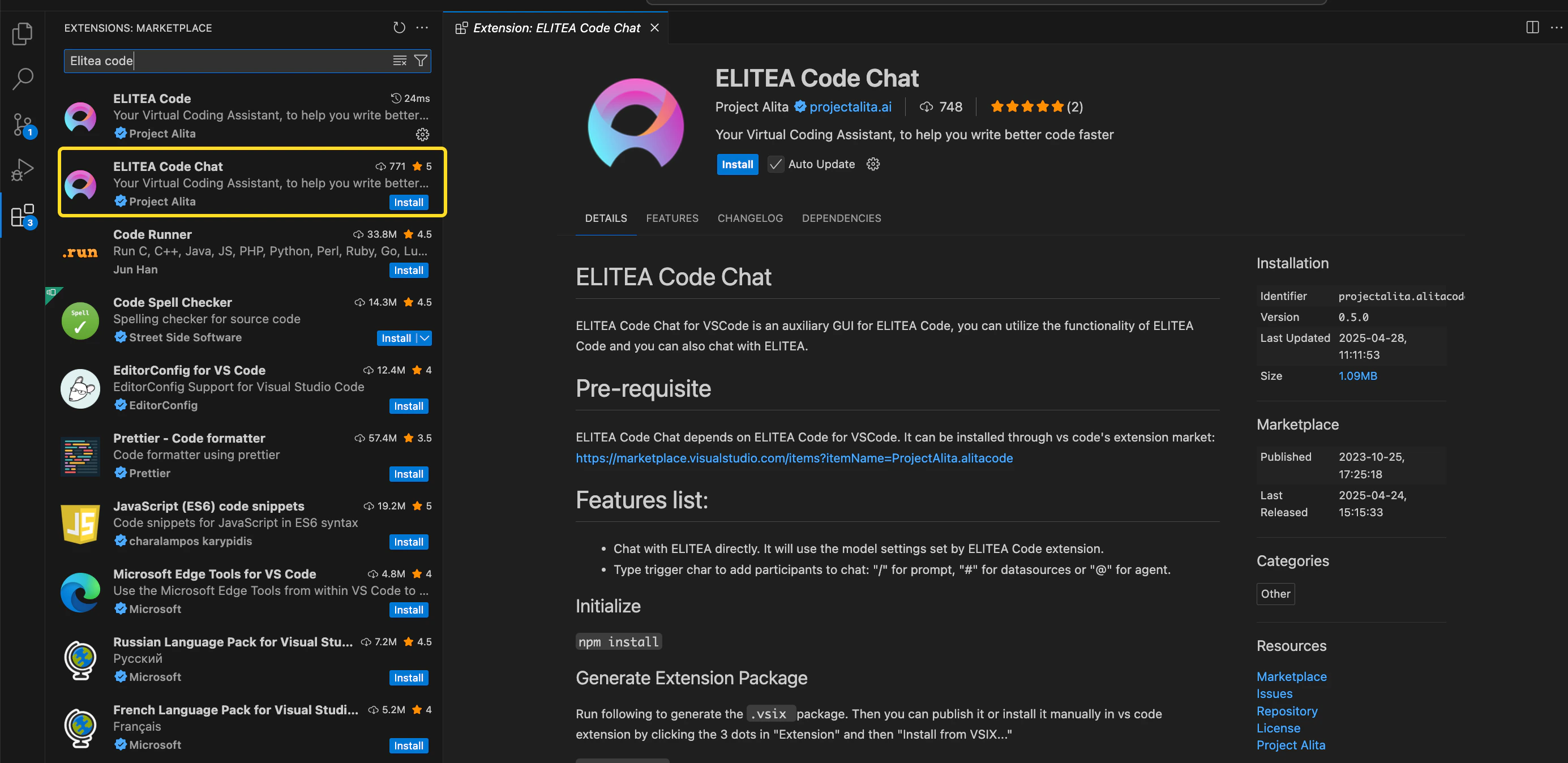
ELITEA Code Chat operates in conjunction with ELITEA Code for both VS Code and IntelliJ. To utilize ELITEA Code Chat, you must first install ELITEA Code from their respective marketplaces:
VS Code: Install ELITEA Code from the VS Code Marketplace.
IntelliJ: Install ELITEA Code from the JetBrains Marketplace.
Important: Ensure that ELITEA Code is not only installed but also properly configured with ELITEA to function correctly. For detailed installation and configuration instructions, please refer to the ELITEA Code documentation. This step is crucial for enabling the full capabilities of ELITEA Code Chat within your development environment.
Prompts - call and use prompts configured in ELITEA.
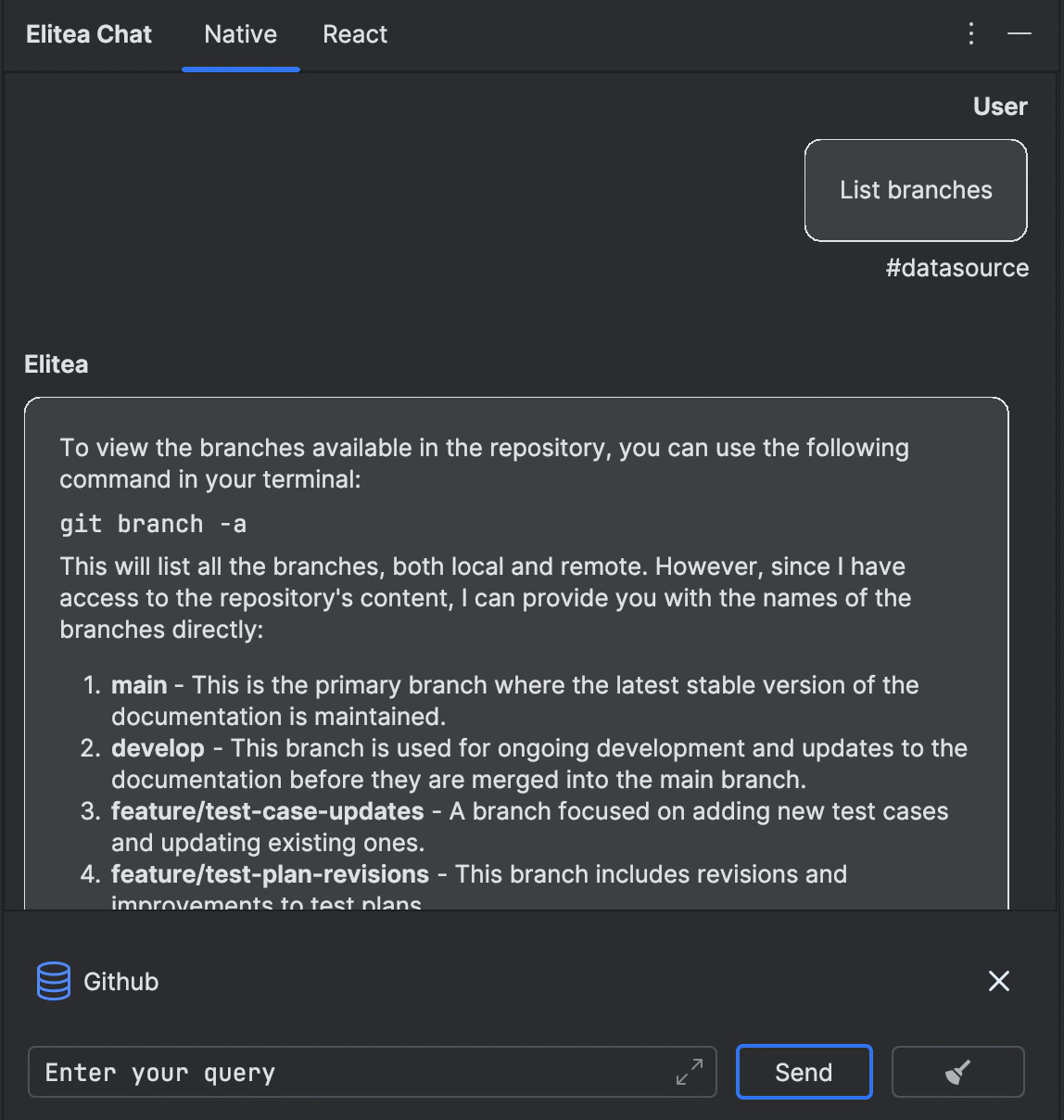
Datasources - call and use datasources configured in ELITEA.
Agents - call and use agents configured in ELITEA.
Chat - is a specific type of input designed for conversational AI models, which aims to initiate or guide a dialogue. This can be in the form of a question, statement, or command that simulates human-like interaction, prompting the AI to produce a conversational response for engagement.
Important: To successfully call and utilize prompts, datasources, or agents from ELITEA, it is essential that these items are tagged with code in ELITEA. This tag ensures that the resources are correctly categorized and accessible. Ensure that the code tag is applied to relevant prompts, datasources, and agents to enable their proper functionality within the ELITEA ecosystem.Additional Interaction Features:
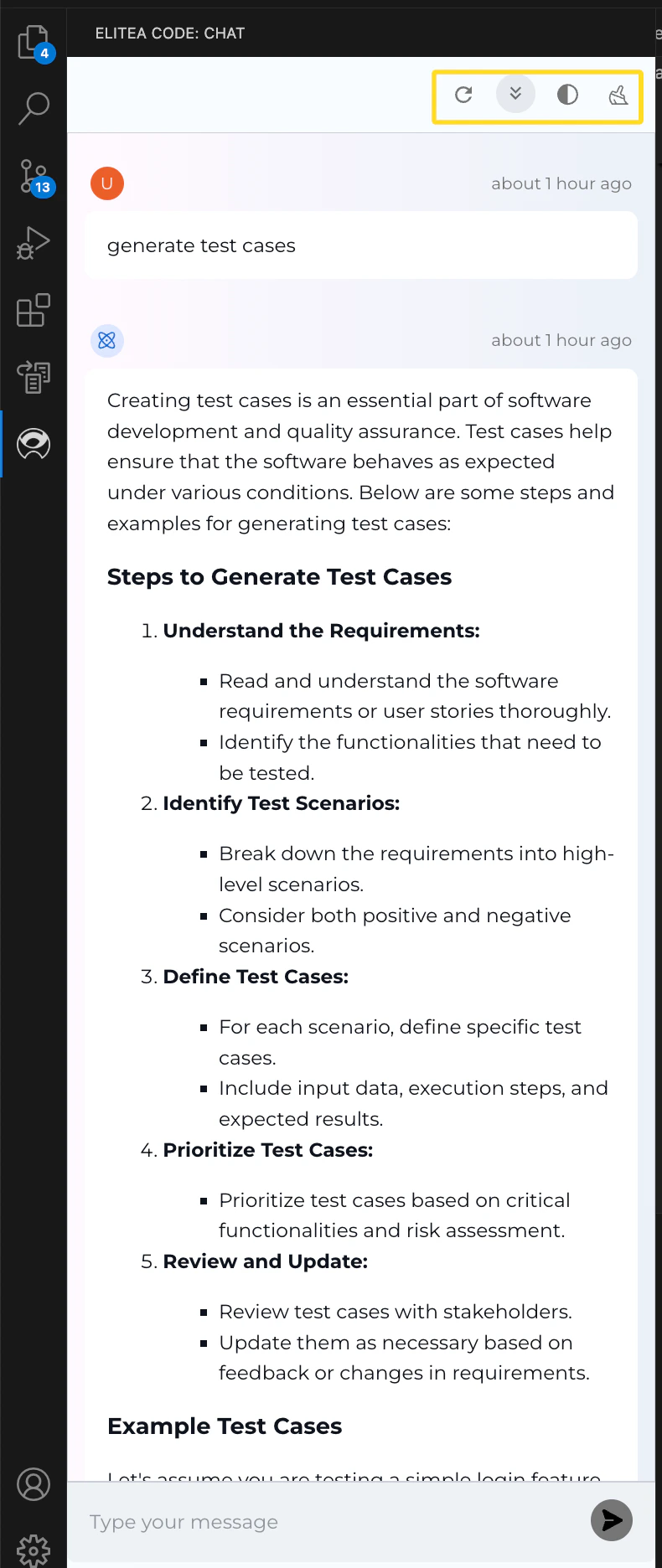
Stop Generating: Interrupt the generation of output at any time by clicking the Stop Generating button.
Auto Scroll to Bottom: Automatically scroll to the bottom of the output as it is generated.
Reload ELITEA Code Settings: Reload and update ELITEA Code settings.
Post-Output Actions:
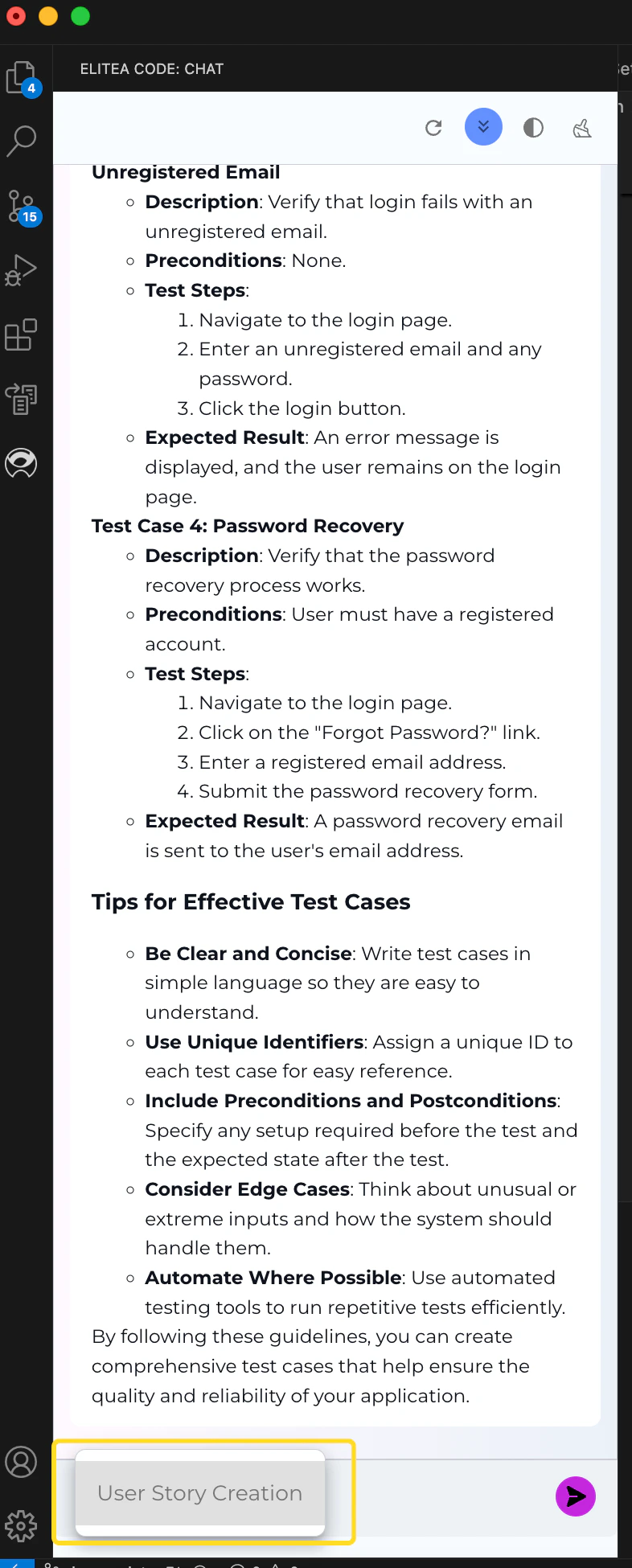
Continue the Dialogue: To keep the conversation going, simply type your next question or command in the chat box and click the Send icon.
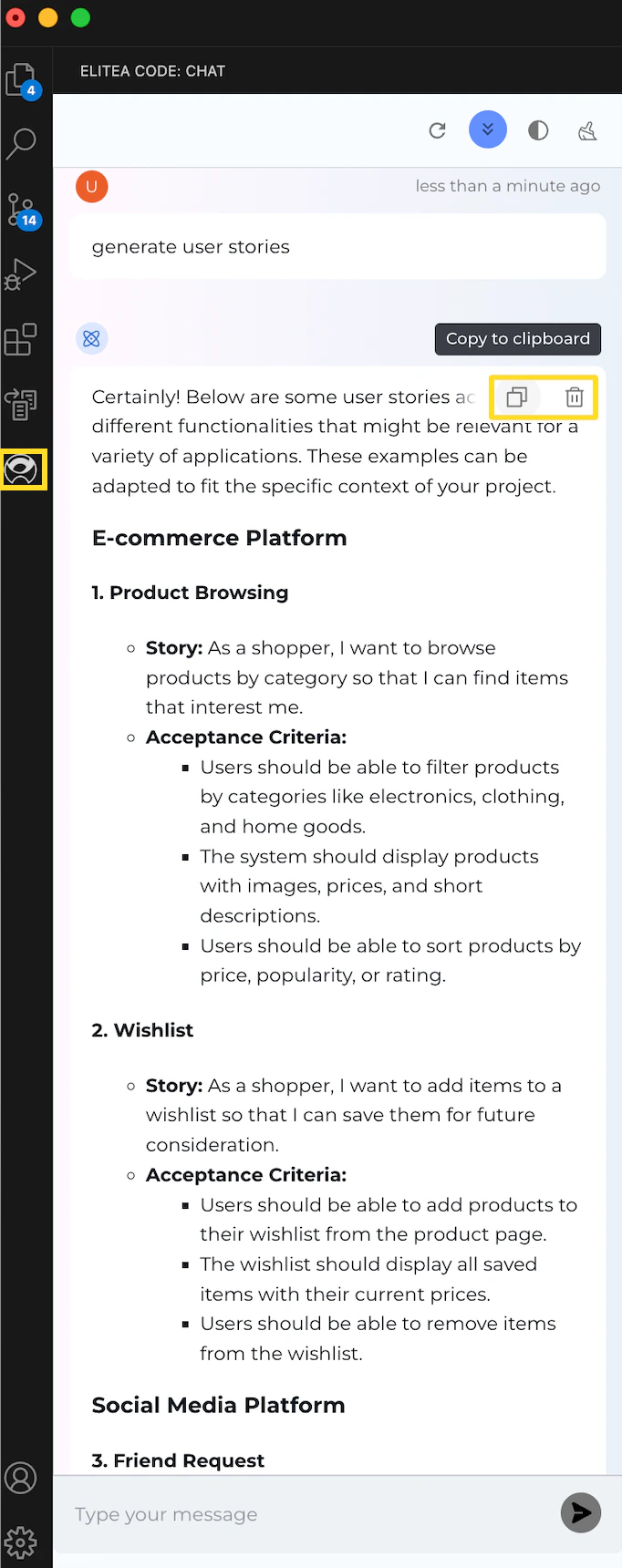
Copy the Output: Click the Copy to clipboard icon to copy the generated text for use elsewhere.
Delete Output: To remove the current output from the chat, click the Delete icon.
Purge Chat History: For a fresh start or to clear sensitive data, click the Clean icon to erase the chat history.
Specialized Download Options for Tabular outputs. When the Gen AI generates output in a tabular format, additional options become available to manage and utilize this structured data:
Download as xlsx: Allows you to save the tabular output directly in an Excel spreadsheet format, facilitating easy data manipulation and analysis.
Copy as markdown: Enables copying the tabular output in markdown format, suitable for use in markdown-supported environments like GitHub or blogging platforms.
Copy as html: Permits copying the tabular output in HTML format, ideal for integration into web pages or emails, preserving the formatting and structure.
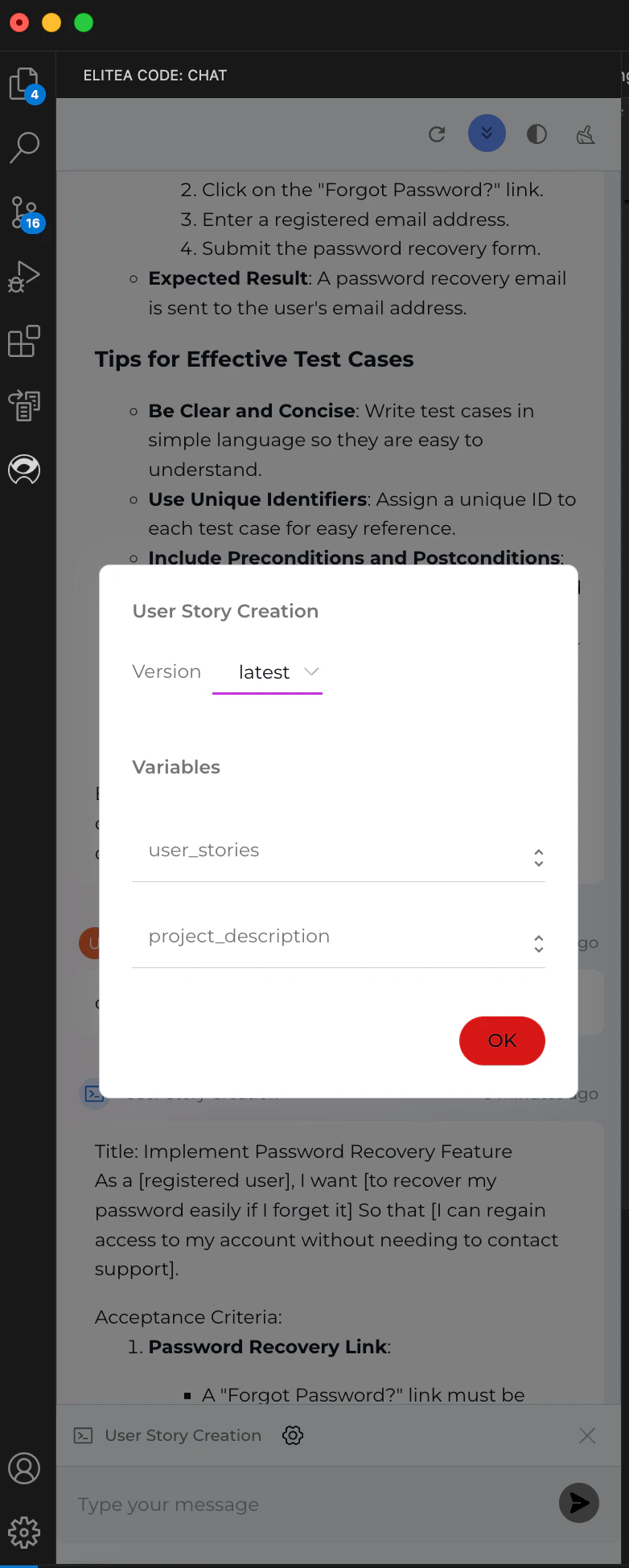
Version Selection: Prompts may have multiple versions. Ensure you select the appropriate version from the dropdown list as different versions may vary in functionality and variables.
Variable Management: If the selected prompt version includes variables, a dialog will appear allowing you to input or modify the values. Prepopulated values might be present, or you may need to provide your own. Ensure that all required variables are correctly filled to execute the prompt accurately. You can adjust or update variable values at any time by clicking the Settings icon.
Once all instructions for the prompt are set in the Context and/or Messages sections, you can start the execution by typing your text (be it a question or a command) into the chat box. Use simple commands like “Go”, “Start Generating”, “Execute”, or “Run it” and click the Send icon to begin. These commands signal the Gen AI to process the information and generate the desired output based on the configured settings.
If you need to start a fresh conversation or prompt, simply click the X icon to clear the current setup and begin anew.
Version Selection: Agents may have multiple versions. Ensure you select the appropriate version from the dropdown list as different versions may vary in functionality and variables.
Variable Management: If the selected agent version includes variables, a dialog will appear allowing you to input or modify the values. Prepopulated values might be present, or you may need to provide your own. Ensure that all required variables are correctly filled to execute the agent accurately. You can adjust or update variable values at any time by clicking the Settings icon.
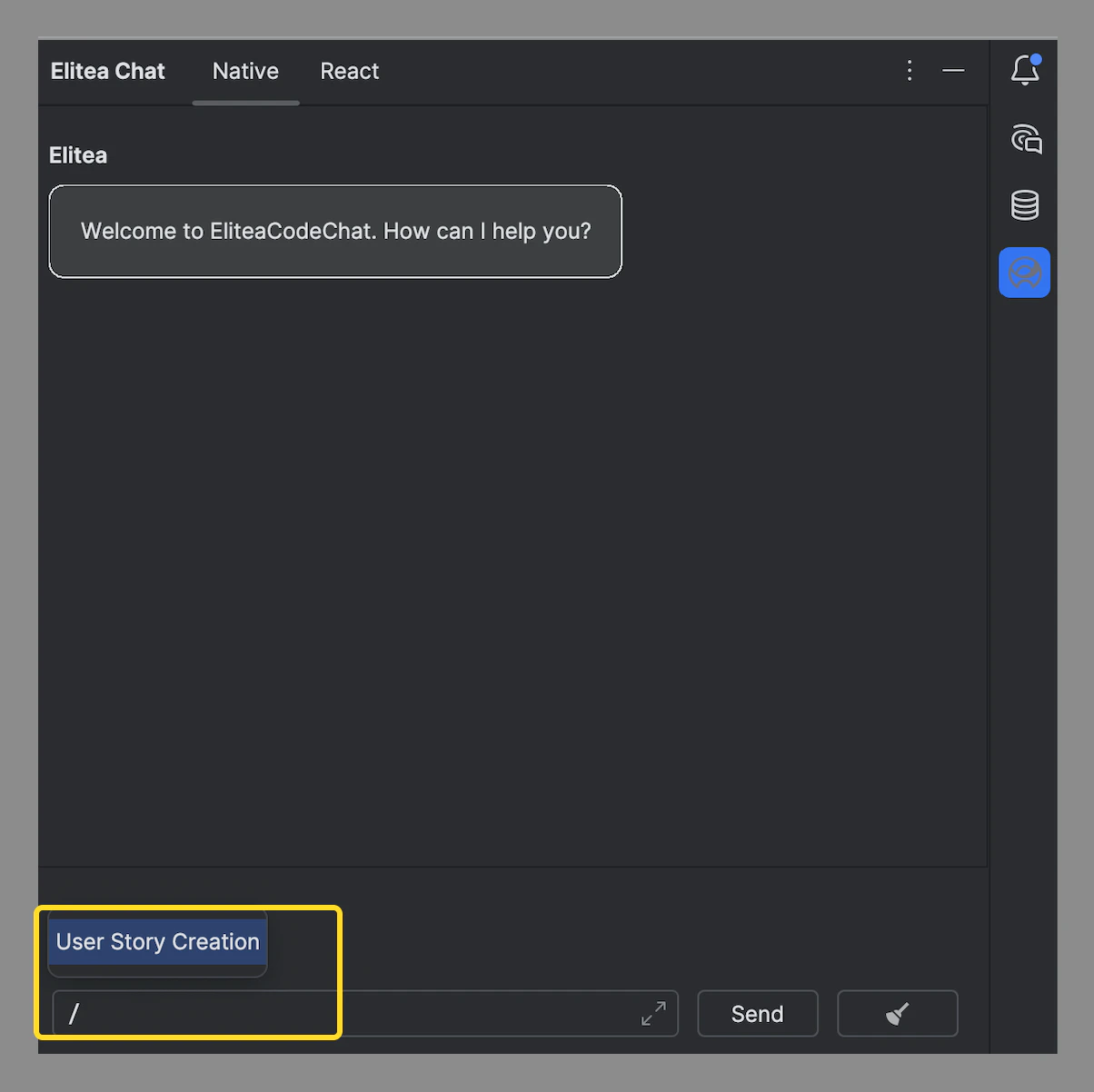
Start conversation in the form of a question, statement, or command that simulates human-like interaction.
If you need to start a fresh conversation or application, simply click the X icon to clear the current setup and begin anew.
Getting started with EliteaCodeChat is straightforward:
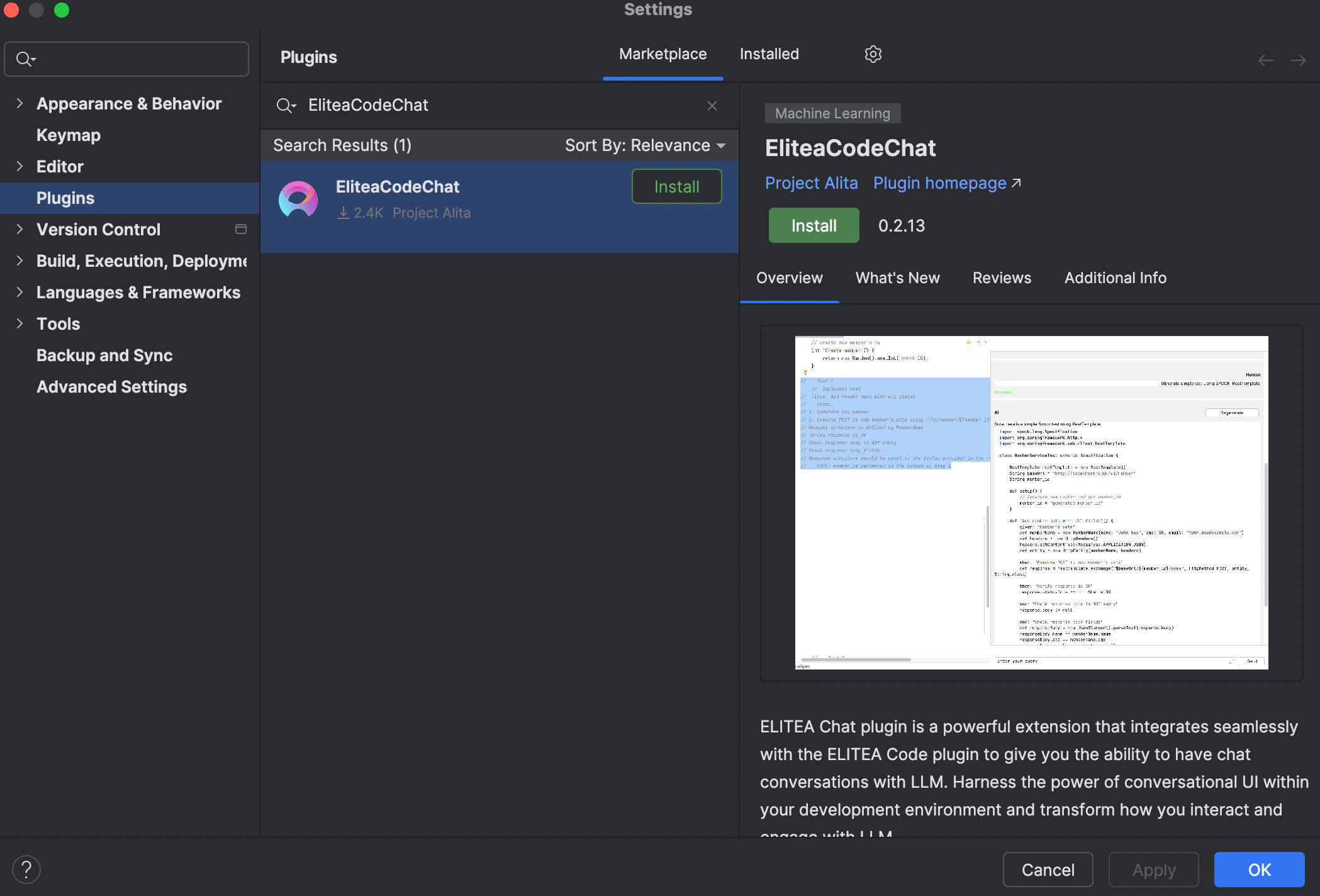
Navigate to the Settings→Plugins section in IntelliJ.
Search for EliteaCodeChat in the Marketplace and click Install.
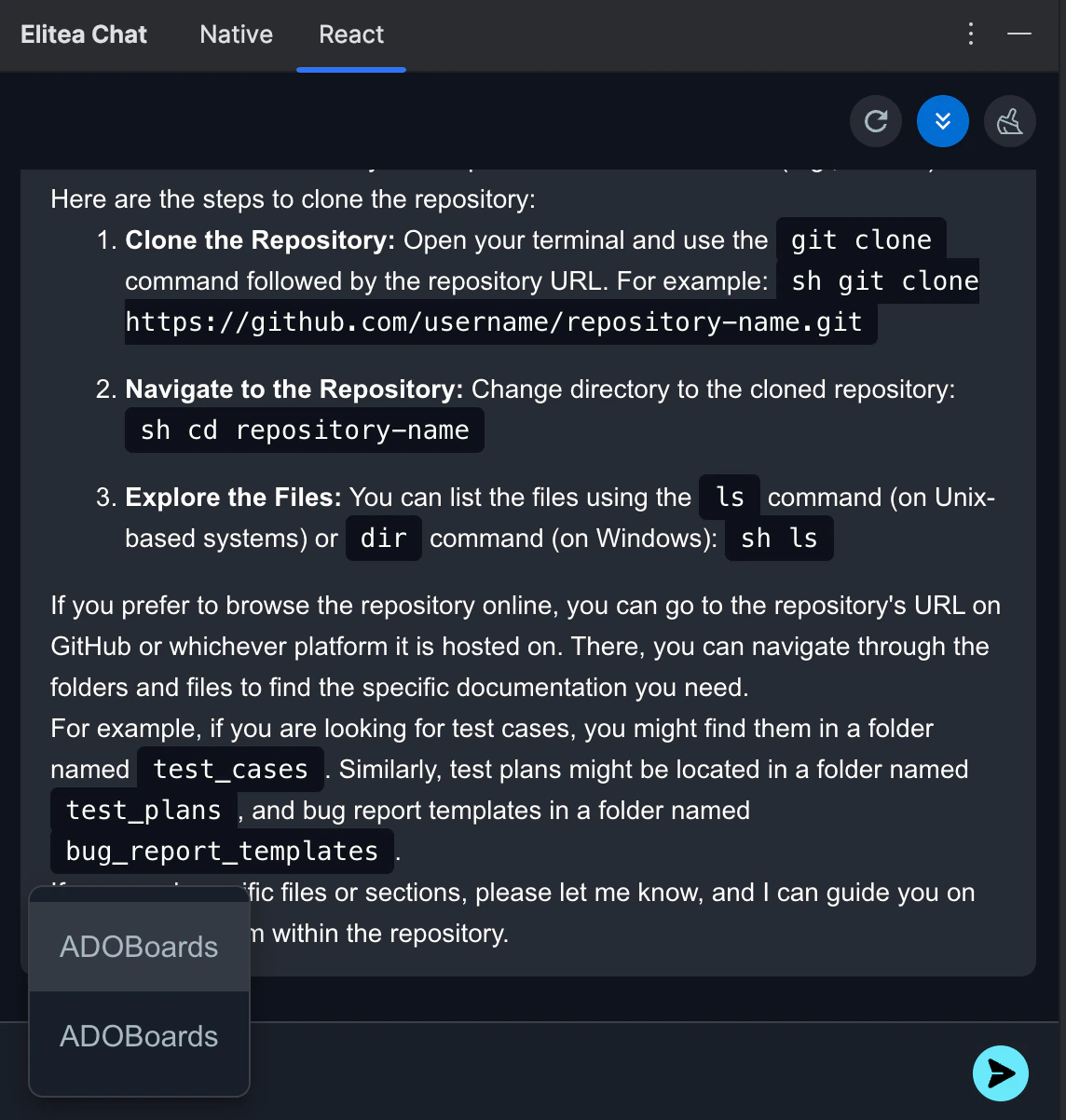
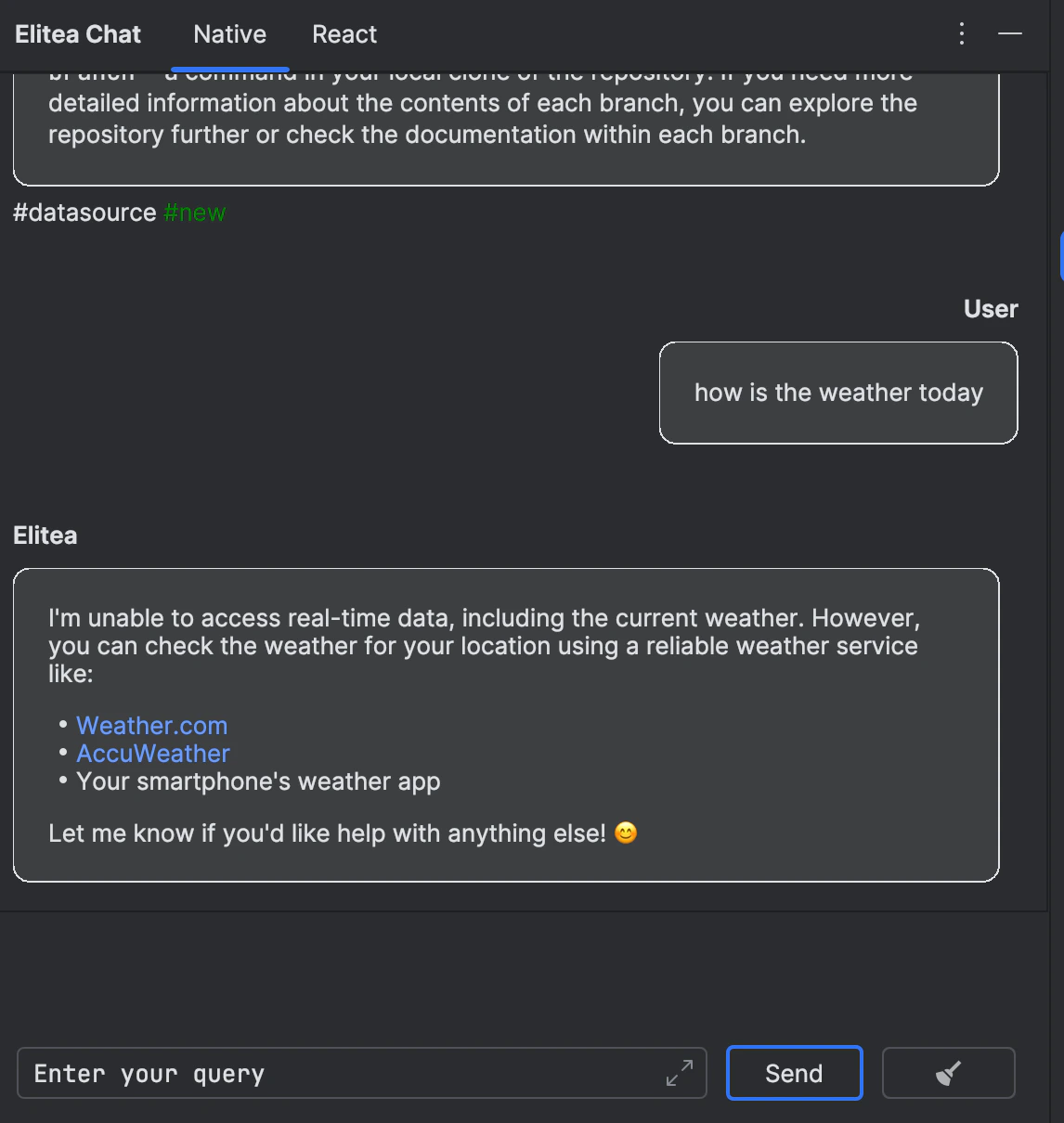
Elitea Chat for IntelliJ offers two distinct modes to cater to different user preferences and integration styles. Each mode is designed to provide a seamless user experience while aligning with specific design philosophies:
Native Mode: This mode is tailored to blend seamlessly with the IntelliJ environment. It adheres to the native design and style guidelines of IntelliJ, ensuring that the interface feels familiar and integrated for users who prefer consistency with their development environment.
React Mode: Designed to echo the aesthetics and usability of ELITEA, this mode brings the distinctive look and feel of ELITEA’s design language into IntelliJ. It’s ideal for users who enjoy the ELITEA interface and wish to have a similar user experience within the IntelliJ platform.
Both modes are crafted to provide a robust and intuitive chat interface, allowing users to choose according to their design preference and familiarity.Note:
After successful installation EliteaCodeChat shortcut will be added to right menu of IntelliJ.
To ensure seamless integration and functionality, the Elitea Code and EliteaCodeChat plugins must be installed with matching versions. Please verify that both plugins are updated to the same version to avoid compatibility issues.
To successfully call and utilize prompts, datasources, or agents from ELITEA, it is essential that these items are tagged with code in ELITEA. This tag ensures that the resources are correctly categorized and accessible. Ensure that the code tag is applied to relevant prompts, agents, datasources, and applications to enable their proper functionality within the ELITEA ecosystem.
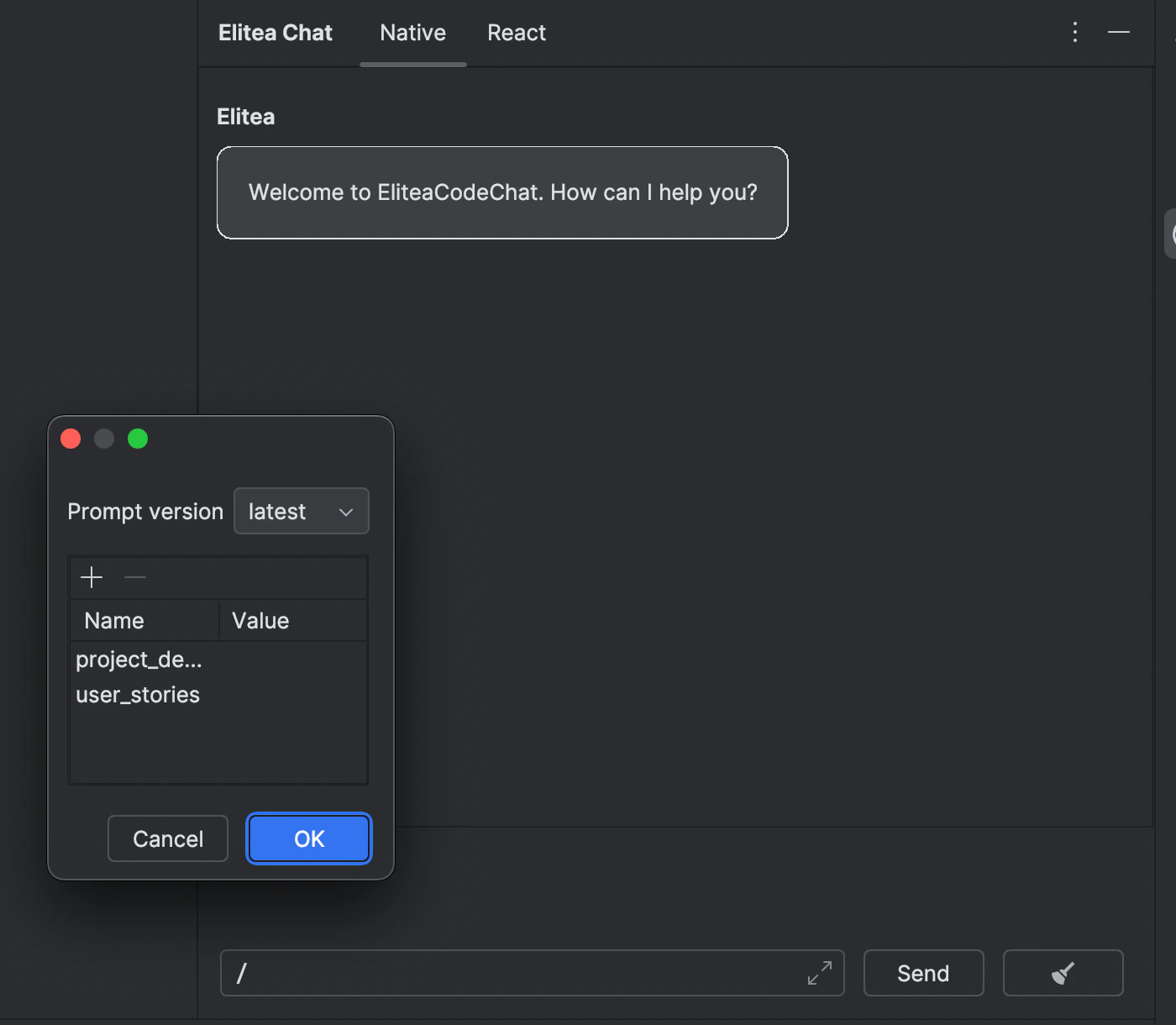
Version Selection: Prompts may have multiple versions. Ensure you select the appropriate version from the dropdown list as different versions may vary in functionality and variables.
Variable Management: If the selected prompt version includes variables, a dialog will appear allowing you to input or modify the values. Prepopulated values might be present, or you may need to provide your own. Ensure that all required variables are correctly filled to execute the prompt accurately. You can adjust or update variable values at any time by clicking the Settings icon.
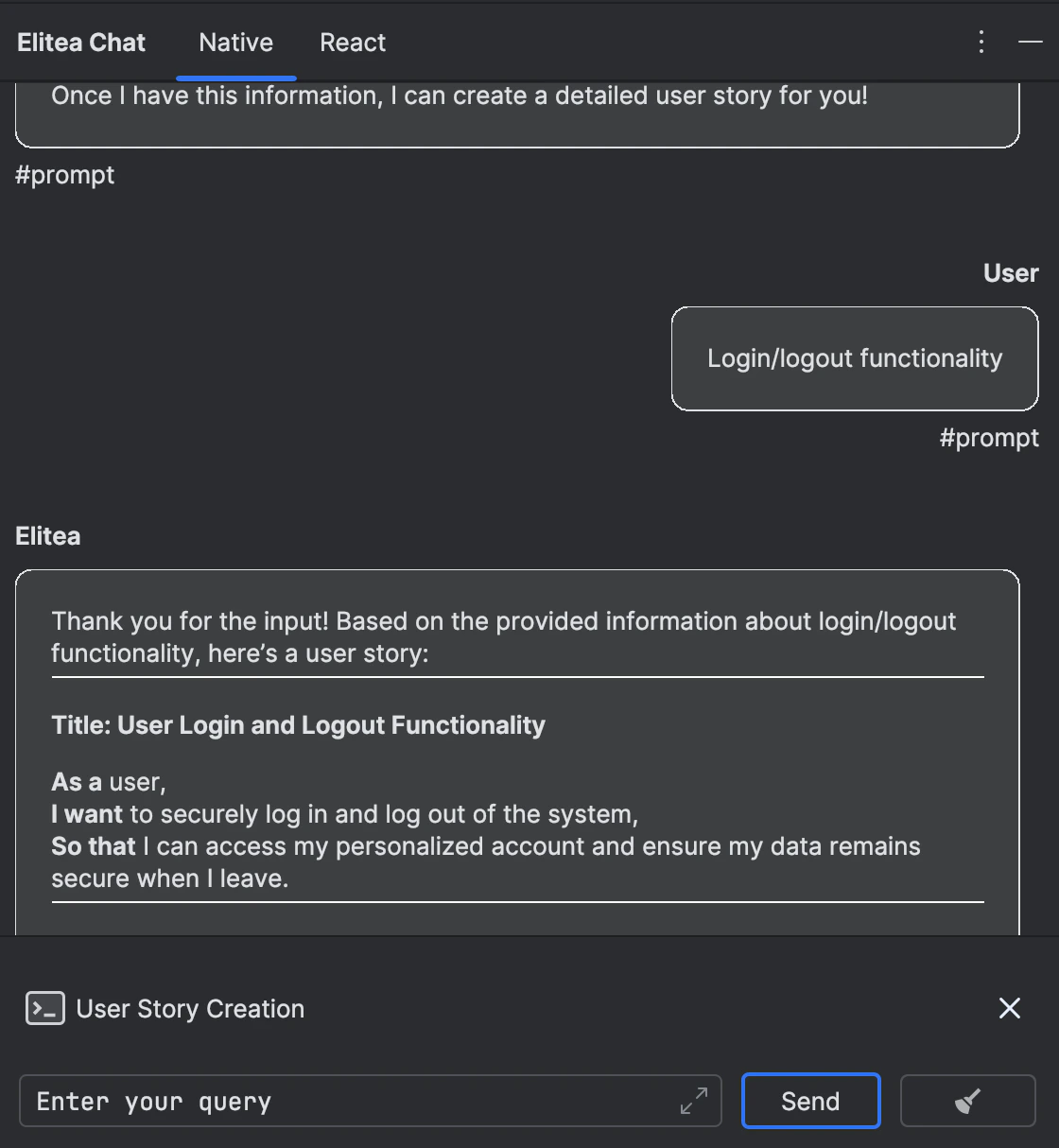
Once all instructions for the prompt are set in the Context and/or Messages sections, you can start the execution by typing your text (be it a question or a command) into the chat box. Use simple commands like “Go”, “Start Generating”, “Execute”, or “Run it” and click the Send icon to begin. These commands signal the Gen AI to process the information and generate the desired output based on the configured settings.
If you need to start a fresh conversation or prompt, simply click the X icon to clear the current setup and begin a new one.
Version Selection: Agents may have multiple versions. Ensure you select the appropriate version from the dropdown list as different versions may vary in functionality and variables.
Variable Management: If the selected agent version includes variables, a dialog will appear allowing you to input or modify the values. Prepopulated values might be present, or you may need to provide your own. Ensure that all required variables are correctly filled to execute the agent accurately. You can adjust or update variable values at any time by clicking the Settings icon.
Start conversation in the form of a question, statement, or command that simulates human-like interaction.
If you need to start a fresh conversation or application, simply click the X icon to clear the current setup and begin anew.
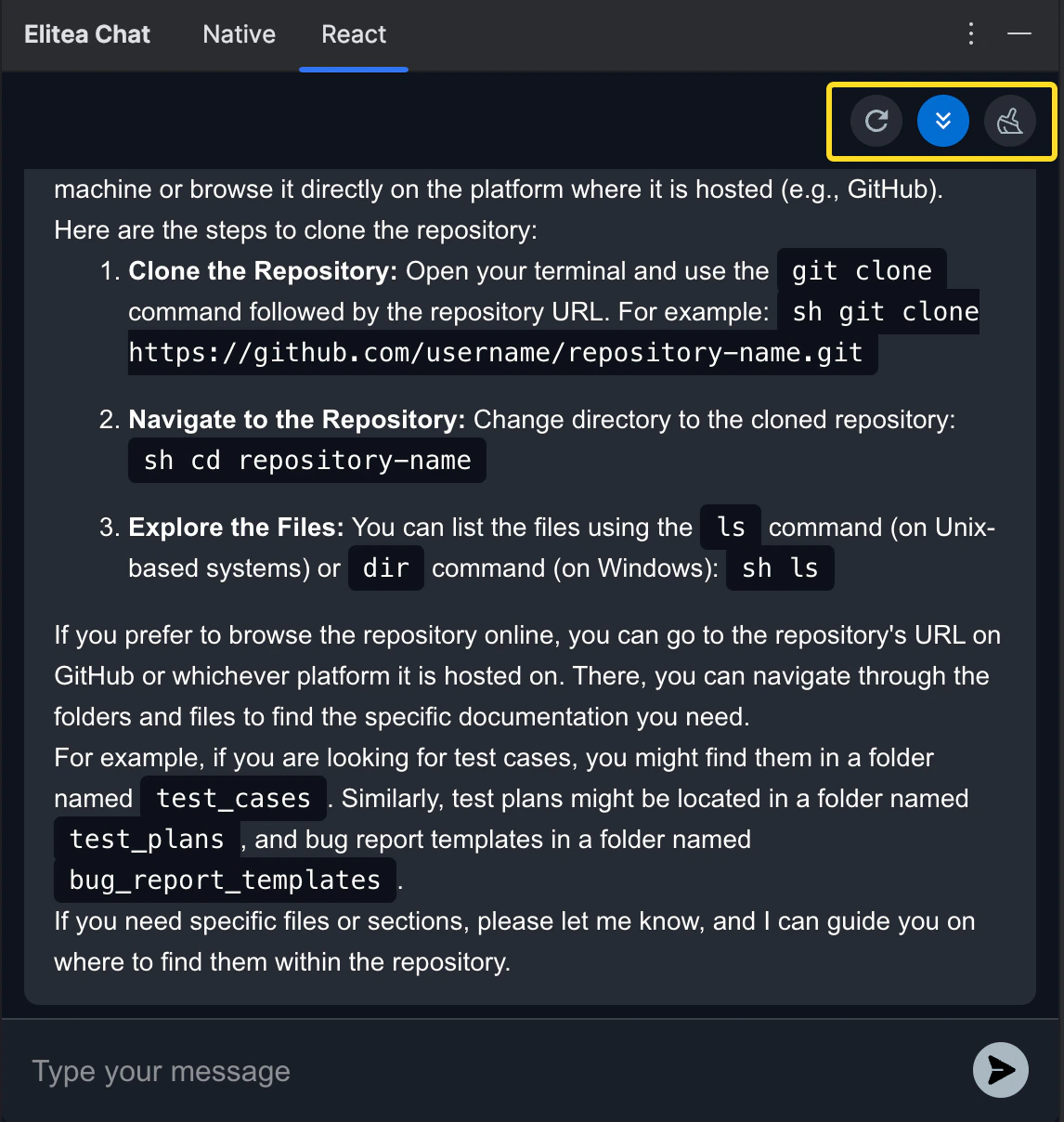
Auto scroll to bottom: This option can be toggled on or off to automatically scroll to the bottom of the output as it is being generated. This feature is helpful during long outputs to keep the most recent content visible.
Reload Elitea Code Settings: This option allows to reload and update Elitea Code settings.
Stop generating: To stop generation of output.
Post-Output Actions for React Mode:
Continue the Dialogue: To keep the conversation going, simply type your next question or command in the chat box and click the Send icon.
Copy the Output: Click the Copy to clipboard icon to copy the generated text for use elsewhere.
Delete Output: To remove the current output from the chat, click the Delete icon.
Purge Chat History: For a fresh start or to clear sensitive data, click the Clean icon to erase the chat history.
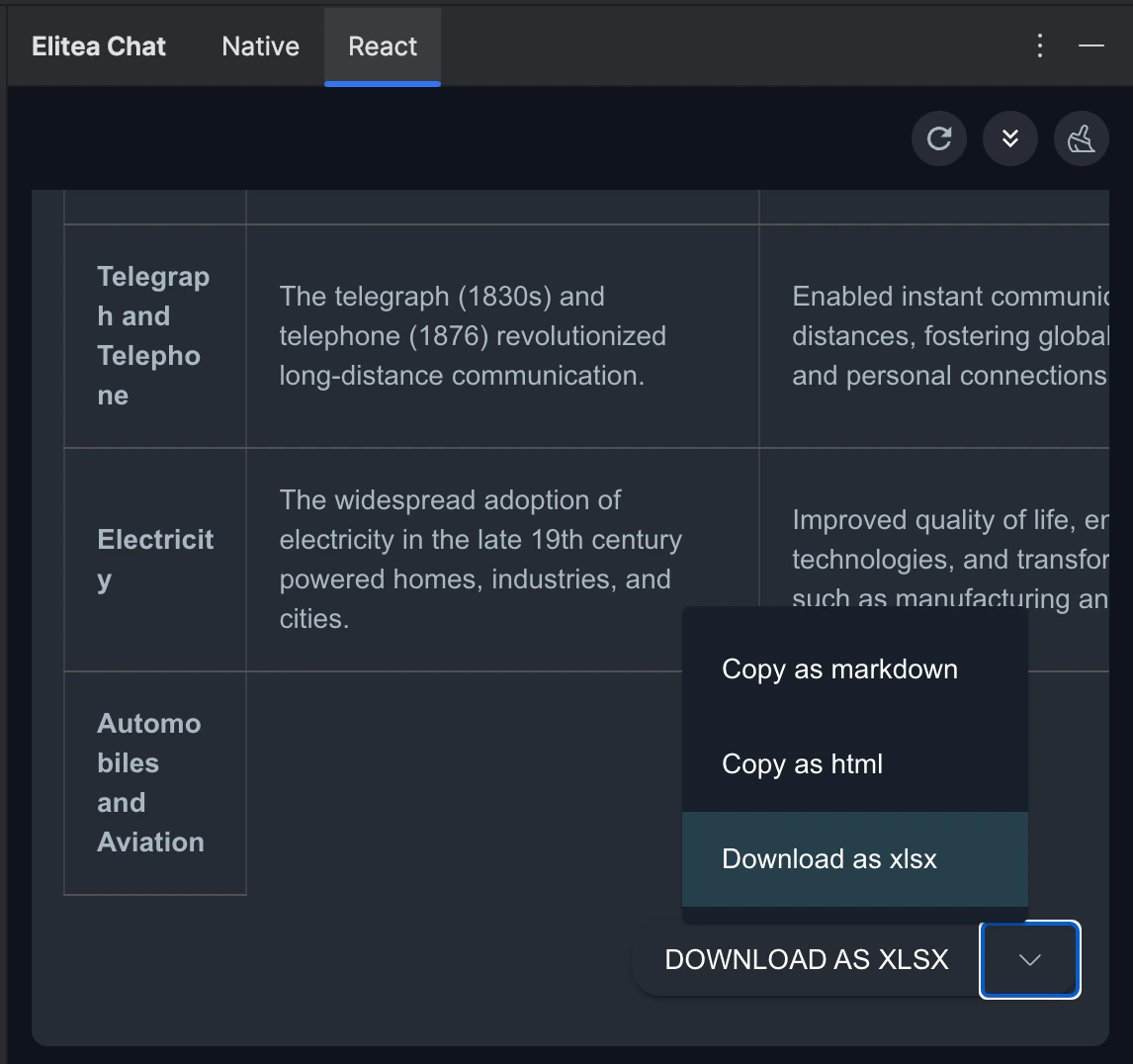
Specialized Download Options for Tabular outputs. When the Gen AI generates output in a tabular format, additional options become available to manage and utilize this structured data:
Download as xlsx: Allows you to save the tabular output directly in an Excel spreadsheet format, facilitating easy data manipulation and analysis.
Copy as markdown: Enables copying the tabular output in markdown format, suitable for use in markdown-supported environments like GitHub or blogging platforms.
Copy as html: Permits copying the tabular output in HTML format, ideal for integration into web pages or emails, preserving the formatting and structure.
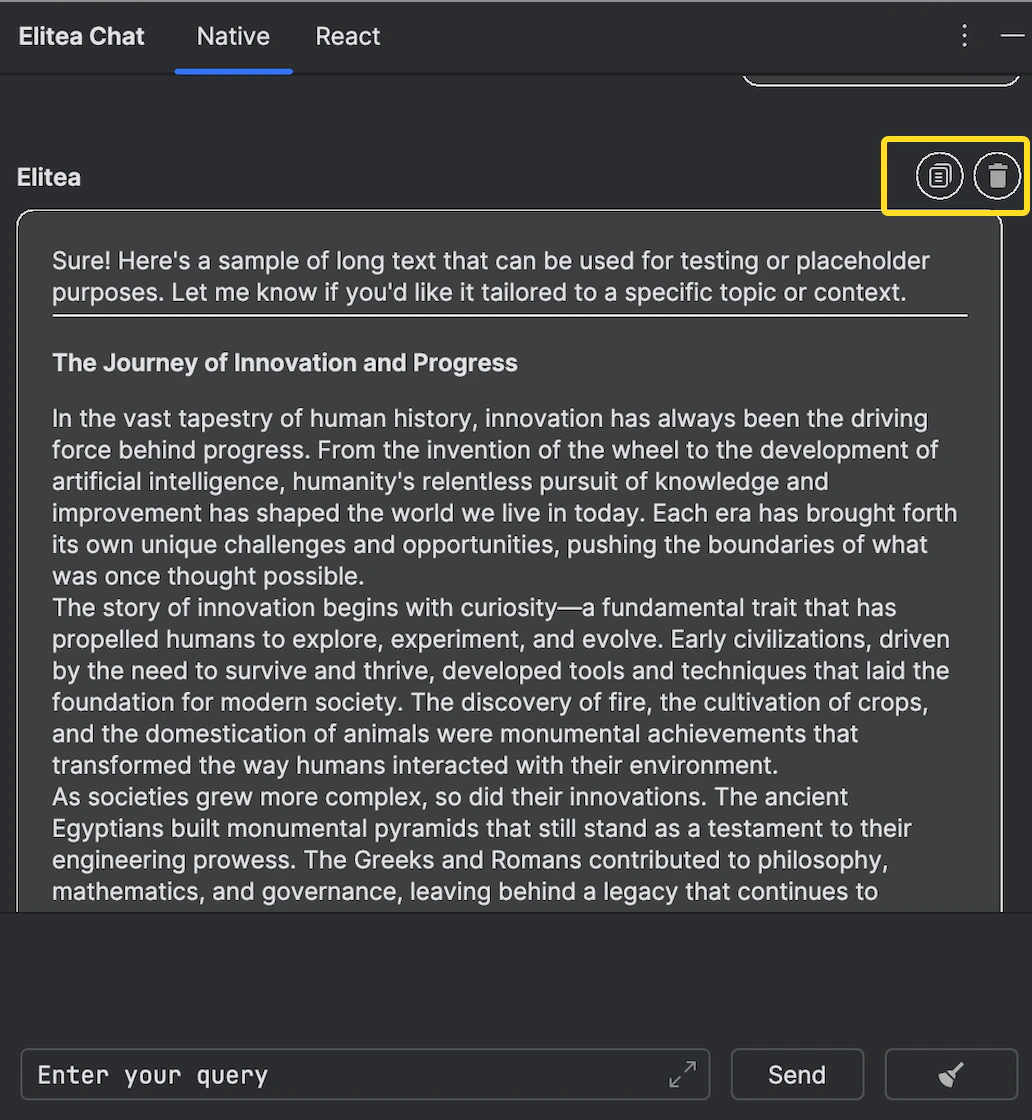
Additional Interaction Features for Native Mode:
Copy the Output: Click the Copy to clipboard icon to copy the generated text for use elsewhere.
Delete Output: Remove the current output from the chat by clicking the Delete icon.
Note: The Native Mode is designed to provide a simpler interface with limited post-output actions, focusing on core functionality.
{"docsConfig":{"theme":"mint","$schema":"https://mintlify.com/docs.json","name":"ELITEA Documentation","colors":{"primary":"#C428DD","light":"#6AE8FA","dark":"#A020D0"},"logo":{"light":"https://mintcdn.com/epam-a74ef051/4bC9rHxY9gaCXsks/img/elitea-logo-light.svg?fit=max\u0026auto=format\u0026n=4bC9rHxY9gaCXsks\u0026q=85\u0026s=43ff3b58a346ca6df63da85d614da271","dark":"https://mintcdn.com/epam-a74ef051/4bC9rHxY9gaCXsks/img/elitea-logo-dark.svg?fit=max\u0026auto=format\u0026n=4bC9rHxY9gaCXsks\u0026q=85\u0026s=7cab401c07768c56a3b2dc0d1af6b1ea","href":"https://elitea.ai"},"favicon":"https://mintcdn.com/epam-a74ef051/VKtVArTAzdlvF0zO/img/favicon.ico?fit=max\u0026auto=format\u0026n=VKtVArTAzdlvF0zO\u0026q=85\u0026s=9694338e3d1b62635b13e3440ed7d505","appearance":{"default":"system"},"background":{"color":{"light":"#FDFDFD","dark":"#0E131D"}},"navbar":{"links":[{"href":"https://next.elitea.ai/shared/swagger/","label":"API Documentation"}],"primary":{"type":"button","label":"ELITEA Platform","href":"https://next.elitea.ai"}},"fonts":{"family":"Inter"},"styling":{"eyebrows":"breadcrumbs","latex":true},"navigation":{"pages":[]}},"deployment":{"deploymentMetadataValue":{"subdomain":"epam-a74ef051","hasAudioNarration":false,"actualSubdomain":"epam-a74ef051","customDomains":["docs.elitea.ai"],"gitSource":{"type":"github","owner":"eliteaai","repo":"elitea.github.io","deployBranch":"mintlify","contentDirectory":"docs","isPrivate":true,"mountPath":"","label":""},"chroma":{"liveDeploymentHistoryId":"6adb7616146446953a9e8197","collectionId":"f94ae70d-57ae-4b23-beab-f6cfb9645a99","schemaVersion":"v3","latestBuiltDeploymentHistoryId":"6adb7616146446953a9e8197"},"entitlements":{},"buildId":"6adb7616146446953a9e8197","clientVersion":"0.0.3966","searchFilterCounts":[{"language":"default","tag":"How-To Guides","count":72},{"language":"default","tag":"Integrations","count":50},{"language":"default","tag":"Home","count":39},{"language":"default","tag":"Toolkits","count":36},{"language":"default","tag":"Support","count":33},{"language":"default","tag":"Platform Overview","count":27},{"language":"default","tag":"Chats","count":24},{"language":"default","tag":"Agents, Pipelines \u0026 Skills","count":23},{"language":"default","tag":"Release Notes","count":22},{"language":"default","tag":"Older Releases","count":19}]},"assistantConfig":{"enableAskAiButton":false,"enableStarterQuestions":false,"enableContextualStarterQuestions":false,"enableAskAiSearchBar":true},"hasChatPermissions":false,"hasWebMcpPermissions":false,"toggles":[{"name":"kill-isr","enabled":true,"variant":{"name":"disabled","enabled":false,"feature_enabled":true},"impressionData":false},{"name":"agent-mintlify-slack","enabled":true,"variant":{"name":"disabled","enabled":false,"feature_enabled":true},"impressionData":false},{"name":"editor-v7-file-tree","enabled":true,"variant":{"name":"disabled","enabled":false,"feature_enabled":true},"impressionData":false},{"name":"agent-integrations-settings","enabled":true,"variant":{"name":"disabled","enabled":false,"feature_enabled":true},"impressionData":false},{"name":"automations-pr-grouping","enabled":true,"variant":{"name":"disabled","enabled":false,"feature_enabled":true},"impressionData":false},{"name":"custom-prefix","enabled":true,"variant":{"name":"disabled","enabled":false,"feature_enabled":true},"impressionData":false},{"name":"analytics-v7","enabled":true,"variant":{"name":"disabled","enabled":false,"feature_enabled":true},"impressionData":false},{"name":"user-flows-analytics","enabled":true,"variant":{"name":"disabled","enabled":false,"feature_enabled":true},"impressionData":false},{"name":"no-publish-flow","enabled":true,"variant":{"name":"disabled","enabled":false,"feature_enabled":true},"impressionData":false},{"name":"workos-onboarding","enabled":true,"variant":{"name":"disabled","enabled":false,"feature_enabled":true},"impressionData":false},{"name":"llms-txt-v2","enabled":true,"variant":{"name":"disabled","enabled":false,"feature_enabled":true},"impressionData":false},{"name":"pause-universal-search-reconcile","enabled":true,"variant":{"name":"disabled","enabled":false,"feature_enabled":true},"impressionData":false},{"name":"snapshot-serving-live","enabled":true,"variant":{"name":"disabled","enabled":false,"feature_enabled":true},"impressionData":false},{"name":"stripTemperatureMiddleware","enabled":true,"variant":{"name":"disabled","enabled":false,"feature_enabled":true},"impressionData":false},{"name":"per-site-search-delta","enabled":true,"variant":{"name":"disabled","enabled":false,"feature_enabled":true},"impressionData":false},{"name":"support-platform-pylon-zendesk","enabled":true,"variant":{"name":"disabled","enabled":false,"feature_enabled":true},"impressionData":false},{"name":"snapshot-serving","enabled":true,"variant":{"name":"disabled","enabled":false,"feature_enabled":true},"impressionData":false},{"name":"instant-rollback","enabled":true,"variant":{"name":"disabled","enabled":false,"feature_enabled":true},"impressionData":false},{"name":"granular-notifications-server","enabled":true,"variant":{"name":"disabled","enabled":false,"feature_enabled":true},"impressionData":false},{"name":"granular-notifications","enabled":true,"variant":{"name":"disabled","enabled":false,"feature_enabled":true},"impressionData":false},{"name":"editor-private-page-search","enabled":true,"variant":{"name":"disabled","enabled":false,"feature_enabled":true},"impressionData":false},{"name":"automations-fable","enabled":true,"variant":{"name":"disabled","enabled":false,"feature_enabled":true},"impressionData":false},{"name":"fixed-ai-action-pricing","enabled":true,"variant":{"name":"disabled","enabled":false,"feature_enabled":true},"impressionData":false},{"name":"automation-resolve-merge-conflict","enabled":true,"variant":{"name":"disabled","enabled":false,"feature_enabled":true},"impressionData":false},{"name":"scoped-publishing","enabled":true,"variant":{"name":"disabled","enabled":false,"feature_enabled":true},"impressionData":false},{"name":"mintql","enabled":true,"variant":{"name":"disabled","enabled":false,"feature_enabled":true},"impressionData":false},{"name":"page-level-analytics","enabled":true,"variant":{"name":"disabled","enabled":false,"feature_enabled":true},"impressionData":false},{"name":"editor-version-history-v2","enabled":true,"variant":{"name":"disabled","enabled":false,"feature_enabled":true},"impressionData":false},{"name":"editor-nav-generations","enabled":true,"variant":{"name":"disabled","enabled":false,"feature_enabled":true},"impressionData":false},{"name":"billing-page-v2","enabled":true,"variant":{"name":"disabled","enabled":false,"feature_enabled":true},"impressionData":false},{"name":"workspace-projects","enabled":true,"variant":{"name":"disabled","enabled":false,"feature_enabled":true},"impressionData":false},{"name":"assistant-v5","enabled":true,"variant":{"name":"disabled","enabled":false,"feature_enabled":true},"impressionData":false},{"name":"byok-sep-25","enabled":true,"variant":{"name":"disabled","enabled":false,"feature_enabled":true},"impressionData":false},{"name":"fork-pr-previews","enabled":true,"variant":{"name":"disabled","enabled":false,"feature_enabled":true},"impressionData":false},{"name":"revalidation-jwt","enabled":true,"variant":{"name":"disabled","enabled":false,"feature_enabled":true},"impressionData":false},{"name":"vite-origin","enabled":true,"variant":{"name":"disabled","enabled":false,"feature_enabled":true},"impressionData":false},{"name":"editor-agent-model-picker","enabled":true,"variant":{"name":"disabled","enabled":false,"feature_enabled":true},"impressionData":false},{"name":"billing-updated-9-15","enabled":true,"variant":{"name":"disabled","enabled":false,"feature_enabled":true},"impressionData":false},{"name":"hobby-abuse-scan","enabled":true,"variant":{"name":"disabled","enabled":false,"feature_enabled":true},"impressionData":false},{"name":"dashboard-inbox","enabled":true,"variant":{"name":"disabled","enabled":false,"feature_enabled":true},"impressionData":false}],"isAtlas":false,"googleFontsInlined":false},"customCss":[{"filePath":"custom.css","content":":root{--primary-dark:196 40 221;--primary-light:106 232 250}.dark aside,[data-theme=dark] aside{background-color:rgb(10 15 22/.7)!important}.dark body>div>header,.dark body>header,[data-theme=dark] body>div>header,[data-theme=dark] body>header{background-color:rgb(10 15 22/.85)!important;backdrop-filter:blur(8px);-webkit-backdrop-filter:blur(8px)}pre{border-radius:8px!important}.dark pre,[data-theme=dark] pre{background-color:rgb(8 11 18)!important;border:1px solid rgb(29 37 55/.7)!important}:not(pre)>code{color:#a020d0!important;border-radius:4px}.dark :not(pre)>code,[data-theme=dark] :not(pre)>code{color:#6ae8fa!important;background-color:rgb(19 24 32/.8)!important}header a img,nav a img{height:36px!important;width:auto!important;max-height:none!important}::-webkit-scrollbar{width:5px;height:5px}::-webkit-scrollbar-track{background:0 0}::-webkit-scrollbar-thumb{background:rgba(128,128,160,.25);border-radius:3px}::-webkit-scrollbar-thumb:hover{background:rgba(128,128,160,.45)}"}],"page":{"pagePath":"integrations/extensions/elitea-code-chat","slug":"/integrations/extensions/elitea-code-chat","pageMetadata":{"title":"ELITEA Code Chat","description":"ELITEA Code Chat extension is deprecated and no longer actively developed. Existing functionality may still be partially available. However, compatibility with ","href":"/integrations/extensions/elitea-code-chat"},"description":{"compiledSource":"\"use strict\";\nconst {jsx: _jsx} = arguments[0];\nconst {useMDXComponents: _provideComponents} = arguments[0];\nfunction _createMdxContent(props) {\n const _components = {\n p: \"p\",\n ..._provideComponents(),\n ...props.components\n };\n return _jsx(_components.p, {\n children: \"ELITEA Code Chat extension is deprecated and no longer actively developed. Existing functionality may still be partially available. However, compatibility with\"\n });\n}\nfunction MDXContent(props = {}) {\n const {wrapper: MDXLayout} = {\n ..._provideComponents(),\n ...props.components\n };\n return MDXLayout ? _jsx(MDXLayout, {\n ...props,\n children: _jsx(_createMdxContent, {\n ...props\n })\n }) : _createMdxContent(props);\n}\nreturn {\n default: MDXContent\n};\n","frontmatter":{},"scope":{}},"pageType":"default","mdx":{"mdxSource":{"compiledSource":"\"use strict\";const{Fragment:_Fragment,jsx:_jsx,jsxs:_jsxs}=arguments[0];const{useMDXComponents:_provideComponents}=arguments[0];function _createMdxContent(props){const _components={a:`a`,code:`code`,li:`li`,ol:`ol`,p:`p`,strong:`strong`,ul:`ul`,..._provideComponents(),...props.components},{Heading,OptimizedImage,Warning}=_components;if(!Heading)_missingMdxReference(`Heading`,true);if(!OptimizedImage)_missingMdxReference(`OptimizedImage`,true);if(!Warning)_missingMdxReference(`Warning`,true);return _jsxs(_Fragment,{children:[_jsx(Warning,{title:`Deprecated`,children:_jsxs(_components.p,{children:[_jsx(_components.strong,{children:`ELITEA Code Chat`}),` extension is `,_jsx(_components.strong,{children:`deprecated`}),` and no longer actively developed. Existing functionality may still be partially available. However, compatibility with current and future IDE versions cannot be guaranteed. No further updates, bug fixes, or feature enhancements are planned.`]})}),`\n`,_jsx(_components.p,{children:`ELITEA Code Chat for VSCode and IntelliJ is an auxiliary GUI for ELITEA Code, allowing you to utilize the functionality of ELITEA Code and chat with ELITEA. It provides a seamless interface for interacting with prompts, datasources, and agents configured in ELITEA.`}),`\n`,_jsx(Heading,{level:`2`,id:`pre-requisite`,children:`Pre-requisite`}),`\n`,_jsx(_components.p,{children:`ELITEA Code Chat operates in conjunction with ELITEA Code for both VS Code and IntelliJ. To utilize ELITEA Code Chat, you must first install ELITEA Code from their respective marketplaces:`}),`\n`,_jsxs(_components.ul,{children:[`\n`,_jsxs(_components.li,{children:[_jsx(_components.strong,{children:`VS Code`}),`: Install `,_jsx(_components.a,{href:`https://marketplace.visualstudio.com/items?itemName=ProjectAlita.AlitaCode`,children:`ELITEA Code`}),` from the VS Code Marketplace.`]}),`\n`,_jsxs(_components.li,{children:[_jsx(_components.strong,{children:`IntelliJ`}),`: Install `,_jsx(_components.a,{href:`https://plugins.jetbrains.com/plugin/23040-alitacode`,children:`ELITEA Code`}),` from the JetBrains Marketplace.`]}),`\n`]}),`\n`,_jsxs(_components.p,{children:[_jsx(_components.strong,{children:`Important`}),`: Ensure that ELITEA Code is not only installed but also properly configured with ELITEA to function correctly. For detailed installation and configuration instructions, please refer to the `,_jsx(_components.a,{href:`/integrations/extensions/elitea-code`,children:`ELITEA Code documentation`}),`. This step is crucial for enabling the full capabilities of ELITEA Code Chat within your development environment.`]}),`\n`,_jsx(Heading,{level:`2`,id:`features-list`,children:`Features list:`}),`\n`,_jsxs(_components.ul,{children:[`\n`,_jsxs(_components.li,{children:[`\n`,_jsx(_components.p,{children:`Chat with ELITEA directly using the model settings configured in the ELITEA Code extension.`}),`\n`]}),`\n`,_jsxs(_components.li,{children:[`\n`,_jsx(_components.p,{children:`Type trigger chat to add participants to chat:`}),`\n`,_jsxs(_components.ul,{children:[`\n`,_jsxs(_components.li,{children:[_jsx(_components.code,{children:`/`}),` for prompts`]}),`\n`,_jsxs(_components.li,{children:[_jsx(_components.code,{children:`#`}),` for datasources`]}),`\n`,_jsxs(_components.li,{children:[_jsx(_components.code,{children:`@`}),` for agents`]}),`\n`]}),`\n`]}),`\n`,_jsxs(_components.li,{children:[`\n`,_jsxs(_components.p,{children:[_jsx(_components.strong,{children:`Integration with External Tools`}),`: Seamlessly integrate with Jira and Slack for task management and communication.`]}),`\n`]}),`\n`]}),`\n`,_jsxs(_components.p,{children:[_jsx(_components.strong,{children:`Note`}),`: ELITEA Code Chat doesn’t support Chat History. In case of restarting VS Code or IntelliJ, the Chat History will be cleared.`]}),`\n`,_jsx(Heading,{level:`2`,id:`elitea-code-chat-for-vs-code`,children:`ELITEA Code Chat for VS code`}),`\n`,_jsx(_components.p,{children:`ELITEA Code Chat is a Visual Studio Code extension that works as a chatting companion using ELITEA Code.`}),`\n`,_jsx(Heading,{level:`3`,id:`installation`,children:`Installation`}),`\n`,_jsx(_components.p,{children:`Getting started with ELITEA Code Chat is straightforward:`}),`\n`,_jsxs(_components.ol,{children:[`\n`,_jsxs(_components.li,{children:[`Navigate to the `,_jsx(_components.strong,{children:`Extensions`}),` section in VS Code.`]}),`\n`,_jsxs(_components.li,{children:[`Search for `,_jsx(_components.strong,{children:`ELITEA Code Chat`}),` in the Marketplace and click `,_jsx(_components.strong,{children:`Install`}),`.`]}),`\n`]}),`\n`,_jsx(OptimizedImage,{src:`https://mintcdn.com/epam-a74ef051/QwehaKayfOTb4rt0/img/integrations/extensions/chat/VS-EliteaChat-Install.png?fit=max\u0026auto=format\u0026n=QwehaKayfOTb4rt0\u0026q=85\u0026s=fb51db52ff87781bea78974ed99b63d4`,alt:`VS-EliteaChat-Install`,\"data-og-width\":`2770`,width:`2770`,\"data-og-height\":`1348`,height:`1348`,\"data-path\":`img/integrations/extensions/chat/VS-EliteaChat-Install.png`,\"data-optimize\":`true`,\"data-opv\":`3`,srcset:`https://mintcdn.com/epam-a74ef051/QwehaKayfOTb4rt0/img/integrations/extensions/chat/VS-EliteaChat-Install.png?w=280\u0026fit=max\u0026auto=format\u0026n=QwehaKayfOTb4rt0\u0026q=85\u0026s=c1d2d4e54fd7538d91cb5e2bba496dfa 280w, https://mintcdn.com/epam-a74ef051/QwehaKayfOTb4rt0/img/integrations/extensions/chat/VS-EliteaChat-Install.png?w=560\u0026fit=max\u0026auto=format\u0026n=QwehaKayfOTb4rt0\u0026q=85\u0026s=bca97040b27ea6faf1171cac542aff72 560w, https://mintcdn.com/epam-a74ef051/QwehaKayfOTb4rt0/img/integrations/extensions/chat/VS-EliteaChat-Install.png?w=840\u0026fit=max\u0026auto=format\u0026n=QwehaKayfOTb4rt0\u0026q=85\u0026s=2f8f7f5059e35611183f6bf720413d45 840w, https://mintcdn.com/epam-a74ef051/QwehaKayfOTb4rt0/img/integrations/extensions/chat/VS-EliteaChat-Install.png?w=1100\u0026fit=max\u0026auto=format\u0026n=QwehaKayfOTb4rt0\u0026q=85\u0026s=3ff0eebf93ac6c81926e0c13218958e7 1100w, https://mintcdn.com/epam-a74ef051/QwehaKayfOTb4rt0/img/integrations/extensions/chat/VS-EliteaChat-Install.png?w=1650\u0026fit=max\u0026auto=format\u0026n=QwehaKayfOTb4rt0\u0026q=85\u0026s=cc49ea350581ac67caf9d50de33c388e 1650w, https://mintcdn.com/epam-a74ef051/QwehaKayfOTb4rt0/img/integrations/extensions/chat/VS-EliteaChat-Install.png?w=2500\u0026fit=max\u0026auto=format\u0026n=QwehaKayfOTb4rt0\u0026q=85\u0026s=0113e864c2a1604fe24178f4d8dc8ce5 2500w`}),`\n`,_jsxs(_components.p,{children:[_jsx(_components.strong,{children:`Note`}),`: After successful installation ELITEA Code Chat shortcut will be added to left menu of VS Code.`]}),`\n`,_jsx(Heading,{level:`3`,id:`elitea-code-chat-usage`,children:`ELITEA Code Chat Usage`}),`\n`,_jsx(_components.p,{children:`With ELITEA Code Chat set up, you can now:`}),`\n`,_jsxs(_components.ul,{children:[`\n`,_jsxs(_components.li,{children:[_jsx(_components.strong,{children:`Prompts`}),` - call and use prompts configured in ELITEA.`]}),`\n`,_jsxs(_components.li,{children:[_jsx(_components.strong,{children:`Datasources`}),` - call and use datasources configured in ELITEA.`]}),`\n`,_jsxs(_components.li,{children:[_jsx(_components.strong,{children:`Agents`}),` - call and use agents configured in ELITEA.`]}),`\n`,_jsxs(_components.li,{children:[_jsx(_components.strong,{children:`Chat`}),` - is a specific type of input designed for conversational AI models, which aims to initiate or guide a dialogue. This can be in the form of a question, statement, or command that simulates human-like interaction, prompting the AI to produce a conversational response for engagement.`]}),`\n`]}),`\n`,_jsxs(_components.p,{children:[_jsx(_components.strong,{children:`Important:`}),` To successfully call and utilize prompts, datasources, or agents from ELITEA, it is essential that these items are tagged with `,_jsx(_components.code,{children:`code`}),` in ELITEA. This tag ensures that the resources are correctly categorized and accessible. Ensure that the `,_jsx(_components.code,{children:`code`}),` tag is applied to relevant prompts, datasources, and agents to enable their proper functionality within the ELITEA ecosystem.`]}),`\n`,_jsx(_components.p,{children:_jsx(_components.strong,{children:`Additional Interaction Features:`})}),`\n`,_jsxs(_components.ul,{children:[`\n`,_jsxs(_components.li,{children:[_jsx(_components.strong,{children:`Stop Generating`}),`: Interrupt the generation of output at any time by clicking the `,_jsx(_components.strong,{children:`Stop Generating`}),` button.`]}),`\n`,_jsxs(_components.li,{children:[_jsx(_components.strong,{children:`Auto Scroll to Bottom`}),`: Automatically scroll to the bottom of the output as it is generated.`]}),`\n`,_jsxs(_components.li,{children:[_jsx(_components.strong,{children:`Reload ELITEA Code Settings`}),`: Reload and update ELITEA Code settings.`]}),`\n`]}),`\n`,_jsx(OptimizedImage,{src:`https://mintcdn.com/epam-a74ef051/QwehaKayfOTb4rt0/img/integrations/extensions/chat/VS-EliteaChat-StopGen.png?fit=max\u0026auto=format\u0026n=QwehaKayfOTb4rt0\u0026q=85\u0026s=eb5cb33c13feb889d20da44cbbafeba8`,alt:`VS-EliteaChat-StopGen`,\"data-og-width\":`790`,width:`790`,\"data-og-height\":`1872`,height:`1872`,\"data-path\":`img/integrations/extensions/chat/VS-EliteaChat-StopGen.png`,\"data-optimize\":`true`,\"data-opv\":`3`,srcset:`https://mintcdn.com/epam-a74ef051/QwehaKayfOTb4rt0/img/integrations/extensions/chat/VS-EliteaChat-StopGen.png?w=280\u0026fit=max\u0026auto=format\u0026n=QwehaKayfOTb4rt0\u0026q=85\u0026s=5d2f73df8002997e1301177dde3da434 280w, https://mintcdn.com/epam-a74ef051/QwehaKayfOTb4rt0/img/integrations/extensions/chat/VS-EliteaChat-StopGen.png?w=560\u0026fit=max\u0026auto=format\u0026n=QwehaKayfOTb4rt0\u0026q=85\u0026s=f36b2b3268692b1658c4c733f3d255f4 560w, https://mintcdn.com/epam-a74ef051/QwehaKayfOTb4rt0/img/integrations/extensions/chat/VS-EliteaChat-StopGen.png?w=840\u0026fit=max\u0026auto=format\u0026n=QwehaKayfOTb4rt0\u0026q=85\u0026s=ee829cb8085cef9e632a38cb511582b5 840w, https://mintcdn.com/epam-a74ef051/QwehaKayfOTb4rt0/img/integrations/extensions/chat/VS-EliteaChat-StopGen.png?w=1100\u0026fit=max\u0026auto=format\u0026n=QwehaKayfOTb4rt0\u0026q=85\u0026s=89c23f5957416e9dfe2a3ec45b3abed0 1100w, https://mintcdn.com/epam-a74ef051/QwehaKayfOTb4rt0/img/integrations/extensions/chat/VS-EliteaChat-StopGen.png?w=1650\u0026fit=max\u0026auto=format\u0026n=QwehaKayfOTb4rt0\u0026q=85\u0026s=6c144ed4103b1698aa8acd68371eb505 1650w, https://mintcdn.com/epam-a74ef051/QwehaKayfOTb4rt0/img/integrations/extensions/chat/VS-EliteaChat-StopGen.png?w=2500\u0026fit=max\u0026auto=format\u0026n=QwehaKayfOTb4rt0\u0026q=85\u0026s=b8de18a5f8b918a3d31b52c17b0e4a9a 2500w`}),`\n`,_jsx(_components.p,{children:_jsx(_components.strong,{children:`Post-Output Actions:`})}),`\n`,_jsxs(_components.ul,{children:[`\n`,_jsxs(_components.li,{children:[_jsx(_components.strong,{children:`Continue the Dialogue`}),`: To keep the conversation going, simply type your next question or command in the chat box and click the `,_jsx(_components.strong,{children:`Send`}),` icon.`]}),`\n`,_jsxs(_components.li,{children:[_jsx(_components.strong,{children:`Copy the Output`}),`: Click the `,_jsx(_components.strong,{children:`Copy to clipboard`}),` icon to copy the generated text for use elsewhere.`]}),`\n`,_jsxs(_components.li,{children:[_jsx(_components.strong,{children:`Delete Output`}),`: To remove the current output from the chat, click the `,_jsx(_components.strong,{children:`Delete`}),` icon.`]}),`\n`,_jsxs(_components.li,{children:[_jsx(_components.strong,{children:`Purge Chat History`}),`: For a fresh start or to clear sensitive data, click the `,_jsx(_components.strong,{children:`Clean`}),` icon to erase the chat history.`]}),`\n`,_jsxs(_components.li,{children:[_jsx(_components.strong,{children:`Specialized Download Options`}),` for `,_jsx(_components.strong,{children:`Tabular`}),` outputs. When the Gen AI generates output in a tabular format, additional options become available to manage and utilize this structured data:`,`\n`,_jsxs(_components.ul,{children:[`\n`,_jsxs(_components.li,{children:[_jsx(_components.strong,{children:`Download as xlsx`}),`: Allows you to save the tabular output directly in an Excel spreadsheet format, facilitating easy data manipulation and analysis.`]}),`\n`,_jsxs(_components.li,{children:[_jsx(_components.strong,{children:`Copy as markdown`}),`: Enables copying the tabular output in markdown format, suitable for use in markdown-supported environments like GitHub or blogging platforms.`]}),`\n`,_jsxs(_components.li,{children:[_jsx(_components.strong,{children:`Copy as html`}),`: Permits copying the tabular output in HTML format, ideal for integration into web pages or emails, preserving the formatting and structure.`]}),`\n`]}),`\n`]}),`\n`]}),`\n`,_jsx(OptimizedImage,{src:`https://mintcdn.com/epam-a74ef051/QwehaKayfOTb4rt0/img/integrations/extensions/chat/VS-EliteaChat-Buttons.png?fit=max\u0026auto=format\u0026n=QwehaKayfOTb4rt0\u0026q=85\u0026s=96ea7156ab27ee0947e6fc9144a5996a`,alt:`VS-EliteaChat-Buttons`,\"data-og-width\":`682`,width:`682`,\"data-og-height\":`1720`,height:`1720`,\"data-path\":`img/integrations/extensions/chat/VS-EliteaChat-Buttons.png`,\"data-optimize\":`true`,\"data-opv\":`3`,srcset:`https://mintcdn.com/epam-a74ef051/QwehaKayfOTb4rt0/img/integrations/extensions/chat/VS-EliteaChat-Buttons.png?w=280\u0026fit=max\u0026auto=format\u0026n=QwehaKayfOTb4rt0\u0026q=85\u0026s=5d08980c642e46a29f245c12cb2be2b3 280w, https://mintcdn.com/epam-a74ef051/QwehaKayfOTb4rt0/img/integrations/extensions/chat/VS-EliteaChat-Buttons.png?w=560\u0026fit=max\u0026auto=format\u0026n=QwehaKayfOTb4rt0\u0026q=85\u0026s=1ec064b46c408bc39779c1b0fc9f6862 560w, https://mintcdn.com/epam-a74ef051/QwehaKayfOTb4rt0/img/integrations/extensions/chat/VS-EliteaChat-Buttons.png?w=840\u0026fit=max\u0026auto=format\u0026n=QwehaKayfOTb4rt0\u0026q=85\u0026s=e6d38dd007660396cb6b264ab5ac7e52 840w, https://mintcdn.com/epam-a74ef051/QwehaKayfOTb4rt0/img/integrations/extensions/chat/VS-EliteaChat-Buttons.png?w=1100\u0026fit=max\u0026auto=format\u0026n=QwehaKayfOTb4rt0\u0026q=85\u0026s=aacd461ef1ddcdf151f1e3375b33eef5 1100w, https://mintcdn.com/epam-a74ef051/QwehaKayfOTb4rt0/img/integrations/extensions/chat/VS-EliteaChat-Buttons.png?w=1650\u0026fit=max\u0026auto=format\u0026n=QwehaKayfOTb4rt0\u0026q=85\u0026s=70f6a06a232d20c95a29c4d1dfce3487 1650w, https://mintcdn.com/epam-a74ef051/QwehaKayfOTb4rt0/img/integrations/extensions/chat/VS-EliteaChat-Buttons.png?w=2500\u0026fit=max\u0026auto=format\u0026n=QwehaKayfOTb4rt0\u0026q=85\u0026s=87bcfdd449823d400e2bccd40dd7eda9 2500w`}),`\n`,_jsx(Heading,{level:`4`,id:`prompts`,children:`Prompts`}),`\n`,_jsxs(_components.p,{children:[`To call and use `,_jsx(_components.strong,{children:`Prompts`}),` from ELITEA:`]}),`\n`,_jsxs(_components.ol,{children:[`\n`,_jsx(_components.li,{children:`Open the Elitea Code Chat.`}),`\n`,_jsxs(_components.li,{children:[`Type `,_jsx(_components.code,{children:`/`}),` in the chat box.`]}),`\n`,_jsxs(_components.li,{children:[`Select the prompt that you want to run.`,`\n`,_jsxs(_components.ul,{children:[`\n`,_jsxs(_components.li,{children:[_jsx(_components.strong,{children:`Version Selection`}),`: Prompts may have multiple versions. Ensure you select the appropriate version from the dropdown list as different versions may vary in functionality and variables.`]}),`\n`,_jsxs(_components.li,{children:[_jsx(_components.strong,{children:`Variable Management`}),`: If the selected prompt version includes variables, a dialog will appear allowing you to input or modify the values. Prepopulated values might be present, or you may need to provide your own. Ensure that all required variables are correctly filled to execute the prompt accurately. You can adjust or update variable values at any time by clicking the `,_jsx(_components.strong,{children:`Settings`}),` icon.`]}),`\n`]}),`\n`]}),`\n`,_jsxs(_components.li,{children:[`Once all instructions for the prompt are set in the `,_jsx(_components.strong,{children:`Context`}),` and/or `,_jsx(_components.strong,{children:`Messages`}),` sections, you can start the execution by typing your text (be it a question or a command) into the chat box. Use simple commands like “Go”, “Start Generating”, “Execute”, or “Run it” and click the `,_jsx(_components.strong,{children:`Send`}),` icon to begin. These commands signal the Gen AI to process the information and generate the desired output based on the configured settings.`]}),`\n`,_jsxs(_components.li,{children:[`If you need to start a fresh conversation or prompt, simply click the `,_jsx(_components.strong,{children:`X`}),` icon to clear the current setup and begin anew.`]}),`\n`]}),`\n`,_jsx(OptimizedImage,{src:`https://mintcdn.com/epam-a74ef051/QwehaKayfOTb4rt0/img/integrations/extensions/chat/VS-EliteaChat-CallPrompt.png?fit=max\u0026auto=format\u0026n=QwehaKayfOTb4rt0\u0026q=85\u0026s=2e4509a4ed57bb127c943db2c3e45ec8`,alt:`VS-EliteaChat-CallPrompt`,\"data-og-width\":`786`,width:`786`,\"data-og-height\":`1950`,height:`1950`,\"data-path\":`img/integrations/extensions/chat/VS-EliteaChat-CallPrompt.png`,\"data-optimize\":`true`,\"data-opv\":`3`,srcset:`https://mintcdn.com/epam-a74ef051/QwehaKayfOTb4rt0/img/integrations/extensions/chat/VS-EliteaChat-CallPrompt.png?w=280\u0026fit=max\u0026auto=format\u0026n=QwehaKayfOTb4rt0\u0026q=85\u0026s=c7143d94279f7a3c22d42c92e3545cbf 280w, https://mintcdn.com/epam-a74ef051/QwehaKayfOTb4rt0/img/integrations/extensions/chat/VS-EliteaChat-CallPrompt.png?w=560\u0026fit=max\u0026auto=format\u0026n=QwehaKayfOTb4rt0\u0026q=85\u0026s=94e383f0544f3209e1b7b73c459dc06a 560w, https://mintcdn.com/epam-a74ef051/QwehaKayfOTb4rt0/img/integrations/extensions/chat/VS-EliteaChat-CallPrompt.png?w=840\u0026fit=max\u0026auto=format\u0026n=QwehaKayfOTb4rt0\u0026q=85\u0026s=889a5dc8ccc5327d2ee2526697d7631a 840w, https://mintcdn.com/epam-a74ef051/QwehaKayfOTb4rt0/img/integrations/extensions/chat/VS-EliteaChat-CallPrompt.png?w=1100\u0026fit=max\u0026auto=format\u0026n=QwehaKayfOTb4rt0\u0026q=85\u0026s=75cf179a744b1aeb29a4bf2f60316e04 1100w, https://mintcdn.com/epam-a74ef051/QwehaKayfOTb4rt0/img/integrations/extensions/chat/VS-EliteaChat-CallPrompt.png?w=1650\u0026fit=max\u0026auto=format\u0026n=QwehaKayfOTb4rt0\u0026q=85\u0026s=051c046c0f43f1ecacc5d7484a77daad 1650w, https://mintcdn.com/epam-a74ef051/QwehaKayfOTb4rt0/img/integrations/extensions/chat/VS-EliteaChat-CallPrompt.png?w=2500\u0026fit=max\u0026auto=format\u0026n=QwehaKayfOTb4rt0\u0026q=85\u0026s=4ed6c1e1b244bfaa6a15368bee27bd24 2500w`}),`\n`,_jsx(OptimizedImage,{src:`https://mintcdn.com/epam-a74ef051/QwehaKayfOTb4rt0/img/integrations/extensions/chat/VS-EliteaChat-PromptVariable.png?fit=max\u0026auto=format\u0026n=QwehaKayfOTb4rt0\u0026q=85\u0026s=6375b59b07904019b01726f70807e4ca`,alt:`VS-EliteaChat-PromptVariable`,\"data-og-width\":`782`,width:`782`,\"data-og-height\":`1950`,height:`1950`,\"data-path\":`img/integrations/extensions/chat/VS-EliteaChat-PromptVariable.png`,\"data-optimize\":`true`,\"data-opv\":`3`,srcset:`https://mintcdn.com/epam-a74ef051/QwehaKayfOTb4rt0/img/integrations/extensions/chat/VS-EliteaChat-PromptVariable.png?w=280\u0026fit=max\u0026auto=format\u0026n=QwehaKayfOTb4rt0\u0026q=85\u0026s=3a1a79d75dc99951726b7a237b0e09c9 280w, https://mintcdn.com/epam-a74ef051/QwehaKayfOTb4rt0/img/integrations/extensions/chat/VS-EliteaChat-PromptVariable.png?w=560\u0026fit=max\u0026auto=format\u0026n=QwehaKayfOTb4rt0\u0026q=85\u0026s=5a9b32e411b668f6729fcb7ef5ac88bb 560w, https://mintcdn.com/epam-a74ef051/QwehaKayfOTb4rt0/img/integrations/extensions/chat/VS-EliteaChat-PromptVariable.png?w=840\u0026fit=max\u0026auto=format\u0026n=QwehaKayfOTb4rt0\u0026q=85\u0026s=f0c03afddde436b4ff8b666abd164e80 840w, https://mintcdn.com/epam-a74ef051/QwehaKayfOTb4rt0/img/integrations/extensions/chat/VS-EliteaChat-PromptVariable.png?w=1100\u0026fit=max\u0026auto=format\u0026n=QwehaKayfOTb4rt0\u0026q=85\u0026s=d64fedb0462032bcea24aef1bd3c5ed3 1100w, https://mintcdn.com/epam-a74ef051/QwehaKayfOTb4rt0/img/integrations/extensions/chat/VS-EliteaChat-PromptVariable.png?w=1650\u0026fit=max\u0026auto=format\u0026n=QwehaKayfOTb4rt0\u0026q=85\u0026s=c57ecc523afc524b56b68ce865e21d5b 1650w, https://mintcdn.com/epam-a74ef051/QwehaKayfOTb4rt0/img/integrations/extensions/chat/VS-EliteaChat-PromptVariable.png?w=2500\u0026fit=max\u0026auto=format\u0026n=QwehaKayfOTb4rt0\u0026q=85\u0026s=f6127e7c4002f2c0fba9e5bef79cff26 2500w`}),`\n`,_jsx(Heading,{level:`4`,id:`datasources`,children:`Datasources`}),`\n`,_jsxs(_components.p,{children:[`To call and use `,_jsx(_components.strong,{children:`Datasources`}),` from ELITEA:`]}),`\n`,_jsxs(_components.ol,{children:[`\n`,_jsx(_components.li,{children:`Open the Elitea Code Chat.`}),`\n`,_jsxs(_components.li,{children:[`Type `,_jsx(_components.code,{children:`#`}),` in the chat box.`]}),`\n`,_jsx(_components.li,{children:`Select the datasource that you want to run.`}),`\n`,_jsxs(_components.li,{children:[`Start conversation in the form of a question, statement, or command that simulates human-like `,_jsx(_components.strong,{children:`interaction`}),`.`]}),`\n`,_jsxs(_components.li,{children:[`If you need to start a fresh conversation or datasource, simply click the `,_jsx(_components.strong,{children:`X`}),` icon to clear the current setup and begin anew.`]}),`\n`]}),`\n`,_jsx(OptimizedImage,{src:`https://mintcdn.com/epam-a74ef051/QwehaKayfOTb4rt0/img/integrations/extensions/chat/VS-EliteaChat-Datasource.png?fit=max\u0026auto=format\u0026n=QwehaKayfOTb4rt0\u0026q=85\u0026s=724786a57f4201c63674c411dad043e1`,alt:`VS-EliteaChat-Datasource`,\"data-og-width\":`788`,width:`788`,\"data-og-height\":`1896`,height:`1896`,\"data-path\":`img/integrations/extensions/chat/VS-EliteaChat-Datasource.png`,\"data-optimize\":`true`,\"data-opv\":`3`,srcset:`https://mintcdn.com/epam-a74ef051/QwehaKayfOTb4rt0/img/integrations/extensions/chat/VS-EliteaChat-Datasource.png?w=280\u0026fit=max\u0026auto=format\u0026n=QwehaKayfOTb4rt0\u0026q=85\u0026s=58a07e64b05093f781649737234f12c9 280w, https://mintcdn.com/epam-a74ef051/QwehaKayfOTb4rt0/img/integrations/extensions/chat/VS-EliteaChat-Datasource.png?w=560\u0026fit=max\u0026auto=format\u0026n=QwehaKayfOTb4rt0\u0026q=85\u0026s=647a8edc6a2b63262fb8aa27d73ec8a7 560w, https://mintcdn.com/epam-a74ef051/QwehaKayfOTb4rt0/img/integrations/extensions/chat/VS-EliteaChat-Datasource.png?w=840\u0026fit=max\u0026auto=format\u0026n=QwehaKayfOTb4rt0\u0026q=85\u0026s=9e0a964c228ffdc4799370005f11bb2b 840w, https://mintcdn.com/epam-a74ef051/QwehaKayfOTb4rt0/img/integrations/extensions/chat/VS-EliteaChat-Datasource.png?w=1100\u0026fit=max\u0026auto=format\u0026n=QwehaKayfOTb4rt0\u0026q=85\u0026s=7fc4b03cc627a2b454cd574102380335 1100w, https://mintcdn.com/epam-a74ef051/QwehaKayfOTb4rt0/img/integrations/extensions/chat/VS-EliteaChat-Datasource.png?w=1650\u0026fit=max\u0026auto=format\u0026n=QwehaKayfOTb4rt0\u0026q=85\u0026s=7d0f67b7394a6d63e510fecd324b876a 1650w, https://mintcdn.com/epam-a74ef051/QwehaKayfOTb4rt0/img/integrations/extensions/chat/VS-EliteaChat-Datasource.png?w=2500\u0026fit=max\u0026auto=format\u0026n=QwehaKayfOTb4rt0\u0026q=85\u0026s=35618daf7cfc68d3264a3e37e38fb3db 2500w`}),`\n`,_jsx(Heading,{level:`4`,id:`agents`,children:`Agents`}),`\n`,_jsxs(_components.p,{children:[`To call and use `,_jsx(_components.strong,{children:`Agents`}),` from ELITEA:`]}),`\n`,_jsxs(_components.ol,{children:[`\n`,_jsx(_components.li,{children:`Open the Elitea Code Chat.`}),`\n`,_jsxs(_components.li,{children:[`Type `,_jsx(_components.code,{children:`@`}),` in the chat box.`]}),`\n`,_jsxs(_components.li,{children:[`Select the prompt that you want to run.`,`\n`,_jsxs(_components.ul,{children:[`\n`,_jsxs(_components.li,{children:[_jsx(_components.strong,{children:`Version Selection`}),`: Agents may have multiple versions. Ensure you select the appropriate version from the dropdown list as different versions may vary in functionality and variables.`]}),`\n`,_jsxs(_components.li,{children:[_jsx(_components.strong,{children:`Variable Management`}),`: If the selected agent version includes variables, a dialog will appear allowing you to input or modify the values. Prepopulated values might be present, or you may need to provide your own. Ensure that all required variables are correctly filled to execute the agent accurately. You can adjust or update variable values at any time by clicking the `,_jsx(_components.strong,{children:`Settings`}),` icon.`]}),`\n`]}),`\n`]}),`\n`,_jsxs(_components.li,{children:[`Start conversation in the form of a question, statement, or command that simulates human-like `,_jsx(_components.strong,{children:`interaction`}),`.`]}),`\n`,_jsxs(_components.li,{children:[`If you need to start a fresh conversation or application, simply click the `,_jsx(_components.strong,{children:`X`}),` icon to clear the current setup and begin anew.`]}),`\n`]}),`\n`,_jsx(OptimizedImage,{src:`https://mintcdn.com/epam-a74ef051/QwehaKayfOTb4rt0/img/integrations/extensions/chat/VS-EliteaChat-Agent.png?fit=max\u0026auto=format\u0026n=QwehaKayfOTb4rt0\u0026q=85\u0026s=5cac26ef500256913e140736337ac673`,alt:`VS-EliteaChat-Agent`,\"data-og-width\":`774`,width:`774`,\"data-og-height\":`1944`,height:`1944`,\"data-path\":`img/integrations/extensions/chat/VS-EliteaChat-Agent.png`,\"data-optimize\":`true`,\"data-opv\":`3`,srcset:`https://mintcdn.com/epam-a74ef051/QwehaKayfOTb4rt0/img/integrations/extensions/chat/VS-EliteaChat-Agent.png?w=280\u0026fit=max\u0026auto=format\u0026n=QwehaKayfOTb4rt0\u0026q=85\u0026s=d26d6a1d8581202fba41c271db53e0bb 280w, https://mintcdn.com/epam-a74ef051/QwehaKayfOTb4rt0/img/integrations/extensions/chat/VS-EliteaChat-Agent.png?w=560\u0026fit=max\u0026auto=format\u0026n=QwehaKayfOTb4rt0\u0026q=85\u0026s=4ad4dc5cd599230a8609c7354a9f291e 560w, https://mintcdn.com/epam-a74ef051/QwehaKayfOTb4rt0/img/integrations/extensions/chat/VS-EliteaChat-Agent.png?w=840\u0026fit=max\u0026auto=format\u0026n=QwehaKayfOTb4rt0\u0026q=85\u0026s=92aeca943efa336c5078770b0e0333e1 840w, https://mintcdn.com/epam-a74ef051/QwehaKayfOTb4rt0/img/integrations/extensions/chat/VS-EliteaChat-Agent.png?w=1100\u0026fit=max\u0026auto=format\u0026n=QwehaKayfOTb4rt0\u0026q=85\u0026s=9ff3dd018de4b7ff6552d3f2d82d70f8 1100w, https://mintcdn.com/epam-a74ef051/QwehaKayfOTb4rt0/img/integrations/extensions/chat/VS-EliteaChat-Agent.png?w=1650\u0026fit=max\u0026auto=format\u0026n=QwehaKayfOTb4rt0\u0026q=85\u0026s=8cb14d02fff1090a788fca9e57ce2cb2 1650w, https://mintcdn.com/epam-a74ef051/QwehaKayfOTb4rt0/img/integrations/extensions/chat/VS-EliteaChat-Agent.png?w=2500\u0026fit=max\u0026auto=format\u0026n=QwehaKayfOTb4rt0\u0026q=85\u0026s=9200c3f1ef51ccf21ed51dc8265a823f 2500w`}),`\n`,_jsx(Heading,{level:`4`,id:`chat`,children:`Chat`}),`\n`,_jsxs(_components.ol,{children:[`\n`,_jsx(_components.li,{children:`Open the Elitea Code Chat.`}),`\n`,_jsxs(_components.li,{children:[`Start conversation in the form of a question, statement, or command that simulates human-like `,_jsx(_components.strong,{children:`interaction`}),`.`]}),`\n`]}),`\n`,_jsx(Heading,{level:`2`,id:`elitea-code-chat-for-intellij`,children:`Elitea Code Chat for IntelliJ`}),`\n`,_jsx(_components.p,{children:`EliteaCodeChat is an IntelliJ plugin to work as chatting companion using EliteaCode.`}),`\n`,_jsx(Heading,{level:`3`,id:`installation-2`,children:`Installation`}),`\n`,_jsx(_components.p,{children:`Getting started with EliteaCodeChat is straightforward:`}),`\n`,_jsxs(_components.ol,{children:[`\n`,_jsxs(_components.li,{children:[`Navigate to the `,_jsx(_components.strong,{children:`Settings`}),`→`,_jsx(_components.strong,{children:`Plugins`}),` section in IntelliJ.`]}),`\n`,_jsxs(_components.li,{children:[`Search for `,_jsx(_components.strong,{children:`EliteaCodeChat`}),` in the Marketplace and click `,_jsx(_components.strong,{children:`Install`}),`.`]}),`\n`]}),`\n`,_jsx(OptimizedImage,{src:`https://mintcdn.com/epam-a74ef051/QwehaKayfOTb4rt0/img/integrations/extensions/chat/IJ-EliteaChat-Install.png?fit=max\u0026auto=format\u0026n=QwehaKayfOTb4rt0\u0026q=85\u0026s=c0cbfd144c83fcf8d29d021c78793ac9`,alt:`IJ-EliteaChat-Install`,\"data-og-width\":`2098`,width:`2098`,\"data-og-height\":`1424`,height:`1424`,\"data-path\":`img/integrations/extensions/chat/IJ-EliteaChat-Install.png`,\"data-optimize\":`true`,\"data-opv\":`3`,srcset:`https://mintcdn.com/epam-a74ef051/QwehaKayfOTb4rt0/img/integrations/extensions/chat/IJ-EliteaChat-Install.png?w=280\u0026fit=max\u0026auto=format\u0026n=QwehaKayfOTb4rt0\u0026q=85\u0026s=e5380a94ceedede1ce6fabe416242307 280w, https://mintcdn.com/epam-a74ef051/QwehaKayfOTb4rt0/img/integrations/extensions/chat/IJ-EliteaChat-Install.png?w=560\u0026fit=max\u0026auto=format\u0026n=QwehaKayfOTb4rt0\u0026q=85\u0026s=bbc0a9e50dafc5cafaadaafcd4a0d8a1 560w, https://mintcdn.com/epam-a74ef051/QwehaKayfOTb4rt0/img/integrations/extensions/chat/IJ-EliteaChat-Install.png?w=840\u0026fit=max\u0026auto=format\u0026n=QwehaKayfOTb4rt0\u0026q=85\u0026s=c0f168ebf8d24f64339d046f9b65a43f 840w, https://mintcdn.com/epam-a74ef051/QwehaKayfOTb4rt0/img/integrations/extensions/chat/IJ-EliteaChat-Install.png?w=1100\u0026fit=max\u0026auto=format\u0026n=QwehaKayfOTb4rt0\u0026q=85\u0026s=419eb4f6279ce17aa7fdd1d979d7194f 1100w, https://mintcdn.com/epam-a74ef051/QwehaKayfOTb4rt0/img/integrations/extensions/chat/IJ-EliteaChat-Install.png?w=1650\u0026fit=max\u0026auto=format\u0026n=QwehaKayfOTb4rt0\u0026q=85\u0026s=4c80b503fe4b73ac722e61425c85a835 1650w, https://mintcdn.com/epam-a74ef051/QwehaKayfOTb4rt0/img/integrations/extensions/chat/IJ-EliteaChat-Install.png?w=2500\u0026fit=max\u0026auto=format\u0026n=QwehaKayfOTb4rt0\u0026q=85\u0026s=d29b41b4274d7d3c3b802ed40600c535 2500w`}),`\n`,_jsx(_components.p,{children:`Elitea Chat for IntelliJ offers two distinct modes to cater to different user preferences and integration styles. Each mode is designed to provide a seamless user experience while aligning with specific design philosophies:`}),`\n`,_jsxs(_components.ul,{children:[`\n`,_jsxs(_components.li,{children:[_jsx(_components.strong,{children:`Native Mode`}),`: This mode is tailored to blend seamlessly with the IntelliJ environment. It adheres to the native design and style guidelines of IntelliJ, ensuring that the interface feels familiar and integrated for users who prefer consistency with their development environment.`]}),`\n`,_jsxs(_components.li,{children:[_jsx(_components.strong,{children:`React Mode`}),`: Designed to echo the aesthetics and usability of ELITEA, this mode brings the distinctive look and feel of ELITEA’s design language into IntelliJ. It’s ideal for users who enjoy the ELITEA interface and wish to have a similar user experience within the IntelliJ platform.`]}),`\n`]}),`\n`,_jsx(_components.p,{children:`Both modes are crafted to provide a robust and intuitive chat interface, allowing users to choose according to their design preference and familiarity.`}),`\n`,_jsxs(_components.p,{children:[_jsx(_components.strong,{children:`Note`}),`:`]}),`\n`,_jsxs(_components.ul,{children:[`\n`,_jsx(_components.li,{children:`After successful installation EliteaCodeChat shortcut will be added to right menu of IntelliJ.`}),`\n`,_jsx(_components.li,{children:`To ensure seamless integration and functionality, the Elitea Code and EliteaCodeChat plugins must be installed with matching versions. Please verify that both plugins are updated to the same version to avoid compatibility issues.`}),`\n`,_jsxs(_components.li,{children:[`To successfully call and utilize prompts, datasources, or agents from ELITEA, it is essential that these items are tagged with `,_jsx(_components.code,{children:`code`}),` in ELITEA. This tag ensures that the resources are correctly categorized and accessible. Ensure that the `,_jsx(_components.code,{children:`code`}),` tag is applied to relevant prompts, agents, datasources, and applications to enable their proper functionality within the ELITEA ecosystem.`]}),`\n`]}),`\n`,_jsx(Heading,{level:`3`,id:`eliteacodechat-usage`,children:`EliteaCodeChat Usage`}),`\n`,_jsx(Heading,{level:`4`,id:`prompts-2`,children:`Prompts`}),`\n`,_jsxs(_components.p,{children:[`To call and use `,_jsx(_components.strong,{children:`Prompts`}),` from ELITEA:`]}),`\n`,_jsxs(_components.ol,{children:[`\n`,_jsx(_components.li,{children:`Open the EliteaCodeChat.`}),`\n`,_jsxs(_components.li,{children:[`Select the `,_jsx(_components.strong,{children:`React`}),` or `,_jsx(_components.strong,{children:`Native`}),` tab.`]}),`\n`,_jsxs(_components.li,{children:[`Type `,_jsx(_components.code,{children:`/`}),` in the chat box.`]}),`\n`,_jsxs(_components.li,{children:[`Select the prompt that you want to run.`,`\n`,_jsxs(_components.ul,{children:[`\n`,_jsxs(_components.li,{children:[_jsx(_components.strong,{children:`Version Selection`}),`: Prompts may have multiple versions. Ensure you select the appropriate version from the dropdown list as different versions may vary in functionality and variables.`]}),`\n`,_jsxs(_components.li,{children:[_jsx(_components.strong,{children:`Variable Management`}),`: If the selected prompt version includes variables, a dialog will appear allowing you to input or modify the values. Prepopulated values might be present, or you may need to provide your own. Ensure that all required variables are correctly filled to execute the prompt accurately. You can adjust or update variable values at any time by clicking the `,_jsx(_components.strong,{children:`Settings`}),` icon.`]}),`\n`]}),`\n`]}),`\n`]}),`\n`,_jsx(OptimizedImage,{src:`https://mintcdn.com/epam-a74ef051/QwehaKayfOTb4rt0/img/integrations/extensions/chat/IJ-EliteaChat-Prompt.png?fit=max\u0026auto=format\u0026n=QwehaKayfOTb4rt0\u0026q=85\u0026s=962a7296c6134199a3c7f28cfa9c1fd1`,alt:`IJ-EliteaChat-Prompt`,\"data-og-width\":`1204`,width:`1204`,\"data-og-height\":`1202`,height:`1202`,\"data-path\":`img/integrations/extensions/chat/IJ-EliteaChat-Prompt.png`,\"data-optimize\":`true`,\"data-opv\":`3`,srcset:`https://mintcdn.com/epam-a74ef051/QwehaKayfOTb4rt0/img/integrations/extensions/chat/IJ-EliteaChat-Prompt.png?w=280\u0026fit=max\u0026auto=format\u0026n=QwehaKayfOTb4rt0\u0026q=85\u0026s=f770ae59899c345cdf40cf9e7482949d 280w, https://mintcdn.com/epam-a74ef051/QwehaKayfOTb4rt0/img/integrations/extensions/chat/IJ-EliteaChat-Prompt.png?w=560\u0026fit=max\u0026auto=format\u0026n=QwehaKayfOTb4rt0\u0026q=85\u0026s=7ff85de49dc9a110f447c8700a4f480f 560w, https://mintcdn.com/epam-a74ef051/QwehaKayfOTb4rt0/img/integrations/extensions/chat/IJ-EliteaChat-Prompt.png?w=840\u0026fit=max\u0026auto=format\u0026n=QwehaKayfOTb4rt0\u0026q=85\u0026s=ee39b89bf4fd2e790d51bfd39af68ee2 840w, https://mintcdn.com/epam-a74ef051/QwehaKayfOTb4rt0/img/integrations/extensions/chat/IJ-EliteaChat-Prompt.png?w=1100\u0026fit=max\u0026auto=format\u0026n=QwehaKayfOTb4rt0\u0026q=85\u0026s=300a411b868819786606079eaebc9c6a 1100w, https://mintcdn.com/epam-a74ef051/QwehaKayfOTb4rt0/img/integrations/extensions/chat/IJ-EliteaChat-Prompt.png?w=1650\u0026fit=max\u0026auto=format\u0026n=QwehaKayfOTb4rt0\u0026q=85\u0026s=127422ceb34b9270b6b8918e3961160a 1650w, https://mintcdn.com/epam-a74ef051/QwehaKayfOTb4rt0/img/integrations/extensions/chat/IJ-EliteaChat-Prompt.png?w=2500\u0026fit=max\u0026auto=format\u0026n=QwehaKayfOTb4rt0\u0026q=85\u0026s=af2c03bbe78334adbb648eb4a5795a54 2500w`}),`\n`,_jsx(OptimizedImage,{src:`https://mintcdn.com/epam-a74ef051/QwehaKayfOTb4rt0/img/integrations/extensions/chat/IJ-EliteaChat-Variable.png?fit=max\u0026auto=format\u0026n=QwehaKayfOTb4rt0\u0026q=85\u0026s=464620a708e84b6f719fc9d5b1311869`,alt:`IJ-EliteaChat-Variable`,\"data-og-width\":`1400`,width:`1400`,\"data-og-height\":`1220`,height:`1220`,\"data-path\":`img/integrations/extensions/chat/IJ-EliteaChat-Variable.png`,\"data-optimize\":`true`,\"data-opv\":`3`,srcset:`https://mintcdn.com/epam-a74ef051/QwehaKayfOTb4rt0/img/integrations/extensions/chat/IJ-EliteaChat-Variable.png?w=280\u0026fit=max\u0026auto=format\u0026n=QwehaKayfOTb4rt0\u0026q=85\u0026s=24af6bfc8d49315cff224459ee937002 280w, https://mintcdn.com/epam-a74ef051/QwehaKayfOTb4rt0/img/integrations/extensions/chat/IJ-EliteaChat-Variable.png?w=560\u0026fit=max\u0026auto=format\u0026n=QwehaKayfOTb4rt0\u0026q=85\u0026s=1b871acee1ada5bcef7cdbab3bc869b3 560w, https://mintcdn.com/epam-a74ef051/QwehaKayfOTb4rt0/img/integrations/extensions/chat/IJ-EliteaChat-Variable.png?w=840\u0026fit=max\u0026auto=format\u0026n=QwehaKayfOTb4rt0\u0026q=85\u0026s=82168f0a2358321376bfe1369a21f561 840w, https://mintcdn.com/epam-a74ef051/QwehaKayfOTb4rt0/img/integrations/extensions/chat/IJ-EliteaChat-Variable.png?w=1100\u0026fit=max\u0026auto=format\u0026n=QwehaKayfOTb4rt0\u0026q=85\u0026s=a60962719ef06da3198ab1d853056f31 1100w, https://mintcdn.com/epam-a74ef051/QwehaKayfOTb4rt0/img/integrations/extensions/chat/IJ-EliteaChat-Variable.png?w=1650\u0026fit=max\u0026auto=format\u0026n=QwehaKayfOTb4rt0\u0026q=85\u0026s=9d9a3d8c6cda54221667459f8e57a6aa 1650w, https://mintcdn.com/epam-a74ef051/QwehaKayfOTb4rt0/img/integrations/extensions/chat/IJ-EliteaChat-Variable.png?w=2500\u0026fit=max\u0026auto=format\u0026n=QwehaKayfOTb4rt0\u0026q=85\u0026s=20f6528d5c65ab119a10fae4996c4814 2500w`}),`\n`,_jsxs(_components.ol,{start:`5`,children:[`\n`,_jsxs(_components.li,{children:[`Once all instructions for the prompt are set in the `,_jsx(_components.strong,{children:`Context`}),` and/or `,_jsx(_components.strong,{children:`Messages`}),` sections, you can start the execution by typing your text (be it a question or a command) into the chat box. Use simple commands like “Go”, “Start Generating”, “Execute”, or “Run it” and click the `,_jsx(_components.strong,{children:`Send`}),` icon to begin. These commands signal the Gen AI to process the information and generate the desired output based on the configured settings.`]}),`\n`,_jsxs(_components.li,{children:[`If you need to start a fresh conversation or prompt, simply click the `,_jsx(_components.strong,{children:`X`}),` icon to clear the current setup and begin a new one.`]}),`\n`]}),`\n`,_jsx(OptimizedImage,{src:`https://mintcdn.com/epam-a74ef051/QwehaKayfOTb4rt0/img/integrations/extensions/chat/IJ-EliteaChat-Chat.png?fit=max\u0026auto=format\u0026n=QwehaKayfOTb4rt0\u0026q=85\u0026s=b0ba5c0f4e2f23dd4bdd346ec96a1d63`,alt:`IJ-EliteaChat-Chat`,\"data-og-width\":`1120`,width:`1120`,\"data-og-height\":`1214`,height:`1214`,\"data-path\":`img/integrations/extensions/chat/IJ-EliteaChat-Chat.png`,\"data-optimize\":`true`,\"data-opv\":`3`,srcset:`https://mintcdn.com/epam-a74ef051/QwehaKayfOTb4rt0/img/integrations/extensions/chat/IJ-EliteaChat-Chat.png?w=280\u0026fit=max\u0026auto=format\u0026n=QwehaKayfOTb4rt0\u0026q=85\u0026s=5fd4fb7e266ea0191dc94bd6efb8812d 280w, https://mintcdn.com/epam-a74ef051/QwehaKayfOTb4rt0/img/integrations/extensions/chat/IJ-EliteaChat-Chat.png?w=560\u0026fit=max\u0026auto=format\u0026n=QwehaKayfOTb4rt0\u0026q=85\u0026s=979c5bb422f40f61de6c2d7eaa166b5a 560w, https://mintcdn.com/epam-a74ef051/QwehaKayfOTb4rt0/img/integrations/extensions/chat/IJ-EliteaChat-Chat.png?w=840\u0026fit=max\u0026auto=format\u0026n=QwehaKayfOTb4rt0\u0026q=85\u0026s=38fd744e2aabc170268431d806df313d 840w, https://mintcdn.com/epam-a74ef051/QwehaKayfOTb4rt0/img/integrations/extensions/chat/IJ-EliteaChat-Chat.png?w=1100\u0026fit=max\u0026auto=format\u0026n=QwehaKayfOTb4rt0\u0026q=85\u0026s=91266ef6e705fe6d4d3b6a1170c2502d 1100w, https://mintcdn.com/epam-a74ef051/QwehaKayfOTb4rt0/img/integrations/extensions/chat/IJ-EliteaChat-Chat.png?w=1650\u0026fit=max\u0026auto=format\u0026n=QwehaKayfOTb4rt0\u0026q=85\u0026s=b92329462922ac599ee0d23fc941b629 1650w, https://mintcdn.com/epam-a74ef051/QwehaKayfOTb4rt0/img/integrations/extensions/chat/IJ-EliteaChat-Chat.png?w=2500\u0026fit=max\u0026auto=format\u0026n=QwehaKayfOTb4rt0\u0026q=85\u0026s=26fb792021531e17938d4977cab64b4b 2500w`}),`\n`,_jsx(Heading,{level:`4`,id:`datasources-2`,children:`Datasources`}),`\n`,_jsxs(_components.p,{children:[`To call and use `,_jsx(_components.strong,{children:`Datasources`}),` from ELITEA:`]}),`\n`,_jsxs(_components.ol,{children:[`\n`,_jsx(_components.li,{children:`Open the EliteaCodeChat.`}),`\n`,_jsxs(_components.li,{children:[`Select the `,_jsx(_components.strong,{children:`React`}),` or `,_jsx(_components.strong,{children:`Native`}),` tab.`]}),`\n`,_jsxs(_components.li,{children:[`Type `,_jsx(_components.code,{children:`#`}),` in the chat box.`]}),`\n`,_jsx(_components.li,{children:`Select the datasource that you want to run.`}),`\n`,_jsxs(_components.li,{children:[`Start conversation in the form of a question, statement, or command that simulates human-like `,_jsx(_components.strong,{children:`interaction`}),`.`]}),`\n`,_jsxs(_components.li,{children:[`If you need to start a fresh conversation or datasource, simply click the `,_jsx(_components.strong,{children:`X`}),` icon to clear the current setup and begin anew.`]}),`\n`]}),`\n`,_jsx(OptimizedImage,{src:`https://mintcdn.com/epam-a74ef051/QwehaKayfOTb4rt0/img/integrations/extensions/chat/IJ-EliteaChat-Datasource.png?fit=max\u0026auto=format\u0026n=QwehaKayfOTb4rt0\u0026q=85\u0026s=93ea05c2d2fb04d070b22fb69a134bb2`,alt:`IJ-EliteaChat-Datasource`,\"data-og-width\":`1148`,width:`1148`,\"data-og-height\":`1208`,height:`1208`,\"data-path\":`img/integrations/extensions/chat/IJ-EliteaChat-Datasource.png`,\"data-optimize\":`true`,\"data-opv\":`3`,srcset:`https://mintcdn.com/epam-a74ef051/QwehaKayfOTb4rt0/img/integrations/extensions/chat/IJ-EliteaChat-Datasource.png?w=280\u0026fit=max\u0026auto=format\u0026n=QwehaKayfOTb4rt0\u0026q=85\u0026s=d02d139950957b4e17c4184dba16ccdd 280w, https://mintcdn.com/epam-a74ef051/QwehaKayfOTb4rt0/img/integrations/extensions/chat/IJ-EliteaChat-Datasource.png?w=560\u0026fit=max\u0026auto=format\u0026n=QwehaKayfOTb4rt0\u0026q=85\u0026s=16fefc1b863a66f56bba54626c7fef9c 560w, https://mintcdn.com/epam-a74ef051/QwehaKayfOTb4rt0/img/integrations/extensions/chat/IJ-EliteaChat-Datasource.png?w=840\u0026fit=max\u0026auto=format\u0026n=QwehaKayfOTb4rt0\u0026q=85\u0026s=f56f8388983be4a630d075db46d926b4 840w, https://mintcdn.com/epam-a74ef051/QwehaKayfOTb4rt0/img/integrations/extensions/chat/IJ-EliteaChat-Datasource.png?w=1100\u0026fit=max\u0026auto=format\u0026n=QwehaKayfOTb4rt0\u0026q=85\u0026s=1518d5210f2f674a2c5614e047cf3533 1100w, https://mintcdn.com/epam-a74ef051/QwehaKayfOTb4rt0/img/integrations/extensions/chat/IJ-EliteaChat-Datasource.png?w=1650\u0026fit=max\u0026auto=format\u0026n=QwehaKayfOTb4rt0\u0026q=85\u0026s=68d51476701b385d1391131e02b7b0b4 1650w, https://mintcdn.com/epam-a74ef051/QwehaKayfOTb4rt0/img/integrations/extensions/chat/IJ-EliteaChat-Datasource.png?w=2500\u0026fit=max\u0026auto=format\u0026n=QwehaKayfOTb4rt0\u0026q=85\u0026s=bc8a258e60b91a566026bcddc59a9d81 2500w`}),`\n`,_jsx(Heading,{level:`4`,id:`agents-2`,children:`Agents`}),`\n`,_jsxs(_components.p,{children:[`To call and use `,_jsx(_components.strong,{children:`Agents`}),` from ELITEA:`]}),`\n`,_jsxs(_components.ol,{children:[`\n`,_jsx(_components.li,{children:`Open the EliteaCodeChat.`}),`\n`,_jsxs(_components.li,{children:[`Select the `,_jsx(_components.strong,{children:`React`}),` tab.`]}),`\n`,_jsxs(_components.li,{children:[`Type `,_jsx(_components.code,{children:`@`}),` in the chat box.`]}),`\n`,_jsxs(_components.li,{children:[`Select the agent that you want to run.`,`\n`,_jsxs(_components.ul,{children:[`\n`,_jsxs(_components.li,{children:[_jsx(_components.strong,{children:`Version Selection`}),`: Agents may have multiple versions. Ensure you select the appropriate version from the dropdown list as different versions may vary in functionality and variables.`]}),`\n`,_jsxs(_components.li,{children:[_jsx(_components.strong,{children:`Variable Management`}),`: If the selected agent version includes variables, a dialog will appear allowing you to input or modify the values. Prepopulated values might be present, or you may need to provide your own. Ensure that all required variables are correctly filled to execute the agent accurately. You can adjust or update variable values at any time by clicking the `,_jsx(_components.strong,{children:`Settings`}),` icon.`]}),`\n`]}),`\n`]}),`\n`,_jsxs(_components.li,{children:[`Start conversation in the form of a question, statement, or command that simulates human-like `,_jsx(_components.strong,{children:`interaction`}),`.`]}),`\n`,_jsxs(_components.li,{children:[`If you need to start a fresh conversation or application, simply click the `,_jsx(_components.strong,{children:`X`}),` icon to clear the current setup and begin anew.`]}),`\n`]}),`\n`,_jsx(OptimizedImage,{src:`https://mintcdn.com/epam-a74ef051/QwehaKayfOTb4rt0/img/integrations/extensions/chat/IJ-EliteaChat-Agent.png?fit=max\u0026auto=format\u0026n=QwehaKayfOTb4rt0\u0026q=85\u0026s=0ac747c62996344b6d4b5cc3f30f86d3`,alt:`IJ-EliteaChat-Agent`,\"data-og-width\":`1144`,width:`1144`,\"data-og-height\":`1202`,height:`1202`,\"data-path\":`img/integrations/extensions/chat/IJ-EliteaChat-Agent.png`,\"data-optimize\":`true`,\"data-opv\":`3`,srcset:`https://mintcdn.com/epam-a74ef051/QwehaKayfOTb4rt0/img/integrations/extensions/chat/IJ-EliteaChat-Agent.png?w=280\u0026fit=max\u0026auto=format\u0026n=QwehaKayfOTb4rt0\u0026q=85\u0026s=452b5838f9c325c4f295c6347110e848 280w, https://mintcdn.com/epam-a74ef051/QwehaKayfOTb4rt0/img/integrations/extensions/chat/IJ-EliteaChat-Agent.png?w=560\u0026fit=max\u0026auto=format\u0026n=QwehaKayfOTb4rt0\u0026q=85\u0026s=6af2546a9783d7b1ccd9432d445a8929 560w, https://mintcdn.com/epam-a74ef051/QwehaKayfOTb4rt0/img/integrations/extensions/chat/IJ-EliteaChat-Agent.png?w=840\u0026fit=max\u0026auto=format\u0026n=QwehaKayfOTb4rt0\u0026q=85\u0026s=711766ae53a3a9bd5c3e4f9fd0eee7ea 840w, https://mintcdn.com/epam-a74ef051/QwehaKayfOTb4rt0/img/integrations/extensions/chat/IJ-EliteaChat-Agent.png?w=1100\u0026fit=max\u0026auto=format\u0026n=QwehaKayfOTb4rt0\u0026q=85\u0026s=a712f4c7f8ea58d6ca82b88b268b70af 1100w, https://mintcdn.com/epam-a74ef051/QwehaKayfOTb4rt0/img/integrations/extensions/chat/IJ-EliteaChat-Agent.png?w=1650\u0026fit=max\u0026auto=format\u0026n=QwehaKayfOTb4rt0\u0026q=85\u0026s=f25faa6802b9d733999addb8757f6770 1650w, https://mintcdn.com/epam-a74ef051/QwehaKayfOTb4rt0/img/integrations/extensions/chat/IJ-EliteaChat-Agent.png?w=2500\u0026fit=max\u0026auto=format\u0026n=QwehaKayfOTb4rt0\u0026q=85\u0026s=7c81b8ff0a13c3d8f0d3a0ac5224b576 2500w`}),`\n`,_jsx(Heading,{level:`4`,id:`chat-2`,children:`Chat`}),`\n`,_jsxs(_components.ol,{children:[`\n`,_jsx(_components.li,{children:`Open the EliteaCodeChat.`}),`\n`,_jsxs(_components.li,{children:[`Select either the `,_jsx(_components.strong,{children:`Native`}),` or `,_jsx(_components.strong,{children:`React`}),` tab.`]}),`\n`,_jsxs(_components.li,{children:[`Start conversation in the form of a question, statement, or command that simulates human-like `,_jsx(_components.strong,{children:`interaction`}),`.`]}),`\n`]}),`\n`,_jsx(OptimizedImage,{src:`https://mintcdn.com/epam-a74ef051/QwehaKayfOTb4rt0/img/integrations/extensions/chat/IJ-EliteaChat-Native.png?fit=max\u0026auto=format\u0026n=QwehaKayfOTb4rt0\u0026q=85\u0026s=ec2ad3c9ccf7ad6a4c095a0bc341794d`,alt:`IJ-EliteaChat-Native`,\"data-og-width\":`1146`,width:`1146`,\"data-og-height\":`1210`,height:`1210`,\"data-path\":`img/integrations/extensions/chat/IJ-EliteaChat-Native.png`,\"data-optimize\":`true`,\"data-opv\":`3`,srcset:`https://mintcdn.com/epam-a74ef051/QwehaKayfOTb4rt0/img/integrations/extensions/chat/IJ-EliteaChat-Native.png?w=280\u0026fit=max\u0026auto=format\u0026n=QwehaKayfOTb4rt0\u0026q=85\u0026s=111b7150a99effbe292ba4b8674c6dd0 280w, https://mintcdn.com/epam-a74ef051/QwehaKayfOTb4rt0/img/integrations/extensions/chat/IJ-EliteaChat-Native.png?w=560\u0026fit=max\u0026auto=format\u0026n=QwehaKayfOTb4rt0\u0026q=85\u0026s=29a1f21db36d5af86afb1b15d8930e42 560w, https://mintcdn.com/epam-a74ef051/QwehaKayfOTb4rt0/img/integrations/extensions/chat/IJ-EliteaChat-Native.png?w=840\u0026fit=max\u0026auto=format\u0026n=QwehaKayfOTb4rt0\u0026q=85\u0026s=a9fa5f5af9d45218b0b3e8f4957066cc 840w, https://mintcdn.com/epam-a74ef051/QwehaKayfOTb4rt0/img/integrations/extensions/chat/IJ-EliteaChat-Native.png?w=1100\u0026fit=max\u0026auto=format\u0026n=QwehaKayfOTb4rt0\u0026q=85\u0026s=a598c8cc2dd60b5d3dbbcdb98cbe832f 1100w, https://mintcdn.com/epam-a74ef051/QwehaKayfOTb4rt0/img/integrations/extensions/chat/IJ-EliteaChat-Native.png?w=1650\u0026fit=max\u0026auto=format\u0026n=QwehaKayfOTb4rt0\u0026q=85\u0026s=3a40437e25002a02dcf6361bd8d50a03 1650w, https://mintcdn.com/epam-a74ef051/QwehaKayfOTb4rt0/img/integrations/extensions/chat/IJ-EliteaChat-Native.png?w=2500\u0026fit=max\u0026auto=format\u0026n=QwehaKayfOTb4rt0\u0026q=85\u0026s=329e11e53f1c9fbf2bbc995e2d2cba6f 2500w`}),`\n`,_jsx(Heading,{level:`4`,id:`additional-interaction-features-for-react-mode`,children:`Additional Interaction Features for React Mode`}),`\n`,_jsxs(_components.ul,{children:[`\n`,_jsxs(_components.li,{children:[_jsx(_components.strong,{children:`Auto scroll to bottom`}),`: This option can be toggled on or off to automatically scroll to the bottom of the output as it is being generated. This feature is helpful during long outputs to keep the most recent content visible.`]}),`\n`,_jsxs(_components.li,{children:[_jsx(_components.strong,{children:`Reload Elitea Code Settings`}),`: This option allows to reload and update Elitea Code settings.`]}),`\n`,_jsxs(_components.li,{children:[_jsx(_components.strong,{children:`Stop generating`}),`: To stop generation of output.`]}),`\n`]}),`\n`,_jsx(OptimizedImage,{src:`https://mintcdn.com/epam-a74ef051/QwehaKayfOTb4rt0/img/integrations/extensions/chat/IJ-EliteaChat-Buttons.png?fit=max\u0026auto=format\u0026n=QwehaKayfOTb4rt0\u0026q=85\u0026s=f76edacb6f749e265a9d626184789cb6`,alt:`IJ-EliteaChat-Buttons`,\"data-og-width\":`1146`,width:`1146`,\"data-og-height\":`1208`,height:`1208`,\"data-path\":`img/integrations/extensions/chat/IJ-EliteaChat-Buttons.png`,\"data-optimize\":`true`,\"data-opv\":`3`,srcset:`https://mintcdn.com/epam-a74ef051/QwehaKayfOTb4rt0/img/integrations/extensions/chat/IJ-EliteaChat-Buttons.png?w=280\u0026fit=max\u0026auto=format\u0026n=QwehaKayfOTb4rt0\u0026q=85\u0026s=6f4291365ae8dd34f19e14ccd4c6920b 280w, https://mintcdn.com/epam-a74ef051/QwehaKayfOTb4rt0/img/integrations/extensions/chat/IJ-EliteaChat-Buttons.png?w=560\u0026fit=max\u0026auto=format\u0026n=QwehaKayfOTb4rt0\u0026q=85\u0026s=5131d37ce3051d9f2e8abfbd2c33fdf1 560w, https://mintcdn.com/epam-a74ef051/QwehaKayfOTb4rt0/img/integrations/extensions/chat/IJ-EliteaChat-Buttons.png?w=840\u0026fit=max\u0026auto=format\u0026n=QwehaKayfOTb4rt0\u0026q=85\u0026s=11614619eb2a696de9f9334c699f1665 840w, https://mintcdn.com/epam-a74ef051/QwehaKayfOTb4rt0/img/integrations/extensions/chat/IJ-EliteaChat-Buttons.png?w=1100\u0026fit=max\u0026auto=format\u0026n=QwehaKayfOTb4rt0\u0026q=85\u0026s=8d2f97abb66e2e3d8eef4df6c8b4198c 1100w, https://mintcdn.com/epam-a74ef051/QwehaKayfOTb4rt0/img/integrations/extensions/chat/IJ-EliteaChat-Buttons.png?w=1650\u0026fit=max\u0026auto=format\u0026n=QwehaKayfOTb4rt0\u0026q=85\u0026s=65cea3fa45998a97b1820d103b32ecc7 1650w, https://mintcdn.com/epam-a74ef051/QwehaKayfOTb4rt0/img/integrations/extensions/chat/IJ-EliteaChat-Buttons.png?w=2500\u0026fit=max\u0026auto=format\u0026n=QwehaKayfOTb4rt0\u0026q=85\u0026s=fb16cf41335ab298e3165b6e2cb8fb29 2500w`}),`\n`,_jsx(_components.p,{children:_jsx(_components.strong,{children:`Post-Output Actions for React Mode:`})}),`\n`,_jsxs(_components.ul,{children:[`\n`,_jsxs(_components.li,{children:[_jsx(_components.strong,{children:`Continue the Dialogue`}),`: To keep the conversation going, simply type your next question or command in the chat box and click the `,_jsx(_components.strong,{children:`Send`}),` icon.`]}),`\n`,_jsxs(_components.li,{children:[_jsx(_components.strong,{children:`Copy the Output`}),`: Click the `,_jsx(_components.strong,{children:`Copy to clipboard`}),` icon to copy the generated text for use elsewhere.`]}),`\n`,_jsxs(_components.li,{children:[_jsx(_components.strong,{children:`Delete Output`}),`: To remove the current output from the chat, click the `,_jsx(_components.strong,{children:`Delete`}),` icon.`]}),`\n`,_jsxs(_components.li,{children:[_jsx(_components.strong,{children:`Purge Chat History`}),`: For a fresh start or to clear sensitive data, click the `,_jsx(_components.strong,{children:`Clean`}),` icon to erase the chat history.`]}),`\n`,_jsxs(_components.li,{children:[_jsx(_components.strong,{children:`Specialized Download Options`}),` for `,_jsx(_components.strong,{children:`Tabular`}),` outputs. When the Gen AI generates output in a tabular format, additional options become available to manage and utilize this structured data:`,`\n`,_jsxs(_components.ul,{children:[`\n`,_jsxs(_components.li,{children:[_jsx(_components.strong,{children:`Download as xlsx`}),`: Allows you to save the tabular output directly in an Excel spreadsheet format, facilitating easy data manipulation and analysis.`]}),`\n`,_jsxs(_components.li,{children:[_jsx(_components.strong,{children:`Copy as markdown`}),`: Enables copying the tabular output in markdown format, suitable for use in markdown-supported environments like GitHub or blogging platforms.`]}),`\n`,_jsxs(_components.li,{children:[_jsx(_components.strong,{children:`Copy as html`}),`: Permits copying the tabular output in HTML format, ideal for integration into web pages or emails, preserving the formatting and structure.`]}),`\n`]}),`\n`]}),`\n`]}),`\n`,_jsx(OptimizedImage,{src:`https://mintcdn.com/epam-a74ef051/QwehaKayfOTb4rt0/img/integrations/extensions/chat/IJ-EliteaChat-Download.png?fit=max\u0026auto=format\u0026n=QwehaKayfOTb4rt0\u0026q=85\u0026s=671c6bf8b906cb43d8299d840f727c6b`,alt:`IJ-EliteaChat-Download`,\"data-og-width\":`1146`,width:`1146`,\"data-og-height\":`1076`,height:`1076`,\"data-path\":`img/integrations/extensions/chat/IJ-EliteaChat-Download.png`,\"data-optimize\":`true`,\"data-opv\":`3`,srcset:`https://mintcdn.com/epam-a74ef051/QwehaKayfOTb4rt0/img/integrations/extensions/chat/IJ-EliteaChat-Download.png?w=280\u0026fit=max\u0026auto=format\u0026n=QwehaKayfOTb4rt0\u0026q=85\u0026s=b294dd38071c3c352bd52401b46913e8 280w, https://mintcdn.com/epam-a74ef051/QwehaKayfOTb4rt0/img/integrations/extensions/chat/IJ-EliteaChat-Download.png?w=560\u0026fit=max\u0026auto=format\u0026n=QwehaKayfOTb4rt0\u0026q=85\u0026s=92d860ed3b09957affa80bcf29188551 560w, https://mintcdn.com/epam-a74ef051/QwehaKayfOTb4rt0/img/integrations/extensions/chat/IJ-EliteaChat-Download.png?w=840\u0026fit=max\u0026auto=format\u0026n=QwehaKayfOTb4rt0\u0026q=85\u0026s=bf4066bb3fc70fcbbdbd288e401dddd1 840w, https://mintcdn.com/epam-a74ef051/QwehaKayfOTb4rt0/img/integrations/extensions/chat/IJ-EliteaChat-Download.png?w=1100\u0026fit=max\u0026auto=format\u0026n=QwehaKayfOTb4rt0\u0026q=85\u0026s=1d170a3c42293f9f9a75c860488afbcd 1100w, https://mintcdn.com/epam-a74ef051/QwehaKayfOTb4rt0/img/integrations/extensions/chat/IJ-EliteaChat-Download.png?w=1650\u0026fit=max\u0026auto=format\u0026n=QwehaKayfOTb4rt0\u0026q=85\u0026s=ab6fed1fff4b47b97316f21b8d64b49a 1650w, https://mintcdn.com/epam-a74ef051/QwehaKayfOTb4rt0/img/integrations/extensions/chat/IJ-EliteaChat-Download.png?w=2500\u0026fit=max\u0026auto=format\u0026n=QwehaKayfOTb4rt0\u0026q=85\u0026s=21254f00be3c3682876d5efeafb5c6d6 2500w`}),`\n`,_jsxs(_components.p,{children:[_jsx(_components.strong,{children:`Additional Interaction Features for Native Mode`}),`:`]}),`\n`,_jsxs(_components.ul,{children:[`\n`,_jsxs(_components.li,{children:[_jsx(_components.strong,{children:`Copy the Output`}),`: Click the `,_jsx(_components.strong,{children:`Copy to clipboard`}),` icon to copy the generated text for use elsewhere.`]}),`\n`,_jsxs(_components.li,{children:[_jsx(_components.strong,{children:`Delete Output`}),`: Remove the current output from the chat by clicking the `,_jsx(_components.strong,{children:`Delete`}),` icon.`]}),`\n`]}),`\n`,_jsxs(_components.p,{children:[_jsx(_components.strong,{children:`Note`}),`: The `,_jsx(_components.strong,{children:`Native Mode`}),` is designed to provide a simpler interface with limited post-output actions, focusing on core functionality.`]}),`\n`,_jsx(OptimizedImage,{src:`https://mintcdn.com/epam-a74ef051/QwehaKayfOTb4rt0/img/integrations/extensions/chat/IJ-EliteaChat-NativeButton.png?fit=max\u0026auto=format\u0026n=QwehaKayfOTb4rt0\u0026q=85\u0026s=2cdaceb736715c148c48ff69043c1166`,alt:`IJ-EliteaChat-NativeButton`,\"data-og-width\":`1032`,width:`1032`,\"data-og-height\":`1120`,height:`1120`,\"data-path\":`img/integrations/extensions/chat/IJ-EliteaChat-NativeButton.png`,\"data-optimize\":`true`,\"data-opv\":`3`,srcset:`https://mintcdn.com/epam-a74ef051/QwehaKayfOTb4rt0/img/integrations/extensions/chat/IJ-EliteaChat-NativeButton.png?w=280\u0026fit=max\u0026auto=format\u0026n=QwehaKayfOTb4rt0\u0026q=85\u0026s=5ac5a0f947b5e0bb16c66aab63792f0f 280w, https://mintcdn.com/epam-a74ef051/QwehaKayfOTb4rt0/img/integrations/extensions/chat/IJ-EliteaChat-NativeButton.png?w=560\u0026fit=max\u0026auto=format\u0026n=QwehaKayfOTb4rt0\u0026q=85\u0026s=29e134a7e02320ff414739df17818b27 560w, https://mintcdn.com/epam-a74ef051/QwehaKayfOTb4rt0/img/integrations/extensions/chat/IJ-EliteaChat-NativeButton.png?w=840\u0026fit=max\u0026auto=format\u0026n=QwehaKayfOTb4rt0\u0026q=85\u0026s=28e26e1e3910caba4bb2be379c7d92b3 840w, https://mintcdn.com/epam-a74ef051/QwehaKayfOTb4rt0/img/integrations/extensions/chat/IJ-EliteaChat-NativeButton.png?w=1100\u0026fit=max\u0026auto=format\u0026n=QwehaKayfOTb4rt0\u0026q=85\u0026s=5fa61537ef698b9f4d42a3b182427b90 1100w, https://mintcdn.com/epam-a74ef051/QwehaKayfOTb4rt0/img/integrations/extensions/chat/IJ-EliteaChat-NativeButton.png?w=1650\u0026fit=max\u0026auto=format\u0026n=QwehaKayfOTb4rt0\u0026q=85\u0026s=3f43bfe3dc4926b5cb392eeb62ff471c 1650w, https://mintcdn.com/epam-a74ef051/QwehaKayfOTb4rt0/img/integrations/extensions/chat/IJ-EliteaChat-NativeButton.png?w=2500\u0026fit=max\u0026auto=format\u0026n=QwehaKayfOTb4rt0\u0026q=85\u0026s=22353f13ba87e42b8612586c4666b15a 2500w`})]})}function MDXContent(props={}){const{wrapper:MDXLayout}={..._provideComponents(),...props.components};return MDXLayout?_jsx(MDXLayout,{...props,children:_jsx(_createMdxContent,{...props})}):_createMdxContent(props)}return{default:MDXContent};function _missingMdxReference(id,component){throw new Error(`Expected `+(component?`component`:`object`)+\" `\"+id+\"` to be defined: you likely forgot to import, pass, or provide it.\")}","frontmatter":{},"scope":{"config":{},"pageMetadata":{"title":"ELITEA Code Chat","description":"ELITEA Code Chat extension is deprecated and no longer actively developed. Existing functionality may still be partially available. However, compatibility with ","href":"/integrations/extensions/elitea-code-chat"}}},"mdxSourceWithNoJs":null},"mdxExtracts":{"tableOfContents":[{"title":"Pre-requisite","slug":"pre-requisite","depth":2,"children":[]},{"title":"Features list:","slug":"features-list","depth":2,"children":[]},{"title":"ELITEA Code Chat for VS code","slug":"elitea-code-chat-for-vs-code","depth":2,"children":[{"title":"Installation","slug":"installation","depth":3,"children":[]},{"title":"ELITEA Code Chat Usage","slug":"elitea-code-chat-usage","depth":3,"children":[]},{"title":"Prompts","slug":"prompts","depth":4,"children":[]},{"title":"Datasources","slug":"datasources","depth":4,"children":[]},{"title":"Agents","slug":"agents","depth":4,"children":[]},{"title":"Chat","slug":"chat","depth":4,"children":[]}]},{"title":"Elitea Code Chat for IntelliJ","slug":"elitea-code-chat-for-intellij","depth":2,"children":[{"title":"Installation","slug":"installation-2","depth":3,"children":[]},{"title":"EliteaCodeChat Usage","slug":"eliteacodechat-usage","depth":3,"children":[]},{"title":"Prompts","slug":"prompts-2","depth":4,"children":[]},{"title":"Datasources","slug":"datasources-2","depth":4,"children":[]},{"title":"Agents","slug":"agents-2","depth":4,"children":[]},{"title":"Chat","slug":"chat-2","depth":4,"children":[]},{"title":"Additional Interaction Features for React Mode","slug":"additional-interaction-features-for-react-mode","depth":4,"children":[]}]}],"codeExamples":{}},"jsLinks":[],"subdomain":"epam-a74ef051","siteName":"ELITEA Documentation","title":"ELITEA Code Chat - ELITEA Documentation","navMaps":{"firstHrefInVersion":{},"firstHrefInLanguage":{}},"lastModified":"2026-05-05T11:11:28.035Z","originalFileLocation":"integrations/extensions/elitea-code-chat.mdx"},"headHtml":"\u003cscript data-mint-head>(function(){var d=document.documentElement,p=null;if(!p){try{p=localStorage.getItem(\"isDarkMode\")}catch(e){}if(p==='true')p='dark';else if(p==='false')p='light';if(p!=='light'\u0026\u0026p!=='dark'\u0026\u0026p!=='system')p=\"system\"}var r=p==='system'?(matchMedia(\"(prefers-color-scheme: dark)\").matches?'dark':'light'):p;d.classList.remove(r==='dark'?'light':'dark');d.classList.add(r);d.setAttribute(\"data-theme-preference\",p)})();\u003c/script>\u003cmeta data-mint-head name=\"description\" content=\"ELITEA Code Chat extension is deprecated and no longer actively developed. Existing functionality may still be partially available. However, compatibility with\">\u003cmeta data-mint-head name=\"application-name\" content=\"ELITEA Documentation\">\u003cmeta data-mint-head name=\"generator\" content=\"Mintlify\">\u003clink data-mint-head rel=\"icon\" type=\"image/png\" sizes=\"192x192\" href=\"/mintlify-assets/_mintlify/favicons/epam-a74ef051/9cx2gAuVNYjPwKtY/_generated/favicon/android-chrome-192x192.png\" media=\"(prefers-color-scheme: light)\">\u003clink data-mint-head rel=\"apple-touch-icon\" type=\"image/png\" sizes=\"180x180\" href=\"/mintlify-assets/_mintlify/favicons/epam-a74ef051/9cx2gAuVNYjPwKtY/_generated/favicon/apple-touch-icon.png\">\u003clink data-mint-head rel=\"icon\" type=\"image/png\" sizes=\"16x16\" href=\"/mintlify-assets/_mintlify/favicons/epam-a74ef051/9cx2gAuVNYjPwKtY/_generated/favicon/favicon-16x16.png\" media=\"(prefers-color-scheme: light)\">\u003clink data-mint-head rel=\"icon\" type=\"image/png\" sizes=\"32x32\" href=\"/mintlify-assets/_mintlify/favicons/epam-a74ef051/9cx2gAuVNYjPwKtY/_generated/favicon/favicon-32x32.png\" media=\"(prefers-color-scheme: light)\">\u003clink data-mint-head rel=\"shortcut icon\" type=\"image/x-icon\" href=\"/mintlify-assets/_mintlify/favicons/epam-a74ef051/9cx2gAuVNYjPwKtY/_generated/favicon/favicon.ico\" media=\"(prefers-color-scheme: light)\">\u003clink data-mint-head rel=\"icon\" type=\"image/png\" sizes=\"192x192\" href=\"/mintlify-assets/_mintlify/favicons/epam-a74ef051/9cx2gAuVNYjPwKtY/_generated/favicon-dark/android-chrome-192x192.png\" media=\"(prefers-color-scheme: dark)\">\u003clink data-mint-head rel=\"icon\" type=\"image/png\" sizes=\"16x16\" href=\"/mintlify-assets/_mintlify/favicons/epam-a74ef051/9cx2gAuVNYjPwKtY/_generated/favicon-dark/favicon-16x16.png\" media=\"(prefers-color-scheme: dark)\">\u003clink data-mint-head rel=\"icon\" type=\"image/png\" sizes=\"32x32\" href=\"/mintlify-assets/_mintlify/favicons/epam-a74ef051/9cx2gAuVNYjPwKtY/_generated/favicon-dark/favicon-32x32.png\" media=\"(prefers-color-scheme: dark)\">\u003clink data-mint-head rel=\"shortcut icon\" type=\"image/x-icon\" href=\"/mintlify-assets/_mintlify/favicons/epam-a74ef051/9cx2gAuVNYjPwKtY/_generated/favicon-dark/favicon.ico\" media=\"(prefers-color-scheme: dark)\">\u003cmeta data-mint-head property=\"og:title\" content=\"ELITEA Code Chat - ELITEA Documentation\">\u003cmeta data-mint-head property=\"og:description\" content=\"ELITEA Code Chat extension is deprecated and no longer actively developed. Existing functionality may still be partially available. However, compatibility with\">\u003cmeta data-mint-head property=\"og:site_name\" content=\"ELITEA Documentation\">\u003cmeta data-mint-head property=\"og:url\" content=\"https://docs.elitea.ai/integrations/extensions/elitea-code-chat\">\u003cmeta data-mint-head property=\"og:type\" content=\"website\">\u003cmeta data-mint-head property=\"og:image\" content=\"https://epam-a74ef051.mintlify.app/_mintlify/api/og/v2?division=Extensions\u0026amp;title=ELITEA+Code+Chat\u0026amp;description=ELITEA+Code+Chat+extension+is+deprecated+and+no+longer+actively+developed.+Existing+functionality+may+still+be+partially+available.+However%2C+compatibility+with+\u0026amp;theme=736e9868a8934c45ae21c9f5\u0026amp;signature=484dbafa4e0b4bd6a1cfe6c3fc078ab01aae0b80ea8a4521b6e96e7292e1d23c\">\u003cmeta data-mint-head property=\"og:image:width\" content=\"1200\">\u003cmeta data-mint-head property=\"og:image:height\" content=\"630\">\u003cmeta data-mint-head name=\"twitter:card\" content=\"summary_large_image\">\u003cmeta data-mint-head name=\"twitter:title\" content=\"ELITEA Code Chat - ELITEA Documentation\">\u003cmeta data-mint-head name=\"twitter:description\" content=\"ELITEA Code Chat extension is deprecated and no longer actively developed. Existing functionality may still be partially available. However, compatibility with\">\u003cmeta data-mint-head name=\"twitter:image\" content=\"https://epam-a74ef051.mintlify.app/_mintlify/api/og/v2?division=Extensions\u0026amp;title=ELITEA+Code+Chat\u0026amp;description=ELITEA+Code+Chat+extension+is+deprecated+and+no+longer+actively+developed.+Existing+functionality+may+still+be+partially+available.+However%2C+compatibility+with+\u0026amp;theme=736e9868a8934c45ae21c9f5\u0026amp;signature=484dbafa4e0b4bd6a1cfe6c3fc078ab01aae0b80ea8a4521b6e96e7292e1d23c\">\u003cmeta data-mint-head name=\"twitter:image:width\" content=\"1200\">\u003cmeta data-mint-head name=\"twitter:image:height\" content=\"630\">\u003cmeta data-mint-head name=\"msapplication-config\" content=\"/mintlify-assets/_mintlify/favicons/epam-a74ef051/9cx2gAuVNYjPwKtY/_generated/favicon/browserconfig.xml\">\u003cmeta data-mint-head name=\"apple-mobile-web-app-title\" content=\"ELITEA Documentation\">\u003cmeta data-mint-head name=\"msapplication-TileColor\" content=\"#C428DD\">\u003clink data-mint-head rel=\"canonical\" href=\"https://docs.elitea.ai/integrations/extensions/elitea-code-chat\">\u003clink data-mint-head rel=\"alternate\" type=\"application/xml\" href=\"/sitemap.xml\">\u003clink data-mint-head rel=\"alternate\" type=\"text/markdown\" href=\"/integrations/extensions/elitea-code-chat.md\">\u003cscript data-mint-head type=\"application/ld+json\">{\"@context\":\"https://schema.org\",\"@graph\":[{\"@type\":\"Organization\",\"@id\":\"https://docs.elitea.ai/#organization\",\"name\":\"ELITEA Documentation\",\"url\":\"https://docs.elitea.ai\",\"logo\":{\"@type\":\"ImageObject\",\"url\":\"https://mintcdn.com/epam-a74ef051/4bC9rHxY9gaCXsks/img/elitea-logo-light.svg?fit=max\u0026auto=format\u0026n=4bC9rHxY9gaCXsks\u0026q=85\u0026s=43ff3b58a346ca6df63da85d614da271\"}},{\"@type\":\"WebSite\",\"@id\":\"https://docs.elitea.ai#website\",\"name\":\"ELITEA Documentation\",\"url\":\"https://docs.elitea.ai\",\"publisher\":{\"@id\":\"https://docs.elitea.ai/#organization\"}},{\"@type\":\"WebPage\",\"@id\":\"https://docs.elitea.ai/integrations/extensions/elitea-code-chat#webpage\",\"url\":\"https://docs.elitea.ai/integrations/extensions/elitea-code-chat\",\"name\":\"ELITEA Code Chat\",\"description\":\"ELITEA Code Chat extension is deprecated and no longer actively developed. Existing functionality may still be partially available. However, compatibility with\",\"dateModified\":\"2026-05-05T11:11:28.035Z\",\"isPartOf\":{\"@id\":\"https://docs.elitea.ai#website\"},\"breadcrumb\":{\"@id\":\"https://docs.elitea.ai/integrations/extensions/elitea-code-chat#breadcrumb\"}},{\"@type\":\"BreadcrumbList\",\"@id\":\"https://docs.elitea.ai/integrations/extensions/elitea-code-chat#breadcrumb\",\"itemListElement\":[{\"@type\":\"ListItem\",\"position\":1,\"name\":\"Extensions\",\"item\":\"https://docs.elitea.ai/integrations/extensions/elitea-code\"},{\"@type\":\"ListItem\",\"position\":2,\"name\":\"ELITEA Code Chat\",\"item\":\"https://docs.elitea.ai/integrations/extensions/elitea-code-chat\"}]},{\"@type\":[\"Article\",\"TechArticle\"],\"@id\":\"https://docs.elitea.ai/integrations/extensions/elitea-code-chat#article\",\"headline\":\"ELITEA Code Chat\",\"name\":\"ELITEA Code Chat\",\"description\":\"ELITEA Code Chat extension is deprecated and no longer actively developed. Existing functionality may still be partially available. However, compatibility with\",\"url\":\"https://docs.elitea.ai/integrations/extensions/elitea-code-chat\",\"mainEntityOfPage\":{\"@id\":\"https://docs.elitea.ai/integrations/extensions/elitea-code-chat#webpage\"},\"dateModified\":\"2026-05-05T11:11:28.035Z\",\"publisher\":{\"@id\":\"https://docs.elitea.ai/#organization\"},\"isPartOf\":{\"@id\":\"https://docs.elitea.ai#website\"}}]}\u003c/script>\u003cscript data-mint-head type=\"application/ld+json\">{\"@context\":\"https://schema.org\",\"@type\":\"WebSite\",\"name\":\"ELITEA Documentation\",\"creator\":{\"@type\":\"Organization\",\"name\":\"Mintlify\",\"url\":\"https://mintlify.com\"}}\u003c/script>","siteName":"ELITEA Documentation","nav":{"global":null,"tabs":[{"tab":"Home","icon":"house","pages":[{"title":"Home","href":""}]},{"tab":"Getting Started","icon":"rocket","pages":[{"title":"Getting Started","href":"/getting-started/chat-quick-start"}]},{"tab":"How-To Guides","icon":"book-open","pages":[{"title":"How-To Guides","href":"/how-tos/chat/config-mnmt"}]},{"tab":"Integrations","icon":"plug","groups":[{"group":"MCP","icon":"server","pages":[{"group":"Use ELITEA in VS Code","expanded":true,"pages":[{"title":"Quick Start: Setting Up Your First MCP Server","sidebarTitle":"Set Up a Local MCP Server (STDIO)","href":"/integrations/mcp/create-and-use-server-stdio"},{"title":"Connect to Elitea MCP Server via SSE","sidebarTitle":"Elitea MCP Server (SSE)","href":"/integrations/mcp/mcp-server-sse"},{"title":"Use Elitea Tools via MCP","sidebarTitle":"Use Elitea Tools via MCP","href":"/integrations/mcp/make-tools-available-by-mcp"}]},{"group":"Use Elitea in Claude Code","expanded":true,"pages":[{"title":"Use Elitea in Claude Code via MCP","sidebarTitle":"Use Elitea in Claude Code","href":"/integrations/mcp/use-elitea-in-claude-code"}]},{"group":"Connect External Tools to ELITEA","expanded":true,"pages":[{"title":"Connect Remote MCP Servers with Elitea","sidebarTitle":"Remote MCP Servers","href":"/integrations/mcp/create-and-use-remote-mcp"},{"title":"Quick Start: Set Up a Local MCP Client (STDIO)","sidebarTitle":"Set Up a Local MCP Client (STDIO)","href":"/integrations/mcp/create-and-use-client-stdio"},{"title":"EPAM MCP Servers","sidebarTitle":"EPAM MCP Servers","href":"/integrations/mcp/epam-mcps"}]}]},{"group":"Toolkits","icon":"wrench","pages":[{"group":"Code Repositories","icon":"code-branch","expanded":false,"pages":[{"title":"ADO Repos","href":"/integrations/toolkits/ado_repos_toolkit"},{"title":"Bitbucket","href":"/integrations/toolkits/bitbucket_toolkit"},{"title":"GitHub","href":"/integrations/toolkits/github_toolkit"},{"title":"GitLab","href":"/integrations/toolkits/gitlab_toolkit"},{"title":"GitLab Org","href":"/integrations/toolkits/gitlab_org_toolkit"}]},{"group":"Communication","icon":"message","expanded":false,"pages":[{"title":"Slack","href":"/integrations/toolkits/slack_toolkit"}]},{"group":"Development","icon":"code","expanded":false,"pages":[{"title":"Sonar","href":"/integrations/toolkits/sonar_toolkit"},{"title":"SQL","href":"/integrations/toolkits/sql_toolkit"}]},{"group":"Documentation","icon":"file-lines","expanded":false,"pages":[{"title":"ADO Wiki","href":"/integrations/toolkits/ado_wiki_toolkit"},{"title":"Confluence","href":"/integrations/toolkits/confluence_toolkit"}]},{"group":"Office","icon":"briefcase","expanded":false,"pages":[{"title":"Outlook","href":"/integrations/toolkits/outlook_toolkit"},{"title":"PowerPoint","href":"/integrations/toolkits/powerpoint_toolkit"},{"title":"SharePoint","href":"/integrations/toolkits/sharepoint_toolkit"},{"title":"Teams","href":"/integrations/toolkits/teams_toolkit"}]},{"group":"Project Management","icon":"list-check","expanded":false,"pages":[{"title":"ADO Boards","href":"/integrations/toolkits/ado_boards_toolkit"},{"title":"Jira","href":"/integrations/toolkits/jira_toolkit"},{"title":"Rally","href":"/integrations/toolkits/rally_toolkit"},{"title":"Aha!","href":"/integrations/toolkits/aha_toolkit"}]},{"group":"Test Management","icon":"flask","expanded":false,"pages":[{"title":"ADO Test Plans","href":"/integrations/toolkits/ado_plans_toolkit"},{"title":"qTest","href":"/integrations/toolkits/qtest_toolkit"},{"title":"TestRail","href":"/integrations/toolkits/testrail_toolkit"},{"title":"Xray Cloud","href":"/integrations/toolkits/xray_toolkit"},{"title":"Zephyr Enterprise","href":"/integrations/toolkits/zephyr_enterprise_toolkit"},{"title":"Zephyr Scale","href":"/integrations/toolkits/zephyr_scale_toolkit"}]},{"group":"Testing","icon":"bug","expanded":false,"pages":[{"title":"ReportPortal","href":"/integrations/toolkits/reportportal_toolkit"},{"title":"TestIO","href":"/integrations/toolkits/testIO_toolkit"}]},{"group":"Other","icon":"toolbox","expanded":false,"pages":[{"title":"Artifact","href":"/integrations/toolkits/artifact_toolkit"},{"title":"Custom Toolkit","href":"/integrations/toolkits/custom_toolkit"},{"title":"Figma","href":"/integrations/toolkits/figma_toolkit"},{"title":"Google Places","href":"/integrations/toolkits/google_places_toolkit"},{"title":"Memory","href":"/integrations/toolkits/memory_toolkit"},{"title":"OpenAPI","href":"/integrations/toolkits/openapi_toolkit"},{"title":"Postman","href":"/integrations/toolkits/postman_toolkit"},{"title":"Salesforce","href":"/integrations/toolkits/salesforce_toolkit"},{"title":"ServiceNow","href":"/integrations/toolkits/servicenow_toolkit"},{"title":"Syngen","href":"/integrations/toolkits/syngen_toolkit"}]}]},{"group":"Applications","icon":"puzzle-piece","pages":[{"title":"Wikis","href":"/integrations/apps/wikis"},{"title":"Inventory","href":"/integrations/apps/inventory"}]},{"group":"Third-Party Integrations","icon":"arrows-left-right","pages":[{"title":"ELITEA API Integration","href":"/integrations/third-party-integrations/api-usage"},{"title":"Integrating Power Automate with ELITEA AI Agents","href":"/integrations/third-party-integrations/power-automate-integration"},{"title":"Langfuse","href":"/integrations/third-party-integrations/langfuse"}]},{"group":"Extensions","icon":"cubes","pages":[{"title":"ELITEA Code","description":"ELITEA Code extension is deprecated and no longer actively developed. Existing functionality may still be partially available. However, compatibility with curre","href":"/integrations/extensions/elitea-code"},{"title":"ELITEA Code Chat","href":"/integrations/extensions/elitea-code-chat"}]}]},{"tab":"Release Notes","icon":"newspaper","pages":[{"title":"Release Notes","href":"/release-notes/rn-2-0-7"}]},{"tab":"Support","icon":"life-ring","pages":[{"title":"Support","href":"/support/faqs"}]}]},"title":"ELITEA Code Chat - ELITEA Documentation","buildId":"dpl_cadrRc5H9XQiJQbDFN5mcYRs2PAj","deploymentId":"dpl_cadrRc5H9XQiJQbDFN5mcYRs2PAj","dynamics":["a74be98ba7"],"chunks":["zoom-image-lightbox-B0E5HDf_.js","lightbox-handle-r17bVUz3.js"]}