ELITEA Code extension is deprecated and no longer actively developed. Existing functionality may still be partially available. However, compatibility with curre
ELITEA Code extension is deprecated and no longer actively developed. Existing functionality may still be partially available. However, compatibility with current and future IDE versions cannot be guaranteed. No further updates, bug fixes, or feature enhancements are planned.
Welcome to the ELITEA Code your comprehensive resource for harnessing the power of the ultimate AI-powered IDE extension that’s set to transform your coding workflow. ELITEA Code integrates seamlessly with VS Code and InteliiJ, offering intelligent suggestions, automating routine tasks, and providing a level of adaptability that’s unmatched, all designed to elevate your coding experience.
ELITEA Code is not just another IDE extension. It’s a revolutionary tool designed to:
Boost Productivity: With AI-powered suggestions, ELITEA Code analyzes your code in real-time, offering insights to enhance code quality, readability, and performance.
Automate Testing and Documentation: Simplify the creation of unit tests, integration tests, and automated tests. ELITEA Code also enriches your code with automatic commenting, making it more accessible and maintainable.
Customizable Assistance: Tailor ELITEA Code’s assistance to your project’s specific needs with customizable prompts, both internal and powered by ELITEA Backend’s LLMs for external prompts.
Collaborative Features: Share prompts, folders, and configurations with team members for seamless collaboration.
To configure the necessary parameters for the Elitea Code extension, follow these steps:
Go to Settings → Configuration on the ELITEA.
Click the + icon to create a new token.
Enter a name and set an expiration date for the token.
Click Generate to create the token.
Immediately copy and securely store the generated token; it will not be visible again once you close the pop-up window.
From the Integration Option dropdown list, select the desired LLM model (e.g., gpt-4o-2024-11-20, gpt-4o-2024-08-06, gpt-4o, etc.).
Once the LLM model is selected, the Download VS Code Settings icon will appear next to the created token.
Click this icon to download the settings.json file, which contains all necessary configuration information for integration with VS Code.
Note: The settings.json file includes essential information such as Project ID, ELITEA’s URL, LLM model, Integration UID, and the generated token.Important: Alternatively, you can manually copy and paste all required parameters into the Elitea Code extension’s settings in VS Code.
Once ELITEA Code is installed, setting it up to work with your project in ELITEA involves:
Open your project in VS Code.
Navigate to the .vscode folder and open the settings.json file. If this folder does not exist, create it and add a settings.json file.
Open the settings.json file downloaded from ELITEA .
Copy all information from this file into the .vscode/settings.json file in your project. Note: Be careful not to overwrite other configurations. If previous ELITEA Code configurations exist, remove them before adding new information.
Save the file. The integration settings will now be applied under Elitea Code → Extension Settings → Workspace tab.
Go to Extensions → ELITEA Code → Extension Settings. Open the Workspace tab and verify that all parameters are correctly populated from the settings.json file. Note: Manual adjustments can be made if necessary.
Elitea Code offers two types of settings to cater to different needs:
User Settings: These are global settings that apply to all sessions across any workspace, providing a consistent environment across your projects.
Workspace Settings: These are specific to a particular workspace, allowing for tailored configurations such as different project IDs or models, which is essential for managing separate environments or specific tasks.
The following settings are available in both tabs (which can either be prepopulated or manually configured):Main Settings:
Eliteacode: LLMServer Url: Enter the URL of your LLM service provider. For connecting to ELITEA Next env., use https://next.elitea.ai/.
Eliteacode: LLMAuth Token: Provide your token for authentication with the LLM service provider. For ELITEA Prod env, input the generated Token.
Eliteacode: Project ID: Input the Project ID for the ELITEA backend.
Eliteacode: Display Type: Choose how the prediction results are displayed:
append - when you run ELITEA Predict the results will be displayed after the text or part that you have selected.
split - when you run ELITEA Predict the results will be displayed in a separate place (view).
replace - when you run ELITEA Predict the results will be displayed instead of the text or part that you have selected.
prepend -when you run ELITEA predict the results will be displayed before the text or part that you have selected.
Eliteacode Verify Ssl: Toggle this setting to verify the LLM service provider’s SSL certificate. For Next env, keep this checkbox not selected.
Eliteacode: Enable: Toggle to enable or disable the ELITEA Code extension as needed.
Eliteacode: Debug: Toggle to enable or disable the debugging feature as needed.
Integration Settings:Eliteacode: Select Integration: Click here to select link to select the available models from dropdown list for above selected environment. Note: After selection the corresponding information will be automatically populated for Eliteacode: LLMModel Name, Eliteacode: Integration Name and Eliteacode: Integration Uid fields.
Eliteacode: LLMModel Name: Write manually the desired LLM model name, if you don’t want to preopoluate all information from .
Eliteacode: Integration Name: This is the integration type which is used for selected LLM model setup in ELITEA→Settings-Integrations page. Will automatically be populated and set after selecting LLM model from Eliteacode: Select Integration.
Eliteacode: Integration Uid: Enter the Integration UID from the ELITEA backend. Will automatically be populated and set after selecting LLM model from Eliteacode: Select Integration.
Advanced Settings:
Eliteacode: Custom Model Tokens: Set the maximum completion tokens for selected custom model. This setting defines the maximum length of the AI’s generated response, measured in tokens.
Eliteacode: Max Tokens: Set the maximum completion tokens for selected model. This setting defines the maximum length of the AI’s generated response, measured in tokens.
Eliteacode: Temperature: Adjust the temperature setting for the selected model to control the randomness of the output.
Eliteacode: Top P: Set the Top P value for the selected model. Also known as nucleus sampling, Top P offers another way to control the randomness of the output.
Eliteacode: Top K: Set the Top K value for the selected model. This parameter limits the AI’s token selection to the K most likely tokens at each step of the generation process.
These settings ensure that ELITEA Code is properly configured to interact with the ELITEA, allowing for seamless integration and efficient use of LLM models within your projects.Note: Restarting VS Code may be necessary for changes to take effect.
Jumpstart your Elitea Code experience with these essential commands:
Elitea: Init: Initialize Elitea Code in your workspace by creating a .promptLib folder at the root. Note: After successful initalization the Elitea: Init command becomes unavailable.
Elitea: Create Prompt: Craft a new prompt within the .promptLib folder.
Elitea: Extend Context: Enhance the context of an existing prompt in the .promptLib folder.
Elitea: Predict: Choose from a list of prompts and generate predictions based on your selection.
Elitea: Sync External Prompts: Synchronize your external prompts, agents and datasources with ELITEA Backend.
Elitea Code is designed to be your coding companion, offering a blend of AI-powered efficiency and customizable support. Whether you’re looking to enhance your productivity, streamline your testing process, or simply make your code more understandable, Elitea Code is here to help. Let’s embark on this journey to revolutionize your coding experience together.
Creating a custom prompt in Elitea Code allows you to tailor Gen AI suggestions to your specific tasks. Here’s how to create one:
Open a File: Start by opening any file from your project, or create a new one.
Access Elitea Menu: Right-click in the editor view to bring up the context menu, where you’ll find the Elitea item.
Create Prompt Option: Hover over Alita in the menu, and on the second level menu, select Create Prompt.
Name Your Prompt: Enter a name for your prompt-template, such as “Generate unit-tests”.
Describe Your Prompt: Press Enter and provide a description for your prompt.
Provide Prompt Content: Press Enter again and input the content of your prompt. This can be modified later in the .promptLib folder.
Finalize Creation: Hit Enter to finalize. Elitea will add a reference to the new prompt in prompts.json and create a corresponding .yaml file in the .promptLib folder, which can be edited to extend content and add examples.
To predict (execute) a prompt or an agent or a datasource directly from VS Code to generate Gen AI-driven code suggestions:
Open a File and Select Text: Open any project file and select the text you want to analyze or for which you need suggestions.
Access Elitea Menu: Right-click in the editor view to see the Elitea menu item.
Predict Option: Hover over Elitea and choose Elitea Predict from the submenu.
Select a Prompt, Agent or Datasource:
Choose the desired prompt, agent or datasource from the dropdown list.
Version Selection: Prompts may have multiple versions. Ensure you select the appropriate version from the dropdown list as different versions may vary in functionality and variables.
Variable Management: If the selected prompt version includes variables, you will either see prepopulated values or you can provide your own values. Ensure that all required variables are correctly filled to execute the prompt accurately.
View Predictions: After execution, the generated response will be displayed in your editor according to the method specified in your Elitea Code: Default View Mode settings. This could be appended, replaced, split, or prepended based on your configuration.
Note: You can use default prompts, those you’ve created, or external prompts, agents and datasources synced from ELITEA Platform.
To configure the necessary parameters for the Elitea Code extension, follow these steps:
Go to Settings → Configuration on the ELITEA.
Click the + icon to create a new token.
Enter a name and set an expiration date for the token.
Click Generate to create the token.
Immediately copy and securely store the generated token; it will not be visible again once you close the pop-up window.
From the Integration Option dropdown list, select the desired LLM model (e.g., gpt-4o-2024-11-20, gpt-4o-2024-08-06, gpt-4o, etc.).
Once the LLM model is selected, the Download Jetbrains Settings icon will appear next to the created token.
Click this icon to download the alita.xml file, which contains all necessary configuration information (except generated token) for integration with IntelliJ.
Once Elitea Code is installed, setting it up to work with your project in ELITEA involves:
Open your project in IntelliJ.
Navigate to the .idea folder and open the alita.xml file. If this folder does not exist, create it and add a alita.xml file.
Open the alita.xml file downloaded from ELITEA.
Copy all information from this file into the .idea/alita.xml file in your project. Note: If previous Elitea Code configurations exist, remove them before adding new information.
Save the file. The integration settings will now be applied under Settings → Tools → Alita tab.
Go to Settings → Tools → Alita. Open it and verify that all parameters are correctly populated from the alita.xml file.
Copy and paste generated token to the LLM Auth Token field.
Check and apply configuration:
Click the Reload icon next to the Integration Name dropdown list.
Select the alita-useast-openai as an integration and model gpt-4o-2024-11-20 for an example and click OK button.
LLM Provider: Select the LLM Provider. To connect with ELITEA Platform, select ELITEA option.
LLM Auth Token: Provide your Bearer token for the LLM service provider.
Provide Settings
Project ID: Enter the Project Id for ELITEA Backend, ignored for OpenAI.
LLM Server URL: Enter the URL to your LLM service provider. (e.g. https://next.elitea.ai)
Integration Name: Select the integration and integration model (e.g. alita-useast-openai gpt-4o-2024-11-20)
Integration UID: Enter the AI integration Id from ELITEA Backend, ignored for OpenAI.
LLM Model Name: Choose the LLM model from the dropdown list.
Custom Model Name: Enter a custom model name if the desired model is not listed. Check the Use custom model checkbox.
Display Type: Select the default display mode for the predictions.
append - when you run Elitea Predict the results will be displayed after the text or part that you have selected.
split - when you run Elitea Predict the results will be displayed in a separate place (view).
replace - when you run Elitea Predict the results will be displayed instead of the text or part that you have selected.
Advanced Settings:
LLM Response Timeout: Set the response timeout, default is 90 seconds.
Max Tokens: Set the max tokens for the selected model.
Temperature: Adjust the temperature for the selected model.
Top K: Set the Top K value for the selected model.
Top P: Set the Top P value for the selected model.
These settings ensure that Elitea Code is properly configured to interact with the ELITEA, allowing for seamless integration and efficient use of LLM models within your projects.Note: Restarting IntelliJ may be necessary for changes to take effect.
Jumpstart your Elitea Code experience with these essential commands:
Alita: Init: Initialize Elitea Code in your workspace by creating a .promptLib folder at the root. Note: After successful initalization the Alita: Init command becomes unavailable.
Elitea: Create Prompt: Craft a new prompt within the .promptLib folder.
Elitea: Edit Context: Edit the context of an existing prompt in the .promptLib folder.
Elitea: Predict: Choose from a list of prompts and generate predictions based on your selection.
Elitea: Sync External Prompts: Synchronize your external prompts, agents and datasources with ELITEA Backend.
Creating a custom prompt in Elitea Code allows you to tailor Gen AI suggestions to your specific tasks. Here’s how to create one:
Open a File: Start by opening any file from your project, or create a new one.
Access Elitea Menu: Right-click in the editor view to bring up the context menu, where you’ll find the Alita Actions item.
Create Prompt Option: Hover over Alita Actions in the menu, and on the second level menu, select Alita: Create Prompt. The Create Prompt window is opened:
Name: Assign a descriptive name that clearly reflects the aim of the prompt.
Description: Summarize the purpose of the prompt, detailing what it intends to achieve.
Context: Well crafted prompt corresponding to well-acceppted Frameworks for creating prompts (e.g. CREATE, CRISPE, Elavis Saravia, etc.). In case the prompt’s context contains Variables, then provide the names and values of the variables in the Variables section.
Click the Use the project integration settings in the context file checkbox to configure Model, Top-P, Top-K, Tempreature and MaX Tokens settings.
Click the Ok button to create a prompt. This can be modified later in the .promptLib folder. Alita Code will add a reference to the new prompt in prompts.json and create a corresponding .yaml file in the .promptLib folder, which can be edited to extend content and add examples.
To predict (execute) a prompt or an agent or a datasource directly from IntelliJ to generate Gen AI-driven code suggestions:
Open a File and Select Text: Open any project file and select the text you want to analyze or for which you need suggestions.
Access Alita Menu: Right-click in the editor view to see the Alita Actions item.
Predict Option: Hover over Alita Actions and choose Alita: Predict from the submenu.
Select a Prompt, Agent or Datasource:
Choose the desired prompt, agent or datasource from the dropdown list.
Version Selection: Prompts may have multiple versions. Ensure you select the appropriate version from the dropdown list as different versions may vary in functionality and variables.
Variable Management: If the selected prompt version includes variables, you will either see prepopulated values or you can provide your own values. Ensure that all required variables are correctly filled to execute the prompt accurately.
View Predictions: After execution, the generated response will be displayed in your editor according to the method specified in your EliteaCode: Display Type.
Note: You can use default prompts, those you’ve created, or external prompts, agents and datasources synced from ELITEA Platform.
{"docsConfig":{"theme":"mint","$schema":"https://mintlify.com/docs.json","name":"ELITEA Documentation","colors":{"primary":"#C428DD","light":"#6AE8FA","dark":"#A020D0"},"logo":{"light":"https://mintcdn.com/epam-a74ef051/4bC9rHxY9gaCXsks/img/elitea-logo-light.svg?fit=max\u0026auto=format\u0026n=4bC9rHxY9gaCXsks\u0026q=85\u0026s=43ff3b58a346ca6df63da85d614da271","dark":"https://mintcdn.com/epam-a74ef051/4bC9rHxY9gaCXsks/img/elitea-logo-dark.svg?fit=max\u0026auto=format\u0026n=4bC9rHxY9gaCXsks\u0026q=85\u0026s=7cab401c07768c56a3b2dc0d1af6b1ea","href":"https://elitea.ai"},"favicon":"https://mintcdn.com/epam-a74ef051/VKtVArTAzdlvF0zO/img/favicon.ico?fit=max\u0026auto=format\u0026n=VKtVArTAzdlvF0zO\u0026q=85\u0026s=9694338e3d1b62635b13e3440ed7d505","appearance":{"default":"system"},"background":{"color":{"light":"#FDFDFD","dark":"#0E131D"}},"navbar":{"links":[{"href":"https://next.elitea.ai/shared/swagger/","label":"API Documentation"}],"primary":{"type":"button","label":"ELITEA Platform","href":"https://next.elitea.ai"}},"fonts":{"family":"Inter"},"styling":{"eyebrows":"breadcrumbs","latex":true},"navigation":{"pages":[]}},"deployment":{"deploymentMetadataValue":{"subdomain":"epam-a74ef051","hasAudioNarration":false,"actualSubdomain":"epam-a74ef051","customDomains":["docs.elitea.ai"],"gitSource":{"type":"github","owner":"eliteaai","repo":"elitea.github.io","deployBranch":"mintlify","contentDirectory":"docs","isPrivate":true,"mountPath":"","label":""},"chroma":{"liveDeploymentHistoryId":"6adb7616146446953a9e8197","collectionId":"f94ae70d-57ae-4b23-beab-f6cfb9645a99","schemaVersion":"v3","latestBuiltDeploymentHistoryId":"6adb7616146446953a9e8197"},"entitlements":{},"buildId":"6adb7616146446953a9e8197","clientVersion":"0.0.3966","searchFilterCounts":[{"language":"default","tag":"How-To Guides","count":72},{"language":"default","tag":"Integrations","count":50},{"language":"default","tag":"Home","count":39},{"language":"default","tag":"Toolkits","count":36},{"language":"default","tag":"Support","count":33},{"language":"default","tag":"Platform Overview","count":27},{"language":"default","tag":"Chats","count":24},{"language":"default","tag":"Agents, Pipelines \u0026 Skills","count":23},{"language":"default","tag":"Release Notes","count":22},{"language":"default","tag":"Older Releases","count":19}]},"assistantConfig":{"enableAskAiButton":false,"enableStarterQuestions":false,"enableContextualStarterQuestions":false,"enableAskAiSearchBar":true},"hasChatPermissions":false,"hasWebMcpPermissions":false,"toggles":[{"name":"kill-isr","enabled":true,"variant":{"name":"disabled","enabled":false,"feature_enabled":true},"impressionData":false},{"name":"agent-mintlify-slack","enabled":true,"variant":{"name":"disabled","enabled":false,"feature_enabled":true},"impressionData":false},{"name":"editor-v7-file-tree","enabled":true,"variant":{"name":"disabled","enabled":false,"feature_enabled":true},"impressionData":false},{"name":"agent-integrations-settings","enabled":true,"variant":{"name":"disabled","enabled":false,"feature_enabled":true},"impressionData":false},{"name":"automations-pr-grouping","enabled":true,"variant":{"name":"disabled","enabled":false,"feature_enabled":true},"impressionData":false},{"name":"custom-prefix","enabled":true,"variant":{"name":"disabled","enabled":false,"feature_enabled":true},"impressionData":false},{"name":"analytics-v7","enabled":true,"variant":{"name":"disabled","enabled":false,"feature_enabled":true},"impressionData":false},{"name":"user-flows-analytics","enabled":true,"variant":{"name":"disabled","enabled":false,"feature_enabled":true},"impressionData":false},{"name":"no-publish-flow","enabled":true,"variant":{"name":"disabled","enabled":false,"feature_enabled":true},"impressionData":false},{"name":"workos-onboarding","enabled":true,"variant":{"name":"disabled","enabled":false,"feature_enabled":true},"impressionData":false},{"name":"llms-txt-v2","enabled":true,"variant":{"name":"disabled","enabled":false,"feature_enabled":true},"impressionData":false},{"name":"pause-universal-search-reconcile","enabled":true,"variant":{"name":"disabled","enabled":false,"feature_enabled":true},"impressionData":false},{"name":"snapshot-serving-live","enabled":true,"variant":{"name":"disabled","enabled":false,"feature_enabled":true},"impressionData":false},{"name":"stripTemperatureMiddleware","enabled":true,"variant":{"name":"disabled","enabled":false,"feature_enabled":true},"impressionData":false},{"name":"per-site-search-delta","enabled":true,"variant":{"name":"disabled","enabled":false,"feature_enabled":true},"impressionData":false},{"name":"support-platform-pylon-zendesk","enabled":true,"variant":{"name":"disabled","enabled":false,"feature_enabled":true},"impressionData":false},{"name":"snapshot-serving","enabled":true,"variant":{"name":"disabled","enabled":false,"feature_enabled":true},"impressionData":false},{"name":"instant-rollback","enabled":true,"variant":{"name":"disabled","enabled":false,"feature_enabled":true},"impressionData":false},{"name":"granular-notifications-server","enabled":true,"variant":{"name":"disabled","enabled":false,"feature_enabled":true},"impressionData":false},{"name":"granular-notifications","enabled":true,"variant":{"name":"disabled","enabled":false,"feature_enabled":true},"impressionData":false},{"name":"editor-private-page-search","enabled":true,"variant":{"name":"disabled","enabled":false,"feature_enabled":true},"impressionData":false},{"name":"automations-fable","enabled":true,"variant":{"name":"disabled","enabled":false,"feature_enabled":true},"impressionData":false},{"name":"fixed-ai-action-pricing","enabled":true,"variant":{"name":"disabled","enabled":false,"feature_enabled":true},"impressionData":false},{"name":"automation-resolve-merge-conflict","enabled":true,"variant":{"name":"disabled","enabled":false,"feature_enabled":true},"impressionData":false},{"name":"scoped-publishing","enabled":true,"variant":{"name":"disabled","enabled":false,"feature_enabled":true},"impressionData":false},{"name":"mintql","enabled":true,"variant":{"name":"disabled","enabled":false,"feature_enabled":true},"impressionData":false},{"name":"page-level-analytics","enabled":true,"variant":{"name":"disabled","enabled":false,"feature_enabled":true},"impressionData":false},{"name":"editor-version-history-v2","enabled":true,"variant":{"name":"disabled","enabled":false,"feature_enabled":true},"impressionData":false},{"name":"editor-nav-generations","enabled":true,"variant":{"name":"disabled","enabled":false,"feature_enabled":true},"impressionData":false},{"name":"billing-page-v2","enabled":true,"variant":{"name":"disabled","enabled":false,"feature_enabled":true},"impressionData":false},{"name":"workspace-projects","enabled":true,"variant":{"name":"disabled","enabled":false,"feature_enabled":true},"impressionData":false},{"name":"assistant-v5","enabled":true,"variant":{"name":"disabled","enabled":false,"feature_enabled":true},"impressionData":false},{"name":"byok-sep-25","enabled":true,"variant":{"name":"disabled","enabled":false,"feature_enabled":true},"impressionData":false},{"name":"fork-pr-previews","enabled":true,"variant":{"name":"disabled","enabled":false,"feature_enabled":true},"impressionData":false},{"name":"revalidation-jwt","enabled":true,"variant":{"name":"disabled","enabled":false,"feature_enabled":true},"impressionData":false},{"name":"vite-origin","enabled":true,"variant":{"name":"disabled","enabled":false,"feature_enabled":true},"impressionData":false},{"name":"editor-agent-model-picker","enabled":true,"variant":{"name":"disabled","enabled":false,"feature_enabled":true},"impressionData":false},{"name":"billing-updated-9-15","enabled":true,"variant":{"name":"disabled","enabled":false,"feature_enabled":true},"impressionData":false},{"name":"hobby-abuse-scan","enabled":true,"variant":{"name":"disabled","enabled":false,"feature_enabled":true},"impressionData":false},{"name":"dashboard-inbox","enabled":true,"variant":{"name":"disabled","enabled":false,"feature_enabled":true},"impressionData":false}],"isAtlas":false,"googleFontsInlined":false},"customCss":[{"filePath":"custom.css","content":":root{--primary-dark:196 40 221;--primary-light:106 232 250}.dark aside,[data-theme=dark] aside{background-color:rgb(10 15 22/.7)!important}.dark body>div>header,.dark body>header,[data-theme=dark] body>div>header,[data-theme=dark] body>header{background-color:rgb(10 15 22/.85)!important;backdrop-filter:blur(8px);-webkit-backdrop-filter:blur(8px)}pre{border-radius:8px!important}.dark pre,[data-theme=dark] pre{background-color:rgb(8 11 18)!important;border:1px solid rgb(29 37 55/.7)!important}:not(pre)>code{color:#a020d0!important;border-radius:4px}.dark :not(pre)>code,[data-theme=dark] :not(pre)>code{color:#6ae8fa!important;background-color:rgb(19 24 32/.8)!important}header a img,nav a img{height:36px!important;width:auto!important;max-height:none!important}::-webkit-scrollbar{width:5px;height:5px}::-webkit-scrollbar-track{background:0 0}::-webkit-scrollbar-thumb{background:rgba(128,128,160,.25);border-radius:3px}::-webkit-scrollbar-thumb:hover{background:rgba(128,128,160,.45)}"}],"page":{"pagePath":"integrations/extensions/elitea-code","slug":"/integrations/extensions/elitea-code","pageMetadata":{"title":"ELITEA Code","description":"ELITEA Code extension is deprecated and no longer actively developed. Existing functionality may still be partially available. However, compatibility with curre","href":"/integrations/extensions/elitea-code"},"description":{"compiledSource":"\"use strict\";\nconst {jsx: _jsx} = arguments[0];\nconst {useMDXComponents: _provideComponents} = arguments[0];\nfunction _createMdxContent(props) {\n const _components = {\n p: \"p\",\n ..._provideComponents(),\n ...props.components\n };\n return _jsx(_components.p, {\n children: \"ELITEA Code extension is deprecated and no longer actively developed. Existing functionality may still be partially available. However, compatibility with curre\"\n });\n}\nfunction MDXContent(props = {}) {\n const {wrapper: MDXLayout} = {\n ..._provideComponents(),\n ...props.components\n };\n return MDXLayout ? _jsx(MDXLayout, {\n ...props,\n children: _jsx(_createMdxContent, {\n ...props\n })\n }) : _createMdxContent(props);\n}\nreturn {\n default: MDXContent\n};\n","frontmatter":{},"scope":{}},"pageType":"default","mdx":{"mdxSource":{"compiledSource":"\"use strict\";const{Fragment:_Fragment,jsx:_jsx,jsxs:_jsxs}=arguments[0];const{useMDXComponents:_provideComponents}=arguments[0];function _createMdxContent(props){const _components={a:`a`,code:`code`,li:`li`,ol:`ol`,p:`p`,strong:`strong`,ul:`ul`,..._provideComponents(),...props.components},{Heading,OptimizedImage,Warning}=_components;if(!Heading)_missingMdxReference(`Heading`,true);if(!OptimizedImage)_missingMdxReference(`OptimizedImage`,true);if(!Warning)_missingMdxReference(`Warning`,true);return _jsxs(_Fragment,{children:[_jsx(Warning,{title:`Deprecated`,children:_jsxs(_components.p,{children:[_jsx(_components.strong,{children:`ELITEA Code`}),` extension is `,_jsx(_components.strong,{children:`deprecated`}),` and no longer actively developed. Existing functionality may still be partially available. However, compatibility with current and future IDE versions cannot be guaranteed. No further updates, bug fixes, or feature enhancements are planned.`]})}),`\n`,_jsx(Heading,{level:`2`,id:`get-started-with-elitea-code`,children:`Get Started with ELITEA Code`}),`\n`,_jsxs(_components.p,{children:[`Welcome to the `,_jsx(_components.strong,{children:`ELITEA Code`}),` your comprehensive resource for harnessing the power of the ultimate AI-powered IDE extension that’s set to transform your coding workflow. ELITEA Code integrates seamlessly with VS Code and InteliiJ, offering intelligent suggestions, automating routine tasks, and providing a level of adaptability that’s unmatched, all designed to elevate your coding experience.`]}),`\n`,_jsx(Heading,{level:`3`,id:`why-choose-elitea-code`,children:`Why Choose ELITEA Code?`}),`\n`,_jsx(_components.p,{children:`ELITEA Code is not just another IDE extension. It’s a revolutionary tool designed to:`}),`\n`,_jsxs(_components.ul,{children:[`\n`,_jsxs(_components.li,{children:[_jsx(_components.strong,{children:`Boost Productivity`}),`: With AI-powered suggestions, ELITEA Code analyzes your code in real-time, offering insights to enhance code quality, readability, and performance.`]}),`\n`,_jsxs(_components.li,{children:[_jsx(_components.strong,{children:`Automate Testing and Documentation`}),`: Simplify the creation of unit tests, integration tests, and automated tests. ELITEA Code also enriches your code with automatic commenting, making it more accessible and maintainable.`]}),`\n`,_jsxs(_components.li,{children:[_jsx(_components.strong,{children:`Customizable Assistance`}),`: Tailor ELITEA Code’s assistance to your project’s specific needs with customizable prompts, both internal and powered by ELITEA Backend’s LLMs for external prompts.`]}),`\n`,_jsxs(_components.li,{children:[_jsx(_components.strong,{children:`Collaborative Features`}),`: Share prompts, folders, and configurations with team members for seamless collaboration.`]}),`\n`]}),`\n`,_jsx(Heading,{level:`3`,id:`key-features`,children:`Key Features`}),`\n`,_jsx(_components.p,{children:`ELITEA Code comes packed with features designed to streamline your development process:`}),`\n`,_jsxs(_components.ul,{children:[`\n`,_jsx(_components.li,{children:`AI-powered code suggestions for smarter coding`}),`\n`,_jsx(_components.li,{children:`Automated generation of unit tests, integration tests, and automated tests`}),`\n`,_jsx(_components.li,{children:`Automatic code commenting for better maintainability`}),`\n`,_jsx(_components.li,{children:`Customizable internal prompts for tailored assistance`}),`\n`,_jsx(_components.li,{children:`Project-specific external prompts, agents and datasources powered by ELITEA Backend`}),`\n`,_jsx(_components.li,{children:`Code explanation and optimization recommendations`}),`\n`,_jsx(_components.li,{children:`Seamless native IDE integration`}),`\n`,_jsx(_components.li,{children:`Folder Sharing with team members or groups for collaborative work.`}),`\n`,_jsx(_components.li,{children:`Regular updates and enhancements`}),`\n`,_jsx(_components.li,{children:`Comprehensive documentation and dedicated support`}),`\n`,_jsx(_components.li,{children:`Collaboration-friendly design for team projects`}),`\n`,_jsx(_components.li,{children:`Secure and privacy-conscious implementation`}),`\n`]}),`\n`,_jsx(Heading,{level:`2`,id:`elitea-code-for-vs-code`,children:`ELITEA Code for VS Code`}),`\n`,_jsx(_components.p,{children:`ELITEA Code is a visual studio extension to handle prompt-engineering based code generation using ELITEA as a backend.`}),`\n`,_jsx(Heading,{level:`3`,id:`installation`,children:`Installation`}),`\n`,_jsx(_components.p,{children:`Getting started with ELITEA Code is straightforward and involves a few simple steps:`}),`\n`,_jsxs(_components.ol,{children:[`\n`,_jsxs(_components.li,{children:[`Open VS Code and navigate to the `,_jsx(_components.strong,{children:`Extensions`}),` section.`]}),`\n`,_jsxs(_components.li,{children:[`In the Marketplace, search for `,_jsx(_components.strong,{children:`Elite Code`}),` and click `,_jsx(_components.strong,{children:`Install`}),`.`]}),`\n`]}),`\n`,_jsx(OptimizedImage,{src:`https://mintcdn.com/epam-a74ef051/QwehaKayfOTb4rt0/img/integrations/extensions/code/VS-EliteaCode-Install.png?fit=max\u0026auto=format\u0026n=QwehaKayfOTb4rt0\u0026q=85\u0026s=8bcdded179e5f5d62bdba376d449d290`,alt:`VS-EliteaCode-Install`,\"data-og-width\":`2770`,width:`2770`,\"data-og-height\":`1268`,height:`1268`,\"data-path\":`img/integrations/extensions/code/VS-EliteaCode-Install.png`,\"data-optimize\":`true`,\"data-opv\":`3`,srcset:`https://mintcdn.com/epam-a74ef051/QwehaKayfOTb4rt0/img/integrations/extensions/code/VS-EliteaCode-Install.png?w=280\u0026fit=max\u0026auto=format\u0026n=QwehaKayfOTb4rt0\u0026q=85\u0026s=b75a0093367705f6e023e373380b3f46 280w, https://mintcdn.com/epam-a74ef051/QwehaKayfOTb4rt0/img/integrations/extensions/code/VS-EliteaCode-Install.png?w=560\u0026fit=max\u0026auto=format\u0026n=QwehaKayfOTb4rt0\u0026q=85\u0026s=70f796eb18aa3df5028995c74fb02639 560w, https://mintcdn.com/epam-a74ef051/QwehaKayfOTb4rt0/img/integrations/extensions/code/VS-EliteaCode-Install.png?w=840\u0026fit=max\u0026auto=format\u0026n=QwehaKayfOTb4rt0\u0026q=85\u0026s=bb21d4924ef36f623647e0fbc041ae77 840w, https://mintcdn.com/epam-a74ef051/QwehaKayfOTb4rt0/img/integrations/extensions/code/VS-EliteaCode-Install.png?w=1100\u0026fit=max\u0026auto=format\u0026n=QwehaKayfOTb4rt0\u0026q=85\u0026s=5274d0547578512d5cce8a2da6ee51d0 1100w, https://mintcdn.com/epam-a74ef051/QwehaKayfOTb4rt0/img/integrations/extensions/code/VS-EliteaCode-Install.png?w=1650\u0026fit=max\u0026auto=format\u0026n=QwehaKayfOTb4rt0\u0026q=85\u0026s=49df60d564f58b1962e3f66c1742d764 1650w, https://mintcdn.com/epam-a74ef051/QwehaKayfOTb4rt0/img/integrations/extensions/code/VS-EliteaCode-Install.png?w=2500\u0026fit=max\u0026auto=format\u0026n=QwehaKayfOTb4rt0\u0026q=85\u0026s=1248ac37bdb8cc5e994e4ed0b6afc5e8 2500w`}),`\n`,_jsx(Heading,{level:`3`,id:`configuration-on-elitea`,children:`Configuration on ELITEA`}),`\n`,_jsx(_components.p,{children:`To configure the necessary parameters for the Elitea Code extension, follow these steps:`}),`\n`,_jsxs(_components.ol,{children:[`\n`,_jsxs(_components.li,{children:[`Go to `,_jsx(_components.strong,{children:`Settings → Configuration`}),` on the ELITEA.`]}),`\n`,_jsxs(_components.li,{children:[`Click the `,_jsx(_components.strong,{children:`+`}),` icon to create a new token.`,`\n`,_jsxs(_components.ul,{children:[`\n`,_jsx(_components.li,{children:`Enter a name and set an expiration date for the token.`}),`\n`,_jsxs(_components.li,{children:[`Click `,_jsx(_components.strong,{children:`Generate`}),` to create the token.`]}),`\n`,_jsx(_components.li,{children:`Immediately copy and securely store the generated token; it will not be visible again once you close the pop-up window.`}),`\n`]}),`\n`]}),`\n`,_jsx(_components.li,{children:`From the Integration Option dropdown list, select the desired LLM model (e.g., gpt-4o-2024-11-20, gpt-4o-2024-08-06, gpt-4o, etc.).`}),`\n`,_jsxs(_components.li,{children:[`Once the LLM model is selected, the `,_jsx(_components.strong,{children:`Download VS Code Settings`}),` icon will appear next to the created token.`]}),`\n`,_jsxs(_components.li,{children:[`Click this icon to download the `,_jsx(_components.code,{children:`settings.json`}),` file, which contains all necessary configuration information for integration with VS Code.`]}),`\n`]}),`\n`,_jsxs(_components.p,{children:[_jsx(_components.strong,{children:`Note`}),`: The `,_jsx(_components.code,{children:`settings.json`}),` file includes essential information such as Project ID, ELITEA’s URL, LLM model, Integration UID, and the generated token.`]}),`\n`,_jsxs(_components.p,{children:[_jsx(_components.strong,{children:`Important`}),`: Alternatively, you can manually copy and paste all required parameters into the Elitea Code extension’s settings in VS Code.`]}),`\n`,_jsx(OptimizedImage,{src:`https://mintcdn.com/epam-a74ef051/QwehaKayfOTb4rt0/img/integrations/extensions/code/VS-Elitea-Config.png?fit=max\u0026auto=format\u0026n=QwehaKayfOTb4rt0\u0026q=85\u0026s=7fa9eb331267f577e05867646afa5cfe`,alt:`VS-Elitea-Config`,\"data-og-width\":`3428`,width:`3428`,\"data-og-height\":`1066`,height:`1066`,\"data-path\":`img/integrations/extensions/code/VS-Elitea-Config.png`,\"data-optimize\":`true`,\"data-opv\":`3`,srcset:`https://mintcdn.com/epam-a74ef051/QwehaKayfOTb4rt0/img/integrations/extensions/code/VS-Elitea-Config.png?w=280\u0026fit=max\u0026auto=format\u0026n=QwehaKayfOTb4rt0\u0026q=85\u0026s=17b826e42da1a26f09514a3649a66af4 280w, https://mintcdn.com/epam-a74ef051/QwehaKayfOTb4rt0/img/integrations/extensions/code/VS-Elitea-Config.png?w=560\u0026fit=max\u0026auto=format\u0026n=QwehaKayfOTb4rt0\u0026q=85\u0026s=6c3b687409f20240639aa1b2abac190b 560w, https://mintcdn.com/epam-a74ef051/QwehaKayfOTb4rt0/img/integrations/extensions/code/VS-Elitea-Config.png?w=840\u0026fit=max\u0026auto=format\u0026n=QwehaKayfOTb4rt0\u0026q=85\u0026s=5653260fde4923c76f9d6dfb6c19026e 840w, https://mintcdn.com/epam-a74ef051/QwehaKayfOTb4rt0/img/integrations/extensions/code/VS-Elitea-Config.png?w=1100\u0026fit=max\u0026auto=format\u0026n=QwehaKayfOTb4rt0\u0026q=85\u0026s=82f8fc68bd64e9d8a330a64b73bcc25b 1100w, https://mintcdn.com/epam-a74ef051/QwehaKayfOTb4rt0/img/integrations/extensions/code/VS-Elitea-Config.png?w=1650\u0026fit=max\u0026auto=format\u0026n=QwehaKayfOTb4rt0\u0026q=85\u0026s=36e62c019e44531d4c190d9c7981319e 1650w, https://mintcdn.com/epam-a74ef051/QwehaKayfOTb4rt0/img/integrations/extensions/code/VS-Elitea-Config.png?w=2500\u0026fit=max\u0026auto=format\u0026n=QwehaKayfOTb4rt0\u0026q=85\u0026s=5746adb6265b753881b61ed087e0952c 2500w`}),`\n`,_jsx(Heading,{level:`3`,id:`configuration-on-vs-code`,children:`Configuration on VS Code`}),`\n`,_jsx(_components.p,{children:`Once ELITEA Code is installed, setting it up to work with your project in ELITEA involves:`}),`\n`,_jsxs(_components.ol,{children:[`\n`,_jsx(_components.li,{children:`Open your project in VS Code.`}),`\n`,_jsxs(_components.li,{children:[`Navigate to the `,_jsx(_components.code,{children:`.vscode`}),` folder and open the `,_jsx(_components.code,{children:`settings.json`}),` file. If this folder does not exist, create it and add a `,_jsx(_components.code,{children:`settings.json`}),` file.`]}),`\n`,_jsxs(_components.li,{children:[`Open the `,_jsx(_components.code,{children:`settings.json`}),` file downloaded from ELITEA .`]}),`\n`,_jsxs(_components.li,{children:[`Copy all information from this file into the `,_jsx(_components.code,{children:`.vscode/settings.json`}),` file in your project. `,_jsx(_components.strong,{children:`Note`}),`: Be careful not to overwrite other configurations. If previous ELITEA Code configurations exist, remove them before adding new information.`]}),`\n`,_jsxs(_components.li,{children:[`Save the file. The integration settings will now be applied under `,_jsx(_components.strong,{children:`Elitea Code → Extension Settings → Workspace`}),` tab.`]}),`\n`,_jsxs(_components.li,{children:[`Go to `,_jsx(_components.strong,{children:`Extensions → ELITEA Code → Extension Settings`}),`. Open the Workspace tab and verify that all parameters are correctly populated from the `,_jsx(_components.code,{children:`settings.json`}),` file. `,_jsx(_components.strong,{children:`Note`}),`: Manual adjustments can be made if necessary.`]}),`\n`]}),`\n`,_jsx(OptimizedImage,{src:`https://mintcdn.com/epam-a74ef051/SX-cHcY90NTT1Crw/img/integrations/extensions/code/VS-EliteaCode-Settings.png?fit=max\u0026auto=format\u0026n=SX-cHcY90NTT1Crw\u0026q=85\u0026s=a52c9d8b97dae41a9661062a1439ad3e`,alt:`VS-Eliteacode-Settings`,\"data-og-width\":`2660`,width:`2660`,\"data-og-height\":`876`,height:`876`,\"data-path\":`img/integrations/extensions/code/VS-EliteaCode-Settings.png`,\"data-optimize\":`true`,\"data-opv\":`3`,srcset:`https://mintcdn.com/epam-a74ef051/SX-cHcY90NTT1Crw/img/integrations/extensions/code/VS-EliteaCode-Settings.png?w=280\u0026fit=max\u0026auto=format\u0026n=SX-cHcY90NTT1Crw\u0026q=85\u0026s=d08ff77012df7f3c86b70158e2b8f31b 280w, https://mintcdn.com/epam-a74ef051/SX-cHcY90NTT1Crw/img/integrations/extensions/code/VS-EliteaCode-Settings.png?w=560\u0026fit=max\u0026auto=format\u0026n=SX-cHcY90NTT1Crw\u0026q=85\u0026s=f80a26d6923f9facb6ebf9bdfa9ff098 560w, https://mintcdn.com/epam-a74ef051/SX-cHcY90NTT1Crw/img/integrations/extensions/code/VS-EliteaCode-Settings.png?w=840\u0026fit=max\u0026auto=format\u0026n=SX-cHcY90NTT1Crw\u0026q=85\u0026s=3f1478679707f8b7d6fe751054a07997 840w, https://mintcdn.com/epam-a74ef051/SX-cHcY90NTT1Crw/img/integrations/extensions/code/VS-EliteaCode-Settings.png?w=1100\u0026fit=max\u0026auto=format\u0026n=SX-cHcY90NTT1Crw\u0026q=85\u0026s=cdc4eac0dec9b0f6f2113a4a054b54c9 1100w, https://mintcdn.com/epam-a74ef051/SX-cHcY90NTT1Crw/img/integrations/extensions/code/VS-EliteaCode-Settings.png?w=1650\u0026fit=max\u0026auto=format\u0026n=SX-cHcY90NTT1Crw\u0026q=85\u0026s=9e1a9dc3c64f974604002fa9cdffd6f1 1650w, https://mintcdn.com/epam-a74ef051/SX-cHcY90NTT1Crw/img/integrations/extensions/code/VS-EliteaCode-Settings.png?w=2500\u0026fit=max\u0026auto=format\u0026n=SX-cHcY90NTT1Crw\u0026q=85\u0026s=3d9a9ebbc893ae8886f0b78a84ac739a 2500w`}),`\n`,_jsx(Heading,{level:`3`,id:`types-of-settings-in-elitea-code`,children:`Types of Settings in ELITEA Code`}),`\n`,_jsx(_components.p,{children:`Elitea Code offers two types of settings to cater to different needs:`}),`\n`,_jsxs(_components.ul,{children:[`\n`,_jsxs(_components.li,{children:[_jsx(_components.strong,{children:`User Settings`}),`: These are global settings that apply to all sessions across any workspace, providing a consistent environment across your projects.`]}),`\n`,_jsxs(_components.li,{children:[_jsx(_components.strong,{children:`Workspace Settings`}),`: These are specific to a particular workspace, allowing for tailored configurations such as different project IDs or models, which is essential for managing separate environments or specific tasks.`]}),`\n`]}),`\n`,_jsx(_components.p,{children:`The following settings are available in both tabs (which can either be prepopulated or manually configured):`}),`\n`,_jsxs(_components.p,{children:[_jsx(_components.strong,{children:`Main Settings`}),`:`]}),`\n`,_jsxs(_components.ul,{children:[`\n`,_jsxs(_components.li,{children:[`\n`,_jsxs(_components.p,{children:[_jsx(_components.strong,{children:`Eliteacode: LLMServer Url`}),`: Enter the URL of your LLM service provider. For connecting to ELITEA Next env., use `,_jsx(_components.code,{children:`https://next.elitea.ai/`}),`.`]}),`\n`]}),`\n`,_jsxs(_components.li,{children:[`\n`,_jsxs(_components.p,{children:[_jsx(_components.strong,{children:`Eliteacode: LLMAuth Token`}),`: Provide your token for authentication with the LLM service provider. For ELITEA Prod env, input the generated Token.`]}),`\n`]}),`\n`,_jsxs(_components.li,{children:[`\n`,_jsxs(_components.p,{children:[_jsx(_components.strong,{children:`Eliteacode: Project ID`}),`: Input the Project ID for the ELITEA backend.`]}),`\n`]}),`\n`,_jsxs(_components.li,{children:[`\n`,_jsxs(_components.p,{children:[_jsx(_components.strong,{children:`Eliteacode: Display Type`}),`: Choose how the prediction results are displayed:`]}),`\n`,_jsxs(_components.ul,{children:[`\n`,_jsxs(_components.li,{children:[_jsx(_components.strong,{children:`append`}),` - when you run `,_jsx(_components.code,{children:`ELITEA Predict`}),` the results will be displayed after the text or part that you have selected.`]}),`\n`,_jsxs(_components.li,{children:[_jsx(_components.strong,{children:`split`}),` - when you run `,_jsx(_components.code,{children:`ELITEA Predict`}),` the results will be displayed in a separate place (view).`]}),`\n`,_jsxs(_components.li,{children:[_jsx(_components.strong,{children:`replace`}),` - when you run `,_jsx(_components.code,{children:`ELITEA Predict`}),` the results will be displayed instead of the text or part that you have selected.`]}),`\n`,_jsxs(_components.li,{children:[_jsx(_components.strong,{children:`prepend`}),` -when you run `,_jsx(_components.code,{children:`ELITEA predict`}),` the results will be displayed before the text or part that you have selected.`]}),`\n`]}),`\n`]}),`\n`,_jsxs(_components.li,{children:[`\n`,_jsxs(_components.p,{children:[_jsx(_components.strong,{children:`Eliteacode Verify Ssl`}),`: Toggle this setting to verify the LLM service provider’s SSL certificate. For `,_jsx(_components.a,{href:`https://next.elitea.ai/`,children:`Next`}),` env, keep this checkbox not selected.`]}),`\n`]}),`\n`,_jsxs(_components.li,{children:[`\n`,_jsxs(_components.p,{children:[_jsx(_components.strong,{children:`Eliteacode: Enable`}),`: Toggle to enable or disable the ELITEA Code extension as needed.`]}),`\n`]}),`\n`,_jsxs(_components.li,{children:[`\n`,_jsxs(_components.p,{children:[_jsx(_components.strong,{children:`Eliteacode: Debug`}),`: Toggle to enable or disable the debugging feature as needed.`]}),`\n`]}),`\n`]}),`\n`,_jsxs(_components.p,{children:[_jsx(_components.strong,{children:`Integration Settings`}),`:`]}),`\n`,_jsxs(_components.p,{children:[_jsx(_components.strong,{children:`Eliteacode: Select Integration`}),`: Click here to select link to select the available models from dropdown list for above selected environment. Note: After selection the corresponding information will be automatically populated for `,_jsx(_components.strong,{children:`Eliteacode: LLMModel Name`}),`, `,_jsx(_components.strong,{children:`Eliteacode: Integration Name`}),` and `,_jsx(_components.strong,{children:`Eliteacode: Integration Uid`}),` fields.`]}),`\n`,_jsxs(_components.ul,{children:[`\n`,_jsxs(_components.li,{children:[_jsx(_components.strong,{children:`Eliteacode: LLMModel Name`}),`: Write manually the desired LLM model name, if you don’t want to preopoluate all information from .`]}),`\n`,_jsxs(_components.li,{children:[_jsx(_components.strong,{children:`Eliteacode: Integration Name`}),`: This is the integration type which is used for selected LLM model setup in ELITEA→Settings-Integrations page. Will automatically be populated and set after selecting LLM model from `,_jsx(_components.strong,{children:`Eliteacode: Select Integration`}),`.`]}),`\n`,_jsxs(_components.li,{children:[_jsx(_components.strong,{children:`Eliteacode: Integration Uid`}),`: Enter the Integration UID from the ELITEA backend. Will automatically be populated and set after selecting LLM model from `,_jsx(_components.strong,{children:`Eliteacode: Select Integration`}),`.`]}),`\n`]}),`\n`,_jsxs(_components.p,{children:[_jsx(_components.strong,{children:`Advanced Settings`}),`:`]}),`\n`,_jsxs(_components.ul,{children:[`\n`,_jsxs(_components.li,{children:[_jsx(_components.strong,{children:`Eliteacode: Custom Model Tokens`}),`: Set the maximum completion tokens for selected custom model. This setting defines the maximum length of the AI’s generated response, measured in tokens.`]}),`\n`,_jsxs(_components.li,{children:[_jsx(_components.strong,{children:`Eliteacode: Max Tokens`}),`: Set the maximum completion tokens for selected model. This setting defines the maximum length of the AI’s generated response, measured in tokens.`]}),`\n`,_jsxs(_components.li,{children:[_jsx(_components.strong,{children:`Eliteacode: Temperature`}),`: Adjust the temperature setting for the selected model to control the randomness of the output.`]}),`\n`,_jsxs(_components.li,{children:[_jsx(_components.strong,{children:`Eliteacode: Top P`}),`: Set the Top P value for the selected model. Also known as nucleus sampling, `,_jsx(_components.strong,{children:`Top P`}),` offers another way to control the randomness of the output.`]}),`\n`,_jsxs(_components.li,{children:[_jsx(_components.strong,{children:`Eliteacode: Top K`}),`: Set the Top K value for the selected model. This parameter limits the AI’s token selection to the `,_jsx(_components.strong,{children:`K`}),` most likely tokens at each step of the generation process.`]}),`\n`]}),`\n`,_jsx(_components.p,{children:`These settings ensure that ELITEA Code is properly configured to interact with the ELITEA, allowing for seamless integration and efficient use of LLM models within your projects.`}),`\n`,_jsxs(_components.p,{children:[_jsx(_components.strong,{children:`Note`}),`: Restarting VS Code may be necessary for changes to take effect.`]}),`\n`,_jsx(Heading,{level:`3`,id:`configuring-elitea-code`,children:`Configuring ELITEA Code`}),`\n`,_jsxs(_components.p,{children:[`To initialize `,_jsx(_components.strong,{children:`ELITEA Code`}),` in your project:`]}),`\n`,_jsxs(_components.ol,{children:[`\n`,_jsxs(_components.li,{children:[`Open any file and right-click to select `,_jsx(_components.strong,{children:`ELITEA → Init`}),`.`]}),`\n`,_jsxs(_components.li,{children:[`This creates a `,_jsx(_components.code,{children:`.promptLib`}),` folder with default prompts and `,_jsx(_components.code,{children:`prompts.json`}),` files.`]}),`\n`]}),`\n`,_jsx(OptimizedImage,{src:`https://mintcdn.com/epam-a74ef051/QwehaKayfOTb4rt0/img/integrations/extensions/code/VS-EliteaCode-Init.png?fit=max\u0026auto=format\u0026n=QwehaKayfOTb4rt0\u0026q=85\u0026s=115db178d07457f70943c64910fb181b`,alt:`VS-EliteaCode-Init`,\"data-og-width\":`1668`,width:`1668`,\"data-og-height\":`1204`,height:`1204`,\"data-path\":`img/integrations/extensions/code/VS-EliteaCode-Init.png`,\"data-optimize\":`true`,\"data-opv\":`3`,srcset:`https://mintcdn.com/epam-a74ef051/QwehaKayfOTb4rt0/img/integrations/extensions/code/VS-EliteaCode-Init.png?w=280\u0026fit=max\u0026auto=format\u0026n=QwehaKayfOTb4rt0\u0026q=85\u0026s=f05e7c41db9abe0932e2738b9aa92b99 280w, https://mintcdn.com/epam-a74ef051/QwehaKayfOTb4rt0/img/integrations/extensions/code/VS-EliteaCode-Init.png?w=560\u0026fit=max\u0026auto=format\u0026n=QwehaKayfOTb4rt0\u0026q=85\u0026s=58ceaba6f5e3b5167d5b3ba10270e231 560w, https://mintcdn.com/epam-a74ef051/QwehaKayfOTb4rt0/img/integrations/extensions/code/VS-EliteaCode-Init.png?w=840\u0026fit=max\u0026auto=format\u0026n=QwehaKayfOTb4rt0\u0026q=85\u0026s=4d84d173a5dae5148f8286f9d2aaafca 840w, https://mintcdn.com/epam-a74ef051/QwehaKayfOTb4rt0/img/integrations/extensions/code/VS-EliteaCode-Init.png?w=1100\u0026fit=max\u0026auto=format\u0026n=QwehaKayfOTb4rt0\u0026q=85\u0026s=eb4b3ca0df49c9f0469722247fe4b6a6 1100w, https://mintcdn.com/epam-a74ef051/QwehaKayfOTb4rt0/img/integrations/extensions/code/VS-EliteaCode-Init.png?w=1650\u0026fit=max\u0026auto=format\u0026n=QwehaKayfOTb4rt0\u0026q=85\u0026s=6be0238f7ae3107809f22d3137cac0f6 1650w, https://mintcdn.com/epam-a74ef051/QwehaKayfOTb4rt0/img/integrations/extensions/code/VS-EliteaCode-Init.png?w=2500\u0026fit=max\u0026auto=format\u0026n=QwehaKayfOTb4rt0\u0026q=85\u0026s=1c31560385aeb4fbe62688d16031330b 2500w`}),`\n`,_jsx(Heading,{level:`3`,id:`elitea-code-usage`,children:`ELITEA Code Usage`}),`\n`,_jsx(Heading,{level:`4`,id:`getting-started-with-extension-commands`,children:`Getting Started with Extension Commands`}),`\n`,_jsx(_components.p,{children:`Jumpstart your Elitea Code experience with these essential commands:`}),`\n`,_jsxs(_components.ul,{children:[`\n`,_jsxs(_components.li,{children:[_jsx(_components.strong,{children:`Elitea: Init`}),`: Initialize Elitea Code in your workspace by creating a `,_jsx(_components.code,{children:`.promptLib`}),` folder at the root. `,_jsx(_components.strong,{children:`Note`}),`: After successful initalization the `,_jsx(_components.code,{children:`Elitea: Init`}),` command becomes unavailable.`]}),`\n`,_jsxs(_components.li,{children:[_jsx(_components.strong,{children:`Elitea: Create Prompt`}),`: Craft a new prompt within the `,_jsx(_components.code,{children:`.promptLib`}),` folder.`]}),`\n`,_jsxs(_components.li,{children:[_jsx(_components.strong,{children:`Elitea: Extend Context`}),`: Enhance the context of an existing prompt in the `,_jsx(_components.code,{children:`.promptLib`}),` folder.`]}),`\n`,_jsxs(_components.li,{children:[_jsx(_components.strong,{children:`Elitea: Predict`}),`: Choose from a list of prompts and generate predictions based on your selection.`]}),`\n`,_jsxs(_components.li,{children:[_jsx(_components.strong,{children:`Elitea: Sync External Prompts`}),`: Synchronize your external prompts, agents and datasources with ELITEA Backend.`]}),`\n`]}),`\n`,_jsxs(_components.p,{children:[_jsx(_components.strong,{children:`Elitea Code`}),` is designed to be your coding companion, offering a blend of AI-powered efficiency and customizable support. Whether you’re looking to enhance your productivity, streamline your testing process, or simply make your code more understandable, Elitea Code is here to help. Let’s embark on this journey to revolutionize your coding experience together.`]}),`\n`,_jsx(Heading,{level:`4`,id:`synchronize-external-prompts`,children:`Synchronize External Prompts`}),`\n`,_jsx(_components.p,{children:`Sync prompts, agents and datasources created in the Elitea with your Elitea Code setup for seamless integration:`}),`\n`,_jsxs(_components.ol,{children:[`\n`,_jsxs(_components.li,{children:[_jsxs(_components.strong,{children:[`Open `,_jsx(_components.code,{children:`prompts.json`})]}),`: Locate and open the `,_jsx(_components.code,{children:`prompts.json`}),` file.`]}),`\n`,_jsxs(_components.li,{children:[_jsx(_components.strong,{children:`Access Elitea Menu`}),`: Right-click in the editor to see the Elitea menu option.`]}),`\n`,_jsxs(_components.li,{children:[_jsx(_components.strong,{children:`Sync Prompts Option`}),`: Select `,_jsx(_components.code,{children:`Elitea: Sync External Prompts`}),` from the submenu.`]}),`\n`,_jsxs(_components.li,{children:[_jsx(_components.strong,{children:`Synchronization`}),`: The prompts, agents and datasources will be synced and added to the `,_jsx(_components.code,{children:`prompts.json`}),` file.`]}),`\n`,_jsxs(_components.li,{children:[_jsx(_components.strong,{children:`Usage`}),`: These prompts, agents and datasources are now ready to be used with `,_jsx(_components.code,{children:`Elitea: Predict`}),` command.`]}),`\n`]}),`\n`,_jsx(OptimizedImage,{src:`https://mintcdn.com/epam-a74ef051/SX-cHcY90NTT1Crw/img/integrations/extensions/code/VS-EliteaCode-Sync.png?fit=max\u0026auto=format\u0026n=SX-cHcY90NTT1Crw\u0026q=85\u0026s=837dd8749e0e86d99220107e65989378`,alt:`VS-EliteCode-Sync)`,\"data-og-width\":`1948`,width:`1948`,\"data-og-height\":`1134`,height:`1134`,\"data-path\":`img/integrations/extensions/code/VS-EliteaCode-Sync.png`,\"data-optimize\":`true`,\"data-opv\":`3`,srcset:`https://mintcdn.com/epam-a74ef051/SX-cHcY90NTT1Crw/img/integrations/extensions/code/VS-EliteaCode-Sync.png?w=280\u0026fit=max\u0026auto=format\u0026n=SX-cHcY90NTT1Crw\u0026q=85\u0026s=b9c27d9bd1b8657d217b497cf21eab30 280w, https://mintcdn.com/epam-a74ef051/SX-cHcY90NTT1Crw/img/integrations/extensions/code/VS-EliteaCode-Sync.png?w=560\u0026fit=max\u0026auto=format\u0026n=SX-cHcY90NTT1Crw\u0026q=85\u0026s=f068b7cf5b794c6ca988b852d4e39cf3 560w, https://mintcdn.com/epam-a74ef051/SX-cHcY90NTT1Crw/img/integrations/extensions/code/VS-EliteaCode-Sync.png?w=840\u0026fit=max\u0026auto=format\u0026n=SX-cHcY90NTT1Crw\u0026q=85\u0026s=cc8744c20416a9d203de4fa89eda573f 840w, https://mintcdn.com/epam-a74ef051/SX-cHcY90NTT1Crw/img/integrations/extensions/code/VS-EliteaCode-Sync.png?w=1100\u0026fit=max\u0026auto=format\u0026n=SX-cHcY90NTT1Crw\u0026q=85\u0026s=88efdb0ed13ee57ce0fbdf51895272d5 1100w, https://mintcdn.com/epam-a74ef051/SX-cHcY90NTT1Crw/img/integrations/extensions/code/VS-EliteaCode-Sync.png?w=1650\u0026fit=max\u0026auto=format\u0026n=SX-cHcY90NTT1Crw\u0026q=85\u0026s=3580807132d5d8d8d9c730b01d3b0198 1650w, https://mintcdn.com/epam-a74ef051/SX-cHcY90NTT1Crw/img/integrations/extensions/code/VS-EliteaCode-Sync.png?w=2500\u0026fit=max\u0026auto=format\u0026n=SX-cHcY90NTT1Crw\u0026q=85\u0026s=fdaedda65600402c715569a31b28d14b 2500w`}),`\n`,_jsxs(_components.p,{children:[_jsx(_components.strong,{children:`Note`}),`: To sync and use prompts, agents and datasources from ELITEA, tag the prompt with `,_jsx(_components.code,{children:`code`}),` in ELITEA .`]}),`\n`,_jsx(Heading,{level:`4`,id:`create-a-prompt`,children:`Create a Prompt`}),`\n`,_jsx(_components.p,{children:`Creating a custom prompt in Elitea Code allows you to tailor Gen AI suggestions to your specific tasks. Here’s how to create one:`}),`\n`,_jsxs(_components.ol,{children:[`\n`,_jsxs(_components.li,{children:[_jsx(_components.strong,{children:`Open a File`}),`: Start by opening any file from your project, or create a new one.`]}),`\n`,_jsxs(_components.li,{children:[_jsx(_components.strong,{children:`Access Elitea Menu`}),`: Right-click in the editor view to bring up the context menu, where you’ll find the Elitea item.`]}),`\n`,_jsxs(_components.li,{children:[_jsx(_components.strong,{children:`Create Prompt Option`}),`: Hover over Alita in the menu, and on the second level menu, select `,_jsx(_components.code,{children:`Create Prompt`}),`.`]}),`\n`,_jsxs(_components.li,{children:[_jsx(_components.strong,{children:`Name Your Prompt`}),`: Enter a name for your prompt-template, such as “Generate unit-tests”.`]}),`\n`,_jsxs(_components.li,{children:[_jsx(_components.strong,{children:`Describe Your Prompt`}),`: Press Enter and provide a description for your prompt.`]}),`\n`,_jsxs(_components.li,{children:[_jsx(_components.strong,{children:`Provide Prompt Content`}),`: Press Enter again and input the content of your prompt. This can be modified later in the `,_jsx(_components.code,{children:`.promptLib`}),` folder.`]}),`\n`,_jsxs(_components.li,{children:[_jsx(_components.strong,{children:`Finalize Creation`}),`: Hit Enter to finalize. Elitea will add a reference to the new prompt in `,_jsx(_components.code,{children:`prompts.json`}),` and create a corresponding `,_jsx(_components.code,{children:`.yaml`}),` file in the `,_jsx(_components.code,{children:`.promptLib`}),` folder, which can be edited to extend content and add examples.`]}),`\n`]}),`\n`,_jsx(OptimizedImage,{src:`https://mintcdn.com/epam-a74ef051/QwehaKayfOTb4rt0/img/integrations/extensions/code/VS-EliteaCode-CreatePrompt.png?fit=max\u0026auto=format\u0026n=QwehaKayfOTb4rt0\u0026q=85\u0026s=b27e280a6c8afa66ff7a77e1a6f1393c`,alt:`VS-EliteaCode-CreatePrompt`,\"data-og-width\":`1688`,width:`1688`,\"data-og-height\":`1250`,height:`1250`,\"data-path\":`img/integrations/extensions/code/VS-EliteaCode-CreatePrompt.png`,\"data-optimize\":`true`,\"data-opv\":`3`,srcset:`https://mintcdn.com/epam-a74ef051/QwehaKayfOTb4rt0/img/integrations/extensions/code/VS-EliteaCode-CreatePrompt.png?w=280\u0026fit=max\u0026auto=format\u0026n=QwehaKayfOTb4rt0\u0026q=85\u0026s=ba0af6f782491689125d2d5e4bccdfdb 280w, https://mintcdn.com/epam-a74ef051/QwehaKayfOTb4rt0/img/integrations/extensions/code/VS-EliteaCode-CreatePrompt.png?w=560\u0026fit=max\u0026auto=format\u0026n=QwehaKayfOTb4rt0\u0026q=85\u0026s=34254f7a289506bb245b06f25a551fe8 560w, https://mintcdn.com/epam-a74ef051/QwehaKayfOTb4rt0/img/integrations/extensions/code/VS-EliteaCode-CreatePrompt.png?w=840\u0026fit=max\u0026auto=format\u0026n=QwehaKayfOTb4rt0\u0026q=85\u0026s=3660546eec425000417ee3fa67be3bef 840w, https://mintcdn.com/epam-a74ef051/QwehaKayfOTb4rt0/img/integrations/extensions/code/VS-EliteaCode-CreatePrompt.png?w=1100\u0026fit=max\u0026auto=format\u0026n=QwehaKayfOTb4rt0\u0026q=85\u0026s=908243db3d0fb9b6b73959bc89af2ca7 1100w, https://mintcdn.com/epam-a74ef051/QwehaKayfOTb4rt0/img/integrations/extensions/code/VS-EliteaCode-CreatePrompt.png?w=1650\u0026fit=max\u0026auto=format\u0026n=QwehaKayfOTb4rt0\u0026q=85\u0026s=6f090a45a4f2f823dda9e118359e1dd2 1650w, https://mintcdn.com/epam-a74ef051/QwehaKayfOTb4rt0/img/integrations/extensions/code/VS-EliteaCode-CreatePrompt.png?w=2500\u0026fit=max\u0026auto=format\u0026n=QwehaKayfOTb4rt0\u0026q=85\u0026s=d107b6b4ee539a26013762c3bd69fced 2500w`}),`\n`,_jsx(OptimizedImage,{src:`https://mintcdn.com/epam-a74ef051/QwehaKayfOTb4rt0/img/integrations/extensions/code/VS-EliteaCode-Prompt.png?fit=max\u0026auto=format\u0026n=QwehaKayfOTb4rt0\u0026q=85\u0026s=321571f0ff438ed5c43fbf943d6145f3`,alt:`VS-EliteaCode-Prompt`,\"data-og-width\":`2792`,width:`2792`,\"data-og-height\":`1288`,height:`1288`,\"data-path\":`img/integrations/extensions/code/VS-EliteaCode-Prompt.png`,\"data-optimize\":`true`,\"data-opv\":`3`,srcset:`https://mintcdn.com/epam-a74ef051/QwehaKayfOTb4rt0/img/integrations/extensions/code/VS-EliteaCode-Prompt.png?w=280\u0026fit=max\u0026auto=format\u0026n=QwehaKayfOTb4rt0\u0026q=85\u0026s=dd6c487056921f9e523153a996126fc2 280w, https://mintcdn.com/epam-a74ef051/QwehaKayfOTb4rt0/img/integrations/extensions/code/VS-EliteaCode-Prompt.png?w=560\u0026fit=max\u0026auto=format\u0026n=QwehaKayfOTb4rt0\u0026q=85\u0026s=511b5ffafb2b1ce8cd0b1f61532b4fd2 560w, https://mintcdn.com/epam-a74ef051/QwehaKayfOTb4rt0/img/integrations/extensions/code/VS-EliteaCode-Prompt.png?w=840\u0026fit=max\u0026auto=format\u0026n=QwehaKayfOTb4rt0\u0026q=85\u0026s=85929ae449bf9ecb7e9d56f0fbc5c00c 840w, https://mintcdn.com/epam-a74ef051/QwehaKayfOTb4rt0/img/integrations/extensions/code/VS-EliteaCode-Prompt.png?w=1100\u0026fit=max\u0026auto=format\u0026n=QwehaKayfOTb4rt0\u0026q=85\u0026s=457473bd81846823e928f17a91adbefb 1100w, https://mintcdn.com/epam-a74ef051/QwehaKayfOTb4rt0/img/integrations/extensions/code/VS-EliteaCode-Prompt.png?w=1650\u0026fit=max\u0026auto=format\u0026n=QwehaKayfOTb4rt0\u0026q=85\u0026s=68199d852d8159a8b2e7171eb05de2de 1650w, https://mintcdn.com/epam-a74ef051/QwehaKayfOTb4rt0/img/integrations/extensions/code/VS-EliteaCode-Prompt.png?w=2500\u0026fit=max\u0026auto=format\u0026n=QwehaKayfOTb4rt0\u0026q=85\u0026s=9539a7137d68cdd5e324498c74008807 2500w`}),`\n`,_jsx(OptimizedImage,{src:`https://mintcdn.com/epam-a74ef051/SX-cHcY90NTT1Crw/img/integrations/extensions/code/VS-EliteaCode-PromptExample.png?fit=max\u0026auto=format\u0026n=SX-cHcY90NTT1Crw\u0026q=85\u0026s=0087a34647c78fd49b9c7c02945332ff`,alt:`VS-EliteaCode-PromptExample`,\"data-og-width\":`2806`,width:`2806`,\"data-og-height\":`1214`,height:`1214`,\"data-path\":`img/integrations/extensions/code/VS-EliteaCode-PromptExample.png`,\"data-optimize\":`true`,\"data-opv\":`3`,srcset:`https://mintcdn.com/epam-a74ef051/SX-cHcY90NTT1Crw/img/integrations/extensions/code/VS-EliteaCode-PromptExample.png?w=280\u0026fit=max\u0026auto=format\u0026n=SX-cHcY90NTT1Crw\u0026q=85\u0026s=b1bf6789fd4f3ed74a208ce02e200f49 280w, https://mintcdn.com/epam-a74ef051/SX-cHcY90NTT1Crw/img/integrations/extensions/code/VS-EliteaCode-PromptExample.png?w=560\u0026fit=max\u0026auto=format\u0026n=SX-cHcY90NTT1Crw\u0026q=85\u0026s=a283018db33f4ae72a2815531dba2216 560w, https://mintcdn.com/epam-a74ef051/SX-cHcY90NTT1Crw/img/integrations/extensions/code/VS-EliteaCode-PromptExample.png?w=840\u0026fit=max\u0026auto=format\u0026n=SX-cHcY90NTT1Crw\u0026q=85\u0026s=4f314c2a7c67b14af74d224f85842fbe 840w, https://mintcdn.com/epam-a74ef051/SX-cHcY90NTT1Crw/img/integrations/extensions/code/VS-EliteaCode-PromptExample.png?w=1100\u0026fit=max\u0026auto=format\u0026n=SX-cHcY90NTT1Crw\u0026q=85\u0026s=2c349782017ad163d3b53186f7cfae8c 1100w, https://mintcdn.com/epam-a74ef051/SX-cHcY90NTT1Crw/img/integrations/extensions/code/VS-EliteaCode-PromptExample.png?w=1650\u0026fit=max\u0026auto=format\u0026n=SX-cHcY90NTT1Crw\u0026q=85\u0026s=cc4838d81c3f244c822df745876ca591 1650w, https://mintcdn.com/epam-a74ef051/SX-cHcY90NTT1Crw/img/integrations/extensions/code/VS-EliteaCode-PromptExample.png?w=2500\u0026fit=max\u0026auto=format\u0026n=SX-cHcY90NTT1Crw\u0026q=85\u0026s=5260a979a7a63126de9480011209a670 2500w`}),`\n`,_jsx(Heading,{level:`4`,id:`extend-prompt-context`,children:`Extend Prompt Context`}),`\n`,_jsx(_components.p,{children:`Enhance the context of an existing prompt with selected text from your code, improving the relevance of AI suggestions:`}),`\n`,_jsxs(_components.ol,{children:[`\n`,_jsxs(_components.li,{children:[_jsx(_components.strong,{children:`Open and Select`}),`: Open any file from your project and select a portion of the text.`]}),`\n`,_jsxs(_components.li,{children:[_jsx(_components.strong,{children:`Access Elitea Menu`}),`: Right-click to open the context menu and find the Elitea item.`]}),`\n`,_jsxs(_components.li,{children:[_jsx(_components.strong,{children:`Extend Context Option`}),`: Hover over Elitea and select “Extend Context” from the submenu.`]}),`\n`,_jsxs(_components.li,{children:[_jsx(_components.strong,{children:`Choose a Prompt`}),`: Pick the prompt you wish to extend the context for from the dropdown list.`]}),`\n`,_jsxs(_components.li,{children:[_jsx(_components.strong,{children:`Extend Context`}),`: The selected text will be automatically added to the prompt’s context, enriching its understanding for future suggestions.`]}),`\n`]}),`\n`,_jsx(Heading,{level:`4`,id:`predict-execute-prompt`,children:`Predict (Execute) Prompt`}),`\n`,_jsx(_components.p,{children:`To predict (execute) a prompt or an agent or a datasource directly from VS Code to generate Gen AI-driven code suggestions:`}),`\n`,_jsxs(_components.ol,{children:[`\n`,_jsxs(_components.li,{children:[_jsx(_components.strong,{children:`Open a File and Select Text`}),`: Open any project file and select the text you want to analyze or for which you need suggestions.`]}),`\n`,_jsxs(_components.li,{children:[_jsx(_components.strong,{children:`Access Elitea Menu`}),`: Right-click in the editor view to see the Elitea menu item.`]}),`\n`,_jsxs(_components.li,{children:[_jsx(_components.strong,{children:`Predict Option`}),`: Hover over Elitea and choose `,_jsx(_components.code,{children:`Elitea Predict`}),` from the submenu.`]}),`\n`,_jsxs(_components.li,{children:[`Select a Prompt, Agent or Datasource:`,`\n`,_jsxs(_components.ul,{children:[`\n`,_jsx(_components.li,{children:`Choose the desired prompt, agent or datasource from the dropdown list.`}),`\n`,_jsxs(_components.li,{children:[_jsx(_components.strong,{children:`Version Selection`}),`: Prompts may have multiple versions. Ensure you select the appropriate version from the dropdown list as different versions may vary in functionality and variables.`]}),`\n`,_jsxs(_components.li,{children:[_jsx(_components.strong,{children:`Variable Management`}),`: If the selected prompt version includes variables, you will either see prepopulated values or you can provide your own values. Ensure that all required variables are correctly filled to execute the prompt accurately.`]}),`\n`]}),`\n`]}),`\n`,_jsxs(_components.li,{children:[_jsx(_components.strong,{children:`View Predictions`}),`: After execution, the generated response will be displayed in your editor according to the method specified in your `,_jsx(_components.strong,{children:`Elitea Code: Default View Mode settings`}),`. This could be appended, replaced, split, or prepended based on your configuration.`]}),`\n`]}),`\n`,_jsx(OptimizedImage,{src:`https://mintcdn.com/epam-a74ef051/QwehaKayfOTb4rt0/img/integrations/extensions/code/VS-EliteaCode-Predict.png?fit=max\u0026auto=format\u0026n=QwehaKayfOTb4rt0\u0026q=85\u0026s=7670750e94b50a3f96ea13ef49c572b9`,alt:`VS-EliteaCode-Predict`,\"data-og-width\":`2794`,width:`2794`,\"data-og-height\":`1164`,height:`1164`,\"data-path\":`img/integrations/extensions/code/VS-EliteaCode-Predict.png`,\"data-optimize\":`true`,\"data-opv\":`3`,srcset:`https://mintcdn.com/epam-a74ef051/QwehaKayfOTb4rt0/img/integrations/extensions/code/VS-EliteaCode-Predict.png?w=280\u0026fit=max\u0026auto=format\u0026n=QwehaKayfOTb4rt0\u0026q=85\u0026s=827e2f7f8d409fe5c2f00d1f64874f49 280w, https://mintcdn.com/epam-a74ef051/QwehaKayfOTb4rt0/img/integrations/extensions/code/VS-EliteaCode-Predict.png?w=560\u0026fit=max\u0026auto=format\u0026n=QwehaKayfOTb4rt0\u0026q=85\u0026s=fede6ebb4f5d5c02c9c4855c892dd8eb 560w, https://mintcdn.com/epam-a74ef051/QwehaKayfOTb4rt0/img/integrations/extensions/code/VS-EliteaCode-Predict.png?w=840\u0026fit=max\u0026auto=format\u0026n=QwehaKayfOTb4rt0\u0026q=85\u0026s=ab88f37e748353a2493ecf429b3f32cb 840w, https://mintcdn.com/epam-a74ef051/QwehaKayfOTb4rt0/img/integrations/extensions/code/VS-EliteaCode-Predict.png?w=1100\u0026fit=max\u0026auto=format\u0026n=QwehaKayfOTb4rt0\u0026q=85\u0026s=7fc98e0dcd1eb70c7990430628b92a66 1100w, https://mintcdn.com/epam-a74ef051/QwehaKayfOTb4rt0/img/integrations/extensions/code/VS-EliteaCode-Predict.png?w=1650\u0026fit=max\u0026auto=format\u0026n=QwehaKayfOTb4rt0\u0026q=85\u0026s=8bc508ef06d4f10513c1d475af35eec5 1650w, https://mintcdn.com/epam-a74ef051/QwehaKayfOTb4rt0/img/integrations/extensions/code/VS-EliteaCode-Predict.png?w=2500\u0026fit=max\u0026auto=format\u0026n=QwehaKayfOTb4rt0\u0026q=85\u0026s=c39aac16ae3ba640304dc7d01b69f530 2500w`}),`\n`,_jsx(OptimizedImage,{src:`https://mintcdn.com/epam-a74ef051/QwehaKayfOTb4rt0/img/integrations/extensions/code/VS-EliteaCode-Predict(Response).png?fit=max\u0026auto=format\u0026n=QwehaKayfOTb4rt0\u0026q=85\u0026s=97a3470f8980262315080b472847cb34`,alt:`VS-EliteaCode-Predict(Response)`,\"data-og-width\":`2744`,width:`2744`,\"data-og-height\":`1222`,height:`1222`,\"data-path\":`img/integrations/extensions/code/VS-EliteaCode-Predict(Response).png`,\"data-optimize\":`true`,\"data-opv\":`3`,srcset:`https://mintcdn.com/epam-a74ef051/QwehaKayfOTb4rt0/img/integrations/extensions/code/VS-EliteaCode-Predict(Response).png?w=280\u0026fit=max\u0026auto=format\u0026n=QwehaKayfOTb4rt0\u0026q=85\u0026s=2a3b15068e20534bc427e05df8667d2d 280w, https://mintcdn.com/epam-a74ef051/QwehaKayfOTb4rt0/img/integrations/extensions/code/VS-EliteaCode-Predict(Response).png?w=560\u0026fit=max\u0026auto=format\u0026n=QwehaKayfOTb4rt0\u0026q=85\u0026s=06367507f6ffded99a6e7a37a0c82994 560w, https://mintcdn.com/epam-a74ef051/QwehaKayfOTb4rt0/img/integrations/extensions/code/VS-EliteaCode-Predict(Response).png?w=840\u0026fit=max\u0026auto=format\u0026n=QwehaKayfOTb4rt0\u0026q=85\u0026s=f3a22d09344829d2ce4392bb623d0297 840w, https://mintcdn.com/epam-a74ef051/QwehaKayfOTb4rt0/img/integrations/extensions/code/VS-EliteaCode-Predict(Response).png?w=1100\u0026fit=max\u0026auto=format\u0026n=QwehaKayfOTb4rt0\u0026q=85\u0026s=687aa48ff8c99eaa0ffe06632949c5f6 1100w, https://mintcdn.com/epam-a74ef051/QwehaKayfOTb4rt0/img/integrations/extensions/code/VS-EliteaCode-Predict(Response).png?w=1650\u0026fit=max\u0026auto=format\u0026n=QwehaKayfOTb4rt0\u0026q=85\u0026s=cd296f94e6a280d78ff9ffebbf0d2363 1650w, https://mintcdn.com/epam-a74ef051/QwehaKayfOTb4rt0/img/integrations/extensions/code/VS-EliteaCode-Predict(Response).png?w=2500\u0026fit=max\u0026auto=format\u0026n=QwehaKayfOTb4rt0\u0026q=85\u0026s=d34a5c9449f5447c89071d8c4ba2781e 2500w`}),`\n`,_jsxs(_components.p,{children:[_jsx(_components.strong,{children:`Note`}),`: You can use default prompts, those you’ve created, or external prompts, agents and datasources synced from `,_jsx(_components.strong,{children:`ELITEA Platform`}),`.`]}),`\n`,_jsx(Heading,{level:`2`,id:`eliteacode-for-intellij-idea`,children:`EliteaCode for IntelliJ Idea`}),`\n`,_jsx(_components.p,{children:`EliteaCode is a IntelliJ plugin to handle prompt-engineering based code generation using ELITEA as a backend.`}),`\n`,_jsx(Heading,{level:`3`,id:`installation-2`,children:`Installation`}),`\n`,_jsx(_components.p,{children:`Getting started with Elitea Code is straightforward and involves a few simple steps:`}),`\n`,_jsxs(_components.ol,{children:[`\n`,_jsxs(_components.li,{children:[`Navigate to the `,_jsx(_components.strong,{children:`Settings`}),`→`,_jsx(_components.strong,{children:`Plugins`}),` section in IntelliJ.`]}),`\n`,_jsxs(_components.li,{children:[`Search for `,_jsx(_components.strong,{children:`Elitea`}),` in the Marketplace and click `,_jsx(_components.strong,{children:`Install`}),`.`]}),`\n`]}),`\n`,_jsx(OptimizedImage,{src:`https://mintcdn.com/epam-a74ef051/QwehaKayfOTb4rt0/img/integrations/extensions/code/IJ-EliteaCode-Install.png?fit=max\u0026auto=format\u0026n=QwehaKayfOTb4rt0\u0026q=85\u0026s=8f3498e28251be5f31f185e7dc2cdc43`,alt:`IJ-EliteaCode-Install`,\"data-og-width\":`1592`,width:`1592`,\"data-og-height\":`1258`,height:`1258`,\"data-path\":`img/integrations/extensions/code/IJ-EliteaCode-Install.png`,\"data-optimize\":`true`,\"data-opv\":`3`,srcset:`https://mintcdn.com/epam-a74ef051/QwehaKayfOTb4rt0/img/integrations/extensions/code/IJ-EliteaCode-Install.png?w=280\u0026fit=max\u0026auto=format\u0026n=QwehaKayfOTb4rt0\u0026q=85\u0026s=f4775ec4ca9b64e0b49847e173eb6d41 280w, https://mintcdn.com/epam-a74ef051/QwehaKayfOTb4rt0/img/integrations/extensions/code/IJ-EliteaCode-Install.png?w=560\u0026fit=max\u0026auto=format\u0026n=QwehaKayfOTb4rt0\u0026q=85\u0026s=c37cebf0182c64b1187d2866484c0948 560w, https://mintcdn.com/epam-a74ef051/QwehaKayfOTb4rt0/img/integrations/extensions/code/IJ-EliteaCode-Install.png?w=840\u0026fit=max\u0026auto=format\u0026n=QwehaKayfOTb4rt0\u0026q=85\u0026s=aad3ba75159a2cab83c558190e29d06e 840w, https://mintcdn.com/epam-a74ef051/QwehaKayfOTb4rt0/img/integrations/extensions/code/IJ-EliteaCode-Install.png?w=1100\u0026fit=max\u0026auto=format\u0026n=QwehaKayfOTb4rt0\u0026q=85\u0026s=b1a6df8175d633aa0da4b57e6711099e 1100w, https://mintcdn.com/epam-a74ef051/QwehaKayfOTb4rt0/img/integrations/extensions/code/IJ-EliteaCode-Install.png?w=1650\u0026fit=max\u0026auto=format\u0026n=QwehaKayfOTb4rt0\u0026q=85\u0026s=5567afb5bd43212195bc2887e40f97d4 1650w, https://mintcdn.com/epam-a74ef051/QwehaKayfOTb4rt0/img/integrations/extensions/code/IJ-EliteaCode-Install.png?w=2500\u0026fit=max\u0026auto=format\u0026n=QwehaKayfOTb4rt0\u0026q=85\u0026s=c5554877bd3e681ce40cfc8fbb193507 2500w`}),`\n`,_jsx(Heading,{level:`3`,id:`configuration-on-elitea-2`,children:`Configuration on ELITEA`}),`\n`,_jsx(_components.p,{children:`To configure the necessary parameters for the Elitea Code extension, follow these steps:`}),`\n`,_jsxs(_components.ol,{children:[`\n`,_jsxs(_components.li,{children:[`Go to `,_jsx(_components.strong,{children:`Settings → Configuration`}),` on the ELITEA.`]}),`\n`,_jsxs(_components.li,{children:[`Click the `,_jsx(_components.strong,{children:`+`}),` icon to create a new token.`,`\n`,_jsxs(_components.ul,{children:[`\n`,_jsx(_components.li,{children:`Enter a name and set an expiration date for the token.`}),`\n`,_jsxs(_components.li,{children:[`Click `,_jsx(_components.strong,{children:`Generate`}),` to create the token.`]}),`\n`,_jsx(_components.li,{children:`Immediately copy and securely store the generated token; it will not be visible again once you close the pop-up window.`}),`\n`]}),`\n`]}),`\n`,_jsxs(_components.li,{children:[`From the `,_jsx(_components.strong,{children:`Integration Option`}),` dropdown list, select the desired LLM model (e.g., gpt-4o-2024-11-20, gpt-4o-2024-08-06, gpt-4o, etc.).`]}),`\n`,_jsxs(_components.li,{children:[`Once the LLM model is selected, the `,_jsx(_components.strong,{children:`Download Jetbrains Settings`}),` icon will appear next to the created token.`]}),`\n`,_jsxs(_components.li,{children:[`Click this icon to download the `,_jsx(_components.code,{children:`alita.xml`}),` file, which contains all necessary configuration information (except generated token) for integration with IntelliJ.`]}),`\n`]}),`\n`,_jsx(OptimizedImage,{src:`https://mintcdn.com/epam-a74ef051/QwehaKayfOTb4rt0/img/integrations/extensions/code/IJ-EliteaCode-Download.png?fit=max\u0026auto=format\u0026n=QwehaKayfOTb4rt0\u0026q=85\u0026s=c416f37b4fe7d012fef052721ad4cc10`,alt:`IJ-EliteaCode-Download`,\"data-og-width\":`3444`,width:`3444`,\"data-og-height\":`1306`,height:`1306`,\"data-path\":`img/integrations/extensions/code/IJ-EliteaCode-Download.png`,\"data-optimize\":`true`,\"data-opv\":`3`,srcset:`https://mintcdn.com/epam-a74ef051/QwehaKayfOTb4rt0/img/integrations/extensions/code/IJ-EliteaCode-Download.png?w=280\u0026fit=max\u0026auto=format\u0026n=QwehaKayfOTb4rt0\u0026q=85\u0026s=2fb168bfecd6e0631e5b058d63578399 280w, https://mintcdn.com/epam-a74ef051/QwehaKayfOTb4rt0/img/integrations/extensions/code/IJ-EliteaCode-Download.png?w=560\u0026fit=max\u0026auto=format\u0026n=QwehaKayfOTb4rt0\u0026q=85\u0026s=c4ad8a89e5d0f444c48fb759e435d75a 560w, https://mintcdn.com/epam-a74ef051/QwehaKayfOTb4rt0/img/integrations/extensions/code/IJ-EliteaCode-Download.png?w=840\u0026fit=max\u0026auto=format\u0026n=QwehaKayfOTb4rt0\u0026q=85\u0026s=8bdd528af8bbf69a39953689c9dd92f5 840w, https://mintcdn.com/epam-a74ef051/QwehaKayfOTb4rt0/img/integrations/extensions/code/IJ-EliteaCode-Download.png?w=1100\u0026fit=max\u0026auto=format\u0026n=QwehaKayfOTb4rt0\u0026q=85\u0026s=f21a51f00fcf09572a4d9961ee9451f1 1100w, https://mintcdn.com/epam-a74ef051/QwehaKayfOTb4rt0/img/integrations/extensions/code/IJ-EliteaCode-Download.png?w=1650\u0026fit=max\u0026auto=format\u0026n=QwehaKayfOTb4rt0\u0026q=85\u0026s=06aada3080f649295b82e1bfb2575d83 1650w, https://mintcdn.com/epam-a74ef051/QwehaKayfOTb4rt0/img/integrations/extensions/code/IJ-EliteaCode-Download.png?w=2500\u0026fit=max\u0026auto=format\u0026n=QwehaKayfOTb4rt0\u0026q=85\u0026s=64207642b165a8da4252fd97e8aa378a 2500w`}),`\n`,_jsx(Heading,{level:`3`,id:`configuration-on-intellij`,children:`Configuration on IntelliJ`}),`\n`,_jsx(_components.p,{children:`Once Elitea Code is installed, setting it up to work with your project in ELITEA involves:`}),`\n`,_jsxs(_components.ol,{children:[`\n`,_jsx(_components.li,{children:`Open your project in IntelliJ.`}),`\n`,_jsxs(_components.li,{children:[`Navigate to the `,_jsx(_components.code,{children:`.idea`}),` folder and open the `,_jsx(_components.code,{children:`alita.xml`}),` file. If this folder does not exist, create it and add a `,_jsx(_components.code,{children:`alita.xml`}),` file.`]}),`\n`,_jsxs(_components.li,{children:[`Open the `,_jsx(_components.code,{children:`alita.xml`}),` file downloaded from ELITEA.`]}),`\n`,_jsxs(_components.li,{children:[`Copy all information from this file into the `,_jsx(_components.code,{children:`.idea/alita.xml`}),` file in your project. `,_jsx(_components.strong,{children:`Note`}),`: If previous Elitea Code configurations exist, remove them before adding new information.`]}),`\n`,_jsxs(_components.li,{children:[`Save the file. The integration settings will now be applied under `,_jsx(_components.strong,{children:`Settings → Tools → Alita`}),` tab.`]}),`\n`,_jsxs(_components.li,{children:[`Go to `,_jsx(_components.strong,{children:`Settings → Tools → Alita`}),`. Open it and verify that all parameters are correctly populated from the `,_jsx(_components.code,{children:`alita.xml`}),` file.`]}),`\n`,_jsxs(_components.li,{children:[`Copy and paste generated token to the `,_jsx(_components.strong,{children:`LLM Auth Token`}),` field.`]}),`\n`,_jsxs(_components.li,{children:[`Check and apply configuration:`,`\n`,_jsxs(_components.ul,{children:[`\n`,_jsxs(_components.li,{children:[`Click the `,_jsx(_components.strong,{children:`Reload`}),` icon next to the `,_jsx(_components.strong,{children:`Integration Name`}),` dropdown list.`]}),`\n`,_jsxs(_components.li,{children:[`Select the `,_jsx(_components.code,{children:`alita-useast-openai`}),` as an integration and model gpt-4o-2024-11-20 for an example and click `,_jsx(_components.strong,{children:`OK`}),` button.`]}),`\n`]}),`\n`]}),`\n`,_jsxs(_components.li,{children:[`To complete the setup click the `,_jsx(_components.strong,{children:`OK`}),` button.`]}),`\n`]}),`\n`,_jsx(OptimizedImage,{src:`https://mintcdn.com/epam-a74ef051/QwehaKayfOTb4rt0/img/integrations/extensions/code/IJ-EliteaCode-Settings.png?fit=max\u0026auto=format\u0026n=QwehaKayfOTb4rt0\u0026q=85\u0026s=fd2327578db976228799b1035e440254`,alt:`IJ-EliteaCode-Settings`,\"data-og-width\":`3146`,width:`3146`,\"data-og-height\":`1400`,height:`1400`,\"data-path\":`img/integrations/extensions/code/IJ-EliteaCode-Settings.png`,\"data-optimize\":`true`,\"data-opv\":`3`,srcset:`https://mintcdn.com/epam-a74ef051/QwehaKayfOTb4rt0/img/integrations/extensions/code/IJ-EliteaCode-Settings.png?w=280\u0026fit=max\u0026auto=format\u0026n=QwehaKayfOTb4rt0\u0026q=85\u0026s=7a7d5c81a844bddd0b0d91aa2f45979c 280w, https://mintcdn.com/epam-a74ef051/QwehaKayfOTb4rt0/img/integrations/extensions/code/IJ-EliteaCode-Settings.png?w=560\u0026fit=max\u0026auto=format\u0026n=QwehaKayfOTb4rt0\u0026q=85\u0026s=c63cbbb1620d759b9480a373d21de662 560w, https://mintcdn.com/epam-a74ef051/QwehaKayfOTb4rt0/img/integrations/extensions/code/IJ-EliteaCode-Settings.png?w=840\u0026fit=max\u0026auto=format\u0026n=QwehaKayfOTb4rt0\u0026q=85\u0026s=79083de0929d9348ccd215c4eefd8545 840w, https://mintcdn.com/epam-a74ef051/QwehaKayfOTb4rt0/img/integrations/extensions/code/IJ-EliteaCode-Settings.png?w=1100\u0026fit=max\u0026auto=format\u0026n=QwehaKayfOTb4rt0\u0026q=85\u0026s=bbc2b02c4c680cb4e6fb565b151b4c41 1100w, https://mintcdn.com/epam-a74ef051/QwehaKayfOTb4rt0/img/integrations/extensions/code/IJ-EliteaCode-Settings.png?w=1650\u0026fit=max\u0026auto=format\u0026n=QwehaKayfOTb4rt0\u0026q=85\u0026s=0f401fa3e7ea54c07d6c9e4b274e1bb3 1650w, https://mintcdn.com/epam-a74ef051/QwehaKayfOTb4rt0/img/integrations/extensions/code/IJ-EliteaCode-Settings.png?w=2500\u0026fit=max\u0026auto=format\u0026n=QwehaKayfOTb4rt0\u0026q=85\u0026s=cd5b0c33bf18fb92fa3c1318c55fb99f 2500w`}),`\n`,_jsx(Heading,{level:`3`,id:`settings-in-elitea-code`,children:`Settings in Elitea Code`}),`\n`,_jsx(_components.p,{children:`Elitea Code includes the following settings:`}),`\n`,_jsxs(_components.ul,{children:[`\n`,_jsxs(_components.li,{children:[_jsx(_components.strong,{children:`LLM Provider`}),`: Select the LLM Provider. To connect with ELITEA Platform, select `,_jsx(_components.code,{children:`ELITEA`}),` option.`]}),`\n`,_jsxs(_components.li,{\"data-no-bullet\":``,children:[`\n`,_jsxs(_components.ul,{children:[`\n`,_jsxs(_components.li,{children:[_jsx(_components.strong,{children:`LLM Auth Token`}),`: Provide your Bearer token for the LLM service provider.`]}),`\n`]}),`\n`]}),`\n`,_jsxs(_components.li,{children:[_jsx(_components.strong,{children:`Provide Settings`}),`\n`,_jsxs(_components.ul,{children:[`\n`,_jsxs(_components.li,{children:[_jsx(_components.strong,{children:`Project ID`}),`: Enter the Project Id for ELITEA Backend, ignored for OpenAI.`]}),`\n`,_jsxs(_components.li,{children:[_jsx(_components.strong,{children:`LLM Server URL`}),`: Enter the URL to your LLM service provider. (e.g. `,_jsx(_components.code,{children:`https://next.elitea.ai`}),`)`]}),`\n`,_jsxs(_components.li,{children:[_jsx(_components.strong,{children:`Integration Name`}),`: Select the integration and integration model (e.g. alita-useast-openai gpt-4o-2024-11-20)`]}),`\n`,_jsxs(_components.li,{children:[_jsx(_components.strong,{children:`Integration UID`}),`: Enter the AI integration Id from ELITEA Backend, ignored for OpenAI.`]}),`\n`,_jsxs(_components.li,{children:[_jsx(_components.strong,{children:`LLM Model Name`}),`: Choose the LLM model from the dropdown list.`]}),`\n`,_jsxs(_components.li,{children:[_jsx(_components.strong,{children:`Custom Model Name`}),`: Enter a custom model name if the desired model is not listed. Check the `,_jsx(_components.strong,{children:`Use custom model`}),` checkbox.`]}),`\n`]}),`\n`]}),`\n`,_jsxs(_components.li,{children:[_jsx(_components.strong,{children:`Display Type`}),`: Select the default display mode for the predictions.`,`\n`,_jsxs(_components.ul,{children:[`\n`,_jsxs(_components.li,{children:[_jsx(_components.strong,{children:`append`}),` - when you run `,_jsx(_components.code,{children:`Elitea Predict`}),` the results will be displayed after the text or part that you have selected.`]}),`\n`,_jsxs(_components.li,{children:[_jsx(_components.strong,{children:`split`}),` - when you run `,_jsx(_components.code,{children:`Elitea Predict`}),` the results will be displayed in a separate place (view).`]}),`\n`,_jsxs(_components.li,{children:[_jsx(_components.strong,{children:`replace`}),` - when you run `,_jsx(_components.code,{children:`Elitea Predict`}),` the results will be displayed instead of the text or part that you have selected.`]}),`\n`]}),`\n`]}),`\n`]}),`\n`,_jsxs(_components.p,{children:[_jsx(_components.strong,{children:`Advanced Settings`}),`:`]}),`\n`,_jsxs(_components.ul,{children:[`\n`,_jsxs(_components.li,{children:[_jsx(_components.strong,{children:`LLM Response Timeout`}),`: Set the response timeout, default is `,_jsx(_components.code,{children:`90`}),` seconds.`]}),`\n`,_jsxs(_components.li,{children:[_jsx(_components.strong,{children:`Max Tokens`}),`: Set the max tokens for the selected model.`]}),`\n`,_jsxs(_components.li,{children:[_jsx(_components.strong,{children:`Temperature`}),`: Adjust the temperature for the selected model.`]}),`\n`,_jsxs(_components.li,{children:[_jsx(_components.strong,{children:`Top K`}),`: Set the Top K value for the selected model.`]}),`\n`,_jsxs(_components.li,{children:[_jsx(_components.strong,{children:`Top P`}),`: Set the Top P value for the selected model.`]}),`\n`]}),`\n`,_jsx(OptimizedImage,{src:`https://mintcdn.com/epam-a74ef051/QwehaKayfOTb4rt0/img/integrations/extensions/code/IJ-EliteaCode-Settings1.png?fit=max\u0026auto=format\u0026n=QwehaKayfOTb4rt0\u0026q=85\u0026s=00bbec97518ae8efc2ac7f1c59678c64`,alt:`IJ-EliteaCode_-ettings1`,\"data-og-width\":`2094`,width:`2094`,\"data-og-height\":`1430`,height:`1430`,\"data-path\":`img/integrations/extensions/code/IJ-EliteaCode-Settings1.png`,\"data-optimize\":`true`,\"data-opv\":`3`,srcset:`https://mintcdn.com/epam-a74ef051/QwehaKayfOTb4rt0/img/integrations/extensions/code/IJ-EliteaCode-Settings1.png?w=280\u0026fit=max\u0026auto=format\u0026n=QwehaKayfOTb4rt0\u0026q=85\u0026s=72a2675a0053b3712087694f92c84aee 280w, https://mintcdn.com/epam-a74ef051/QwehaKayfOTb4rt0/img/integrations/extensions/code/IJ-EliteaCode-Settings1.png?w=560\u0026fit=max\u0026auto=format\u0026n=QwehaKayfOTb4rt0\u0026q=85\u0026s=15e0ec5d6ac8185de4c0d55e16a3c0c1 560w, https://mintcdn.com/epam-a74ef051/QwehaKayfOTb4rt0/img/integrations/extensions/code/IJ-EliteaCode-Settings1.png?w=840\u0026fit=max\u0026auto=format\u0026n=QwehaKayfOTb4rt0\u0026q=85\u0026s=2c5bf1320e182186a1b0b69160097402 840w, https://mintcdn.com/epam-a74ef051/QwehaKayfOTb4rt0/img/integrations/extensions/code/IJ-EliteaCode-Settings1.png?w=1100\u0026fit=max\u0026auto=format\u0026n=QwehaKayfOTb4rt0\u0026q=85\u0026s=54d0b1bf9379384027eb6df6251d29be 1100w, https://mintcdn.com/epam-a74ef051/QwehaKayfOTb4rt0/img/integrations/extensions/code/IJ-EliteaCode-Settings1.png?w=1650\u0026fit=max\u0026auto=format\u0026n=QwehaKayfOTb4rt0\u0026q=85\u0026s=ae89c82de2f593329706c17cd1eb1986 1650w, https://mintcdn.com/epam-a74ef051/QwehaKayfOTb4rt0/img/integrations/extensions/code/IJ-EliteaCode-Settings1.png?w=2500\u0026fit=max\u0026auto=format\u0026n=QwehaKayfOTb4rt0\u0026q=85\u0026s=e7c16af85233caa75009044ffc11491b 2500w`}),`\n`,_jsx(OptimizedImage,{src:`https://mintcdn.com/epam-a74ef051/QwehaKayfOTb4rt0/img/integrations/extensions/code/IJ-EliteaCode-Settings2.png?fit=max\u0026auto=format\u0026n=QwehaKayfOTb4rt0\u0026q=85\u0026s=47305d2e5af98b789021b5584279b661`,alt:`IJ-EliteaCode-Settings2`,\"data-og-width\":`2082`,width:`2082`,\"data-og-height\":`1288`,height:`1288`,\"data-path\":`img/integrations/extensions/code/IJ-EliteaCode-Settings2.png`,\"data-optimize\":`true`,\"data-opv\":`3`,srcset:`https://mintcdn.com/epam-a74ef051/QwehaKayfOTb4rt0/img/integrations/extensions/code/IJ-EliteaCode-Settings2.png?w=280\u0026fit=max\u0026auto=format\u0026n=QwehaKayfOTb4rt0\u0026q=85\u0026s=e8e85b810ec7101065e5b6850c9aa0cb 280w, https://mintcdn.com/epam-a74ef051/QwehaKayfOTb4rt0/img/integrations/extensions/code/IJ-EliteaCode-Settings2.png?w=560\u0026fit=max\u0026auto=format\u0026n=QwehaKayfOTb4rt0\u0026q=85\u0026s=d903dd34b0d79181a5eca88029eed9b7 560w, https://mintcdn.com/epam-a74ef051/QwehaKayfOTb4rt0/img/integrations/extensions/code/IJ-EliteaCode-Settings2.png?w=840\u0026fit=max\u0026auto=format\u0026n=QwehaKayfOTb4rt0\u0026q=85\u0026s=7509d3996c87b47f0b7c0c2a6979aef0 840w, https://mintcdn.com/epam-a74ef051/QwehaKayfOTb4rt0/img/integrations/extensions/code/IJ-EliteaCode-Settings2.png?w=1100\u0026fit=max\u0026auto=format\u0026n=QwehaKayfOTb4rt0\u0026q=85\u0026s=6d471debeae376a12dc1dd679255d36c 1100w, https://mintcdn.com/epam-a74ef051/QwehaKayfOTb4rt0/img/integrations/extensions/code/IJ-EliteaCode-Settings2.png?w=1650\u0026fit=max\u0026auto=format\u0026n=QwehaKayfOTb4rt0\u0026q=85\u0026s=1edd85e733d03c00af0eafa606630beb 1650w, https://mintcdn.com/epam-a74ef051/QwehaKayfOTb4rt0/img/integrations/extensions/code/IJ-EliteaCode-Settings2.png?w=2500\u0026fit=max\u0026auto=format\u0026n=QwehaKayfOTb4rt0\u0026q=85\u0026s=168d11e92d91b56c345cb5e752f44c7c 2500w`}),`\n`,_jsx(OptimizedImage,{src:`https://mintcdn.com/epam-a74ef051/QwehaKayfOTb4rt0/img/integrations/extensions/code/IJ-EliteaCode-Settings3.png?fit=max\u0026auto=format\u0026n=QwehaKayfOTb4rt0\u0026q=85\u0026s=323e453ac29d76e83c5843dc588c7489`,alt:`IJ-EliteaCode-Settings3`,\"data-og-width\":`3146`,width:`3146`,\"data-og-height\":`1400`,height:`1400`,\"data-path\":`img/integrations/extensions/code/IJ-EliteaCode-Settings3.png`,\"data-optimize\":`true`,\"data-opv\":`3`,srcset:`https://mintcdn.com/epam-a74ef051/QwehaKayfOTb4rt0/img/integrations/extensions/code/IJ-EliteaCode-Settings3.png?w=280\u0026fit=max\u0026auto=format\u0026n=QwehaKayfOTb4rt0\u0026q=85\u0026s=7f711b3968c5f540410e691064fc8035 280w, https://mintcdn.com/epam-a74ef051/QwehaKayfOTb4rt0/img/integrations/extensions/code/IJ-EliteaCode-Settings3.png?w=560\u0026fit=max\u0026auto=format\u0026n=QwehaKayfOTb4rt0\u0026q=85\u0026s=00824fdd52c9c1bb39b767ec7a4c39f1 560w, https://mintcdn.com/epam-a74ef051/QwehaKayfOTb4rt0/img/integrations/extensions/code/IJ-EliteaCode-Settings3.png?w=840\u0026fit=max\u0026auto=format\u0026n=QwehaKayfOTb4rt0\u0026q=85\u0026s=df215fcd6ffe4e9589749c37c62ed01c 840w, https://mintcdn.com/epam-a74ef051/QwehaKayfOTb4rt0/img/integrations/extensions/code/IJ-EliteaCode-Settings3.png?w=1100\u0026fit=max\u0026auto=format\u0026n=QwehaKayfOTb4rt0\u0026q=85\u0026s=fe6ded8b8da1a9b924bae37177575b1a 1100w, https://mintcdn.com/epam-a74ef051/QwehaKayfOTb4rt0/img/integrations/extensions/code/IJ-EliteaCode-Settings3.png?w=1650\u0026fit=max\u0026auto=format\u0026n=QwehaKayfOTb4rt0\u0026q=85\u0026s=501c38d256caeea1c4ac1d08f0c8a250 1650w, https://mintcdn.com/epam-a74ef051/QwehaKayfOTb4rt0/img/integrations/extensions/code/IJ-EliteaCode-Settings3.png?w=2500\u0026fit=max\u0026auto=format\u0026n=QwehaKayfOTb4rt0\u0026q=85\u0026s=cb2f15cdfebb374870e1f346992654f3 2500w`}),`\n`,_jsx(_components.p,{children:`These settings ensure that Elitea Code is properly configured to interact with the ELITEA, allowing for seamless integration and efficient use of LLM models within your projects.`}),`\n`,_jsxs(_components.p,{children:[_jsx(_components.strong,{children:`Note`}),`: Restarting IntelliJ may be necessary for changes to take effect.`]}),`\n`,_jsx(Heading,{level:`3`,id:`configuration`,children:`Configuration`}),`\n`,_jsxs(_components.p,{children:[`To initialize `,_jsx(_components.strong,{children:`Elitea Code`}),` in your project:`]}),`\n`,_jsxs(_components.ol,{children:[`\n`,_jsxs(_components.li,{children:[`Open any file and right-click to select `,_jsx(_components.strong,{children:`Alita → Alita:Init`}),`.`]}),`\n`,_jsxs(_components.li,{children:[`This creates a `,_jsx(_components.code,{children:`.promptLib`}),` folder with default prompts and `,_jsx(_components.code,{children:`prompts.json`}),` files.`]}),`\n`]}),`\n`,_jsx(OptimizedImage,{src:`https://mintcdn.com/epam-a74ef051/QwehaKayfOTb4rt0/img/integrations/extensions/code/IJ-EliteaCode-Init.png?fit=max\u0026auto=format\u0026n=QwehaKayfOTb4rt0\u0026q=85\u0026s=a61dafe74b21d40285eb9c9bc95de77c`,alt:`IJ-EliteaCode-Init`,\"data-og-width\":`1208`,width:`1208`,\"data-og-height\":`1220`,height:`1220`,\"data-path\":`img/integrations/extensions/code/IJ-EliteaCode-Init.png`,\"data-optimize\":`true`,\"data-opv\":`3`,srcset:`https://mintcdn.com/epam-a74ef051/QwehaKayfOTb4rt0/img/integrations/extensions/code/IJ-EliteaCode-Init.png?w=280\u0026fit=max\u0026auto=format\u0026n=QwehaKayfOTb4rt0\u0026q=85\u0026s=82ac7ecf8111df5d1743408b2c9dcaa8 280w, https://mintcdn.com/epam-a74ef051/QwehaKayfOTb4rt0/img/integrations/extensions/code/IJ-EliteaCode-Init.png?w=560\u0026fit=max\u0026auto=format\u0026n=QwehaKayfOTb4rt0\u0026q=85\u0026s=f3a91732ccdf622b4e4f695f5fef3a5d 560w, https://mintcdn.com/epam-a74ef051/QwehaKayfOTb4rt0/img/integrations/extensions/code/IJ-EliteaCode-Init.png?w=840\u0026fit=max\u0026auto=format\u0026n=QwehaKayfOTb4rt0\u0026q=85\u0026s=9dac56fe431d0885daa468192ad9f824 840w, https://mintcdn.com/epam-a74ef051/QwehaKayfOTb4rt0/img/integrations/extensions/code/IJ-EliteaCode-Init.png?w=1100\u0026fit=max\u0026auto=format\u0026n=QwehaKayfOTb4rt0\u0026q=85\u0026s=e1b3530debe5a43eff5ade5b7e81e95a 1100w, https://mintcdn.com/epam-a74ef051/QwehaKayfOTb4rt0/img/integrations/extensions/code/IJ-EliteaCode-Init.png?w=1650\u0026fit=max\u0026auto=format\u0026n=QwehaKayfOTb4rt0\u0026q=85\u0026s=df2de21fb6c0cf4380a9dc5ddd536337 1650w, https://mintcdn.com/epam-a74ef051/QwehaKayfOTb4rt0/img/integrations/extensions/code/IJ-EliteaCode-Init.png?w=2500\u0026fit=max\u0026auto=format\u0026n=QwehaKayfOTb4rt0\u0026q=85\u0026s=0d0744069be062f53fd9cf6d0ae5d75b 2500w`}),`\n`,_jsx(Heading,{level:`3`,id:`eliteacode-usage`,children:`EliteaCode Usage`}),`\n`,_jsx(Heading,{level:`4`,id:`getting-started-with-extension-commands-2`,children:`Getting Started with Extension Commands`}),`\n`,_jsx(_components.p,{children:`Jumpstart your Elitea Code experience with these essential commands:`}),`\n`,_jsxs(_components.ul,{children:[`\n`,_jsxs(_components.li,{children:[_jsx(_components.strong,{children:`Alita: Init`}),`: Initialize Elitea Code in your workspace by creating a `,_jsx(_components.code,{children:`.promptLib`}),` folder at the root. `,_jsx(_components.strong,{children:`Note`}),`: After successful initalization the `,_jsx(_components.code,{children:`Alita: Init`}),` command becomes unavailable.`]}),`\n`,_jsxs(_components.li,{children:[_jsx(_components.strong,{children:`Elitea: Create Prompt`}),`: Craft a new prompt within the `,_jsx(_components.code,{children:`.promptLib`}),` folder.`]}),`\n`,_jsxs(_components.li,{children:[_jsx(_components.strong,{children:`Elitea: Edit Context`}),`: Edit the context of an existing prompt in the `,_jsx(_components.code,{children:`.promptLib`}),` folder.`]}),`\n`,_jsxs(_components.li,{children:[_jsx(_components.strong,{children:`Elitea: Predict`}),`: Choose from a list of prompts and generate predictions based on your selection.`]}),`\n`,_jsxs(_components.li,{children:[_jsx(_components.strong,{children:`Elitea: Sync External Prompts`}),`: Synchronize your external prompts, agents and datasources with ELITEA Backend.`]}),`\n`]}),`\n`,_jsx(Heading,{level:`4`,id:`synchronize-external-prompts-2`,children:`Synchronize External Prompts`}),`\n`,_jsx(_components.p,{children:`Sync prompts, agents and datasources created in the ELITEA with your Elitea Code setup for seamless integration:`}),`\n`,_jsxs(_components.ol,{children:[`\n`,_jsxs(_components.li,{children:[_jsxs(_components.strong,{children:[`Open `,_jsx(_components.code,{children:`prompts.json`})]}),`: Locate and open the `,_jsx(_components.code,{children:`prompts.json`}),` file.`]}),`\n`,_jsxs(_components.li,{children:[_jsx(_components.strong,{children:`Access Alita Menu`}),`: Right-click in the editor to see the `,_jsx(_components.strong,{children:`Alita Actions`}),` item.`]}),`\n`,_jsxs(_components.li,{children:[_jsx(_components.strong,{children:`Sync Prompts Option`}),`: Select the `,_jsx(_components.strong,{children:`Alita: Sync External Prompts`}),` option from the submenu.`]}),`\n`,_jsxs(_components.li,{children:[_jsx(_components.strong,{children:`Synchronization`}),`: The prompts, agents and datasources will be synced and added to the `,_jsx(_components.code,{children:`prompts.json`}),` file.`]}),`\n`,_jsxs(_components.li,{children:[_jsx(_components.strong,{children:`Usage`}),`: These prompts, agents and datasources are now ready to be used with `,_jsx(_components.code,{children:`Alita: Predict`}),` command.`]}),`\n`]}),`\n`,_jsx(OptimizedImage,{src:`https://mintcdn.com/epam-a74ef051/QwehaKayfOTb4rt0/img/integrations/extensions/code/IJ-EliteaCode-Sync.png?fit=max\u0026auto=format\u0026n=QwehaKayfOTb4rt0\u0026q=85\u0026s=34a435530a6594032bc2a287257b595a`,alt:`IJ-EliteaCode-Sync)`,\"data-og-width\":`2140`,width:`2140`,\"data-og-height\":`1720`,height:`1720`,\"data-path\":`img/integrations/extensions/code/IJ-EliteaCode-Sync.png`,\"data-optimize\":`true`,\"data-opv\":`3`,srcset:`https://mintcdn.com/epam-a74ef051/QwehaKayfOTb4rt0/img/integrations/extensions/code/IJ-EliteaCode-Sync.png?w=280\u0026fit=max\u0026auto=format\u0026n=QwehaKayfOTb4rt0\u0026q=85\u0026s=03b4db89ec6f4398c0c982a0403d0193 280w, https://mintcdn.com/epam-a74ef051/QwehaKayfOTb4rt0/img/integrations/extensions/code/IJ-EliteaCode-Sync.png?w=560\u0026fit=max\u0026auto=format\u0026n=QwehaKayfOTb4rt0\u0026q=85\u0026s=e6c530799546798f7d2543f31e732479 560w, https://mintcdn.com/epam-a74ef051/QwehaKayfOTb4rt0/img/integrations/extensions/code/IJ-EliteaCode-Sync.png?w=840\u0026fit=max\u0026auto=format\u0026n=QwehaKayfOTb4rt0\u0026q=85\u0026s=018c0ac668f8403f2e7be3855cae8fa0 840w, https://mintcdn.com/epam-a74ef051/QwehaKayfOTb4rt0/img/integrations/extensions/code/IJ-EliteaCode-Sync.png?w=1100\u0026fit=max\u0026auto=format\u0026n=QwehaKayfOTb4rt0\u0026q=85\u0026s=805e28da39d3344320de9f21e5123710 1100w, https://mintcdn.com/epam-a74ef051/QwehaKayfOTb4rt0/img/integrations/extensions/code/IJ-EliteaCode-Sync.png?w=1650\u0026fit=max\u0026auto=format\u0026n=QwehaKayfOTb4rt0\u0026q=85\u0026s=f89dcbc853d64f857d02ef2d7221c98e 1650w, https://mintcdn.com/epam-a74ef051/QwehaKayfOTb4rt0/img/integrations/extensions/code/IJ-EliteaCode-Sync.png?w=2500\u0026fit=max\u0026auto=format\u0026n=QwehaKayfOTb4rt0\u0026q=85\u0026s=601e1a7c8512d9fd94c4e90ed445a324 2500w`}),`\n`,_jsxs(_components.p,{children:[_jsx(_components.strong,{children:`Note`}),`: To sync and use prompts, agents and datasources from ELITEA, tag the prompt with `,_jsx(_components.code,{children:`code`}),` in ELITEA.`]}),`\n`,_jsx(Heading,{level:`4`,id:`create-a-prompt-2`,children:`Create a Prompt`}),`\n`,_jsx(_components.p,{children:`Creating a custom prompt in Elitea Code allows you to tailor Gen AI suggestions to your specific tasks. Here’s how to create one:`}),`\n`,_jsxs(_components.ol,{children:[`\n`,_jsxs(_components.li,{children:[_jsx(_components.strong,{children:`Open a File`}),`: Start by opening any file from your project, or create a new one.`]}),`\n`,_jsxs(_components.li,{children:[_jsx(_components.strong,{children:`Access Elitea Menu`}),`: Right-click in the editor view to bring up the context menu, where you’ll find the `,_jsx(_components.strong,{children:`Alita Actions`}),` item.`]}),`\n`,_jsxs(_components.li,{children:[_jsx(_components.strong,{children:`Create Prompt Option`}),`: Hover over `,_jsx(_components.strong,{children:`Alita Actions`}),` in the menu, and on the second level menu, select `,_jsx(_components.strong,{children:`Alita: Create Prompt`}),`. The Create Prompt window is opened:`,`\n`,_jsxs(_components.ul,{children:[`\n`,_jsxs(_components.li,{children:[_jsx(_components.strong,{children:`Name`}),`: Assign a descriptive name that clearly reflects the aim of the prompt.`]}),`\n`,_jsxs(_components.li,{children:[_jsx(_components.strong,{children:`Description`}),`: Summarize the purpose of the prompt, detailing what it intends to achieve.`]}),`\n`,_jsxs(_components.li,{children:[_jsx(_components.strong,{children:`Context`}),`: Well crafted prompt corresponding to well-acceppted Frameworks for creating prompts (e.g. CREATE, CRISPE, Elavis Saravia, etc.). In case the prompt’s context contains `,_jsx(_components.strong,{children:`Variables`}),`, then provide the names and values of the variables in the Variables section.`]}),`\n`,_jsxs(_components.li,{children:[`Click the `,_jsx(_components.strong,{children:`Use the project integration settings in the context file`}),` checkbox to configure Model, Top-P, Top-K, Tempreature and MaX Tokens settings.`]}),`\n`]}),`\n`]}),`\n`,_jsxs(_components.li,{children:[`Click the `,_jsx(_components.strong,{children:`Ok`}),` button to create a prompt. This can be modified later in the `,_jsx(_components.code,{children:`.promptLib`}),` folder. Alita Code will add a reference to the new prompt in `,_jsx(_components.code,{children:`prompts.json`}),` and create a corresponding `,_jsx(_components.code,{children:`.yaml`}),` file in the `,_jsx(_components.code,{children:`.promptLib`}),` folder, which can be edited to extend content and add examples.`]}),`\n`]}),`\n`,_jsx(OptimizedImage,{src:`https://mintcdn.com/epam-a74ef051/QwehaKayfOTb4rt0/img/integrations/extensions/code/IJ-EliteaCode-CreatePrompt.png?fit=max\u0026auto=format\u0026n=QwehaKayfOTb4rt0\u0026q=85\u0026s=471e6cf8fddb34eee02f5af31bde41fa`,alt:`IJ-EliteaCode-CreatePrompt`,\"data-og-width\":`2384`,width:`2384`,\"data-og-height\":`1784`,height:`1784`,\"data-path\":`img/integrations/extensions/code/IJ-EliteaCode-CreatePrompt.png`,\"data-optimize\":`true`,\"data-opv\":`3`,srcset:`https://mintcdn.com/epam-a74ef051/QwehaKayfOTb4rt0/img/integrations/extensions/code/IJ-EliteaCode-CreatePrompt.png?w=280\u0026fit=max\u0026auto=format\u0026n=QwehaKayfOTb4rt0\u0026q=85\u0026s=6fa8537e73a1d80f59328b35e10acbbf 280w, https://mintcdn.com/epam-a74ef051/QwehaKayfOTb4rt0/img/integrations/extensions/code/IJ-EliteaCode-CreatePrompt.png?w=560\u0026fit=max\u0026auto=format\u0026n=QwehaKayfOTb4rt0\u0026q=85\u0026s=fa8cf7dc9a8587624936d314a1ff7584 560w, https://mintcdn.com/epam-a74ef051/QwehaKayfOTb4rt0/img/integrations/extensions/code/IJ-EliteaCode-CreatePrompt.png?w=840\u0026fit=max\u0026auto=format\u0026n=QwehaKayfOTb4rt0\u0026q=85\u0026s=0d6b1cefb8a512ba3e0166d61a1a13f4 840w, https://mintcdn.com/epam-a74ef051/QwehaKayfOTb4rt0/img/integrations/extensions/code/IJ-EliteaCode-CreatePrompt.png?w=1100\u0026fit=max\u0026auto=format\u0026n=QwehaKayfOTb4rt0\u0026q=85\u0026s=25f452606f1daf07672ce39f9e0197b2 1100w, https://mintcdn.com/epam-a74ef051/QwehaKayfOTb4rt0/img/integrations/extensions/code/IJ-EliteaCode-CreatePrompt.png?w=1650\u0026fit=max\u0026auto=format\u0026n=QwehaKayfOTb4rt0\u0026q=85\u0026s=bc883a1244bc32484c3b729faee6e67b 1650w, https://mintcdn.com/epam-a74ef051/QwehaKayfOTb4rt0/img/integrations/extensions/code/IJ-EliteaCode-CreatePrompt.png?w=2500\u0026fit=max\u0026auto=format\u0026n=QwehaKayfOTb4rt0\u0026q=85\u0026s=fe419cebfb2450b2fea908733a282963 2500w`}),`\n`,_jsx(Heading,{level:`4`,id:`edit-prompt-context`,children:`Edit Prompt Context`}),`\n`,_jsx(_components.p,{children:`Enhance the context of an existing prompt with selected text from your code, improving the relevance of AI suggestions:`}),`\n`,_jsxs(_components.ol,{children:[`\n`,_jsxs(_components.li,{children:[_jsx(_components.strong,{children:`Open and Select`}),`: Open any file from your project and select a portion of the text.`]}),`\n`,_jsxs(_components.li,{children:[_jsx(_components.strong,{children:`Access Alita Menu`}),`: Right-click to open the context menu and find the `,_jsx(_components.strong,{children:`Alita Actions`}),` item.`]}),`\n`,_jsxs(_components.li,{children:[_jsx(_components.strong,{children:`Edit Context Option`}),`: Hover over `,_jsx(_components.strong,{children:`Alita Actions`}),` and select `,_jsx(_components.strong,{children:`Alita: Edit Context`}),` from the submenu.`]}),`\n`,_jsxs(_components.li,{children:[_jsx(_components.strong,{children:`Choose a Prompt`}),`: Select the prompt you wish to modify for from the list and click the `,_jsx(_components.strong,{children:`Edit`}),` button.`]}),`\n`,_jsxs(_components.li,{children:[_jsx(_components.strong,{children:`Edit Context`}),` The selected prompt’s `,_jsx(_components.code,{children:`yaml`}),` file will be opened where you can make the changes.`]}),`\n`]}),`\n`,_jsx(OptimizedImage,{src:`https://mintcdn.com/epam-a74ef051/QwehaKayfOTb4rt0/img/integrations/extensions/code/IJ-EliteaCode-Edit.png?fit=max\u0026auto=format\u0026n=QwehaKayfOTb4rt0\u0026q=85\u0026s=4d3a639d510dc18c05a678685318d9e3`,alt:`IJ-EliteaCode_Edit`,\"data-og-width\":`596`,width:`596`,\"data-og-height\":`670`,height:`670`,\"data-path\":`img/integrations/extensions/code/IJ-EliteaCode-Edit.png`,\"data-optimize\":`true`,\"data-opv\":`3`,srcset:`https://mintcdn.com/epam-a74ef051/QwehaKayfOTb4rt0/img/integrations/extensions/code/IJ-EliteaCode-Edit.png?w=280\u0026fit=max\u0026auto=format\u0026n=QwehaKayfOTb4rt0\u0026q=85\u0026s=8e24e4af35a4358e74300dc408b9c0dd 280w, https://mintcdn.com/epam-a74ef051/QwehaKayfOTb4rt0/img/integrations/extensions/code/IJ-EliteaCode-Edit.png?w=560\u0026fit=max\u0026auto=format\u0026n=QwehaKayfOTb4rt0\u0026q=85\u0026s=4646fc19a3ce175a56f3f3bfb3ac3aa2 560w, https://mintcdn.com/epam-a74ef051/QwehaKayfOTb4rt0/img/integrations/extensions/code/IJ-EliteaCode-Edit.png?w=840\u0026fit=max\u0026auto=format\u0026n=QwehaKayfOTb4rt0\u0026q=85\u0026s=dea5b17d522069f4f04e92c250e8eb7b 840w, https://mintcdn.com/epam-a74ef051/QwehaKayfOTb4rt0/img/integrations/extensions/code/IJ-EliteaCode-Edit.png?w=1100\u0026fit=max\u0026auto=format\u0026n=QwehaKayfOTb4rt0\u0026q=85\u0026s=c07ee2e03eb5f8362f89588621f9b417 1100w, https://mintcdn.com/epam-a74ef051/QwehaKayfOTb4rt0/img/integrations/extensions/code/IJ-EliteaCode-Edit.png?w=1650\u0026fit=max\u0026auto=format\u0026n=QwehaKayfOTb4rt0\u0026q=85\u0026s=a64731dcbce72cc75553d5d40a5cc9e1 1650w, https://mintcdn.com/epam-a74ef051/QwehaKayfOTb4rt0/img/integrations/extensions/code/IJ-EliteaCode-Edit.png?w=2500\u0026fit=max\u0026auto=format\u0026n=QwehaKayfOTb4rt0\u0026q=85\u0026s=8d4b7b1844b5c414a9b4e79a3643c7a6 2500w`}),`\n`,_jsx(Heading,{level:`4`,id:`predict-execute-prompt-2`,children:`Predict (Execute) Prompt`}),`\n`,_jsx(_components.p,{children:`To predict (execute) a prompt or an agent or a datasource directly from IntelliJ to generate Gen AI-driven code suggestions:`}),`\n`,_jsxs(_components.ol,{children:[`\n`,_jsxs(_components.li,{children:[_jsx(_components.strong,{children:`Open a File and Select Text`}),`: Open any project file and select the text you want to analyze or for which you need suggestions.`]}),`\n`,_jsxs(_components.li,{children:[_jsx(_components.strong,{children:`Access Alita Menu`}),`: Right-click in the editor view to see the `,_jsx(_components.strong,{children:`Alita Actions`}),` item.`]}),`\n`,_jsxs(_components.li,{children:[_jsx(_components.strong,{children:`Predict Option`}),`: Hover over `,_jsx(_components.strong,{children:`Alita Actions`}),` and choose `,_jsx(_components.strong,{children:`Alita: Predict`}),` from the submenu.`]}),`\n`,_jsxs(_components.li,{children:[`Select a Prompt, Agent or Datasource:`,`\n`,_jsxs(_components.ul,{children:[`\n`,_jsx(_components.li,{children:`Choose the desired prompt, agent or datasource from the dropdown list.`}),`\n`,_jsxs(_components.li,{children:[_jsx(_components.strong,{children:`Version Selection`}),`: Prompts may have multiple versions. Ensure you select the appropriate version from the dropdown list as different versions may vary in functionality and variables.`]}),`\n`,_jsxs(_components.li,{children:[_jsx(_components.strong,{children:`Variable Management`}),`: If the selected prompt version includes variables, you will either see prepopulated values or you can provide your own values. Ensure that all required variables are correctly filled to execute the prompt accurately.`]}),`\n`]}),`\n`]}),`\n`,_jsxs(_components.li,{children:[_jsx(_components.strong,{children:`View Predictions`}),`: After execution, the generated response will be displayed in your editor according to the method specified in your `,_jsx(_components.strong,{children:`EliteaCode: Display Type`}),`.`]}),`\n`]}),`\n`,_jsx(OptimizedImage,{src:`https://mintcdn.com/epam-a74ef051/QwehaKayfOTb4rt0/img/integrations/extensions/code/IJ-EliteaCode-Predict.png?fit=max\u0026auto=format\u0026n=QwehaKayfOTb4rt0\u0026q=85\u0026s=a5c0dd8b5f34130b667cfb9310bdbb15`,alt:`IJ-EliteaCode-Predict`,\"data-og-width\":`600`,width:`600`,\"data-og-height\":`1120`,height:`1120`,\"data-path\":`img/integrations/extensions/code/IJ-EliteaCode-Predict.png`,\"data-optimize\":`true`,\"data-opv\":`3`,srcset:`https://mintcdn.com/epam-a74ef051/QwehaKayfOTb4rt0/img/integrations/extensions/code/IJ-EliteaCode-Predict.png?w=280\u0026fit=max\u0026auto=format\u0026n=QwehaKayfOTb4rt0\u0026q=85\u0026s=11724cd89af68e70a7c58209ee642fbf 280w, https://mintcdn.com/epam-a74ef051/QwehaKayfOTb4rt0/img/integrations/extensions/code/IJ-EliteaCode-Predict.png?w=560\u0026fit=max\u0026auto=format\u0026n=QwehaKayfOTb4rt0\u0026q=85\u0026s=12f34f795f89d086c56dc7a966ba6ca9 560w, https://mintcdn.com/epam-a74ef051/QwehaKayfOTb4rt0/img/integrations/extensions/code/IJ-EliteaCode-Predict.png?w=840\u0026fit=max\u0026auto=format\u0026n=QwehaKayfOTb4rt0\u0026q=85\u0026s=3a8d7d120d81fc6459df14a2dcc2ff56 840w, https://mintcdn.com/epam-a74ef051/QwehaKayfOTb4rt0/img/integrations/extensions/code/IJ-EliteaCode-Predict.png?w=1100\u0026fit=max\u0026auto=format\u0026n=QwehaKayfOTb4rt0\u0026q=85\u0026s=2bda2c26778bb3bf0f58f27079a77dba 1100w, https://mintcdn.com/epam-a74ef051/QwehaKayfOTb4rt0/img/integrations/extensions/code/IJ-EliteaCode-Predict.png?w=1650\u0026fit=max\u0026auto=format\u0026n=QwehaKayfOTb4rt0\u0026q=85\u0026s=c5f9220b075ae968cbfa6590296aceda 1650w, https://mintcdn.com/epam-a74ef051/QwehaKayfOTb4rt0/img/integrations/extensions/code/IJ-EliteaCode-Predict.png?w=2500\u0026fit=max\u0026auto=format\u0026n=QwehaKayfOTb4rt0\u0026q=85\u0026s=a84f86dd0cb905cbe3146bf3af105e1c 2500w`}),`\n`,_jsx(OptimizedImage,{src:`https://mintcdn.com/epam-a74ef051/QwehaKayfOTb4rt0/img/integrations/extensions/code/IJ-EliteaCode-Predict(Response).png?fit=max\u0026auto=format\u0026n=QwehaKayfOTb4rt0\u0026q=85\u0026s=d24c5f9fbf7c1d289c819961bea9fa80`,alt:`IJ-EliteaCode-Predict(Response)`,\"data-og-width\":`3380`,width:`3380`,\"data-og-height\":`1080`,height:`1080`,\"data-path\":`img/integrations/extensions/code/IJ-EliteaCode-Predict(Response).png`,\"data-optimize\":`true`,\"data-opv\":`3`,srcset:`https://mintcdn.com/epam-a74ef051/QwehaKayfOTb4rt0/img/integrations/extensions/code/IJ-EliteaCode-Predict(Response).png?w=280\u0026fit=max\u0026auto=format\u0026n=QwehaKayfOTb4rt0\u0026q=85\u0026s=701d7dedd07f90a50489101132870e70 280w, https://mintcdn.com/epam-a74ef051/QwehaKayfOTb4rt0/img/integrations/extensions/code/IJ-EliteaCode-Predict(Response).png?w=560\u0026fit=max\u0026auto=format\u0026n=QwehaKayfOTb4rt0\u0026q=85\u0026s=70e95d267c46508157122cabf5215cd7 560w, https://mintcdn.com/epam-a74ef051/QwehaKayfOTb4rt0/img/integrations/extensions/code/IJ-EliteaCode-Predict(Response).png?w=840\u0026fit=max\u0026auto=format\u0026n=QwehaKayfOTb4rt0\u0026q=85\u0026s=55cb156d391deca4044b075cfc91b862 840w, https://mintcdn.com/epam-a74ef051/QwehaKayfOTb4rt0/img/integrations/extensions/code/IJ-EliteaCode-Predict(Response).png?w=1100\u0026fit=max\u0026auto=format\u0026n=QwehaKayfOTb4rt0\u0026q=85\u0026s=11f98fdf9bdda3f12b744fe80079a7a9 1100w, https://mintcdn.com/epam-a74ef051/QwehaKayfOTb4rt0/img/integrations/extensions/code/IJ-EliteaCode-Predict(Response).png?w=1650\u0026fit=max\u0026auto=format\u0026n=QwehaKayfOTb4rt0\u0026q=85\u0026s=b10b79d5c42e1d4479332198e977cda9 1650w, https://mintcdn.com/epam-a74ef051/QwehaKayfOTb4rt0/img/integrations/extensions/code/IJ-EliteaCode-Predict(Response).png?w=2500\u0026fit=max\u0026auto=format\u0026n=QwehaKayfOTb4rt0\u0026q=85\u0026s=0a4721d40cea161333f2a2fc87a53dab 2500w`}),`\n`,_jsxs(_components.p,{children:[_jsx(_components.strong,{children:`Note`}),`: You can use default prompts, those you’ve created, or external prompts, agents and datasources synced from `,_jsx(_components.strong,{children:`ELITEA Platform`}),`.`]})]})}function MDXContent(props={}){const{wrapper:MDXLayout}={..._provideComponents(),...props.components};return MDXLayout?_jsx(MDXLayout,{...props,children:_jsx(_createMdxContent,{...props})}):_createMdxContent(props)}return{default:MDXContent};function _missingMdxReference(id,component){throw new Error(`Expected `+(component?`component`:`object`)+\" `\"+id+\"` to be defined: you likely forgot to import, pass, or provide it.\")}","frontmatter":{},"scope":{"config":{},"pageMetadata":{"title":"ELITEA Code","description":"ELITEA Code extension is deprecated and no longer actively developed. Existing functionality may still be partially available. However, compatibility with curre","href":"/integrations/extensions/elitea-code"}}},"mdxSourceWithNoJs":null},"mdxExtracts":{"tableOfContents":[{"title":"Get Started with ELITEA Code","slug":"get-started-with-elitea-code","depth":2,"children":[{"title":"Why Choose ELITEA Code?","slug":"why-choose-elitea-code","depth":3,"children":[]},{"title":"Key Features","slug":"key-features","depth":3,"children":[]}]},{"title":"ELITEA Code for VS Code","slug":"elitea-code-for-vs-code","depth":2,"children":[{"title":"Installation","slug":"installation","depth":3,"children":[]},{"title":"Configuration on ELITEA","slug":"configuration-on-elitea","depth":3,"children":[]},{"title":"Configuration on VS Code","slug":"configuration-on-vs-code","depth":3,"children":[]},{"title":"Types of Settings in ELITEA Code","slug":"types-of-settings-in-elitea-code","depth":3,"children":[]},{"title":"Configuring ELITEA Code","slug":"configuring-elitea-code","depth":3,"children":[]},{"title":"ELITEA Code Usage","slug":"elitea-code-usage","depth":3,"children":[]},{"title":"Getting Started with Extension Commands","slug":"getting-started-with-extension-commands","depth":4,"children":[]},{"title":"Synchronize External Prompts","slug":"synchronize-external-prompts","depth":4,"children":[]},{"title":"Create a Prompt","slug":"create-a-prompt","depth":4,"children":[]},{"title":"Extend Prompt Context","slug":"extend-prompt-context","depth":4,"children":[]},{"title":"Predict (Execute) Prompt","slug":"predict-execute-prompt","depth":4,"children":[]}]},{"title":"EliteaCode for IntelliJ Idea","slug":"eliteacode-for-intellij-idea","depth":2,"children":[{"title":"Installation","slug":"installation-2","depth":3,"children":[]},{"title":"Configuration on ELITEA","slug":"configuration-on-elitea-2","depth":3,"children":[]},{"title":"Configuration on IntelliJ","slug":"configuration-on-intellij","depth":3,"children":[]},{"title":"Settings in Elitea Code","slug":"settings-in-elitea-code","depth":3,"children":[]},{"title":"Configuration","slug":"configuration","depth":3,"children":[]},{"title":"EliteaCode Usage","slug":"eliteacode-usage","depth":3,"children":[]},{"title":"Getting Started with Extension Commands","slug":"getting-started-with-extension-commands-2","depth":4,"children":[]},{"title":"Synchronize External Prompts","slug":"synchronize-external-prompts-2","depth":4,"children":[]},{"title":"Create a Prompt","slug":"create-a-prompt-2","depth":4,"children":[]},{"title":"Edit Prompt Context","slug":"edit-prompt-context","depth":4,"children":[]},{"title":"Predict (Execute) Prompt","slug":"predict-execute-prompt-2","depth":4,"children":[]}]}],"codeExamples":{}},"jsLinks":[],"subdomain":"epam-a74ef051","siteName":"ELITEA Documentation","title":"ELITEA Code - ELITEA Documentation","navMaps":{"firstHrefInVersion":{},"firstHrefInLanguage":{}},"lastModified":"2026-04-09T18:31:58.525Z","originalFileLocation":"integrations/extensions/elitea-code.mdx"},"headHtml":"\u003cscript data-mint-head>(function(){var d=document.documentElement,p=null;if(!p){try{p=localStorage.getItem(\"isDarkMode\")}catch(e){}if(p==='true')p='dark';else if(p==='false')p='light';if(p!=='light'\u0026\u0026p!=='dark'\u0026\u0026p!=='system')p=\"system\"}var r=p==='system'?(matchMedia(\"(prefers-color-scheme: dark)\").matches?'dark':'light'):p;d.classList.remove(r==='dark'?'light':'dark');d.classList.add(r);d.setAttribute(\"data-theme-preference\",p)})();\u003c/script>\u003cmeta data-mint-head name=\"description\" content=\"ELITEA Code extension is deprecated and no longer actively developed. Existing functionality may still be partially available. However, compatibility with curre\">\u003cmeta data-mint-head name=\"application-name\" content=\"ELITEA Documentation\">\u003cmeta data-mint-head name=\"generator\" content=\"Mintlify\">\u003clink data-mint-head rel=\"icon\" type=\"image/png\" sizes=\"192x192\" href=\"/mintlify-assets/_mintlify/favicons/epam-a74ef051/9cx2gAuVNYjPwKtY/_generated/favicon/android-chrome-192x192.png\" media=\"(prefers-color-scheme: light)\">\u003clink data-mint-head rel=\"apple-touch-icon\" type=\"image/png\" sizes=\"180x180\" href=\"/mintlify-assets/_mintlify/favicons/epam-a74ef051/9cx2gAuVNYjPwKtY/_generated/favicon/apple-touch-icon.png\">\u003clink data-mint-head rel=\"icon\" type=\"image/png\" sizes=\"16x16\" href=\"/mintlify-assets/_mintlify/favicons/epam-a74ef051/9cx2gAuVNYjPwKtY/_generated/favicon/favicon-16x16.png\" media=\"(prefers-color-scheme: light)\">\u003clink data-mint-head rel=\"icon\" type=\"image/png\" sizes=\"32x32\" href=\"/mintlify-assets/_mintlify/favicons/epam-a74ef051/9cx2gAuVNYjPwKtY/_generated/favicon/favicon-32x32.png\" media=\"(prefers-color-scheme: light)\">\u003clink data-mint-head rel=\"shortcut icon\" type=\"image/x-icon\" href=\"/mintlify-assets/_mintlify/favicons/epam-a74ef051/9cx2gAuVNYjPwKtY/_generated/favicon/favicon.ico\" media=\"(prefers-color-scheme: light)\">\u003clink data-mint-head rel=\"icon\" type=\"image/png\" sizes=\"192x192\" href=\"/mintlify-assets/_mintlify/favicons/epam-a74ef051/9cx2gAuVNYjPwKtY/_generated/favicon-dark/android-chrome-192x192.png\" media=\"(prefers-color-scheme: dark)\">\u003clink data-mint-head rel=\"icon\" type=\"image/png\" sizes=\"16x16\" href=\"/mintlify-assets/_mintlify/favicons/epam-a74ef051/9cx2gAuVNYjPwKtY/_generated/favicon-dark/favicon-16x16.png\" media=\"(prefers-color-scheme: dark)\">\u003clink data-mint-head rel=\"icon\" type=\"image/png\" sizes=\"32x32\" href=\"/mintlify-assets/_mintlify/favicons/epam-a74ef051/9cx2gAuVNYjPwKtY/_generated/favicon-dark/favicon-32x32.png\" media=\"(prefers-color-scheme: dark)\">\u003clink data-mint-head rel=\"shortcut icon\" type=\"image/x-icon\" href=\"/mintlify-assets/_mintlify/favicons/epam-a74ef051/9cx2gAuVNYjPwKtY/_generated/favicon-dark/favicon.ico\" media=\"(prefers-color-scheme: dark)\">\u003cmeta data-mint-head property=\"og:title\" content=\"ELITEA Code - ELITEA Documentation\">\u003cmeta data-mint-head property=\"og:description\" content=\"ELITEA Code extension is deprecated and no longer actively developed. Existing functionality may still be partially available. However, compatibility with curre\">\u003cmeta data-mint-head property=\"og:site_name\" content=\"ELITEA Documentation\">\u003cmeta data-mint-head property=\"og:url\" content=\"https://docs.elitea.ai/integrations/extensions/elitea-code\">\u003cmeta data-mint-head property=\"og:type\" content=\"website\">\u003cmeta data-mint-head property=\"og:image\" content=\"https://epam-a74ef051.mintlify.app/_mintlify/api/og/v2?division=Extensions\u0026amp;title=ELITEA+Code\u0026amp;description=ELITEA+Code+extension+is+deprecated+and+no+longer+actively+developed.+Existing+functionality+may+still+be+partially+available.+However%2C+compatibility+with+curre\u0026amp;theme=736e9868a8934c45ae21c9f5\u0026amp;signature=4295bf3540e6ba14f804b38d4bc2deca789f6988fcd3cc3556522b9626c8b716\">\u003cmeta data-mint-head property=\"og:image:width\" content=\"1200\">\u003cmeta data-mint-head property=\"og:image:height\" content=\"630\">\u003cmeta data-mint-head name=\"twitter:card\" content=\"summary_large_image\">\u003cmeta data-mint-head name=\"twitter:title\" content=\"ELITEA Code - ELITEA Documentation\">\u003cmeta data-mint-head name=\"twitter:description\" content=\"ELITEA Code extension is deprecated and no longer actively developed. Existing functionality may still be partially available. However, compatibility with curre\">\u003cmeta data-mint-head name=\"twitter:image\" content=\"https://epam-a74ef051.mintlify.app/_mintlify/api/og/v2?division=Extensions\u0026amp;title=ELITEA+Code\u0026amp;description=ELITEA+Code+extension+is+deprecated+and+no+longer+actively+developed.+Existing+functionality+may+still+be+partially+available.+However%2C+compatibility+with+curre\u0026amp;theme=736e9868a8934c45ae21c9f5\u0026amp;signature=4295bf3540e6ba14f804b38d4bc2deca789f6988fcd3cc3556522b9626c8b716\">\u003cmeta data-mint-head name=\"twitter:image:width\" content=\"1200\">\u003cmeta data-mint-head name=\"twitter:image:height\" content=\"630\">\u003cmeta data-mint-head name=\"msapplication-config\" content=\"/mintlify-assets/_mintlify/favicons/epam-a74ef051/9cx2gAuVNYjPwKtY/_generated/favicon/browserconfig.xml\">\u003cmeta data-mint-head name=\"apple-mobile-web-app-title\" content=\"ELITEA Documentation\">\u003cmeta data-mint-head name=\"msapplication-TileColor\" content=\"#C428DD\">\u003clink data-mint-head rel=\"canonical\" href=\"https://docs.elitea.ai/integrations/extensions/elitea-code\">\u003clink data-mint-head rel=\"alternate\" type=\"application/xml\" href=\"/sitemap.xml\">\u003clink data-mint-head rel=\"alternate\" type=\"text/markdown\" href=\"/integrations/extensions/elitea-code.md\">\u003cscript data-mint-head type=\"application/ld+json\">{\"@context\":\"https://schema.org\",\"@graph\":[{\"@type\":\"Organization\",\"@id\":\"https://docs.elitea.ai/#organization\",\"name\":\"ELITEA Documentation\",\"url\":\"https://docs.elitea.ai\",\"logo\":{\"@type\":\"ImageObject\",\"url\":\"https://mintcdn.com/epam-a74ef051/4bC9rHxY9gaCXsks/img/elitea-logo-light.svg?fit=max\u0026auto=format\u0026n=4bC9rHxY9gaCXsks\u0026q=85\u0026s=43ff3b58a346ca6df63da85d614da271\"}},{\"@type\":\"WebSite\",\"@id\":\"https://docs.elitea.ai#website\",\"name\":\"ELITEA Documentation\",\"url\":\"https://docs.elitea.ai\",\"publisher\":{\"@id\":\"https://docs.elitea.ai/#organization\"}},{\"@type\":\"WebPage\",\"@id\":\"https://docs.elitea.ai/integrations/extensions/elitea-code#webpage\",\"url\":\"https://docs.elitea.ai/integrations/extensions/elitea-code\",\"name\":\"ELITEA Code\",\"description\":\"ELITEA Code extension is deprecated and no longer actively developed. Existing functionality may still be partially available. However, compatibility with curre\",\"dateModified\":\"2026-04-09T18:31:58.525Z\",\"isPartOf\":{\"@id\":\"https://docs.elitea.ai#website\"},\"breadcrumb\":{\"@id\":\"https://docs.elitea.ai/integrations/extensions/elitea-code#breadcrumb\"}},{\"@type\":\"BreadcrumbList\",\"@id\":\"https://docs.elitea.ai/integrations/extensions/elitea-code#breadcrumb\",\"itemListElement\":[{\"@type\":\"ListItem\",\"position\":1,\"name\":\"ELITEA Documentation\",\"item\":\"https://docs.elitea.ai\"},{\"@type\":\"ListItem\",\"position\":2,\"name\":\"ELITEA Code\",\"item\":\"https://docs.elitea.ai/integrations/extensions/elitea-code\"}]},{\"@type\":[\"Article\",\"TechArticle\"],\"@id\":\"https://docs.elitea.ai/integrations/extensions/elitea-code#article\",\"headline\":\"ELITEA Code\",\"name\":\"ELITEA Code\",\"description\":\"ELITEA Code extension is deprecated and no longer actively developed. Existing functionality may still be partially available. However, compatibility with curre\",\"url\":\"https://docs.elitea.ai/integrations/extensions/elitea-code\",\"mainEntityOfPage\":{\"@id\":\"https://docs.elitea.ai/integrations/extensions/elitea-code#webpage\"},\"dateModified\":\"2026-04-09T18:31:58.525Z\",\"publisher\":{\"@id\":\"https://docs.elitea.ai/#organization\"},\"isPartOf\":{\"@id\":\"https://docs.elitea.ai#website\"}}]}\u003c/script>\u003cscript data-mint-head type=\"application/ld+json\">{\"@context\":\"https://schema.org\",\"@type\":\"WebSite\",\"name\":\"ELITEA Documentation\",\"creator\":{\"@type\":\"Organization\",\"name\":\"Mintlify\",\"url\":\"https://mintlify.com\"}}\u003c/script>","siteName":"ELITEA Documentation","nav":{"global":null,"tabs":[{"tab":"Home","icon":"house","pages":[{"title":"Home","href":""}]},{"tab":"Getting Started","icon":"rocket","pages":[{"title":"Getting Started","href":"/getting-started/chat-quick-start"}]},{"tab":"How-To Guides","icon":"book-open","pages":[{"title":"How-To Guides","href":"/how-tos/chat/config-mnmt"}]},{"tab":"Integrations","icon":"plug","groups":[{"group":"MCP","icon":"server","pages":[{"group":"Use ELITEA in VS Code","expanded":true,"pages":[{"title":"Quick Start: Setting Up Your First MCP Server","sidebarTitle":"Set Up a Local MCP Server (STDIO)","href":"/integrations/mcp/create-and-use-server-stdio"},{"title":"Connect to Elitea MCP Server via SSE","sidebarTitle":"Elitea MCP Server (SSE)","href":"/integrations/mcp/mcp-server-sse"},{"title":"Use Elitea Tools via MCP","sidebarTitle":"Use Elitea Tools via MCP","href":"/integrations/mcp/make-tools-available-by-mcp"}]},{"group":"Use Elitea in Claude Code","expanded":true,"pages":[{"title":"Use Elitea in Claude Code via MCP","sidebarTitle":"Use Elitea in Claude Code","href":"/integrations/mcp/use-elitea-in-claude-code"}]},{"group":"Connect External Tools to ELITEA","expanded":true,"pages":[{"title":"Connect Remote MCP Servers with Elitea","sidebarTitle":"Remote MCP Servers","href":"/integrations/mcp/create-and-use-remote-mcp"},{"title":"Quick Start: Set Up a Local MCP Client (STDIO)","sidebarTitle":"Set Up a Local MCP Client (STDIO)","href":"/integrations/mcp/create-and-use-client-stdio"},{"title":"EPAM MCP Servers","sidebarTitle":"EPAM MCP Servers","href":"/integrations/mcp/epam-mcps"}]}]},{"group":"Toolkits","icon":"wrench","pages":[{"group":"Code Repositories","icon":"code-branch","expanded":false,"pages":[{"title":"ADO Repos","href":"/integrations/toolkits/ado_repos_toolkit"},{"title":"Bitbucket","href":"/integrations/toolkits/bitbucket_toolkit"},{"title":"GitHub","href":"/integrations/toolkits/github_toolkit"},{"title":"GitLab","href":"/integrations/toolkits/gitlab_toolkit"},{"title":"GitLab Org","href":"/integrations/toolkits/gitlab_org_toolkit"}]},{"group":"Communication","icon":"message","expanded":false,"pages":[{"title":"Slack","href":"/integrations/toolkits/slack_toolkit"}]},{"group":"Development","icon":"code","expanded":false,"pages":[{"title":"Sonar","href":"/integrations/toolkits/sonar_toolkit"},{"title":"SQL","href":"/integrations/toolkits/sql_toolkit"}]},{"group":"Documentation","icon":"file-lines","expanded":false,"pages":[{"title":"ADO Wiki","href":"/integrations/toolkits/ado_wiki_toolkit"},{"title":"Confluence","href":"/integrations/toolkits/confluence_toolkit"}]},{"group":"Office","icon":"briefcase","expanded":false,"pages":[{"title":"Outlook","href":"/integrations/toolkits/outlook_toolkit"},{"title":"PowerPoint","href":"/integrations/toolkits/powerpoint_toolkit"},{"title":"SharePoint","href":"/integrations/toolkits/sharepoint_toolkit"},{"title":"Teams","href":"/integrations/toolkits/teams_toolkit"}]},{"group":"Project Management","icon":"list-check","expanded":false,"pages":[{"title":"ADO Boards","href":"/integrations/toolkits/ado_boards_toolkit"},{"title":"Jira","href":"/integrations/toolkits/jira_toolkit"},{"title":"Rally","href":"/integrations/toolkits/rally_toolkit"},{"title":"Aha!","href":"/integrations/toolkits/aha_toolkit"}]},{"group":"Test Management","icon":"flask","expanded":false,"pages":[{"title":"ADO Test Plans","href":"/integrations/toolkits/ado_plans_toolkit"},{"title":"qTest","href":"/integrations/toolkits/qtest_toolkit"},{"title":"TestRail","href":"/integrations/toolkits/testrail_toolkit"},{"title":"Xray Cloud","href":"/integrations/toolkits/xray_toolkit"},{"title":"Zephyr Enterprise","href":"/integrations/toolkits/zephyr_enterprise_toolkit"},{"title":"Zephyr Scale","href":"/integrations/toolkits/zephyr_scale_toolkit"}]},{"group":"Testing","icon":"bug","expanded":false,"pages":[{"title":"ReportPortal","href":"/integrations/toolkits/reportportal_toolkit"},{"title":"TestIO","href":"/integrations/toolkits/testIO_toolkit"}]},{"group":"Other","icon":"toolbox","expanded":false,"pages":[{"title":"Artifact","href":"/integrations/toolkits/artifact_toolkit"},{"title":"Custom Toolkit","href":"/integrations/toolkits/custom_toolkit"},{"title":"Figma","href":"/integrations/toolkits/figma_toolkit"},{"title":"Google Places","href":"/integrations/toolkits/google_places_toolkit"},{"title":"Memory","href":"/integrations/toolkits/memory_toolkit"},{"title":"OpenAPI","href":"/integrations/toolkits/openapi_toolkit"},{"title":"Postman","href":"/integrations/toolkits/postman_toolkit"},{"title":"Salesforce","href":"/integrations/toolkits/salesforce_toolkit"},{"title":"ServiceNow","href":"/integrations/toolkits/servicenow_toolkit"},{"title":"Syngen","href":"/integrations/toolkits/syngen_toolkit"}]}]},{"group":"Applications","icon":"puzzle-piece","pages":[{"title":"Wikis","href":"/integrations/apps/wikis"},{"title":"Inventory","href":"/integrations/apps/inventory"}]},{"group":"Third-Party Integrations","icon":"arrows-left-right","pages":[{"title":"ELITEA API Integration","href":"/integrations/third-party-integrations/api-usage"},{"title":"Integrating Power Automate with ELITEA AI Agents","href":"/integrations/third-party-integrations/power-automate-integration"},{"title":"Langfuse","description":"Langfuse is an observability and monitoring platform for Large Language Model (LLM) applications. It provides comprehensive tracing capabilities that help you u","href":"/integrations/third-party-integrations/langfuse"}]},{"group":"Extensions","icon":"cubes","pages":[{"title":"ELITEA Code","href":"/integrations/extensions/elitea-code"},{"title":"ELITEA Code Chat","description":"ELITEA Code Chat extension is deprecated and no longer actively developed. Existing functionality may still be partially available. However, compatibility with ","href":"/integrations/extensions/elitea-code-chat"}]}]},{"tab":"Release Notes","icon":"newspaper","pages":[{"title":"Release Notes","href":"/release-notes/rn-2-0-7"}]},{"tab":"Support","icon":"life-ring","pages":[{"title":"Support","href":"/support/faqs"}]}]},"title":"ELITEA Code - ELITEA Documentation","buildId":"dpl_cadrRc5H9XQiJQbDFN5mcYRs2PAj","deploymentId":"dpl_cadrRc5H9XQiJQbDFN5mcYRs2PAj","dynamics":["a74be98ba7"],"chunks":["zoom-image-lightbox-B0E5HDf_.js","lightbox-handle-r17bVUz3.js"]}


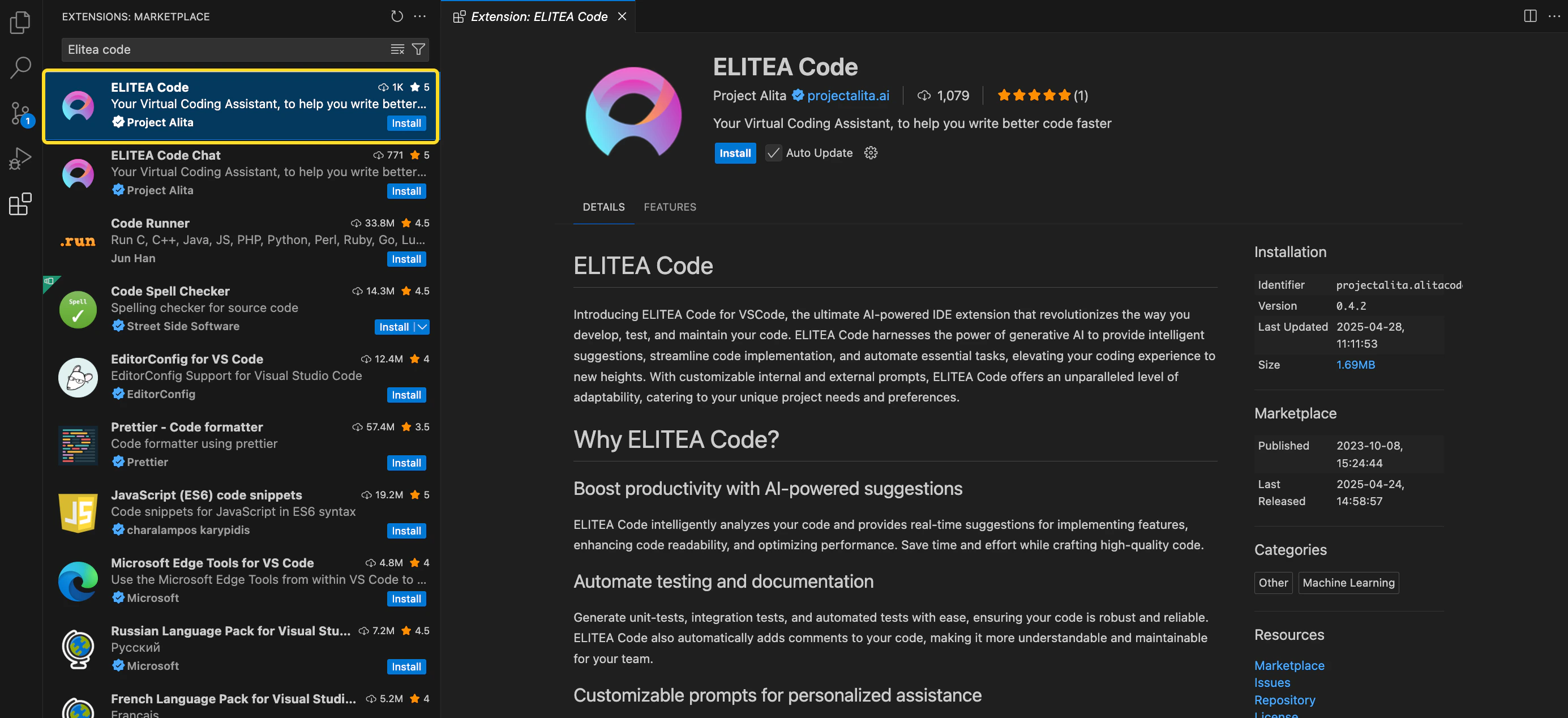
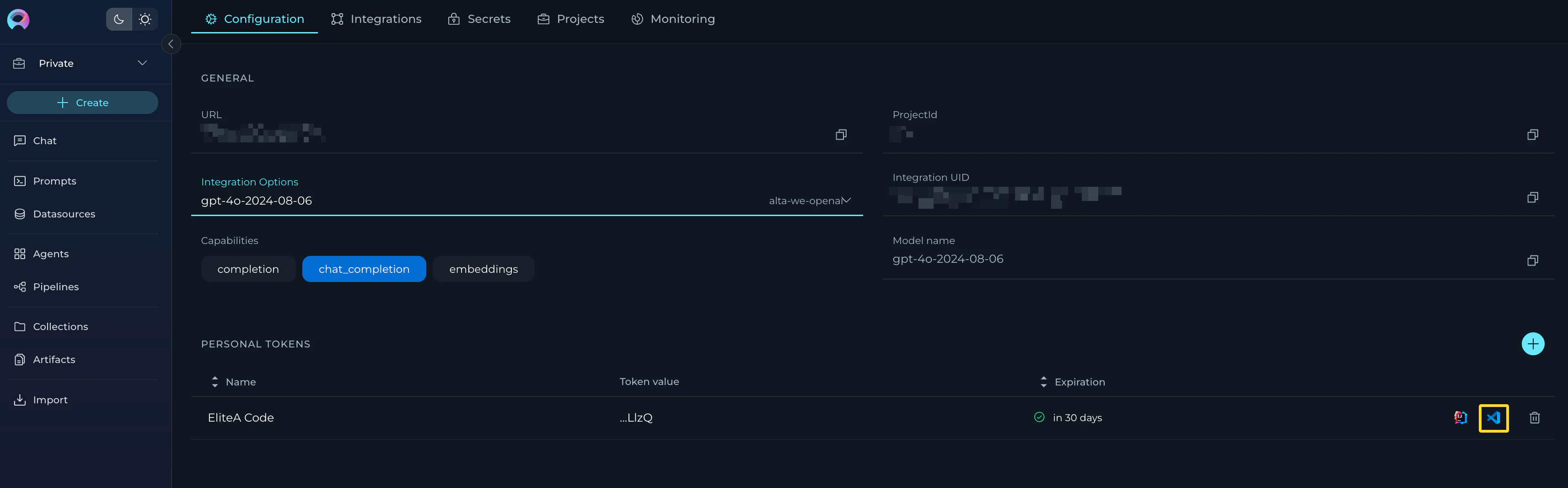
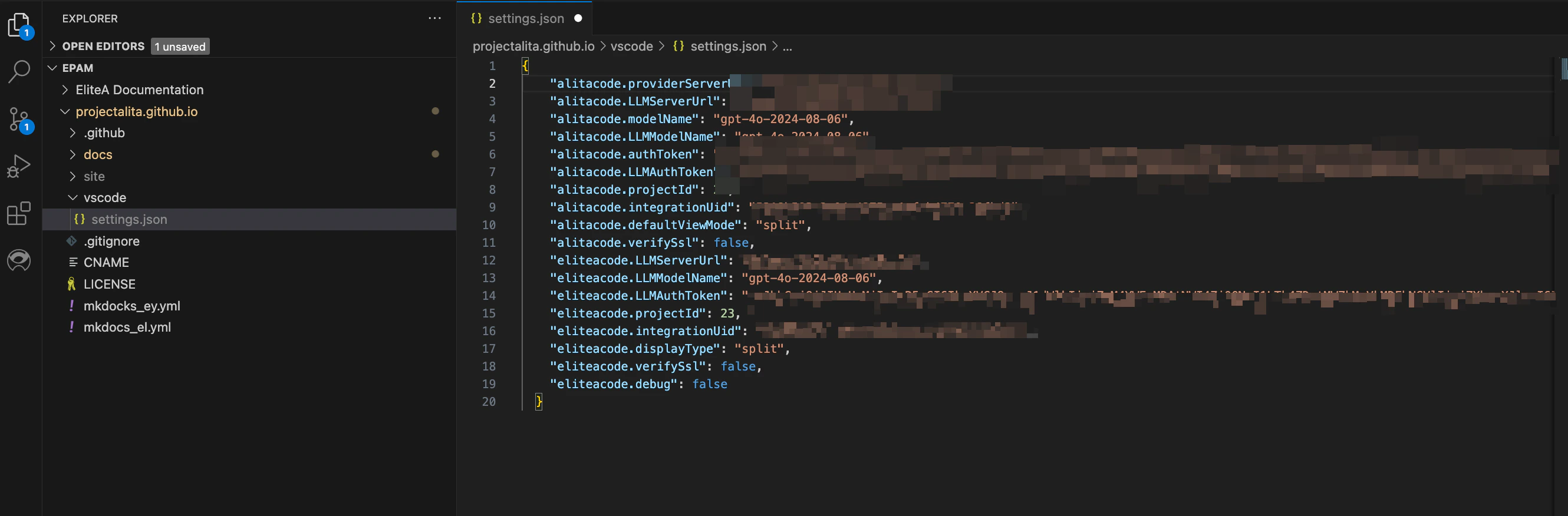
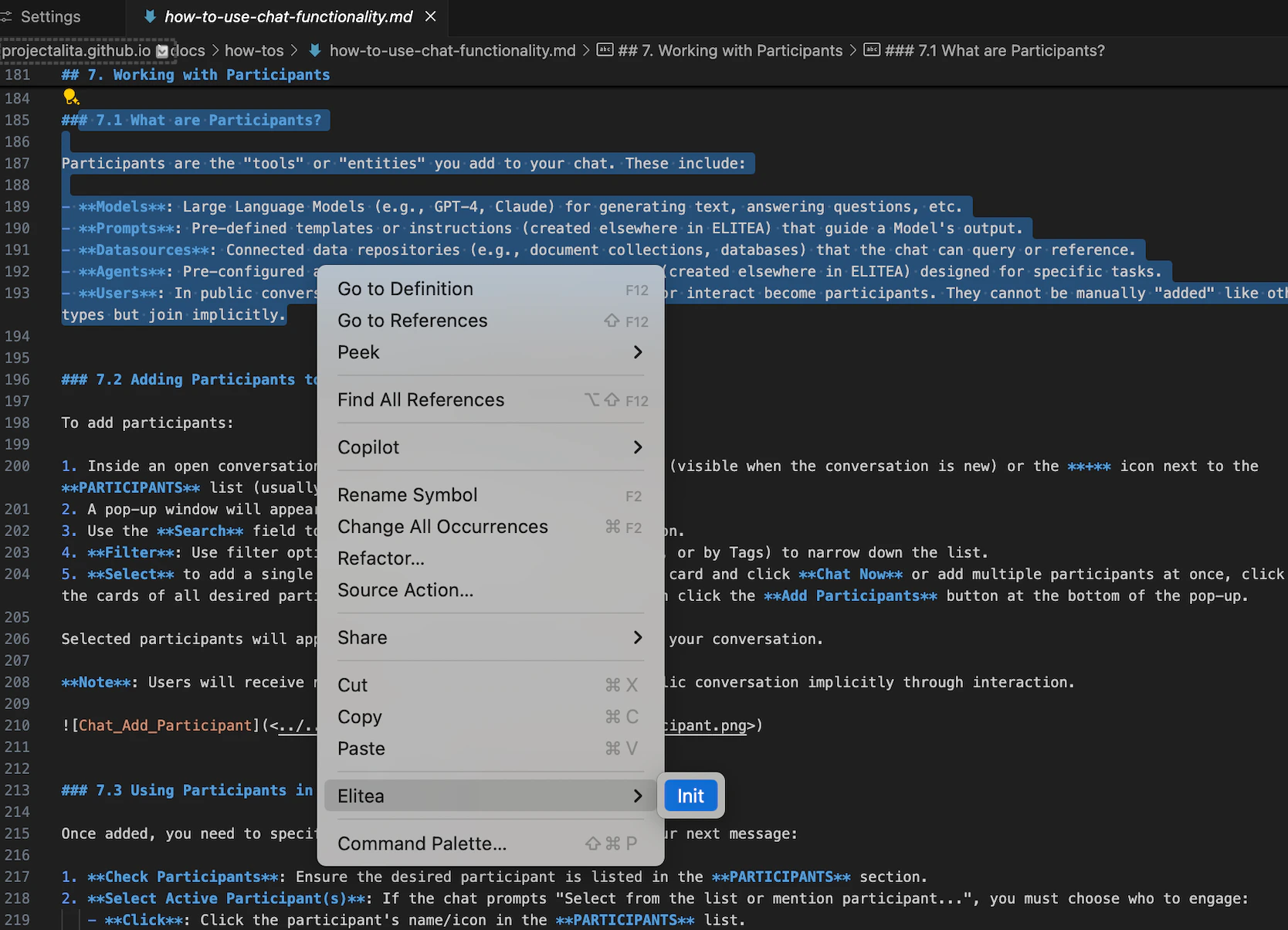
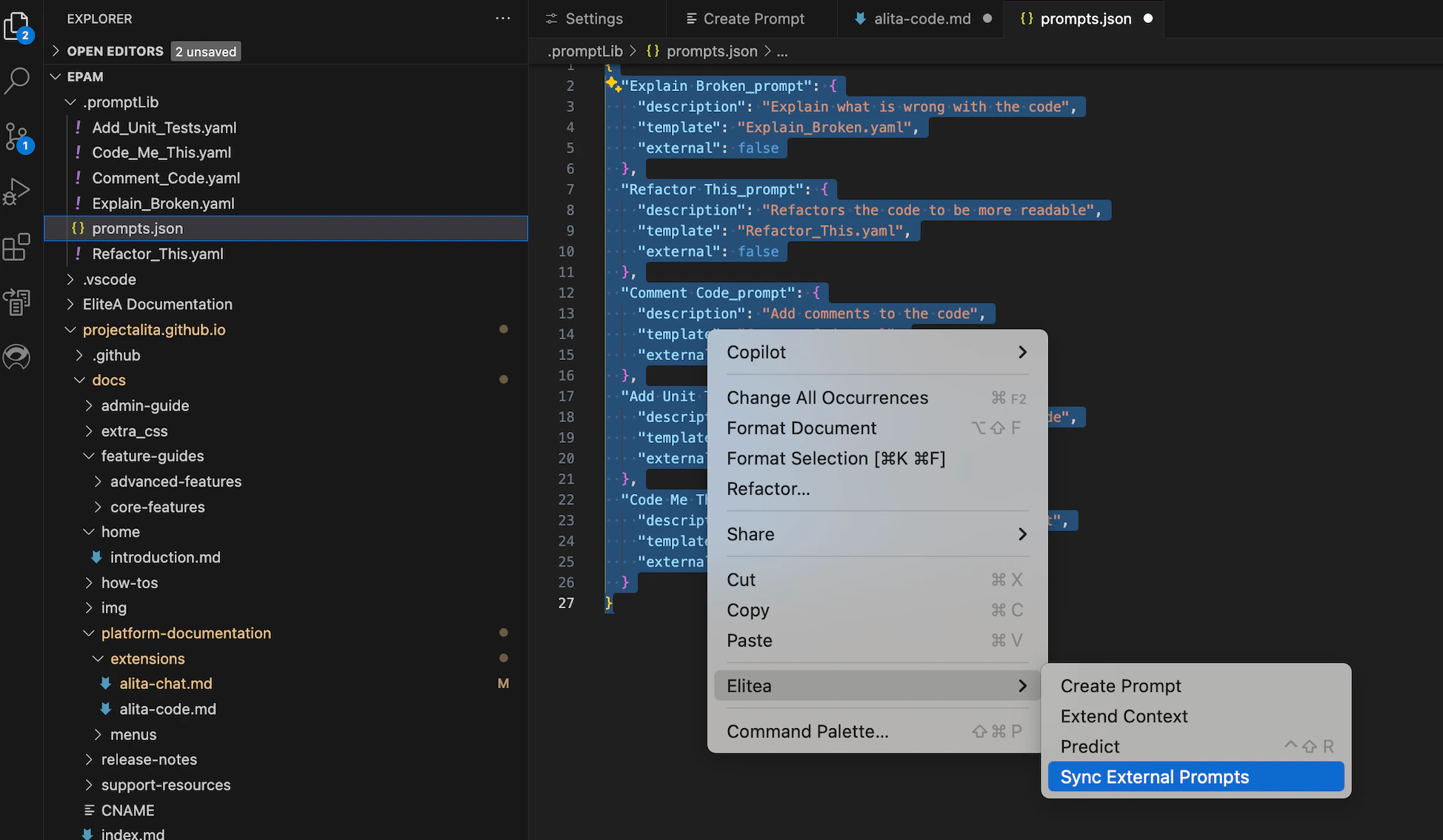
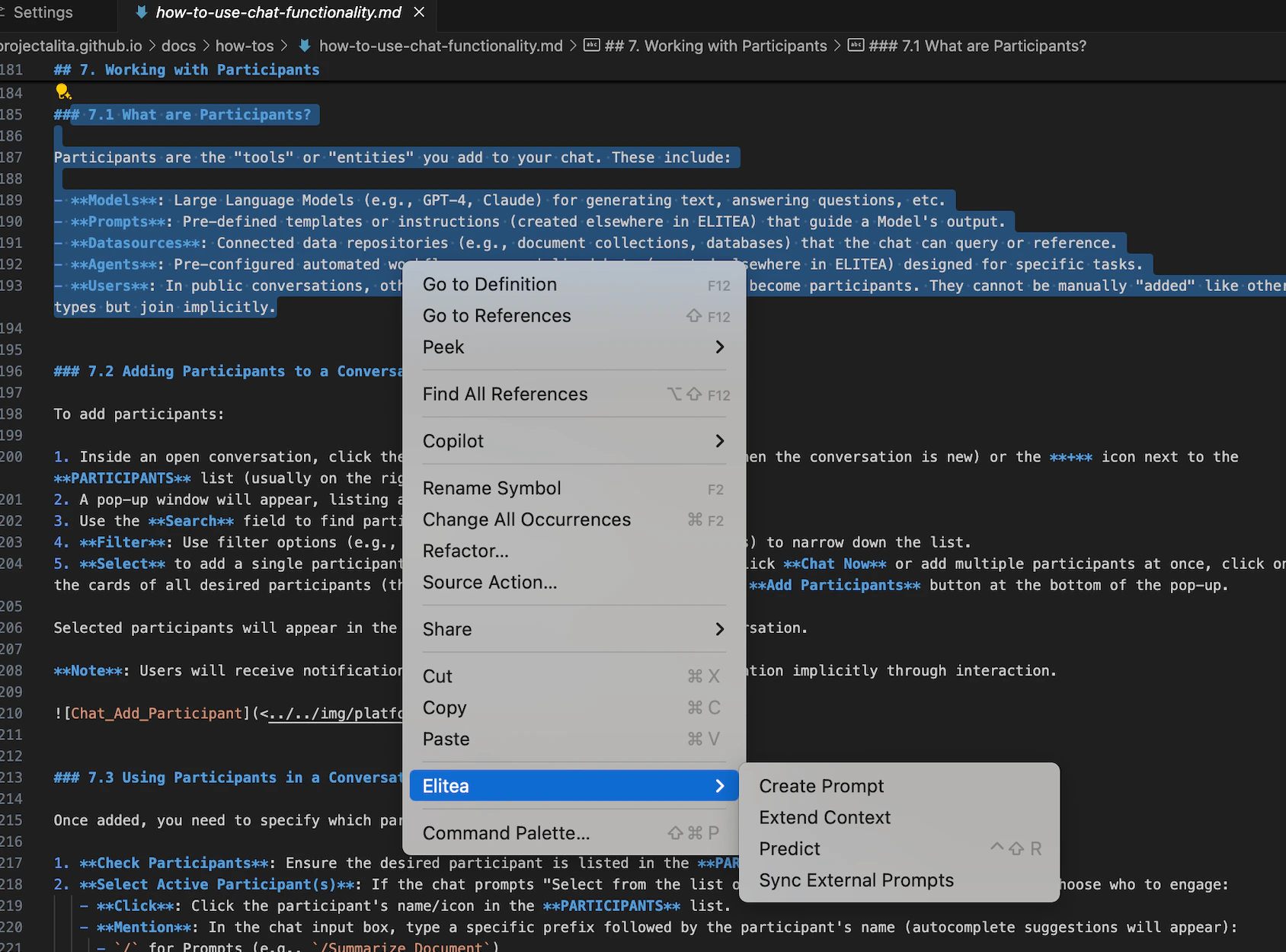
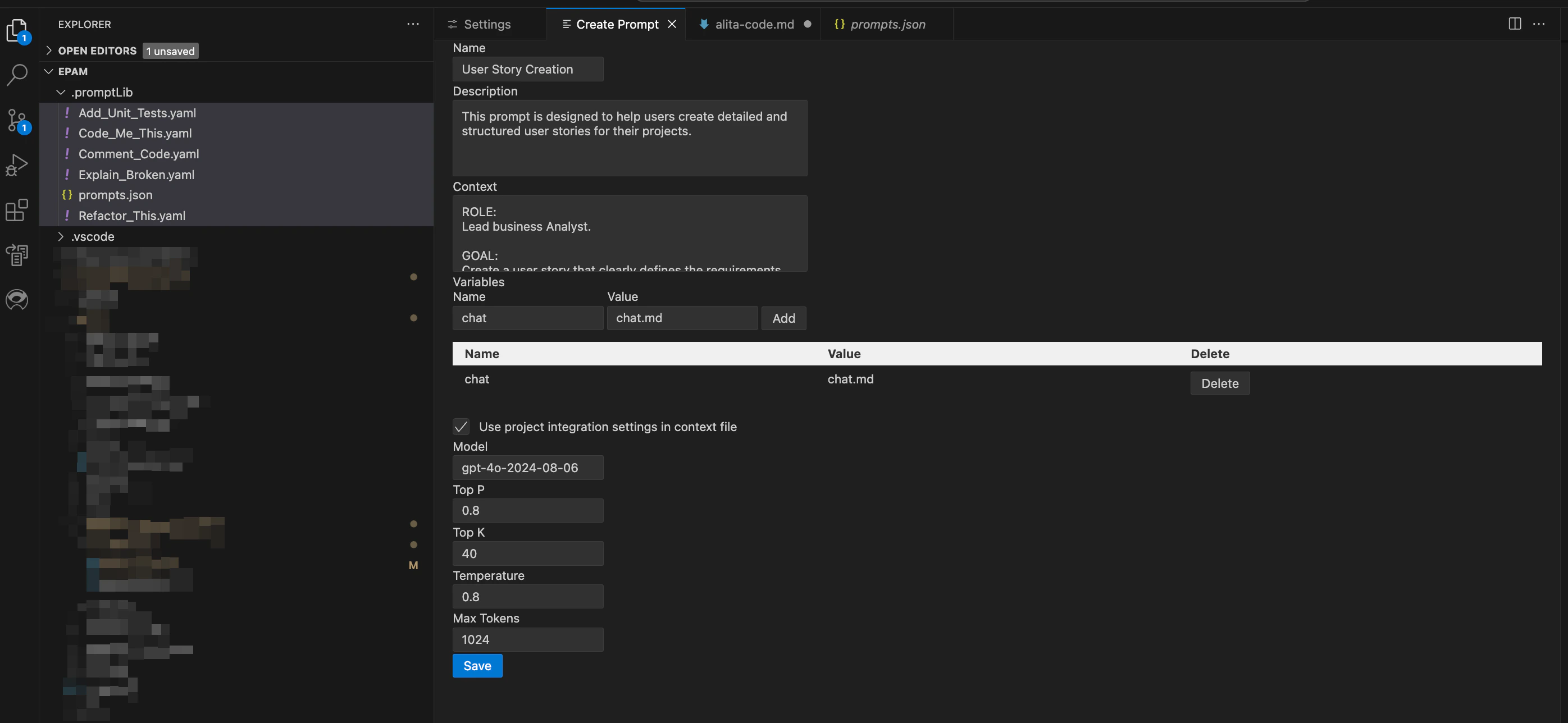
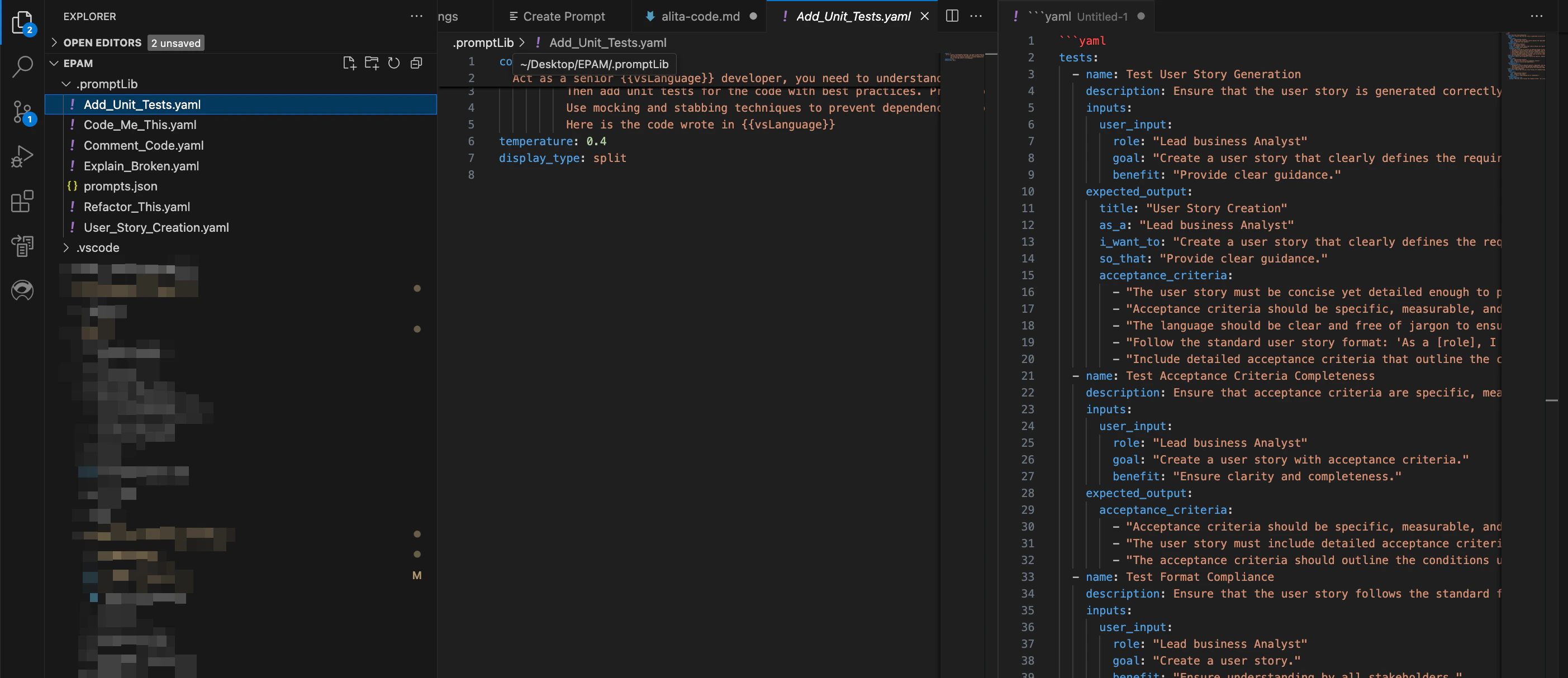
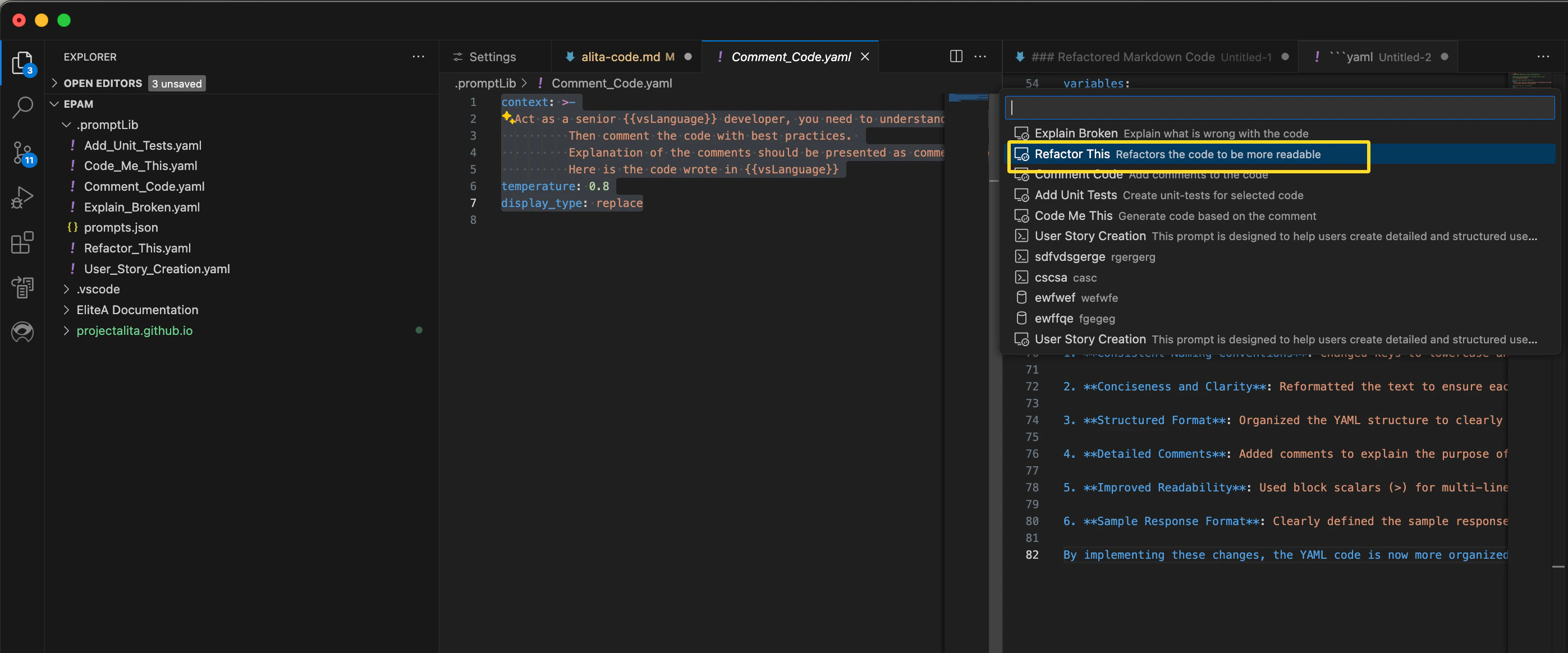
.png?fit=max&auto=format&n=QwehaKayfOTb4rt0&q=85&s=97a3470f8980262315080b472847cb34)
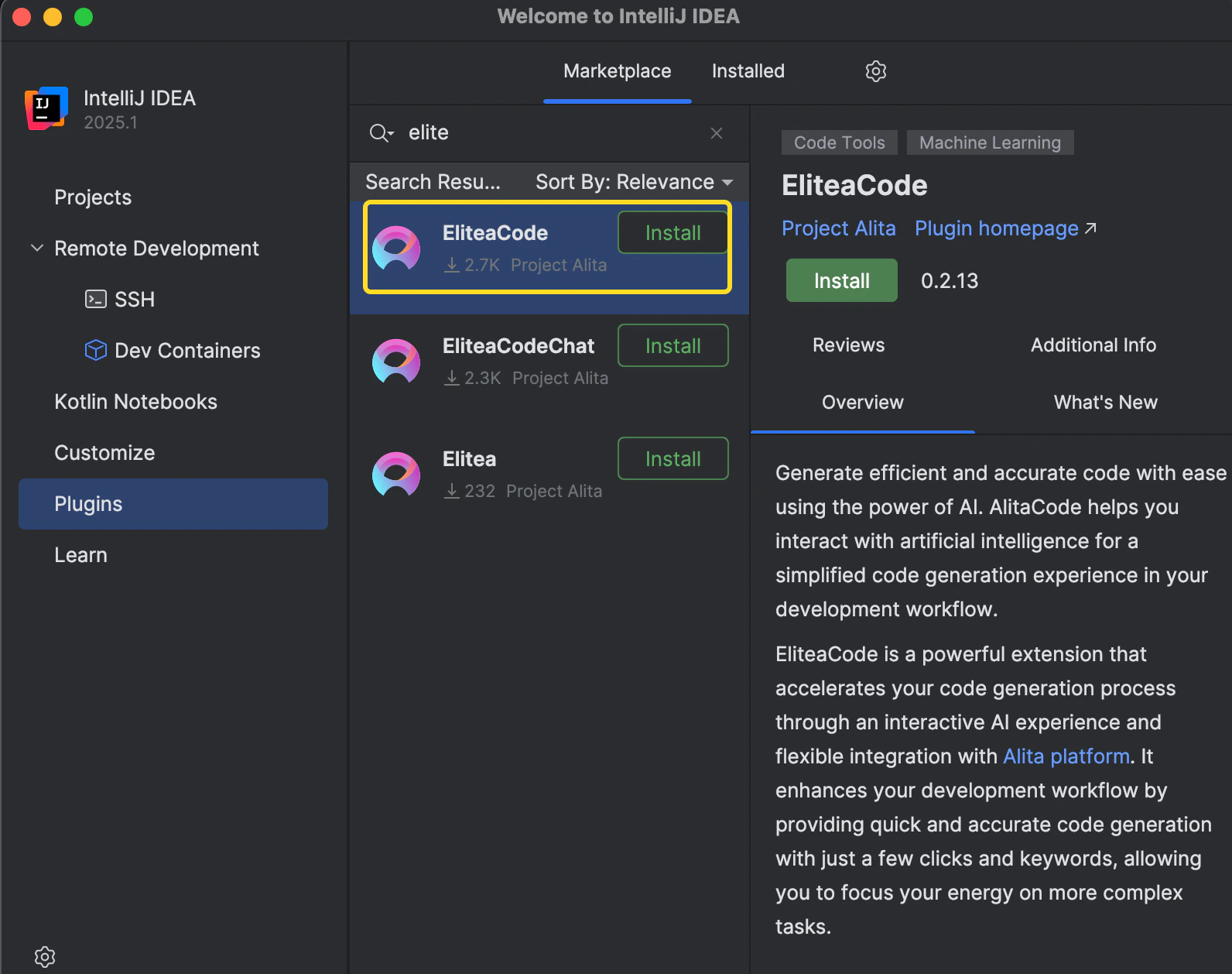
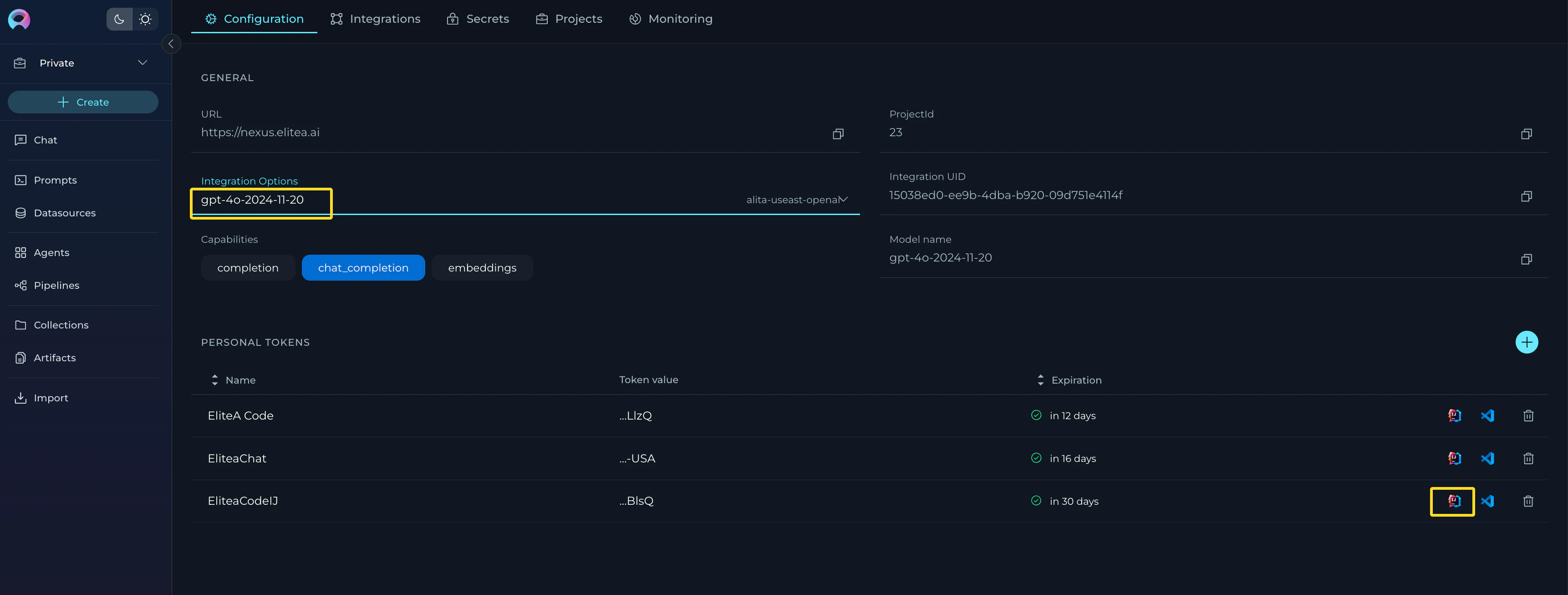
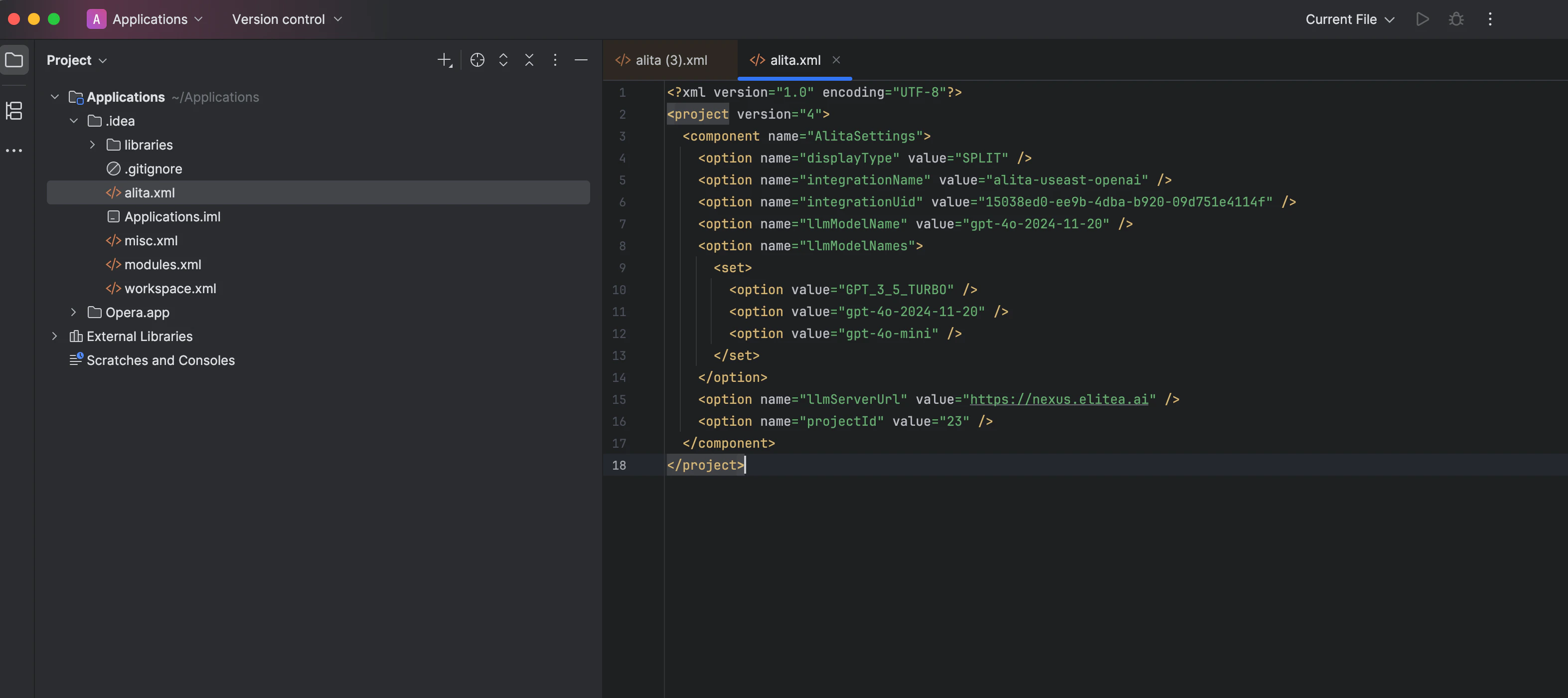
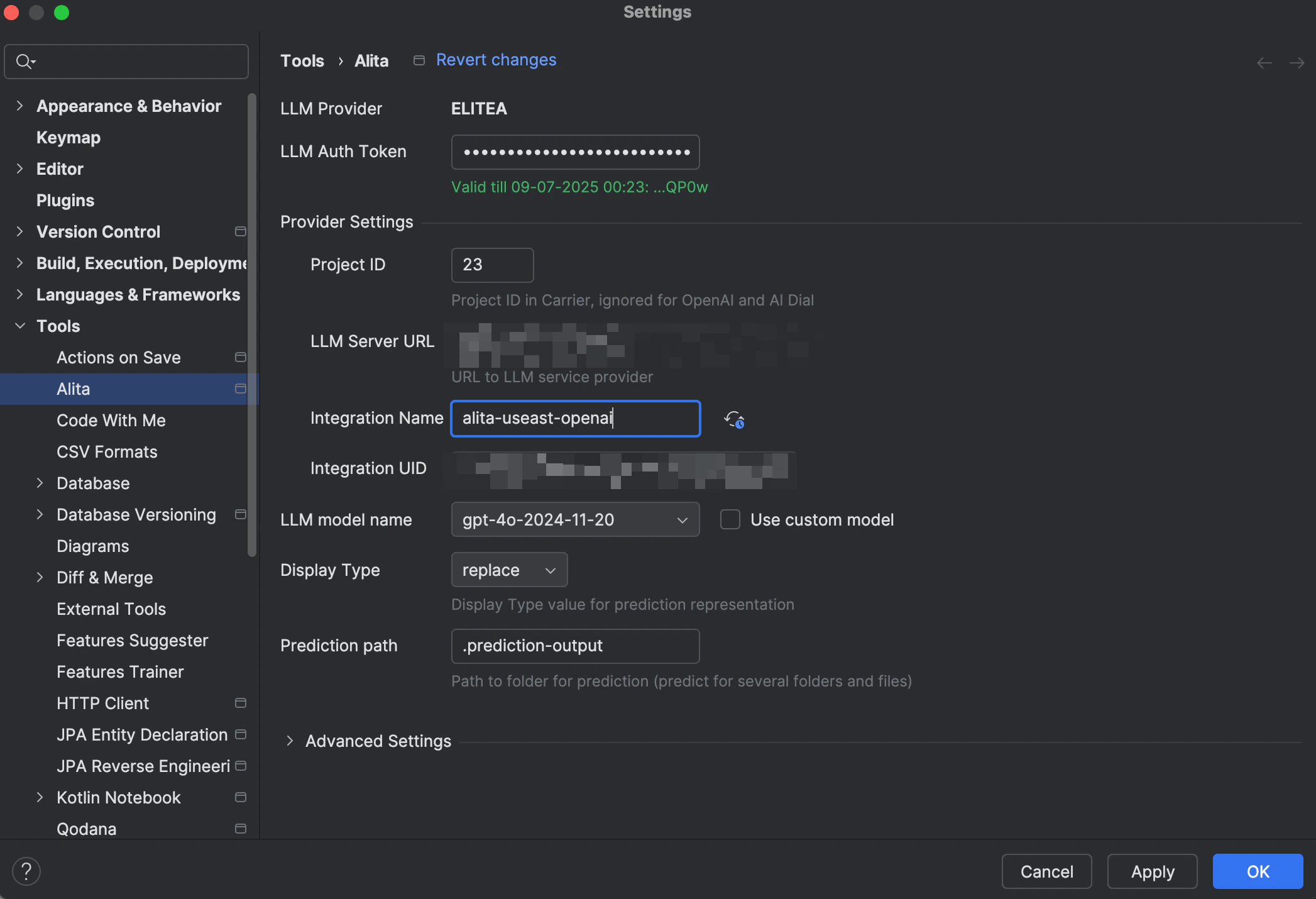
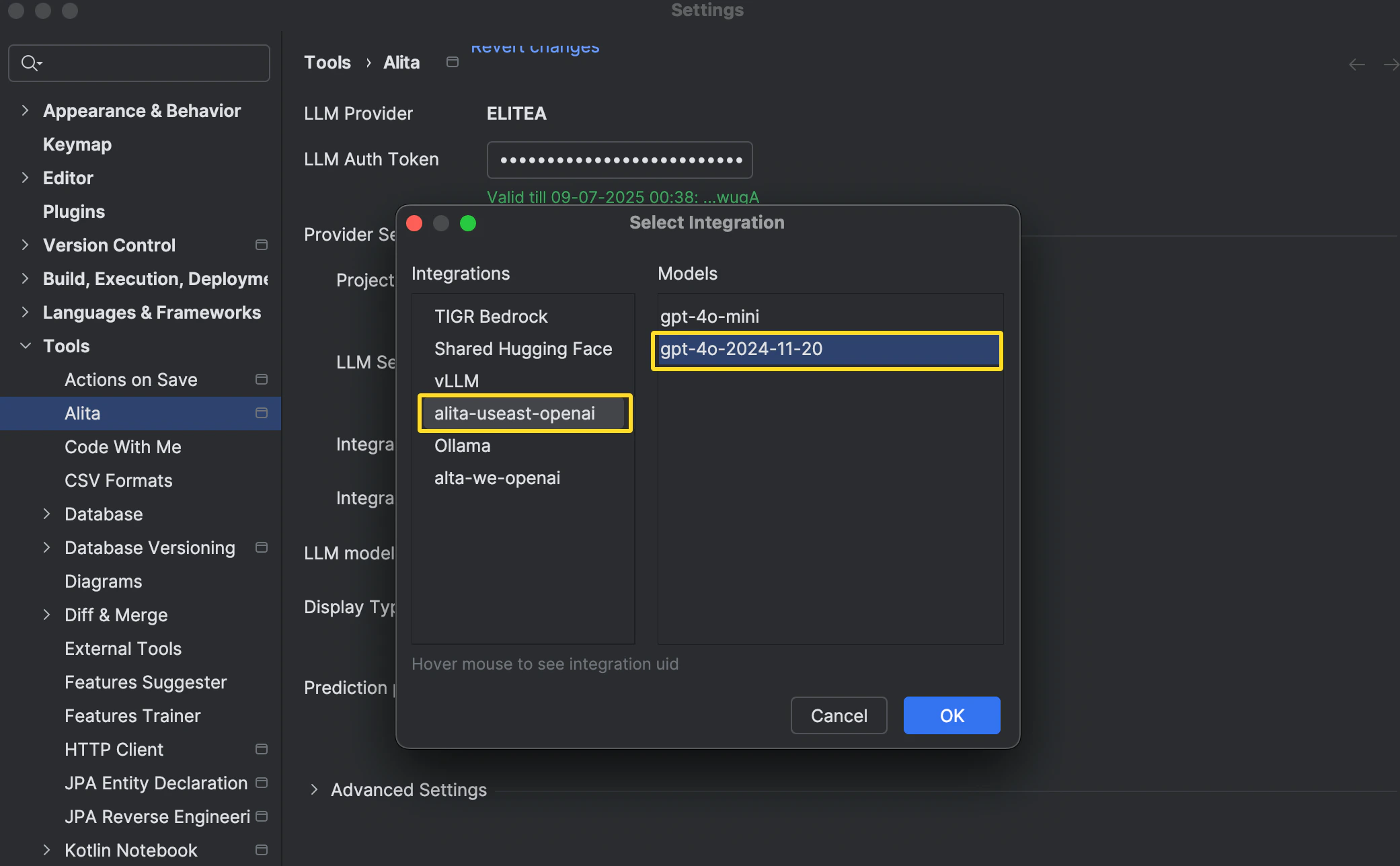
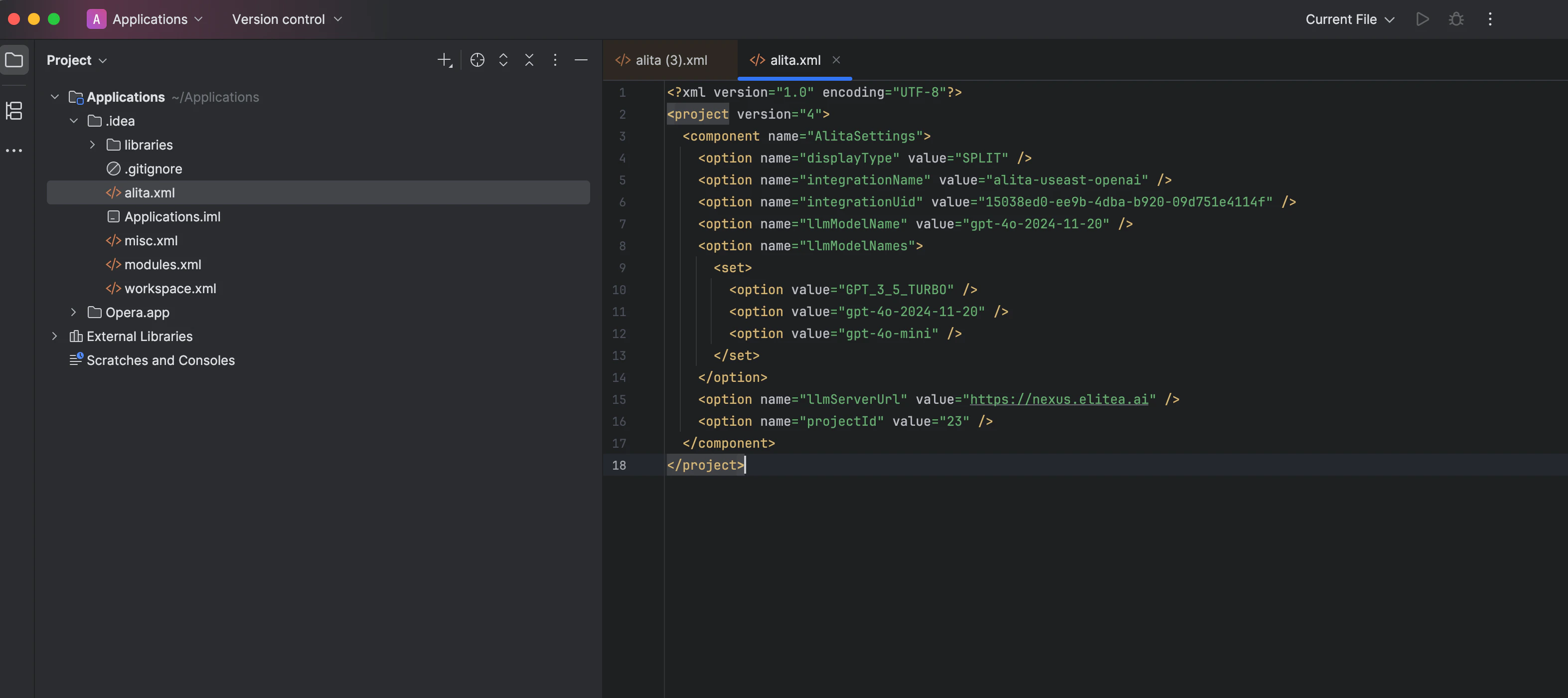
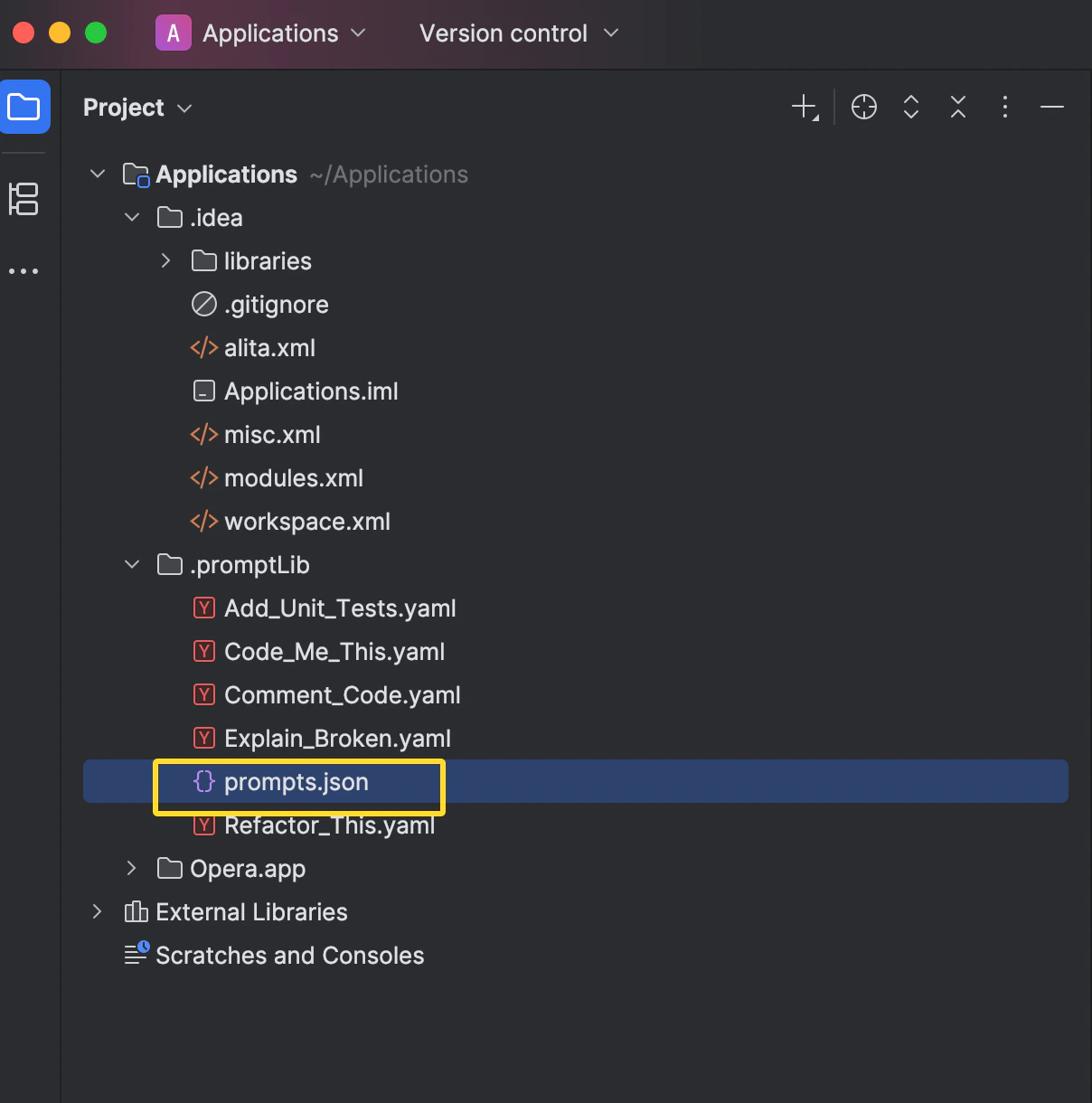
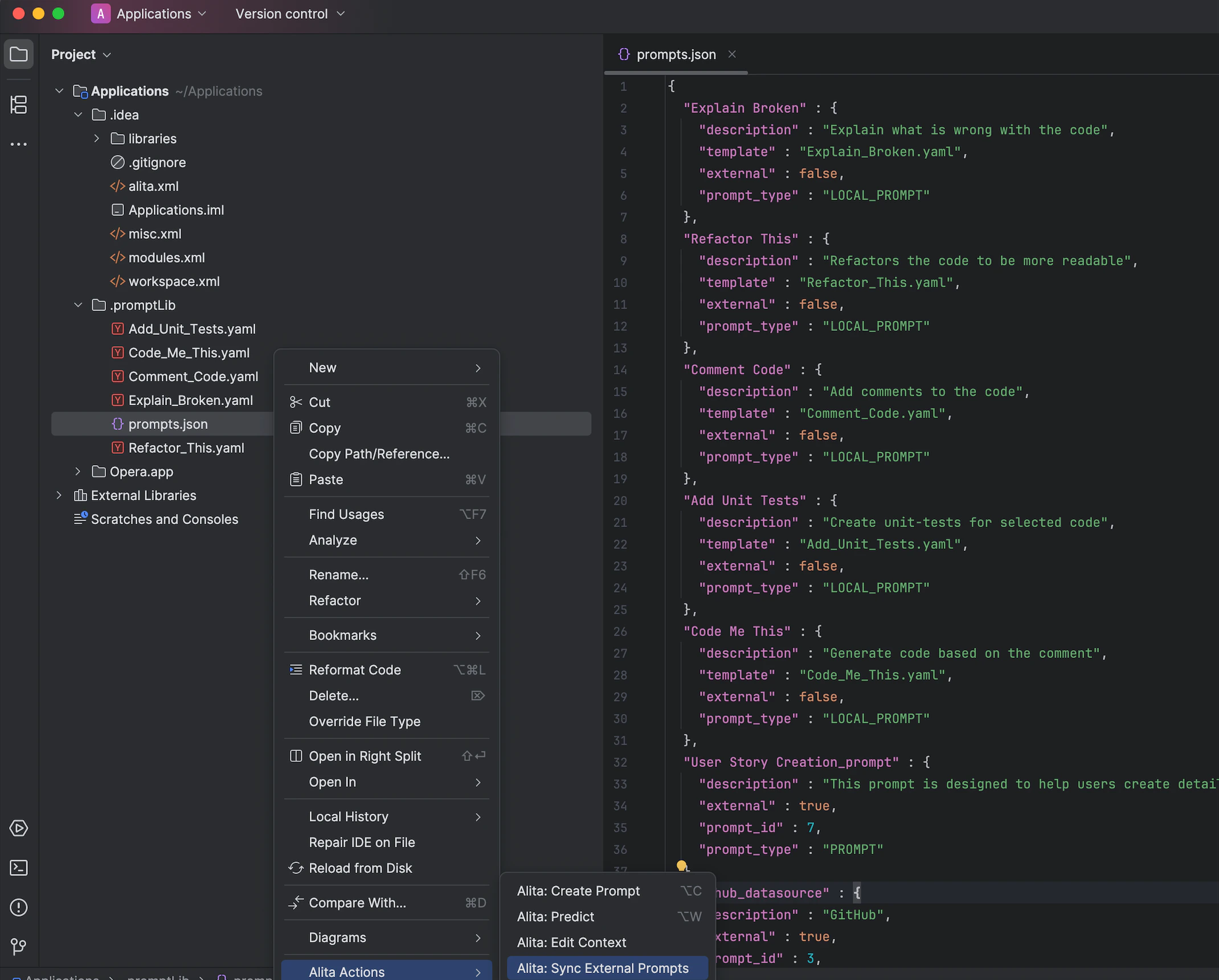
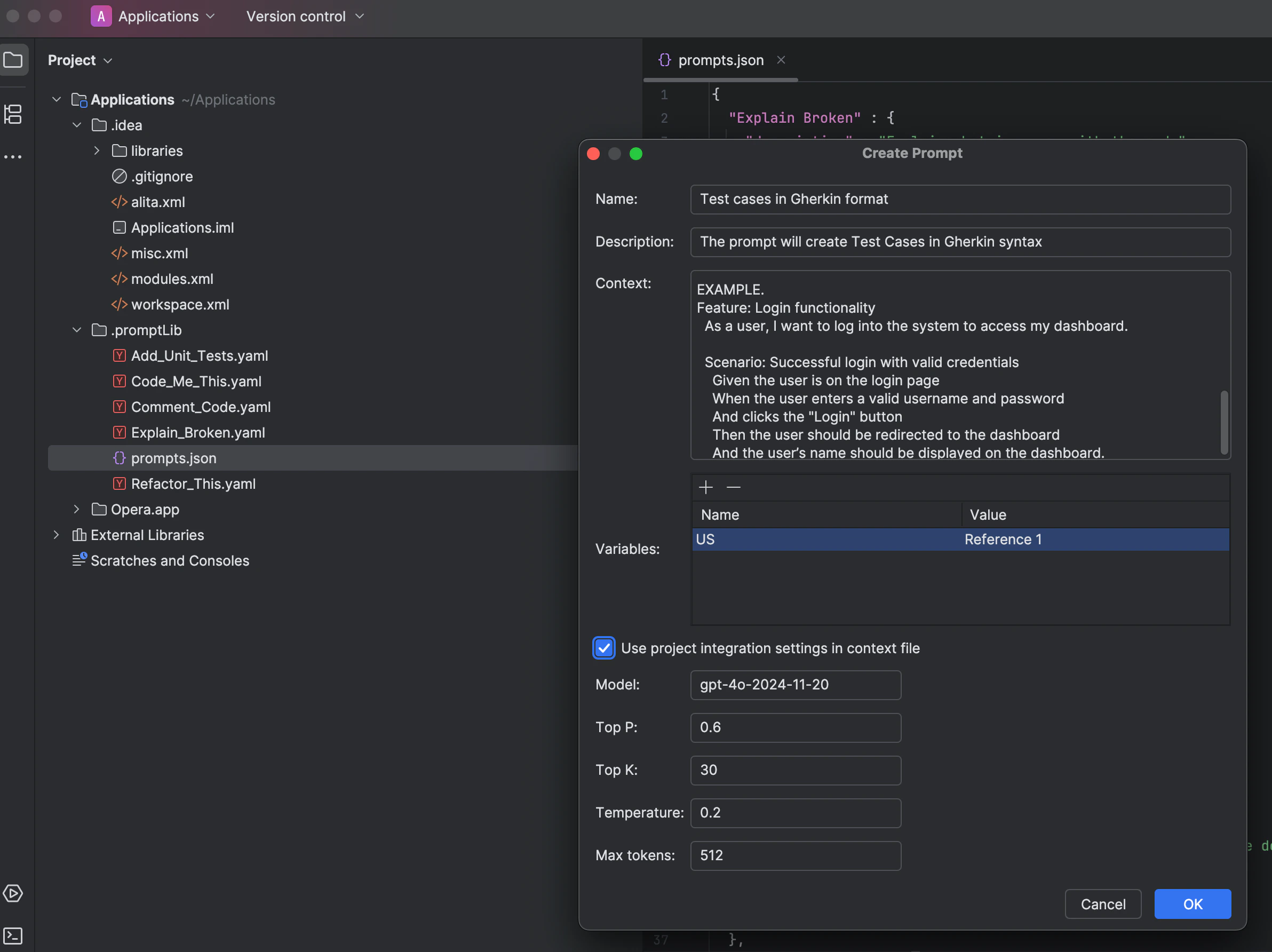
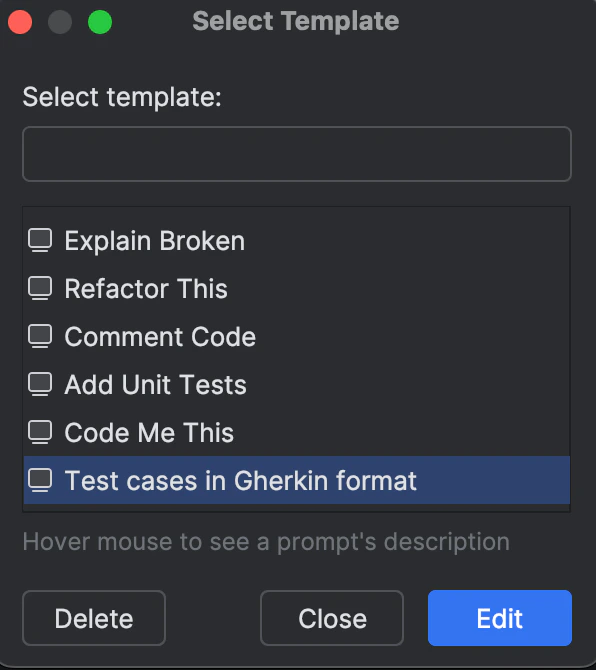
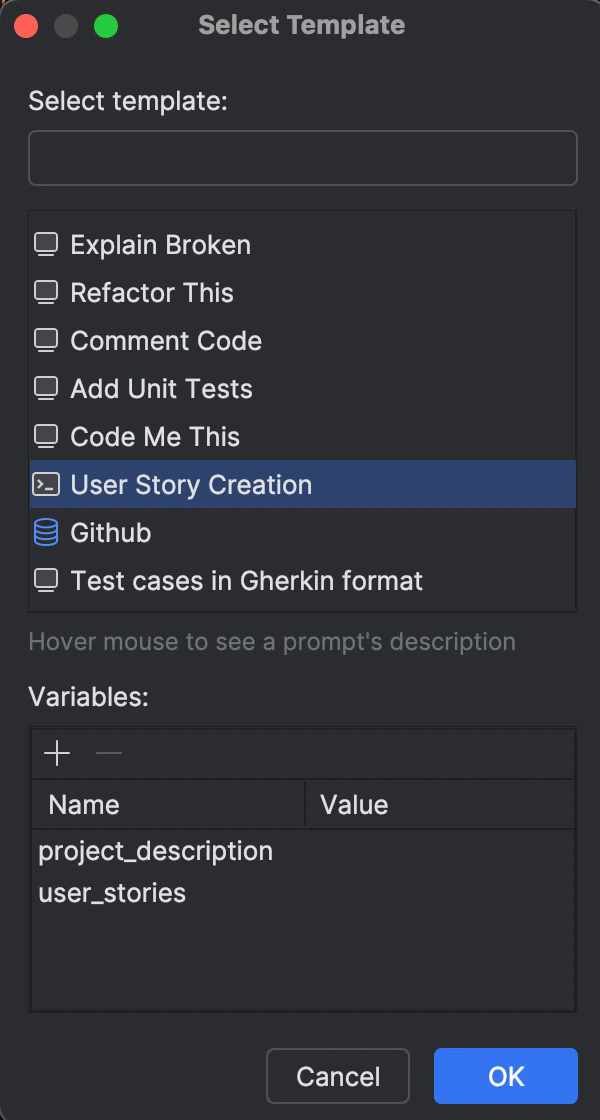
.png?fit=max&auto=format&n=QwehaKayfOTb4rt0&q=85&s=d24c5f9fbf7c1d289c819961bea9fa80)