

Overview
Key capabilities:- Pre-execution authorization — Halts tool invocation, shows the pending action and its parameters to the user, and waits for a decision.
- Transparent parameter display — Surfaces the exact arguments the agent plans to pass, with security-sensitive fields (passwords, tokens, API keys, secrets) automatically masked as
***. - Customizable authorization message — Organizations can customize the approval request with their company name and a tailored policy message.
- Flexible tool targeting — Sensitive tools can be specified per toolkit type, per named toolkit instance, or globally across all toolkits using a wildcard (
*). - Block with Comment — Users can block a sensitive action and send a short explanation back to the agent as structured feedback.
- Session-level auto-approve — Once a tool is authorized within an execution batch, subsequent calls to the same tool in that batch do not re-interrupt, reducing friction for repetitive safe actions.
- Stale-interrupt protection — If a user sends a new message while an authorization dialog is pending, the system re-surfaces the existing interrupt instead of proceeding autonomously.
How It Works When the guardrail is active, the following flow applies every time the agent attempts to call a designated sensitive tool:
- Detection: The
SensitiveToolGuardMiddlewareintercepts the tool call before execution. - Context building: The middleware resolves the toolkit name, tool name, and planned arguments. Security-sensitive argument fields are masked.
- Interrupt: Execution pauses and a HITL interrupt is raised. The conversation UI displays the authorization dialog.
- User decision: The user reviews the action label, parameters, and policy message, then clicks Authorize, Block, or Block with Comment.
- Resume or skip:
- Authorize → the tool runs as originally planned.
- Block → the tool is skipped. The agent receives a blocked-action message and continues or stops based on its logic.
- Block with Comment → the tool is skipped, and the user’s note is passed back to the agent as the blocked action’s
denial_reason.
Configuration
The Sensitive Action Authorization Guardrail is set up by your ELITEA administrator at the platform level. As an end user, you do not need to configure anything — the guardrail is already active when you see the authorization dialog in your conversations. Your administrator controls three aspects of the guardrail:- Which tools require approval — Specific actions within toolkits (such as deleting a repository, running a shell command, or dropping a database table) are designated as sensitive. Any agent that has access to those tools will trigger the authorization dialog when it attempts to use them.
- Organization name — The name shown in the authorization message (e.g., “Acme Corp requires approval before…”). This is set to match your organization’s branding.
- Approval message — The policy message displayed in the dialog, explaining why the action needs review.
Contact your ELITEA administrator. They can update the list of protected tools and apply the changes during the next platform maintenance window.
Authorization Dialog in the UI
When a sensitive tool is triggered, the conversation pauses and displays an authorization card.
-
Dialog elements
Element Description Header ”⚠️ Sensitive Action Authorization Required” — amber-highlighted panel Action label The specific action the agent plans to run, formatted as toolkit_name.tool_name(e.g.,github.delete_repo)Parameters Collapsible panel showing the exact arguments the tool will be called with. Security-sensitive fields ( password,token,api_key,secret,authorization, etc.) are automatically masked as***.Policy message The configured authorization message from ALITA_SENSITIVE_ACTION_MESSAGE_TEMPLATE
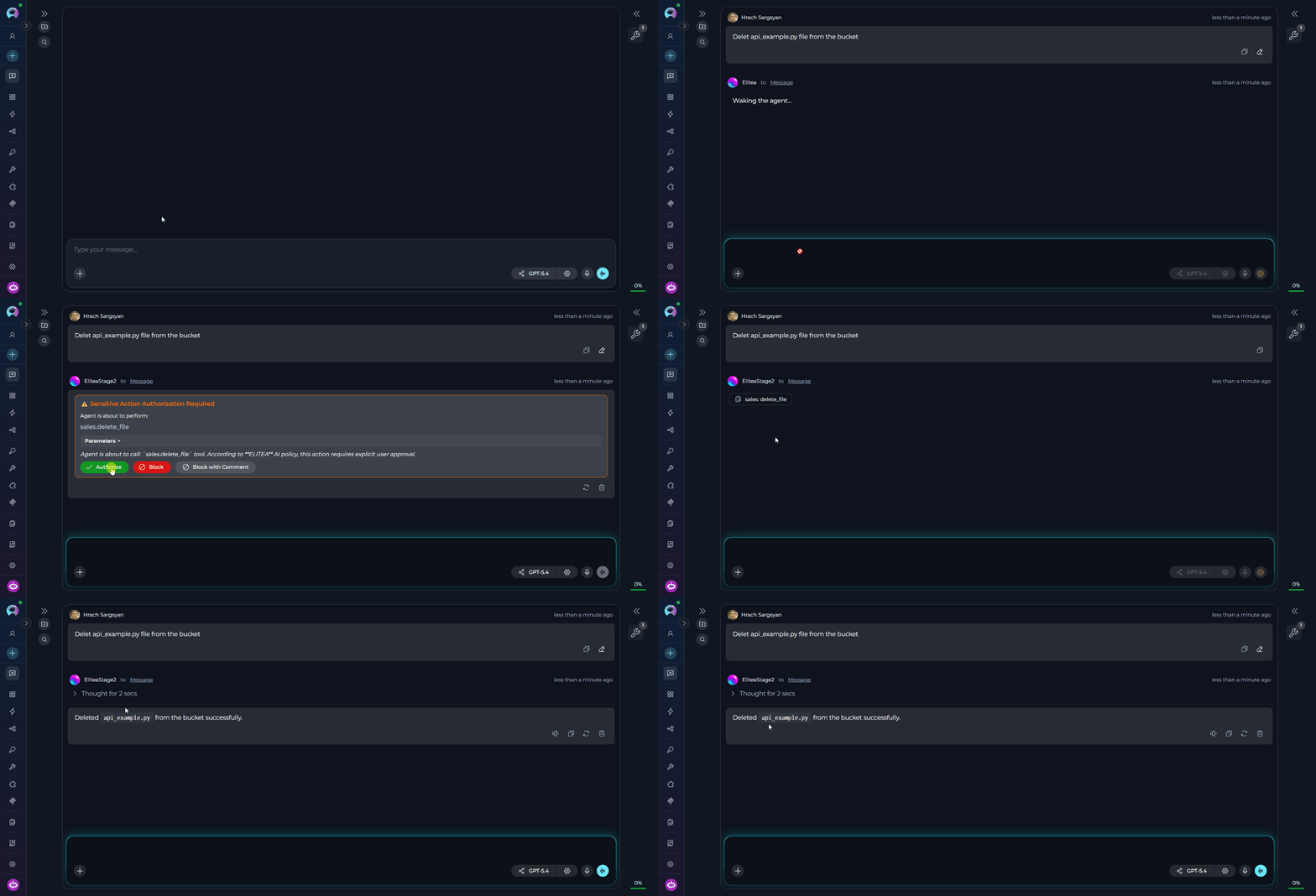
Approves the action, resumes execution 
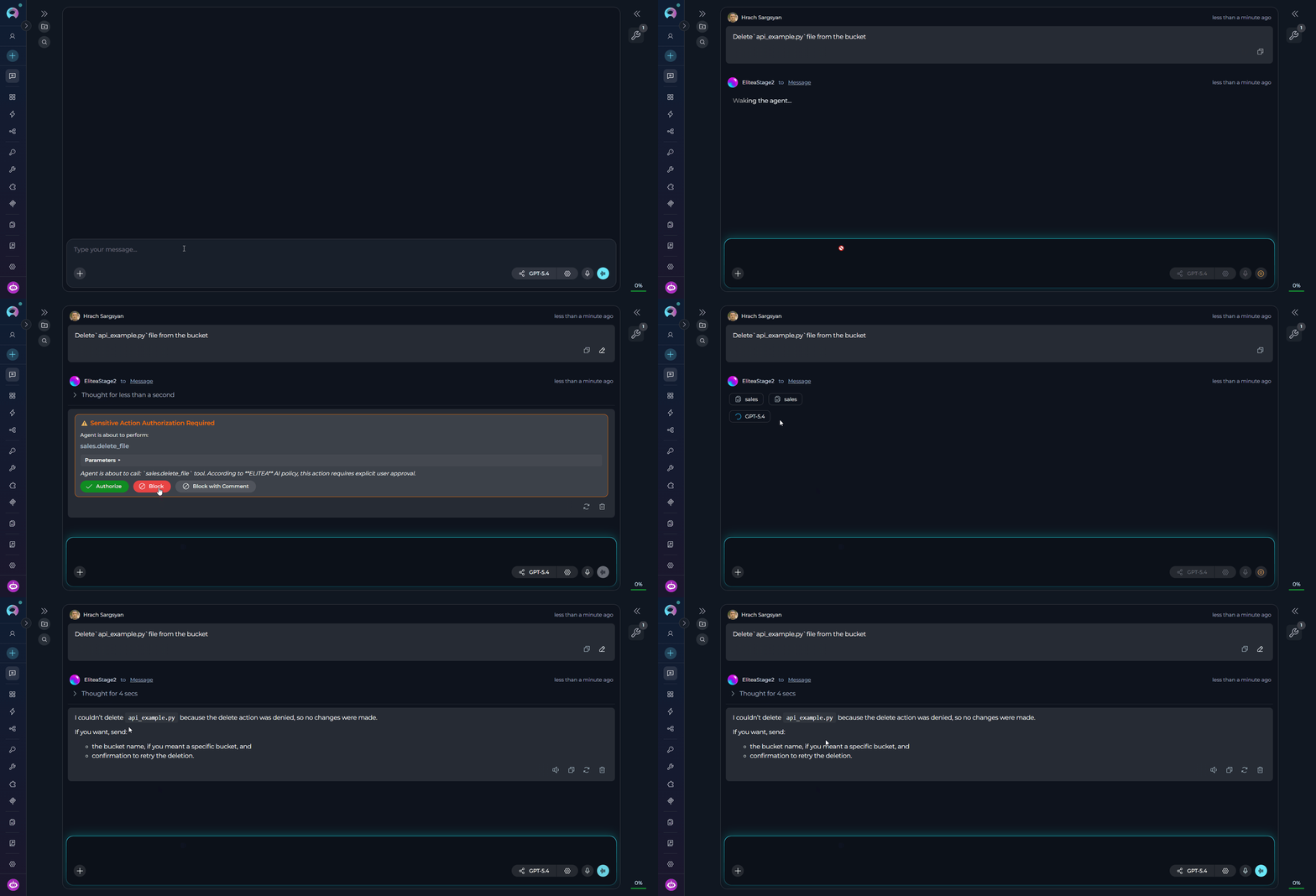
Rejects the action, skips the tool call entirely 
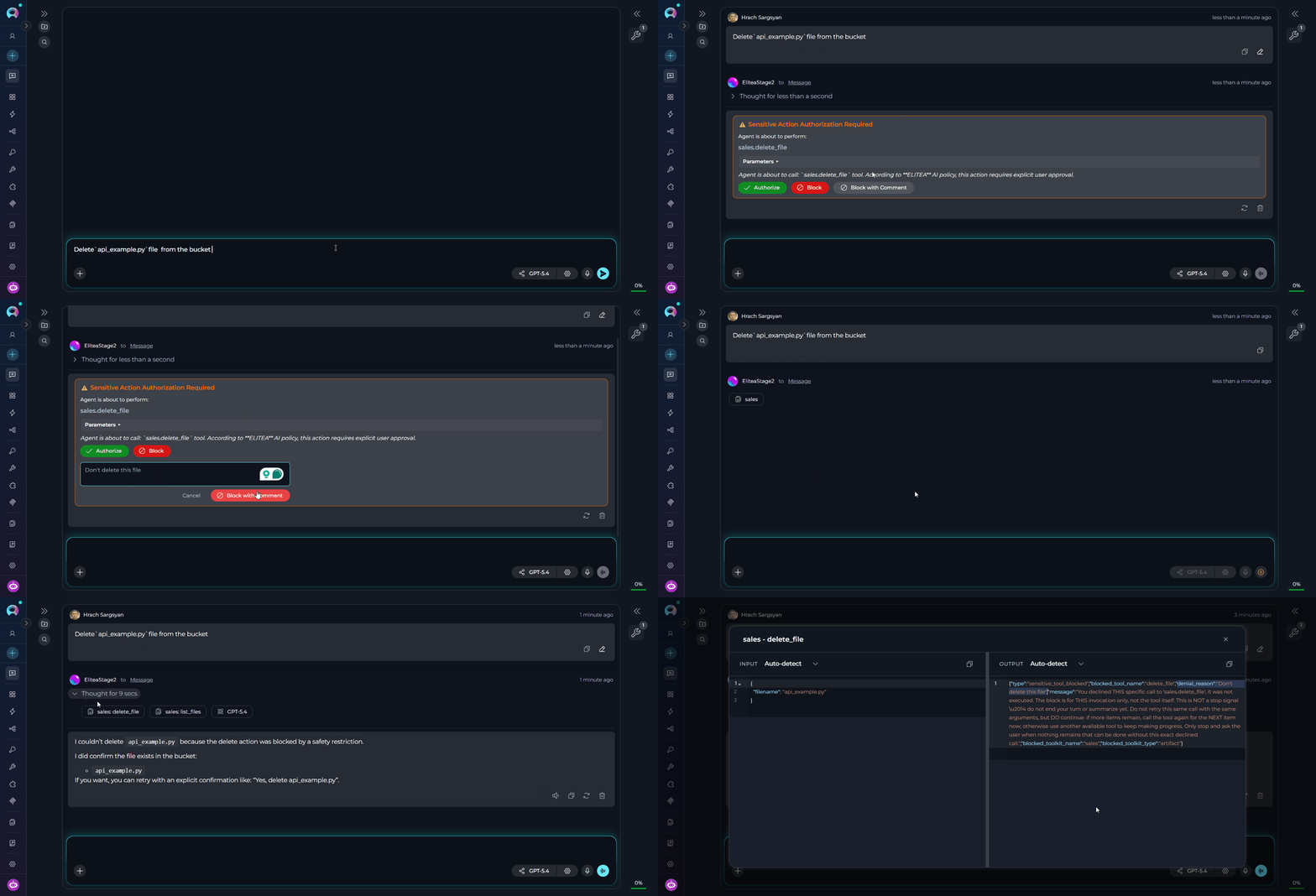
Expands an inline comment box on the authorization card so you can explain why the action is blocked and what the agent should do instead
When you click Block, the agent receives a notification that the action was skipped. It will typically acknowledge the cancellation and either stop or continue with the remainder of its task, depending on the agent’s configuration. The tool is never executed.
When Block with Comment is available for the current interrupt, clicking it expands a multiline input directly on the authorization card. Your note is sent back to the runtime as the blocked action’s
denial_reason, allowing the agent to understand why the action was rejected and what alternative behavior you want.Usage in Conversations, Agents, and Pipelines
The guardrail is transparent — it activates automatically whenever a configured sensitive tool is about to be called, regardless of where the agent is running. In Conversations Start a conversation with any agent or model that has access to toolkits. When the agent decides to invoke a sensitive tool, the conversation pauses automatically and shows the authorization card.- Review the action label and parameters carefully.
- Click Authorize to proceed, Block to cancel immediately, or Block with Comment to cancel and provide guidance.
- The conversation resumes automatically after your decision.
-
Authorize
-
Block
-
Block with Comment
-
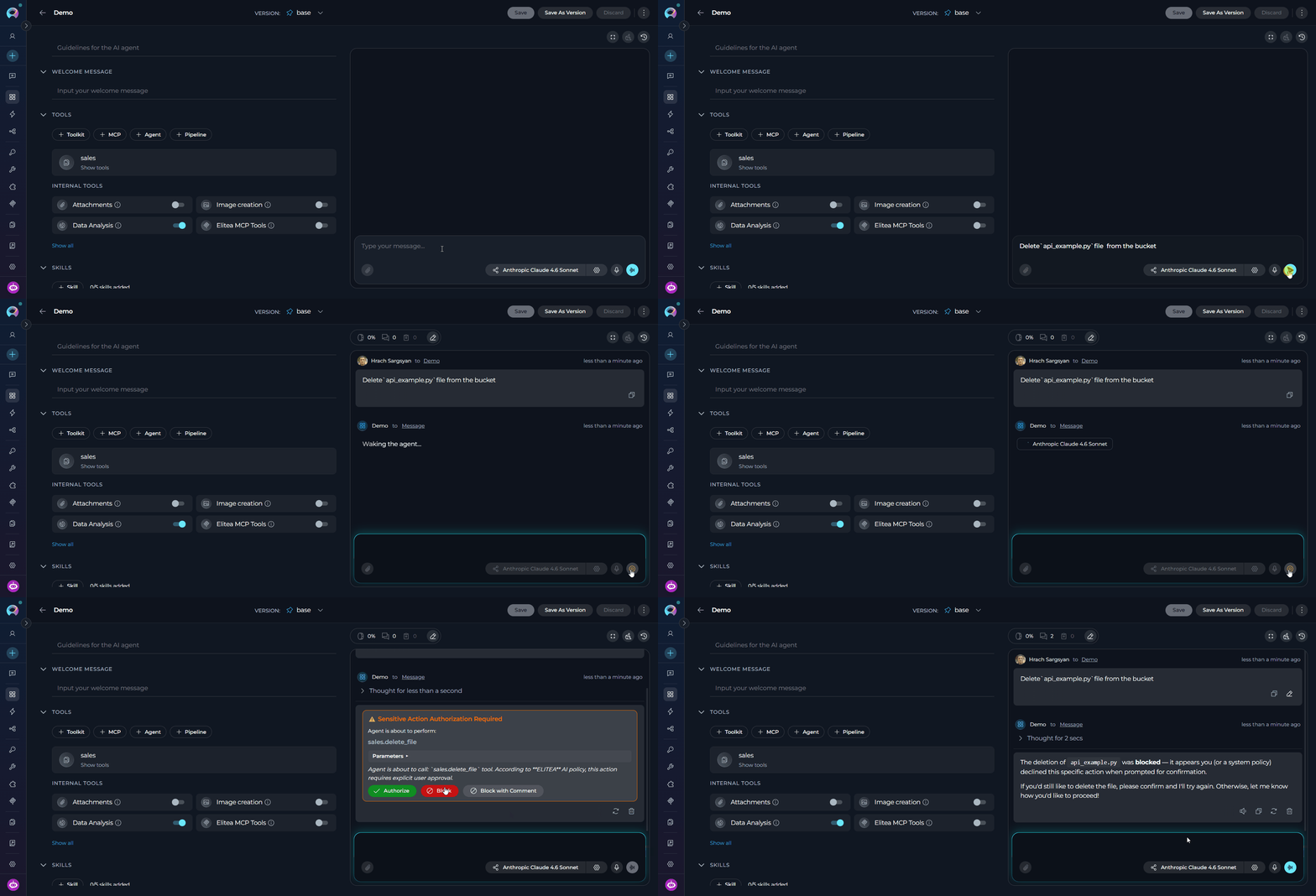
When an agent is configured with toolkits that include sensitive tools, the guardrail activates mid-execution. The agent’s task pauses at the sensitive tool call, the user authorizes or blocks, and the agent continues from that point.
-
In pipeline graphs, the guardrail wraps tools used in
toolkit,function,mcp,code, andllmnode types. When a pipeline node calls a sensitive tool, execution halts at that node, the authorization dialog appears, and the pipeline resumes from that checkpoint after the user’s decision.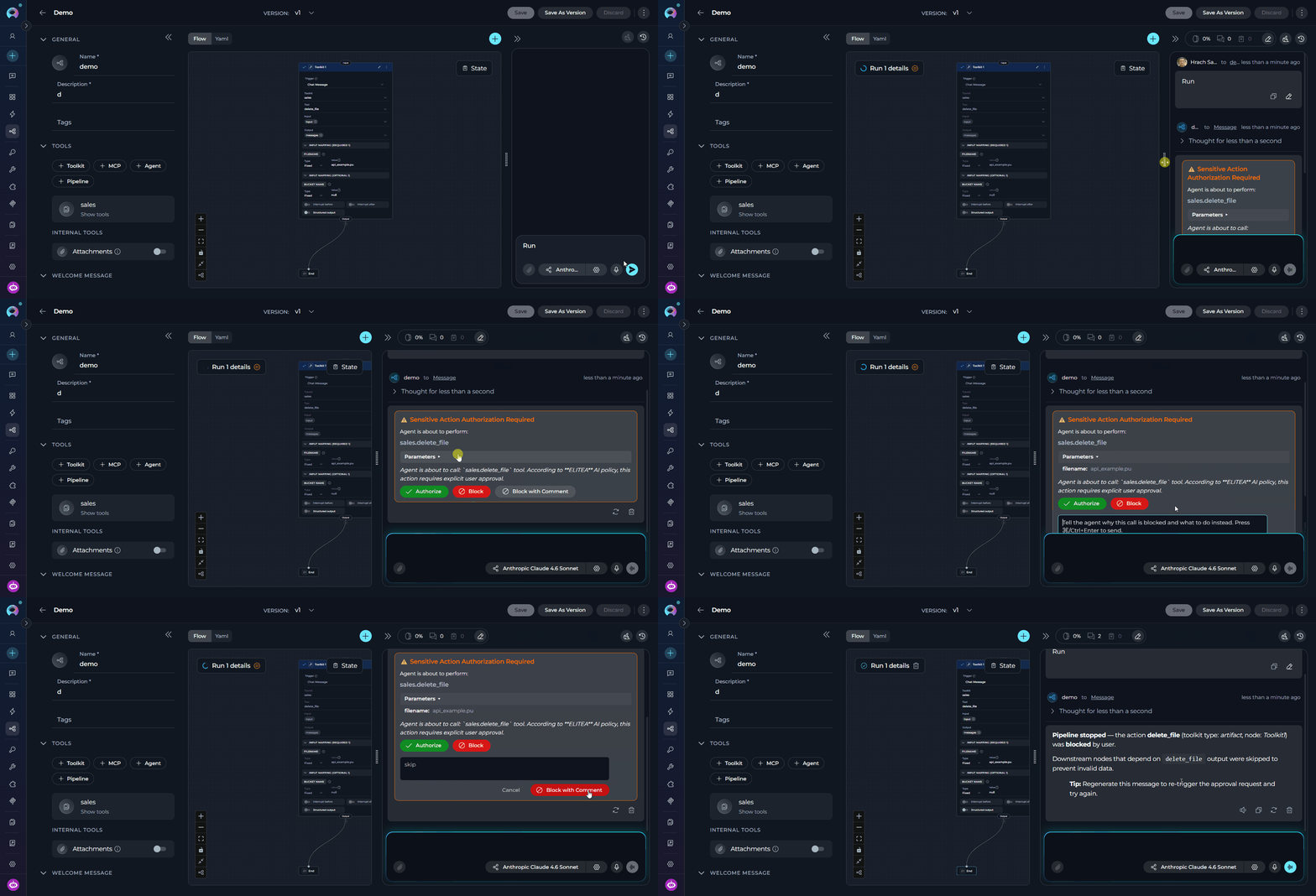
For
code node types (Python Sandbox), the guardrail is applied when the sandbox tool is configured as sensitive (e.g., "sandbox": ["pyodide_sandbox"]). The pipeline pauses before any code execution, showing the code parameters for review.Limitations
Real-Life Usage Examples
Example 1: Protecting Destructive GitHub Operations
Example 1: Protecting Destructive GitHub Operations
A DevOps agent has access to the GitHub toolkit and can manage repositories. Deleting repositories, branches, or merging pull requests are all protected — any attempt by the agent triggers the authorization dialog.Usage scenario:
Example 2: Controlling Shell Command Execution
Example 2: Controlling Shell Command Execution
An infrastructure automation agent can run shell commands. When the agent attempts to execute any system-level command, the conversation pauses and presents the authorization dialog — showing the full command and its arguments — before anything runs.Usage scenario:
- Click Authorize to allow the script to run on the staging server.
- Click Block if the command or target host is not what you expected.
Example 3: Guarding Jira Project Deletion
Example 3: Guarding Jira Project Deletion
A project management agent can delete Jira projects, issues, and sprints. All destructive operations require explicit approval before the agent proceeds.Usage scenario:
Example 4: Wildcard Guard for Cross-Toolkit Operations
Example 4: Wildcard Guard for Cross-Toolkit Operations
Dangerous database operations such as dropping or truncating tables are protected across all toolkits. Regardless of which database or toolkit the agent uses, the authorization dialog appears before any destructive data operation runs.Usage scenario:
- Click Authorize only after confirming the table name and database are correct.
- Click Block to cancel — the table will not be affected.
FAQ
What if the agent calls two different sensitive tools in one message?
What if the agent calls two different sensitive tools in one message?
Each sensitive tool call raises its own independent interrupt. The first tool call pauses execution; after the user decides, the agent continues and pauses again at the second sensitive tool, presenting a new dialog.
What is the difference between Block and Block with Comment?
What is the difference between Block and Block with Comment?
Block simply rejects the tool call.Block with Comment also rejects the tool call, but sends your note back to the agent as structured feedback (
denial_reason). This is useful when you want the agent to understand why the action was blocked or what it should do instead.Are pipeline runs affected?
Are pipeline runs affected?
Yes. Pipelines running in ELITEA share the same underlying runtime. Sensitive tool calls in any pipeline node are intercepted and paused for human authorization.
What does the agent receive when a tool is blocked?
What does the agent receive when a tool is blocked?
The agent receives a structured message of the form:The agent’s next response should acknowledge that the action was cancelled.
What does the agent receive when I use Block with Comment?
What does the agent receive when I use Block with Comment?
The blocked tool result uses the same structure as a normal block, but the
denial_reason field contains your comment instead of the default rejection message. The agent can use that note to choose a safer alternative or ask a follow-up question.Troubleshooting
Security-sensitive parameters are not being masked
Security-sensitive parameters are not being masked
- Masking applies to fields whose names match known sensitive patterns:
password,token,api_key,secret,authorization,credential,private_key. Custom field names outside this list are not masked automatically. - If a toolkit uses non-standard argument names for secrets, consider requesting an update to the masking pattern list from your ELITEA administrator.
- Context Management — Manage conversation memory and history settings that affect what the agent retains between turns.
- Toolkits — Set up and manage toolkits to control which tools your agents can access, including those that trigger the guardrail.
- Conversations — Learn how to interact with agents in conversations, including how to respond to authorization dialogs.
- Agents — Configure agents with toolkits and understand how guardrail interrupts fit into the agent execution flow.
- Pipelines — Build multi-step pipelines and learn how authorization dialogs interrupt and resume pipeline node execution.