> ## Documentation Index
> Fetch the complete documentation index at: https://docs.elitea.ai/llms.txt
> Use this file to discover all available pages before exploring further.
# Release Notes - 2.0.5
ELITEA 2.0.5 focuses on making the platform easier to configure, scale, and understand in daily use. This release expands AI-assisted creation and editing, strengthens skill reuse and publishing workflows, adds usage and analytics visibility and improves settings, sidebar, indexing, toolkit, chat and artifact behavior.
* **Release version**: 2.0.5
* **Released on**: August 9, 2026
* **Access**: [ELITEA Platform](https://next.elitea.ai)
## New Features
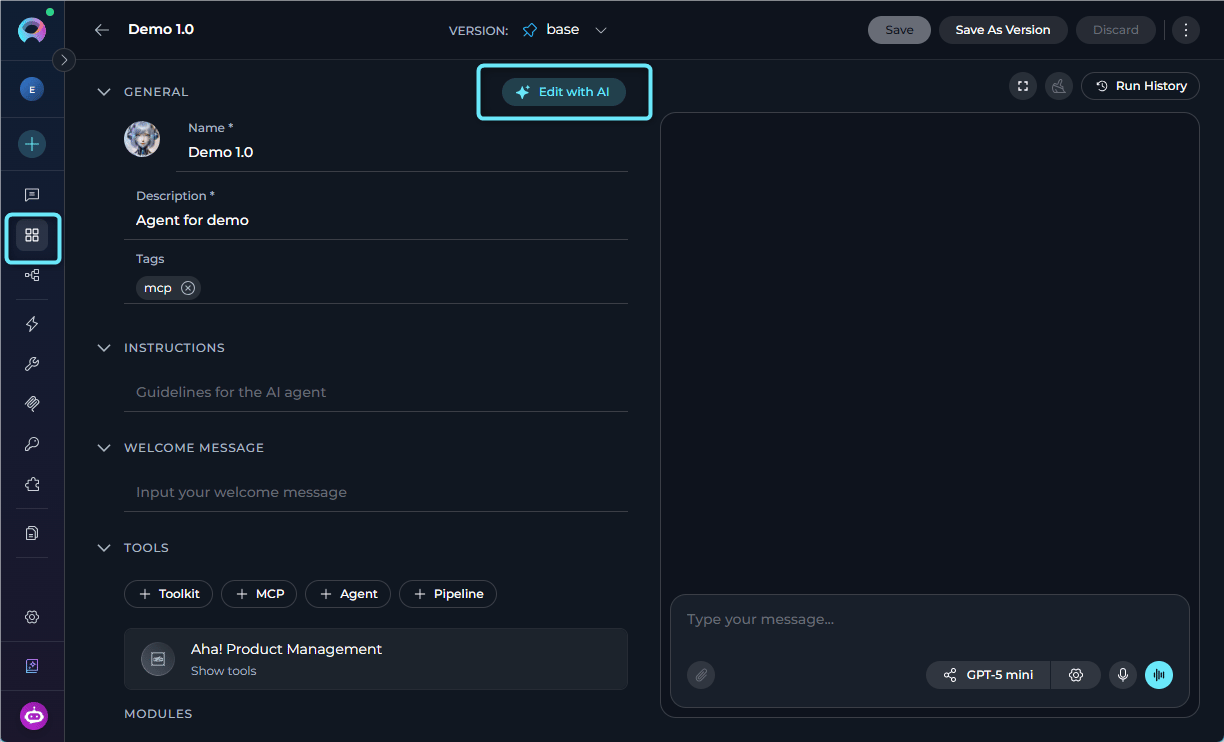
### Edit with AI
You can now use **Edit with AI** to update existing agents, skills and project context. Describe desired changes in plain language, review AI-generated updates and apply only the changes you want.
* Use **Edit with AI** to update: for agents - their details, instructions, user interaction, tools and skills; for skills - skill's name, description and instructions; and for the Project Context - the content of the Project Background field.
* Review current vs. suggested content through side-by-side or step-based comparison flows that highlight differences.
* Keep full control over what gets applied by further editing, excluding unwanted suggestions, or canceling the flow entirely.
**Benefits:** Faster iteration on existing agents, skills and context with less manual rewriting.
Details: [Agents](../menus/agents#edit-agent-with-ai), [Skills](../menus/skills#edit-a-skill-with-ai), [Project Context](../menus/settings/project-context#edit-with-ai).
 ### Progressive Disclosure of Skills
You can now let agents apply attached skills more autonomously through progressive disclosure, reducing the need to invoke every skill manually.
* Get smarter skill-driven orchestration.
* Apply attached skills autonomously, allowing agents to use relevant skills without requiring an explicit `~skill-name` in every message.
* Ensure agents only work with the skills attached to their own configuration.
* Allow multiple relevant skills to be applied in the same turn when the task calls for them.
* Surface loaded skill details more clearly during execution so users can better understand which skills were applied.
**Benefits:** Less manual invocation and more natural, scalable use of attached skills.
Details: [Skills](../menus/skills), [Agents](../menus/agents).
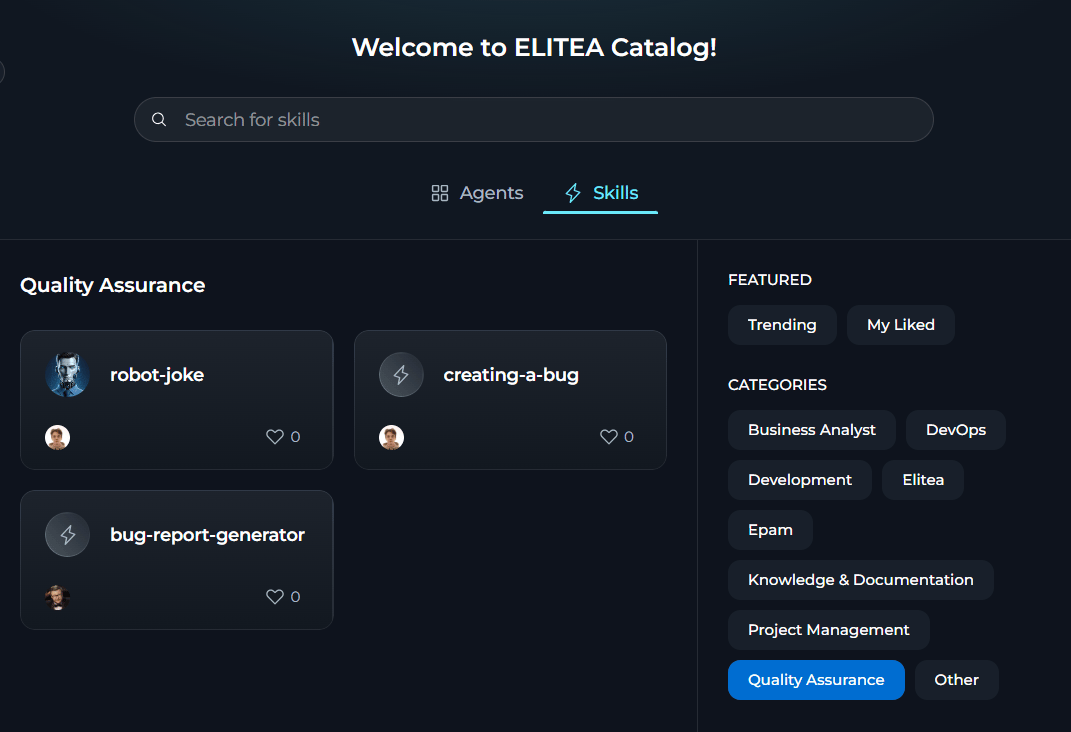
### Skill Publishing
You can now publish reusable skills into a shared catalog through a guided flow backed by deterministic and AI-powered quality validation.
* Publish skills to the **Catalog** through a guided self-service wizard with built-in deterministic and AI-assisted quality checks against skill name, description, instructions, icon, version name and category.
* Assign skills to curated categories so it is easier to browse and manage them in the shared catalog.
* Publish and manage multiple versions of the same skill, with version naming and validation handled within the publishing flow.
* Keep skills attached to an agent when it is published.
* Rely on platform-level controls to validate, block publishing, or unpublish skills.
**Benefits:** Faster skill sharing, better skill quality control and safer publishing of skill-dependent agents.
Details: [Skills](../how-tos/agents-pipelines/skill-publishing.mdx), [Catalog](../menus/agents-studio#skills-in-catalog).
### Progressive Disclosure of Skills
You can now let agents apply attached skills more autonomously through progressive disclosure, reducing the need to invoke every skill manually.
* Get smarter skill-driven orchestration.
* Apply attached skills autonomously, allowing agents to use relevant skills without requiring an explicit `~skill-name` in every message.
* Ensure agents only work with the skills attached to their own configuration.
* Allow multiple relevant skills to be applied in the same turn when the task calls for them.
* Surface loaded skill details more clearly during execution so users can better understand which skills were applied.
**Benefits:** Less manual invocation and more natural, scalable use of attached skills.
Details: [Skills](../menus/skills), [Agents](../menus/agents).
### Skill Publishing
You can now publish reusable skills into a shared catalog through a guided flow backed by deterministic and AI-powered quality validation.
* Publish skills to the **Catalog** through a guided self-service wizard with built-in deterministic and AI-assisted quality checks against skill name, description, instructions, icon, version name and category.
* Assign skills to curated categories so it is easier to browse and manage them in the shared catalog.
* Publish and manage multiple versions of the same skill, with version naming and validation handled within the publishing flow.
* Keep skills attached to an agent when it is published.
* Rely on platform-level controls to validate, block publishing, or unpublish skills.
**Benefits:** Faster skill sharing, better skill quality control and safer publishing of skill-dependent agents.
Details: [Skills](../how-tos/agents-pipelines/skill-publishing.mdx), [Catalog](../menus/agents-studio#skills-in-catalog).
 ### Skills Customization and Forking
You can now fork skills across projects, personalize skills with custom icons and write richer skill instructions.
* Maintain skills as reusable building blocks.
* Fork a skill version directly to another your project without manual export-and-import workarounds.
* Fork agents together with their attached skills to preserve skill-backed behavior.
* Write skill instructions up to 5,000 characters to ensure better guidance and include examples and output expectations.
* Upload custom icons for skills.
**Benefits:** Better cross-project reuse, more expressive skill definition and clearer visual identification.
Details: [Skills](../menus/skills), [Catalog](../menus/agents-studio).
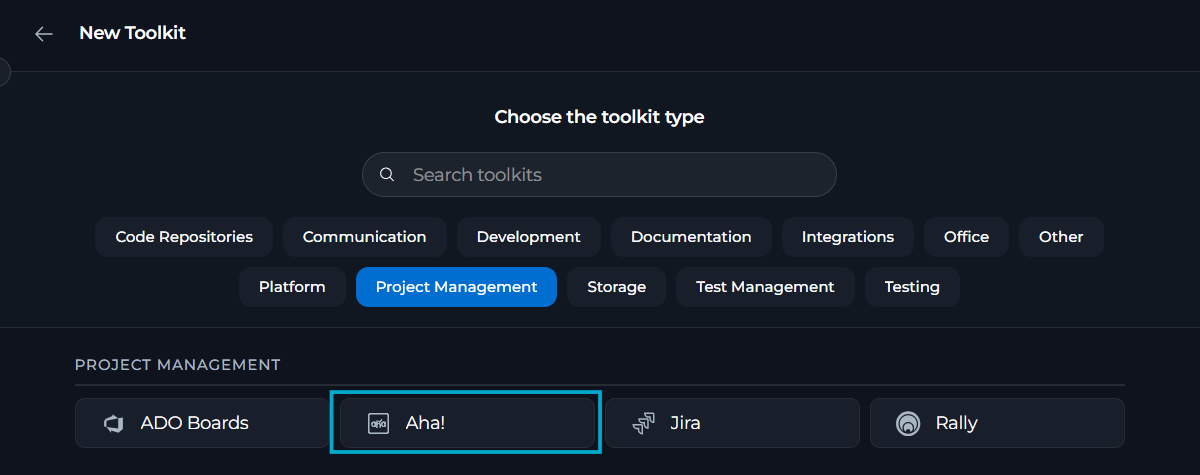
### Aha! Toolkit
You can now connect Aha! as a native toolkit to work with product-management records in agents, pipelines and chats and index supported Aha! data for AI use.
* Connect Aha! as a toolkit and validate the connection with clear success or error feedback.
* Use personal or project-scoped Aha! credentials for individual access or shared project use.
* Work with Aha! records through dedicated tools, including find projects, search, read, analyze and copy records, retrieve data, add comments, etc.
**Benefits:** Smoother Aha!-based agent and indexing workflows with safer authentication and error handling.
Details [Aha! Toolkit](../integrations/toolkits/aha_toolkit/).
### Skills Customization and Forking
You can now fork skills across projects, personalize skills with custom icons and write richer skill instructions.
* Maintain skills as reusable building blocks.
* Fork a skill version directly to another your project without manual export-and-import workarounds.
* Fork agents together with their attached skills to preserve skill-backed behavior.
* Write skill instructions up to 5,000 characters to ensure better guidance and include examples and output expectations.
* Upload custom icons for skills.
**Benefits:** Better cross-project reuse, more expressive skill definition and clearer visual identification.
Details: [Skills](../menus/skills), [Catalog](../menus/agents-studio).
### Aha! Toolkit
You can now connect Aha! as a native toolkit to work with product-management records in agents, pipelines and chats and index supported Aha! data for AI use.
* Connect Aha! as a toolkit and validate the connection with clear success or error feedback.
* Use personal or project-scoped Aha! credentials for individual access or shared project use.
* Work with Aha! records through dedicated tools, including find projects, search, read, analyze and copy records, retrieve data, add comments, etc.
**Benefits:** Smoother Aha!-based agent and indexing workflows with safer authentication and error handling.
Details [Aha! Toolkit](../integrations/toolkits/aha_toolkit/).
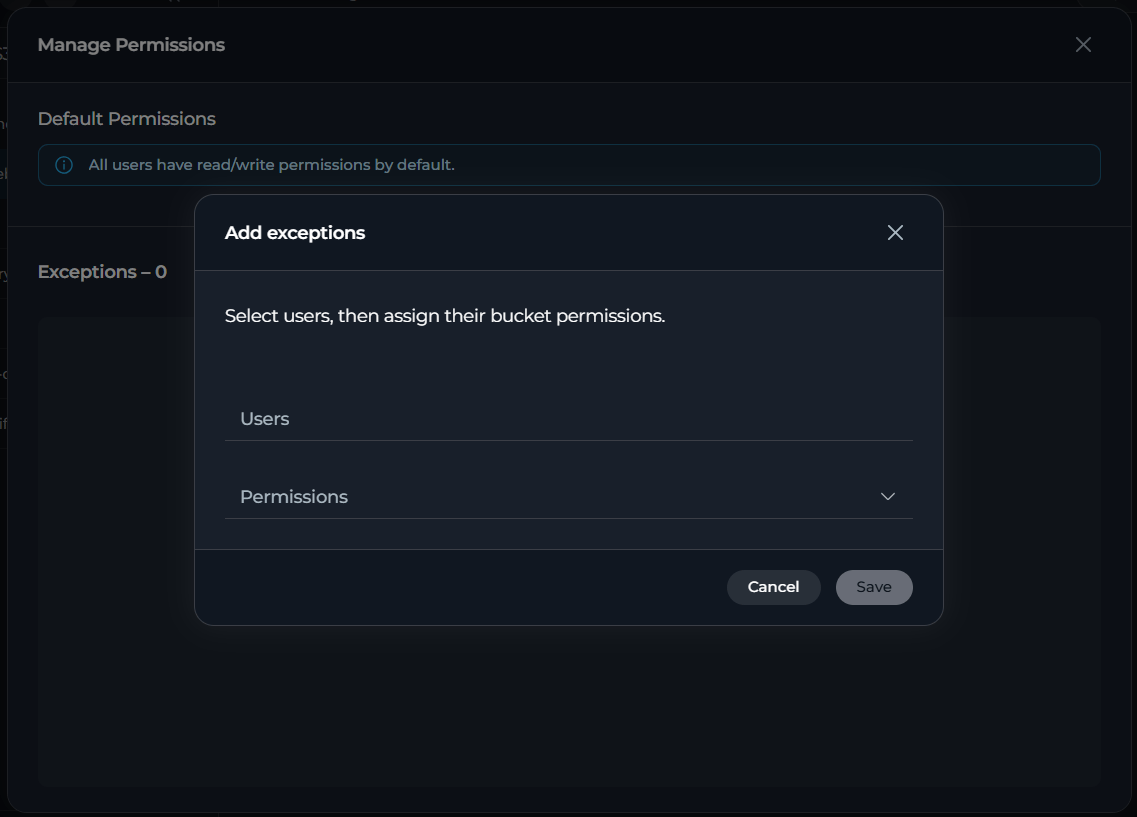
 ### Bucket-Level Access to Team Artifacts
You can now control who can view or modify content in team artifact buckets through a redesigned **Manage Permissions** experience.
* Manage access per bucket by assigning clear bucket permission levels.
* Use the redesigned **Permission Exceptions** view with searchable user selection, bulk actions and clear single-user or multi-user update patterns.
* Apply bucket-level permissions to all nested folders and files through a single permission model.
* Enforce bucket permissions consistently across the ELITEA Artifacts API and S3-compatible routes, preventing bypass through direct requests.
**Benefits:** Better control over shared artifacts, clearer access-management workflows, consistent permission handling across interfaces.
Details: [Artifacts](../menus/artifacts#manage-bucket-access).
### Bucket-Level Access to Team Artifacts
You can now control who can view or modify content in team artifact buckets through a redesigned **Manage Permissions** experience.
* Manage access per bucket by assigning clear bucket permission levels.
* Use the redesigned **Permission Exceptions** view with searchable user selection, bulk actions and clear single-user or multi-user update patterns.
* Apply bucket-level permissions to all nested folders and files through a single permission model.
* Enforce bucket permissions consistently across the ELITEA Artifacts API and S3-compatible routes, preventing bypass through direct requests.
**Benefits:** Better control over shared artifacts, clearer access-management workflows, consistent permission handling across interfaces.
Details: [Artifacts](../menus/artifacts#manage-bucket-access).
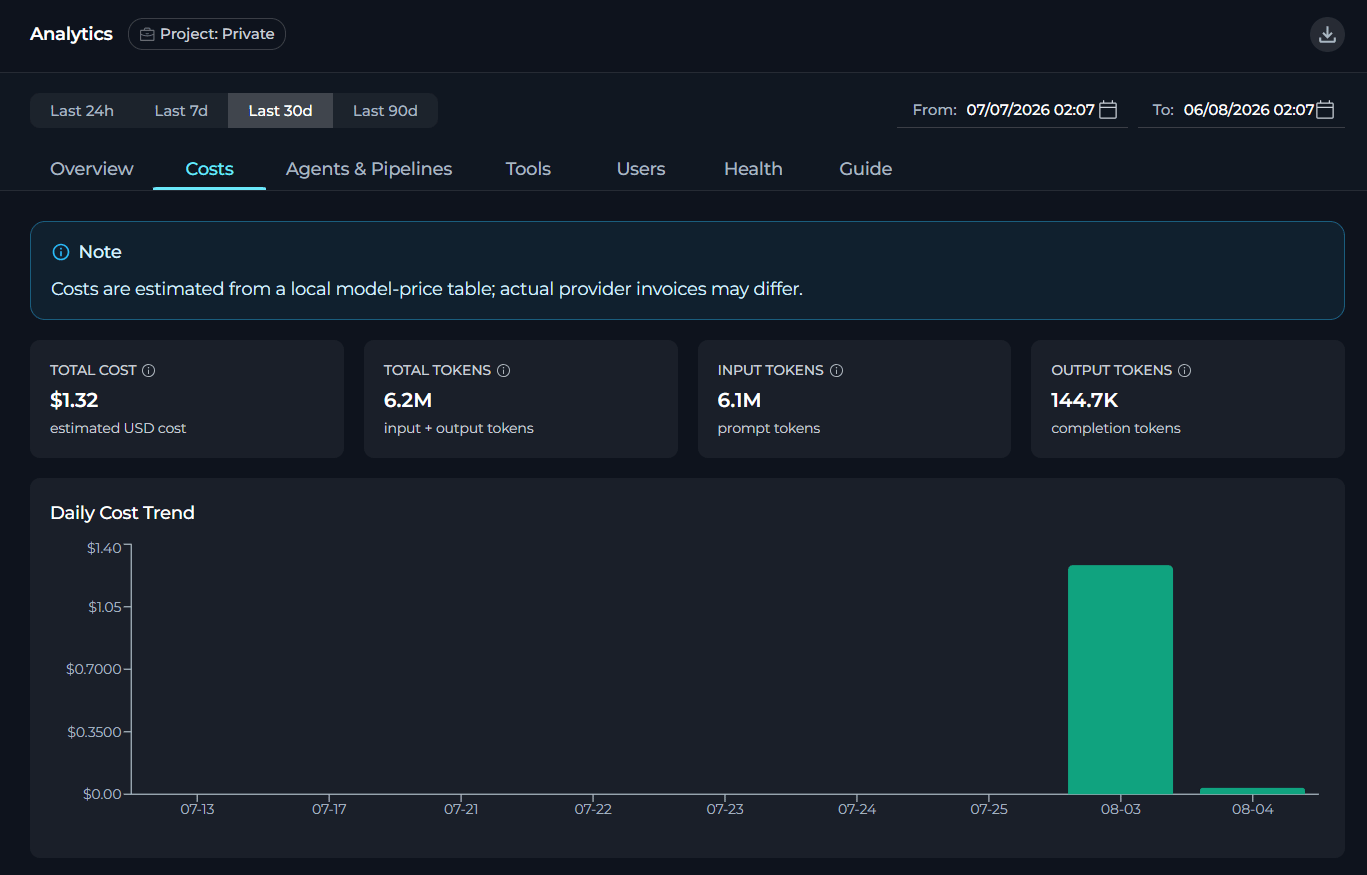
 ### New Analytics for Costs
You can now track token usage, AI costs, sub-agent activity and chat-level insights across your projects.
* Track token consumption across supported AI activities.
* Use enhanced cost tracking to better understand the financial impact of model usage.
* Gain clearer insight into delegated and nested agent execution through improved sub-agent observability.
* Understand conversation-level activities and usage patterns better through the expanded chat analytics.
**Benefits:** Better usage transparency, increased cost awareness and stronger observability for complex agent workflows.
Details: [Analytics](../menus/settings/analytics).
### New Analytics for Costs
You can now track token usage, AI costs, sub-agent activity and chat-level insights across your projects.
* Track token consumption across supported AI activities.
* Use enhanced cost tracking to better understand the financial impact of model usage.
* Gain clearer insight into delegated and nested agent execution through improved sub-agent observability.
* Understand conversation-level activities and usage patterns better through the expanded chat analytics.
**Benefits:** Better usage transparency, increased cost awareness and stronger observability for complex agent workflows.
Details: [Analytics](../menus/settings/analytics).
 ### Usage in Settings
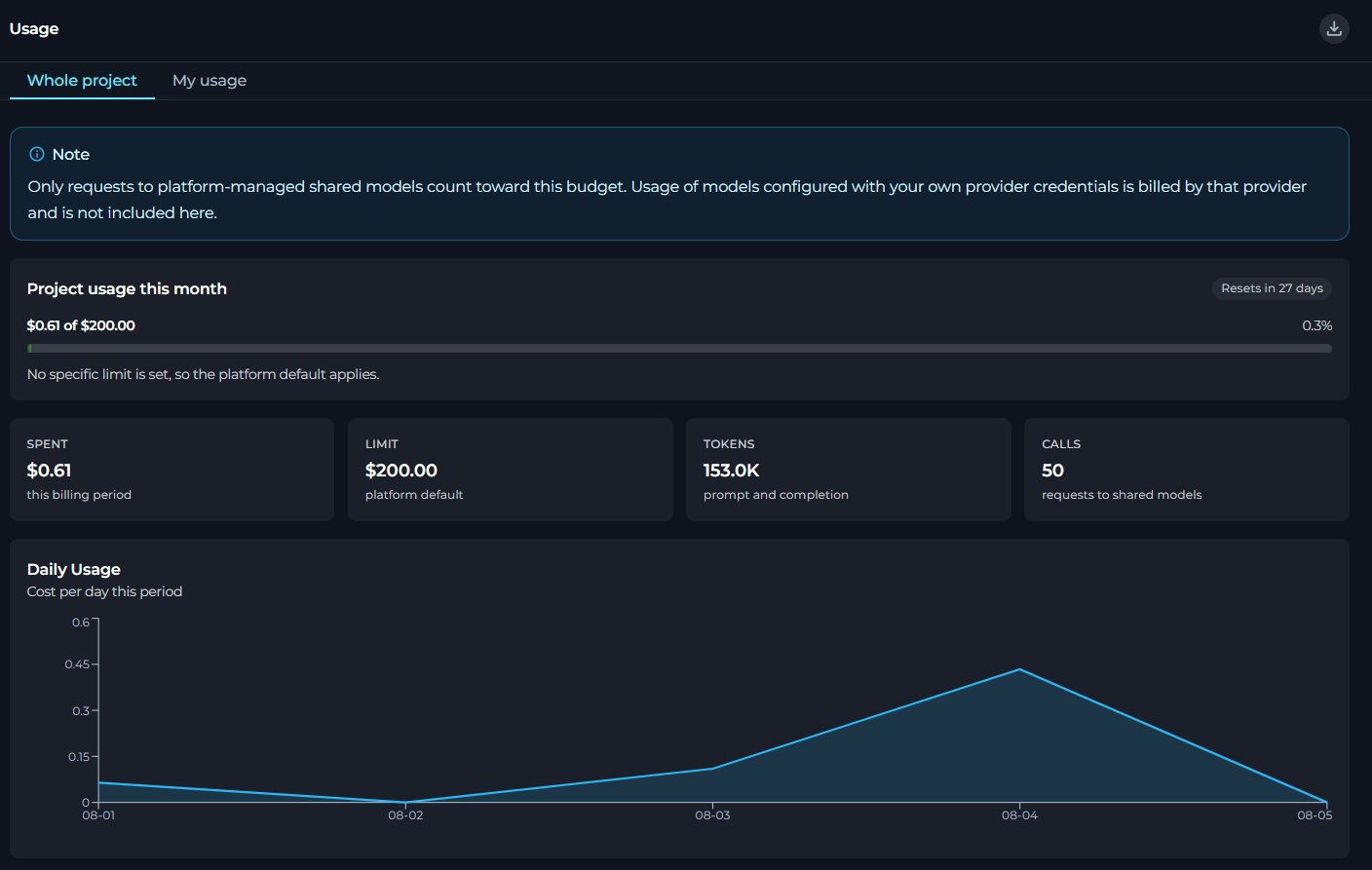
You can now track spending, token usage and model-level consumption from a dedicated **Usage** page in **Settings**, available for both private and team projects.
* Review current usage in a single project-focused view for private projects, team projects and per-user views within team projects.
* Monitor monthly spend against budget limits and track when the billing period resets.
* Review prompt and completion token totals together with request counts for supported shared-model usage.
* Analyze model-level usage details including cost, calls, token volume and relative share by model.
* Export usage data to Excel.
**Benefits:** Better AI consumption visibility, clearer budget awareness and easier model-level analysis for private and team projects.
Details: [Usage](../menus/settings/usage), [Settings](../menus/settings/settings-overview).
### Usage in Settings
You can now track spending, token usage and model-level consumption from a dedicated **Usage** page in **Settings**, available for both private and team projects.
* Review current usage in a single project-focused view for private projects, team projects and per-user views within team projects.
* Monitor monthly spend against budget limits and track when the billing period resets.
* Review prompt and completion token totals together with request counts for supported shared-model usage.
* Analyze model-level usage details including cost, calls, token volume and relative share by model.
* Export usage data to Excel.
**Benefits:** Better AI consumption visibility, clearer budget awareness and easier model-level analysis for private and team projects.
Details: [Usage](../menus/settings/usage), [Settings](../menus/settings/settings-overview).
 ### HTML and MDX Preview & Editing
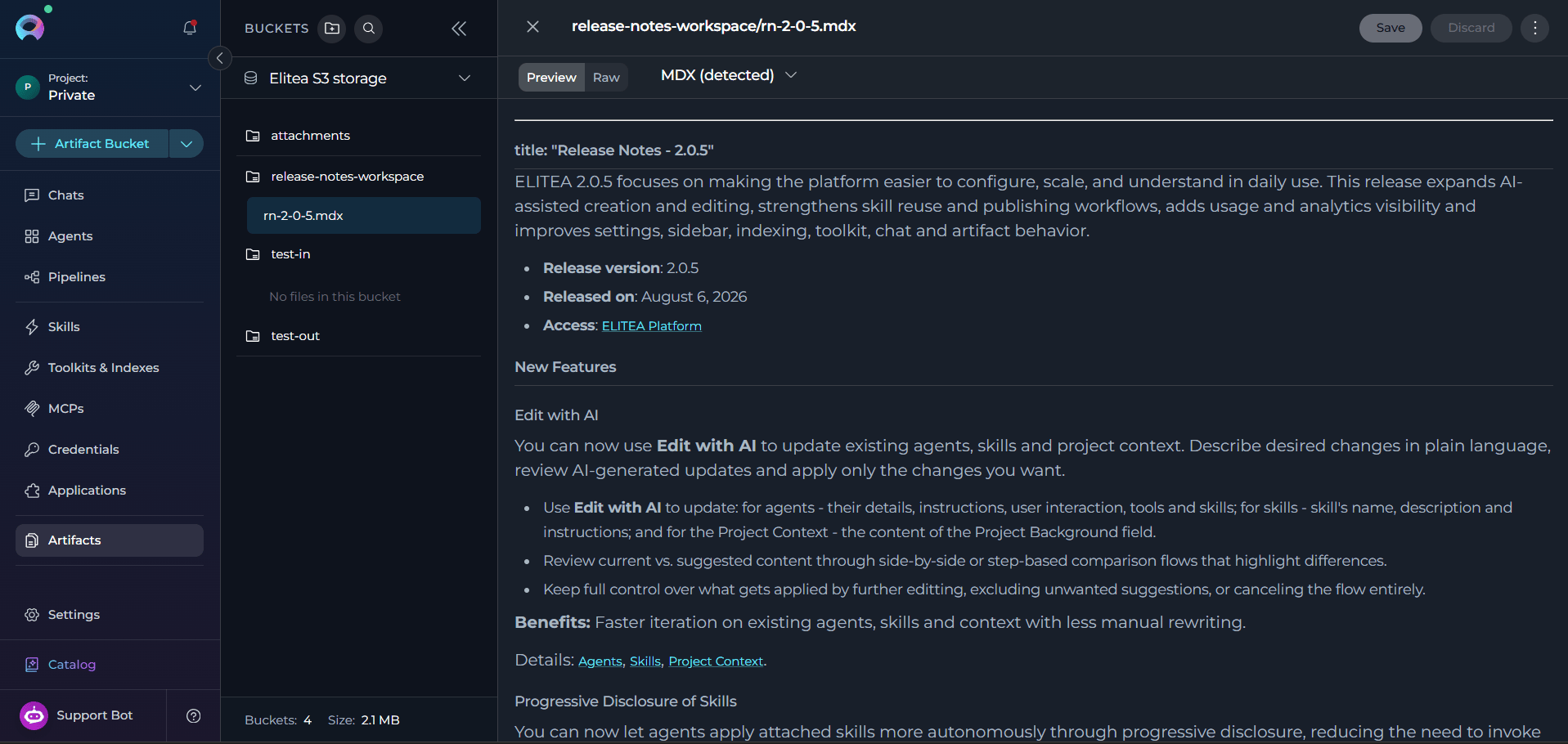
You can now upload, preview, edit and save HTML and MDX files directly in the Artifacts and Chat canvas without leaving the platform.
* Open `.html`, `.htm` and `.mdx` files in **Artifacts** or directly from the generated chat results without downloading them first.
* Switch between the **Preview** (default, renders output) and **Raw** (syntax-highlighted source editing) modes.
* Edit, save and discard changes in HTML or MDX source in the **Raw** mode, writing changes back to the same file in the same artifacts bucket and path.
* Rely on sandboxed preview isolation that prevents rendered HTML or MDX content from accessing ELITEA session data, cookies, local storage, or the parent page.
* Handle unsupported or unsafe MDX constructs by blocking execution in preview and displaying a clear warning when a file contains unsupported or unsafe components.
**Benefits:** Faster and safer preview and editing workflows for HTML and MDX content.
Details: [Artifacts](../menus/artifacts), [Chat](../menus/chat).
### HTML and MDX Preview & Editing
You can now upload, preview, edit and save HTML and MDX files directly in the Artifacts and Chat canvas without leaving the platform.
* Open `.html`, `.htm` and `.mdx` files in **Artifacts** or directly from the generated chat results without downloading them first.
* Switch between the **Preview** (default, renders output) and **Raw** (syntax-highlighted source editing) modes.
* Edit, save and discard changes in HTML or MDX source in the **Raw** mode, writing changes back to the same file in the same artifacts bucket and path.
* Rely on sandboxed preview isolation that prevents rendered HTML or MDX content from accessing ELITEA session data, cookies, local storage, or the parent page.
* Handle unsupported or unsafe MDX constructs by blocking execution in preview and displaying a clear warning when a file contains unsupported or unsafe components.
**Benefits:** Faster and safer preview and editing workflows for HTML and MDX content.
Details: [Artifacts](../menus/artifacts), [Chat](../menus/chat).
 ### Personality-Specific Default User Instructions
You can now save different default user instructions for each personality type so that switching between personalities automatically switches to the matching instruction set.
* Save separate default user instructions for each personality type.
* Switch between personalities and automatically restore the instructions previously saved for the selected personality.
* Start from a blank instruction field when opening an unconfigured personality, instead of inheriting unrelated text.
* Work with a dynamic instructions field that stays aligned with the selected default personality.
* Carry forward existing default instructions into the new personality-specific model for backward compatibility.
**Benefits:** More predictable personalization workflow.
Details: [AI Personalisation](../menus/settings/ai-personality#default-personality).
## Changed Features
### Toolkits & Indexes Redesign
You can now manage the full index lifecycle — from discovery and configuration to execution, scheduling and history — through a redesigned **Toolkits & Indexes** landing page.
* Discover index-capable toolkits on the redesigned **Toolkits & Indexes** landing page with searchable toolkit cards, index counts and clearer breadcrumb-based navigation between toolkit- and index-level pages.
* Create and manage indexes from dedicated pages within the toolkit details view, with a safer reindex workflow and delete confirmation.
* Monitor index runs with clearer status indicators, indexed and skipped counts, structured run history and activity and search settings.
* Configure recurring indexing through a redesigned scheduling flow.
**Benefits:** Better index discoverability, clearer lifecycle management and improved visibility into run outcomes.
Details: [Toolkits](../menus/toolkits), [Indexing Overview](../how-tos/indexing/indexing-overview), [Create & Use Indexes](../how-tos/indexing/using-indexes-tab-interface.mdx).
### Safer Reindex Workflow
You can now update indexing-critical settings for an existing index through a safer reindex workflow that keeps saved configuration in sync with actual index contents.
* Edit indexing-critical settings such as source settings, chunking parameters and filters through a workflow that recognizes when a reindex is required and applies changes through a dedicated reindex path rather than as ordinary settings updates.
* Avoid silent configuration drift where the stored index still reflects older parameters after toolkit settings have changed.
* Protect the existing index if a configuration-triggered reindex does not complete successfully.
* Get clearer signals when configuration edits affect index quality or source coverage and require rebuilding the index.
**Benefits:** Consistent index contents, safer maintenance, less risk during configuration changes.
Details: [Indexing Overview](../how-tos/indexing/indexing-overview).
### Reorganized Settings
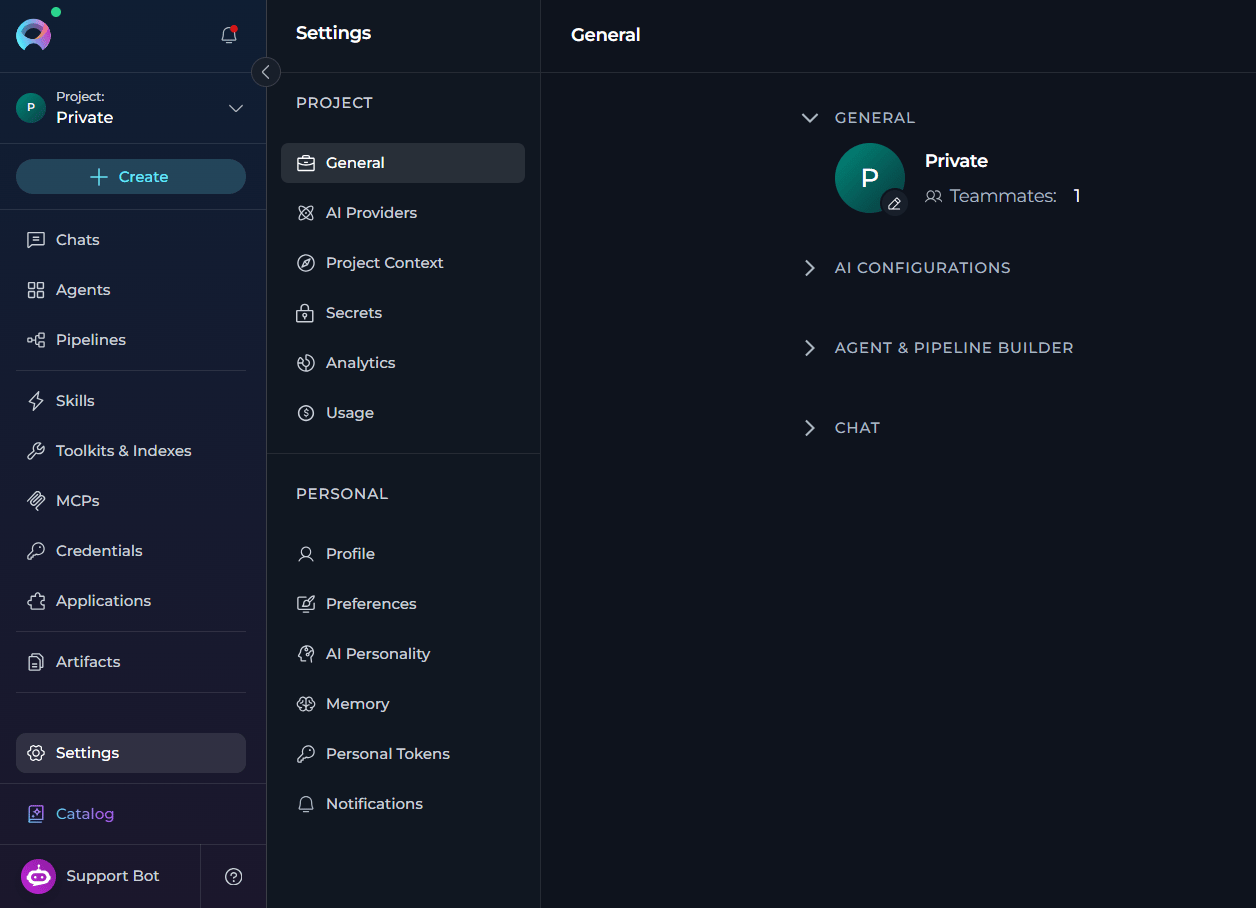
You can now find project setup and personal preferences more easily through a reorganized **Settings** structure.
* Navigate through redesigned **Settings** with clearer grouping and improved access to settings and notifications.
* Switch projects using a project selector at the top of the sidebar with default or custom project avatars for faster recognition.
* Benefit from improved notification visibility and access.
* Match ELITEA theme to your system theme automatically.
**Benefits:** Clearer navigation, improved notification visibility, more flexible theme experience.
Details: [Overview](../menus/overview), [Settings Overview](../menus/settings/settings-overview).
### Personality-Specific Default User Instructions
You can now save different default user instructions for each personality type so that switching between personalities automatically switches to the matching instruction set.
* Save separate default user instructions for each personality type.
* Switch between personalities and automatically restore the instructions previously saved for the selected personality.
* Start from a blank instruction field when opening an unconfigured personality, instead of inheriting unrelated text.
* Work with a dynamic instructions field that stays aligned with the selected default personality.
* Carry forward existing default instructions into the new personality-specific model for backward compatibility.
**Benefits:** More predictable personalization workflow.
Details: [AI Personalisation](../menus/settings/ai-personality#default-personality).
## Changed Features
### Toolkits & Indexes Redesign
You can now manage the full index lifecycle — from discovery and configuration to execution, scheduling and history — through a redesigned **Toolkits & Indexes** landing page.
* Discover index-capable toolkits on the redesigned **Toolkits & Indexes** landing page with searchable toolkit cards, index counts and clearer breadcrumb-based navigation between toolkit- and index-level pages.
* Create and manage indexes from dedicated pages within the toolkit details view, with a safer reindex workflow and delete confirmation.
* Monitor index runs with clearer status indicators, indexed and skipped counts, structured run history and activity and search settings.
* Configure recurring indexing through a redesigned scheduling flow.
**Benefits:** Better index discoverability, clearer lifecycle management and improved visibility into run outcomes.
Details: [Toolkits](../menus/toolkits), [Indexing Overview](../how-tos/indexing/indexing-overview), [Create & Use Indexes](../how-tos/indexing/using-indexes-tab-interface.mdx).
### Safer Reindex Workflow
You can now update indexing-critical settings for an existing index through a safer reindex workflow that keeps saved configuration in sync with actual index contents.
* Edit indexing-critical settings such as source settings, chunking parameters and filters through a workflow that recognizes when a reindex is required and applies changes through a dedicated reindex path rather than as ordinary settings updates.
* Avoid silent configuration drift where the stored index still reflects older parameters after toolkit settings have changed.
* Protect the existing index if a configuration-triggered reindex does not complete successfully.
* Get clearer signals when configuration edits affect index quality or source coverage and require rebuilding the index.
**Benefits:** Consistent index contents, safer maintenance, less risk during configuration changes.
Details: [Indexing Overview](../how-tos/indexing/indexing-overview).
### Reorganized Settings
You can now find project setup and personal preferences more easily through a reorganized **Settings** structure.
* Navigate through redesigned **Settings** with clearer grouping and improved access to settings and notifications.
* Switch projects using a project selector at the top of the sidebar with default or custom project avatars for faster recognition.
* Benefit from improved notification visibility and access.
* Match ELITEA theme to your system theme automatically.
**Benefits:** Clearer navigation, improved notification visibility, more flexible theme experience.
Details: [Overview](../menus/overview), [Settings Overview](../menus/settings/settings-overview).
 ### Updated Inventory Setup & Ingestion
You can now configure and operate the Inventory application more reliably with improvements across setup validation, ingestion control and bucket configuration.
* Get clearer source-related validation feedback earlier in the app creation flow.
* Stop active ingestion runs more reliably when an interruption is needed.
* Avoid overlapping ingestion runs.
* Use a fixed internal bucket for Inventory data aligned to the dedicated `inventory-graphs` path.
* Work with more consistent field-label sizing in **Inventory** and related application setup flows.
* Use a more supportable Kubernetes deployment setup.
**Benefits:** More predictable setup, safer ingestion control, less configuration overhead.
Details: [Inventory App](../integrations/apps/inventory).
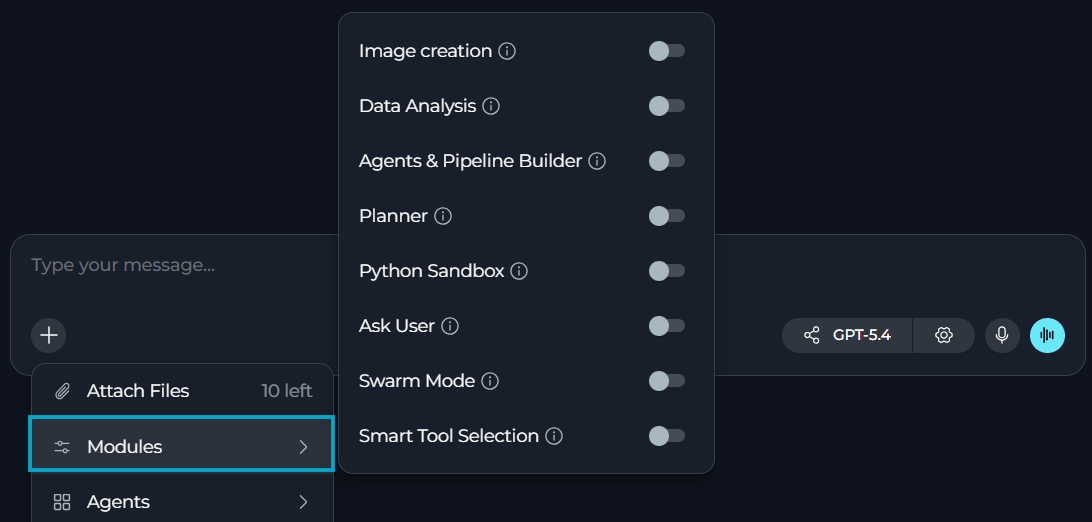
### Internal Tools Renamed to Modules
ELITEA now uses **Modules** instead of **Internal Tools** in key configuration and chat surfaces.
* See **Modules** as the section label on agent and pipeline detail pages where built-in capabilities are configured.
* Continue using built-in capabilities such as image creation, data analysis, planner, Python sandbox, swarm mode, smart tools selection and related options without any workflow changes.
* Distinguish built-in platform capabilities more clearly from **Tools**, **Toolkits** and **MCP Tools**.
**Benefits:** Clearer terminology.
Details: [Chat](../menus/chat), [Agents](../menus/agents), [Pipelines](../menus/pipelines).
### Updated Inventory Setup & Ingestion
You can now configure and operate the Inventory application more reliably with improvements across setup validation, ingestion control and bucket configuration.
* Get clearer source-related validation feedback earlier in the app creation flow.
* Stop active ingestion runs more reliably when an interruption is needed.
* Avoid overlapping ingestion runs.
* Use a fixed internal bucket for Inventory data aligned to the dedicated `inventory-graphs` path.
* Work with more consistent field-label sizing in **Inventory** and related application setup flows.
* Use a more supportable Kubernetes deployment setup.
**Benefits:** More predictable setup, safer ingestion control, less configuration overhead.
Details: [Inventory App](../integrations/apps/inventory).
### Internal Tools Renamed to Modules
ELITEA now uses **Modules** instead of **Internal Tools** in key configuration and chat surfaces.
* See **Modules** as the section label on agent and pipeline detail pages where built-in capabilities are configured.
* Continue using built-in capabilities such as image creation, data analysis, planner, Python sandbox, swarm mode, smart tools selection and related options without any workflow changes.
* Distinguish built-in platform capabilities more clearly from **Tools**, **Toolkits** and **MCP Tools**.
**Benefits:** Clearer terminology.
Details: [Chat](../menus/chat), [Agents](../menus/agents), [Pipelines](../menus/pipelines).
 ## Fixed Issues
* [#6057](https://github.com/EliteaAI/elitea_issues/issues/6057) Clicking **Continue** extends the previous incomplete response instead of replacing it with a separate fresh answer.
* [#5996](https://github.com/EliteaAI/elitea_issues/issues/5996) GitLab toolkit initialization no longer fails on missing description values.
* [#5994](https://github.com/EliteaAI/elitea_issues/issues/5994) GitLab root listing no longer requires a `path` value in the UI.
* [#5894](https://github.com/EliteaAI/elitea_issues/issues/5894) Remote MCP sessions no longer remain active after logout.
* [#5823](https://github.com/EliteaAI/elitea_issues/issues/5823) Regenerated responses show the real thinking duration for that request.
* [#5821](https://github.com/EliteaAI/elitea_issues/issues/5821) Model-specific settings align with the selected model behavior, preventing related sub-agent execution failures.
* [#5819](https://github.com/EliteaAI/elitea_issues/issues/5819) `@Everyone` does not trigger the inconsistent LLM behavior or infinite-loop pattern.
* [#5784](https://github.com/EliteaAI/elitea_issues/issues/5784) Users no longer need to click **Load tools** to trigger authentication for a configured MCP.
* [#5643](https://github.com/EliteaAI/elitea_issues/issues/5643) Nested agents with remote MCPs trigger the expected authorization request.
* [#5638](https://github.com/EliteaAI/elitea_issues/issues/5638) SharePoint toolkits support a smart OAuth authentication flow for agents.
* [#5391](https://github.com/EliteaAI/elitea_issues/issues/5391) Langfuse traces record all executed pipeline or agent nodes.
* [#5390](https://github.com/EliteaAI/elitea_issues/issues/5390) Langfuse pipeline traces contain all the necessary data.
* [#5267](https://github.com/EliteaAI/elitea_issues/issues/5267) Elitea MCP Tools are available when an agent is invoked as a sub-agent.
* [#3745](https://github.com/EliteaAI/elitea_issues/issues/3745) Stopped indexing runs from chat, agents and pipelines have the correct status.
## Known Issues
* [#3151](https://github.com/EliteaAI/elitea_issues/issues/3151) PPT Files Fail to Read or Index from Artifacts or SharePoint.
* [#2719](https://github.com/EliteaAI/elitea_issues/issues/2719) MCP client disconnects on macOS despite tray showing "connected".
* [#1567](https://github.com/EliteaAI/elitea_issues/issues/1567) MCP-tagged resources execute the latest version only.
## Fixed Issues
* [#6057](https://github.com/EliteaAI/elitea_issues/issues/6057) Clicking **Continue** extends the previous incomplete response instead of replacing it with a separate fresh answer.
* [#5996](https://github.com/EliteaAI/elitea_issues/issues/5996) GitLab toolkit initialization no longer fails on missing description values.
* [#5994](https://github.com/EliteaAI/elitea_issues/issues/5994) GitLab root listing no longer requires a `path` value in the UI.
* [#5894](https://github.com/EliteaAI/elitea_issues/issues/5894) Remote MCP sessions no longer remain active after logout.
* [#5823](https://github.com/EliteaAI/elitea_issues/issues/5823) Regenerated responses show the real thinking duration for that request.
* [#5821](https://github.com/EliteaAI/elitea_issues/issues/5821) Model-specific settings align with the selected model behavior, preventing related sub-agent execution failures.
* [#5819](https://github.com/EliteaAI/elitea_issues/issues/5819) `@Everyone` does not trigger the inconsistent LLM behavior or infinite-loop pattern.
* [#5784](https://github.com/EliteaAI/elitea_issues/issues/5784) Users no longer need to click **Load tools** to trigger authentication for a configured MCP.
* [#5643](https://github.com/EliteaAI/elitea_issues/issues/5643) Nested agents with remote MCPs trigger the expected authorization request.
* [#5638](https://github.com/EliteaAI/elitea_issues/issues/5638) SharePoint toolkits support a smart OAuth authentication flow for agents.
* [#5391](https://github.com/EliteaAI/elitea_issues/issues/5391) Langfuse traces record all executed pipeline or agent nodes.
* [#5390](https://github.com/EliteaAI/elitea_issues/issues/5390) Langfuse pipeline traces contain all the necessary data.
* [#5267](https://github.com/EliteaAI/elitea_issues/issues/5267) Elitea MCP Tools are available when an agent is invoked as a sub-agent.
* [#3745](https://github.com/EliteaAI/elitea_issues/issues/3745) Stopped indexing runs from chat, agents and pipelines have the correct status.
## Known Issues
* [#3151](https://github.com/EliteaAI/elitea_issues/issues/3151) PPT Files Fail to Read or Index from Artifacts or SharePoint.
* [#2719](https://github.com/EliteaAI/elitea_issues/issues/2719) MCP client disconnects on macOS despite tray showing "connected".
* [#1567](https://github.com/EliteaAI/elitea_issues/issues/1567) MCP-tagged resources execute the latest version only.