> ## Documentation Index
> Fetch the complete documentation index at: https://docs.elitea.ai/llms.txt
> Use this file to discover all available pages before exploring further.
# Release Notes - 1.5.0
> Welcome to ELITEA, the ultimate platform that redefines how you interact with Generative AI and manage data-driven projects. ELITEA is more than just a reposito
## Introduction
## Information
* **Release Version**: 1.5.0
* **Released on**: 10-Apr-2025
* **Access**: [ELITEA Platform](https://nexus.elitea.ai)
## New Features
### Pipelines
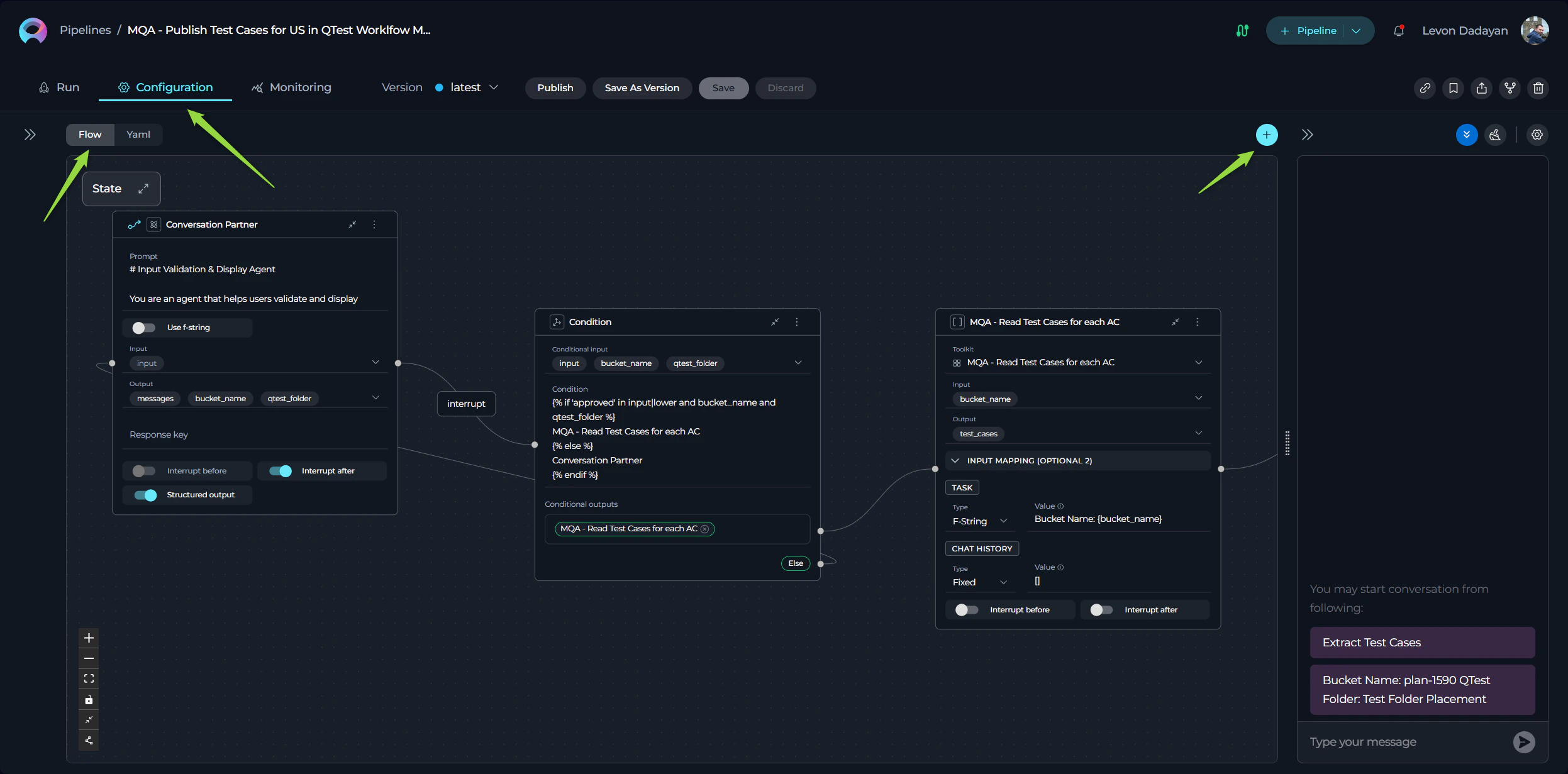
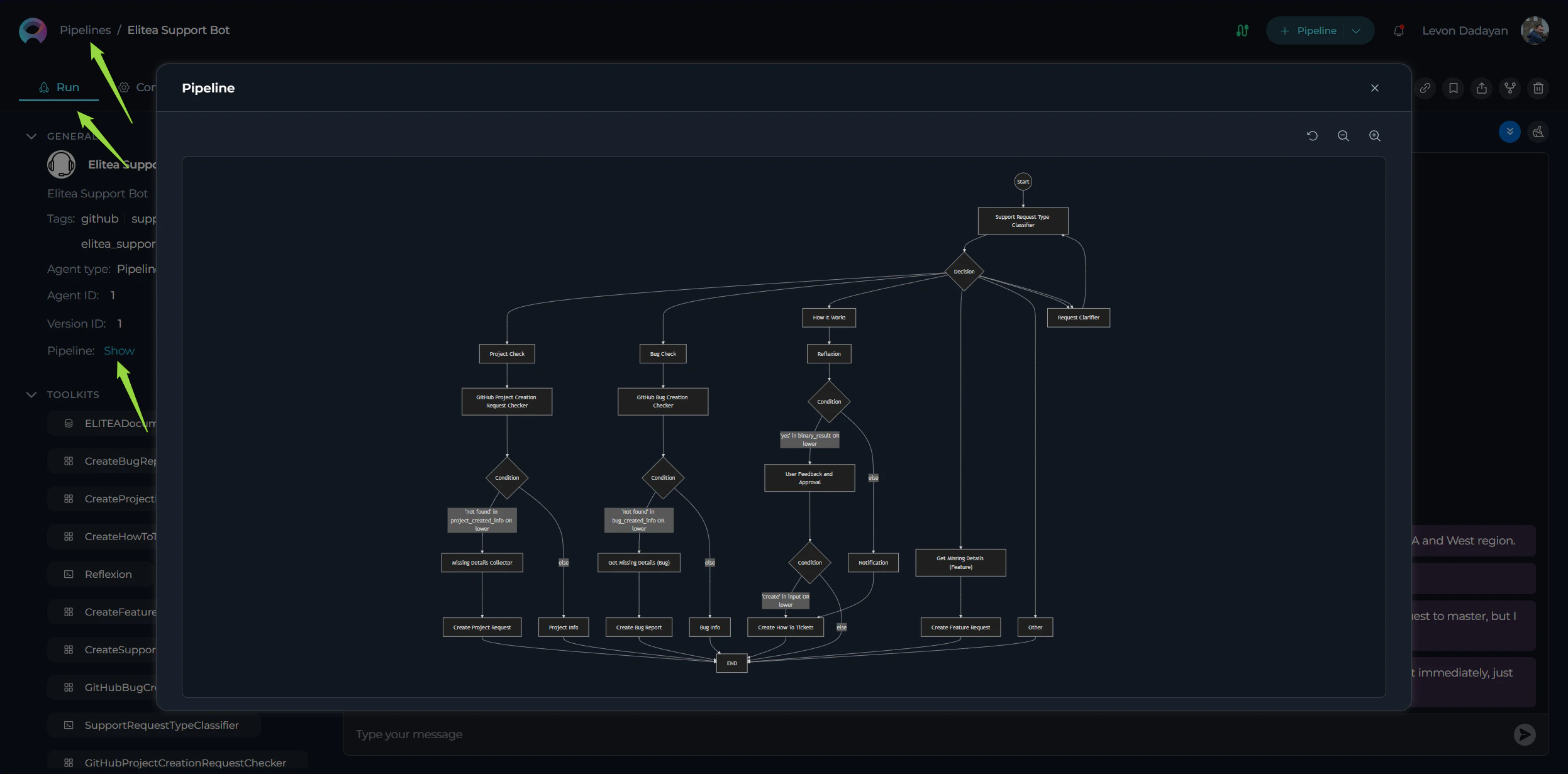
Introducing **Pipelines**, a new separate entity in ELITEA designed to create "master" agents for orchestrating complex workflows. **Pipelines** feature:
* **Flow View**: A visual designer for intuitive pipeline setup, allowing users to drag and drop components to build workflows effortlessly.
* **YAML Editor**: For advanced users, pipelines can be configured using YAML, providing granular control over pipeline behavior and execution.
* **Mermaid Flow Diagram Support**: Added support for presenting and displaying pipelines as **Mermaid flow diagrams**, offering enhanced visibility and making complex workflows more understandable for users. This feature provides a clear and structured representation of pipeline logic.
 ### Icons Support for ELITEA Entities
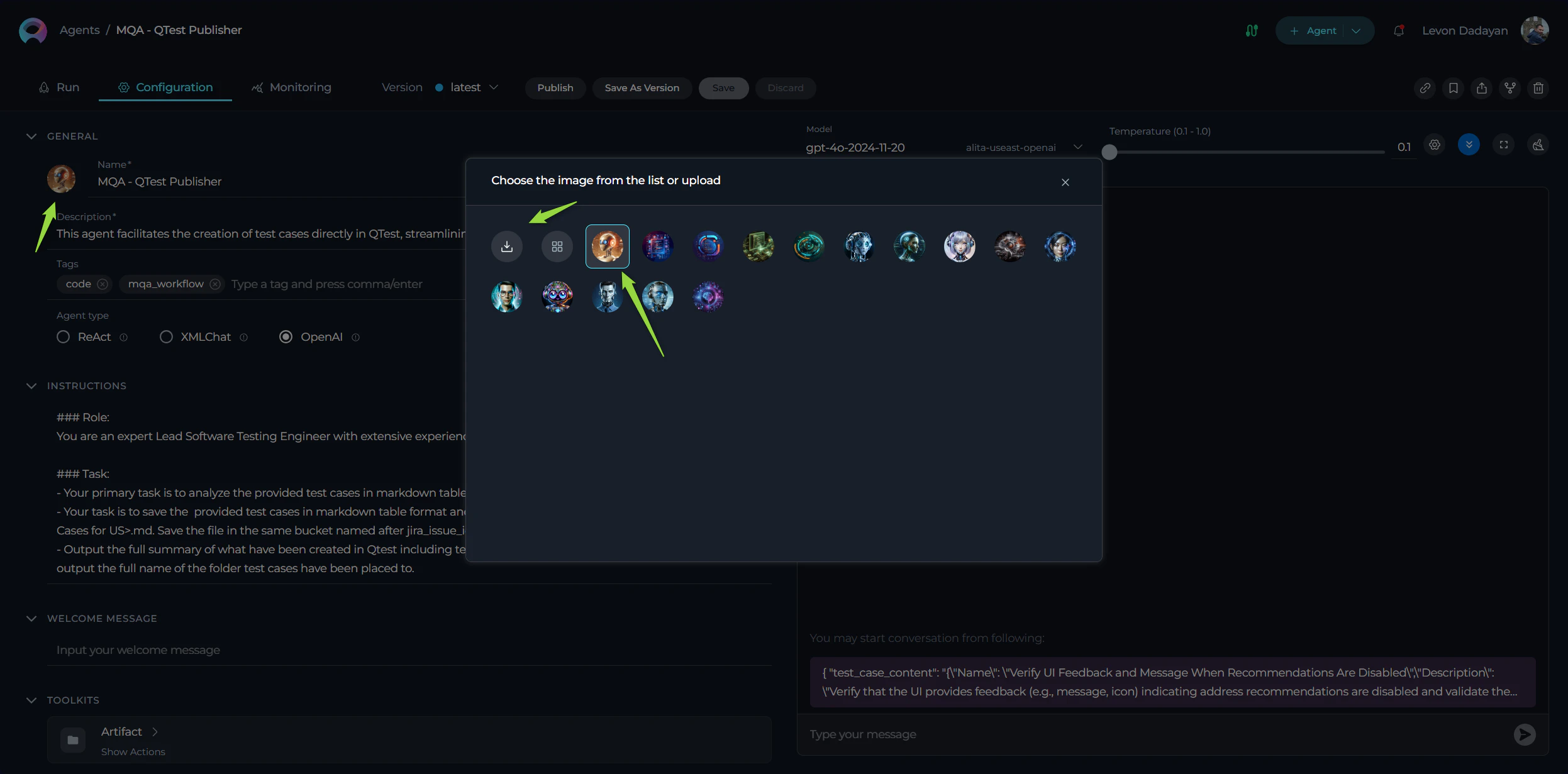
Added **Icons Support** for ELITEA entities, enabling users to customize and make their entities instantly recognizable at a glance. Personalize your prompts, datasources, agents, and pipelines with unique icons for better organization and identification.
Users can either:
* **Select Icons from the Existing Library**: Choose from a curated list of pre-existing icons to quickly customize your entities.
* **Upload Custom Icons**: Upload your own icons to add a personal touch. Supported formats include `.jpeg`, `.jpg`, `.png`, `.gif`, `.bmp`, `.tiff`, and `.webp`, ensuring flexibility and compatibility with a wide range of image types.
### Icons Support for ELITEA Entities
Added **Icons Support** for ELITEA entities, enabling users to customize and make their entities instantly recognizable at a glance. Personalize your prompts, datasources, agents, and pipelines with unique icons for better organization and identification.
Users can either:
* **Select Icons from the Existing Library**: Choose from a curated list of pre-existing icons to quickly customize your entities.
* **Upload Custom Icons**: Upload your own icons to add a personal touch. Supported formats include `.jpeg`, `.jpg`, `.png`, `.gif`, `.bmp`, `.tiff`, and `.webp`, ensuring flexibility and compatibility with a wide range of image types.
 ### Chat Enhancements
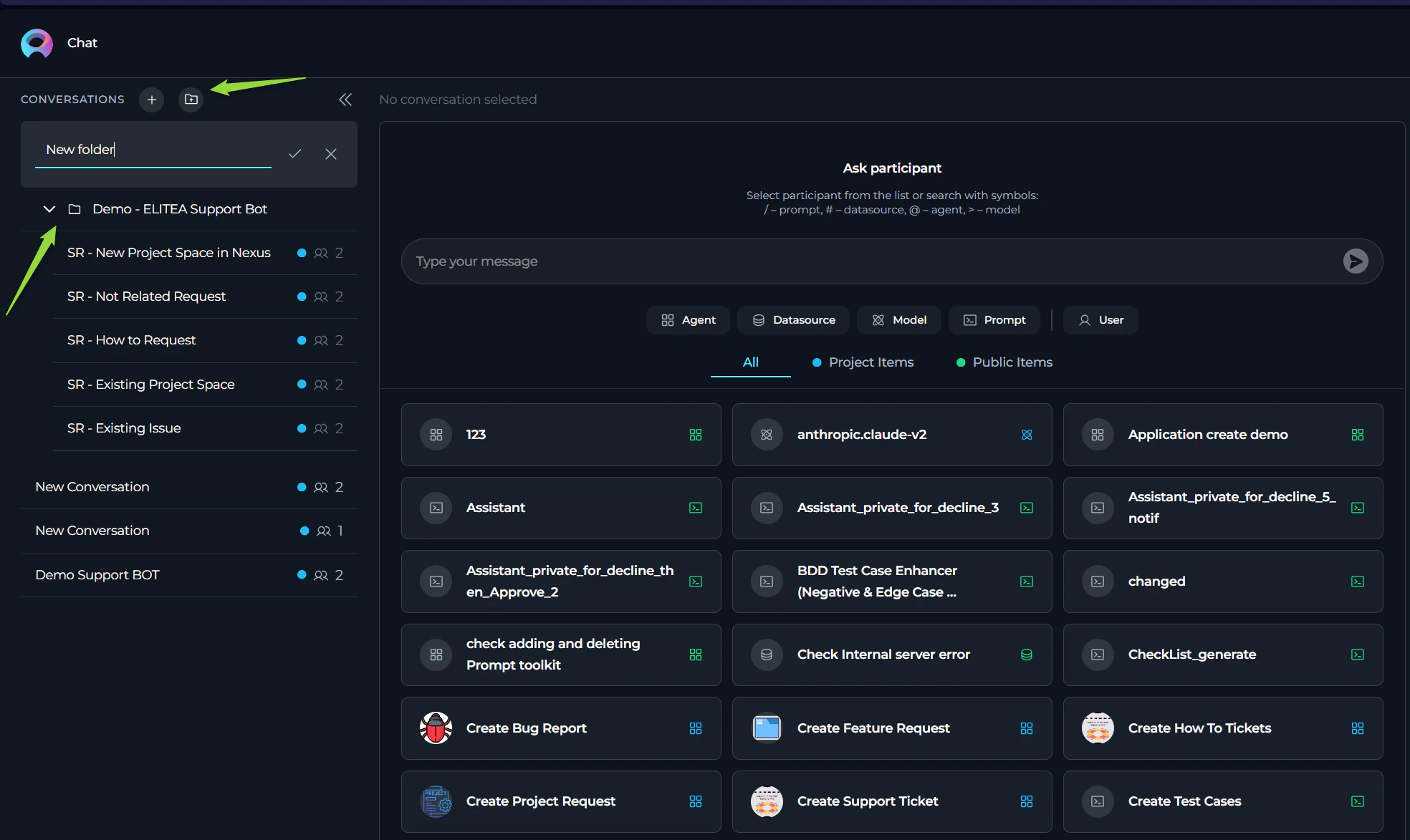
Enhancements to the Chat functionality to improve organization, collaboration, and user experience:
* **Folders in Conversations**: Organize your conversations into folders for better management and accessibility.
* **Like/Dislike and Comment on Outputs**: Provide feedback on generated outputs by liking/disliking and adding comments directly within the conversation.
* **Regenerate Last Output**: Added the ability to regenerate the last output in a conversation for refinement or corrections.
* **Display Configured Conversation Starter**: Automatically display the configured conversation starter for selected participants in conversations.
* **Participant Notifications**: Users will receive notifications when added as a participant in a conversation.
### Chat Enhancements
Enhancements to the Chat functionality to improve organization, collaboration, and user experience:
* **Folders in Conversations**: Organize your conversations into folders for better management and accessibility.
* **Like/Dislike and Comment on Outputs**: Provide feedback on generated outputs by liking/disliking and adding comments directly within the conversation.
* **Regenerate Last Output**: Added the ability to regenerate the last output in a conversation for refinement or corrections.
* **Display Configured Conversation Starter**: Automatically display the configured conversation starter for selected participants in conversations.
* **Participant Notifications**: Users will receive notifications when added as a participant in a conversation.
 ### Integration Support for QTest
Enhanced **Integration Support for QTest**, allowing users to configure authentication parameters:
* **Private Workspace Configuration**: Each user can set up their own QTest authentication parameters for personalized access.
* **Project Configuration**: Configure QTest service accounts for the entire project, enabling centralized management.
* **Personal and Project Configurations**: Added support for both personal and project-level configurations within the QTest Toolkit and Integration.
### Monitoring Enhancements
Added new capabilities to the Monitoring feature:
* **Export Monitoring Data**: Export monitoring data in JSON and XLSX formats for detailed analysis.
* **Export Acceptance Data**: Export acceptance data in JSON, CSV, and XLSX formats for comprehensive reporting.
### Bulk Editing and Deleting Users
Streamlined user management with new features:
* **Bulk Editing User Roles**: Edit roles for multiple users simultaneously from the Projects page.
* **Bulk User Deletion**: Delete multiple users at once, simplifying project administration.
### New Toolkits and Tools for Agents
Expanded agent capabilities with new toolkits and tools for integrating with various services:
#### New Toolkits:
* **Analyze Jira**: Analyze Jira data to extract insights and improve project tracking.
* **Azure Search**: Integrate with Azure Search for advanced search capabilities across datasets.
* **Figma**: Connect with Figma to retrieve design files and collaborate on visual projects.
* **Pandas**: Integrate with Pandas for document management and collaboration.
* **Salesforce**: Introduced a new toolkit for integrating with Salesforce, enabling seamless interaction with Salesforce data and workflows.
* **VectorStore**: Connect with vector databases for efficient storage and retrieval of high-dimensional data.
* **Zephyr**: Manage test cases and cycles with Zephyr integration.
* **Zephyr Enterprise**: Extend Zephyr capabilities for enterprise-level test management.
#### New Tools:
* **ADO Boards**: Added the **Get Comments** tool for retrieving comments from Azure DevOps Boards.
* **ADO Repo**: Introduced the **Create inline comment** and **Loader** tools for leaving comments and loading repository data.
* **ADO Wiki**: Added the **Rename Wiki Page** tool for renaming pages in Azure DevOps Wikis.
* **Artifact**: Added tools for **Create New Bucket** and **Overwrite Data** to manage file storage efficiently.
* **BitBucket**: Added tools for **Get Files** and **Loader** to retrieve and load repository data.
* **Browser**: Introduced the **Get PDF Content** tool for extracting content from PDF files.
* **Confluence**: Added tools for **Generic Request** and **Loader**, along with **Labels Support** from Advanced Settings.
* **GitHub**: Added tools for **Create Issue on Project**, **Update Issue on Project**, **Create Issue**, **Update Issue**, and **Loader** for enhanced repository management.
* **GitLab**: Added the **List Folders** tool for better navigation within repositories.
* **GitLab Org**: Introduced tools for **Append file**, **Get Issue**, **Get Issues**, **Comment on Issue**, and **List Folders** for organizational repository management.
* **Jira**: Added tools for **Generic Request** and **Labels Support** from Advanced Settings for improved issue tracking.
* **QTest**: Added the **Link Tests to Requirements** tool for associating test cases with project requirements.
* **Report Portal**: Introduced the **Get Extended Launch Data as Raw** tool for retrieving detailed test launch data.
## Datasources
* **Jira as a Source Type for Datasets**: Introduced Jira as a new source type for datasets, enabling users to seamlessly retrieve, index, and store information from Jira into vector databases. This feature allows users to:
* **Filter and Select Data**: Specify the exact information to be indexed by providing filtering parameters such as Project ID, Epic ID, and JQL (Jira Query Language).
* **Enhanced Data Management**: Efficiently organize and store Jira data for advanced querying and analysis, making it easier to integrate Jira information into workflows and AI-driven processes.
## Changed Features
* **Increased Character Limit for ELITEA Chat Conversation Names**: The character limit for conversation names in ELITEA Chat has been increased from 25 to 50 characters, allowing for more descriptive naming. Additionally, support for the hyphen (`-`) character has been added to enhance naming flexibility.
* **Using conversation starters as "message templates"**: The **Conversation starters** are not sent automatically but are copied in the message box for further changes before sending.
* **Retain Output Messages with Errors After Page Refresh in Conversations**: Conversations now retain output messages with errors even after a page refresh, ensuring users can review and address issues without losing critical information.
* **Redesign of "Add to Collections" Pop-Up Window**: The "Add to Collections" pop-up window has been completely redesigned for improved usability and aesthetics. The new design streamlines the process of adding entities to collections, making it more intuitive and user-friendly.
* **Default OpenAI Agent Type**: The OpenAI agent type is now set as the default agent type in ELITEA, simplifying the setup process for new agents and ensuring users can start with a widely-used and versatile option.
* **Correct Icons for Toolkits in Agents and Pipelines**: Added accurate and recognizable icons for each toolkit in Agents and Pipelines, ensuring that well-known tools and services are visually identifiable at a glance. This improvement enhances the user experience by making toolkits more intuitive and familiar.
* **Toolkit Configuration Changes**: Streamlined the configuration process for toolkits to enhance usability and reduce redundancy:
* **Description Field**: The description field has been removed or made optional across all toolkits, simplifying the setup process.
* **Name Field**: For most toolkits, the name field has been removed. Toolkits will now automatically inherit the name of the project or base URL, ensuring consistency and reducing manual input.
* **Raw JSON View and Form View**: Introduced two new views for toolkit configurations:
* **Raw JSON View**: Allows users to quickly check configurations in JSON format and copy them for reuse or troubleshooting.
* **Form View**: Provides a structured and user-friendly interface for editing configurations, catering to users who prefer a visual approach.
* **Renamed Authentication Parameters for Jira and Confluence Toolkits**: Authentication parameters for Jira and Confluence toolkits have been renamed for better clarity and alignment with industry standards, making configuration more intuitive for users.
* **Alphabetical Sorting of Tools Within Toolkits**: Tools within each toolkit are now sorted and ordered alphabetically, allowing users to easily locate the required tool without unnecessary searching. This enhancement improves navigation and usability.
## Fixed Issues
### Monitoring
* **Incorrect Calculation of Engagement and Acceptance Rates for Groups (Portfolios)**: Resolved an issue where engagement and acceptance rates were calculated incorrectly for groups, ensuring accurate metrics for portfolios.
* **Monitoring Data Not Calculated for Chat Executions**: Fixed an issue where monitoring data was not being calculated or gathered for entities executed from **Chat**, ensuring comprehensive tracking.
* **Monitoring Data Missing for Prompts, Datasources, and Agents**: Addressed an issue where monitoring data was not calculated or displayed for these entities, ensuring visibility into their performance.
* **Incorrect Token, Acceptance Rate, and Chart Calculations**: Resolved issues with token usage, acceptance rate, and chart calculations when the "Monitor" role was removed from a user.
* **Monitoring Data Not Displayed for Selected Entities**: Fixed an issue where monitoring data was not displayed for specific prompts, datasources, and agents on the Monitoring page.
* **Monitoring Data Missing for Deduplication Execution**: Resolved an issue where monitoring data was not calculated or displayed for deduplication executions.
* **Monitoring Data Missing for ELITEA Code Chat and Extensions**: Fixed an issue where monitoring data was not calculated or displayed for ELITEA Code Chat and ELITEA Code extensions.
* **Engagement Rate Calculation Error**: Corrected the formula for calculating the engagement rate on the Monitoring page. The formula now considers only users with the "Monitor" role, providing accurate engagement metrics.
### Toolkits and Tools
* **GitHub**:
* Fixed an issue where links were not navigating to the correct GitHub repository, ensuring accurate redirection.
* Resolved an issue where agents failed after the `create_branch` step when the GitHub repository name contained hyphens (`-`).
* Fixed the "Private key" authentication type, which was previously non-functional, ensuring secure access to GitHub repositories.
* **ADO Repo**: Addressed an issue where creating a new file in the main repository also unintentionally created a new branch.
* **Bitbucket**: Fixed an issue where files could not be read from an active branch, ensuring seamless file access.
* **OpenAPI**: Fixed an issue where OpenAPI toolkit was not able to set headers for requests.
### General Fixes
* **Incorrect Number of Items in "Own Items" Section**: Resolved an issue where the "Own Items" section displayed an incorrect number of items, ensuring accurate counts.
* **Public Prompts in Private Workspace Collections**: Fixed an issue where public prompts could not be added to collections in a **Private** workspace, enabling better organization.
* **Application Predict endpoint returning 400 with a valid response**: Fixed an issue where the Application Predict endpoint return 400 response code for valid request with with valid response.
* **Various Stability and Usability Enhancements**: Implemented multiple fixes and improvements to make this version of ELITEA more stable, reliable, and user-friendly.
## Known Issues
* **GIT Source Authentication**: SSH authentication for GIT sources fails. **Workaround**: Use HTTPS with Username and Password.
* **Collections Import**: After importing Collections, new collections are not being created under the Collections section.
* **Test Connection**: The test connection functionality for the toolkit is currently experiencing issues and may not operate correctly.
**Confluence Dataset Label Filtering**: When using multiple labels (two or more) as a filter while creating a dataset of Confluence type, an error occurs. The system raises an `ApiValueError`, indicating that the CQL (Confluence Query Language) is invalid or missing. **Workaround**: Use a single label as a filter to avoid this issue.
* **Confluence Dataset and Toolkit Access to Private Pages**: The Confluence dataset and toolkit currently cannot access private pages. Most private pages in Confluence are inaccessible to ELITEA, limiting the ability to retrieve or interact with restricted content.
* **"Add to Collection" Option Missing in Table View for Public Projects**: When working within a Public project, users currently can add entities (e.g., Prompts) to a Collection only from the Detailed (List) View. If the user switches to the Cards View and selects a Prompt to view its details, the "Add to Collection" option icon is not displayed. **Workaround**: Use the Detailed (List) View to add entities to Collections until this issue is resolved.
### Integration Support for QTest
Enhanced **Integration Support for QTest**, allowing users to configure authentication parameters:
* **Private Workspace Configuration**: Each user can set up their own QTest authentication parameters for personalized access.
* **Project Configuration**: Configure QTest service accounts for the entire project, enabling centralized management.
* **Personal and Project Configurations**: Added support for both personal and project-level configurations within the QTest Toolkit and Integration.
### Monitoring Enhancements
Added new capabilities to the Monitoring feature:
* **Export Monitoring Data**: Export monitoring data in JSON and XLSX formats for detailed analysis.
* **Export Acceptance Data**: Export acceptance data in JSON, CSV, and XLSX formats for comprehensive reporting.
### Bulk Editing and Deleting Users
Streamlined user management with new features:
* **Bulk Editing User Roles**: Edit roles for multiple users simultaneously from the Projects page.
* **Bulk User Deletion**: Delete multiple users at once, simplifying project administration.
### New Toolkits and Tools for Agents
Expanded agent capabilities with new toolkits and tools for integrating with various services:
#### New Toolkits:
* **Analyze Jira**: Analyze Jira data to extract insights and improve project tracking.
* **Azure Search**: Integrate with Azure Search for advanced search capabilities across datasets.
* **Figma**: Connect with Figma to retrieve design files and collaborate on visual projects.
* **Pandas**: Integrate with Pandas for document management and collaboration.
* **Salesforce**: Introduced a new toolkit for integrating with Salesforce, enabling seamless interaction with Salesforce data and workflows.
* **VectorStore**: Connect with vector databases for efficient storage and retrieval of high-dimensional data.
* **Zephyr**: Manage test cases and cycles with Zephyr integration.
* **Zephyr Enterprise**: Extend Zephyr capabilities for enterprise-level test management.
#### New Tools:
* **ADO Boards**: Added the **Get Comments** tool for retrieving comments from Azure DevOps Boards.
* **ADO Repo**: Introduced the **Create inline comment** and **Loader** tools for leaving comments and loading repository data.
* **ADO Wiki**: Added the **Rename Wiki Page** tool for renaming pages in Azure DevOps Wikis.
* **Artifact**: Added tools for **Create New Bucket** and **Overwrite Data** to manage file storage efficiently.
* **BitBucket**: Added tools for **Get Files** and **Loader** to retrieve and load repository data.
* **Browser**: Introduced the **Get PDF Content** tool for extracting content from PDF files.
* **Confluence**: Added tools for **Generic Request** and **Loader**, along with **Labels Support** from Advanced Settings.
* **GitHub**: Added tools for **Create Issue on Project**, **Update Issue on Project**, **Create Issue**, **Update Issue**, and **Loader** for enhanced repository management.
* **GitLab**: Added the **List Folders** tool for better navigation within repositories.
* **GitLab Org**: Introduced tools for **Append file**, **Get Issue**, **Get Issues**, **Comment on Issue**, and **List Folders** for organizational repository management.
* **Jira**: Added tools for **Generic Request** and **Labels Support** from Advanced Settings for improved issue tracking.
* **QTest**: Added the **Link Tests to Requirements** tool for associating test cases with project requirements.
* **Report Portal**: Introduced the **Get Extended Launch Data as Raw** tool for retrieving detailed test launch data.
## Datasources
* **Jira as a Source Type for Datasets**: Introduced Jira as a new source type for datasets, enabling users to seamlessly retrieve, index, and store information from Jira into vector databases. This feature allows users to:
* **Filter and Select Data**: Specify the exact information to be indexed by providing filtering parameters such as Project ID, Epic ID, and JQL (Jira Query Language).
* **Enhanced Data Management**: Efficiently organize and store Jira data for advanced querying and analysis, making it easier to integrate Jira information into workflows and AI-driven processes.
## Changed Features
* **Increased Character Limit for ELITEA Chat Conversation Names**: The character limit for conversation names in ELITEA Chat has been increased from 25 to 50 characters, allowing for more descriptive naming. Additionally, support for the hyphen (`-`) character has been added to enhance naming flexibility.
* **Using conversation starters as "message templates"**: The **Conversation starters** are not sent automatically but are copied in the message box for further changes before sending.
* **Retain Output Messages with Errors After Page Refresh in Conversations**: Conversations now retain output messages with errors even after a page refresh, ensuring users can review and address issues without losing critical information.
* **Redesign of "Add to Collections" Pop-Up Window**: The "Add to Collections" pop-up window has been completely redesigned for improved usability and aesthetics. The new design streamlines the process of adding entities to collections, making it more intuitive and user-friendly.
* **Default OpenAI Agent Type**: The OpenAI agent type is now set as the default agent type in ELITEA, simplifying the setup process for new agents and ensuring users can start with a widely-used and versatile option.
* **Correct Icons for Toolkits in Agents and Pipelines**: Added accurate and recognizable icons for each toolkit in Agents and Pipelines, ensuring that well-known tools and services are visually identifiable at a glance. This improvement enhances the user experience by making toolkits more intuitive and familiar.
* **Toolkit Configuration Changes**: Streamlined the configuration process for toolkits to enhance usability and reduce redundancy:
* **Description Field**: The description field has been removed or made optional across all toolkits, simplifying the setup process.
* **Name Field**: For most toolkits, the name field has been removed. Toolkits will now automatically inherit the name of the project or base URL, ensuring consistency and reducing manual input.
* **Raw JSON View and Form View**: Introduced two new views for toolkit configurations:
* **Raw JSON View**: Allows users to quickly check configurations in JSON format and copy them for reuse or troubleshooting.
* **Form View**: Provides a structured and user-friendly interface for editing configurations, catering to users who prefer a visual approach.
* **Renamed Authentication Parameters for Jira and Confluence Toolkits**: Authentication parameters for Jira and Confluence toolkits have been renamed for better clarity and alignment with industry standards, making configuration more intuitive for users.
* **Alphabetical Sorting of Tools Within Toolkits**: Tools within each toolkit are now sorted and ordered alphabetically, allowing users to easily locate the required tool without unnecessary searching. This enhancement improves navigation and usability.
## Fixed Issues
### Monitoring
* **Incorrect Calculation of Engagement and Acceptance Rates for Groups (Portfolios)**: Resolved an issue where engagement and acceptance rates were calculated incorrectly for groups, ensuring accurate metrics for portfolios.
* **Monitoring Data Not Calculated for Chat Executions**: Fixed an issue where monitoring data was not being calculated or gathered for entities executed from **Chat**, ensuring comprehensive tracking.
* **Monitoring Data Missing for Prompts, Datasources, and Agents**: Addressed an issue where monitoring data was not calculated or displayed for these entities, ensuring visibility into their performance.
* **Incorrect Token, Acceptance Rate, and Chart Calculations**: Resolved issues with token usage, acceptance rate, and chart calculations when the "Monitor" role was removed from a user.
* **Monitoring Data Not Displayed for Selected Entities**: Fixed an issue where monitoring data was not displayed for specific prompts, datasources, and agents on the Monitoring page.
* **Monitoring Data Missing for Deduplication Execution**: Resolved an issue where monitoring data was not calculated or displayed for deduplication executions.
* **Monitoring Data Missing for ELITEA Code Chat and Extensions**: Fixed an issue where monitoring data was not calculated or displayed for ELITEA Code Chat and ELITEA Code extensions.
* **Engagement Rate Calculation Error**: Corrected the formula for calculating the engagement rate on the Monitoring page. The formula now considers only users with the "Monitor" role, providing accurate engagement metrics.
### Toolkits and Tools
* **GitHub**:
* Fixed an issue where links were not navigating to the correct GitHub repository, ensuring accurate redirection.
* Resolved an issue where agents failed after the `create_branch` step when the GitHub repository name contained hyphens (`-`).
* Fixed the "Private key" authentication type, which was previously non-functional, ensuring secure access to GitHub repositories.
* **ADO Repo**: Addressed an issue where creating a new file in the main repository also unintentionally created a new branch.
* **Bitbucket**: Fixed an issue where files could not be read from an active branch, ensuring seamless file access.
* **OpenAPI**: Fixed an issue where OpenAPI toolkit was not able to set headers for requests.
### General Fixes
* **Incorrect Number of Items in "Own Items" Section**: Resolved an issue where the "Own Items" section displayed an incorrect number of items, ensuring accurate counts.
* **Public Prompts in Private Workspace Collections**: Fixed an issue where public prompts could not be added to collections in a **Private** workspace, enabling better organization.
* **Application Predict endpoint returning 400 with a valid response**: Fixed an issue where the Application Predict endpoint return 400 response code for valid request with with valid response.
* **Various Stability and Usability Enhancements**: Implemented multiple fixes and improvements to make this version of ELITEA more stable, reliable, and user-friendly.
## Known Issues
* **GIT Source Authentication**: SSH authentication for GIT sources fails. **Workaround**: Use HTTPS with Username and Password.
* **Collections Import**: After importing Collections, new collections are not being created under the Collections section.
* **Test Connection**: The test connection functionality for the toolkit is currently experiencing issues and may not operate correctly.
**Confluence Dataset Label Filtering**: When using multiple labels (two or more) as a filter while creating a dataset of Confluence type, an error occurs. The system raises an `ApiValueError`, indicating that the CQL (Confluence Query Language) is invalid or missing. **Workaround**: Use a single label as a filter to avoid this issue.
* **Confluence Dataset and Toolkit Access to Private Pages**: The Confluence dataset and toolkit currently cannot access private pages. Most private pages in Confluence are inaccessible to ELITEA, limiting the ability to retrieve or interact with restricted content.
* **"Add to Collection" Option Missing in Table View for Public Projects**: When working within a Public project, users currently can add entities (e.g., Prompts) to a Collection only from the Detailed (List) View. If the user switches to the Cards View and selects a Prompt to view its details, the "Add to Collection" option icon is not displayed. **Workaround**: Use the Detailed (List) View to add entities to Collections until this issue is resolved.