> ## Documentation Index
> Fetch the complete documentation index at: https://docs.elitea.ai/llms.txt
> Use this file to discover all available pages before exploring further.
# YAML Configuration
> YAML view provides code-based pipeline configuration with advanced control over definitions, schemas, and patterns.
For **advanced users** who prefer code editing or need version-controlled pipeline definitions.
## What is YAML View
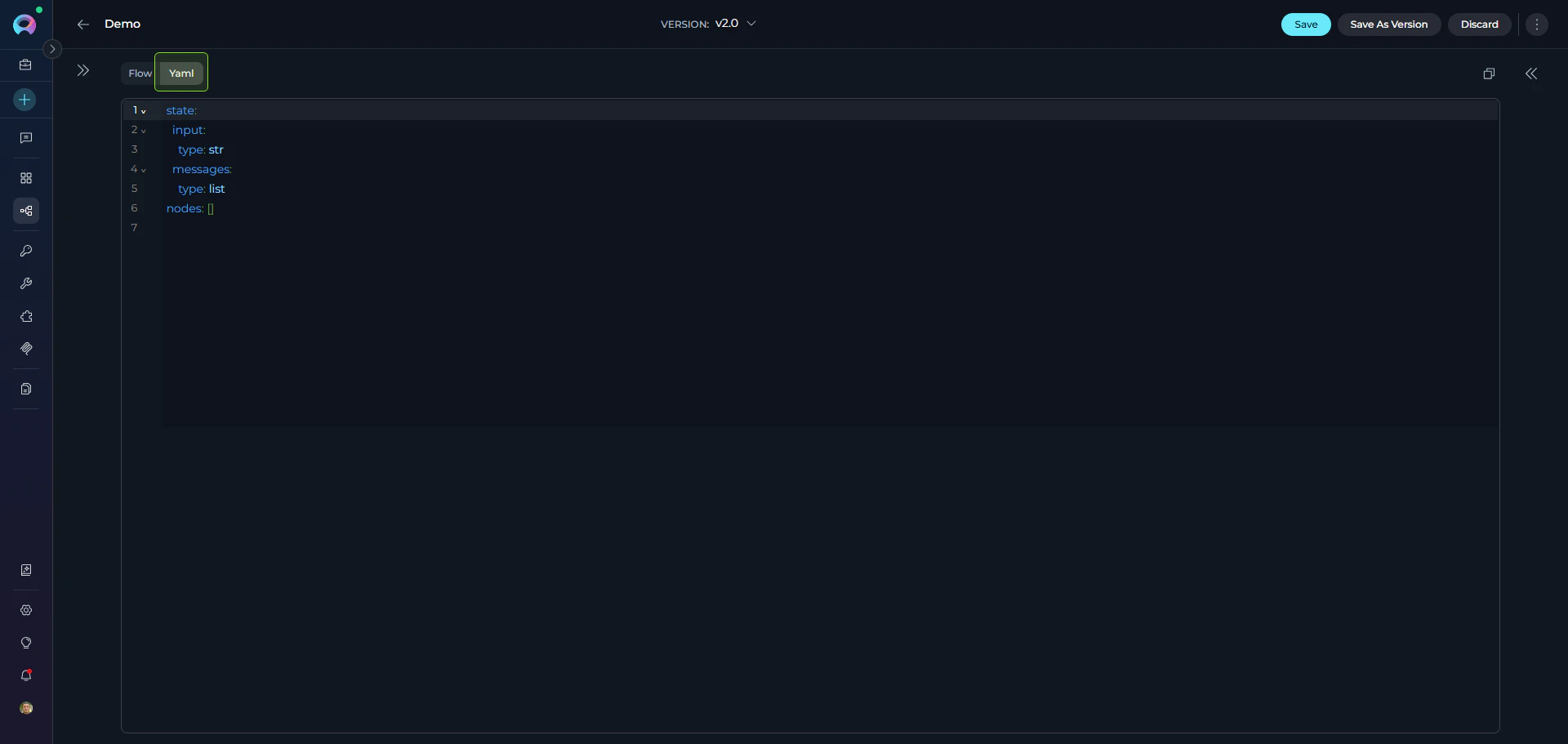
A code editor for pipelines in the **Configuration** tab (alongside [Flow Editor](./flow-editor)) that provides direct access to pipeline YAML definitions.
**Features:**
* **Instant Flow Sync**: Changes sync instantly between YAML and Flow views
* **Syntax Highlighting**: Color-coded YAML structure with CodeMirror
* **Real-time Validation**: Immediate error feedback
* **Find & Replace**: `Ctrl+F` (Windows) or `⌘+F` (Mac)
* **Version Control**: Copy/paste YAML for backup or sharing
 ***
## Schema Structure
Every pipeline has three required top-level sections:
```yaml theme={null}
entry_point: # Required
state: {...} # Required
nodes: [...] # Required
```
| Field | Type | Required | Description |
| ------------- | ------ | -------- | -------------------------- |
| `entry_point` | String | ✔️ | Starting node ID |
| `state` | Object | ✔️ | State variable definitions |
| `nodes` | Array | ✔️ | Node configurations |
***
## State Configuration
Defines all variables used across the pipeline. Each has a type and optional default value.
### State Syntax
```yaml theme={null}
state:
:
type:
value: # Optional
```
Default variables like `input` and `messages` don't require initial values—they are populated during pipeline execution.
**Data Types:**
| Type | Example |
| -------- | ------------------------ |
| `string` | `"Hello"` |
| `number` | `42`, `3.14` |
| `list` | `[]`, `["a", "b"]` |
| `JSON` | `{}`, `{"key": "value"}` |
**Example:**
```yaml theme={null}
state:
input:
type: string
counter:
type: number
value: 0
qna_list:
type: list
value: []
metadata:
type: JSON
value: {}
```
* Use descriptive names (`user_query` vs `q`)
* Initialize accumulators (`''`, `[]`, `0`)
* See [States Guide](./states) for details
***
## Node Configuration
The `nodes` array contains all pipeline nodes with common structure plus node-specific fields.
**Common Fields (all nodes):**
| Field | Type | Required | Description |
| ------------ | ------ | ----------- | ---------------------------------------------------------------- |
| `id` | String | ✔️ | Unique node identifier |
| `type` | String | ✔️ | Node type ([see overview](./nodes/overview)) |
| `input` | Array | ✔️ | State variables to read |
| `output` | Array | ✔️ | State variables to write |
| `transition` | String | Conditional | Next node ID (not needed with `condition`, `decision`, or `END`) |
***
## Node-Type-Specific Configurations
Configurations for key node types. See [Nodes Overview](./nodes/overview) for the full list of all 11 node types.
### 1. [LLM Node](./nodes/interaction-nodes#llm-node)
Calls language models with system/task prompts.
```yaml theme={null}
- id: Summarizer
type: llm
prompt:
type: string
value: ''
input: [article_text]
output: [messages]
structured_output: false
transition: NextNode
input_mapping:
system:
type: fixed
value: "You are an expert summarizer"
task:
type: fstring
value: "Summarize: {article_text}"
chat_history:
type: fixed
value: []
tool_names: # Optional
toolkit_name:
- tool1
```
**Mapping Types:** `fixed` (static), `variable` (state reference), `fstring` (template with `{var}`)
### 2. [Agent Node](./nodes/interaction-nodes#agent-node)
Executes pre-configured agents.
```yaml theme={null}
- id: Agent 1
type: agent
input:
- input
output:
- metadata
transition: END
input_mapping:
task:
type: fstring
value: ''
chat_history:
type: fixed
value: []
tool: Github
```
### 3. [Code Node](./nodes/execution-nodes#code-node)
Executes Python in sandbox.
```yaml theme={null}
- id: DataProcessor
type: code
code:
type: fixed
value: |
# Access state
input_text = alita_state.get('input')
# Return dict to update state
{"processed": input_text.upper()}
input: [input]
output: [processed_data]
structured_output: true
transition: END
```
Use `alita_state.get('var')` to access state variables, return dict with `structured_output: true`
### 4. [Router Node](./nodes/control-flow-nodes#router-node)
Template-based routing with Jinja2.
```yaml theme={null}
- id: CategoryRouter
type: router
default_output: DefaultNode
routes: [ProcessA, ProcessB, END]
input: [category]
condition: |
{% if category == 'urgent' %}
ProcessA
{% elif category == 'normal' %}
ProcessB
{% else %}
END
{% endif %}
```
### 5. [Decision Node](./nodes/control-flow-nodes#decision-node)
LLM-powered routing.
```yaml theme={null}
- id: SmartRouter
type: decision
input: [user_input]
output: [classification]
decision:
description: |
Route to SaveNode if user wants to save,
otherwise END
decisional_inputs: [user_input]
nodes: [SaveNode]
default_output: END
tool_names: # Optional
toolkit1: [tool_a]
```
### 6. [State Modifier Node](./nodes/utility-nodes#state-modifier-node)
Transforms state with Jinja2 templates.
```yaml theme={null}
- id: IncrementCounter
type: state_modifier
template: '{{ index + 1 }}'
variables_to_clean: []
input: [index]
output: [index]
transition: NextNode
```
**Advanced Example:**
```yaml theme={null}
- id: AggregateResponse
type: state_modifier
template: |
{{ response_full }}
## Question {{index}}
{{question}}
## Answer {{index}}
{{messages[-1].content }}
variables_to_clean: []
input: [response_full, messages, question, index]
output: [response_full]
transition: NextStep
```
### 7. [HITL Node](./nodes/control-flow-nodes#human-in-the-loop-node)
Pauses pipeline execution and waits for a human decision (Approve, Edit, or Reject) before continuing.
```yaml theme={null}
- id: Review_summary
type: hitl
input:
- summary
user_message:
type: fstring # fixed | fstring | variable
value: "Please review the following summary and choose an action:\n\n{summary}"
routes:
approve: Publish_node # Route on Approve
reject: END # Route on Reject
edit: Regenerate_node # Route on Edit
edit_state_key: summary # State variable updated when user edits
```
**User Message Types:**
| Type | Description | Example |
| ---------- | ------------------------------------------------------------ | ------------------------------------ |
| `fixed` | Static text shown as-is | `"Please approve to continue."` |
| `fstring` | Template with `{state_key}` placeholders resolved from state | `"Review draft:\n\n{draft_content}"` |
| `variable` | Reads the entire message from a named state variable | `review_message` |
* Only configured routes appear as buttons in the UI — omit routes you don't need
* `edit` requires `edit_state_key` to be set; omitting either hides the Edit button
* Use `END` as a route value to terminate the pipeline for that action
* HITL nodes do not use `transition` — routing is handled entirely by `routes`
***
## [Entry Point](./entry-point)
Specifies the first node to execute.
```yaml theme={null}
entry_point: StartNode
nodes:
- id: StartNode
type: llm
# ...
```
Must reference existing node ID; only one per pipeline; Router nodes cannot be entry points
***
## Interrupts
Defines pause points for user input. See [Nodes Connectors](./nodes-connectors#interrupt-options).
```yaml theme={null}
interrupt_after:
- ReviewNode
- ApprovalCheck
nodes:
- id: ReviewNode
type: llm
transition: NextNode
```
Human-in-the-loop workflows, review checkpoints, approval gates
***
## Connections
Nodes connect via `transition`, `condition`, `decision`, or routes. See [Nodes Connectors](./nodes-connectors).
**Simple Transition:**
```yaml theme={null}
- id: Step1
type: llm
transition: Step2
- id: Step2
type: code
transition: END
```
**Router:**
```yaml theme={null}
nodes:
- id: CategoryRouter
type: router
default_output: DefaultNode
routes:
- ProcessA
- ProcessB
condition: |
{% if category == 'urgent' %}
ProcessA
{% else %}
ProcessB
{% endif %}
```
**Decision:**
```yaml theme={null}
nodes:
- id: SmartRouter
type: decision
decision:
description: "Route based on user intent"
nodes:
- SaveNode
- ProcessNode
default_output: END
```
**HITL Routes:**
```yaml theme={null}
nodes:
- id: ReviewStep
type: hitl
user_message:
type: fixed
value: "Please approve or reject the generated content."
routes:
approve: PublishNode
reject: END
edit: ReviseNode
edit_state_key: draft_content
```
***
## Editor Features
**CodeMirror Capabilities:**
* Syntax highlighting with color-coded structure
* Error detection (red underlines for invalid YAML)
* Auto-indentation for nested structures
* Line numbers for navigation
* Find & Replace: `Ctrl+F` (Windows) / `⌘+F` (Mac)
***
## Schema Structure
Every pipeline has three required top-level sections:
```yaml theme={null}
entry_point: # Required
state: {...} # Required
nodes: [...] # Required
```
| Field | Type | Required | Description |
| ------------- | ------ | -------- | -------------------------- |
| `entry_point` | String | ✔️ | Starting node ID |
| `state` | Object | ✔️ | State variable definitions |
| `nodes` | Array | ✔️ | Node configurations |
***
## State Configuration
Defines all variables used across the pipeline. Each has a type and optional default value.
### State Syntax
```yaml theme={null}
state:
:
type:
value: # Optional
```
Default variables like `input` and `messages` don't require initial values—they are populated during pipeline execution.
**Data Types:**
| Type | Example |
| -------- | ------------------------ |
| `string` | `"Hello"` |
| `number` | `42`, `3.14` |
| `list` | `[]`, `["a", "b"]` |
| `JSON` | `{}`, `{"key": "value"}` |
**Example:**
```yaml theme={null}
state:
input:
type: string
counter:
type: number
value: 0
qna_list:
type: list
value: []
metadata:
type: JSON
value: {}
```
* Use descriptive names (`user_query` vs `q`)
* Initialize accumulators (`''`, `[]`, `0`)
* See [States Guide](./states) for details
***
## Node Configuration
The `nodes` array contains all pipeline nodes with common structure plus node-specific fields.
**Common Fields (all nodes):**
| Field | Type | Required | Description |
| ------------ | ------ | ----------- | ---------------------------------------------------------------- |
| `id` | String | ✔️ | Unique node identifier |
| `type` | String | ✔️ | Node type ([see overview](./nodes/overview)) |
| `input` | Array | ✔️ | State variables to read |
| `output` | Array | ✔️ | State variables to write |
| `transition` | String | Conditional | Next node ID (not needed with `condition`, `decision`, or `END`) |
***
## Node-Type-Specific Configurations
Configurations for key node types. See [Nodes Overview](./nodes/overview) for the full list of all 11 node types.
### 1. [LLM Node](./nodes/interaction-nodes#llm-node)
Calls language models with system/task prompts.
```yaml theme={null}
- id: Summarizer
type: llm
prompt:
type: string
value: ''
input: [article_text]
output: [messages]
structured_output: false
transition: NextNode
input_mapping:
system:
type: fixed
value: "You are an expert summarizer"
task:
type: fstring
value: "Summarize: {article_text}"
chat_history:
type: fixed
value: []
tool_names: # Optional
toolkit_name:
- tool1
```
**Mapping Types:** `fixed` (static), `variable` (state reference), `fstring` (template with `{var}`)
### 2. [Agent Node](./nodes/interaction-nodes#agent-node)
Executes pre-configured agents.
```yaml theme={null}
- id: Agent 1
type: agent
input:
- input
output:
- metadata
transition: END
input_mapping:
task:
type: fstring
value: ''
chat_history:
type: fixed
value: []
tool: Github
```
### 3. [Code Node](./nodes/execution-nodes#code-node)
Executes Python in sandbox.
```yaml theme={null}
- id: DataProcessor
type: code
code:
type: fixed
value: |
# Access state
input_text = alita_state.get('input')
# Return dict to update state
{"processed": input_text.upper()}
input: [input]
output: [processed_data]
structured_output: true
transition: END
```
Use `alita_state.get('var')` to access state variables, return dict with `structured_output: true`
### 4. [Router Node](./nodes/control-flow-nodes#router-node)
Template-based routing with Jinja2.
```yaml theme={null}
- id: CategoryRouter
type: router
default_output: DefaultNode
routes: [ProcessA, ProcessB, END]
input: [category]
condition: |
{% if category == 'urgent' %}
ProcessA
{% elif category == 'normal' %}
ProcessB
{% else %}
END
{% endif %}
```
### 5. [Decision Node](./nodes/control-flow-nodes#decision-node)
LLM-powered routing.
```yaml theme={null}
- id: SmartRouter
type: decision
input: [user_input]
output: [classification]
decision:
description: |
Route to SaveNode if user wants to save,
otherwise END
decisional_inputs: [user_input]
nodes: [SaveNode]
default_output: END
tool_names: # Optional
toolkit1: [tool_a]
```
### 6. [State Modifier Node](./nodes/utility-nodes#state-modifier-node)
Transforms state with Jinja2 templates.
```yaml theme={null}
- id: IncrementCounter
type: state_modifier
template: '{{ index + 1 }}'
variables_to_clean: []
input: [index]
output: [index]
transition: NextNode
```
**Advanced Example:**
```yaml theme={null}
- id: AggregateResponse
type: state_modifier
template: |
{{ response_full }}
## Question {{index}}
{{question}}
## Answer {{index}}
{{messages[-1].content }}
variables_to_clean: []
input: [response_full, messages, question, index]
output: [response_full]
transition: NextStep
```
### 7. [HITL Node](./nodes/control-flow-nodes#human-in-the-loop-node)
Pauses pipeline execution and waits for a human decision (Approve, Edit, or Reject) before continuing.
```yaml theme={null}
- id: Review_summary
type: hitl
input:
- summary
user_message:
type: fstring # fixed | fstring | variable
value: "Please review the following summary and choose an action:\n\n{summary}"
routes:
approve: Publish_node # Route on Approve
reject: END # Route on Reject
edit: Regenerate_node # Route on Edit
edit_state_key: summary # State variable updated when user edits
```
**User Message Types:**
| Type | Description | Example |
| ---------- | ------------------------------------------------------------ | ------------------------------------ |
| `fixed` | Static text shown as-is | `"Please approve to continue."` |
| `fstring` | Template with `{state_key}` placeholders resolved from state | `"Review draft:\n\n{draft_content}"` |
| `variable` | Reads the entire message from a named state variable | `review_message` |
* Only configured routes appear as buttons in the UI — omit routes you don't need
* `edit` requires `edit_state_key` to be set; omitting either hides the Edit button
* Use `END` as a route value to terminate the pipeline for that action
* HITL nodes do not use `transition` — routing is handled entirely by `routes`
***
## [Entry Point](./entry-point)
Specifies the first node to execute.
```yaml theme={null}
entry_point: StartNode
nodes:
- id: StartNode
type: llm
# ...
```
Must reference existing node ID; only one per pipeline; Router nodes cannot be entry points
***
## Interrupts
Defines pause points for user input. See [Nodes Connectors](./nodes-connectors#interrupt-options).
```yaml theme={null}
interrupt_after:
- ReviewNode
- ApprovalCheck
nodes:
- id: ReviewNode
type: llm
transition: NextNode
```
Human-in-the-loop workflows, review checkpoints, approval gates
***
## Connections
Nodes connect via `transition`, `condition`, `decision`, or routes. See [Nodes Connectors](./nodes-connectors).
**Simple Transition:**
```yaml theme={null}
- id: Step1
type: llm
transition: Step2
- id: Step2
type: code
transition: END
```
**Router:**
```yaml theme={null}
nodes:
- id: CategoryRouter
type: router
default_output: DefaultNode
routes:
- ProcessA
- ProcessB
condition: |
{% if category == 'urgent' %}
ProcessA
{% else %}
ProcessB
{% endif %}
```
**Decision:**
```yaml theme={null}
nodes:
- id: SmartRouter
type: decision
decision:
description: "Route based on user intent"
nodes:
- SaveNode
- ProcessNode
default_output: END
```
**HITL Routes:**
```yaml theme={null}
nodes:
- id: ReviewStep
type: hitl
user_message:
type: fixed
value: "Please approve or reject the generated content."
routes:
approve: PublishNode
reject: END
edit: ReviseNode
edit_state_key: draft_content
```
***
## Editor Features
**CodeMirror Capabilities:**
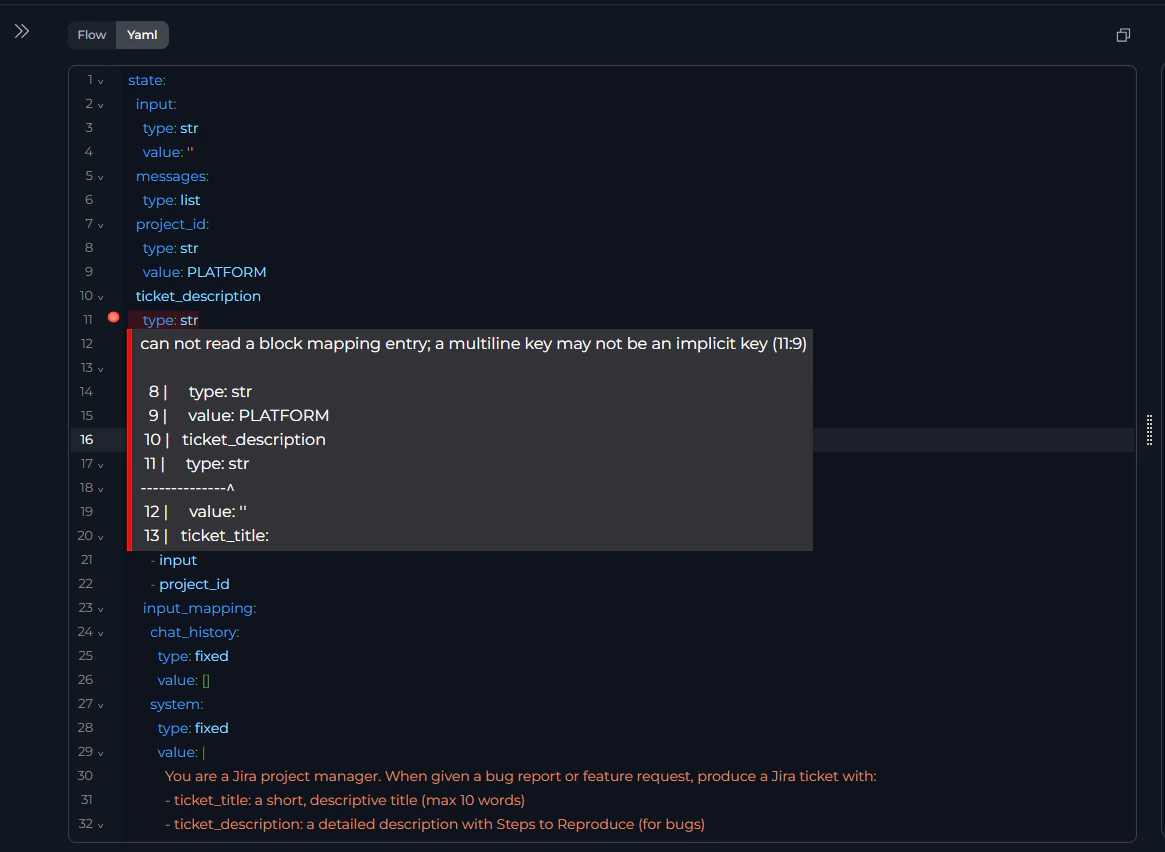
* Syntax highlighting with color-coded structure
* Error detection (red underlines for invalid YAML)
* Auto-indentation for nested structures
* Line numbers for navigation
* Find & Replace: `Ctrl+F` (Windows) / `⌘+F` (Mac)
 **Two-Way Sync:**
Changes sync instantly between YAML and Flow Editor.
* YAML → Flow: Add node in YAML → appears in Flow canvas
* Flow → YAML: Add node via Flow `+` button → YAML updates automatically
Start in Flow for layout → switch to YAML for bulk edits → copy YAML for version control
***
## YAML Guide
### Syntax Rules
**Indentation** (use spaces, not tabs):
```yaml theme={null}
✔️ Correct:
nodes:
- id: Node1
type: llm
input:
- var1
✘ Incorrect (mixed spaces/tabs):
nodes:
- id: Node1
type: llm # Tab used instead of spaces
```
### Strings with Special Characters
```yaml theme={null}
✔️ Correct:
template: '{{ index + 1 }}'
description: "Route: urgent"
value: |
Multi-line
content
✘ Wrong:
template: {{ index + 1 }}
description: Route: urgent
```
**Lists** (use block style):
```yaml theme={null}
✔️ Correct:
input: [var1, var2]
routes:
- NodeA
- NodeB
✘ Avoid inline for readability
```
**Booleans/Null** (lowercase):
```yaml theme={null}
✔️ Correct:
structured_output: true
structured_output: false
value: null
✘ Wrong:
structured_output: True
value: None
```
### Common Errors
**Missing Quotes:**
```yaml theme={null}
✘ condition: {% if approved %}
✔️ condition: '{% if approved %}'
```
**Undefined Node:**
```yaml theme={null}
✘ transition: NonExistentNode
✔️ Ensure node exists in nodes array
```
**Invalid Type:**
```yaml theme={null}
✘ type: invalid_type
✔️ type: llm # Use: llm, agent, toolkit, mcp, code, custom, router, decision, hitl, state_modifier, printer
```
**Missing Fields:**
```yaml theme={null}
✘ nodes:
- id: Node1
type: llm
✔️ Add: input, output, transition
```
### Validation Checklist
Before saving:
* [ ] Entry point references existing node ID
* [ ] All node IDs are unique
* [ ] All transitions reference existing nodes or END
* [ ] State variables in nodes are defined in `state`
* [ ] Input/output arrays use valid variable names
* [ ] Node-specific fields complete (e.g., LLM has `input_mapping`)
* [ ] No YAML syntax errors (red underlines)
* [ ] Indentation uses spaces
* [ ] Quotes around special characters (`:`, `{`, `%`)
### Best Practices
```yaml theme={null}
✔️ - id: FetchUserData
✘ - id: Node1
```
```yaml theme={null}
✔️ counter: {type: number, value: 0}
✘ counter: {type: number}
```
```yaml theme={null}
✔️ template: |
{% if condition %}NodeA{% else %}NodeB{% endif %}
✘ template: '{% if condition %}NodeA{% else %}NodeB{% endif %}'
```
```yaml theme={null}
nodes:
# Data Loading
- id: LoadData
# Processing
- id: ProcessData
```
```yaml theme={null}
✘ api_key: {type: fixed, value: "sk-123"}
✔️ Use Credentials instead
```
```yaml theme={null}
✘ - id: Node1
transition: Node3
- id: Node2 # Unreachable
```
```yaml theme={null}
✔️ - id: FinalNode
transition: END
```
1. **Start Visual, Refine in Code:** Use Flow Editor for layout → YAML for bulk edits
2. **Bulk Updates:** Find/replace to update toolkit names, node IDs
3. **Test Incrementally:** Add one node at a time, run pipeline after each
4. **Version Control:** Copy YAML to files, commit to git
5. **Use Comments:**
```yaml theme={null}
# Step 1: Load data
- id: LoadData
```
***
* [Flow Editor](./flow-editor) - Visual pipeline building
* [States](./states) - State variable design
* [Nodes Overview](./nodes/overview) - All node types
* [Nodes Connectors](./nodes-connectors) - Connection patterns
* [Entry Point](./entry-point) - Entry point rules
* [Interaction Nodes](./nodes/interaction-nodes) - LLM, Agent
* [Execution Nodes](./nodes/execution-nodes) - Toolkit, MCP, Code, Custom nodes
* [Control Flow Nodes](./nodes/control-flow-nodes) - Router, Decision, HITL
* [Utility Nodes](./nodes/utility-nodes) - State Modifier, Printer
**Two-Way Sync:**
Changes sync instantly between YAML and Flow Editor.
* YAML → Flow: Add node in YAML → appears in Flow canvas
* Flow → YAML: Add node via Flow `+` button → YAML updates automatically
Start in Flow for layout → switch to YAML for bulk edits → copy YAML for version control
***
## YAML Guide
### Syntax Rules
**Indentation** (use spaces, not tabs):
```yaml theme={null}
✔️ Correct:
nodes:
- id: Node1
type: llm
input:
- var1
✘ Incorrect (mixed spaces/tabs):
nodes:
- id: Node1
type: llm # Tab used instead of spaces
```
### Strings with Special Characters
```yaml theme={null}
✔️ Correct:
template: '{{ index + 1 }}'
description: "Route: urgent"
value: |
Multi-line
content
✘ Wrong:
template: {{ index + 1 }}
description: Route: urgent
```
**Lists** (use block style):
```yaml theme={null}
✔️ Correct:
input: [var1, var2]
routes:
- NodeA
- NodeB
✘ Avoid inline for readability
```
**Booleans/Null** (lowercase):
```yaml theme={null}
✔️ Correct:
structured_output: true
structured_output: false
value: null
✘ Wrong:
structured_output: True
value: None
```
### Common Errors
**Missing Quotes:**
```yaml theme={null}
✘ condition: {% if approved %}
✔️ condition: '{% if approved %}'
```
**Undefined Node:**
```yaml theme={null}
✘ transition: NonExistentNode
✔️ Ensure node exists in nodes array
```
**Invalid Type:**
```yaml theme={null}
✘ type: invalid_type
✔️ type: llm # Use: llm, agent, toolkit, mcp, code, custom, router, decision, hitl, state_modifier, printer
```
**Missing Fields:**
```yaml theme={null}
✘ nodes:
- id: Node1
type: llm
✔️ Add: input, output, transition
```
### Validation Checklist
Before saving:
* [ ] Entry point references existing node ID
* [ ] All node IDs are unique
* [ ] All transitions reference existing nodes or END
* [ ] State variables in nodes are defined in `state`
* [ ] Input/output arrays use valid variable names
* [ ] Node-specific fields complete (e.g., LLM has `input_mapping`)
* [ ] No YAML syntax errors (red underlines)
* [ ] Indentation uses spaces
* [ ] Quotes around special characters (`:`, `{`, `%`)
### Best Practices
```yaml theme={null}
✔️ - id: FetchUserData
✘ - id: Node1
```
```yaml theme={null}
✔️ counter: {type: number, value: 0}
✘ counter: {type: number}
```
```yaml theme={null}
✔️ template: |
{% if condition %}NodeA{% else %}NodeB{% endif %}
✘ template: '{% if condition %}NodeA{% else %}NodeB{% endif %}'
```
```yaml theme={null}
nodes:
# Data Loading
- id: LoadData
# Processing
- id: ProcessData
```
```yaml theme={null}
✘ api_key: {type: fixed, value: "sk-123"}
✔️ Use Credentials instead
```
```yaml theme={null}
✘ - id: Node1
transition: Node3
- id: Node2 # Unreachable
```
```yaml theme={null}
✔️ - id: FinalNode
transition: END
```
1. **Start Visual, Refine in Code:** Use Flow Editor for layout → YAML for bulk edits
2. **Bulk Updates:** Find/replace to update toolkit names, node IDs
3. **Test Incrementally:** Add one node at a time, run pipeline after each
4. **Version Control:** Copy YAML to files, commit to git
5. **Use Comments:**
```yaml theme={null}
# Step 1: Load data
- id: LoadData
```
***
* [Flow Editor](./flow-editor) - Visual pipeline building
* [States](./states) - State variable design
* [Nodes Overview](./nodes/overview) - All node types
* [Nodes Connectors](./nodes-connectors) - Connection patterns
* [Entry Point](./entry-point) - Entry point rules
* [Interaction Nodes](./nodes/interaction-nodes) - LLM, Agent
* [Execution Nodes](./nodes/execution-nodes) - Toolkit, MCP, Code, Custom nodes
* [Control Flow Nodes](./nodes/control-flow-nodes) - Router, Decision, HITL
* [Utility Nodes](./nodes/utility-nodes) - State Modifier, Printer