> ## Documentation Index
> Fetch the complete documentation index at: https://docs.elitea.ai/llms.txt
> Use this file to discover all available pages before exploring further.
# Pipeline Nodes Overview
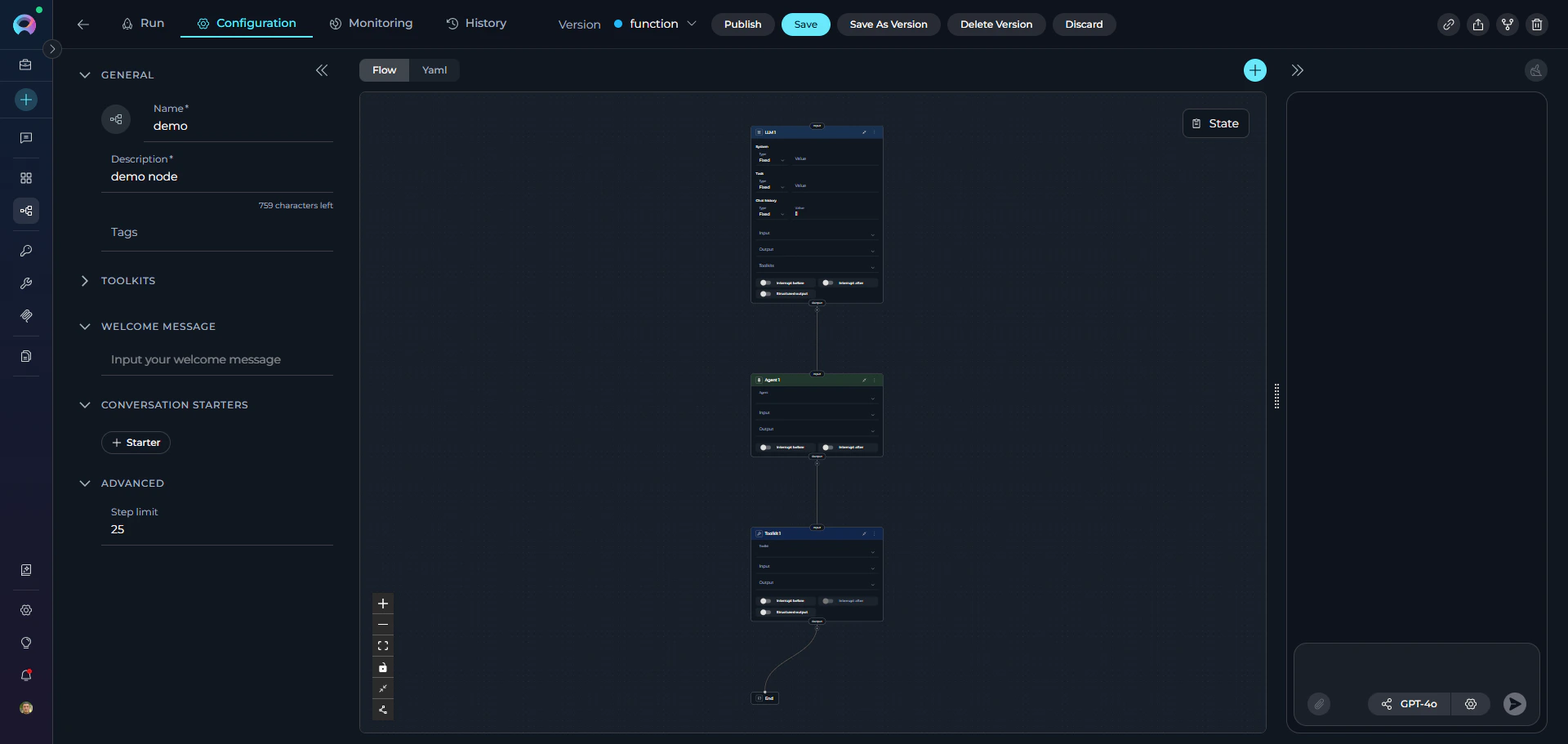
> Nodes are the fundamental building blocks of ELITEA Pipelines—individual steps that perform specific actions within your workflow. Each node:
* Performs one specific task (call an AI model, execute code, make a decision)
* Reads input from pipeline state
* Writes output back to state
* Connects to other nodes to form a workflow
Nodes execute sequentially or conditionally based on your configuration.
 ```Yaml theme={null}
state:
input:
type: str
messages:
type: list
entry_point: LLM 1
interrupt_after: []
nodes:
- id: Agent 1
type: agent
input: []
input_mapping: {}
output: []
transition: Toolkit 1
- id: LLM 1
type: llm
input: []
input_mapping:
chat_history:
type: fixed
value: []
system:
type: fixed
value: ''
task:
type: fixed
value: ''
output: []
structured_output: false
transition: Agent 1
- id: Toolkit 1
type: toolkit
input: []
input_mapping: {}
output: []
structured_output: false
tool: ''
transition: END
```
## Execution Flow
When a pipeline runs:
1. **Entry Point** - Execution begins at the starting node
2. **Node Execution** - The node reads from state, performs its action, and writes results
3. **Transition** - Execution moves to the next node based on configuration
4. **Iteration** - Process continues until reaching END or completing all nodes
All nodes share the same state. Data written by one node is immediately available to subsequent nodes.
## Common Node Attributes
All nodes share these common configuration attributes:
### Core Attributes
**`id`** (required)
: Unique identifier for the node within the pipeline. Must be unique across all nodes.
```yaml theme={null}
id: "process_request"
```
**`type`** (required)
: Node type (llm, agent, hitl, toolkit, mcp, code, custom, router, decision, state\_modifier, printer). Determines behavior and available parameters.
```yaml theme={null}
type: "llm"
```
### Input/Output Attributes
**`input`** (optional, default: `["input"]`)
: List of state variable names the node reads from. Defines which parts of the state the node can access.
```yaml theme={null}
input: ["user_input", "messages", "config"]
```
**`output`** (optional, default: `[]`)
: List of state variable names the node writes to. Specifies where the node's results are stored in state.
```yaml theme={null}
output: ["extracted_data", "confidence_score"]
```
If `output` is not specified, results typically go to the `messages` state variable (varies by node type).
### Flow Control Attributes
**`transition`** (optional)
: Simple transition to another node. Specifies the next node to execute unconditionally.
```yaml theme={null}
transition: "next_step"
```
**`condition`** (optional)
: Conditional branching using Jinja2 templates. Routes to different nodes based on expression evaluation.
```yaml theme={null}
condition:
condition_input: ["status", "approval"]
condition_definition: |
{% if status == 'approved' and approval == true %}
PublishNode
{% else %}
ReviewNode
{% endif %}
```
**`decision`** (optional)
: AI-powered decision making. Uses LLM to determine the next node based on context.
```yaml theme={null}
decision:
nodes: ["Publish", "Edit", "Reject"]
decisional_inputs: ["feedback", "messages"]
default_output: "ReviewAgain"
```
### Node-Specific Attributes
Each node type has additional parameters covered in the individual node type guides.
```Yaml theme={null}
state:
input:
type: str
messages:
type: list
entry_point: LLM 1
interrupt_after: []
nodes:
- id: Agent 1
type: agent
input: []
input_mapping: {}
output: []
transition: Toolkit 1
- id: LLM 1
type: llm
input: []
input_mapping:
chat_history:
type: fixed
value: []
system:
type: fixed
value: ''
task:
type: fixed
value: ''
output: []
structured_output: false
transition: Agent 1
- id: Toolkit 1
type: toolkit
input: []
input_mapping: {}
output: []
structured_output: false
tool: ''
transition: END
```
## Execution Flow
When a pipeline runs:
1. **Entry Point** - Execution begins at the starting node
2. **Node Execution** - The node reads from state, performs its action, and writes results
3. **Transition** - Execution moves to the next node based on configuration
4. **Iteration** - Process continues until reaching END or completing all nodes
All nodes share the same state. Data written by one node is immediately available to subsequent nodes.
## Common Node Attributes
All nodes share these common configuration attributes:
### Core Attributes
**`id`** (required)
: Unique identifier for the node within the pipeline. Must be unique across all nodes.
```yaml theme={null}
id: "process_request"
```
**`type`** (required)
: Node type (llm, agent, hitl, toolkit, mcp, code, custom, router, decision, state\_modifier, printer). Determines behavior and available parameters.
```yaml theme={null}
type: "llm"
```
### Input/Output Attributes
**`input`** (optional, default: `["input"]`)
: List of state variable names the node reads from. Defines which parts of the state the node can access.
```yaml theme={null}
input: ["user_input", "messages", "config"]
```
**`output`** (optional, default: `[]`)
: List of state variable names the node writes to. Specifies where the node's results are stored in state.
```yaml theme={null}
output: ["extracted_data", "confidence_score"]
```
If `output` is not specified, results typically go to the `messages` state variable (varies by node type).
### Flow Control Attributes
**`transition`** (optional)
: Simple transition to another node. Specifies the next node to execute unconditionally.
```yaml theme={null}
transition: "next_step"
```
**`condition`** (optional)
: Conditional branching using Jinja2 templates. Routes to different nodes based on expression evaluation.
```yaml theme={null}
condition:
condition_input: ["status", "approval"]
condition_definition: |
{% if status == 'approved' and approval == true %}
PublishNode
{% else %}
ReviewNode
{% endif %}
```
**`decision`** (optional)
: AI-powered decision making. Uses LLM to determine the next node based on context.
```yaml theme={null}
decision:
nodes: ["Publish", "Edit", "Reject"]
decisional_inputs: ["feedback", "messages"]
default_output: "ReviewAgain"
```
### Node-Specific Attributes
Each node type has additional parameters covered in the individual node type guides.
 ## Node Categories
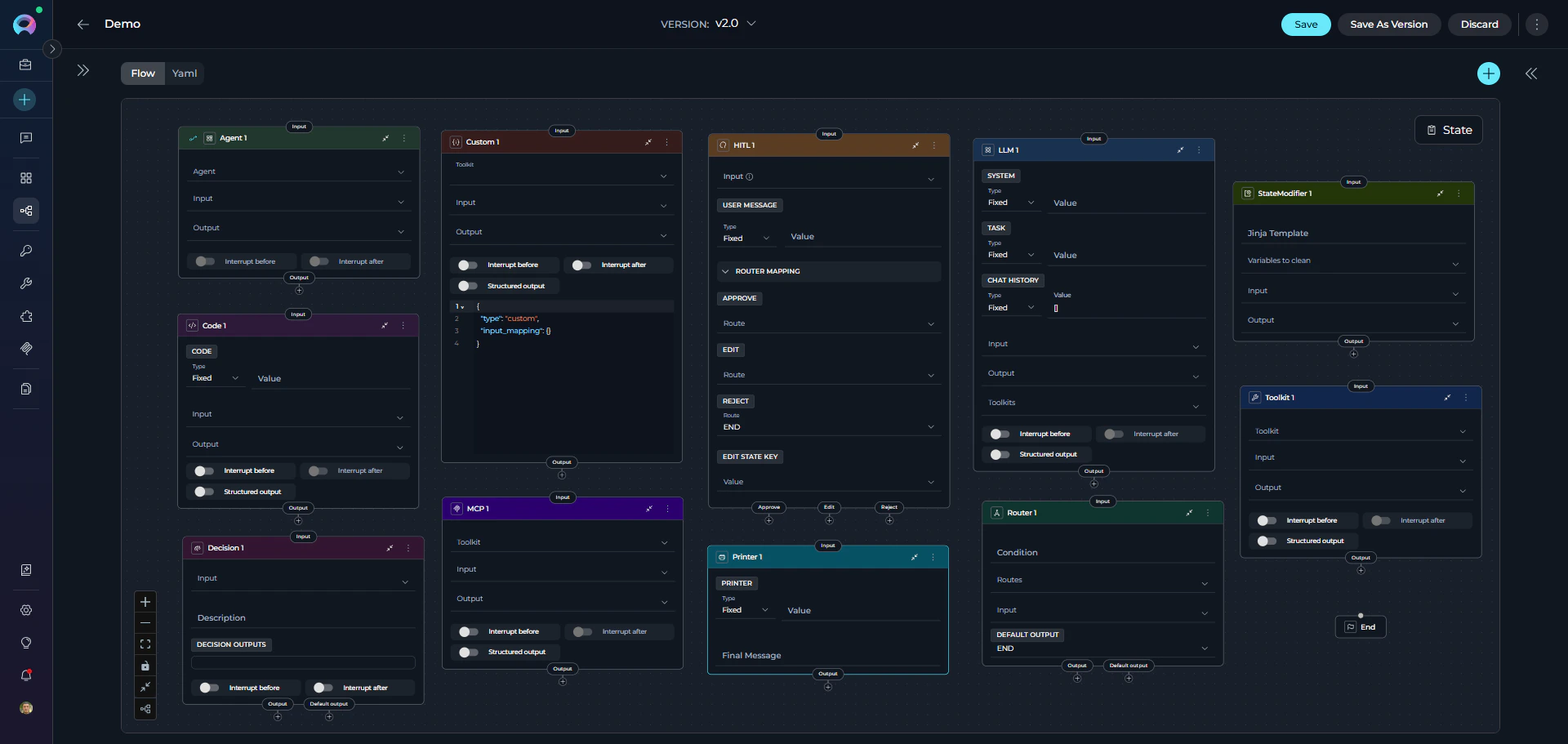
ELITEA Pipelines provide **11 different node types** organized into **4 functional categories**. Understanding these categories helps you quickly identify the right node for your needs.
### Interaction Nodes
**Purpose**: Interact with users or AI models to gather information, generate responses, or delegate tasks.
**Node Types**:
1. **[LLM Node](./interaction-nodes#llm-node)** - Interact with Large Language Models
* Call AI models (GPT-4, Claude, etc.) for text generation
* Support chat history and conversation context
* Bind tools for function calling
* Extract structured data from responses
2. **[Agent Node](./interaction-nodes#agent-node)** - Delegate tasks to pre-built AI agents
* Execute specialized agents within your pipeline
* Leverage agent-specific capabilities
* Pass context and get results
* Combine multiple agents in workflows
!!! tip "Use Cases"
* Generate text, summaries, or responses
* Analyze content or extract information
* Have contextual conversations
* Delegate to specialized AI capabilities
***
### Execution Nodes
**Purpose**: Perform actions, call external services, execute code, or trigger integrations.
**Node Types**:
1. **[Toolkit Node](./execution-nodes#toolkit-node)** - Execute ELITEA toolkit functions
* Call toolkit functions (Jira, GitHub, Slack, Confluence, etc.)
* Direct execution without LLM preprocessing
* Map inputs to toolkit parameters
* Capture structured outputs
* Support for all ELITEA toolkits
2. **[MCP Node](./execution-nodes#mcp-node)** - Execute Model Context Protocol (MCP) tools
* Connect to remote MCP servers via HTTP
* Execute MCP server tools directly
* Configure connection parameters (URL, headers, timeout)
* Map inputs and capture outputs
* Enable/disable specific tools from MCP server
3. **[Code Node](./execution-nodes#code-node)** - Run custom Python code
* Execute arbitrary Python scripts
* Access pipeline state via `alita_state`
* Process data, perform calculations
* Integrate with external APIs
* Return structured results
4. **Custom Node** - Advanced manual JSON configuration
* Make manual and advanced configurations
* Use any available toolkit (Agents, Pipelines, Toolkits, MCPs)
* Full control via JSON-based configuration
* For advanced users with specific requirements
!!! tip "Use Cases"
* Call external services or APIs
* Execute custom business logic
* Process or transform data
* Integrate with third-party systems
* Perform calculations or validations
***
### Control Flow Nodes
**Purpose**: Make decisions and route pipeline execution based on conditions or logic.
**Node Types**:
1. **[Router Node](./control-flow-nodes#router-node)** - Route based on expression evaluation
* Evaluate Python expressions
* Direct flow to specific nodes based on result
* Support multiple output routes
* Use state variables in conditions
2. **[Decision Node](./control-flow-nodes#decision-node)** - AI-powered routing decisions
* Let LLM decide the next step based on context
* Provide natural language description of routing criteria
* Define possible decision outcomes (nodes list)
* Specify decisional inputs for LLM analysis
* Fallback to default output if decision unclear
3. **[Human-in-the-Loop Node](./control-flow-nodes#human-in-the-loop-node)** - Pause for a human decision
* Present AI output for human review
* Provide Approve / Edit / Reject actions
* Route the pipeline based on the human's choice
* Optionally update a state variable with the user's edited value
!!! tip "Use Cases"
* Branch workflow based on data values
* Implement business rules
* Create approval workflows
* Route based on AI interpretation
* Handle different scenarios dynamically
***
### Utility Nodes
**Purpose**: Manage state, transform data, and display information.
**Node Types**:
1. **[State Modifier Node](./utility-nodes#state-modifier-node)** - Transform and clean state
* Use Jinja2 templates to modify state
* Combine multiple state variables
* Format and transform data
* Clean up or reset state variables
* Apply filters (from\_json, base64\_to\_string, split\_by\_words, etc.)
2. **[Printer Node](./utility-nodes#printer-node)** - Display formatted output to users
* Format and display messages during pipeline execution
* Pause pipeline execution for user review
* Use Jinja2 templates to format output
* Access state variables in templates
* Resume execution after user acknowledgment
!!! tip "Use Cases"
* Format output for specific purposes
* Combine data from multiple sources
* Clean up temporary state
* Transform and structure data
* Display progress or results to users
* Show intermediate workflow status
***
## Choosing the Right Node
Use this guide to select the appropriate node:
### Decision Tree
```
Need to...
│
├─ Generate text or analyze content?
│ └─ Use **LLM Node** or **Agent Node**
│
├─ Call an external service or API?
│ ├─ ELITEA Toolkit? → **Toolkit Node**
│ ├─ MCP Server? → **MCP Node**
│ └─ Custom integration? → **Code Node**
│
├─ Make a decision or branch?
│ ├─ Simple expression/condition? → **Router Node**
│ ├─ AI-powered decision? → **Decision Node**
│ └─ Human decision required? → **HITL Node**
│
├─ Delegate to specialized agent?
│ └─ Use **Agent Node**
│
└─ Transform, manage state, or display output?
├─ Transform state? → **State Modifier Node**
└─ Display to user? → **Printer Node**
```
### Quick Reference Table
| **Goal** | **Recommended Node** | **Alternative** | **Example Use Case** |
| -------------------------------- | -------------------- | ---------------- | --------------------------------------------------------------------- |
| Generate text with AI | LLM Node | Agent Node | Summarize documents, generate responses, analyze content |
| Call external API or service | Toolkit Node | Code Node + API | Create Jira tickets, send Slack messages, query databases |
| Execute MCP server tools | MCP Node | Code Node + HTTP | Connect to remote MCP servers, execute MCP tools |
| Make conditional decisions | Router Node | Decision Node | Route by status (approved/rejected), check error conditions |
| Require human approval or review | HITL Node | - | Approve AI-generated content, compliance checkpoint before publishing |
| Transform or format data | State Modifier Node | Code Node | Format output with templates, combine state variables |
| Run custom business logic | Code Node | Toolkit Node | Perform calculations, data processing, custom validations |
| Display information to users | Printer Node | Code Node | Show progress updates, formatted reports, status messages |
| Delegate to AI agents | Agent Node | - | Use specialized agents for complex tasks, multi-step workflows |
| AI-powered routing | Decision Node | Router Node | Route based on content analysis, sentiment, or context |
## Common Patterns
**Pattern 1: Gather → Process → Act**
```yaml theme={null}
nodes:
# 1. Gather information using LLM
- id: "gather_requirements"
type: "llm"
input: ["user_input", "messages"]
output: ["requirements", "project_id"]
structured_output: true
# 2. Process with external tool
- id: "create_tickets"
type: "toolkit"
toolkit_name: "jira_toolkit"
tool: "create_issue"
input: ["requirements", "project_id"]
output: ["ticket_ids"]
input_mapping: {}
# 3. Act - send notification
- id: "notify_team"
type: "toolkit"
toolkit_name: "slack_toolkit"
tool: "send_message"
input: ["ticket_ids"]
input_mapping: {}
transition: "END"
```
**Pattern 2: Conditional Branching**
```yaml theme={null}
nodes:
- id: "check_approval"
type: "router"
condition: "status == 'approved'"
input: ["status"]
routes: ["approved", "rejected"]
default_output: "review_needed"
- id: "approved"
type: "llm"
# ... approved workflow
- id: "rejected"
type: "llm"
# ... rejection workflow
- id: "review_needed"
type: "llm"
# ... review workflow
```
**Pattern 3: Toolkit Integration**
```yaml theme={null}
nodes:
- id: "fetch_jira_issues"
type: "toolkit"
toolkit_name: "jira_toolkit"
tool: "search_issues"
input: ["project_key", "status"]
output: ["issues"]
input_mapping: {}
- id: "process_issues"
type: "code"
code: |
# Process each issue
processed = []
for issue in alita_state.get('issues', []):
processed.append({
'key': issue['key'],
'summary': issue['summary']
})
return {'processed_issues': processed}
input: ["issues"]
output: ["processed_issues"]
transition: "send_summary"
- id: "send_summary"
type: "toolkit"
toolkit_name: "slack_toolkit"
tool: "send_message"
input: ["processed_issues"]
input_mapping: {}
transition: "END"
```
**Pattern 4: State Transformation**
```yaml theme={null}
nodes:
- id: "extract_data"
type: "llm"
output: ["raw_data", "metadata"]
- id: "format_output"
type: "state_modifier"
template: |
## Report
**Data**: {{raw_data}}
**Metadata**: {{metadata | from_json}}
input: ["raw_data", "metadata"]
output: ["formatted_report"]
```
## Best Practices
**Use Descriptive Node IDs**
✔️ Good:
```yaml theme={null}
id: "extract_jira_requirements"
id: "send_slack_notification"
id: "approve_or_reject_decision"
```
✘ Avoid:
```yaml theme={null}
id: "node1"
id: "process"
id: "step_final"
```
**Minimize State Pollution**
Only output what you need:
✔️ Good:
```yaml theme={null}
output: ["user_id", "status"] # Only what's needed
```
✘ Avoid:
```yaml theme={null}
output: ["user_id", "status", "temp_data", "debug_info", "raw_response"]
```
**Choose the Right Tool**
* **Toolkit Node** for direct ELITEA toolkit calls (faster, more reliable)
* **MCP Node** for Model Context Protocol server integrations
* **Code Node** for custom logic not available in toolkits or MCPs
* **Printer Node** for displaying formatted output to users during execution
**Handle Errors Gracefully**
Use router nodes to check for errors:
```yaml theme={null}
- id: "api_call"
type: "toolkit"
toolkit_name: "api_toolkit"
tool: "fetch_data"
output: ["result", "error"]
- id: "check_error"
type: "router"
condition: "error is not None"
routes: ["handle_error", "continue_success"]
input: ["error"]
```
**Keep Nodes Focused**
Each node should have a single responsibility:
✔️ Good: Separate nodes for each step
```yaml theme={null}
- id: "fetch_data"
- id: "process_data"
- id: "send_results"
```
✘ Avoid: One node doing everything
```yaml theme={null}
- id: "fetch_process_and_send_everything"
```
**Use Consistent Naming**
Establish naming conventions for your team:
```yaml theme={null}
# Verb-noun pattern
id: "fetch_users"
id: "create_ticket"
id: "validate_input"
# Or: subject-action pattern
id: "user_validation"
id: "ticket_creation"
id: "email_notification"
```
**Document Complex Nodes**
Use comments in YAML to explain non-obvious logic:
```yaml theme={null}
# This node uses LLM to extract structured data from user stories
# Expected output: {title, description, acceptance_criteria}
- id: "extract_story_details"
type: "llm"
structured_output: true
output: ["title", "description", "acceptance_criteria"]
```
***
## Deprecated Nodes
The following nodes are deprecated and will be removed in a future release. Please migrate to the recommended alternatives:
The **Condition** node is deprecated and will be removed in an upcoming release.
**Migration:** Use the **Router** node for expression-based routing or the **Decision** node for AI-powered routing decisions.
**Migration Guide:** [Condition Node Migration](../../../migration/v2.0.1/condition-node-migration)
The **Function** node is deprecated and will be removed in an upcoming release.
**Migration:** Use the **Toolkit** node for ELITEA toolkits, the **MCP** node for Model Context Protocol servers, or the **Agent** node for delegating to AI agents.
**Migration Guide:** [Function Node Migration](../../../migration/v2.0.1/function-node-migration)
The **Tool** node is deprecated and will be removed in an upcoming release.
**Migration:** Use the **Toolkit** node for direct toolkit execution without LLM preprocessing.
**Migration Guide:** [Tool Node Migration](../../../migration/v2.0.1/tool-node-migration)
The **Loop** node is deprecated and will be removed in an upcoming release.
**Migration:** Use the **Router** node with state-based iteration control for implementing loop patterns.
**Migration Guide:** [Loop Node Migration](../../../migration/v2.0.1/loop-node-migration)
The **Loop from Tool** node is deprecated and will be removed in an upcoming release.
**Migration:** Use the **Router** node with state-based iteration control for implementing loop patterns.
**Migration Guide:** [Loop Node Migration](../../../migration/v2.0.1/loop-node-migration)
The **Pipeline** (Subgraph) node is deprecated and will be removed in an upcoming release.
**Migration:** Use the **Agent** node to delegate tasks to specialized AI agents, effectively replacing nested pipeline functionality.
**Migration Guide:** [Pipeline Node Migration](../../../migration/v2.0.1/pipeline-node-migration)
***
* **[States](../states)** - Understand how nodes read from and write to pipeline state
* **[Connections](../nodes-connectors)** - Learn how to link nodes together
* **[Entry Point](../entry-point)** - Define where your pipeline begins
* **[Flow Editor](../flow-editor)** - Build pipelines visually with drag-and-drop
* **[YAML Configuration](../yaml)** - See complete node definition syntax
* **[Appendix - Comparison Tables](../appendix-comparison-tables)**
## Node Categories
ELITEA Pipelines provide **11 different node types** organized into **4 functional categories**. Understanding these categories helps you quickly identify the right node for your needs.
### Interaction Nodes
**Purpose**: Interact with users or AI models to gather information, generate responses, or delegate tasks.
**Node Types**:
1. **[LLM Node](./interaction-nodes#llm-node)** - Interact with Large Language Models
* Call AI models (GPT-4, Claude, etc.) for text generation
* Support chat history and conversation context
* Bind tools for function calling
* Extract structured data from responses
2. **[Agent Node](./interaction-nodes#agent-node)** - Delegate tasks to pre-built AI agents
* Execute specialized agents within your pipeline
* Leverage agent-specific capabilities
* Pass context and get results
* Combine multiple agents in workflows
!!! tip "Use Cases"
* Generate text, summaries, or responses
* Analyze content or extract information
* Have contextual conversations
* Delegate to specialized AI capabilities
***
### Execution Nodes
**Purpose**: Perform actions, call external services, execute code, or trigger integrations.
**Node Types**:
1. **[Toolkit Node](./execution-nodes#toolkit-node)** - Execute ELITEA toolkit functions
* Call toolkit functions (Jira, GitHub, Slack, Confluence, etc.)
* Direct execution without LLM preprocessing
* Map inputs to toolkit parameters
* Capture structured outputs
* Support for all ELITEA toolkits
2. **[MCP Node](./execution-nodes#mcp-node)** - Execute Model Context Protocol (MCP) tools
* Connect to remote MCP servers via HTTP
* Execute MCP server tools directly
* Configure connection parameters (URL, headers, timeout)
* Map inputs and capture outputs
* Enable/disable specific tools from MCP server
3. **[Code Node](./execution-nodes#code-node)** - Run custom Python code
* Execute arbitrary Python scripts
* Access pipeline state via `alita_state`
* Process data, perform calculations
* Integrate with external APIs
* Return structured results
4. **Custom Node** - Advanced manual JSON configuration
* Make manual and advanced configurations
* Use any available toolkit (Agents, Pipelines, Toolkits, MCPs)
* Full control via JSON-based configuration
* For advanced users with specific requirements
!!! tip "Use Cases"
* Call external services or APIs
* Execute custom business logic
* Process or transform data
* Integrate with third-party systems
* Perform calculations or validations
***
### Control Flow Nodes
**Purpose**: Make decisions and route pipeline execution based on conditions or logic.
**Node Types**:
1. **[Router Node](./control-flow-nodes#router-node)** - Route based on expression evaluation
* Evaluate Python expressions
* Direct flow to specific nodes based on result
* Support multiple output routes
* Use state variables in conditions
2. **[Decision Node](./control-flow-nodes#decision-node)** - AI-powered routing decisions
* Let LLM decide the next step based on context
* Provide natural language description of routing criteria
* Define possible decision outcomes (nodes list)
* Specify decisional inputs for LLM analysis
* Fallback to default output if decision unclear
3. **[Human-in-the-Loop Node](./control-flow-nodes#human-in-the-loop-node)** - Pause for a human decision
* Present AI output for human review
* Provide Approve / Edit / Reject actions
* Route the pipeline based on the human's choice
* Optionally update a state variable with the user's edited value
!!! tip "Use Cases"
* Branch workflow based on data values
* Implement business rules
* Create approval workflows
* Route based on AI interpretation
* Handle different scenarios dynamically
***
### Utility Nodes
**Purpose**: Manage state, transform data, and display information.
**Node Types**:
1. **[State Modifier Node](./utility-nodes#state-modifier-node)** - Transform and clean state
* Use Jinja2 templates to modify state
* Combine multiple state variables
* Format and transform data
* Clean up or reset state variables
* Apply filters (from\_json, base64\_to\_string, split\_by\_words, etc.)
2. **[Printer Node](./utility-nodes#printer-node)** - Display formatted output to users
* Format and display messages during pipeline execution
* Pause pipeline execution for user review
* Use Jinja2 templates to format output
* Access state variables in templates
* Resume execution after user acknowledgment
!!! tip "Use Cases"
* Format output for specific purposes
* Combine data from multiple sources
* Clean up temporary state
* Transform and structure data
* Display progress or results to users
* Show intermediate workflow status
***
## Choosing the Right Node
Use this guide to select the appropriate node:
### Decision Tree
```
Need to...
│
├─ Generate text or analyze content?
│ └─ Use **LLM Node** or **Agent Node**
│
├─ Call an external service or API?
│ ├─ ELITEA Toolkit? → **Toolkit Node**
│ ├─ MCP Server? → **MCP Node**
│ └─ Custom integration? → **Code Node**
│
├─ Make a decision or branch?
│ ├─ Simple expression/condition? → **Router Node**
│ ├─ AI-powered decision? → **Decision Node**
│ └─ Human decision required? → **HITL Node**
│
├─ Delegate to specialized agent?
│ └─ Use **Agent Node**
│
└─ Transform, manage state, or display output?
├─ Transform state? → **State Modifier Node**
└─ Display to user? → **Printer Node**
```
### Quick Reference Table
| **Goal** | **Recommended Node** | **Alternative** | **Example Use Case** |
| -------------------------------- | -------------------- | ---------------- | --------------------------------------------------------------------- |
| Generate text with AI | LLM Node | Agent Node | Summarize documents, generate responses, analyze content |
| Call external API or service | Toolkit Node | Code Node + API | Create Jira tickets, send Slack messages, query databases |
| Execute MCP server tools | MCP Node | Code Node + HTTP | Connect to remote MCP servers, execute MCP tools |
| Make conditional decisions | Router Node | Decision Node | Route by status (approved/rejected), check error conditions |
| Require human approval or review | HITL Node | - | Approve AI-generated content, compliance checkpoint before publishing |
| Transform or format data | State Modifier Node | Code Node | Format output with templates, combine state variables |
| Run custom business logic | Code Node | Toolkit Node | Perform calculations, data processing, custom validations |
| Display information to users | Printer Node | Code Node | Show progress updates, formatted reports, status messages |
| Delegate to AI agents | Agent Node | - | Use specialized agents for complex tasks, multi-step workflows |
| AI-powered routing | Decision Node | Router Node | Route based on content analysis, sentiment, or context |
## Common Patterns
**Pattern 1: Gather → Process → Act**
```yaml theme={null}
nodes:
# 1. Gather information using LLM
- id: "gather_requirements"
type: "llm"
input: ["user_input", "messages"]
output: ["requirements", "project_id"]
structured_output: true
# 2. Process with external tool
- id: "create_tickets"
type: "toolkit"
toolkit_name: "jira_toolkit"
tool: "create_issue"
input: ["requirements", "project_id"]
output: ["ticket_ids"]
input_mapping: {}
# 3. Act - send notification
- id: "notify_team"
type: "toolkit"
toolkit_name: "slack_toolkit"
tool: "send_message"
input: ["ticket_ids"]
input_mapping: {}
transition: "END"
```
**Pattern 2: Conditional Branching**
```yaml theme={null}
nodes:
- id: "check_approval"
type: "router"
condition: "status == 'approved'"
input: ["status"]
routes: ["approved", "rejected"]
default_output: "review_needed"
- id: "approved"
type: "llm"
# ... approved workflow
- id: "rejected"
type: "llm"
# ... rejection workflow
- id: "review_needed"
type: "llm"
# ... review workflow
```
**Pattern 3: Toolkit Integration**
```yaml theme={null}
nodes:
- id: "fetch_jira_issues"
type: "toolkit"
toolkit_name: "jira_toolkit"
tool: "search_issues"
input: ["project_key", "status"]
output: ["issues"]
input_mapping: {}
- id: "process_issues"
type: "code"
code: |
# Process each issue
processed = []
for issue in alita_state.get('issues', []):
processed.append({
'key': issue['key'],
'summary': issue['summary']
})
return {'processed_issues': processed}
input: ["issues"]
output: ["processed_issues"]
transition: "send_summary"
- id: "send_summary"
type: "toolkit"
toolkit_name: "slack_toolkit"
tool: "send_message"
input: ["processed_issues"]
input_mapping: {}
transition: "END"
```
**Pattern 4: State Transformation**
```yaml theme={null}
nodes:
- id: "extract_data"
type: "llm"
output: ["raw_data", "metadata"]
- id: "format_output"
type: "state_modifier"
template: |
## Report
**Data**: {{raw_data}}
**Metadata**: {{metadata | from_json}}
input: ["raw_data", "metadata"]
output: ["formatted_report"]
```
## Best Practices
**Use Descriptive Node IDs**
✔️ Good:
```yaml theme={null}
id: "extract_jira_requirements"
id: "send_slack_notification"
id: "approve_or_reject_decision"
```
✘ Avoid:
```yaml theme={null}
id: "node1"
id: "process"
id: "step_final"
```
**Minimize State Pollution**
Only output what you need:
✔️ Good:
```yaml theme={null}
output: ["user_id", "status"] # Only what's needed
```
✘ Avoid:
```yaml theme={null}
output: ["user_id", "status", "temp_data", "debug_info", "raw_response"]
```
**Choose the Right Tool**
* **Toolkit Node** for direct ELITEA toolkit calls (faster, more reliable)
* **MCP Node** for Model Context Protocol server integrations
* **Code Node** for custom logic not available in toolkits or MCPs
* **Printer Node** for displaying formatted output to users during execution
**Handle Errors Gracefully**
Use router nodes to check for errors:
```yaml theme={null}
- id: "api_call"
type: "toolkit"
toolkit_name: "api_toolkit"
tool: "fetch_data"
output: ["result", "error"]
- id: "check_error"
type: "router"
condition: "error is not None"
routes: ["handle_error", "continue_success"]
input: ["error"]
```
**Keep Nodes Focused**
Each node should have a single responsibility:
✔️ Good: Separate nodes for each step
```yaml theme={null}
- id: "fetch_data"
- id: "process_data"
- id: "send_results"
```
✘ Avoid: One node doing everything
```yaml theme={null}
- id: "fetch_process_and_send_everything"
```
**Use Consistent Naming**
Establish naming conventions for your team:
```yaml theme={null}
# Verb-noun pattern
id: "fetch_users"
id: "create_ticket"
id: "validate_input"
# Or: subject-action pattern
id: "user_validation"
id: "ticket_creation"
id: "email_notification"
```
**Document Complex Nodes**
Use comments in YAML to explain non-obvious logic:
```yaml theme={null}
# This node uses LLM to extract structured data from user stories
# Expected output: {title, description, acceptance_criteria}
- id: "extract_story_details"
type: "llm"
structured_output: true
output: ["title", "description", "acceptance_criteria"]
```
***
## Deprecated Nodes
The following nodes are deprecated and will be removed in a future release. Please migrate to the recommended alternatives:
The **Condition** node is deprecated and will be removed in an upcoming release.
**Migration:** Use the **Router** node for expression-based routing or the **Decision** node for AI-powered routing decisions.
**Migration Guide:** [Condition Node Migration](../../../migration/v2.0.1/condition-node-migration)
The **Function** node is deprecated and will be removed in an upcoming release.
**Migration:** Use the **Toolkit** node for ELITEA toolkits, the **MCP** node for Model Context Protocol servers, or the **Agent** node for delegating to AI agents.
**Migration Guide:** [Function Node Migration](../../../migration/v2.0.1/function-node-migration)
The **Tool** node is deprecated and will be removed in an upcoming release.
**Migration:** Use the **Toolkit** node for direct toolkit execution without LLM preprocessing.
**Migration Guide:** [Tool Node Migration](../../../migration/v2.0.1/tool-node-migration)
The **Loop** node is deprecated and will be removed in an upcoming release.
**Migration:** Use the **Router** node with state-based iteration control for implementing loop patterns.
**Migration Guide:** [Loop Node Migration](../../../migration/v2.0.1/loop-node-migration)
The **Loop from Tool** node is deprecated and will be removed in an upcoming release.
**Migration:** Use the **Router** node with state-based iteration control for implementing loop patterns.
**Migration Guide:** [Loop Node Migration](../../../migration/v2.0.1/loop-node-migration)
The **Pipeline** (Subgraph) node is deprecated and will be removed in an upcoming release.
**Migration:** Use the **Agent** node to delegate tasks to specialized AI agents, effectively replacing nested pipeline functionality.
**Migration Guide:** [Pipeline Node Migration](../../../migration/v2.0.1/pipeline-node-migration)
***
* **[States](../states)** - Understand how nodes read from and write to pipeline state
* **[Connections](../nodes-connectors)** - Learn how to link nodes together
* **[Entry Point](../entry-point)** - Define where your pipeline begins
* **[Flow Editor](../flow-editor)** - Build pipelines visually with drag-and-drop
* **[YAML Configuration](../yaml)** - See complete node definition syntax
* **[Appendix - Comparison Tables](../appendix-comparison-tables)**