> ## Documentation Index
> Fetch the complete documentation index at: https://docs.elitea.ai/llms.txt
> Use this file to discover all available pages before exploring further.
# Control Flow Nodes
> Control Flow Nodes enable your pipeline to make decisions, route execution down different paths, and implement conditional logic. These nodes form the "decisio
**Available Control Flow Nodes:**
* **[Router Node](#router-node)** - Route execution based on condition matching with multiple named paths
* **[Decision Node](#decision-node)** - LLM-powered intelligent routing based on natural language criteria
* **[Human-in-the-Loop Node](#human-in-the-loop-node)** - Pause execution and request a human decision before proceeding
***
## Router Node
The Router Node evaluates a condition and routes pipeline execution to one of multiple named paths. It uses template-based conditions (similar to Jinja2 syntax) to determine which route to take, with a default fallback route if no conditions match.
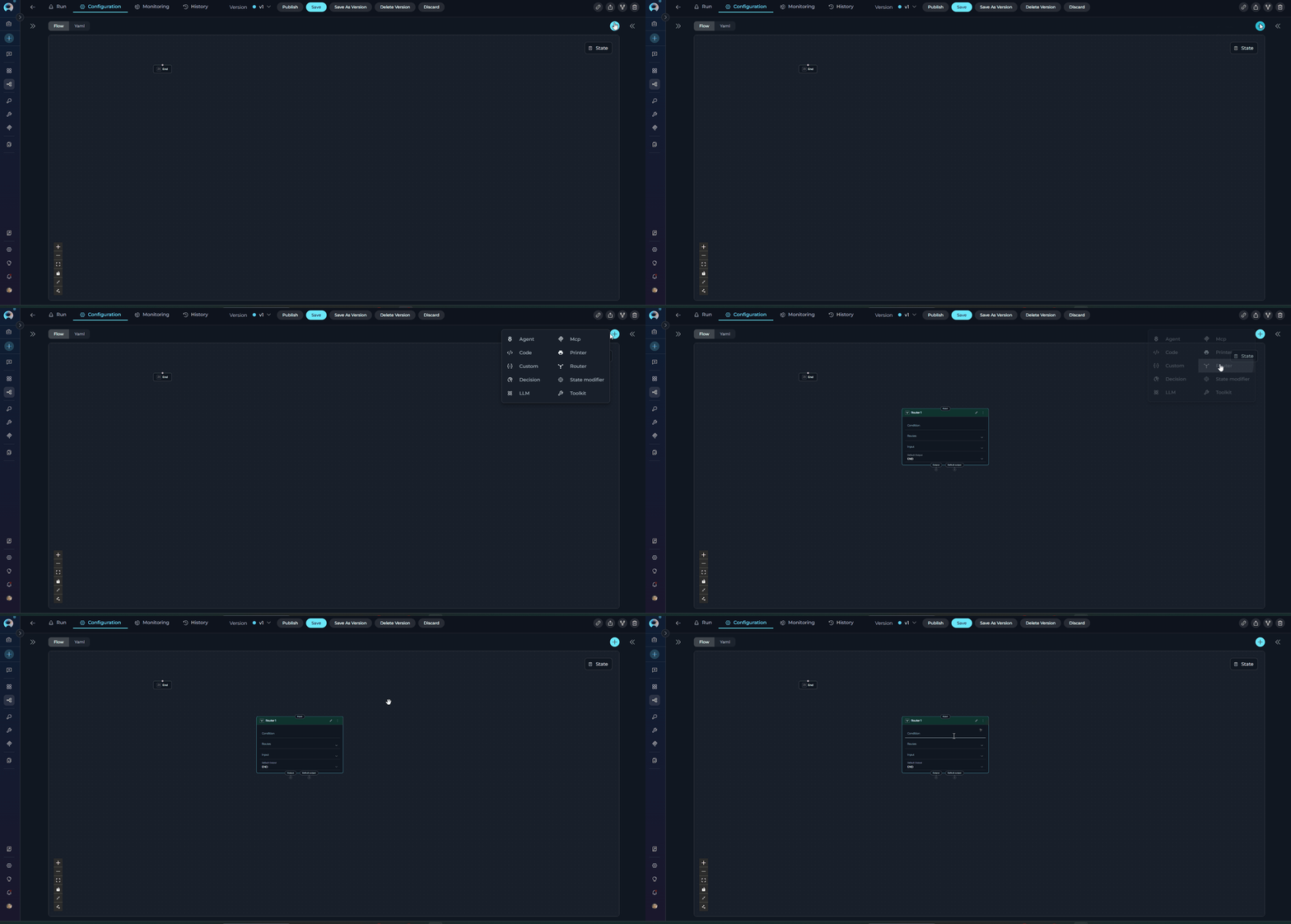 **Purpose**
Use the Router Node to:
* **Route execution** to different paths based on state variable values
* **Implement branching logic** with multiple named routes
* **Evaluate complex conditions** using template syntax
* **Provide fallback behavior** with default output
* **Create multi-path workflows** based on data conditions
* **Create loops and iterative execution** by routing back to previous nodes
**Parameters**
| Parameter | Purpose | Type Options & Examples |
| -------------------- | ---------------------------------------------------------------------------- | ------------------------------------------------------------------------------------------------------------------------------------------------------------------------------------------------------------------------------------------------------------------------------------------------------------------------------------------------------------------------------------------------------------------------------------------------------------------------------------------------------------------------------------------------------------------------------------------------------------------------------------------------ |
| **Condition** | Define the conditional logic that determines which route to take | **Syntax:** Template syntax (Jinja2-like)
**Purpose**
Use the Router Node to:
* **Route execution** to different paths based on state variable values
* **Implement branching logic** with multiple named routes
* **Evaluate complex conditions** using template syntax
* **Provide fallback behavior** with default output
* **Create multi-path workflows** based on data conditions
* **Create loops and iterative execution** by routing back to previous nodes
**Parameters**
| Parameter | Purpose | Type Options & Examples |
| -------------------- | ---------------------------------------------------------------------------- | ------------------------------------------------------------------------------------------------------------------------------------------------------------------------------------------------------------------------------------------------------------------------------------------------------------------------------------------------------------------------------------------------------------------------------------------------------------------------------------------------------------------------------------------------------------------------------------------------------------------------------------------------ |
| **Condition** | Define the conditional logic that determines which route to take | **Syntax:** Template syntax (Jinja2-like)
**Operators:**
`{% if condition %}` - Start conditional block
`{% elif condition %}` - Alternative condition
`{% else %}` - Fallback condition
`{% endif %}` - End conditional block
**State Variables:** Use variable names directly (e.g., `input`, `status`, `priority`)
**Filters:** `\|lower`, `\|upper`, `in` operator for substring matching
**Example:**
`\{% if 'approved' in input\|lower %\}`
ArticlePublisher
`\{% elif 'finish' in input\|lower or 'complete' in input\|lower %\}`
END
`\{% endif %\}`
|
| **Routes** | Define the named paths (node IDs) that the router can select | **Configuration:** List of node IDs that correspond to the route names returned by the condition
**Example:**
`- ArticlePublisher`
`- END`
**Important:** Route names in the condition must **exactly match** node IDs in the Routes list |
| **Input** | Specify which state variables the Router node reads for condition evaluation | **Default states:** `input`, `messages`
**Custom states:** Any defined state variables
**Example:**
`- input`
`- status`
`- user_type` |
| **Default Output** | Specify the fallback route if no conditions in the Router match | **Options:** Select a node ID from available nodes in the pipeline
**Example:** `ContentModerator`
**Fallback Behavior:** If the condition doesn't return any route name, execution goes to Default Output |
| **Interrupt Before** | Pause pipeline execution before the Router node executes | **Enabled** / **Disabled** |
| **Interrupt After** | Pause pipeline execution after the Router node for inspection | **Enabled** / **Disabled** |
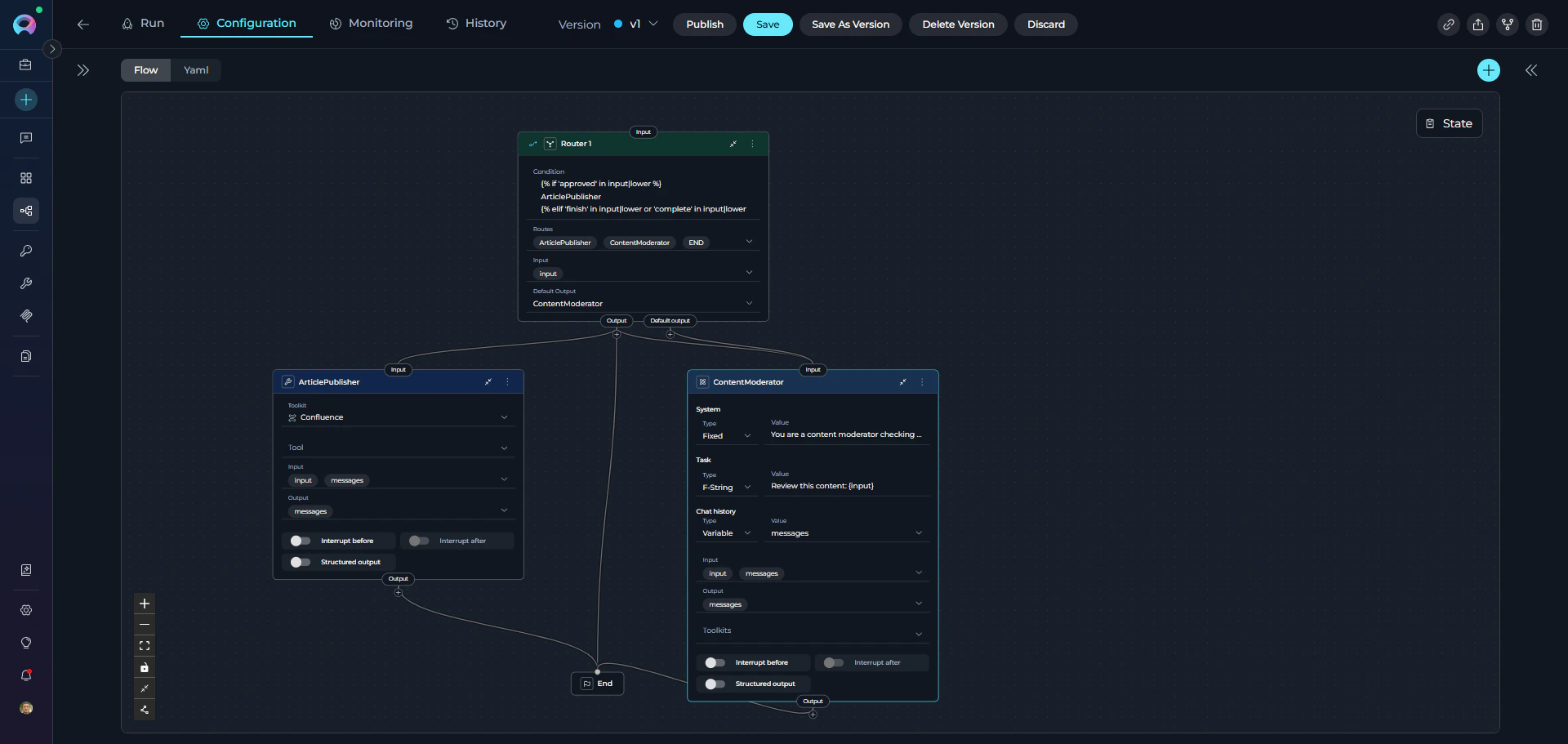 Route names in the condition must **exactly match** node IDs in the pipeline. Case sensitivity matters: "ArticlePublisher" ≠ "article\_publisher".
**YAML Configuration**
```yaml theme={null}
state:
input:
type: str
value: ''
messages:
type: list
entry_point: Router 1
nodes:
- id: Router 1
type: router
condition: |2-
{% if 'approved' in input|lower %}
ArticlePublisher
{% elif 'finish' in input|lower or 'complete' in input|lower %}
END
{% endif %}
input:
- input
routes:
- ArticlePublisher
- ContentModerator
- END
default_output: ContentModerator
- id: ArticlePublisher
type: toolkit
toolkit_name: publishing_toolkit
tool: publish_article
input:
- input
- messages
output:
- messages
input_mapping:
article_content:
type: variable
value: input
status:
type: fixed
value: published
structured_output: false
transition: END
- id: ContentModerator
type: llm
prompt:
type: string
value: Review content for policy compliance and quality standards
input:
- input
- messages
output:
- messages
input_mapping:
system:
type: fixed
value: You are a content moderator checking for policy violations and quality issues
task:
type: fstring
value: 'Review this content: {input}'
chat_history:
type: variable
value: messages
structured_output: false
transition: END
```
The Router Node uses Jinja2-like template syntax for condition evaluation. Here are common patterns:
**String Matching:**
```jinja theme={null}
{% if 'keyword' in input|lower %}
NodeA
{% endif %}
```
**Multiple Conditions with elif:**
```jinja theme={null}
{% if priority == 'high' %}
UrgentHandler
{% elif priority == 'medium' %}
NormalHandler
{% elif priority == 'low' %}
LowPriorityHandler
{% else %}
DefaultHandler
{% endif %}
```
**Logical Operators:**
```jinja theme={null}
{% if status == 'approved' and priority == 'high' %}
FastTrackPublisher
{% elif status == 'approved' or status == 'pending' %}
ReviewQueue
{% endif %}
```
**Numeric Comparisons:**
```jinja theme={null}
{% if score > 80 %}
HighQualityPath
{% elif score >= 50 %}
MediumQualityPath
{% else %}
LowQualityPath
{% endif %}
```
**String Filters:**
```jinja theme={null}
{% if input|upper == 'APPROVED' %}
ApprovalNode
{% elif 'reject' in input|lower %}
RejectionNode
{% endif %}
```
**Complex Conditions:**
```jinja theme={null}
{% if ('urgent' in input|lower or priority == 'high') and status != 'completed' %}
EscalationNode
{% elif status == 'pending' and not ('hold' in input|lower) %}
ProcessingNode
{% endif %}
```
The Router evaluates the condition from top to bottom. When a condition matches, it returns the associated route name and execution proceeds to that node. If no conditions match, execution goes to the default output
Router nodes can create loop structures by routing back to previous nodes. This enables iterative processing by:
* Routing to an earlier node when a condition is met (e.g., counter \< max\_iterations)
* Routing to the next node or END when the loop should exit
* Using state variables to track iteration count and control loop termination
This is an alternative to Loop and Loop from Tool nodes, offering more precise control over loop conditions and execution flow.
**Best Practices**
* Always Provide Default Output: Ensure fallback behavior for unmatched conditions to prevent pipeline failures.
* Match Route Names Exactly: Route names in condition must match node IDs exactly (case-sensitive).
* Order Conditions by Specificity: Place most specific conditions first to avoid unintended matches.
* Use Filters for String Comparisons: Normalize strings with `|lower` or `|upper` for reliable matching.
* List All Routes: Include all possible routes in the Routes list for clarity and validation.
* Test All Paths: Ensure every condition path is reachable and test edge cases.
* Use Descriptive Route Names: Name routes clearly to indicate their purpose (e.g., "ApprovedWorkflow" not "Path1").
* Document Complex Conditions: Add comments in YAML to explain routing logic for maintainability.
* Use Router for Loop Control: When creating loops, use state variables (counters, flags) to control loop termination and prevent infinite loops.
***
## Decision Node
The Decision Node uses LLM intelligence to make routing decisions based on natural language criteria. It operates as a standalone node in the pipeline and analyzes the input to intelligently select the appropriate output path from multiple decision outputs.
Route names in the condition must **exactly match** node IDs in the pipeline. Case sensitivity matters: "ArticlePublisher" ≠ "article\_publisher".
**YAML Configuration**
```yaml theme={null}
state:
input:
type: str
value: ''
messages:
type: list
entry_point: Router 1
nodes:
- id: Router 1
type: router
condition: |2-
{% if 'approved' in input|lower %}
ArticlePublisher
{% elif 'finish' in input|lower or 'complete' in input|lower %}
END
{% endif %}
input:
- input
routes:
- ArticlePublisher
- ContentModerator
- END
default_output: ContentModerator
- id: ArticlePublisher
type: toolkit
toolkit_name: publishing_toolkit
tool: publish_article
input:
- input
- messages
output:
- messages
input_mapping:
article_content:
type: variable
value: input
status:
type: fixed
value: published
structured_output: false
transition: END
- id: ContentModerator
type: llm
prompt:
type: string
value: Review content for policy compliance and quality standards
input:
- input
- messages
output:
- messages
input_mapping:
system:
type: fixed
value: You are a content moderator checking for policy violations and quality issues
task:
type: fstring
value: 'Review this content: {input}'
chat_history:
type: variable
value: messages
structured_output: false
transition: END
```
The Router Node uses Jinja2-like template syntax for condition evaluation. Here are common patterns:
**String Matching:**
```jinja theme={null}
{% if 'keyword' in input|lower %}
NodeA
{% endif %}
```
**Multiple Conditions with elif:**
```jinja theme={null}
{% if priority == 'high' %}
UrgentHandler
{% elif priority == 'medium' %}
NormalHandler
{% elif priority == 'low' %}
LowPriorityHandler
{% else %}
DefaultHandler
{% endif %}
```
**Logical Operators:**
```jinja theme={null}
{% if status == 'approved' and priority == 'high' %}
FastTrackPublisher
{% elif status == 'approved' or status == 'pending' %}
ReviewQueue
{% endif %}
```
**Numeric Comparisons:**
```jinja theme={null}
{% if score > 80 %}
HighQualityPath
{% elif score >= 50 %}
MediumQualityPath
{% else %}
LowQualityPath
{% endif %}
```
**String Filters:**
```jinja theme={null}
{% if input|upper == 'APPROVED' %}
ApprovalNode
{% elif 'reject' in input|lower %}
RejectionNode
{% endif %}
```
**Complex Conditions:**
```jinja theme={null}
{% if ('urgent' in input|lower or priority == 'high') and status != 'completed' %}
EscalationNode
{% elif status == 'pending' and not ('hold' in input|lower) %}
ProcessingNode
{% endif %}
```
The Router evaluates the condition from top to bottom. When a condition matches, it returns the associated route name and execution proceeds to that node. If no conditions match, execution goes to the default output
Router nodes can create loop structures by routing back to previous nodes. This enables iterative processing by:
* Routing to an earlier node when a condition is met (e.g., counter \< max\_iterations)
* Routing to the next node or END when the loop should exit
* Using state variables to track iteration count and control loop termination
This is an alternative to Loop and Loop from Tool nodes, offering more precise control over loop conditions and execution flow.
**Best Practices**
* Always Provide Default Output: Ensure fallback behavior for unmatched conditions to prevent pipeline failures.
* Match Route Names Exactly: Route names in condition must match node IDs exactly (case-sensitive).
* Order Conditions by Specificity: Place most specific conditions first to avoid unintended matches.
* Use Filters for String Comparisons: Normalize strings with `|lower` or `|upper` for reliable matching.
* List All Routes: Include all possible routes in the Routes list for clarity and validation.
* Test All Paths: Ensure every condition path is reachable and test edge cases.
* Use Descriptive Route Names: Name routes clearly to indicate their purpose (e.g., "ApprovedWorkflow" not "Path1").
* Document Complex Conditions: Add comments in YAML to explain routing logic for maintainability.
* Use Router for Loop Control: When creating loops, use state variables (counters, flags) to control loop termination and prevent infinite loops.
***
## Decision Node
The Decision Node uses LLM intelligence to make routing decisions based on natural language criteria. It operates as a standalone node in the pipeline and analyzes the input to intelligently select the appropriate output path from multiple decision outputs.
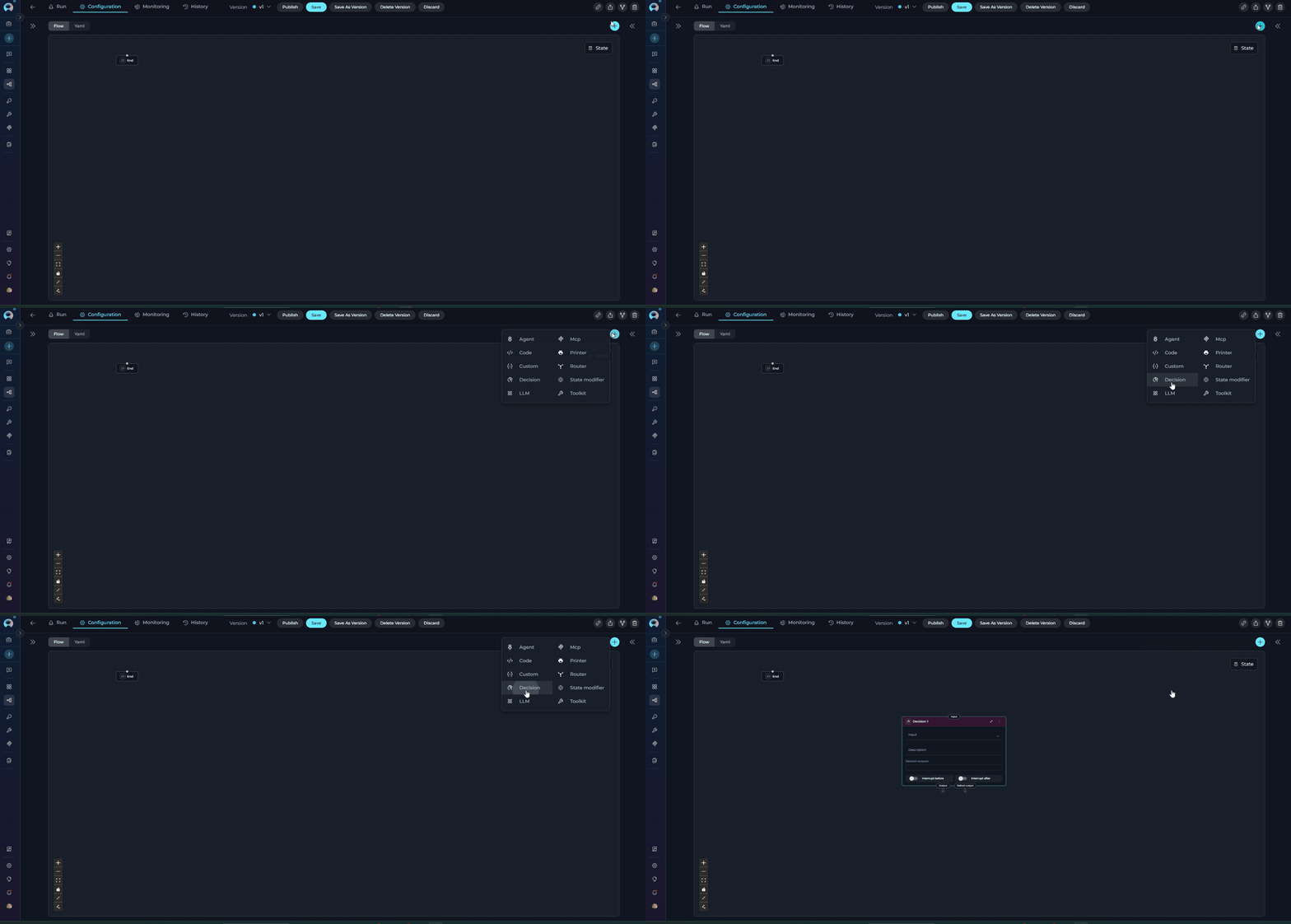 **Purpose**
Use the Decision Node to:
* **Make intelligent routing decisions** using LLM reasoning
* **Route based on natural language criteria** without writing conditions
* **Handle complex decision logic** that's difficult to express in templates
* **Leverage context and semantics** for routing decisions
* **Simplify decision-making** with descriptive instructions
Decision Nodes are slower than Router nodes due to LLM processing. Use for complex routing requiring semantic understanding, not simple condition matching.
Decision nodes **cannot be connected to another Decision node**. If you need sequential decision-making, use a different node type (such as Router, LLM, or Code) between Decision nodes.
**Parameters**
| Parameter | Purpose | Type Options & Examples |
| ---------------------------- | ------------------------------------------------------------------------------------------ | -------------------------------------------------------------------------------------------------------------------------------------------------------------------------------------------------------------------------------------------------------------------------------------------------------------------------------------------------------------------------------------------------------------------------------------------------------------------------------------------------------- |
| **Input** | Specify which state variables the LLM analyzes to make the routing decision | **Default states:** `input`, `messages`
**Purpose**
Use the Decision Node to:
* **Make intelligent routing decisions** using LLM reasoning
* **Route based on natural language criteria** without writing conditions
* **Handle complex decision logic** that's difficult to express in templates
* **Leverage context and semantics** for routing decisions
* **Simplify decision-making** with descriptive instructions
Decision Nodes are slower than Router nodes due to LLM processing. Use for complex routing requiring semantic understanding, not simple condition matching.
Decision nodes **cannot be connected to another Decision node**. If you need sequential decision-making, use a different node type (such as Router, LLM, or Code) between Decision nodes.
**Parameters**
| Parameter | Purpose | Type Options & Examples |
| ---------------------------- | ------------------------------------------------------------------------------------------ | -------------------------------------------------------------------------------------------------------------------------------------------------------------------------------------------------------------------------------------------------------------------------------------------------------------------------------------------------------------------------------------------------------------------------------------------------------------------------------------------------------- |
| **Input** | Specify which state variables the LLM analyzes to make the routing decision | **Default states:** `input`, `messages`
**Custom states:** Any defined state variables
**Example:**
`- input`
`- messages`
**Usage:** The LLM reads these state variables' content and analyzes them against the description criteria |
| **Description** | Provide natural language instructions describing how the LLM should make routing decisions | **Format:** Clear, structured instructions with specific routing criteria
**Example:**
Your task is to route content based on user intent:
- if user wants to publish the content, redirect to "ArticlePublisher" node
- if user wants content review or moderation, redirect to "ContentModerator" node
- If the request is to finish or end the process, redirect to "END" node
**Best Practices:** Use clear criteria, specific examples, structured format |
| **Decision Outputs (nodes)** | Define the possible output paths (node IDs) the LLM can select from | **Configuration:** List of node IDs that the LLM can route execution to
**Example:**
`- ArticlePublisher`
`- ContentModerator`
**How It Works:** LLM analyzes input, reviews description, selects appropriate output from list |
| **Default Output** | Specify the fallback route if the LLM cannot make a confident decision | **Options:** Select a node ID from available nodes in the pipeline
**Example:** `END`
**Fallback Behavior:** If LLM can't decide confidently, execution goes to Default Output |
| **Interrupt Before** | Pause pipeline execution before the Decision node executes | **Enabled** / **Disabled** |
| **Interrupt After** | Pause pipeline execution after the Decision node for inspection | **Enabled** / **Disabled** |
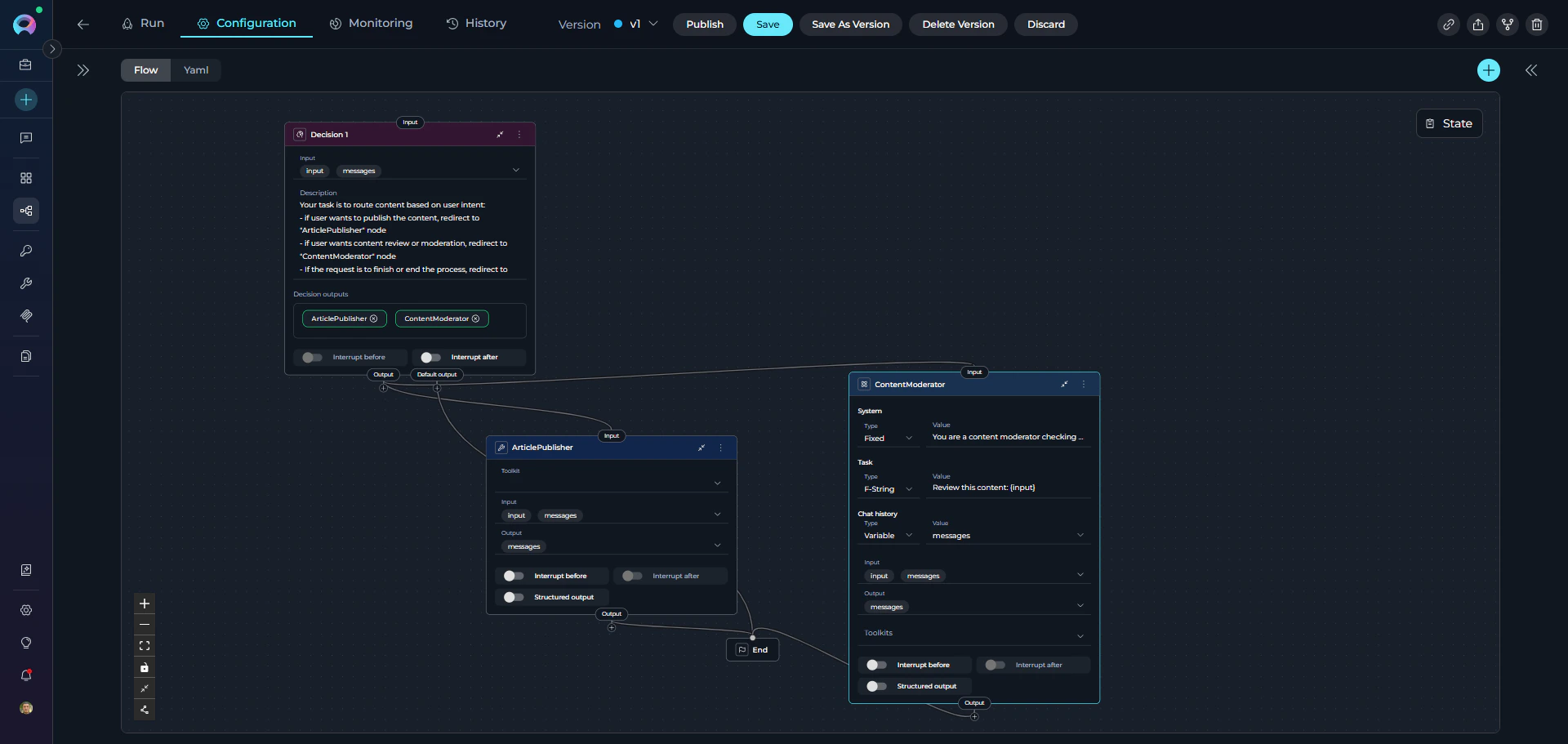 **YAML Configuration**
```yaml theme={null}
state:
input:
type: str
value: ''
messages:
type: list
entry_point: Decision 1
nodes:
- id: Decision 1
type: decision
description: |
Your task is to route content based on user intent:
- if user wants to publish the content, redirect to "ArticlePublisher" node
- if user wants content review or moderation, redirect to "ContentModerator" node
- If the request is to finish or end the process, redirect to "END" node
input:
- input
- messages
nodes:
- ArticlePublisher
- ContentModerator
default_output: END
- id: ArticlePublisher
type: toolkit
toolkit_name: publishing_toolkit
tool: publish_article
input:
- input
- messages
output:
- messages
input_mapping:
article_content:
type: variable
value: input
status:
type: fixed
value: published
structured_output: false
transition: END
- id: ContentModerator
type: llm
prompt:
type: string
value: Review content for policy compliance and quality standards
input:
- input
- messages
output:
- messages
input_mapping:
system:
type: fixed
value: You are a content moderator checking for policy violations and quality issues
task:
type: fstring
value: 'Review this content: {input}'
chat_history:
type: variable
value: messages
structured_output: false
transition: END
```
The Decision Node operates as a standalone node that uses LLM to:
1. Read input state variables (configured in `input` parameter)
2. Analyze description for routing criteria
3. Select appropriate output from `nodes` list
4. Return selected node ID for routing
5. If uncertain, defaults to `default_output`
**Best Practices**
* Write Clear Decision Criteria: Provide specific, unambiguous routing rules with examples for each path.
* Provide Examples in Description: Help the LLM understand expected routing with concrete examples.
* Always Define Default Output: Provide fallback for unclear cases to prevent pipeline failures.
* List All Decision Outputs: Include all possible routing targets in the `nodes` list.
* Structure Descriptions Clearly: Use headings, lists, and clear formatting to organize routing criteria.
* Use Decision Node for Complex Routing: Choose when routing requires semantic understanding, not simple condition matching.
* Configure Input Variables: Include relevant state variables in `input` for the LLM to analyze.
* Test with Various Inputs: Verify LLM routing across different scenarios and edge cases.
* Monitor Decision Quality: Review LLM routing decisions periodically and refine description if needed.
* Provide Context in Description: Help the LLM make better decisions by explaining the use case.
* Use Descriptive Output Names: Name outputs clearly to match description (e.g., "TechnicalSupport" not "Output1").
* Use Interrupts for Debugging: Enable interrupts to review decision-making and routing results during development.
***
## Human-in-the-Loop Node
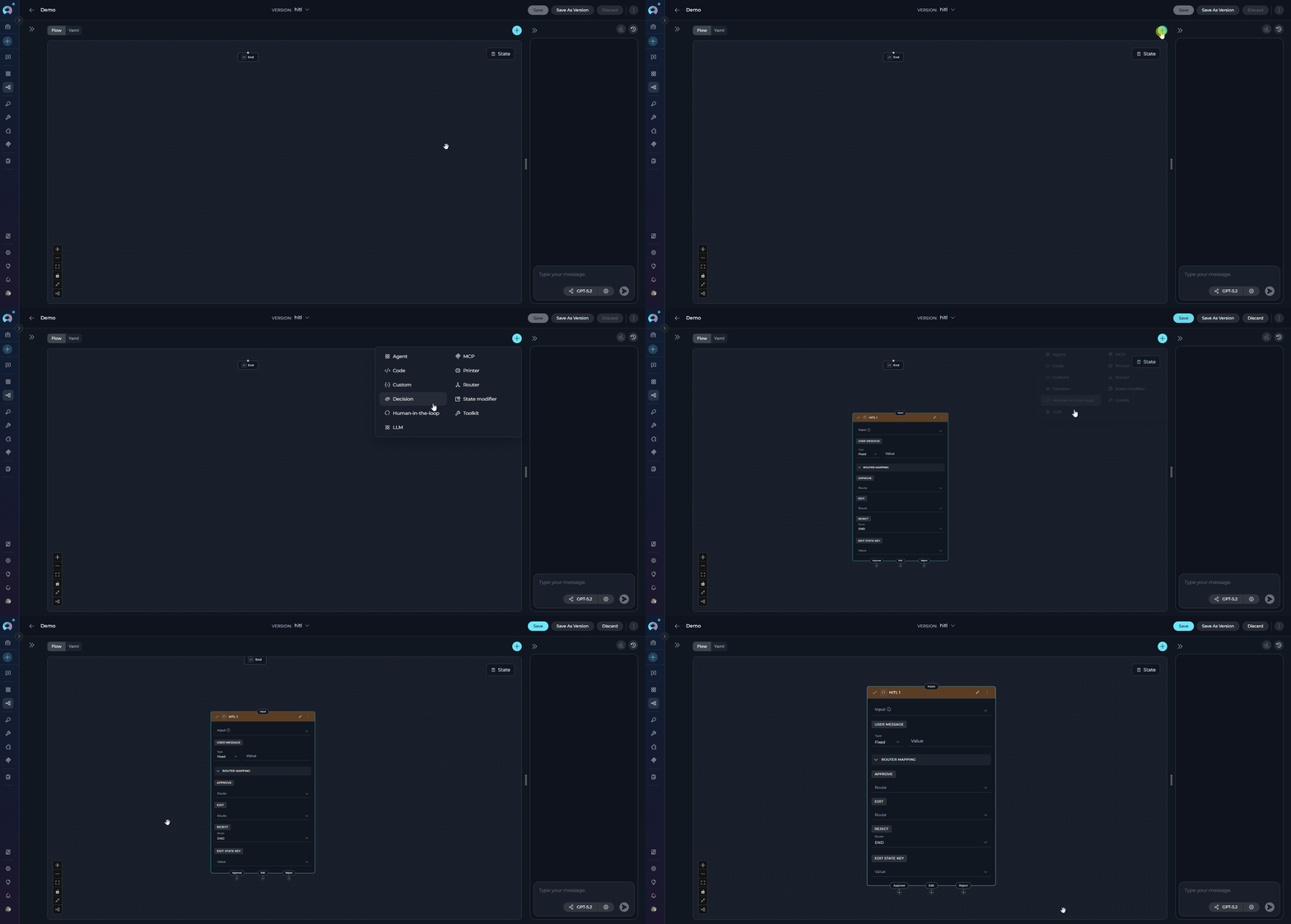
The Human-in-the-Loop (HITL) Node pauses pipeline execution and waits for a human decision before continuing. It presents a configurable message to the user and provides up to three action buttons — **Approve**, **Edit**, and **Reject** — each routing to a different downstream node.
**YAML Configuration**
```yaml theme={null}
state:
input:
type: str
value: ''
messages:
type: list
entry_point: Decision 1
nodes:
- id: Decision 1
type: decision
description: |
Your task is to route content based on user intent:
- if user wants to publish the content, redirect to "ArticlePublisher" node
- if user wants content review or moderation, redirect to "ContentModerator" node
- If the request is to finish or end the process, redirect to "END" node
input:
- input
- messages
nodes:
- ArticlePublisher
- ContentModerator
default_output: END
- id: ArticlePublisher
type: toolkit
toolkit_name: publishing_toolkit
tool: publish_article
input:
- input
- messages
output:
- messages
input_mapping:
article_content:
type: variable
value: input
status:
type: fixed
value: published
structured_output: false
transition: END
- id: ContentModerator
type: llm
prompt:
type: string
value: Review content for policy compliance and quality standards
input:
- input
- messages
output:
- messages
input_mapping:
system:
type: fixed
value: You are a content moderator checking for policy violations and quality issues
task:
type: fstring
value: 'Review this content: {input}'
chat_history:
type: variable
value: messages
structured_output: false
transition: END
```
The Decision Node operates as a standalone node that uses LLM to:
1. Read input state variables (configured in `input` parameter)
2. Analyze description for routing criteria
3. Select appropriate output from `nodes` list
4. Return selected node ID for routing
5. If uncertain, defaults to `default_output`
**Best Practices**
* Write Clear Decision Criteria: Provide specific, unambiguous routing rules with examples for each path.
* Provide Examples in Description: Help the LLM understand expected routing with concrete examples.
* Always Define Default Output: Provide fallback for unclear cases to prevent pipeline failures.
* List All Decision Outputs: Include all possible routing targets in the `nodes` list.
* Structure Descriptions Clearly: Use headings, lists, and clear formatting to organize routing criteria.
* Use Decision Node for Complex Routing: Choose when routing requires semantic understanding, not simple condition matching.
* Configure Input Variables: Include relevant state variables in `input` for the LLM to analyze.
* Test with Various Inputs: Verify LLM routing across different scenarios and edge cases.
* Monitor Decision Quality: Review LLM routing decisions periodically and refine description if needed.
* Provide Context in Description: Help the LLM make better decisions by explaining the use case.
* Use Descriptive Output Names: Name outputs clearly to match description (e.g., "TechnicalSupport" not "Output1").
* Use Interrupts for Debugging: Enable interrupts to review decision-making and routing results during development.
***
## Human-in-the-Loop Node
The Human-in-the-Loop (HITL) Node pauses pipeline execution and waits for a human decision before continuing. It presents a configurable message to the user and provides up to three action buttons — **Approve**, **Edit**, and **Reject** — each routing to a different downstream node.
 **Purpose**
Use the HITL Node to:
* **Gate critical actions** — require human sign-off before irreversible steps
* **Validate AI output** — let a human review and approve content generated by previous nodes
* **Allow human correction** — give users the ability to edit a state value before the pipeline continues
* **Implement approval workflows** — build multi-step review processes where humans are in the decision path
* **Enforce compliance checkpoints** — ensure sensitive operations are authorized by a person
**Parameters**
**Purpose**
Use the HITL Node to:
* **Gate critical actions** — require human sign-off before irreversible steps
* **Validate AI output** — let a human review and approve content generated by previous nodes
* **Allow human correction** — give users the ability to edit a state value before the pipeline continues
* **Implement approval workflows** — build multi-step review processes where humans are in the decision path
* **Enforce compliance checkpoints** — ensure sensitive operations are authorized by a person
**Parameters**
 | Parameter | Purpose | Type Options & Examples |
| ---------------------- | ---------------------------------------------------------------------------------------- | ------------------------------------------------------------------------------------------------------------------------------------------------------------------------------------------------------------------------------------------------------------------------------------------------------------------------------------------------------------------ |
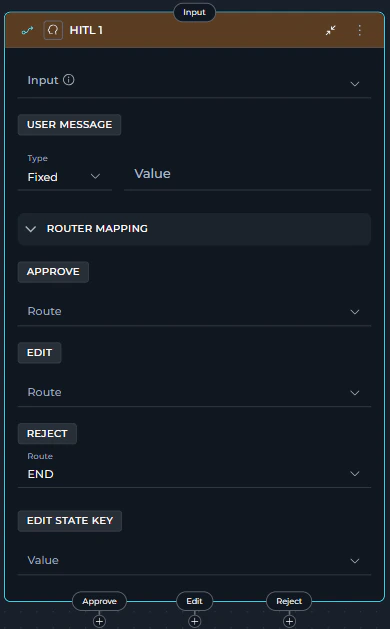
| **Input** | State variables available for interpolation in the User message when using F-String type | **Default:** `[]`
| Parameter | Purpose | Type Options & Examples |
| ---------------------- | ---------------------------------------------------------------------------------------- | ------------------------------------------------------------------------------------------------------------------------------------------------------------------------------------------------------------------------------------------------------------------------------------------------------------------------------------------------------------------ |
| **Input** | State variables available for interpolation in the User message when using F-String type | **Default:** `[]`
**Custom:** Any defined state variables
Example:
`- summary`
`- draft_content` |
| **User Message Type** | How the message presented to the user is constructed | **`Fixed`** - Static text
Example: `"Please review the generated summary and choose an action."`
**`F-String`** - Text with `{state_key}` placeholders resolved at runtime
Example: `"Review the following draft:\n\n{summary}"`
**`Variable`** - Entire message taken from a single state variable
Example: `review_message` |
| **User Message Value** | The message content shown to the user at the interrupt point | Depends on type:
- Fixed: plain text
- F-String: template with `{state_key}` placeholders
- Variable: name of a state variable |
| **Approve Route** | Next node when the user clicks **Approve** | Any registered node name or `END`
Example: `publish_node` |
| **Reject Route** | Next node when the user clicks **Reject** | Any registered node name or `END`
Example: `END` |
| **Edit Route** | Next node when the user clicks **Edit** | Any registered node name (**cannot be `END`**)
Example: `regenerate_node`
**Requires `edit_state_key` to be set** |
| **Edit State Key** | The state variable updated with the user's edited value when the Edit action is chosen | Must match an existing state variable name
Example: `summary`
**Required when an Edit route is configured** |
The Edit action is only available to users when both conditions are met:
1. **`edit_state_key`** is set to a valid state variable name.
2. **Edit route** is configured and does **not** point to `END`.
If either condition is missing, the Edit button will not appear in the UI.
**How It Works**
1. The node builds the user-facing message from the configured `user_message`.
2. Pipeline execution **pauses** using LangGraph's dynamic interrupt mechanism.
3. The UI displays the message along with action buttons for each configured route.
4. The user chooses an action:
| Action | Button Color | State Change | Behavior |
| ----------- | ------------------------------------------------------------------------------------------------------------------------------------------------------------------------------------------------------------------------------------------------------------------------------------------------------------------------------------------------------------------------------------------------------------------------------------------------------------------------------------------------------------------------------------------------------------------------------------------------------------------------------------------------------------------------------------------------------------------------------------------------------------------------------------------------------------------------------------------------------------------------------------------------------------------------------------------------------------------------------------------------------------------------------------------------------------------------------------------------------------------------------------------------------------------------------------------------------------------------------------------------------------------------------------------------------------------------------------------------------------------------------------------------------------------------------------------------------------------------------------------------------------------------------------------------------------------------------------------------------------------------------------------------------------------------------------------------------------------------------------------------------------------------------------------------------------------------------------- | ------------------------------------------ | --------------------------------------------------------------------------------------------- |
| **Approve** |  | None | Pipeline resumes and routes to the Approve route |
| **Reject** |
| None | Pipeline resumes and routes to the Approve route |
| **Reject** |  | None | Pipeline resumes and routes to the Reject route |
| **Edit** |
| None | Pipeline resumes and routes to the Reject route |
| **Edit** |  | `edit_state_key` updated with user's input | A text input appears; user provides the revised value, then pipeline routes to the Edit route |
5. Execution continues from the target node.
**YAML Configuration**
```yaml theme={null}
state:
messages:
type: list
input:
type: str
summary:
type: str
value: ''
entry_point: Review_summary
nodes:
- id: Review_summary
type: hitl
input:
- summary
user_message:
type: fstring
value: "Please review the following summary and choose an action:\n\n{summary}"
routes:
approve: Publish_node
reject: END
edit: Regenerate_node
edit_state_key: summary
```
The HITL node uses LangGraph's `Command(goto=)` pattern for routing — no explicit `transition` field or conditional edges are needed. All route target nodes must exist in the pipeline.
## UI Behavior
When the pipeline reaches a HITL node during a run, the chat panel displays the configured user message and action buttons for each configured route. Only buttons with valid routes appear. After the user clicks an action, the pipeline resumes automatically.
**Approve**
**Appears when:** the `approve` route is configured.
* The **Approve** button signals that the user accepts the content or action as-is. Clicking it immediately resumes the pipeline and routes execution to the node specified in `approve`. No state variables are modified — the pipeline continues with the same state it had when it paused.
| `edit_state_key` updated with user's input | A text input appears; user provides the revised value, then pipeline routes to the Edit route |
5. Execution continues from the target node.
**YAML Configuration**
```yaml theme={null}
state:
messages:
type: list
input:
type: str
summary:
type: str
value: ''
entry_point: Review_summary
nodes:
- id: Review_summary
type: hitl
input:
- summary
user_message:
type: fstring
value: "Please review the following summary and choose an action:\n\n{summary}"
routes:
approve: Publish_node
reject: END
edit: Regenerate_node
edit_state_key: summary
```
The HITL node uses LangGraph's `Command(goto=)` pattern for routing — no explicit `transition` field or conditional edges are needed. All route target nodes must exist in the pipeline.
## UI Behavior
When the pipeline reaches a HITL node during a run, the chat panel displays the configured user message and action buttons for each configured route. Only buttons with valid routes appear. After the user clicks an action, the pipeline resumes automatically.
**Approve**
**Appears when:** the `approve` route is configured.
* The **Approve** button signals that the user accepts the content or action as-is. Clicking it immediately resumes the pipeline and routes execution to the node specified in `approve`. No state variables are modified — the pipeline continues with the same state it had when it paused.
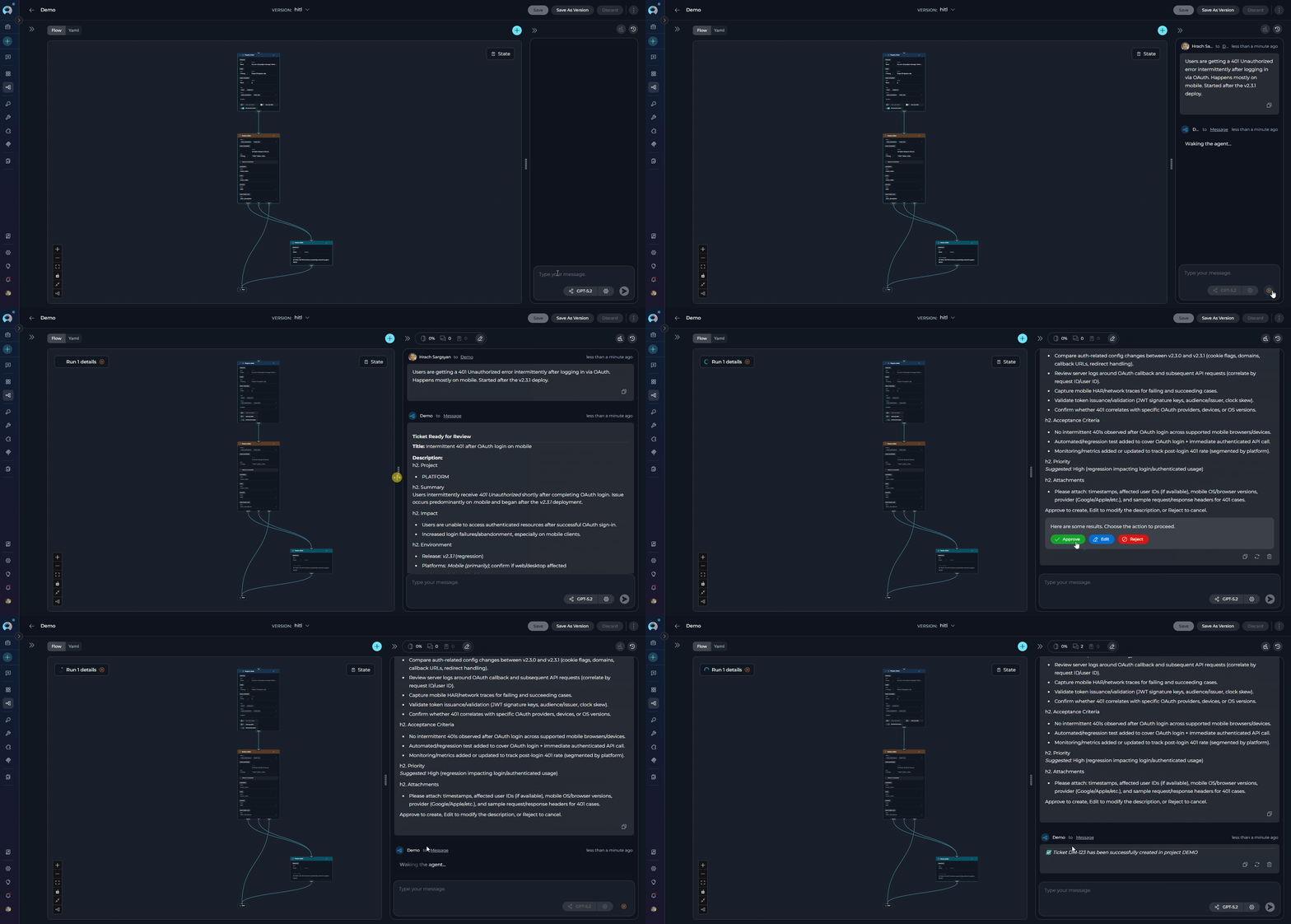 **Use this when:** the generated output is correct and ready for the next step (e.g., publishing content, creating a ticket, sending a notification).
**Edit**
**Appears when:** both an `edit` route and a valid `edit_state_key` are configured (and the Edit route does not point to `END`).
* The **Edit** button allows the user to revise a specific piece of content before the pipeline continues. Clicking it opens a text input field pre-filled with (or adjacent to) the current value of the `edit_state_key` state variable. After the user submits the revised text, the pipeline updates `edit_state_key` with the new value and routes execution to the node specified in `edit`.
**Use this when:** the generated output is correct and ready for the next step (e.g., publishing content, creating a ticket, sending a notification).
**Edit**
**Appears when:** both an `edit` route and a valid `edit_state_key` are configured (and the Edit route does not point to `END`).
* The **Edit** button allows the user to revise a specific piece of content before the pipeline continues. Clicking it opens a text input field pre-filled with (or adjacent to) the current value of the `edit_state_key` state variable. After the user submits the revised text, the pipeline updates `edit_state_key` with the new value and routes execution to the node specified in `edit`.
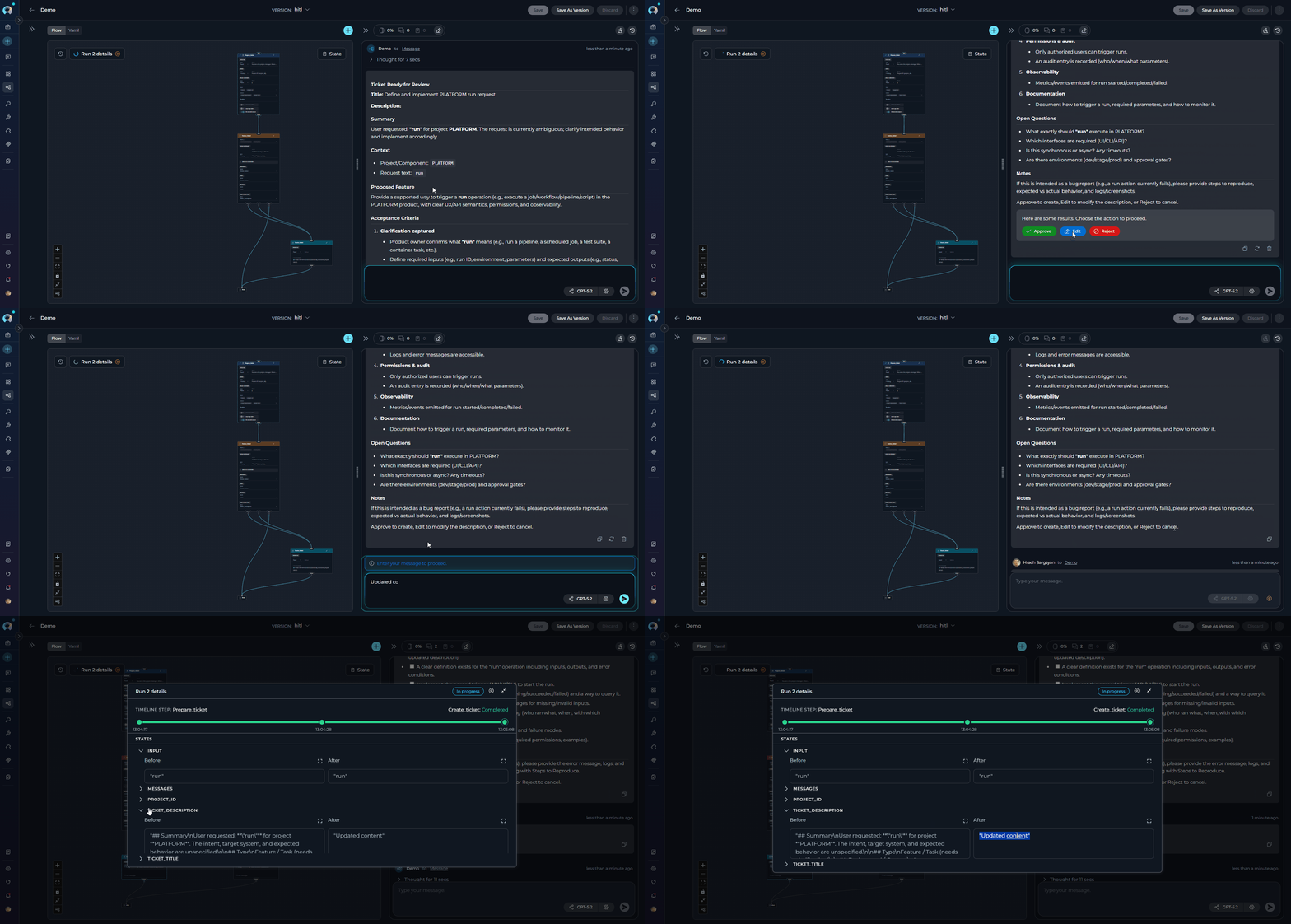 **Use this when:** the output is mostly correct but needs minor adjustments — for example, rewording a ticket description or correcting a generated summary — without restarting the full generation process.
**Reject**
**Appears when:** the `reject` route is configured.
* The **Reject** button (red) signals that the user has declined the content or action entirely. Clicking it resumes the pipeline and routes execution to the node specified in `reject` — typically `END` to cancel the workflow, or a regeneration node to start over. No state variables are modified.
**Use this when:** the output is mostly correct but needs minor adjustments — for example, rewording a ticket description or correcting a generated summary — without restarting the full generation process.
**Reject**
**Appears when:** the `reject` route is configured.
* The **Reject** button (red) signals that the user has declined the content or action entirely. Clicking it resumes the pipeline and routes execution to the node specified in `reject` — typically `END` to cancel the workflow, or a regeneration node to start over. No state variables are modified.
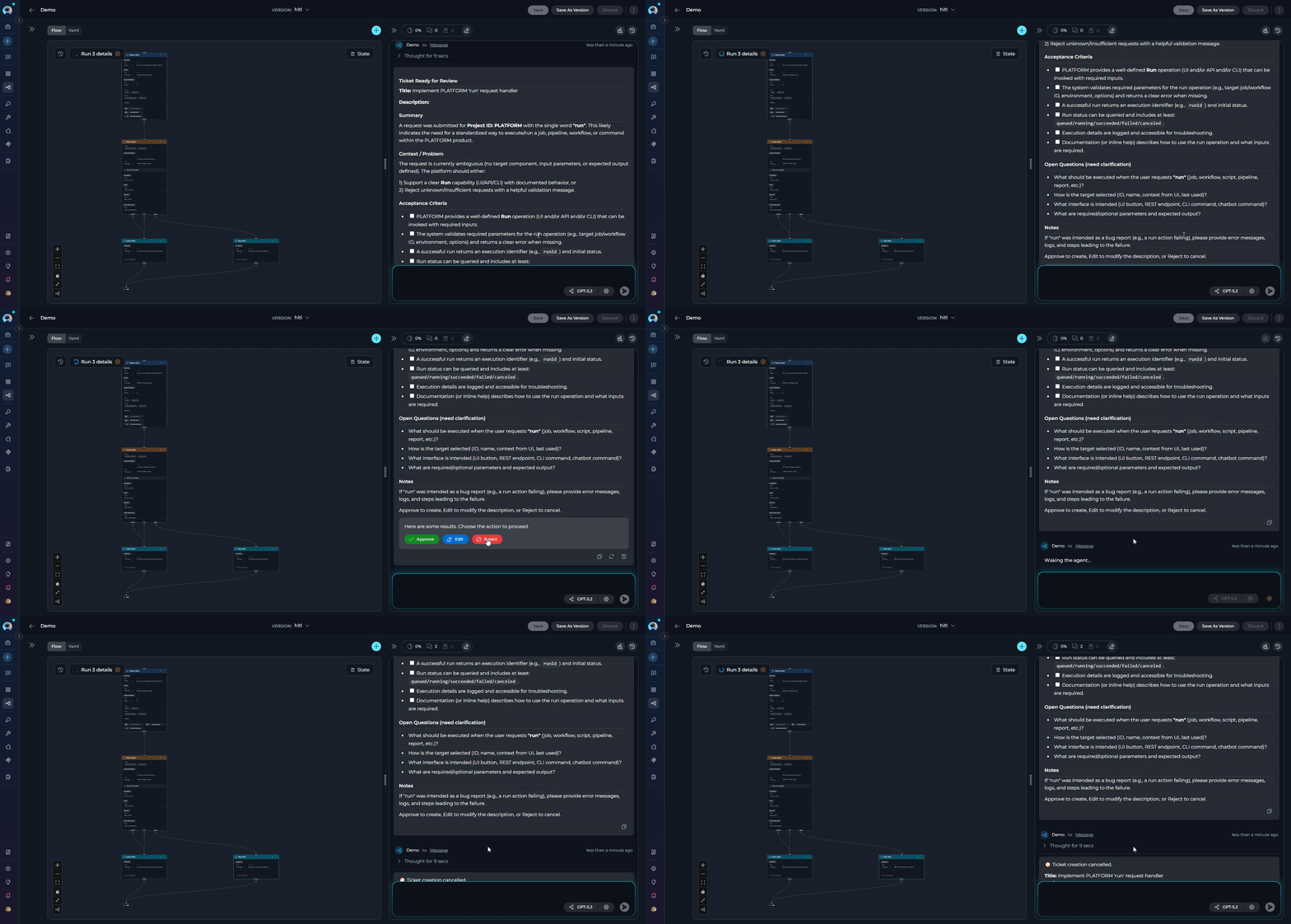 **Use this when:** the output is unacceptable and the pipeline should be stopped or fully restarted rather than edited inline.
* The Edit route **cannot** point to `END`.
* `edit_state_key` must be set for the Edit button to appear; it must reference a state variable that already exists.
* Because HITL uses a dynamic interrupt, **the pipeline must be running with checkpoint/memory support** (a `thread_id` must be active) for the resume to work correctly.
* Each HITL node can handle only one pending interrupt at a time.
* The node does not modify state on Approve or Reject — only Edit mutates state.
**Best Practices**
Always gate destructive or hard-to-undo operations:
✅ **Good**:
```yaml theme={null}
# HITL → review → publish to production
- id: Review_before_publish
type: hitl
user_message:
type: fixed
value: "Ready to publish. Approve to proceed, Reject to cancel."
routes:
approve: Publish_node
reject: END
```
Show users the content they are reviewing:
✅ **Good**:
```yaml theme={null}
- id: Review_ticket
type: hitl
input:
- ticket_title
- ticket_description
user_message:
type: fstring
value: |
## Ticket Ready for Review
**Title:** {ticket_title}
**Description:**
{ticket_description}
Approve to create the ticket, Edit to modify, or Reject to discard.
routes:
approve: Create_ticket
edit: Create_ticket
reject: END
edit_state_key: ticket_description
```
If the user's edited value needs to be re-processed by an LLM, route Edit to a node earlier in the pipeline:
```yaml theme={null}
routes:
approve: Publish_node
edit: Reformat_node # re-runs formatting with the edited value
reject: END
```
Without a Reject route, users cannot decline an action. Set it to `END` or a recovery node:
```yaml theme={null}
routes:
approve: Next_step
reject: END
```
**Real-Life Usage Examples**
An LLM generates a blog post draft. A human reviews it, approves it for publishing, edits the draft directly, or rejects it to trigger a full regeneration.
```yaml theme={null}
entry_point: Generate_draft
nodes:
- id: Generate_draft
type: llm
input:
- input
output:
- draft
- messages
structured_output: true
transition: Review_draft
input_mapping:
system:
type: fixed
value: You are a blog writer.
task:
type: fstring
value: Write a blog draft about {input}.
chat_history:
type: fixed
value: []
- id: Review_draft
type: hitl
input:
- draft
user_message:
type: fstring
value: "Draft ready for review:\n\n{draft}\n\nApprove to publish, Edit to revise inline, Reject to regenerate."
routes:
approve: Publish
edit: Publish
reject: Generate_draft
edit_state_key: draft
- id: Publish
type: toolkit
tool: PublishTool
input:
- draft
transition: END
input_mapping:
content:
type: variable
value: draft
state:
input:
type: str
messages:
type: list
draft:
type: str
value: ''
```
An agent prepares a Jira ticket. A human approves, edits the description, or rejects ticket creation entirely.
```yaml theme={null}
entry_point: Prepare_ticket
nodes:
- id: Prepare_ticket
type: agent
input:
- input
- project_id
output:
- ticket_title
- ticket_description
- messages
transition: Review_ticket
input_mapping:
task:
type: fstring
value: "Prepare a Jira ticket for project {project_id} based on: {input}"
chat_history:
type: fixed
value: []
tool: JiraAgent
- id: Review_ticket
type: hitl
input:
- ticket_title
- ticket_description
user_message:
type: fstring
value: |
## Ticket Ready for Review
**Title:** {ticket_title}
**Description:**
{ticket_description}
Approve to create, Edit to modify the description, or Reject to cancel.
routes:
approve: Create_ticket
edit: Create_ticket
reject: END
edit_state_key: ticket_description
- id: Create_ticket
type: toolkit
tool: create_issue
input:
- ticket_title
- ticket_description
- project_id
transition: END
input_mapping:
title:
type: variable
value: ticket_title
description:
type: variable
value: ticket_description
project:
type: variable
value: project_id
state:
input:
type: str
messages:
type: list
project_id:
type: str
value: ''
ticket_title:
type: str
value: ''
ticket_description:
type: str
value: ''
```
***
## Control Flow Nodes Comparison
| Feature | Router Node | Decision Node | HITL Node | |
| --------------------- | ---------------------------------------------------------------------------------------------- | -------------------------------------------------------------------------------------------- | ----------------------------------------------------------------------------------- | ------------------- |
| **Purpose** | Route execution based on template conditions with multiple paths | LLM-powered intelligent routing as a standalone node | Pause execution and require explicit human approval, edit, or rejection | |
| **Node Type** | Independent routing node | Independent decision-making node | Independent human decision checkpoint | |
| **Decision Logic** | Template-based conditions (Jinja2-like) | LLM reasoning from natural language description | Human judgment (Approve / Edit / Reject buttons) | |
| **Configuration** | Condition, Routes, Input, Default Output | Input, Description, Nodes (decision outputs), Default Output | User Message, Routes (approve/reject/edit), Edit State Key | |
| **LLM Usage** | No LLM | Yes (LLM analyzes and decides) | No LLM | |
| **Condition Syntax** | Template syntax with filters (`{% if %}`, \` | lower`, `in\`) | Natural language instructions | N/A (human decides) |
| **Input Variables** | State variables for condition evaluation | State variables for LLM analysis | State variables for message interpolation | |
| **Complexity** | Medium (template syntax) | Low (natural language) | Low (configure message and routes) | |
| **Flexibility** | High (full template control) | Very High (LLM reasoning) | Low (fixed 3-action model) | |
| **Performance** | Fast (template evaluation) | Slower (LLM overhead) | Depends on human response time | |
| **Output Definition** | Routes list | Nodes list (decision outputs) | Per-action routes (approve/edit/reject) | |
| **Default Behavior** | Default output if no match | Default output if LLM uncertain | Waits indefinitely until user acts | |
| **Best For** | Explicit multi-path routing with known conditions | Complex routing requiring semantic understanding | Approval gates, compliance checkpoints, human validation | |
| **Use Case** | Status-based routing, priority levels, keyword matching, approval checks, validation branching | Customer support routing, sentiment analysis, intent classification, context-aware decisions | Content approval before publish, Jira ticket sign-off, irreversible operation gates | |
### When to Use Each Node
**Choose Router Node when you**:
* Need multiple named routes based on explicit conditions
* Have condition logic you can express in Jinja2-like templates
* Want fast, deterministic routing without LLM overhead
* Know all possible paths and conditions upfront
* Need to match keywords, compare values, or check status
* Need binary or multi-branch conditional logic with if-else routing
* Want to create loops by routing back to previous nodes
**Example**: Route tickets by priority level (critical/high/medium/low), approval status (approved/pending/rejected), validation branching (valid → ProcessPath, invalid → ErrorPath), or iterative processing with loop control.
**Choose Decision Node when you**:
* Need LLM intelligence for routing decisions
* Routing logic is complex, nuanced, or context-dependent
* Want natural language decision criteria instead of templates
* Require semantic understanding of user input or content
* Template conditions are too rigid or difficult to express
* Need to analyze multiple input variables simultaneously
* Routing depends on understanding intent, sentiment, or meaning
**Example**: Customer support routing (technical/billing/general inquiries), sentiment analysis (positive/negative/neutral routing), intent classification, context-aware content moderation, or multi-factor decision making based on conversation history.
**Choose HITL Node when you need**:
* A human to approve, reject, or edit pipeline output before it is acted upon
* A compliance checkpoint before an irreversible operation (database write, external API call, email send)
* Inline human correction of AI-generated content without restarting the pipeline
* An explicit audit trail of human decisions in an automated workflow
***
## Deprecated Control Flow Nodes
The following control flow nodes are deprecated and will be removed in a future release. Please migrate to the recommended alternatives:
The **Condition** node is deprecated and will be removed in an upcoming release.
**Migration:** Use the **Router** node for expression-based routing or the **Decision** node for AI-powered routing decisions.
**Migration Guide:** [Condition Node Migration](../../../migration/v2.0.1/condition-node-migration)
***
* **[Nodes Overview](./overview)** - Understand all available node types
* **[Execution Nodes](./execution-nodes)** - Function, Tool, Code, and Custom nodes
* **[States](../states)** - Manage data flow through pipeline state
* **[Connections](../nodes-connectors)** - Link nodes together
* **[YAML Configuration](../yaml)** - See complete node syntax examples
**Use this when:** the output is unacceptable and the pipeline should be stopped or fully restarted rather than edited inline.
* The Edit route **cannot** point to `END`.
* `edit_state_key` must be set for the Edit button to appear; it must reference a state variable that already exists.
* Because HITL uses a dynamic interrupt, **the pipeline must be running with checkpoint/memory support** (a `thread_id` must be active) for the resume to work correctly.
* Each HITL node can handle only one pending interrupt at a time.
* The node does not modify state on Approve or Reject — only Edit mutates state.
**Best Practices**
Always gate destructive or hard-to-undo operations:
✅ **Good**:
```yaml theme={null}
# HITL → review → publish to production
- id: Review_before_publish
type: hitl
user_message:
type: fixed
value: "Ready to publish. Approve to proceed, Reject to cancel."
routes:
approve: Publish_node
reject: END
```
Show users the content they are reviewing:
✅ **Good**:
```yaml theme={null}
- id: Review_ticket
type: hitl
input:
- ticket_title
- ticket_description
user_message:
type: fstring
value: |
## Ticket Ready for Review
**Title:** {ticket_title}
**Description:**
{ticket_description}
Approve to create the ticket, Edit to modify, or Reject to discard.
routes:
approve: Create_ticket
edit: Create_ticket
reject: END
edit_state_key: ticket_description
```
If the user's edited value needs to be re-processed by an LLM, route Edit to a node earlier in the pipeline:
```yaml theme={null}
routes:
approve: Publish_node
edit: Reformat_node # re-runs formatting with the edited value
reject: END
```
Without a Reject route, users cannot decline an action. Set it to `END` or a recovery node:
```yaml theme={null}
routes:
approve: Next_step
reject: END
```
**Real-Life Usage Examples**
An LLM generates a blog post draft. A human reviews it, approves it for publishing, edits the draft directly, or rejects it to trigger a full regeneration.
```yaml theme={null}
entry_point: Generate_draft
nodes:
- id: Generate_draft
type: llm
input:
- input
output:
- draft
- messages
structured_output: true
transition: Review_draft
input_mapping:
system:
type: fixed
value: You are a blog writer.
task:
type: fstring
value: Write a blog draft about {input}.
chat_history:
type: fixed
value: []
- id: Review_draft
type: hitl
input:
- draft
user_message:
type: fstring
value: "Draft ready for review:\n\n{draft}\n\nApprove to publish, Edit to revise inline, Reject to regenerate."
routes:
approve: Publish
edit: Publish
reject: Generate_draft
edit_state_key: draft
- id: Publish
type: toolkit
tool: PublishTool
input:
- draft
transition: END
input_mapping:
content:
type: variable
value: draft
state:
input:
type: str
messages:
type: list
draft:
type: str
value: ''
```
An agent prepares a Jira ticket. A human approves, edits the description, or rejects ticket creation entirely.
```yaml theme={null}
entry_point: Prepare_ticket
nodes:
- id: Prepare_ticket
type: agent
input:
- input
- project_id
output:
- ticket_title
- ticket_description
- messages
transition: Review_ticket
input_mapping:
task:
type: fstring
value: "Prepare a Jira ticket for project {project_id} based on: {input}"
chat_history:
type: fixed
value: []
tool: JiraAgent
- id: Review_ticket
type: hitl
input:
- ticket_title
- ticket_description
user_message:
type: fstring
value: |
## Ticket Ready for Review
**Title:** {ticket_title}
**Description:**
{ticket_description}
Approve to create, Edit to modify the description, or Reject to cancel.
routes:
approve: Create_ticket
edit: Create_ticket
reject: END
edit_state_key: ticket_description
- id: Create_ticket
type: toolkit
tool: create_issue
input:
- ticket_title
- ticket_description
- project_id
transition: END
input_mapping:
title:
type: variable
value: ticket_title
description:
type: variable
value: ticket_description
project:
type: variable
value: project_id
state:
input:
type: str
messages:
type: list
project_id:
type: str
value: ''
ticket_title:
type: str
value: ''
ticket_description:
type: str
value: ''
```
***
## Control Flow Nodes Comparison
| Feature | Router Node | Decision Node | HITL Node | |
| --------------------- | ---------------------------------------------------------------------------------------------- | -------------------------------------------------------------------------------------------- | ----------------------------------------------------------------------------------- | ------------------- |
| **Purpose** | Route execution based on template conditions with multiple paths | LLM-powered intelligent routing as a standalone node | Pause execution and require explicit human approval, edit, or rejection | |
| **Node Type** | Independent routing node | Independent decision-making node | Independent human decision checkpoint | |
| **Decision Logic** | Template-based conditions (Jinja2-like) | LLM reasoning from natural language description | Human judgment (Approve / Edit / Reject buttons) | |
| **Configuration** | Condition, Routes, Input, Default Output | Input, Description, Nodes (decision outputs), Default Output | User Message, Routes (approve/reject/edit), Edit State Key | |
| **LLM Usage** | No LLM | Yes (LLM analyzes and decides) | No LLM | |
| **Condition Syntax** | Template syntax with filters (`{% if %}`, \` | lower`, `in\`) | Natural language instructions | N/A (human decides) |
| **Input Variables** | State variables for condition evaluation | State variables for LLM analysis | State variables for message interpolation | |
| **Complexity** | Medium (template syntax) | Low (natural language) | Low (configure message and routes) | |
| **Flexibility** | High (full template control) | Very High (LLM reasoning) | Low (fixed 3-action model) | |
| **Performance** | Fast (template evaluation) | Slower (LLM overhead) | Depends on human response time | |
| **Output Definition** | Routes list | Nodes list (decision outputs) | Per-action routes (approve/edit/reject) | |
| **Default Behavior** | Default output if no match | Default output if LLM uncertain | Waits indefinitely until user acts | |
| **Best For** | Explicit multi-path routing with known conditions | Complex routing requiring semantic understanding | Approval gates, compliance checkpoints, human validation | |
| **Use Case** | Status-based routing, priority levels, keyword matching, approval checks, validation branching | Customer support routing, sentiment analysis, intent classification, context-aware decisions | Content approval before publish, Jira ticket sign-off, irreversible operation gates | |
### When to Use Each Node
**Choose Router Node when you**:
* Need multiple named routes based on explicit conditions
* Have condition logic you can express in Jinja2-like templates
* Want fast, deterministic routing without LLM overhead
* Know all possible paths and conditions upfront
* Need to match keywords, compare values, or check status
* Need binary or multi-branch conditional logic with if-else routing
* Want to create loops by routing back to previous nodes
**Example**: Route tickets by priority level (critical/high/medium/low), approval status (approved/pending/rejected), validation branching (valid → ProcessPath, invalid → ErrorPath), or iterative processing with loop control.
**Choose Decision Node when you**:
* Need LLM intelligence for routing decisions
* Routing logic is complex, nuanced, or context-dependent
* Want natural language decision criteria instead of templates
* Require semantic understanding of user input or content
* Template conditions are too rigid or difficult to express
* Need to analyze multiple input variables simultaneously
* Routing depends on understanding intent, sentiment, or meaning
**Example**: Customer support routing (technical/billing/general inquiries), sentiment analysis (positive/negative/neutral routing), intent classification, context-aware content moderation, or multi-factor decision making based on conversation history.
**Choose HITL Node when you need**:
* A human to approve, reject, or edit pipeline output before it is acted upon
* A compliance checkpoint before an irreversible operation (database write, external API call, email send)
* Inline human correction of AI-generated content without restarting the pipeline
* An explicit audit trail of human decisions in an automated workflow
***
## Deprecated Control Flow Nodes
The following control flow nodes are deprecated and will be removed in a future release. Please migrate to the recommended alternatives:
The **Condition** node is deprecated and will be removed in an upcoming release.
**Migration:** Use the **Router** node for expression-based routing or the **Decision** node for AI-powered routing decisions.
**Migration Guide:** [Condition Node Migration](../../../migration/v2.0.1/condition-node-migration)
***
* **[Nodes Overview](./overview)** - Understand all available node types
* **[Execution Nodes](./execution-nodes)** - Function, Tool, Code, and Custom nodes
* **[States](../states)** - Manage data flow through pipeline state
* **[Connections](../nodes-connectors)** - Link nodes together
* **[YAML Configuration](../yaml)** - See complete node syntax examples