> ## Documentation Index
> Fetch the complete documentation index at: https://docs.elitea.ai/llms.txt
> Use this file to discover all available pages before exploring further.
# Index ADO Wiki Data
> Indexing tools are available in the Next environment (Release 1.7.0) and replace legacy Datasources/Datasets. For context, see Release Notes 1.7.0 and the Index
Indexing tools are available in the [Next environment](https://next.elitea.ai) (Release 1.7.0) and replace legacy Datasources/Datasets. For context, see [Release Notes 1.7.0](../../release-notes/archived/rn13#indexing-dedicated-toolkit-indexes-tab) and the [Indexing Overview](./indexing-overview).
## Overview
ADO Wiki indexing allows you to create searchable indexes from your Azure DevOps wiki content:
* **Wiki Pages**: Documentation, procedures, knowledge articles, and technical specifications
* **Project Wikis**: Organization-specific wikis with project documentation and standards
* **Code Wikis**: Repository-linked wikis containing development documentation and guides
* **Page Hierarchies**: Nested page structures, categories, and topic organization
* **Page Metadata**: Creation dates, modification history, author information, and page properties
**What you can do with indexed ADO Wiki data:**
* **Semantic Search**: Find documentation and procedures across projects using natural language queries
* **Context-Aware Chat**: Get AI-generated answers from your wiki content with citations to specific pages
* **Cross-Project Discovery**: Search across multiple ADO wikis and project documentation
* **Knowledge Management**: Transform scattered documentation into searchable organizational knowledge
* **Documentation Analysis**: Analyze documentation patterns, gaps, and content quality for improvement
**Common use cases:**
* Finding existing documentation before creating new content to avoid duplication
* Onboarding new team members by allowing them to ask questions about processes and standards
* Analyzing documentation coverage gaps and identifying areas needing additional content
* Support teams searching for troubleshooting guides and standard operating procedures
* Project managers extracting insights from team documentation for reporting and process improvement
***
## Prerequisites
Before indexing ADO Wiki data, ensure you have:
1. **ADO Credential**: An Azure DevOps personal access token with [authentication credentials](../credentials-toolkits/how-to-use-credentials#ado-azure-devops-credential-setup) configured in ELITEA
2. **Vector Storage**: PgVector selected in Settings → [AI Configuration](../../menus/settings/ai-configuration)
3. **Embedding Model**: Selected in AI Configuration (defaults available) → [AI Configuration](../../menus/settings/ai-configuration)
4. **ADO Wiki Toolkit**: Configured with your Azure DevOps organization details and credentials
### Required Permissions
Your ADO credential needs appropriate permissions based on what you want to index:
**For Content Access:**
* Read access to Azure DevOps projects and wikis
* Permission to view the specific wikis you want to index
**For Comprehensive Indexing:**
* Access to view wiki page content and metadata
* Permission to view both project wikis and code wikis (based on your requirements)
* Access to specific projects containing the wikis you want to index
**Authentication Method:**
* **ADO Personal Access Token**: Token generated in Azure DevOps with appropriate wiki read permissions
***
## Step-by-Step: Creating an ADO Credential
1. **Generate ADO Personal Access Token** in your Azure DevOps account (User Settings → Personal Access Tokens → New Token)
2. **Create Credential in ELITEA**: Navigate to **Credentials** → **+ Create** → **ADO** → enter details and save
For complete credential setup steps including personal access token generation and security best practices, see:
* [Create a Credential](../../getting-started/create-credential)
* [ADO Credential Setup](../credentials-toolkits/how-to-use-credentials#ado-azure-devops-credential-setup)
* [ADO Wiki Toolkit Integration Guide](../../integrations/toolkits/ado_wiki_toolkit)
***
## Step-by-Step: Configure ADO Wiki Toolkit
1. **Create Toolkit**: Navigate to **Toolkits** → **+ Create** → **ADO Wiki**
2. **Configure Settings**: Set ADO organization URL, project, and assign your ADO credential
3. **Enable Tools**: Select `Index Data`, `List Collections`, `Search Index`, `Stepback Search Index`, `Stepback Summary Index`, and `Remove Index` tools
4. **Save Configuration**
### Tool Overview:
* **Index Data**: Creates searchable indexes from ADO wiki pages and documentation
* **List Collections**: Lists all available collections/indexes to verify what's been indexed
* **Search Index**: Performs semantic search across indexed content using natural language queries
* **Stepback Search Index**: Advanced search that breaks down complex questions into simpler parts for better results
* **Stepback Summary Index**: Generates summaries and insights from search results across indexed content
* **Remove Index**: Deletes existing collections/indexes when you need to clean up or start fresh
### Configuration Settings:
| Setting | Description | Example Value |
| -------------------- | -------------------------------------------- | ------------------------------------- |
| **Organization URL** | Azure DevOps organization URL | `https://dev.azure.com/yourorg/` |
| **Project** | Azure DevOps project name | `MyProject` |
| **Token** | ADO personal access token for authentication | Select from Secrets or enter directly |
Use the complete Azure DevOps organization URL including `https://` and your organization name (e.g., `https://dev.azure.com/yourorg/`).
For complete toolkit configuration including URL setup and authentication options, see:
* [Toolkits Menu](../../menus/toolkits)
* [ADO Wiki Toolkit Integration Guide](../../integrations/toolkits/ado_wiki_toolkit)
***
## Step-by-Step: Index ADO Wiki Data
All indexing operations are performed via the **Indexes Tab Interface**. This dedicated interface provides comprehensive index management with visual status indicators, real-time progress monitoring, and integrated search capabilities.
Before proceeding, ensure your project has PgVector and Embedding Model configured in Settings → AI Configuration, and your ADO Wiki toolkit has the **Index Data** tool enabled.
### Step 1: Access the Interface
1. **Navigate to Toolkits**: Go to **Toolkits** in the main navigation
2. **Select Your ADO Wiki Toolkit**: Choose your configured ADO Wiki toolkit from the list
3. **Open Indexes Tab**: Click on the **Indexes** tab in the toolkit detail view
If the tab is disabled or not visible, verify that:
* PgVector and Embedding Model are configured in Settings → AI Configuration
* The **Index Data** tool is enabled in your toolkit configuration
### Step 2: Create a New Index
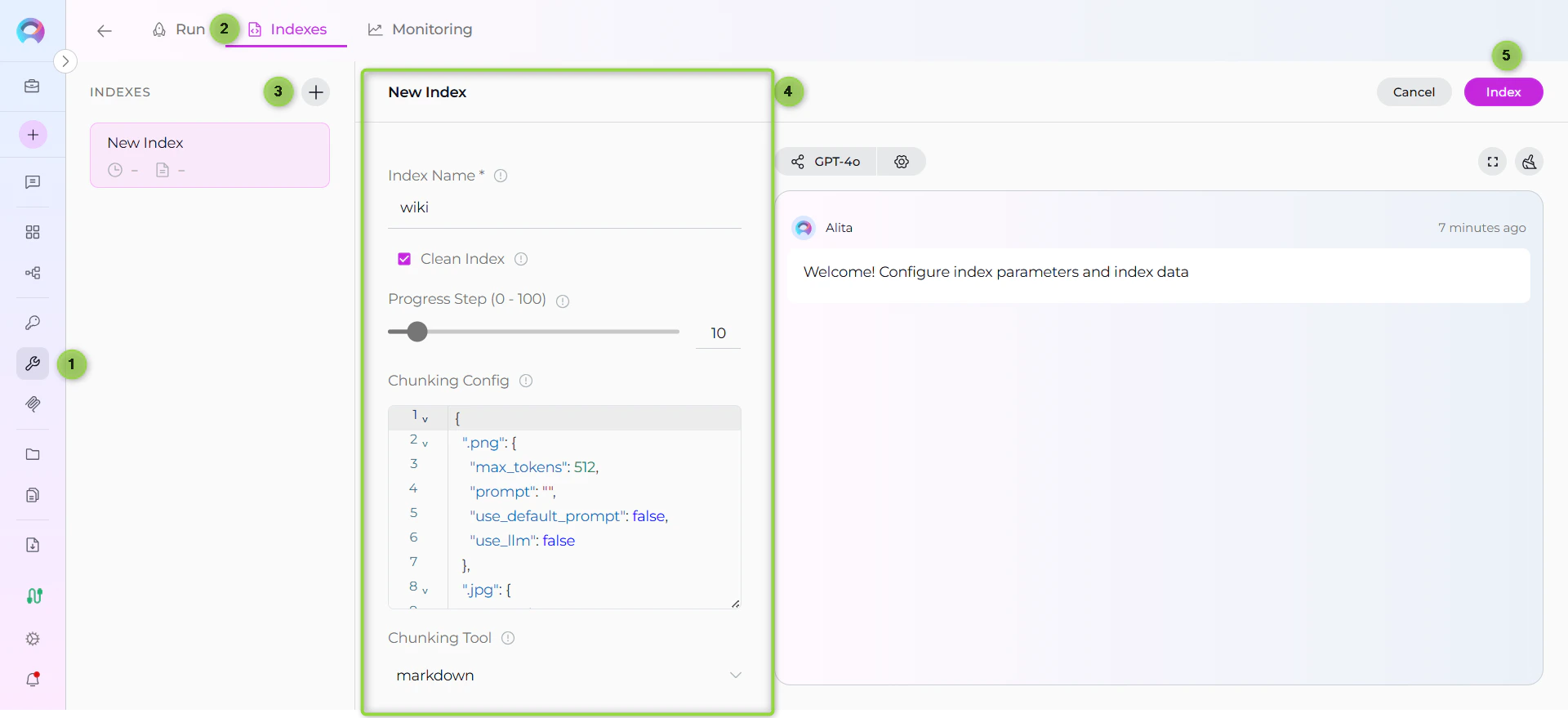
1. **Click Create New Index**: In the Indexes sidebar, click the **+ Create New Index** button
2. **New Index Form**: The center panel displays the new index creation form
### Step 3: Configure Index Parameters
Fill in the required and optional parameters for your ADO Wiki indexing:
| Parameter | Required | Description | Example Value |
| ----------------------- | -------- | ------------------------------------------------------------------------------ | -------------------------------------------- |
| Index Name | ✓ | Suffix for collection name (max 7 chars) | `docs` or `wiki` |
| Clean Index | ✗ | Remove existing index data before re-indexing | ✓ (checked) or ✗ (unchecked) |
| Progress Step (0 - 100) | ✗ | Step size for progress reporting during indexing | `10` (default) |
| Chunking Config | ✗ | Configuration settings for content chunking | `{"chunk_size": 4000, "chunk_overlap": 200}` |
| Chunking Tool | ✗ | Method for splitting content into chunks | `markdown` (default) |
| wiki\_identifier | ✓ | Wiki identifier to index, e.g., 'ABCProject.wiki' | `ProjectName.wiki` or `RepoName.wiki` |
| title\_contains | ✗ | Optional filter to include only pages with titles containing exact this string | `API` or leave empty |
**Understanding the Parameters:**
* **Index Name**: This will be used as the collection suffix for your indexed data. Keep it short and descriptive.
* **wiki\_identifier**: The identifier of the wiki you want to index (e.g., `MyProject.wiki` for project wikis or `MyRepo.wiki` for code wikis)
* **title\_contains**: Use this to filter and index only pages whose titles contain a specific string (case-sensitive exact match)
* **Clean Index**: Enable this to remove existing indexed data for this collection before re-indexing
* **Chunking Tool**: Set to `markdown` for optimal wiki content processing
### Step 4: Start Indexing
1. **Form Validation**: The **Index** button remains inactive until all required fields are filled
2. **Review Configuration**: Verify all parameters are correct
3. **Click Index Button**: Start the indexing process
4. **Monitor Progress**: Watch real-time updates with visual indicators:
* 🔄 **In Progress**: Indexing is currently running
* ✅ **Completed**: All items indexed successfully
* ⚠️ **Partially Indexed**: Indexing finished but some files were skipped (unsupported extension, empty content, or errors). The index is fully usable for search and scheduling — review the skipped-file breakdown in the chat panel.
* ❌ **Failed**: Indexing encountered an error
 For quick testing and validation, you can also use the **Test Settings** panel on the right side of the toolkit detail page. Select a model, choose the **Index Data** tool from the dropdown, configure parameters, and click **Run Tool**. However, the Indexes Tab Interface is the recommended approach for comprehensive index management.
### Step 5: Verify Index Creation
After indexing completes, verify the index was created successfully:
1. **Check Index Status**: Visual indicators show completion status
2. **Review Index Details**: Click on the created index to see metadata and document count
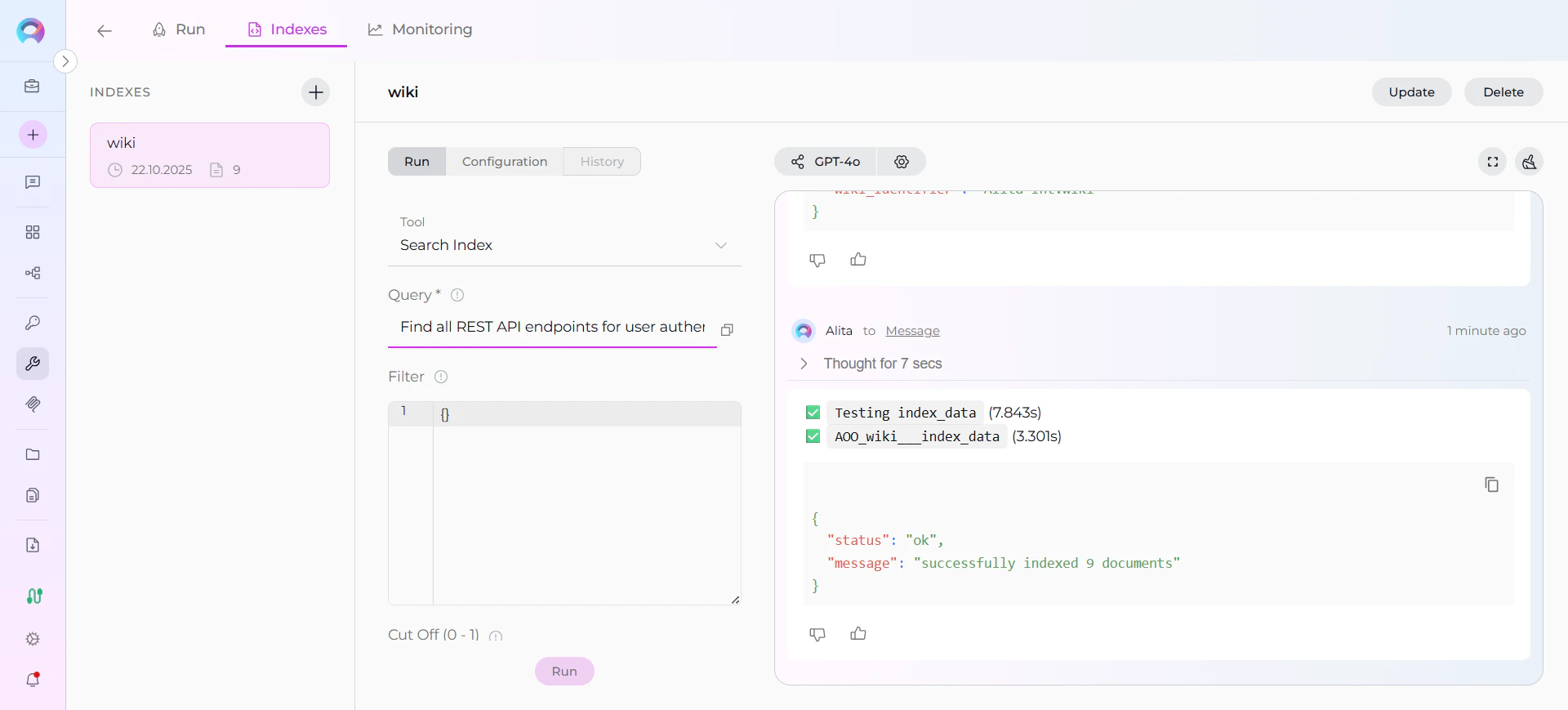
3. **Test Search**: Use the **Run** tab to test search functionality with sample queries
***
## Real-Life Example: Indexing Development Team Documentation
**Scenario**: You have a development team wiki in Azure DevOps containing project documentation, API guides, and troubleshooting information. You want to make this documentation searchable for your team.
### Using Indexes Tab Interface (Recommended):
1. **Navigate to Toolkits** → Select your ADO Wiki toolkit
2. **Click the Indexes tab**
3. **Click + Create New Index** button
4. **Configure parameters:**
* **Index Name**: `docs`
* **wiki\_identifier**: `WebApp.wiki`
* **Clean Index**: ✓ (checked for fresh start)
* **Progress Step**: `10`
* **title\_contains**: (leave empty to index all pages)
* **Chunking Tool**: `markdown`
* **Chunking Config**: `{"chunk_size": 4000, "chunk_overlap": 200}`
5. **Click Index** button and monitor progress
6. **Wait for ✅ Completed** status
7. **Verify** using Run tab → Search Index tool with a test query
**Result**: Your team can now ask natural language questions about your documentation and get instant answers with citations to specific wiki pages.
**After indexing, you can search for:**
* **API documentation**: *"Find all REST API endpoints for user authentication"*
* **Development procedures**: *"What are the deployment steps for the payment service?"*
* **Architecture information**: *"Show me the microservices communication patterns"*
* **Troubleshooting guides**: *"How do we debug database connection issues?"*
* **Setup instructions**: *"What are the local development environment requirements?"*
***
## Search and Chat with Indexed Data
Once your ADO Wiki data is indexed, you can search and interact with your documentation using the **Run** tab or by adding the toolkit to conversations and agents.
### Using the Run Tab (Quick Testing)
In your ADO Wiki toolkit:
1. **Click the Run tab** (next to Indexes tab)
2. **Select search tools** from the dropdown:
* **Search Index**: Perform semantic search with natural language queries
* **Stepback Search Index**: Complex multi-part questions
* **Stepback Summary Index**: Generate summaries from search results
3. **Enter your query** and click Run Tool
4. **Review results** with citations and relevance scores
For quick testing and validation, you can also use the **Test Settings** panel on the right side of the toolkit detail page. Select a model, choose the **Index Data** tool from the dropdown, configure parameters, and click **Run Tool**. However, the Indexes Tab Interface is the recommended approach for comprehensive index management.
### Step 5: Verify Index Creation
After indexing completes, verify the index was created successfully:
1. **Check Index Status**: Visual indicators show completion status
2. **Review Index Details**: Click on the created index to see metadata and document count
3. **Test Search**: Use the **Run** tab to test search functionality with sample queries
***
## Real-Life Example: Indexing Development Team Documentation
**Scenario**: You have a development team wiki in Azure DevOps containing project documentation, API guides, and troubleshooting information. You want to make this documentation searchable for your team.
### Using Indexes Tab Interface (Recommended):
1. **Navigate to Toolkits** → Select your ADO Wiki toolkit
2. **Click the Indexes tab**
3. **Click + Create New Index** button
4. **Configure parameters:**
* **Index Name**: `docs`
* **wiki\_identifier**: `WebApp.wiki`
* **Clean Index**: ✓ (checked for fresh start)
* **Progress Step**: `10`
* **title\_contains**: (leave empty to index all pages)
* **Chunking Tool**: `markdown`
* **Chunking Config**: `{"chunk_size": 4000, "chunk_overlap": 200}`
5. **Click Index** button and monitor progress
6. **Wait for ✅ Completed** status
7. **Verify** using Run tab → Search Index tool with a test query
**Result**: Your team can now ask natural language questions about your documentation and get instant answers with citations to specific wiki pages.
**After indexing, you can search for:**
* **API documentation**: *"Find all REST API endpoints for user authentication"*
* **Development procedures**: *"What are the deployment steps for the payment service?"*
* **Architecture information**: *"Show me the microservices communication patterns"*
* **Troubleshooting guides**: *"How do we debug database connection issues?"*
* **Setup instructions**: *"What are the local development environment requirements?"*
***
## Search and Chat with Indexed Data
Once your ADO Wiki data is indexed, you can search and interact with your documentation using the **Run** tab or by adding the toolkit to conversations and agents.
### Using the Run Tab (Quick Testing)
In your ADO Wiki toolkit:
1. **Click the Run tab** (next to Indexes tab)
2. **Select search tools** from the dropdown:
* **Search Index**: Perform semantic search with natural language queries
* **Stepback Search Index**: Complex multi-part questions
* **Stepback Summary Index**: Generate summaries from search results
3. **Enter your query** and click Run Tool
4. **Review results** with citations and relevance scores
 ### Using Toolkit in Conversations and Agents
Your ADO Wiki toolkit can be used in two main contexts:
1. **In Conversations**: Add the toolkit as a participant to ask questions and search your indexed wiki data
2. **In Agents**: Include the toolkit when creating AI agents to give them access to your documentation
**How to use:**
* **Start a New Conversation or Create an Agent**
* **Add Toolkit as Participant**: Select your ADO Wiki toolkit from the available toolkits
* **Ask Natural Language Questions**: The toolkit will automatically search your indexed data and provide relevant answers with citations
### Using Indexed ADO Wiki Data in Conversations
Let's walk through a complete example of querying indexed documentation:
**Step 1: Add toolkit to a conversation and start asking questions:**
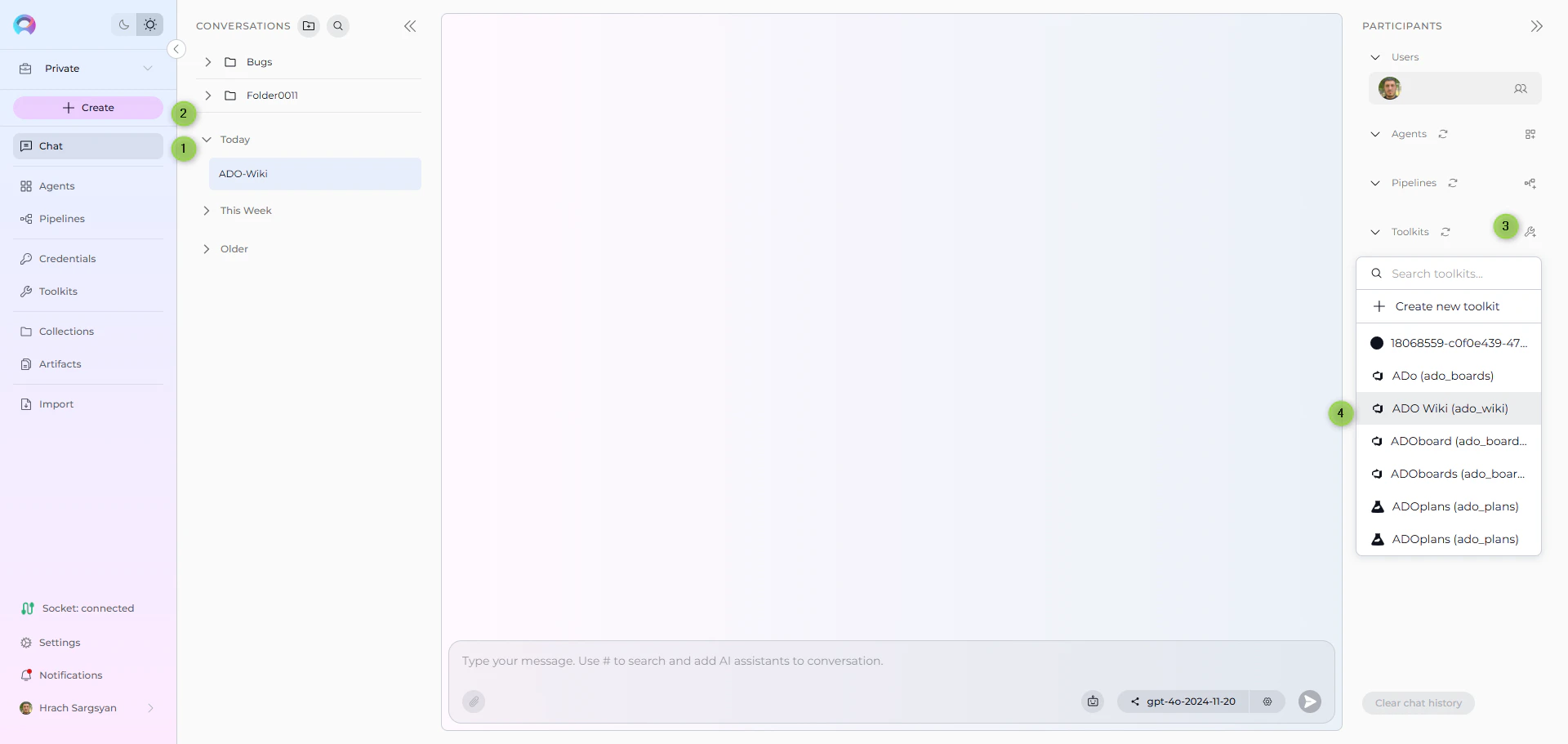
* Navigate to **Chat** → **+ Create**
* In the participants section click + to add Toolkit
* Select your ADO Wiki toolkit from the available toolkits list
### Using Toolkit in Conversations and Agents
Your ADO Wiki toolkit can be used in two main contexts:
1. **In Conversations**: Add the toolkit as a participant to ask questions and search your indexed wiki data
2. **In Agents**: Include the toolkit when creating AI agents to give them access to your documentation
**How to use:**
* **Start a New Conversation or Create an Agent**
* **Add Toolkit as Participant**: Select your ADO Wiki toolkit from the available toolkits
* **Ask Natural Language Questions**: The toolkit will automatically search your indexed data and provide relevant answers with citations
### Using Indexed ADO Wiki Data in Conversations
Let's walk through a complete example of querying indexed documentation:
**Step 1: Add toolkit to a conversation and start asking questions:**
* Navigate to **Chat** → **+ Create**
* In the participants section click + to add Toolkit
* Select your ADO Wiki toolkit from the available toolkits list
 **Step 2: Start comprehensive analysis with your indexed documentation**
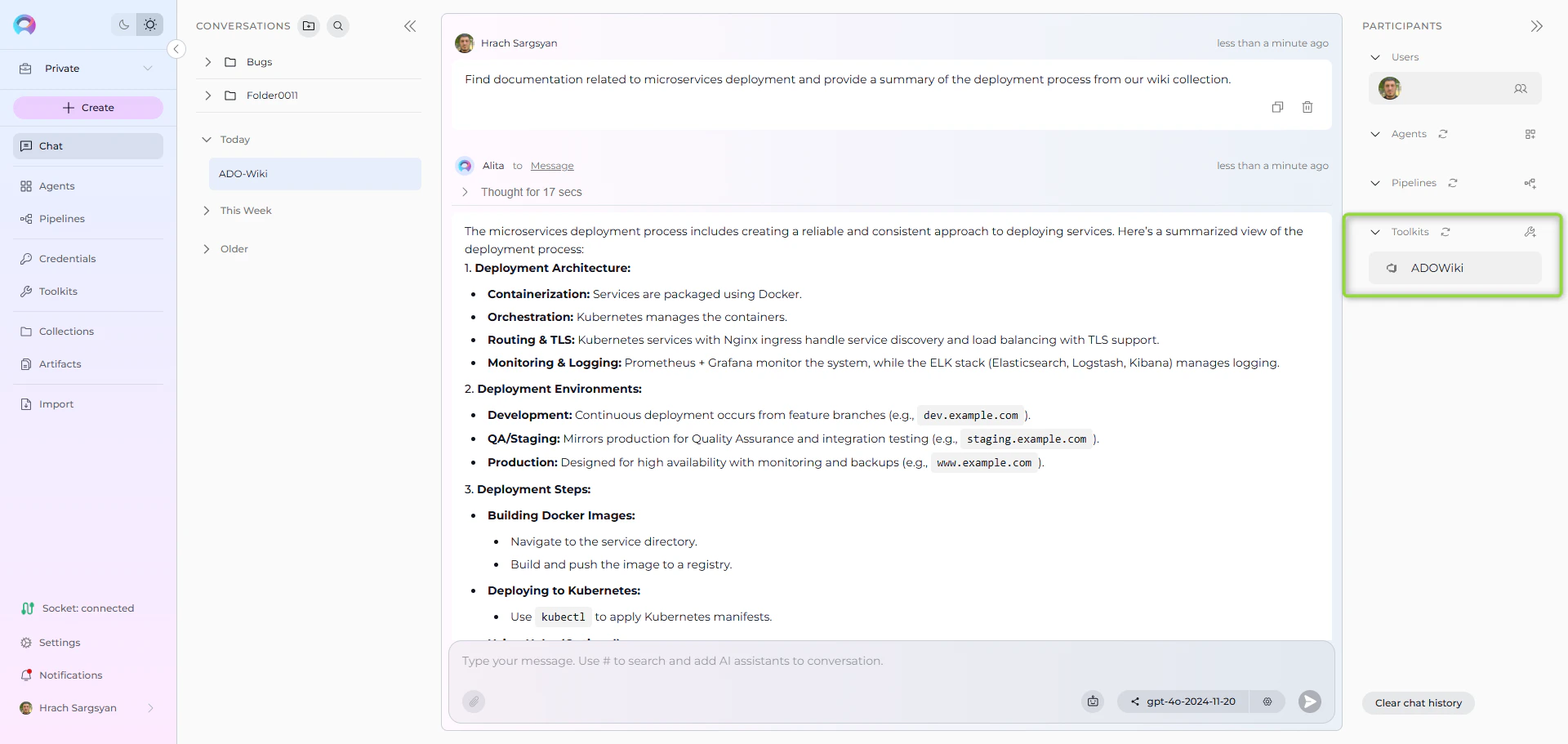
* **User Request:** "Find all documentation related to microservices deployment and provide a summary of the deployment process from our wiki collection."
* **ADO Wiki Toolkit:** "Based on your indexed wiki pages, here's a comprehensive summary of microservices deployment:
**Deployment Documentation Found:**
1. **CI/CD Pipeline Setup**: Complete guide for automated deployment workflows
2. **Environment Configuration**: Development, staging, and production environment setup
3. **Container Deployment**: Docker containerization and Kubernetes deployment procedures
4. **Database Migration**: Scripts and procedures for database schema updates
5. **Service Discovery**: Configuration for service registration and discovery mechanisms
**Deployment Process Summary:**
**Pre-Deployment:**
* Code review and merge to main branch
* Automated testing pipeline execution
* Security scanning and quality gates validation
**Deployment Stages:**
* **Development**: Automatic deployment on code commit
* **Staging**: Manual approval with integration testing
* **Production**: Blue-green deployment with rollback capabilities
**Post-Deployment:**
* Health checks and monitoring validation
* Performance metrics verification
* Service mesh configuration updates
**Key Configuration Files:**
* `docker-compose.yml`: Container orchestration
* `deployment.yaml`: Kubernetes deployment manifests
* `pipeline.yml`: CI/CD pipeline configuration
**Rollback Procedures:**
* Automated rollback triggers on health check failures
* Manual rollback commands for emergency situations
* Database rollback scripts for schema changes
\[Citations: Deployment Guide v2.1, Container Best Practices, Production Runbook]"
**Step 2: Start comprehensive analysis with your indexed documentation**
* **User Request:** "Find all documentation related to microservices deployment and provide a summary of the deployment process from our wiki collection."
* **ADO Wiki Toolkit:** "Based on your indexed wiki pages, here's a comprehensive summary of microservices deployment:
**Deployment Documentation Found:**
1. **CI/CD Pipeline Setup**: Complete guide for automated deployment workflows
2. **Environment Configuration**: Development, staging, and production environment setup
3. **Container Deployment**: Docker containerization and Kubernetes deployment procedures
4. **Database Migration**: Scripts and procedures for database schema updates
5. **Service Discovery**: Configuration for service registration and discovery mechanisms
**Deployment Process Summary:**
**Pre-Deployment:**
* Code review and merge to main branch
* Automated testing pipeline execution
* Security scanning and quality gates validation
**Deployment Stages:**
* **Development**: Automatic deployment on code commit
* **Staging**: Manual approval with integration testing
* **Production**: Blue-green deployment with rollback capabilities
**Post-Deployment:**
* Health checks and monitoring validation
* Performance metrics verification
* Service mesh configuration updates
**Key Configuration Files:**
* `docker-compose.yml`: Container orchestration
* `deployment.yaml`: Kubernetes deployment manifests
* `pipeline.yml`: CI/CD pipeline configuration
**Rollback Procedures:**
* Automated rollback triggers on health check failures
* Manual rollback commands for emergency situations
* Database rollback scripts for schema changes
\[Citations: Deployment Guide v2.1, Container Best Practices, Production Runbook]"
 ### Advanced Search Examples
**Searching for specific technical information:**
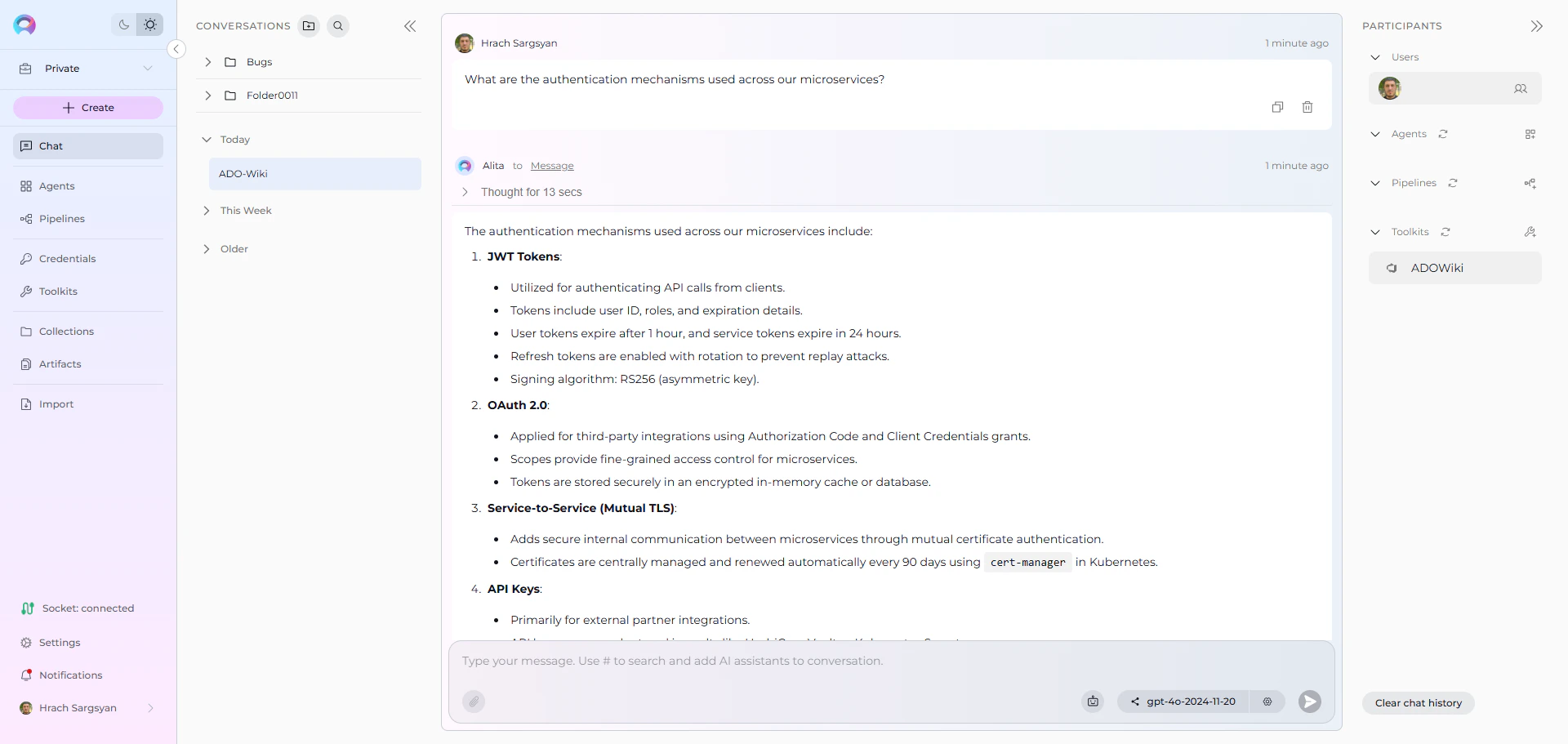
* **User:** "What are the authentication mechanisms used across our microservices?"
* **ADO Wiki Toolkit:** "According to the indexed documentation, your microservices use a multi-layered authentication approach:
**Authentication Methods:**
1. **JWT Tokens**: Primary authentication for API calls
2. **OAuth 2.0**: Third-party service integration
3. **Service-to-Service**: Mutual TLS authentication
4. **API Keys**: External partner integration
**Implementation Details:**
* Token expiration: 1 hour for user tokens, 24 hours for service tokens
* Refresh token rotation: Enabled for enhanced security
* Certificate management: Automated renewal via cert-manager
\[Citations: Authentication Architecture, API Security Guide, Service Mesh Configuration]"
### Advanced Search Examples
**Searching for specific technical information:**
* **User:** "What are the authentication mechanisms used across our microservices?"
* **ADO Wiki Toolkit:** "According to the indexed documentation, your microservices use a multi-layered authentication approach:
**Authentication Methods:**
1. **JWT Tokens**: Primary authentication for API calls
2. **OAuth 2.0**: Third-party service integration
3. **Service-to-Service**: Mutual TLS authentication
4. **API Keys**: External partner integration
**Implementation Details:**
* Token expiration: 1 hour for user tokens, 24 hours for service tokens
* Refresh token rotation: Enabled for enhanced security
* Certificate management: Automated renewal via cert-manager
\[Citations: Authentication Architecture, API Security Guide, Service Mesh Configuration]"
 **Finding troubleshooting information:**
* **User Request:** "How do we handle database connection timeouts in the order service?"
* **ADO Wiki Toolkit:** "Based on the troubleshooting documentation for the order service:
**Database Connection Timeout Resolution:**
**Immediate Actions:**
1. Check connection pool utilization in monitoring dashboard
2. Verify database server health and resource usage
3. Review recent deployment changes that might affect connections
**Configuration Adjustments:**
* Connection timeout: Increase from 30s to 60s if needed
* Pool size: Adjust based on load patterns (current: min=5, max=20)
* Retry logic: Exponential backoff with 3 retry attempts
**Monitoring and Alerts:**
* Connection pool metrics in Grafana dashboard
* Alert thresholds: >80% pool utilization
* Log aggregation in ELK stack for pattern analysis
\[Citations: Order Service Troubleshooting Guide, Database Configuration, Monitoring Setup]"
***
## Managing Your ADO Wiki Indexes
### Updating Indexed Content
When your wiki content changes significantly:
1. **Re-run Index Data tool** with the same parameters to update existing indexes
2. **Use Clean Index option** to completely refresh the collection with current content
3. **Monitor indexing progress** through the progress step reporting
### Best Practices
**Collection Organization:**
* Use descriptive collection suffixes that reflect content types
* Create separate collections for different teams or purposes
* Consider wiki scope when planning collection structure
**Content Filtering:**
* Use `Title Contains` parameter for focused indexing
* Index frequently updated content separately for easier maintenance
* Consider page hierarchy when organizing collections
**Performance Optimization:**
* Index during low-usage periods for large wikis
* Use appropriate chunking settings for your content types
* Monitor vector storage usage and clean up unused collections
***
## Troubleshooting
### Common Issues
**Indexing Failures:**
* Review wiki content for formatting issues that might cause parsing errors
* Check for very large pages that might exceed processing limits
* Verify vector storage configuration and available space
* Ensure the wiki\_identifier format is correct (`ProjectName.wiki` for project wikis)
* Check that the wiki exists and contains pages
**Connection Issues:**
* Verify ADO personal access token has wiki read permissions
* Check organization URL format and project name accuracy in toolkit configuration
* Ensure token hasn't expired and has appropriate permissions
* Confirm you have access to the specified project and wiki
### Poor Search Results
**Problem**: Search queries return irrelevant or no results
**Solutions:**
* Try more specific, detailed search queries related to your documentation content
* Adjust the **Cut Off** score parameter in search tools (lower for more results, higher for precision)
* Use **Stepback Search Index** tool for complex documentation questions
* Verify the **Index Name** (collection suffix) targets the right dataset
* Check if indexing completed successfully using **List Collections** tool in the Run tab
### Interface Issues
**Problem**: Indexes tab not loading or responding
**Solutions:**
* Refresh the page and try accessing the Indexes tab again
* Verify your ADO Wiki toolkit is properly configured with valid credentials
* Check that PgVector and Embedding Model are configured in Settings → AI Configuration
* Ensure the **Index Data** tool is enabled in your toolkit configuration
* Check browser console for any JavaScript errors
* Use Test Settings as an alternative if interface issues persist
### Getting Help
For additional support with ADO Wiki indexing:
1. **Check Vector Storage**: Verify PgVector is properly configured and accessible
2. **Review Toolkit Configuration**: Ensure all required fields are properly set
3. **Test with Small Dataset**: Start with a limited wiki or filtered content
4. **Contact Support**: Reach out to ELITEA support with specific error messages and configuration details
***
For additional information and detailed setup instructions, see:
* **[Indexing Overview](./indexing-overview)** - *Complete guide to ELITEA's indexing system and capabilities*
* **[Indexing Tools](./indexing-tools)** - *Detailed reference for all indexing tools and parameters*
* **[ADO Wiki Toolkit Guide](../../integrations/toolkits/ado_wiki_toolkit)** - *Comprehensive guide to the ADO Wiki Toolkit and its capabilities*
* **[How to Use Credentials](../credentials-toolkits/how-to-use-credentials#ado-azure-devops-credential-setup)** - *ADO credential setup and management*
* **[AI Configuration](../../menus/settings/ai-configuration)** - *Set up vector storage and embedding models for indexing*
* **[Toolkits Menu](../../menus/toolkits)** - *General toolkit configuration and management*
* **[Chat Menu](../../menus/chat)** - *Create conversations and add toolkits as participants*
* **[Agents Menu](../../menus/agents)** - *Create AI agents with access to your indexed ADO Wiki data*
***
**Finding troubleshooting information:**
* **User Request:** "How do we handle database connection timeouts in the order service?"
* **ADO Wiki Toolkit:** "Based on the troubleshooting documentation for the order service:
**Database Connection Timeout Resolution:**
**Immediate Actions:**
1. Check connection pool utilization in monitoring dashboard
2. Verify database server health and resource usage
3. Review recent deployment changes that might affect connections
**Configuration Adjustments:**
* Connection timeout: Increase from 30s to 60s if needed
* Pool size: Adjust based on load patterns (current: min=5, max=20)
* Retry logic: Exponential backoff with 3 retry attempts
**Monitoring and Alerts:**
* Connection pool metrics in Grafana dashboard
* Alert thresholds: >80% pool utilization
* Log aggregation in ELK stack for pattern analysis
\[Citations: Order Service Troubleshooting Guide, Database Configuration, Monitoring Setup]"
***
## Managing Your ADO Wiki Indexes
### Updating Indexed Content
When your wiki content changes significantly:
1. **Re-run Index Data tool** with the same parameters to update existing indexes
2. **Use Clean Index option** to completely refresh the collection with current content
3. **Monitor indexing progress** through the progress step reporting
### Best Practices
**Collection Organization:**
* Use descriptive collection suffixes that reflect content types
* Create separate collections for different teams or purposes
* Consider wiki scope when planning collection structure
**Content Filtering:**
* Use `Title Contains` parameter for focused indexing
* Index frequently updated content separately for easier maintenance
* Consider page hierarchy when organizing collections
**Performance Optimization:**
* Index during low-usage periods for large wikis
* Use appropriate chunking settings for your content types
* Monitor vector storage usage and clean up unused collections
***
## Troubleshooting
### Common Issues
**Indexing Failures:**
* Review wiki content for formatting issues that might cause parsing errors
* Check for very large pages that might exceed processing limits
* Verify vector storage configuration and available space
* Ensure the wiki\_identifier format is correct (`ProjectName.wiki` for project wikis)
* Check that the wiki exists and contains pages
**Connection Issues:**
* Verify ADO personal access token has wiki read permissions
* Check organization URL format and project name accuracy in toolkit configuration
* Ensure token hasn't expired and has appropriate permissions
* Confirm you have access to the specified project and wiki
### Poor Search Results
**Problem**: Search queries return irrelevant or no results
**Solutions:**
* Try more specific, detailed search queries related to your documentation content
* Adjust the **Cut Off** score parameter in search tools (lower for more results, higher for precision)
* Use **Stepback Search Index** tool for complex documentation questions
* Verify the **Index Name** (collection suffix) targets the right dataset
* Check if indexing completed successfully using **List Collections** tool in the Run tab
### Interface Issues
**Problem**: Indexes tab not loading or responding
**Solutions:**
* Refresh the page and try accessing the Indexes tab again
* Verify your ADO Wiki toolkit is properly configured with valid credentials
* Check that PgVector and Embedding Model are configured in Settings → AI Configuration
* Ensure the **Index Data** tool is enabled in your toolkit configuration
* Check browser console for any JavaScript errors
* Use Test Settings as an alternative if interface issues persist
### Getting Help
For additional support with ADO Wiki indexing:
1. **Check Vector Storage**: Verify PgVector is properly configured and accessible
2. **Review Toolkit Configuration**: Ensure all required fields are properly set
3. **Test with Small Dataset**: Start with a limited wiki or filtered content
4. **Contact Support**: Reach out to ELITEA support with specific error messages and configuration details
***
For additional information and detailed setup instructions, see:
* **[Indexing Overview](./indexing-overview)** - *Complete guide to ELITEA's indexing system and capabilities*
* **[Indexing Tools](./indexing-tools)** - *Detailed reference for all indexing tools and parameters*
* **[ADO Wiki Toolkit Guide](../../integrations/toolkits/ado_wiki_toolkit)** - *Comprehensive guide to the ADO Wiki Toolkit and its capabilities*
* **[How to Use Credentials](../credentials-toolkits/how-to-use-credentials#ado-azure-devops-credential-setup)** - *ADO credential setup and management*
* **[AI Configuration](../../menus/settings/ai-configuration)** - *Set up vector storage and embedding models for indexing*
* **[Toolkits Menu](../../menus/toolkits)** - *General toolkit configuration and management*
* **[Chat Menu](../../menus/chat)** - *Create conversations and add toolkits as participants*
* **[Agents Menu](../../menus/agents)** - *Create AI agents with access to your indexed ADO Wiki data*
***