> ## Documentation Index
> Fetch the complete documentation index at: https://docs.elitea.ai/llms.txt
> Use this file to discover all available pages before exploring further.
# Python Sandbox Internal Tool
> Run secure Python code in conversations with persistent session state and Pyodide-compatible libraries.
## Overview
**Key Features:**
* **Secure Execution:** Code runs in an isolated WebAssembly environment with configurable permissions via Deno
* **Rich Python Ecosystem:** Access to Pyodide-compatible packages including NumPy, Pandas, Matplotlib, SciPy, and more
* **Stateful Sessions:** Variables, imports, and function definitions persist across code blocks within the same conversation
* **Instant Results:** Execute calculations, data analysis, and visualizations without leaving the chat
* **No Setup Required:** Works out-of-the-box once Deno is installed on the server—no Python installation needed
Enable Python Sandbox when your workflows involve data analysis, calculations, algorithm testing, or any task that benefits from Python's extensive libraries. Perfect for QA engineers testing code, data analysts processing datasets, or developers prototyping solutions.
***
## Prerequisites
* **Permission Level**: User role with conversation or agent edit access
* **Use Case**: Tasks involving Python code execution, data analysis, calculations, or algorithm validation
***
## How It Works
**Traditional Approach vs Python Sandbox**
| Aspect | Without Python Sandbox | With Python Sandbox |
| --------------------- | ------------------------------------------ | ------------------------------------------------- |
| **Code Execution** | Copy code, run locally or in external tool | Execute code directly in conversation |
| **Environment Setup** | Install Python, packages, dependencies | No setup—Pyodide runs in WebAssembly via Deno |
| **Data Sharing** | Export/import files between tools | Process data within conversation context |
| **Results** | Manual copy-paste of outputs | Automatic integration of results into chat |
| **Security** | Depends on local environment | Isolated sandbox with restricted Deno permissions |
**Execution Flow**
When Python Sandbox is enabled:
1. **Code Generation:** Assistant writes Python code to solve your request
2. **Sandbox Invocation:** Code is sent to the Pyodide sandbox environment via Deno subprocess
3. **Isolated Execution:** Code runs in WebAssembly with access to Pyodide packages
4. **Result Capture:** Output (print statements, return values, errors) is captured
5. **Response Integration:** Results are formatted and returned in the conversation
With Python Sandbox enabled, the assistant can:
* Execute multi-line Python scripts
* Use Pyodide-compatible packages (numpy, pandas, matplotlib, scipy, scikit-learn, etc.)
* Perform complex calculations and data transformations
* Generate visualizations and charts (via matplotlib)
* Maintain variables and state between executions in the same conversation
* Handle errors gracefully and provide debugging information
* Install additional packages available in Pyodide ecosystem
***
## Enabling Python Sandbox in Conversations
Enable Python Sandbox for code execution in your conversations.
1. Navigate to your conversation.
2. Locate the chat input toolbar at the bottom of the screen.
3. Click the **Internal Tools** icon (value icon) next to the attachment button.
4. In the popup, find **Python sandbox** in the list.
5. Click the toggle switch next to "Python sandbox" to enable it.
6. A success toast notification appears: "Internal tools configuration updated".
7. Click anywhere outside the popup to close it.
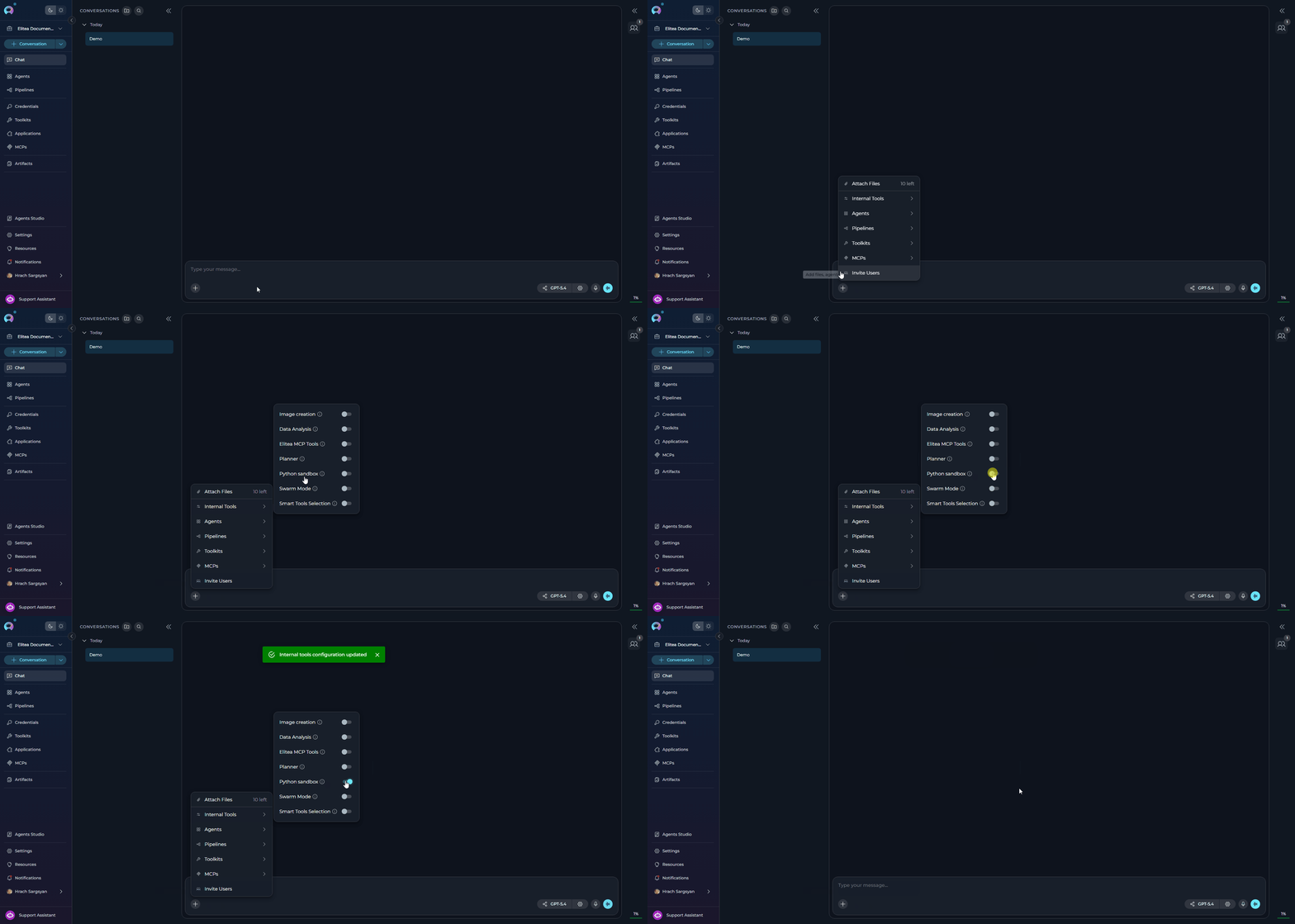 The Python Sandbox setting persists for the conversation. You can toggle it on/off at any time during the conversation.
***
## Enabling Python Sandbox in Agent Configuration
Configure Python Sandbox as part of an agent's default configuration.
1. Navigate to **Agents** in the main menu.
2. Select the agent you want to configure or create a new agent.
3. On the **Configuration** tab, scroll down to the **TOOLKITS** section.
4. Within the TOOLKITS section, locate the **INTERNAL TOOLS** subsection.
5. Find the **Python sandbox** toggle. If it is not visible, click **Show all** to expand the full list of internal tools.
6. Click the **Python sandbox** toggle to enable it.
7. Click **Save** at the top of the configuration page to persist the change.
8. New conversations created with this agent will have Python Sandbox enabled by default.
The Python Sandbox setting persists for the conversation. You can toggle it on/off at any time during the conversation.
***
## Enabling Python Sandbox in Agent Configuration
Configure Python Sandbox as part of an agent's default configuration.
1. Navigate to **Agents** in the main menu.
2. Select the agent you want to configure or create a new agent.
3. On the **Configuration** tab, scroll down to the **TOOLKITS** section.
4. Within the TOOLKITS section, locate the **INTERNAL TOOLS** subsection.
5. Find the **Python sandbox** toggle. If it is not visible, click **Show all** to expand the full list of internal tools.
6. Click the **Python sandbox** toggle to enable it.
7. Click **Save** at the top of the configuration page to persist the change.
8. New conversations created with this agent will have Python Sandbox enabled by default.
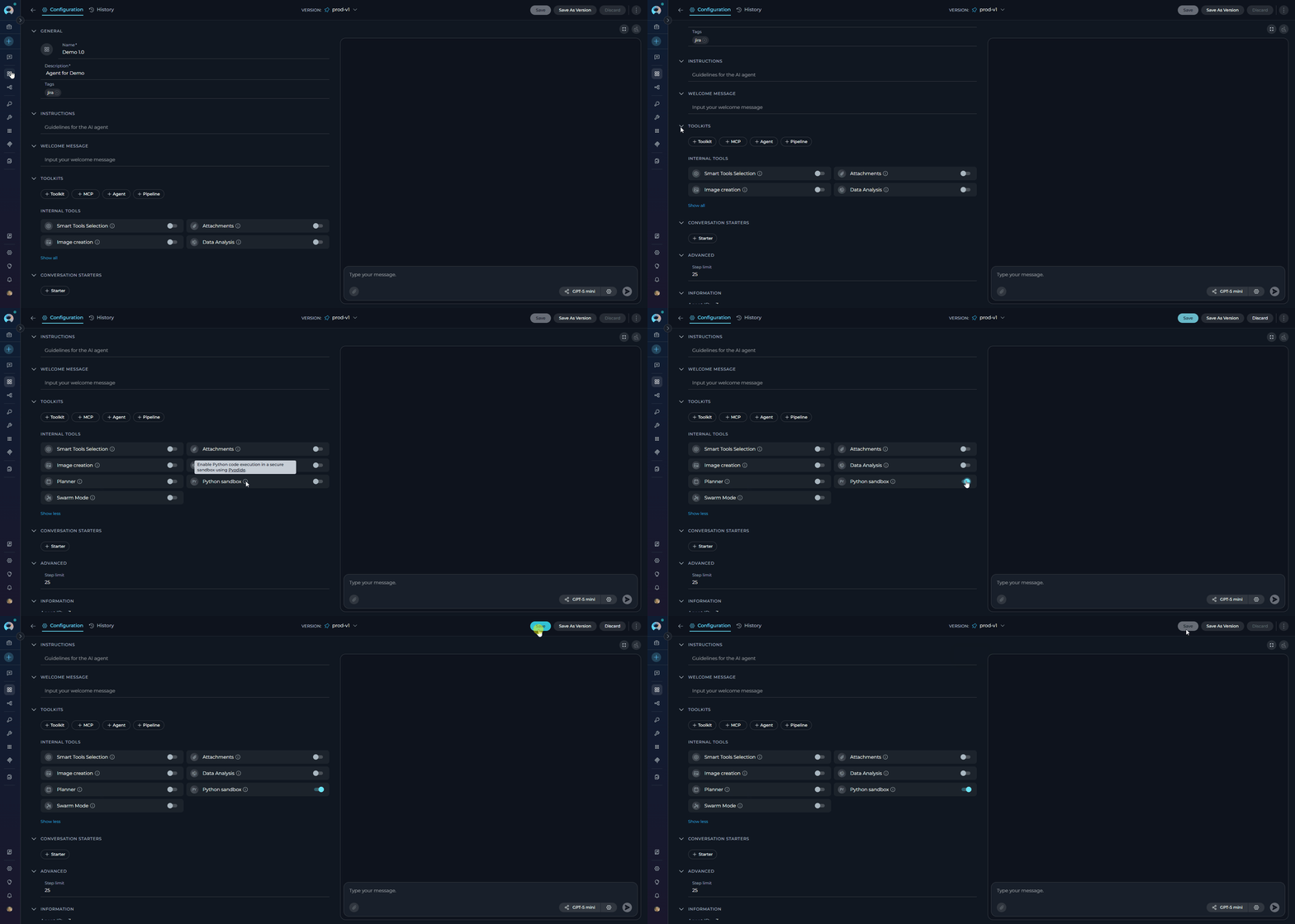 For agents designed for data analysis, testing, or development tasks, enabling **Python sandbox** significantly enhances their problem-solving capabilities and allows them to provide executable solutions.
***
## Using Python Sandbox
Once enabled, Python Sandbox works seamlessly during conversations. The assistant automatically uses it to execute code when needed to solve your requests.
### What Happens Behind the Scenes
1. **Code Generation:** The assistant writes Python code to address your request
2. **Automatic Execution:** Code is executed in the Pyodide sandbox without manual intervention
3. **Result Processing:** Output, errors, and visualizations are captured
4. **Integrated Response:** Results are presented naturally in the conversation flow
***
### Example Scenarios
**User**: I'm writing a function to validate email addresses. Can you help me test it with various inputs to make sure it works correctly?
```python theme={null}
import re
def validate_email(email):
"""
Improved email validation with better edge case handling.
"""
# Check for consecutive dots
if '..' in email:
return False
# More strict regex pattern
# Local part: starts and ends with alphanumeric, can contain ._+-%
# Domain: proper format with labels that start/end with alphanumeric
pattern = (
r'^[a-zA-Z0-9][a-zA-Z0-9._%+-]*[a-zA-Z0-9]'
r'@[a-zA-Z0-9]+([.-][a-zA-Z0-9]+)*\.[a-zA-Z]{2,}$'
r'|^[a-zA-Z0-9]@[a-zA-Z0-9]+([.-][a-zA-Z0-9]+)*\.[a-zA-Z]{2,}$'
)
return re.match(pattern, email) is not None
```
**Assistant**: I'll help you test your email validation function with a comprehensive set of test cases! Let me run various inputs through it to identify any edge cases.
*\[Tool Used: pyodide\_sandbox]*
```python theme={null}
import re
def validate_email(email):
"""
Improved email validation with better edge case handling.
"""
# Check for consecutive dots
if '..' in email:
return False
# More strict regex pattern
pattern = r'^[a-zA-Z0-9][a-zA-Z0-9._%+-]*[a-zA-Z0-9]@[a-zA-Z0-9]+([.-][a-zA-Z0-9]+)*\.[a-zA-Z]{2,}$|^[a-zA-Z0-9]@[a-zA-Z0-9]+([.-][a-zA-Z0-9]+)*\.[a-zA-Z]{2,}$'
return re.match(pattern, email) is not None
# Test cases
test_cases = [
("user@example.com", True),
("user.name@example.co.uk", True),
("user+tag@example.com", True),
("invalid.email@", False),
("@example.com", False),
("user@.com", False),
("user@example", False),
("user name@example.com", False),
("user@example..com", False),
]
print("Email Validation Test Results")
print("=" * 50)
passed = 0
failed = 0
for email, expected in test_cases:
result = validate_email(email)
status = "✓ PASS" if result == expected else "✗ FAIL"
if result == expected:
passed += 1
else:
failed += 1
print(f"{status} | {email:30} | Expected: {expected}, Got: {result}")
print("=" * 50)
print(f"Results: {passed}/{len(test_cases)} passed, {failed} failed")
if failed > 0:
print("\n⚠️ Some test cases failed. Review the pattern.")
else:
print("\n✓ All test cases passed!")
```
**Output:**
```
Email Validation Test Results
==================================================
✓ PASS | user@example.com | Expected: True, Got: True
✓ PASS | user.name@example.co.uk | Expected: True, Got: True
✓ PASS | user+tag@example.com | Expected: True, Got: True
✓ PASS | invalid.email@ | Expected: False, Got: False
✓ PASS | @example.com | Expected: False, Got: False
✓ PASS | user@.com | Expected: False, Got: False
✓ PASS | user@example | Expected: False, Got: False
✓ PASS | user name@example.com | Expected: False, Got: False
✓ PASS | user@example..com | Expected: False, Got: False
==================================================
Results: 9/9 passed, 0 failed
✓ All test cases passed!
```
Great! Your improved email validation function passes all test cases. The enhancements you made successfully handle:
* Consecutive dots (rejected)
* Domain without TLD (rejected)
* Proper multi-part domains (accepted)
* Special characters in local part (accepted when appropriate)
**Scenario:** A data analyst needs to quickly analyze a dataset and calculate statistical metrics.
**User Request:**
> "I have sales data for the past 12 months: \[45000, 52000, 48000, 61000, 58000, 67000, 72000, 68000, 75000, 81000, 79000, 88000]. Calculate mean, median, standard deviation, and identify the growth trend."
**Assistant Response:**
The assistant generates and executes Python code using NumPy to:
* Calculate mean, median, and standard deviation
* Compute month-over-month growth rates
* Identify the overall trend
* Present results in a formatted summary
**Code Executed:**
```python theme={null}
import numpy as np
sales_data = np.array([45000, 52000, 48000, 61000, 58000, 67000,
72000, 68000, 75000, 81000, 79000, 88000])
mean_sales = np.mean(sales_data)
median_sales = np.median(sales_data)
std_dev = np.std(sales_data)
# Calculate month-over-month growth
growth_rates = np.diff(sales_data) / sales_data[:-1] * 100
avg_growth = np.mean(growth_rates)
print(f"Sales Analysis Report")
print("=" * 50)
print(f"Mean Sales: ${mean_sales:,.2f}")
print(f"Median Sales: ${median_sales:,.2f}")
print(f"Standard Deviation: ${std_dev:,.2f}")
print(f"Average Monthly Growth: {avg_growth:.2f}%")
print(f"Trend: {'Positive' if avg_growth > 0 else 'Negative'}")
```
Python Sandbox enables instant analysis without switching tools or exporting data, with results returned directly in the conversation.
**Scenario:** A developer wants to test a binary search implementation with various edge cases.
**User Request:**
> "Test my binary search function with edge cases including empty arrays, single elements, duplicate values, and targets not in the array."
**Assistant Response:**
The assistant:
* Generates comprehensive test cases covering all edge cases
* Executes the algorithm with each test case
* Validates correctness for each scenario
* Reports results with detailed pass/fail status and execution details
**Code Executed:**
```python theme={null}
def binary_search(arr, target):
left, right = 0, len(arr) - 1
while left <= right:
mid = (left + right) // 2
if arr[mid] == target:
return mid
elif arr[mid] < target:
left = mid + 1
else:
right = mid - 1
return -1
# Test cases
test_cases = [
([], 5, -1, "Empty array"),
([1], 1, 0, "Single element - found"),
([1], 2, -1, "Single element - not found"),
([1, 2, 3, 4, 5], 3, 2, "Standard case - middle element"),
([1, 2, 3, 4, 5], 1, 0, "First element"),
([1, 2, 3, 4, 5], 5, 4, "Last element"),
([1, 2, 3, 4, 5], 6, -1, "Target larger than all"),
([1, 1, 2, 2, 3, 3], 2, 2, "Duplicate values"),
]
print("Binary Search Test Results")
print("=" * 70)
passed = 0
for arr, target, expected, description in test_cases:
result = binary_search(arr, target)
status = "✓ PASS" if result == expected else "✗ FAIL"
if result == expected:
passed += 1
print(f"{status} | {description:30} | Expected: {expected:3}, Got: {result:3}")
print("=" * 70)
print(f"Results: {passed}/{len(test_cases)} tests passed")
```
Python Sandbox provides immediate feedback on algorithm behavior and comprehensive edge case validation.
**Scenario:** A student needs to solve quadratic equations and understand the mathematical properties.
**User Request:**
> "Solve the quadratic equation 2x² - 8x + 6 = 0 and explain the solutions."
**Assistant Response:**
Using Python Sandbox with mathematical operations:
* Calculates discriminant to determine solution types
* Computes exact solutions using the quadratic formula
* Verifies solutions by substitution
* Explains the mathematical interpretation
**Code Executed:**
```python theme={null}
import math
# Coefficients for 2x² - 8x + 6 = 0
a, b, c = 2, -8, 6
# Calculate discriminant
discriminant = b**2 - 4*a*c
print(f"Quadratic Equation: {a}x² + ({b})x + {c} = 0")
print("=" * 50)
print(f"Discriminant (b² - 4ac): {discriminant}")
if discriminant > 0:
x1 = (-b + math.sqrt(discriminant)) / (2*a)
x2 = (-b - math.sqrt(discriminant)) / (2*a)
print(f"\nTwo distinct real solutions:")
print(f"x₁ = {x1}")
print(f"x₂ = {x2}")
# Verify solutions
print(f"\nVerification:")
print(f"For x₁={x1}: {a}({x1})² + ({b})({x1}) + {c} = {a*x1**2 + b*x1 + c:.10f}")
print(f"For x₂={x2}: {a}({x2})² + ({b})({x2}) + {c} = {a*x2**2 + b*x2 + c:.10f}")
elif discriminant == 0:
x = -b / (2*a)
print(f"\nOne repeated real solution: x = {x}")
else:
real_part = -b / (2*a)
imaginary_part = math.sqrt(-discriminant) / (2*a)
print(f"\nTwo complex solutions:")
print(f"x₁ = {real_part} + {imaginary_part}i")
print(f"x₂ = {real_part} - {imaginary_part}i")
```
Python Sandbox brings mathematical concepts to life with executable code and instant verification.
***
## Best Practices
Pyodide supports many popular Python packages including NumPy, Pandas, Matplotlib, SciPy, scikit-learn, and more. Check the [Pyodide packages list](https://pyodide.org/en/stable/usage/packages-in-pyodide.html) to see what's available. These packages are precompiled for WebAssembly and work seamlessly in the sandbox environment.
For better readability and debugging, ask the assistant to break complex analysis into logical steps. Each code block can build on previous results since the sandbox maintains state within a conversation. This makes it easier to understand the process and identify issues.
Perfect for quickly testing code snippets, validating algorithms, or prototyping data transformations before implementing in production. Get immediate feedback without setting up local environments or installing dependencies.
When working with conversation attachments (CSV, Excel files), enable both Python Sandbox and Data Analysis internal tools. Python Sandbox provides the execution environment, while Data Analysis can help with file parsing and data structure handling.
Python Sandbox works seamlessly alongside **Swarm Mode**. In multi-agent setups, individual child agents can each have Python Sandbox enabled, allowing them to perform independent code execution tasks within the shared conversation context.
While Python Sandbox is secure and isolated, reviewing the code the assistant plans to execute helps you understand the approach and learn from the implementation. This is especially valuable for educational use cases.
When requesting data analysis or processing, include sample data in your message or describe the data format clearly. This helps the assistant generate more accurate and relevant code tailored to your specific use case.
When asking the assistant to work with data structures or algorithms, use clear descriptions and specify expected behavior. This helps generate more readable and maintainable code with appropriate variable names and comments.
***
\##Performance Considerations
**Data Analysis and Processing**
* Excellent for processing datasets, calculating statistics, and transforming data structures using NumPy and Pandas.
**Algorithm Testing and Validation**
* Perfect for testing code snippets, validating algorithms with comprehensive test cases, and prototyping solutions before production implementation.
**Mathematical Computations**
* Ideal for complex calculations, equation solving, numerical analysis, and mathematical modeling.
**Quick Prototyping**
* Enables rapid iteration on solutions without leaving the conversation or setting up local environments. Instant feedback loop for development.
**Heavy Computational Tasks**
* Very large datasets or computationally intensive operations may hit Deno timeout limits (default: 60 seconds). For production workloads with large-scale data processing, use dedicated Python environments.
**Package Limitations**
* Some Python packages are not available in Pyodide. Check the [Pyodide packages list](https://pyodide.org/en/stable/usage/packages-in-pyodide.html) before relying on specific libraries. C-extension packages may not be supported.
**File System Access**
* Limited file I/O capabilities due to WebAssembly sandbox restrictions. For tasks requiring extensive file operations or system-level access, consider alternative approaches.
**Network Operations**
* Network access is configurable via Deno permissions but may be restricted depending on server configuration. External API calls and web scraping may not work as expected.
***
***
## Troubleshooting
**Possible Causes:**
* Python Sandbox not enabled in conversation or agent configuration
* Deno not installed on the server
* Backend service unavailable or crashed
**Solution:**
1. Verify Python Sandbox is enabled in the Internal Tools popup or agent configuration
2. Check that the success notification appeared when enabling the tool
3. Contact system administrator to verify Deno installation on the server
4. Try disabling and re-enabling Python Sandbox to reset the connection
5. Refresh the page and start a new conversation to reset state
6. Check server logs for Deno-related errors
**Possible Causes:**
* Package not available in Pyodide ecosystem
* Package not preloaded in the sandbox environment
* Typo in package name
**Solution:**
1. Verify the package is listed in the [Pyodide packages list](https://pyodide.org/en/stable/usage/packages-in-pyodide.html)
2. Use alternative packages that are Pyodide-compatible
3. Check the error message for suggestions on alternative packages
4. For pure Python packages, some may need to be loaded dynamically
**Possible Causes:**
* Long-running computations exceeding timeout limit
* Infinite loops in the code
* Large dataset processing taking too long
**Solution:**
1. Break large computations into smaller chunks that execute faster
2. Optimize algorithms to reduce time complexity
3. Use iterative processing for large datasets
4. Review code for potential infinite loops or performance bottlenecks
5. Consider using local Python environment for heavy computations
**Possible Causes:**
* Conversation reset or page refresh
* Backend session expiration
* Error in previous code execution corrupted session state
**Solution:**
1. Re-run initialization code to redefine variables and imports
2. Avoid page refreshes during stateful work sessions
3. Check for errors in previous executions that may have corrupted state
4. Use explicit variable definitions in each code block for critical values
5. Start a new conversation if session state is corrupted
**Possible Causes:**
* Network access not allowed by Deno permissions
* Firewall blocking outbound connections from sandbox
* Using `requests` library instead of `httpx.AsyncClient`
**Solution:**
1. Ensure network access is configured in sandbox settings (`allow_net=True`)
2. Use `httpx.AsyncClient` for HTTP requests instead of the `requests` library
3. Contact administrator to check Deno network permission configuration
4. Check if specific domains need to be whitelisted in Deno settings
***
* [Pyodide Documentation](https://pyodide.org/en/stable/) - Learn about Python in WebAssembly
* [Pyodide Packages](https://pyodide.org/en/stable/usage/packages-in-pyodide.html) - Available Python packages and compatibility
* [Deno Documentation](https://docs.deno.com/) - Deno runtime and security model
* [Data Analysis Internal Tool](./data-analysis-internal-tool) - Complementary tool for working with uploaded CSV/Excel files
* [Swarm Mode Internal Tool](./swarm-mode-internal-tool) - Multi-agent collaboration for complex workflows
* [Smart Tools Selection Internal Tool](./smart-tools-selection-internal-tool) - Intelligent toolkit selection and management
* [Planner Internal Tool](./planner-internal-tool) - Task planning and execution coordination
* [Agent Configuration](../../menus/agents) - Complete guide to configuring agents and toolkits
* [Conversation Management](../../menus/chat) - Managing conversations and settings
* [Toolkits Overview](../../menus/toolkits) - Understanding toolkits and internal tools
For agents designed for data analysis, testing, or development tasks, enabling **Python sandbox** significantly enhances their problem-solving capabilities and allows them to provide executable solutions.
***
## Using Python Sandbox
Once enabled, Python Sandbox works seamlessly during conversations. The assistant automatically uses it to execute code when needed to solve your requests.
### What Happens Behind the Scenes
1. **Code Generation:** The assistant writes Python code to address your request
2. **Automatic Execution:** Code is executed in the Pyodide sandbox without manual intervention
3. **Result Processing:** Output, errors, and visualizations are captured
4. **Integrated Response:** Results are presented naturally in the conversation flow
***
### Example Scenarios
**User**: I'm writing a function to validate email addresses. Can you help me test it with various inputs to make sure it works correctly?
```python theme={null}
import re
def validate_email(email):
"""
Improved email validation with better edge case handling.
"""
# Check for consecutive dots
if '..' in email:
return False
# More strict regex pattern
# Local part: starts and ends with alphanumeric, can contain ._+-%
# Domain: proper format with labels that start/end with alphanumeric
pattern = (
r'^[a-zA-Z0-9][a-zA-Z0-9._%+-]*[a-zA-Z0-9]'
r'@[a-zA-Z0-9]+([.-][a-zA-Z0-9]+)*\.[a-zA-Z]{2,}$'
r'|^[a-zA-Z0-9]@[a-zA-Z0-9]+([.-][a-zA-Z0-9]+)*\.[a-zA-Z]{2,}$'
)
return re.match(pattern, email) is not None
```
**Assistant**: I'll help you test your email validation function with a comprehensive set of test cases! Let me run various inputs through it to identify any edge cases.
*\[Tool Used: pyodide\_sandbox]*
```python theme={null}
import re
def validate_email(email):
"""
Improved email validation with better edge case handling.
"""
# Check for consecutive dots
if '..' in email:
return False
# More strict regex pattern
pattern = r'^[a-zA-Z0-9][a-zA-Z0-9._%+-]*[a-zA-Z0-9]@[a-zA-Z0-9]+([.-][a-zA-Z0-9]+)*\.[a-zA-Z]{2,}$|^[a-zA-Z0-9]@[a-zA-Z0-9]+([.-][a-zA-Z0-9]+)*\.[a-zA-Z]{2,}$'
return re.match(pattern, email) is not None
# Test cases
test_cases = [
("user@example.com", True),
("user.name@example.co.uk", True),
("user+tag@example.com", True),
("invalid.email@", False),
("@example.com", False),
("user@.com", False),
("user@example", False),
("user name@example.com", False),
("user@example..com", False),
]
print("Email Validation Test Results")
print("=" * 50)
passed = 0
failed = 0
for email, expected in test_cases:
result = validate_email(email)
status = "✓ PASS" if result == expected else "✗ FAIL"
if result == expected:
passed += 1
else:
failed += 1
print(f"{status} | {email:30} | Expected: {expected}, Got: {result}")
print("=" * 50)
print(f"Results: {passed}/{len(test_cases)} passed, {failed} failed")
if failed > 0:
print("\n⚠️ Some test cases failed. Review the pattern.")
else:
print("\n✓ All test cases passed!")
```
**Output:**
```
Email Validation Test Results
==================================================
✓ PASS | user@example.com | Expected: True, Got: True
✓ PASS | user.name@example.co.uk | Expected: True, Got: True
✓ PASS | user+tag@example.com | Expected: True, Got: True
✓ PASS | invalid.email@ | Expected: False, Got: False
✓ PASS | @example.com | Expected: False, Got: False
✓ PASS | user@.com | Expected: False, Got: False
✓ PASS | user@example | Expected: False, Got: False
✓ PASS | user name@example.com | Expected: False, Got: False
✓ PASS | user@example..com | Expected: False, Got: False
==================================================
Results: 9/9 passed, 0 failed
✓ All test cases passed!
```
Great! Your improved email validation function passes all test cases. The enhancements you made successfully handle:
* Consecutive dots (rejected)
* Domain without TLD (rejected)
* Proper multi-part domains (accepted)
* Special characters in local part (accepted when appropriate)
**Scenario:** A data analyst needs to quickly analyze a dataset and calculate statistical metrics.
**User Request:**
> "I have sales data for the past 12 months: \[45000, 52000, 48000, 61000, 58000, 67000, 72000, 68000, 75000, 81000, 79000, 88000]. Calculate mean, median, standard deviation, and identify the growth trend."
**Assistant Response:**
The assistant generates and executes Python code using NumPy to:
* Calculate mean, median, and standard deviation
* Compute month-over-month growth rates
* Identify the overall trend
* Present results in a formatted summary
**Code Executed:**
```python theme={null}
import numpy as np
sales_data = np.array([45000, 52000, 48000, 61000, 58000, 67000,
72000, 68000, 75000, 81000, 79000, 88000])
mean_sales = np.mean(sales_data)
median_sales = np.median(sales_data)
std_dev = np.std(sales_data)
# Calculate month-over-month growth
growth_rates = np.diff(sales_data) / sales_data[:-1] * 100
avg_growth = np.mean(growth_rates)
print(f"Sales Analysis Report")
print("=" * 50)
print(f"Mean Sales: ${mean_sales:,.2f}")
print(f"Median Sales: ${median_sales:,.2f}")
print(f"Standard Deviation: ${std_dev:,.2f}")
print(f"Average Monthly Growth: {avg_growth:.2f}%")
print(f"Trend: {'Positive' if avg_growth > 0 else 'Negative'}")
```
Python Sandbox enables instant analysis without switching tools or exporting data, with results returned directly in the conversation.
**Scenario:** A developer wants to test a binary search implementation with various edge cases.
**User Request:**
> "Test my binary search function with edge cases including empty arrays, single elements, duplicate values, and targets not in the array."
**Assistant Response:**
The assistant:
* Generates comprehensive test cases covering all edge cases
* Executes the algorithm with each test case
* Validates correctness for each scenario
* Reports results with detailed pass/fail status and execution details
**Code Executed:**
```python theme={null}
def binary_search(arr, target):
left, right = 0, len(arr) - 1
while left <= right:
mid = (left + right) // 2
if arr[mid] == target:
return mid
elif arr[mid] < target:
left = mid + 1
else:
right = mid - 1
return -1
# Test cases
test_cases = [
([], 5, -1, "Empty array"),
([1], 1, 0, "Single element - found"),
([1], 2, -1, "Single element - not found"),
([1, 2, 3, 4, 5], 3, 2, "Standard case - middle element"),
([1, 2, 3, 4, 5], 1, 0, "First element"),
([1, 2, 3, 4, 5], 5, 4, "Last element"),
([1, 2, 3, 4, 5], 6, -1, "Target larger than all"),
([1, 1, 2, 2, 3, 3], 2, 2, "Duplicate values"),
]
print("Binary Search Test Results")
print("=" * 70)
passed = 0
for arr, target, expected, description in test_cases:
result = binary_search(arr, target)
status = "✓ PASS" if result == expected else "✗ FAIL"
if result == expected:
passed += 1
print(f"{status} | {description:30} | Expected: {expected:3}, Got: {result:3}")
print("=" * 70)
print(f"Results: {passed}/{len(test_cases)} tests passed")
```
Python Sandbox provides immediate feedback on algorithm behavior and comprehensive edge case validation.
**Scenario:** A student needs to solve quadratic equations and understand the mathematical properties.
**User Request:**
> "Solve the quadratic equation 2x² - 8x + 6 = 0 and explain the solutions."
**Assistant Response:**
Using Python Sandbox with mathematical operations:
* Calculates discriminant to determine solution types
* Computes exact solutions using the quadratic formula
* Verifies solutions by substitution
* Explains the mathematical interpretation
**Code Executed:**
```python theme={null}
import math
# Coefficients for 2x² - 8x + 6 = 0
a, b, c = 2, -8, 6
# Calculate discriminant
discriminant = b**2 - 4*a*c
print(f"Quadratic Equation: {a}x² + ({b})x + {c} = 0")
print("=" * 50)
print(f"Discriminant (b² - 4ac): {discriminant}")
if discriminant > 0:
x1 = (-b + math.sqrt(discriminant)) / (2*a)
x2 = (-b - math.sqrt(discriminant)) / (2*a)
print(f"\nTwo distinct real solutions:")
print(f"x₁ = {x1}")
print(f"x₂ = {x2}")
# Verify solutions
print(f"\nVerification:")
print(f"For x₁={x1}: {a}({x1})² + ({b})({x1}) + {c} = {a*x1**2 + b*x1 + c:.10f}")
print(f"For x₂={x2}: {a}({x2})² + ({b})({x2}) + {c} = {a*x2**2 + b*x2 + c:.10f}")
elif discriminant == 0:
x = -b / (2*a)
print(f"\nOne repeated real solution: x = {x}")
else:
real_part = -b / (2*a)
imaginary_part = math.sqrt(-discriminant) / (2*a)
print(f"\nTwo complex solutions:")
print(f"x₁ = {real_part} + {imaginary_part}i")
print(f"x₂ = {real_part} - {imaginary_part}i")
```
Python Sandbox brings mathematical concepts to life with executable code and instant verification.
***
## Best Practices
Pyodide supports many popular Python packages including NumPy, Pandas, Matplotlib, SciPy, scikit-learn, and more. Check the [Pyodide packages list](https://pyodide.org/en/stable/usage/packages-in-pyodide.html) to see what's available. These packages are precompiled for WebAssembly and work seamlessly in the sandbox environment.
For better readability and debugging, ask the assistant to break complex analysis into logical steps. Each code block can build on previous results since the sandbox maintains state within a conversation. This makes it easier to understand the process and identify issues.
Perfect for quickly testing code snippets, validating algorithms, or prototyping data transformations before implementing in production. Get immediate feedback without setting up local environments or installing dependencies.
When working with conversation attachments (CSV, Excel files), enable both Python Sandbox and Data Analysis internal tools. Python Sandbox provides the execution environment, while Data Analysis can help with file parsing and data structure handling.
Python Sandbox works seamlessly alongside **Swarm Mode**. In multi-agent setups, individual child agents can each have Python Sandbox enabled, allowing them to perform independent code execution tasks within the shared conversation context.
While Python Sandbox is secure and isolated, reviewing the code the assistant plans to execute helps you understand the approach and learn from the implementation. This is especially valuable for educational use cases.
When requesting data analysis or processing, include sample data in your message or describe the data format clearly. This helps the assistant generate more accurate and relevant code tailored to your specific use case.
When asking the assistant to work with data structures or algorithms, use clear descriptions and specify expected behavior. This helps generate more readable and maintainable code with appropriate variable names and comments.
***
\##Performance Considerations
**Data Analysis and Processing**
* Excellent for processing datasets, calculating statistics, and transforming data structures using NumPy and Pandas.
**Algorithm Testing and Validation**
* Perfect for testing code snippets, validating algorithms with comprehensive test cases, and prototyping solutions before production implementation.
**Mathematical Computations**
* Ideal for complex calculations, equation solving, numerical analysis, and mathematical modeling.
**Quick Prototyping**
* Enables rapid iteration on solutions without leaving the conversation or setting up local environments. Instant feedback loop for development.
**Heavy Computational Tasks**
* Very large datasets or computationally intensive operations may hit Deno timeout limits (default: 60 seconds). For production workloads with large-scale data processing, use dedicated Python environments.
**Package Limitations**
* Some Python packages are not available in Pyodide. Check the [Pyodide packages list](https://pyodide.org/en/stable/usage/packages-in-pyodide.html) before relying on specific libraries. C-extension packages may not be supported.
**File System Access**
* Limited file I/O capabilities due to WebAssembly sandbox restrictions. For tasks requiring extensive file operations or system-level access, consider alternative approaches.
**Network Operations**
* Network access is configurable via Deno permissions but may be restricted depending on server configuration. External API calls and web scraping may not work as expected.
***
***
## Troubleshooting
**Possible Causes:**
* Python Sandbox not enabled in conversation or agent configuration
* Deno not installed on the server
* Backend service unavailable or crashed
**Solution:**
1. Verify Python Sandbox is enabled in the Internal Tools popup or agent configuration
2. Check that the success notification appeared when enabling the tool
3. Contact system administrator to verify Deno installation on the server
4. Try disabling and re-enabling Python Sandbox to reset the connection
5. Refresh the page and start a new conversation to reset state
6. Check server logs for Deno-related errors
**Possible Causes:**
* Package not available in Pyodide ecosystem
* Package not preloaded in the sandbox environment
* Typo in package name
**Solution:**
1. Verify the package is listed in the [Pyodide packages list](https://pyodide.org/en/stable/usage/packages-in-pyodide.html)
2. Use alternative packages that are Pyodide-compatible
3. Check the error message for suggestions on alternative packages
4. For pure Python packages, some may need to be loaded dynamically
**Possible Causes:**
* Long-running computations exceeding timeout limit
* Infinite loops in the code
* Large dataset processing taking too long
**Solution:**
1. Break large computations into smaller chunks that execute faster
2. Optimize algorithms to reduce time complexity
3. Use iterative processing for large datasets
4. Review code for potential infinite loops or performance bottlenecks
5. Consider using local Python environment for heavy computations
**Possible Causes:**
* Conversation reset or page refresh
* Backend session expiration
* Error in previous code execution corrupted session state
**Solution:**
1. Re-run initialization code to redefine variables and imports
2. Avoid page refreshes during stateful work sessions
3. Check for errors in previous executions that may have corrupted state
4. Use explicit variable definitions in each code block for critical values
5. Start a new conversation if session state is corrupted
**Possible Causes:**
* Network access not allowed by Deno permissions
* Firewall blocking outbound connections from sandbox
* Using `requests` library instead of `httpx.AsyncClient`
**Solution:**
1. Ensure network access is configured in sandbox settings (`allow_net=True`)
2. Use `httpx.AsyncClient` for HTTP requests instead of the `requests` library
3. Contact administrator to check Deno network permission configuration
4. Check if specific domains need to be whitelisted in Deno settings
***
* [Pyodide Documentation](https://pyodide.org/en/stable/) - Learn about Python in WebAssembly
* [Pyodide Packages](https://pyodide.org/en/stable/usage/packages-in-pyodide.html) - Available Python packages and compatibility
* [Deno Documentation](https://docs.deno.com/) - Deno runtime and security model
* [Data Analysis Internal Tool](./data-analysis-internal-tool) - Complementary tool for working with uploaded CSV/Excel files
* [Swarm Mode Internal Tool](./swarm-mode-internal-tool) - Multi-agent collaboration for complex workflows
* [Smart Tools Selection Internal Tool](./smart-tools-selection-internal-tool) - Intelligent toolkit selection and management
* [Planner Internal Tool](./planner-internal-tool) - Task planning and execution coordination
* [Agent Configuration](../../menus/agents) - Complete guide to configuring agents and toolkits
* [Conversation Management](../../menus/chat) - Managing conversations and settings
* [Toolkits Overview](../../menus/toolkits) - Understanding toolkits and internal tools