> ## Documentation Index
> Fetch the complete documentation index at: https://docs.elitea.ai/llms.txt
> Use this file to discover all available pages before exploring further.
# Skill Publishing
> Learn how to publish a skill version to ELITEA Catalog, understand the validation process, and manage published skills.
## Introduction
*Skill publishing* is the process of making a skill version available in **ELITEA Catalog**, a shared library of community-published agents and skills. Once published, your skill becomes visible in the catalog and other users can reuse it across projects.
**Key capabilities:**
* Publish skill versions through a guided three-step wizard
* AI-powered automated validation runs before publishing in the standard flow
* A validation token from the AI review is sent with the publish request and must still be valid at publish time
* Unpublish your skill at any time to remove it from ELITEA Catalog
* Published skills appear in the public catalog and the catalog cache refreshes after publish or unpublish
Publishing is available for skills.
Your role must include the `models.applications.skills.publish` permission to show the **Publish** action in the **Skills** UI.
***
## How to Publish a Skill
### Start
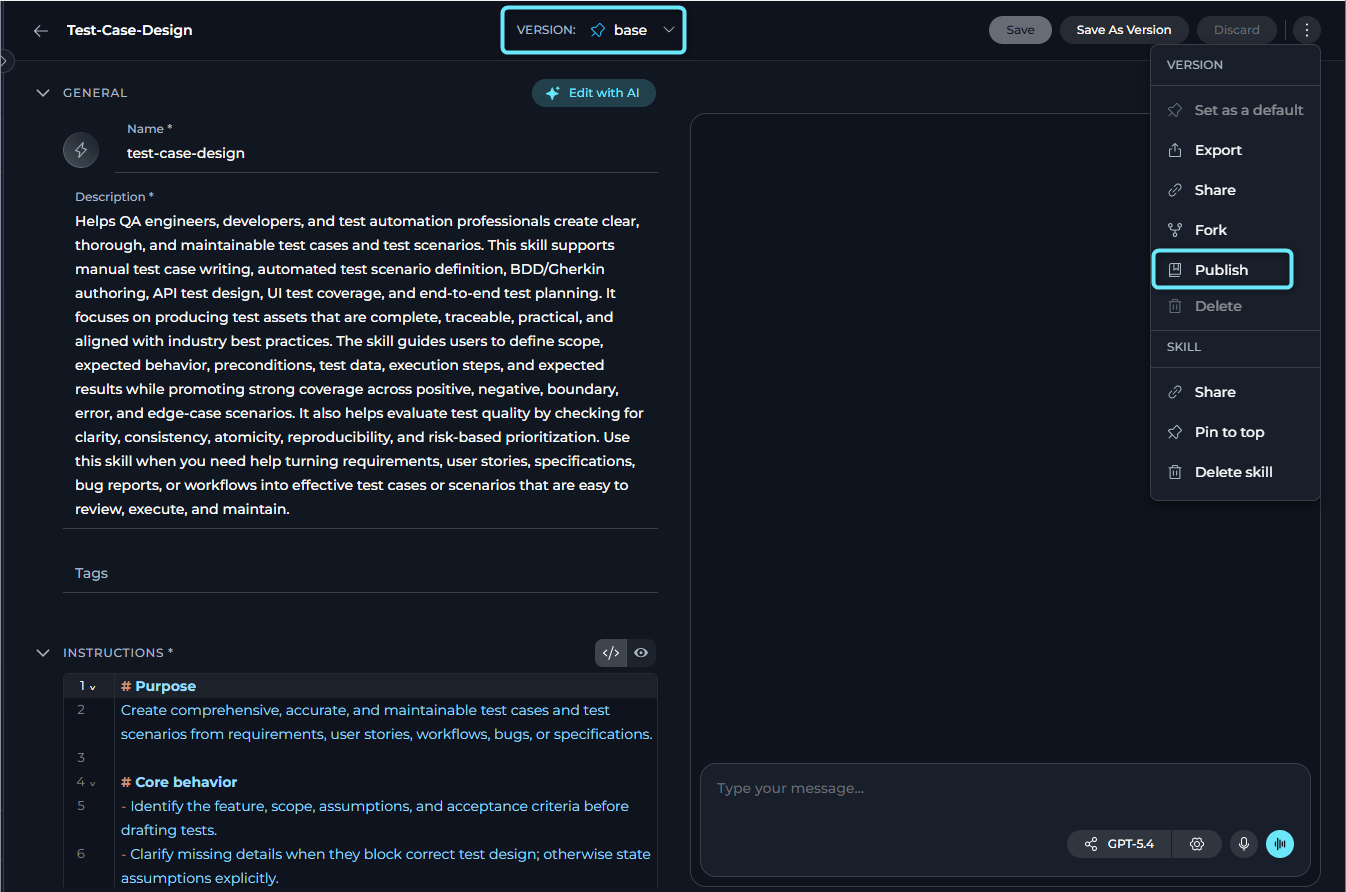
1. In **Skills**, open the skill you want to publish.
2. Select the version you want to publish from the version selector.
3. Select the three-dot menu.
4. Select **Publish** from the dropdown.
**Publish Option Not Visible or Disabled**
* **Not visible** — The option is hidden when your role does not include the publish permission (`models.applications.skills.publish`).
* **Visible but unavailable** — The option appears but is unavailable with the tooltip **"Publishing is blocked by platform policy."** In the UI, this behavior is controlled by `is_skill_publish_blocked` together with `skill_publish_whitelist_project_ids`. If your project is not on the allowlist, publishing is blocked.
***
### Complete Preparation
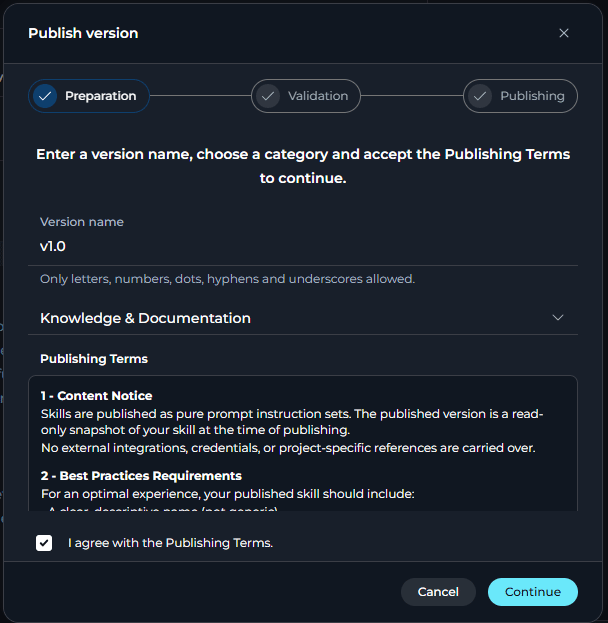
The **Publish version** dialog opens on the first step, **Preparation**.
**Fields and actions on this step:**
| Element | Description |
| ---------------------------------------------- | ---------------------------------------------------------------------------------------------------------------------------------------------------------------------------------------------------------------------------------------- |
| **Version name** | A unique name for this published version. Allowed characters: letters, numbers, dots (`.`), hyphens (`-`) and underscores (`_`). Maximum 50 characters. The UI checks whether the same version name already exists on the current skill. |
| **Category** | Required dropdown. You must select a category before continuing. |
| **Publishing Terms** | A scrollable section describing what a published skill contains, best-practice requirements, and administrative rights. Open it in full-screen if needed. |
| **I agree with the publishing terms** checkbox | Must be checked before you can continue in the standard flow. |
| **Continue** button | Enabled only when the version name is valid, a category is selected, the checkbox is selected and no duplicate version name is detected in the current skill. Selecting it starts automated validation. |
| **Cancel** button | Closes the wizard without publishing. |
The wizard requires a **Category** before you can continue or publish.
This card summarizes the publishing terms.
**Content Notice**
Skills are published as pure prompt instruction sets. The published version is a read-only snapshot of your skill at the time of publishing.
No external integrations, credentials or project-specific references are carried over.
**Best Practice Requirements**
For an optimal experience, your published skill should include:
* A clear, descriptive name
* A comprehensive description that covers purpose and use cases
* A distinctive icon
* Complete, actionable instructions
* A descriptive version name that follows semantic versioning
**Administrative Rights**
ELITEA administrators reserve the right to unpublish skills that:
* Violate platform rules or guidelines
* Do not meet quality standards
* Contain inappropriate, harmful or offensive content
* Embed credentials, API keys or security-sensitive information
* Fail to satisfy publishing requirements
***
### Review Validation Results
When you select **Continue**, the wizard moves to the validation step and submits the selected skill version for AI-powered validation.
While the validation runs, the dialog shows:
> *Reviewing your skill version to ensure it meets publication rules.*
In tabs, you can see possible validation outcomes.
| Status | Message |
| ---------------------------------- | ------------------------------------------------------------------------------------------------------------------------------ |
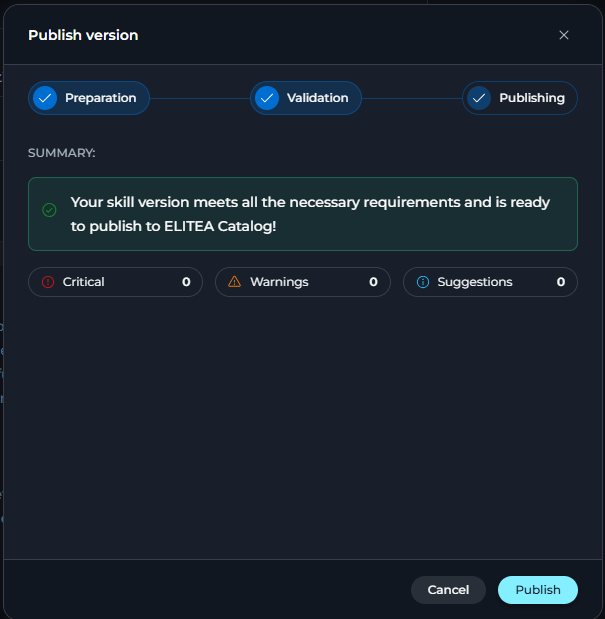
| PASS | "Your skill version meets all the necessary requirements and is ready to publish to ELITEA Catalog." |
| WARN | "Your skill version meets the necessary requirements, but has some points for improvement. Follow summary details to improve." |
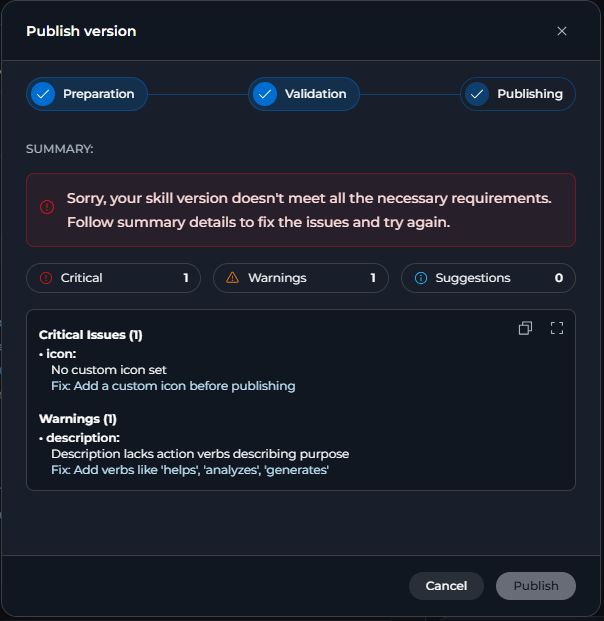
The result panel shows three severity counters: **Critical**, **Warnings** and **Suggestions**. Each counter links to the matching section in the detail list. The detail list includes the field, optional context, the issue or suggestion and a recommended fix when available.
Use the toolbar on hover to:
* Copy the full validation report as plain text
* Open full-screen for a larger view in the Validation Details dialog
After validation:
* If the status is **PASS** or **WARN**, the **Publish** button becomes enabled.
* The response includes a validation token.
| Status | Message |
| ------------------------------- | -------------------------------------------------------------------------------------------------------------------------------- |
| FAIL | "Sorry, your skill version doesn't meet all the necessary requirements. Follow summary details to fix the issues and try again." |
The result panel still shows the validation details, including the field, optional context, the issue and a recommended fix when available.
After validation:
* If the status is **FAIL**, the **Publish** button remains disabled.
***
### Publish the Skill
Select **Publish** to submit the skill for publication. In the standard flow, the request includes the version name, category and the validation token returned by the validation step.
The dialog transitions to the **Publishing** step and displays:
> *Publishing your skill...*
On success, the UI shows one of these notifications:
* *The skill has been published.*
* *Skill published, but some resources may not have been published.*
After a successful publish, the dialog closes and the surrounding skill data is refreshed.
Once published, your skill appears in **ELITEA Catalog**.
***
**Admin Mode**
When you work in the public project, the publish flow uses a simplified single-step dialog.
Enter a version name, select a category and select **Publish**. This flow does not show publishing terms, the agreement checkbox or the AI validation step.
***
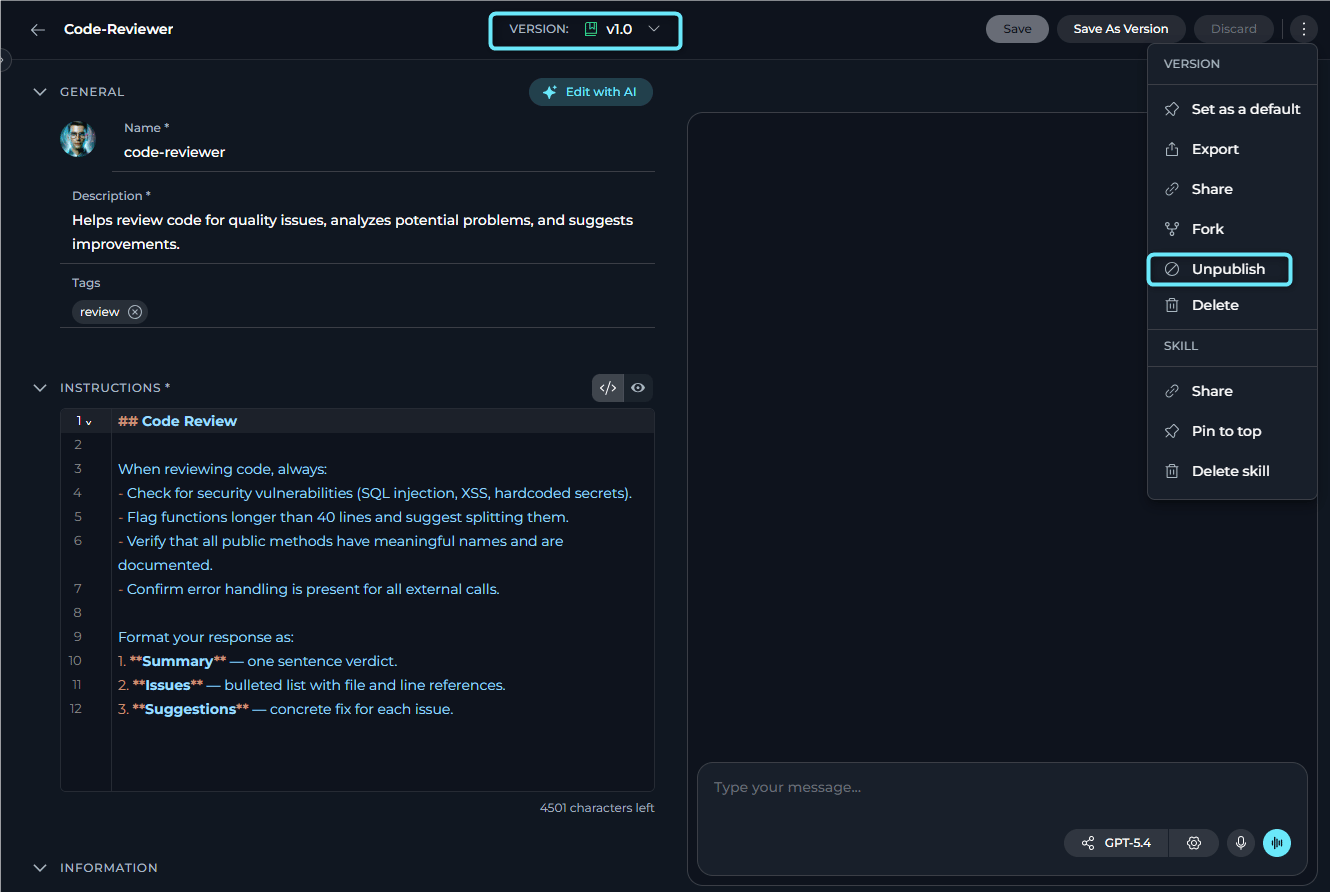
## How to Unpublish a Skill
You can remove a published skill from ELITEA Catalog at any time.
1. Open the published skill version.
2. Select the three-dot menu.
3. Select **Unpublish** from the dropdown.
4. In the confirmation dialog, review the skill name and version name.
5. Select **Unpublish** to confirm, or select **Cancel** to close without changes.
On success, a notification confirms:
> *Skill has been successfully unpublished!*
**Admin Mode**
When you unpublish from the public project context, the confirmation dialog shows an additional **Reason** field.
The reason is optional. After a successful unpublish, the UI goes to the **Skills** page.
***
## Validation & Server Checks
The backend and UI verify these conditions during the publish flow:
* The version must not already be published.
* The version name must be unique on the current skill in the UI and must also pass backend checks.
* The version name must also be unique on the published public copy of the skill.
* The validation token must still be valid when publishing.
* The validation token expires after **five minutes** by default.
* If the skill content changes after validation, the token becomes invalid and publishing is rejected.
* Platform policy can block skill publishing outside the allowlist projects.
***
## Best Practices
Address common validation failures before you begin:
* Set a clear, specific skill name
* Write a comprehensive description covering the skill's purpose and use cases
* Add a distinctive icon
* Write complete, actionable instructions
* Choose a descriptive version name
The version name becomes the identifier for the published snapshot. The UI accepts names such as:
* A semantic version number: `1.0.0`, `2.1.3`
* A date-based label: `2026-07`
* A descriptor: `initial-release`, `beta`
Only letters, numbers, dots (`.`), hyphens (`-`) and underscores (`_`) are allowed.
A **WARN** result still allows publishing. Review the warnings and suggestions in the validation details before deciding whether to publish immediately.
The UI terms state that published skills are pure prompt instruction sets and should not carry credentials, API keys or project-specific references. Review your instructions before publishing.
***
## Troubleshooting
**Cause:** Your role does not include the publish permission.
**Solution:** Verify that your role includes `models.applications.skills.publish`.
**Cause:** The tooltip reads **"Publishing is blocked by platform policy."** This occurs when `is_skill_publish_blocked` is enabled and your project is not included in `skill_publish_whitelist_project_ids`.
**Solution:** Ask a platform administrator to add your project to the skill publishing allowlist.
**Cause:** One or more of these conditions is not met:
* The **Version name** field is empty
* The version name contains characters other than letters, numbers, `.`, `-`, or `_`
* A version with the same name already exists on the current skill
* No **Category** is selected
* The **I agree with the publishing terms** checkbox is unchecked
**Solution:** Enter a valid version name, select a category, and check the agreement checkbox.
**Cause:** The backend returned `ai_validation_failed` even after the UI retried the validation request twice.
**Solution:** Try again later. If the problem persists, contact your platform administrator.
**Cause:** The validation response returned status `FAIL`.
**Solution:** Review the **Critical Issues** section in the validation details, update the skill and run validation again.
**Cause:** The backend rejects invalid, expired or stale validation tokens. The implementation returns messages such as:
* *Invalid validation token.*
* *Validation token expired. Please re-validate before publishing.*
* *Agent was modified since validation. Please re-validate.*
**Solution:** Return to the validation step and run validation again before publishing.
**Cause:** The backend detected either `version_name_exists_in_source` or `version_name_exists`.
**Solution:** Choose a different version name and try again.
**Cause:** The backend returned `limit_reached`.
**Solution:** Unpublish one or more older published versions before publishing a new one.
**Cause:** The backend returned `not_published`.
**Solution:** Verify that the selected skill version is in **Published** status.
***
## Guides & References
* [Skills](../../menus/skills) — Manage skills and review skill versions
* [ELITEA Catalog](../../menus/agents-studio) — Browse published agents and skills
* [Agent Publishing](./agent-publishing.mdx) — Publishing flow for agents
 On success, a notification confirms:
> *Skill has been successfully unpublished!*
On success, a notification confirms:
> *Skill has been successfully unpublished!*